
Finding Defects in C#
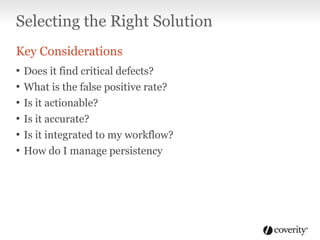
Selecting the Right Solution
Key Considerations
•
•
•
•
•
•

Does it find critical defects?
What is the false positive rate?
Is it actionable?

Is it accurate?
Is it integrated to my workflow?
How do I manage persistency
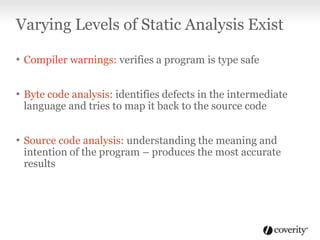
Varying Levels of Static Analysis Exist
• Compiler warnings: verifies a program is type safe
• Byte code analysis: identifies defects in the intermediate
language and tries to map it back to the source code

• Source code analysis: understanding the meaning and

intention of the program – produces the most accurate
results
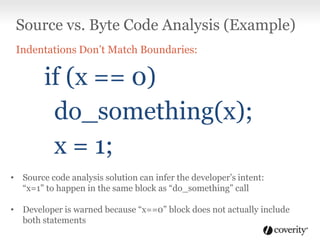
Source vs. Byte Code Analysis (Example)
Indentations Don’t Match Boundaries:

if (x == 0)
do_something(x);
x = 1;
• Source code analysis solution can infer the developer’s intent:
“x=1” to happen in the same block as “do_something” call
• Developer is warned because “x==0” block does not actually include
both statements
Coverity and FxCop Case Study
Complementary Solutions
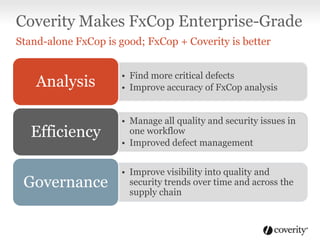
Coverity Makes FxCop Enterprise-Grade
Stand-alone FxCop is good; FxCop + Coverity is better

Analysis

• Find more critical defects
• Improve accuracy of FxCop analysis

Efficiency

• Manage all quality and security issues in
one workflow
• Improved defect management

Governance

• Improve visibility into quality and
security trends over time and across the
supply chain
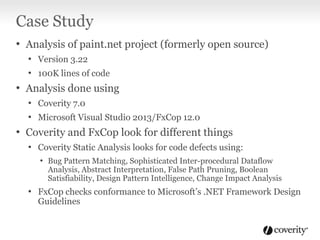
Case Study
• Analysis of paint.net project (formerly open source)
• Version 3.22
• 100K lines of code

• Analysis done using
• Coverity 7.0
• Microsoft Visual Studio 2013/FxCop 12.0

• Coverity and FxCop look for different things
• Coverity Static Analysis looks for code defects using:
• Bug Pattern Matching, Sophisticated Inter-procedural Dataflow

Analysis, Abstract Interpretation, False Path Pruning, Boolean
Satisfiability, Design Pattern Intelligence, Change Impact Analysis

• FxCop checks conformance to Microsoft’s .NET Framework Design
Guidelines
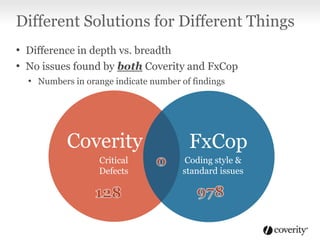
Different Solutions for Different Things
• Difference in depth vs. breadth
• No issues found by both Coverity and FxCop
• Numbers in orange indicate number of findings

Coverity
Critical
Defects

FxCop
Coding style &
standard issues
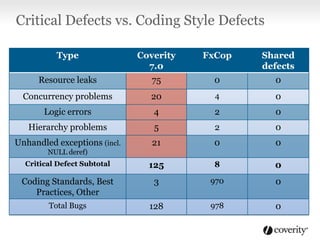
Critical Defects vs. Coding Style Defects
Type

Coverity
7.0

FxCop

Shared
defects

Resource leaks

75

0

0

Concurrency problems

20

4

0

Logic errors

4

2

0

Hierarchy problems

5

2

0

Unhandled exceptions (incl.

21

0

0

Critical Defect Subtotal

125

8

0

Coding Standards, Best
Practices, Other

3

970

0

Total Bugs

128

978

0

NULL deref)
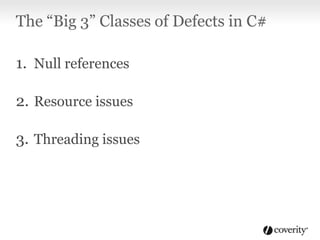
The “Big 3” Classes of Defects in C#
1. Null references

2. Resource issues
3. Threading issues
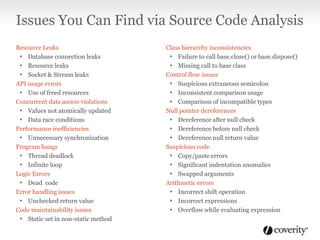
Issues You Can Find via Source Code Analysis
Resource Leaks
• Database connection leaks
• Resource leaks
• Socket & Stream leaks
API usage errors
• Use of freed resources
Concurrent data access violations
• Values not atomically updated
• Data race conditions
Performance inefficiencies
• Unnecessary synchronization
Program hangs
• Thread deadlock
• Infinite loop
Logic Errors
• Dead code
Error handling issues
• Unchecked return value
Code maintainability issues
• Static set in non-static method

Class hierarchy inconsistencies
• Failure to call base.close() or base.dispose()
• Missing call to base class
Control flow issues
• Suspicious extraneous semicolon
• Inconsistent comparison usage
• Comparison of incompatible types
Null pointer dereferences
• Dereference after null check
• Dereference before null check
• Dereference null return value
Suspicious code
• Copy/paste errors
• Significant indentation anomalies
• Swapped arguments
Arithmetic errors
• Incorrect shift operation
• Incorrect expressions
• Overflow while evaluating expression
Conclusion
• Different analysis tools often find different but
complementary issues

• Use the right solution to find the issues that are important
to you
Want to try Coverity on
your code?

For a free trial visit:
www.coverity.com

Finding Defects in C#: Coverity vs. FxCop

  • 1.
  • 2.
    Selecting the RightSolution Key Considerations • • • • • • Does it find critical defects? What is the false positive rate? Is it actionable? Is it accurate? Is it integrated to my workflow? How do I manage persistency
  • 3.
    Varying Levels ofStatic Analysis Exist • Compiler warnings: verifies a program is type safe • Byte code analysis: identifies defects in the intermediate language and tries to map it back to the source code • Source code analysis: understanding the meaning and intention of the program – produces the most accurate results
  • 4.
    Source vs. ByteCode Analysis (Example) Indentations Don’t Match Boundaries: if (x == 0) do_something(x); x = 1; • Source code analysis solution can infer the developer’s intent: “x=1” to happen in the same block as “do_something” call • Developer is warned because “x==0” block does not actually include both statements
  • 5.
    Coverity and FxCopCase Study Complementary Solutions
  • 6.
    Coverity Makes FxCopEnterprise-Grade Stand-alone FxCop is good; FxCop + Coverity is better Analysis • Find more critical defects • Improve accuracy of FxCop analysis Efficiency • Manage all quality and security issues in one workflow • Improved defect management Governance • Improve visibility into quality and security trends over time and across the supply chain
  • 7.
    Case Study • Analysisof paint.net project (formerly open source) • Version 3.22 • 100K lines of code • Analysis done using • Coverity 7.0 • Microsoft Visual Studio 2013/FxCop 12.0 • Coverity and FxCop look for different things • Coverity Static Analysis looks for code defects using: • Bug Pattern Matching, Sophisticated Inter-procedural Dataflow Analysis, Abstract Interpretation, False Path Pruning, Boolean Satisfiability, Design Pattern Intelligence, Change Impact Analysis • FxCop checks conformance to Microsoft’s .NET Framework Design Guidelines
  • 8.
    Different Solutions forDifferent Things • Difference in depth vs. breadth • No issues found by both Coverity and FxCop • Numbers in orange indicate number of findings Coverity Critical Defects FxCop Coding style & standard issues
  • 9.
    Critical Defects vs.Coding Style Defects Type Coverity 7.0 FxCop Shared defects Resource leaks 75 0 0 Concurrency problems 20 4 0 Logic errors 4 2 0 Hierarchy problems 5 2 0 Unhandled exceptions (incl. 21 0 0 Critical Defect Subtotal 125 8 0 Coding Standards, Best Practices, Other 3 970 0 Total Bugs 128 978 0 NULL deref)
  • 10.
    The “Big 3”Classes of Defects in C# 1. Null references 2. Resource issues 3. Threading issues
  • 11.
    Issues You CanFind via Source Code Analysis Resource Leaks • Database connection leaks • Resource leaks • Socket & Stream leaks API usage errors • Use of freed resources Concurrent data access violations • Values not atomically updated • Data race conditions Performance inefficiencies • Unnecessary synchronization Program hangs • Thread deadlock • Infinite loop Logic Errors • Dead code Error handling issues • Unchecked return value Code maintainability issues • Static set in non-static method Class hierarchy inconsistencies • Failure to call base.close() or base.dispose() • Missing call to base class Control flow issues • Suspicious extraneous semicolon • Inconsistent comparison usage • Comparison of incompatible types Null pointer dereferences • Dereference after null check • Dereference before null check • Dereference null return value Suspicious code • Copy/paste errors • Significant indentation anomalies • Swapped arguments Arithmetic errors • Incorrect shift operation • Incorrect expressions • Overflow while evaluating expression
  • 12.
    Conclusion • Different analysistools often find different but complementary issues • Use the right solution to find the issues that are important to you
  • 13.
    Want to tryCoverity on your code? For a free trial visit: www.coverity.com