Presented By: Ankur Patel
Introduction to Nexus
Repository Manager
Lack of etiquette and manners is a huge turn off.
KnolX Etiquettes
Punctuality
Join the session 5 minutes prior to
the session start time. We start on
time and conclude on time!
Feedback
Make sure to submit a constructive
feedback for all sessions as it is
very helpful for the presenter.
Silent Mode
Keep your mobile devices in silent
mode, feel free to move out of
session in case you need to attend
an urgent call.
Avoid Disturbance
Avoid unwanted chit chat during
the session.
Our Agenda
01 Introduction to Nexus Repository Manager
02 Nexus Repository Repository Types
03 Nexus Repository Manager Artifacts storage types
04 How can we use Nexus as private Docker Registry and
Maven Repository?(Demo)
05 Q&A
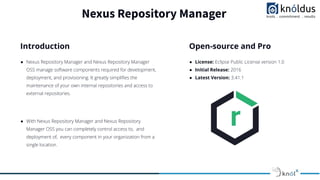
Nexus Repository Manager
● Nexus Repository Manager and Nexus Repository Manager
OSS manage software components required for development,
deployment, and provisioning. It greatly simplifies the
maintenance of your own internal repositories and access to
external repositories.
● With Nexus Repository Manager and Nexus Repository
Manager OSS you can completely control access to, and
deployment of, every component in your organization from a
single location.
Introduction
● License: Eclipse Public License version 1.0
● Initial Release: 2016
● Latest Version: 3.41.1
Open-source and Pro
Why Nexus Repository Manager?
● An repository manager allows to store and retrieve
build artifacts.
● Centralizes the way binaries are controlled, stored and
managed.
● Nexus Repository Manager helps you host your own
repositories, also you can also use the Nexus proxy for
public repositories as well.
● Support ecosystems like Java/Maven, npm, NuGet, PyPI,
RubyGems, CocoaPods and more.
● Distribute packaged and containerized apps like Docker,
Helm, Yum, and APT.
Nexus Repository Repository Types
● Hosted Repository: A Hosted Repository is a repository that
is hosted by Nexus that stores components in the repository
manager as the authoritative location for these components.
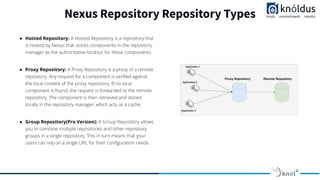
● Proxy Repository: A Proxy Repository is a proxy of a remote
repository. Any request for a component is verified against
the local content of the proxy repository. If no local
component is found, the request is forwarded to the remote
repository. The component is then retrieved and stored
locally in the repository manager, which acts as a cache.
● Group Repository(Pro Version): A Group Repository allows
you to combine multiple repositories and other repository
groups in a single repository. This in turn means that your
users can rely on a single URL for their configuration needs.
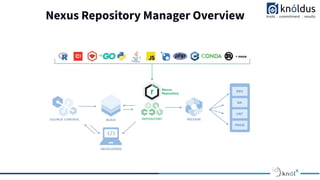
Nexus Repository Manager Overview
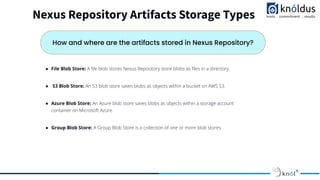
Nexus Repository Artifacts Storage Types
How and where are the artifacts stored in Nexus Repository?
● File Blob Store: A file blob stores Nexus Repository store blobs as files in a directory.
● S3 Blob Store: An S3 blob store saves blobs as objects within a bucket on AWS S3.
● Azure Blob Store: An Azure blob store saves blobs as objects within a storage account
container on Microsoft Azure.
● Group Blob Store: A Group Blob Store is a collection of one or more blob stores.
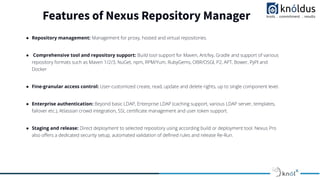
Features of Nexus Repository Manager
● Repository management: Management for proxy, hosted and virtual repositories.
● Comprehensive tool and repository support: Build tool support for Maven, Ant/Ivy, Gradle and support of various
repository formats such as Maven 1/2/3, NuGet, npm, RPM/Yum, RubyGems, OBR/OSGI, P2, APT, Bower, PyPI and
Docker
● Fine-granular access control: User-customized create, read, update and delete rights, up to single component level.
● Enterprise authentication: Beyond basic LDAP, Enterprise LDAP (caching support, various LDAP server, templates,
failover etc.), Atlassian crowd integration, SSL certificate management and user token support.
● Staging and release: Direct deployment to selected repository using according build or deployment tool. Nexus Pro
also offers a dedicated security setup, automated validation of defined rules and release Re-Run.
Demo
Thank You !

Introduction to Nexus Repository Manager.pdf

  • 1.
    Presented By: AnkurPatel Introduction to Nexus Repository Manager
  • 2.
    Lack of etiquetteand manners is a huge turn off. KnolX Etiquettes Punctuality Join the session 5 minutes prior to the session start time. We start on time and conclude on time! Feedback Make sure to submit a constructive feedback for all sessions as it is very helpful for the presenter. Silent Mode Keep your mobile devices in silent mode, feel free to move out of session in case you need to attend an urgent call. Avoid Disturbance Avoid unwanted chit chat during the session.
  • 3.
    Our Agenda 01 Introductionto Nexus Repository Manager 02 Nexus Repository Repository Types 03 Nexus Repository Manager Artifacts storage types 04 How can we use Nexus as private Docker Registry and Maven Repository?(Demo) 05 Q&A
  • 4.
    Nexus Repository Manager ●Nexus Repository Manager and Nexus Repository Manager OSS manage software components required for development, deployment, and provisioning. It greatly simplifies the maintenance of your own internal repositories and access to external repositories. ● With Nexus Repository Manager and Nexus Repository Manager OSS you can completely control access to, and deployment of, every component in your organization from a single location. Introduction ● License: Eclipse Public License version 1.0 ● Initial Release: 2016 ● Latest Version: 3.41.1 Open-source and Pro
  • 5.
    Why Nexus RepositoryManager? ● An repository manager allows to store and retrieve build artifacts. ● Centralizes the way binaries are controlled, stored and managed. ● Nexus Repository Manager helps you host your own repositories, also you can also use the Nexus proxy for public repositories as well. ● Support ecosystems like Java/Maven, npm, NuGet, PyPI, RubyGems, CocoaPods and more. ● Distribute packaged and containerized apps like Docker, Helm, Yum, and APT.
  • 6.
    Nexus Repository RepositoryTypes ● Hosted Repository: A Hosted Repository is a repository that is hosted by Nexus that stores components in the repository manager as the authoritative location for these components. ● Proxy Repository: A Proxy Repository is a proxy of a remote repository. Any request for a component is verified against the local content of the proxy repository. If no local component is found, the request is forwarded to the remote repository. The component is then retrieved and stored locally in the repository manager, which acts as a cache. ● Group Repository(Pro Version): A Group Repository allows you to combine multiple repositories and other repository groups in a single repository. This in turn means that your users can rely on a single URL for their configuration needs.
  • 7.
  • 8.
    Nexus Repository ArtifactsStorage Types How and where are the artifacts stored in Nexus Repository? ● File Blob Store: A file blob stores Nexus Repository store blobs as files in a directory. ● S3 Blob Store: An S3 blob store saves blobs as objects within a bucket on AWS S3. ● Azure Blob Store: An Azure blob store saves blobs as objects within a storage account container on Microsoft Azure. ● Group Blob Store: A Group Blob Store is a collection of one or more blob stores.
  • 9.
    Features of NexusRepository Manager ● Repository management: Management for proxy, hosted and virtual repositories. ● Comprehensive tool and repository support: Build tool support for Maven, Ant/Ivy, Gradle and support of various repository formats such as Maven 1/2/3, NuGet, npm, RPM/Yum, RubyGems, OBR/OSGI, P2, APT, Bower, PyPI and Docker ● Fine-granular access control: User-customized create, read, update and delete rights, up to single component level. ● Enterprise authentication: Beyond basic LDAP, Enterprise LDAP (caching support, various LDAP server, templates, failover etc.), Atlassian crowd integration, SSL certificate management and user token support. ● Staging and release: Direct deployment to selected repository using according build or deployment tool. Nexus Pro also offers a dedicated security setup, automated validation of defined rules and release Re-Run.
  • 10.
  • 11.