
 An independent SQL Consultant
 A user of SQL Server from version 2000 onwards with 12+ years
experience.
 A DBA / developer hybrid
Techniques for scaling out the data flow and how well they
scale
A look into the inner working of the dataflow engine using
Xperf.
How ‘Elastic’ scalability might be achieved
A wrap up with some key ‘Takeaway’ points
No parallel ‘On’ switch
Parallelism has to be implemented by design, at:
Package level
In the execution flow
In the data flow, by hand and / or through
Transforms that come with SSIS
Third party components
Separating out synchronous transforms
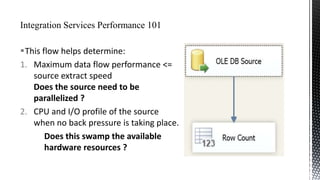
This flow helps determine:
1. Maximum data flow performance <=
source extract speed
Does the source need to be
parallelized ?
2. CPU and I/O profile of the source
when no back pressure is taking place.
Does this swamp the available
hardware resources ?
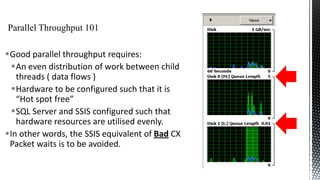
Good parallel throughput requires:
An even distribution of work between child
threads ( data flows )
Hardware to be configured such that it is
“Hot spot free”
SQL Server and SSIS configured such that
hardware resources are utilised evenly.
In other words, the SSIS equivalent of Bad CX
Packet waits is to be avoided.
Four different ways of extracting data from the source
will be looked at:
NTILE

DELETE statement with an OUTPUT clause
Hash partitioning the source table
Select statement to ‘Partition’ the source by
TransactionID.
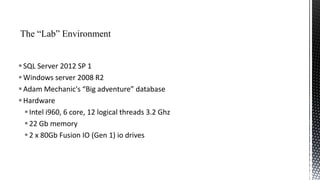
 SQL Server 2012 SP 1
 Windows server 2008 R2
 Adam Mechanic's “Big adventure” database
 Hardware
 Intel i960, 6 core, 12 logical threads 3.2 Ghz
 22 Gb memory
 2 x 80Gb Fusion IO (Gen 1) io drives
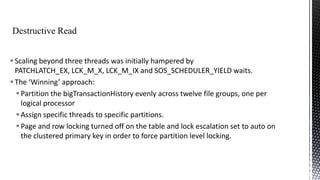
 Scaling beyond three threads was initially hampered by
PATCHLATCH_EX, LCK_M_X, LCK_M_IX and SOS_SCHEDULER_YIELD waits.
 The ‘Winning’ approach:
 Partition the bigTransactionHistory evenly across twelve file groups, one per
logical processor
 Assign specific threads to specific partitions.
 Page and row locking turned off on the table and lock escalation set to auto on
the clustered primary key in order to force partition level locking.
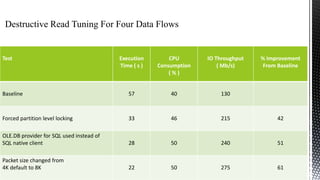
Test

Execution
Time ( s )

CPU
Consumption
(%)

IO Throughput
( Mb/s)

% Improvement
From Baseline

Baseline

57

40

130

Forced partition level locking

33

46

215

42

OLE.DB provider for SQL used instead of
SQL native client

28

50

240

51

Packet size changed from
4K default to 8K

22

50

275

61
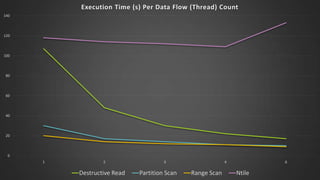
Execution Time (s) Per Data Flow (Thread) Count
140

120

100

80

60

40

20

0
1

2

Destructive Read

3

Partition Scan

4

Range Scan

6

Ntile
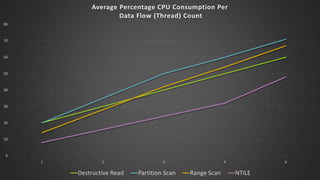
Average Percentage CPU Consumption Per
Data Flow (Thread) Count
80

70

60

50

40

30

20

10

0
1

2

Destructive Read

3

Partition Scan

4

Range Scan

6

NTILE
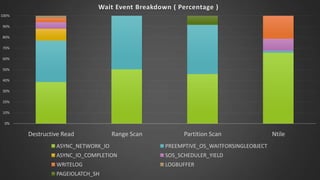
Wait Event Breakdown ( Percentage )
100%
90%
80%
70%
60%
50%
40%
30%
20%
10%
0%

Destructive Read

Range Scan

Partition Scan

ASYNC_NETWORK_IO

PREEMPTIVE_OS_WAITFORSINGLEOBJECT

ASYNC_IO_COMPLETION

SOS_SCHEDULER_YIELD

WRITELOG

LOGBUFFER

PAGEIOLATCH_SH

Ntile
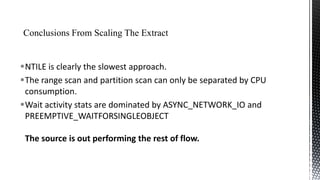
NTILE is clearly the slowest approach.
The range scan and partition scan can only be separated by CPU
consumption.
Wait activity stats are dominated by ASYNC_NETWORK_IO and
PREEMPTIVE_WAITFORSINGLEOBJECT
The source is out performing the rest of flow.
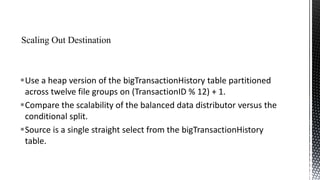
Use a heap version of the bigTransactionHistory table partitioned
across twelve file groups on (TransactionID % 12) + 1.
Compare the scalability of the balanced data distributor versus the
conditional split.
Source is a single straight select from the bigTransactionHistory
table.
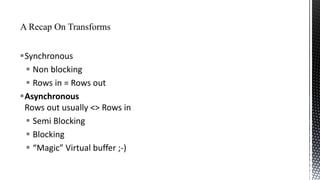
Synchronous
 Non blocking
 Rows in = Rows out
Asynchronous
Rows out usually <> Rows in
 Semi Blocking
 Blocking
 “Magic” Virtual buffer ;-)
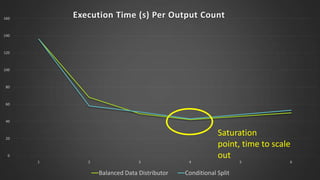
Execution Time (s) Per Output Count

160

140

120

100

80

60

40

20

0
1

2

3

Balanced Data Distributor

4

Saturation
point, time to scale
out

Conditional Split

5

6
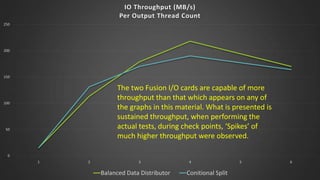
IO Throughput (MB/s)
Per Output Thread Count
250

200

150

The two Fusion I/O cards are capable of more
throughput than that which appears on any of
the graphs in this material. What is presented is
sustained throughput, when performing the
actual tests, during check points, ‘Spikes’ of
much higher throughput were observed.

100

50

0
1

2

3

Balanced Data Distributor

4

Conitional Split

5

6
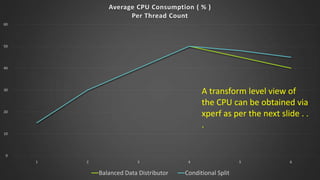
Average CPU Consumption ( % )
Per Thread Count
60

50

40

A transform level view of
the CPU can be obtained via
xperf as per the next slide . .
.

30

20

10

0
1

2

3

Balanced Data Distributor

4

Conditional Split

5

6
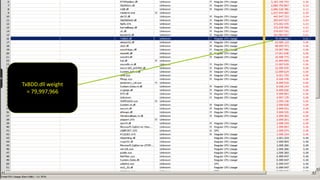
TxBDD.dll weight
= 79,997,966
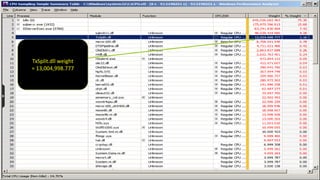
TxSplit.dll weight
= 13,004,998.777
Too few threads
= CPU starvation 
Too many threads
= context switching 
The “Sweet spot” is somewhere in between O/
Elements in the dataflow that can create new threads:
Execution paths
Conditional splits, multicasts and the balanced data distributor create
threads for their outputs
Synchronous transforms
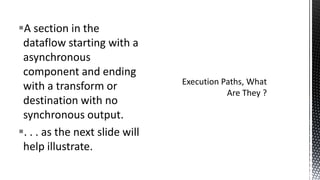
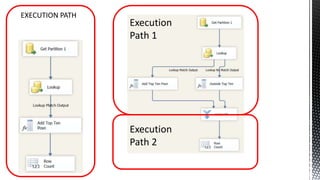
A section in the
dataflow starting with a
asynchronous
component and ending
with a transform or
destination with no
synchronous output.
. . . as the next slide will
help illustrate.
EXECUTION PATH

Execution
Path 1

Execution
Path 2
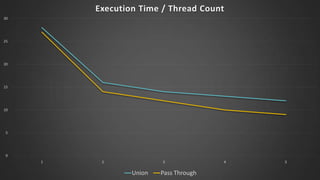
Execution Time / Thread Count
30

25

20

15

10

5

0
1

2

3

Union

Pass Through

4

5
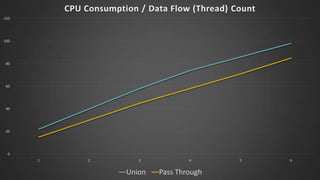
CPU Consumption / Data Flow (Thread) Count
120

100

80

60

40

20

0
1

2

3

Union

4

Pass Through

5

6
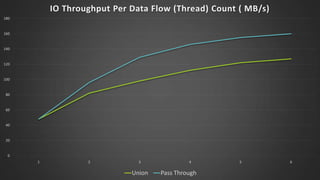
IO Throughput Per Data Flow (Thread) Count ( MB/s)
180

160

140

120

100

80

60

40

20

0
1

2

3

Union

4

Pass Through

5

6
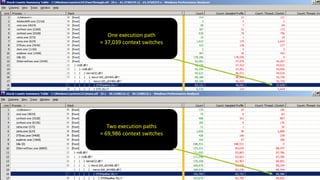
One execution path
= 37,039 context switches

Two execution paths
= 69,986 context switches
Most of the demos so far have achieved data flow scale out via
“Copy and paste”.
Service broker is highly elastic, the number of readers associated
with a queue can be increased via the
ALTER QUEUE command.
SSIS has no “Out of the box” equivalent to this.
However the work pile pattern can be adapted in order to
achieve ‘Elastic’ style scale out as the next slide will illustrate.
“WORK PILE”

SSIS “Server Farm”

Package 1

DTEexec . . .
/set Package.variables[MaxThreads].Value;3
/set Package.variables[ThreadNumber].Value;1

SSIS Server 1

Package 2

DTEexec . . .
/set Package.variables[MaxThreads].Value;3
/set Package.variables[ThreadNumber].Value;2

SSIS Server 2

Package N

DTEexec . . .
/set Package.variables[MaxThreads].Value;3
/set Package.variables[ThreadNumber].Value;3

SSIS Server N
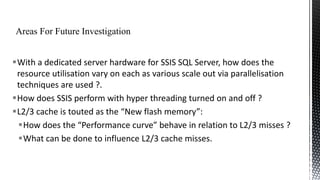
With a dedicated server hardware for SSIS SQL Server, how does the
resource utilisation vary on each as various scale out via parallelisation
techniques are used ?.
How does SSIS perform with hyper threading turned on and off ?
L2/3 cache is touted as the “New flash memory”:
How does the “Performance curve” behave in relation to L2/3 misses ?
What can be done to influence L2/3 cache misses.
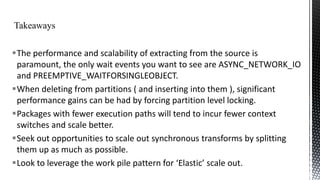
The performance and scalability of extracting from the source is
paramount, the only wait events you want to see are ASYNC_NETWORK_IO
and PREEMPTIVE_WAITFORSINGLEOBJECT.
When deleting from partitions ( and inserting into them ), significant
performance gains can be had by forcing partition level locking.
Packages with fewer execution paths will tend to incur fewer context
switches and scale better.
Seek out opportunities to scale out synchronous transforms by splitting
them up as much as possible.
Look to leverage the work pile pattern for ‘Elastic’ scale out.
Integration Services: Performance Tuning Techniques
Elizabeth Vitt, Intellimentum and Hitachi Corporation
SQL Server Integration Services Performance Design Patterns
Matt Masson, Senior Program Manager Microsoft
Increasing Throughput of Pipelines by Splitting Synchronous
Transformations into Multiple Tasks
Sedat Yogurtcuoglu, Henk van der Valk, and Thomas Kejser
Resources for SSIS Performance Best Practices
Matt Masson and others
ChrisAdkin8

chris1adkin@yahoo.co.uk

http://uk.linkedin.com/in/wollatondba
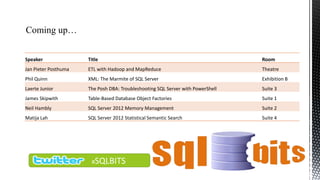
Speaker

Title

Room

Jan Pieter Posthuma

ETL with Hadoop and MapReduce

Theatre

Phil Quinn

XML: The Marmite of SQL Server

Exhibition B

Laerte Junior

The Posh DBA: Troubleshooting SQL Server with PowerShell

Suite 3

James Skipwith

Table-Based Database Object Factories

Suite 1

Neil Hambly

SQL Server 2012 Memory Management

Suite 2

Matija Lah

SQL Server 2012 Statistical Semantic Search

Suite 4

#SQLBITS

Scaling out SSIS with Parallelism, Diving Deep Into The Dataflow Engine

  • 2.
     An independentSQL Consultant  A user of SQL Server from version 2000 onwards with 12+ years experience.  A DBA / developer hybrid
  • 3.
    Techniques for scalingout the data flow and how well they scale A look into the inner working of the dataflow engine using Xperf. How ‘Elastic’ scalability might be achieved A wrap up with some key ‘Takeaway’ points
  • 4.
    No parallel ‘On’switch Parallelism has to be implemented by design, at: Package level In the execution flow In the data flow, by hand and / or through Transforms that come with SSIS Third party components Separating out synchronous transforms
  • 5.
    This flow helpsdetermine: 1. Maximum data flow performance <= source extract speed Does the source need to be parallelized ? 2. CPU and I/O profile of the source when no back pressure is taking place. Does this swamp the available hardware resources ?
  • 6.
    Good parallel throughputrequires: An even distribution of work between child threads ( data flows ) Hardware to be configured such that it is “Hot spot free” SQL Server and SSIS configured such that hardware resources are utilised evenly. In other words, the SSIS equivalent of Bad CX Packet waits is to be avoided.
  • 7.
    Four different waysof extracting data from the source will be looked at: NTILE DELETE statement with an OUTPUT clause Hash partitioning the source table Select statement to ‘Partition’ the source by TransactionID.
  • 9.
     SQL Server2012 SP 1  Windows server 2008 R2  Adam Mechanic's “Big adventure” database  Hardware  Intel i960, 6 core, 12 logical threads 3.2 Ghz  22 Gb memory  2 x 80Gb Fusion IO (Gen 1) io drives
  • 11.
     Scaling beyondthree threads was initially hampered by PATCHLATCH_EX, LCK_M_X, LCK_M_IX and SOS_SCHEDULER_YIELD waits.  The ‘Winning’ approach:  Partition the bigTransactionHistory evenly across twelve file groups, one per logical processor  Assign specific threads to specific partitions.  Page and row locking turned off on the table and lock escalation set to auto on the clustered primary key in order to force partition level locking.
  • 12.
    Test Execution Time ( s) CPU Consumption (%) IO Throughput ( Mb/s) % Improvement From Baseline Baseline 57 40 130 Forced partition level locking 33 46 215 42 OLE.DB provider for SQL used instead of SQL native client 28 50 240 51 Packet size changed from 4K default to 8K 22 50 275 61
  • 13.
    Execution Time (s)Per Data Flow (Thread) Count 140 120 100 80 60 40 20 0 1 2 Destructive Read 3 Partition Scan 4 Range Scan 6 Ntile
  • 14.
    Average Percentage CPUConsumption Per Data Flow (Thread) Count 80 70 60 50 40 30 20 10 0 1 2 Destructive Read 3 Partition Scan 4 Range Scan 6 NTILE
  • 15.
    Wait Event Breakdown( Percentage ) 100% 90% 80% 70% 60% 50% 40% 30% 20% 10% 0% Destructive Read Range Scan Partition Scan ASYNC_NETWORK_IO PREEMPTIVE_OS_WAITFORSINGLEOBJECT ASYNC_IO_COMPLETION SOS_SCHEDULER_YIELD WRITELOG LOGBUFFER PAGEIOLATCH_SH Ntile
  • 16.
    NTILE is clearlythe slowest approach. The range scan and partition scan can only be separated by CPU consumption. Wait activity stats are dominated by ASYNC_NETWORK_IO and PREEMPTIVE_WAITFORSINGLEOBJECT The source is out performing the rest of flow.
  • 17.
    Use a heapversion of the bigTransactionHistory table partitioned across twelve file groups on (TransactionID % 12) + 1. Compare the scalability of the balanced data distributor versus the conditional split. Source is a single straight select from the bigTransactionHistory table.
  • 18.
    Synchronous  Non blocking Rows in = Rows out Asynchronous Rows out usually <> Rows in  Semi Blocking  Blocking  “Magic” Virtual buffer ;-)
  • 20.
    Execution Time (s)Per Output Count 160 140 120 100 80 60 40 20 0 1 2 3 Balanced Data Distributor 4 Saturation point, time to scale out Conditional Split 5 6
  • 21.
    IO Throughput (MB/s) PerOutput Thread Count 250 200 150 The two Fusion I/O cards are capable of more throughput than that which appears on any of the graphs in this material. What is presented is sustained throughput, when performing the actual tests, during check points, ‘Spikes’ of much higher throughput were observed. 100 50 0 1 2 3 Balanced Data Distributor 4 Conitional Split 5 6
  • 22.
    Average CPU Consumption( % ) Per Thread Count 60 50 40 A transform level view of the CPU can be obtained via xperf as per the next slide . . . 30 20 10 0 1 2 3 Balanced Data Distributor 4 Conditional Split 5 6
  • 23.
  • 24.
  • 25.
    Too few threads =CPU starvation  Too many threads = context switching  The “Sweet spot” is somewhere in between O/ Elements in the dataflow that can create new threads: Execution paths Conditional splits, multicasts and the balanced data distributor create threads for their outputs Synchronous transforms
  • 26.
    A section inthe dataflow starting with a asynchronous component and ending with a transform or destination with no synchronous output. . . . as the next slide will help illustrate.
  • 27.
  • 29.
    Execution Time /Thread Count 30 25 20 15 10 5 0 1 2 3 Union Pass Through 4 5
  • 30.
    CPU Consumption /Data Flow (Thread) Count 120 100 80 60 40 20 0 1 2 3 Union 4 Pass Through 5 6
  • 31.
    IO Throughput PerData Flow (Thread) Count ( MB/s) 180 160 140 120 100 80 60 40 20 0 1 2 3 Union 4 Pass Through 5 6
  • 32.
    One execution path =37,039 context switches Two execution paths = 69,986 context switches
  • 33.
    Most of thedemos so far have achieved data flow scale out via “Copy and paste”. Service broker is highly elastic, the number of readers associated with a queue can be increased via the ALTER QUEUE command. SSIS has no “Out of the box” equivalent to this. However the work pile pattern can be adapted in order to achieve ‘Elastic’ style scale out as the next slide will illustrate.
  • 34.
    “WORK PILE” SSIS “ServerFarm” Package 1 DTEexec . . . /set Package.variables[MaxThreads].Value;3 /set Package.variables[ThreadNumber].Value;1 SSIS Server 1 Package 2 DTEexec . . . /set Package.variables[MaxThreads].Value;3 /set Package.variables[ThreadNumber].Value;2 SSIS Server 2 Package N DTEexec . . . /set Package.variables[MaxThreads].Value;3 /set Package.variables[ThreadNumber].Value;3 SSIS Server N
  • 35.
    With a dedicatedserver hardware for SSIS SQL Server, how does the resource utilisation vary on each as various scale out via parallelisation techniques are used ?. How does SSIS perform with hyper threading turned on and off ? L2/3 cache is touted as the “New flash memory”: How does the “Performance curve” behave in relation to L2/3 misses ? What can be done to influence L2/3 cache misses.
  • 36.
    The performance andscalability of extracting from the source is paramount, the only wait events you want to see are ASYNC_NETWORK_IO and PREEMPTIVE_WAITFORSINGLEOBJECT. When deleting from partitions ( and inserting into them ), significant performance gains can be had by forcing partition level locking. Packages with fewer execution paths will tend to incur fewer context switches and scale better. Seek out opportunities to scale out synchronous transforms by splitting them up as much as possible. Look to leverage the work pile pattern for ‘Elastic’ scale out.
  • 37.
    Integration Services: PerformanceTuning Techniques Elizabeth Vitt, Intellimentum and Hitachi Corporation SQL Server Integration Services Performance Design Patterns Matt Masson, Senior Program Manager Microsoft Increasing Throughput of Pipelines by Splitting Synchronous Transformations into Multiple Tasks Sedat Yogurtcuoglu, Henk van der Valk, and Thomas Kejser Resources for SSIS Performance Best Practices Matt Masson and others
  • 39.
  • 40.
    Speaker Title Room Jan Pieter Posthuma ETLwith Hadoop and MapReduce Theatre Phil Quinn XML: The Marmite of SQL Server Exhibition B Laerte Junior The Posh DBA: Troubleshooting SQL Server with PowerShell Suite 3 James Skipwith Table-Based Database Object Factories Suite 1 Neil Hambly SQL Server 2012 Memory Management Suite 2 Matija Lah SQL Server 2012 Statistical Semantic Search Suite 4 #SQLBITS

Editor's Notes

  • #6 In the case of the environment set up for this presentation, scanning the whole bigTransactionHistory table and feeding it into a row count takes 21.653 seconds. The RowCount destination might be one of the best free tuning tools there is for SSIS, not only can it be used to test source extract speed, but if it is substituted for the destination, it can be used to detect whether the rest of the upstream flow is being throttled back due to back pressure.
  • #7 Of the resources that SSIS uses IO will probably be the thing that is most prone to “Hot spots”, yes SSIS is an in memory ETL engine, however at some stage you will interact with one or more databases, i.e. it is not an in-memory pipeline ‘Island’. Storage sub systems, more so those that are spinning disk based can be prone to “Hot spots”, I have seen tier 1 SANs with latencies anywhere between 10 and 100ms, NAS arrays where a single database consumed 85% of the total IO across all of the databases, but was only allocated half of the disks available, the rest could have quite happily ran on a laptop. Ideally each thread should get an equal amount of CPU, memory, network and storage resource.
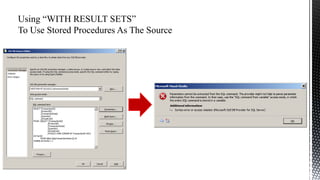
  • #9 If we try to parameterize certain types of queries we get the error on the right. The work around with SQL Server 2012 is to put the query into a stored procedure and invoke this with a “WITH RESULT SETS” clause, this new functionality provides tremendous flexibility in the way in which the source can be partitioned. This will be used in the NTILE test and the range scan test.
  • #11 This demonstration will illustrate what the different test packages look like in data tools platform.
  • #12 The motivation for a “Destructive read source” was the belief that if the source could ‘Drain’ the table it reads from, multiple instances of the package could be executed in parallel in order to achieve parallelism. The work I carried out looking into this could have filled a slide deck just on its own and would have made a good blog posting along the lines of a Thomas Kejser “Grade Of The Steel” blog post. The next slide will summarise some of the more interesting findings.
  • #13 This table represents the results of tuning the “Low hanging fruit”. Forcing partition level locking is achieved by disabled page and row level locking on the clustered primary key and setting lock escalation on the table to auto. The other key point to note is that most people, including myself up until very recently, would think that the SQL Native client offers the best performance through memory to memory transfers, it transpires that the OLE provider for SQL Server has undergone a lot more tuning and optimisation at Microsoft than its native counterpart.
  • #14 The observant may point out that its standard practise to stage data into a heap as opposed to a table with a clustered index and that the figures do not reflect the time taken to build the clustered index, on the ‘Lab’ hardware this is actually 17 seconds, which still makes the range scan more efficient than the method that uses NTILE.
  • #16 The most salient point to note about this slide, is that most of the wait time is dominated by the ASYNC_NETWORK_IO and PREEMPTIVE_OS_WAITFORSINGLEOBJECT wait events.
  • #17 The ASYNC_NETWORK_IO wait occurs when the client ( SSIS ) cannot acknowledge receipt of the data fast enough, PREEMPTIVE_WAITFORSINGLEOBJECT represents SQLOS ‘Parking’ threads when there is no work for the thread(s) to do. Balanced data flow design is required, there is a finite amount of CPU resource, it’s a waste extracting this with too many threads and burning up most of the CPU, if the destinations cannot consume the data flow fast enough.
  • #19 The third asynchronous transform may be a surprise to a few people, including myself not too long ago, however, according to the SSIS team at Microsoft this does actually exist. It refers to the: multi cast, conditional split and the balanced data distributor transforms, each output is assigned a separate thread and a ‘Magic’ / ‘Virtual buffer’, i.e. input buffers are copied to the output by reference and not by value. This is an optimisation which came in with SQL Server 2008.
  • #20 This demonstration will show what the “Scaling out the destination” demo packages look like.
  • #27 Prior to SQL Server 2008 execution paths were referred to as trees, the two things differ in name only. Execution paths matter for two main reasons, firstly any given server will only be able to handle a certain number of threads, too many and context switching will take place, too few and CPU core starvation will take place. Secondly, buffer creation is important, an execution path can handle a maximum of five buffers, copying memory (main memory and not on CPU cache) is expensive, a CPU cache miss can cost 200 CPU cycles and potentially more is there is a TLB miss on top of this.
  • #28 Hypothesis: the approach on the left should scale than that on the right because it incurs fewer context switches
  • #33 This is for 6 threads ( data flows )