SetFocus
Business Intelligence –Master Program


  SQL SERVER INTEGRATION SERVICE


            PORJECT DOCUMENTATION


                         ON

  AllWorks, Inc. – a Ficticious Construction Company


                    Submitted By

                   Yubaraj Khanal
                      (May,2009)


                                                       0
Table of Contents


1.      Introduction: ....................................................................................................................................... 2
2.      Project Requirements: ........................................................................................................................ 2
3.      Project Overview ................................................................................................................................. 2
4.      Create SSIS Packages ........................................................................................................................... 2
4.1. Employee Master Package: ................................................................................................................. 3
4.2. Employee Rate Package ...................................................................................................................... 4
4.3. ClientMaster Package.......................................................................................................................... 4
4.4. ClientGrouping Master Package.......................................................................................................... 5
4.5. Division Master Package ..................................................................................................................... 6
4.6. Client grouping to client xref package ................................................................................................ 7
4.7. Project (Job)Master Package ............................................................................................................... 8
4.8. Project(Job)TimeSheetPackage ........................................................................................................... 9
4.9. Database Backup Package ................................................................................................................. 11
4.10. Database Re index and Shrink Package............................................................................................. 11
4.11. Master Package ................................................................................................................................. 11
4.12. Project Build, Deploy and Execution ................................................................................................. 12


SSIS Student Project Documentation                                                                                                                       1
1. Introduction:

        The project is for a fictitious construction company called AllWorks. The basic requirement of
        the project is to design and crate an ETL solution to update a SQL Server 2005 database from
        excel and flat file sources using SQL Server Integration Service.


2. Project Requirements:

        The major task of the project is to transfer the data from the different raw data sources (xls, csv
        and xml) to the SQL Server Database.

        Different packages are created to read source file and insert them into the AllWorksDBStudent
        SQL dataset. After execution of every package, an email should be generated that will send
        report containing no of rows inserted, updated or error while execution. All packages should be
        executed everyday at midnight and after execution a database should be backed up, re index
        and shrink.


3. Project Overview

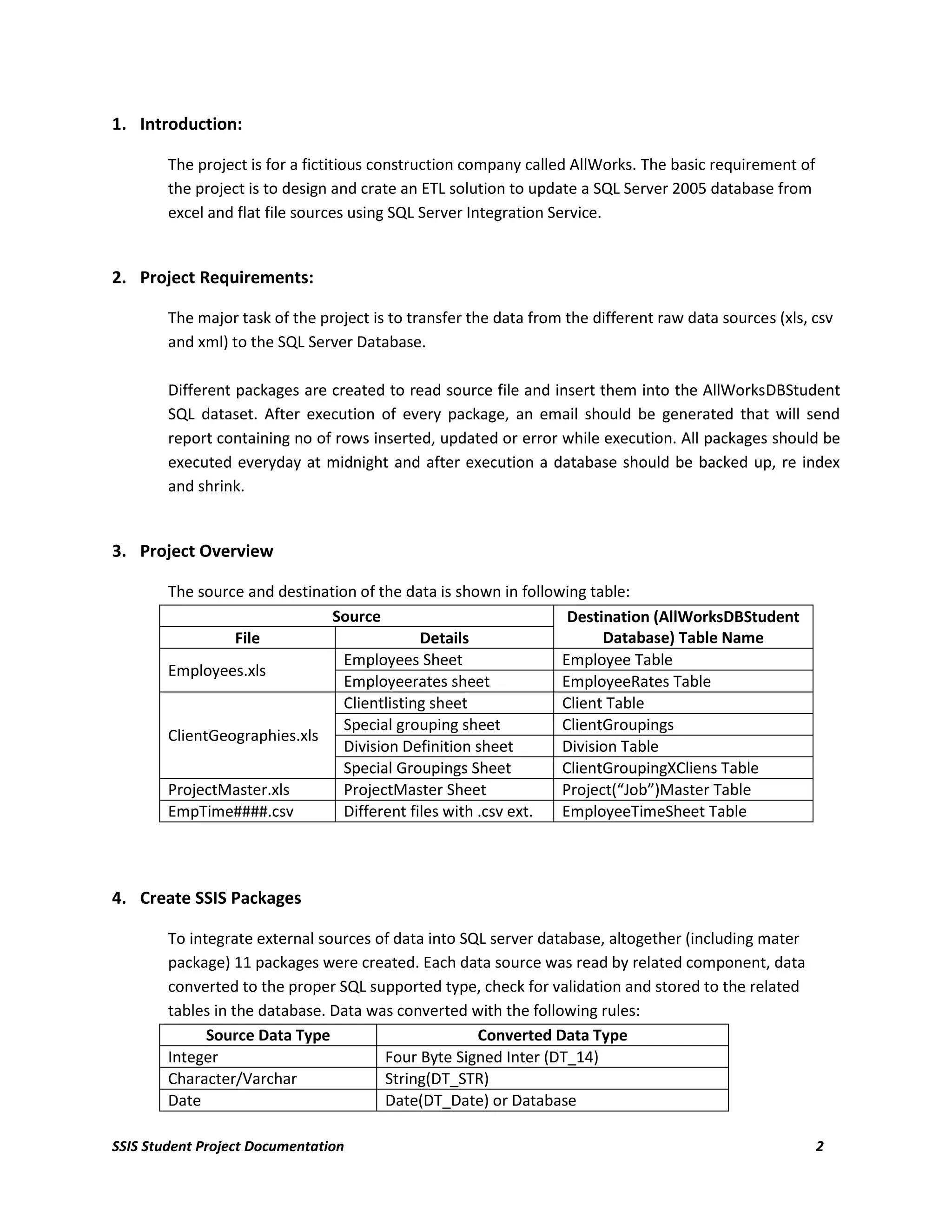
        The source and destination of the data is shown in following table:
                               Source                             Destination (AllWorksDBStudent
                 File                        Details                   Database) Table Name
                                 Employees Sheet                 Employee Table
        Employees.xls
                                 Employeerates sheet             EmployeeRates Table
                                 Clientlisting sheet             Client Table
                                 Special grouping sheet          ClientGroupings
        ClientGeographies.xls
                                 Division Definition sheet       Division Table
                                 Special Groupings Sheet         ClientGroupingXCliens Table
        ProjectMaster.xls        ProjectMaster Sheet             Project(“Job”)Master Table
        EmpTime####.csv          Different files with .csv ext.  EmployeeTimeSheet Table


4. Create SSIS Packages

        To integrate external sources of data into SQL server database, altogether (including mater
        package) 11 packages were created. Each data source was read by related component, data
        converted to the proper SQL supported type, check for validation and stored to the related
        tables in the database. Data was converted with the following rules:
              Source Data Type                       Converted Data Type
        Integer                        Four Byte Signed Inter (DT_14)
        Character/Varchar              String(DT_STR)
        Date                           Date(DT_Date) or Database

SSIS Student Project Documentation                                                                       2
TimeStamp(DT_DBTIMESTAMP)
        Currency/General Numbers      Numeric(DT_NUMERIC)
        Logical/Boolean               Boolean(DT_BOOLEAN)


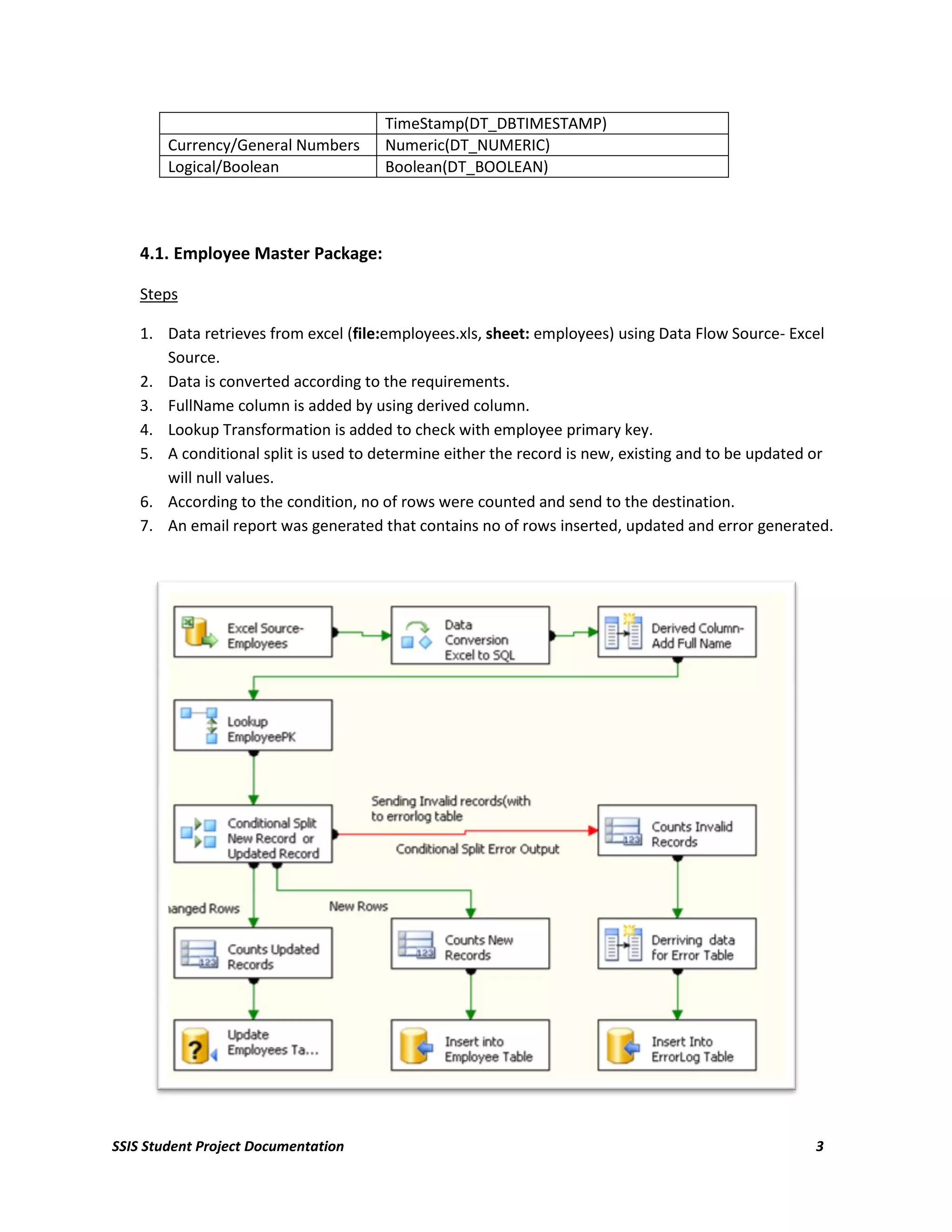
    4.1. Employee Master Package:

    Steps

    1. Data retrieves from excel (file:employees.xls, sheet: employees) using Data Flow Source- Excel
       Source.
    2. Data is converted according to the requirements.
    3. FullName column is added by using derived column.
    4. Lookup Transformation is added to check with employee primary key.
    5. A conditional split is used to determine either the record is new, existing and to be updated or
       will null values.
    6. According to the condition, no of rows were counted and send to the destination.
    7. An email report was generated that contains no of rows inserted, updated and error generated.


SSIS Student Project Documentation                                                                  3
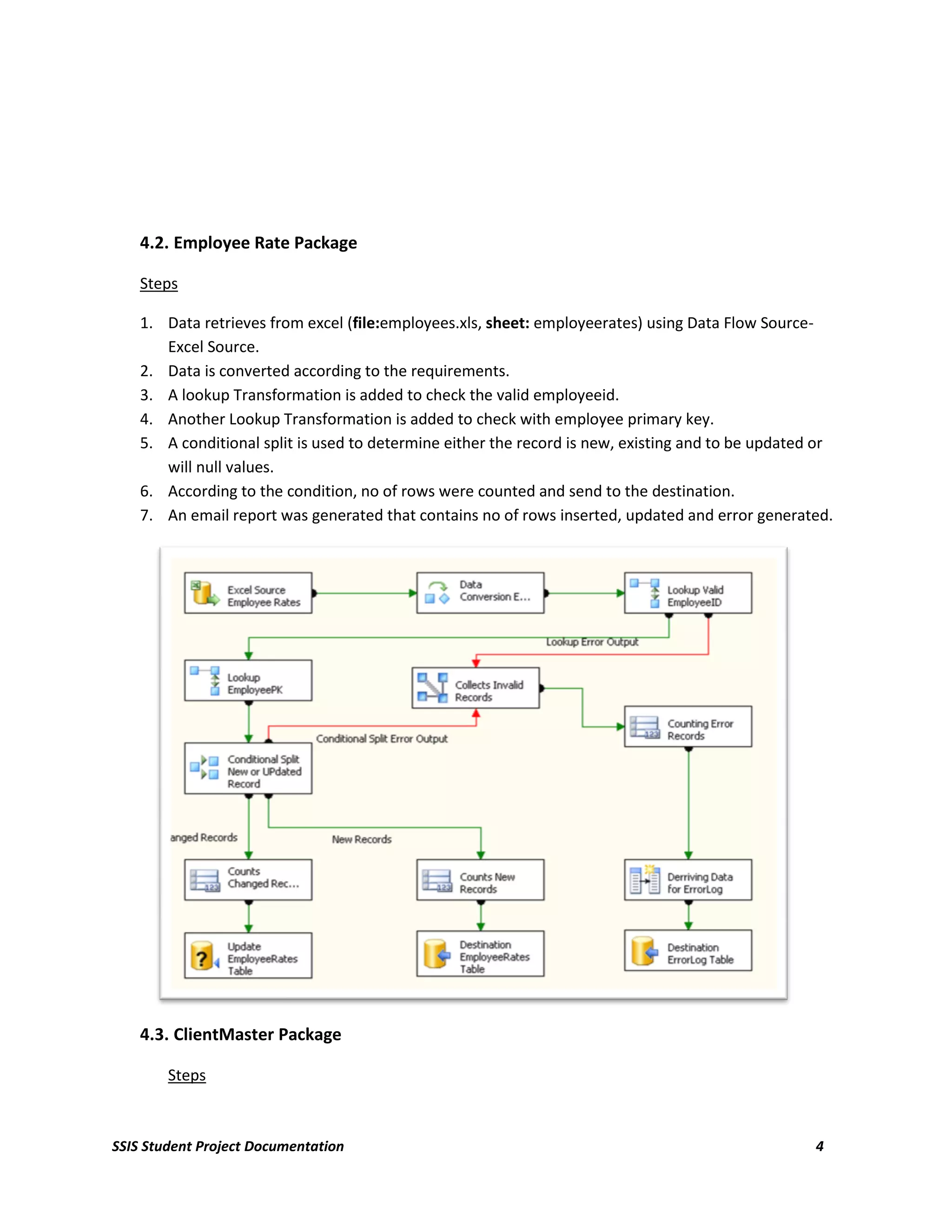
4.2. Employee Rate Package

    Steps

    1. Data retrieves from excel (file:employees.xls, sheet: employeerates) using Data Flow Source-
       Excel Source.
    2. Data is converted according to the requirements.
    3. A lookup Transformation is added to check the valid employeeid.
    4. Another Lookup Transformation is added to check with employee primary key.
    5. A conditional split is used to determine either the record is new, existing and to be updated or
       will null values.
    6. According to the condition, no of rows were counted and send to the destination.
    7. An email report was generated that contains no of rows inserted, updated and error generated.


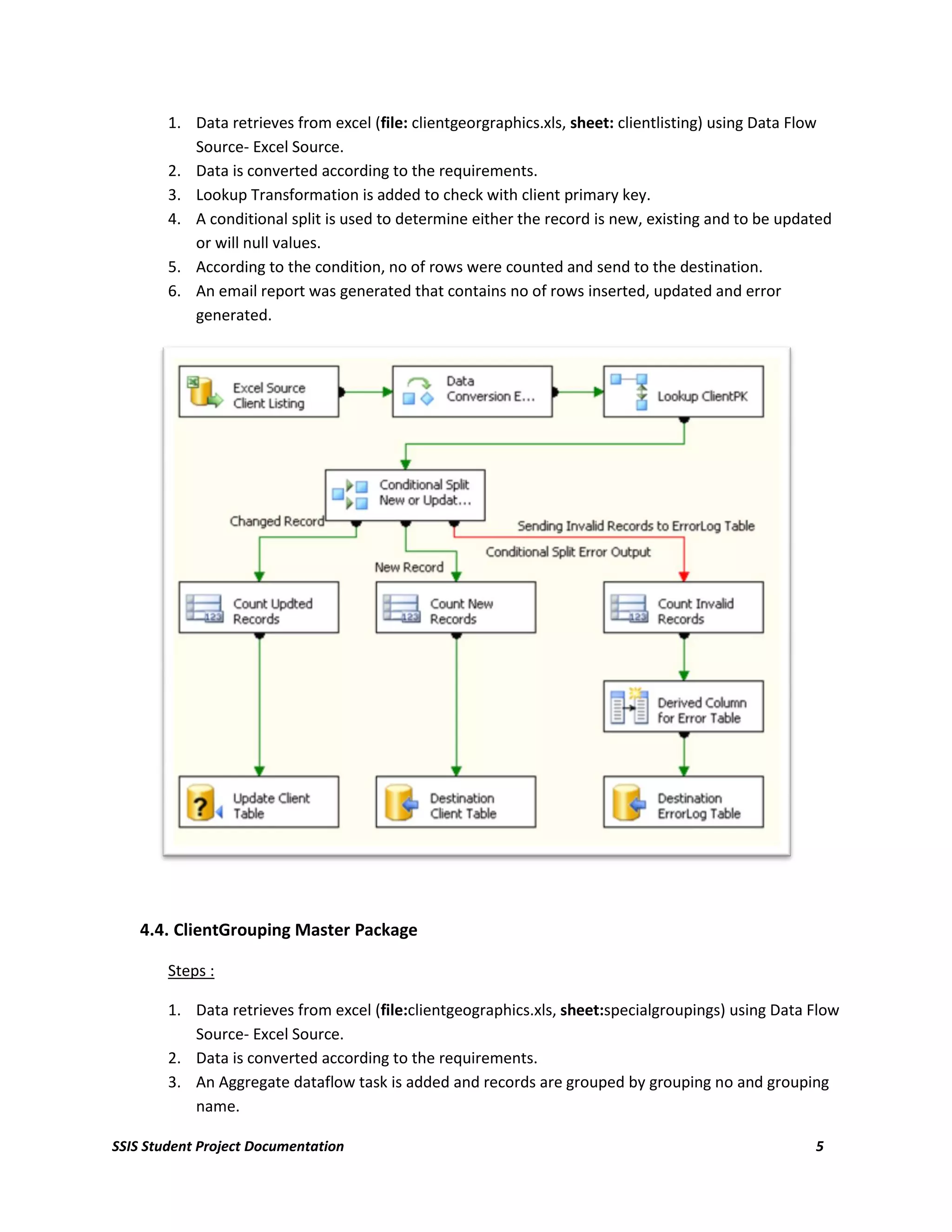
    4.3. ClientMaster Package

        Steps


SSIS Student Project Documentation                                                                  4
1. Data retrieves from excel (file: clientgeorgraphics.xls, sheet: clientlisting) using Data Flow
           Source- Excel Source.
        2. Data is converted according to the requirements.
        3. Lookup Transformation is added to check with client primary key.
        4. A conditional split is used to determine either the record is new, existing and to be updated
           or will null values.
        5. According to the condition, no of rows were counted and send to the destination.
        6. An email report was generated that contains no of rows inserted, updated and error
           generated.


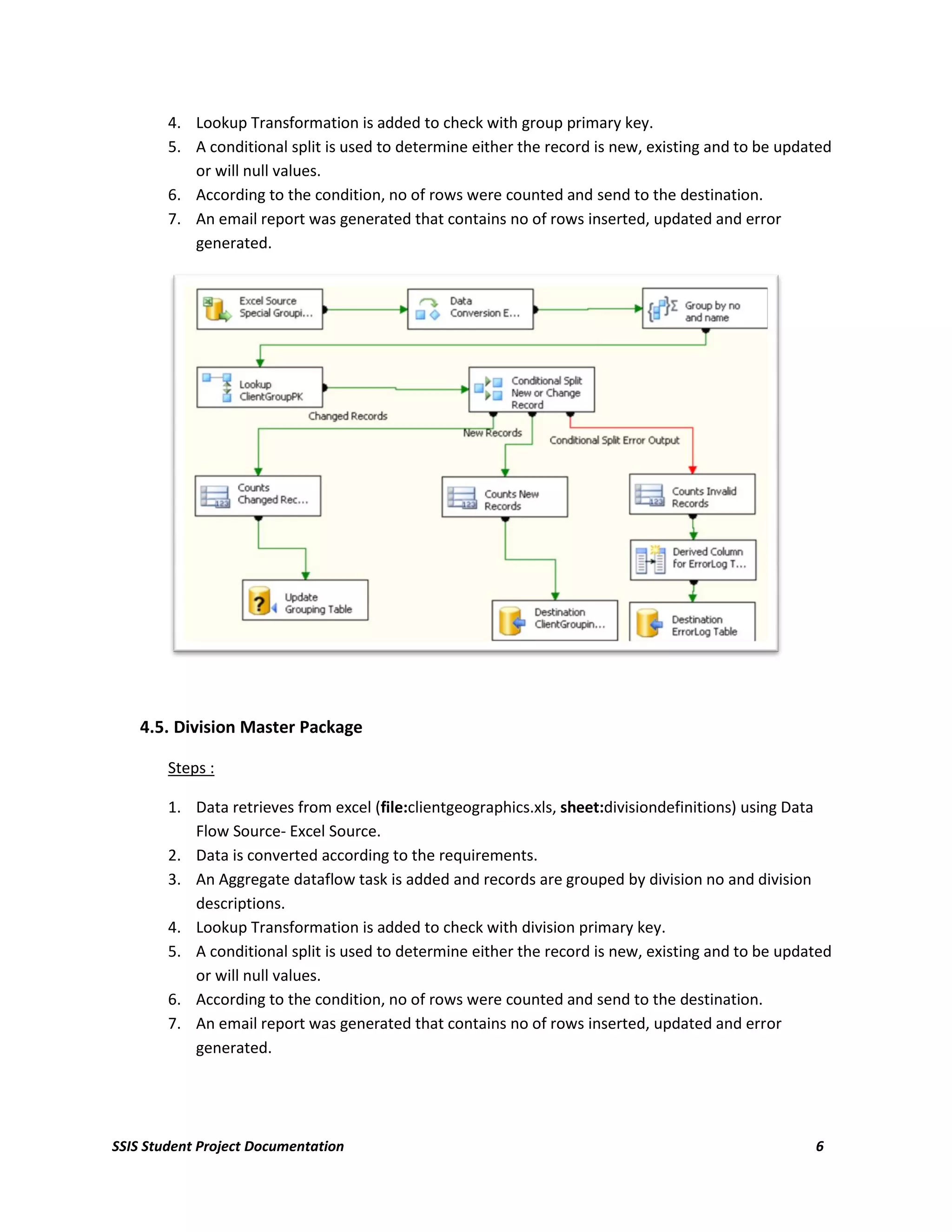
    4.4. ClientGrouping Master Package

        Steps :

        1. Data retrieves from excel (file:clientgeographics.xls, sheet:specialgroupings) using Data Flow
           Source- Excel Source.
        2. Data is converted according to the requirements.
        3. An Aggregate dataflow task is added and records are grouped by grouping no and grouping
           name.

SSIS Student Project Documentation                                                                    5
4. Lookup Transformation is added to check with group primary key.
        5. A conditional split is used to determine either the record is new, existing and to be updated
           or will null values.
        6. According to the condition, no of rows were counted and send to the destination.
        7. An email report was generated that contains no of rows inserted, updated and error
           generated.


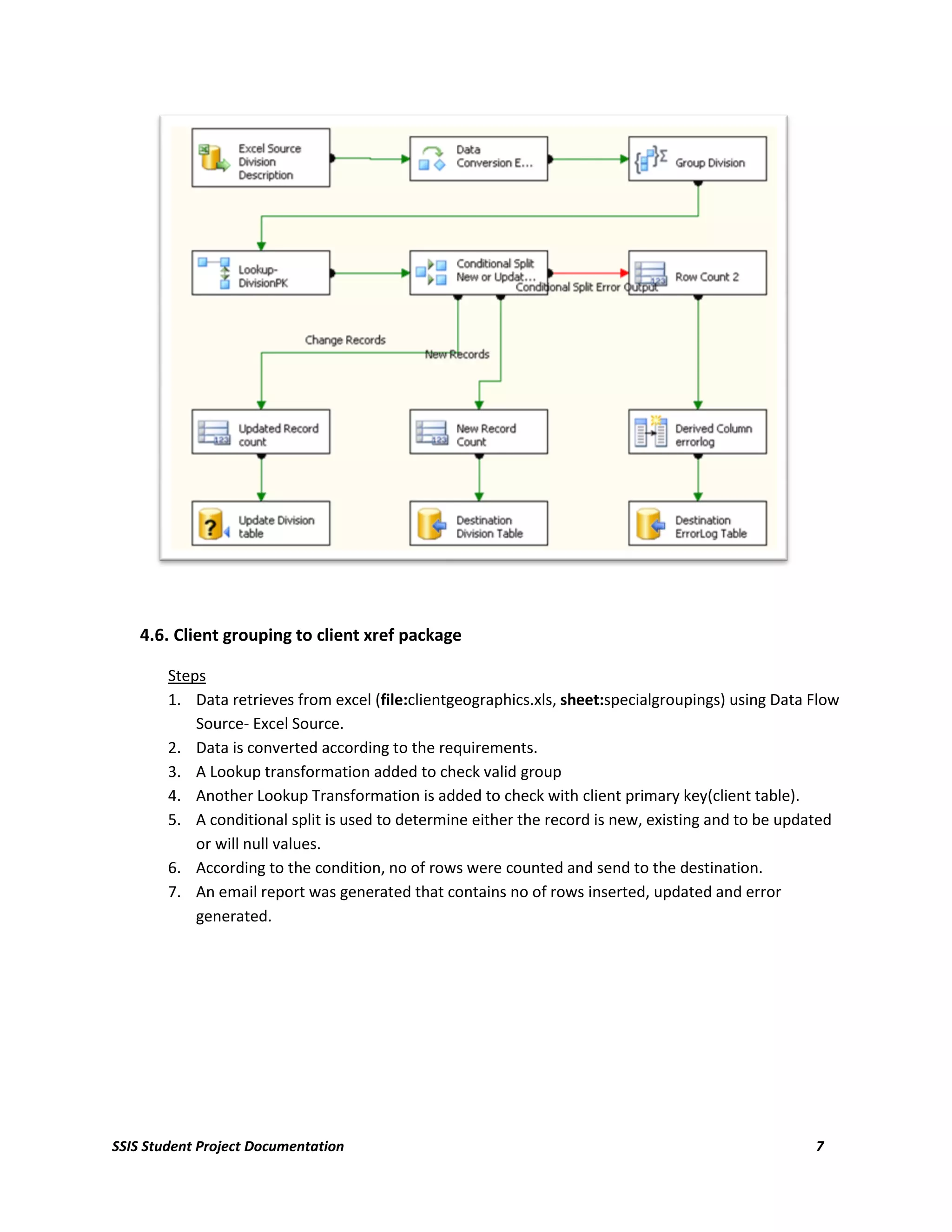
    4.5. Division Master Package

        Steps :

        1. Data retrieves from excel (file:clientgeographics.xls, sheet:divisiondefinitions) using Data
           Flow Source- Excel Source.
        2. Data is converted according to the requirements.
        3. An Aggregate dataflow task is added and records are grouped by division no and division
           descriptions.
        4. Lookup Transformation is added to check with division primary key.
        5. A conditional split is used to determine either the record is new, existing and to be updated
           or will null values.
        6. According to the condition, no of rows were counted and send to the destination.
        7. An email report was generated that contains no of rows inserted, updated and error
           generated.


SSIS Student Project Documentation                                                                   6
4.6. Client grouping to client xref package

        Steps
        1. Data retrieves from excel (file:clientgeographics.xls, sheet:specialgroupings) using Data Flow
            Source- Excel Source.
        2. Data is converted according to the requirements.
        3. A Lookup transformation added to check valid group
        4. Another Lookup Transformation is added to check with client primary key(client table).
        5. A conditional split is used to determine either the record is new, existing and to be updated
            or will null values.
        6. According to the condition, no of rows were counted and send to the destination.
        7. An email report was generated that contains no of rows inserted, updated and error
            generated.


SSIS Student Project Documentation                                                                   7
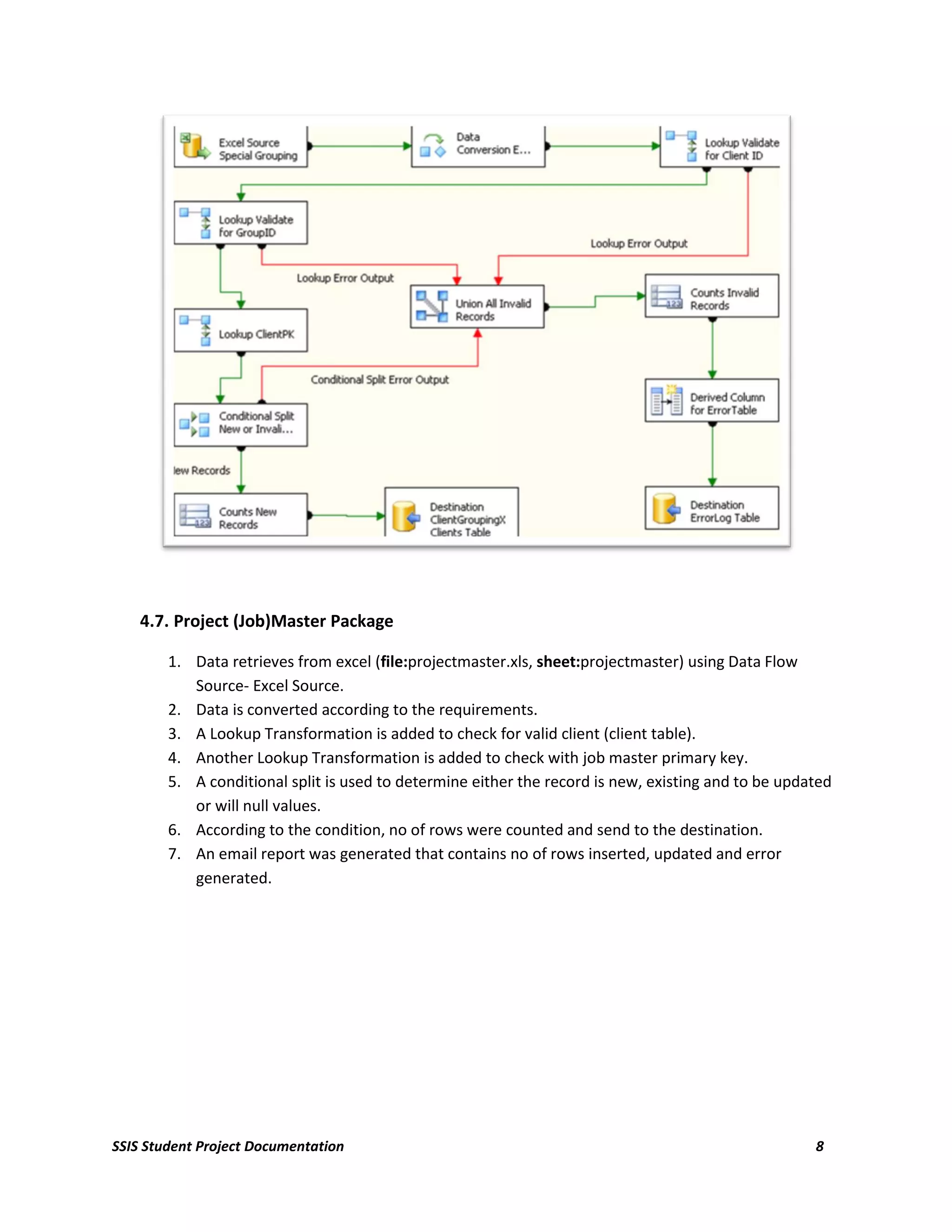
4.7. Project (Job)Master Package

        1. Data retrieves from excel (file:projectmaster.xls, sheet:projectmaster) using Data Flow
           Source- Excel Source.
        2. Data is converted according to the requirements.
        3. A Lookup Transformation is added to check for valid client (client table).
        4. Another Lookup Transformation is added to check with job master primary key.
        5. A conditional split is used to determine either the record is new, existing and to be updated
           or will null values.
        6. According to the condition, no of rows were counted and send to the destination.
        7. An email report was generated that contains no of rows inserted, updated and error
           generated.


SSIS Student Project Documentation                                                                   8
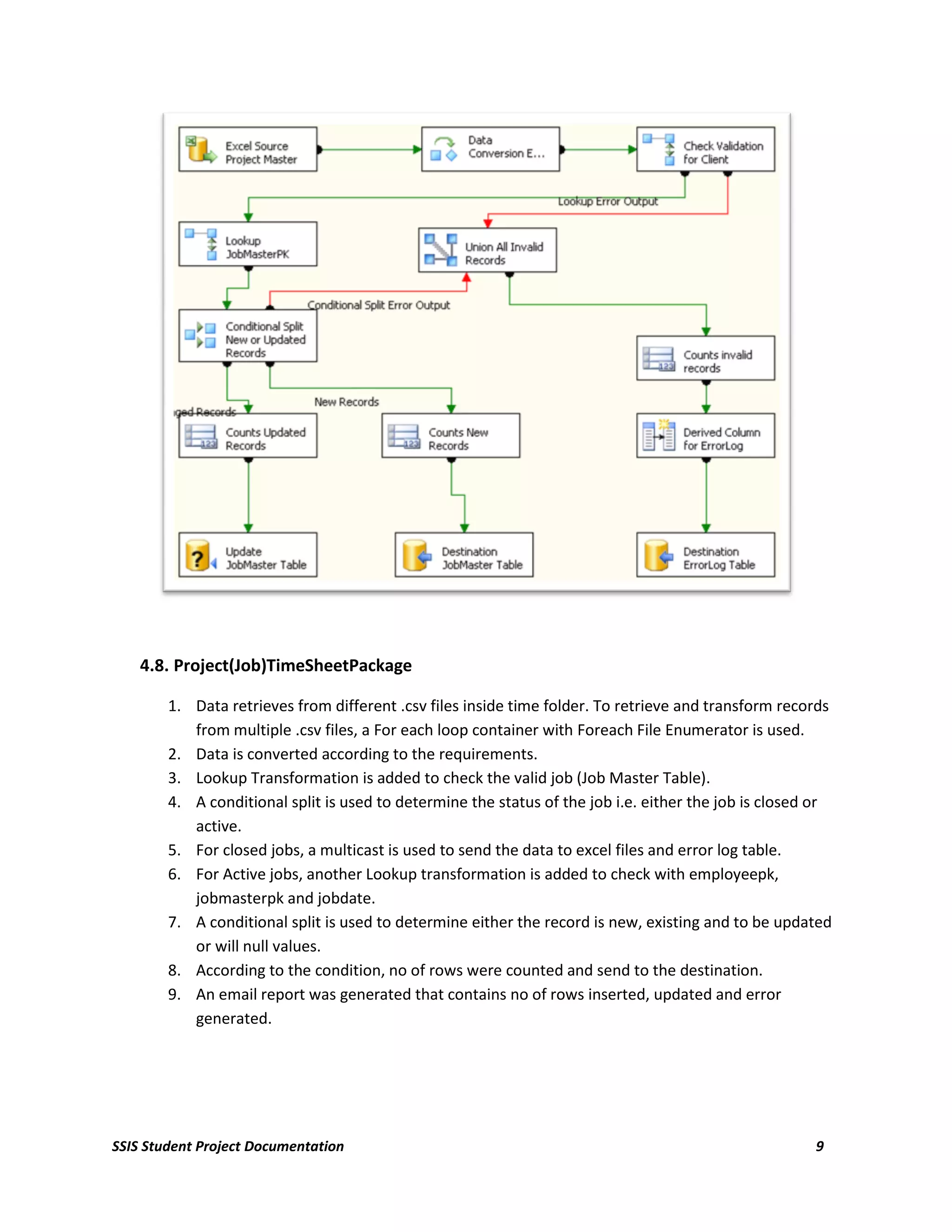
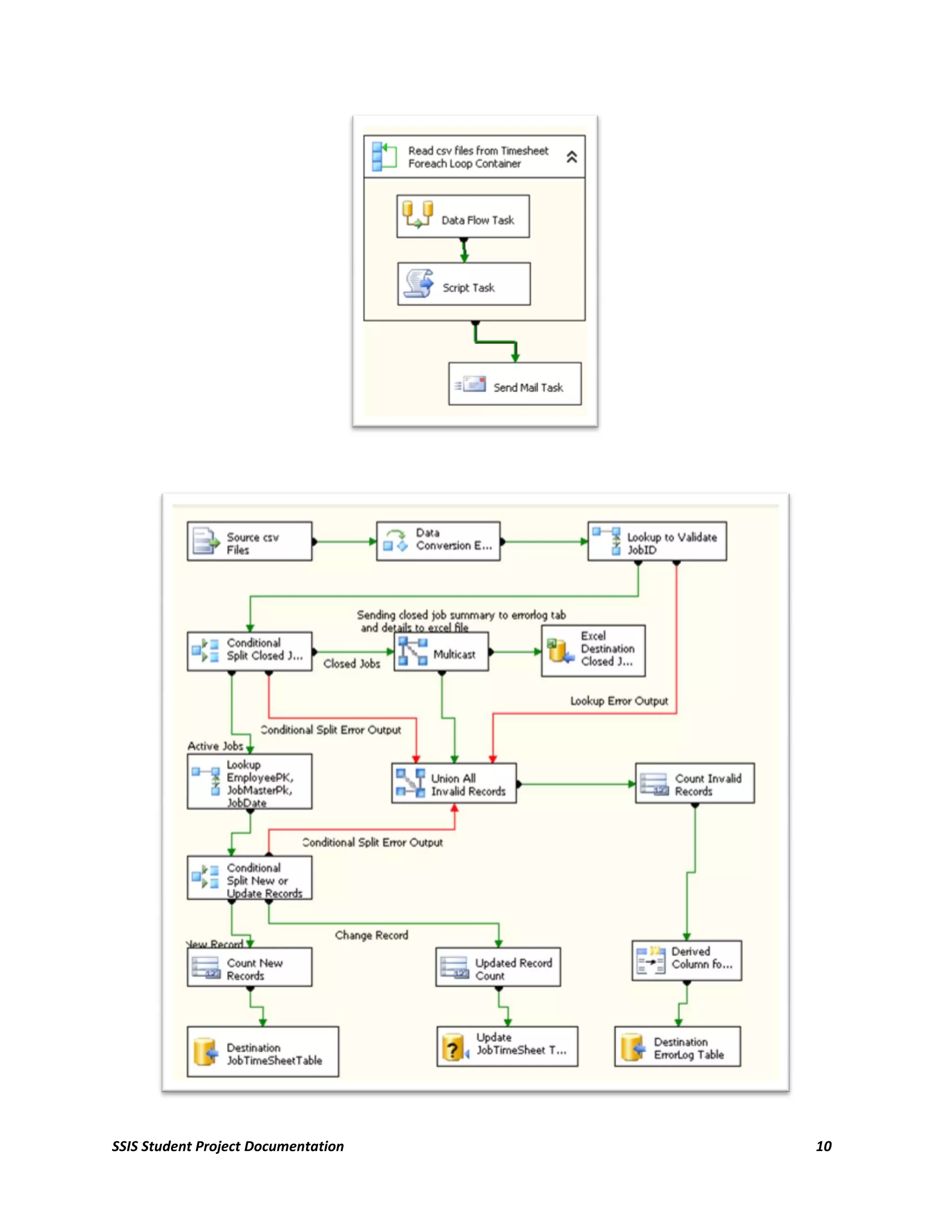
4.8. Project(Job)TimeSheetPackage

        1. Data retrieves from different .csv files inside time folder. To retrieve and transform records
           from multiple .csv files, a For each loop container with Foreach File Enumerator is used.
        2. Data is converted according to the requirements.
        3. Lookup Transformation is added to check the valid job (Job Master Table).
        4. A conditional split is used to determine the status of the job i.e. either the job is closed or
           active.
        5. For closed jobs, a multicast is used to send the data to excel files and error log table.
        6. For Active jobs, another Lookup transformation is added to check with employeepk,
           jobmasterpk and jobdate.
        7. A conditional split is used to determine either the record is new, existing and to be updated
           or will null values.
        8. According to the condition, no of rows were counted and send to the destination.
        9. An email report was generated that contains no of rows inserted, updated and error
           generated.


SSIS Student Project Documentation                                                                     9
SSIS Student Project Documentation   10
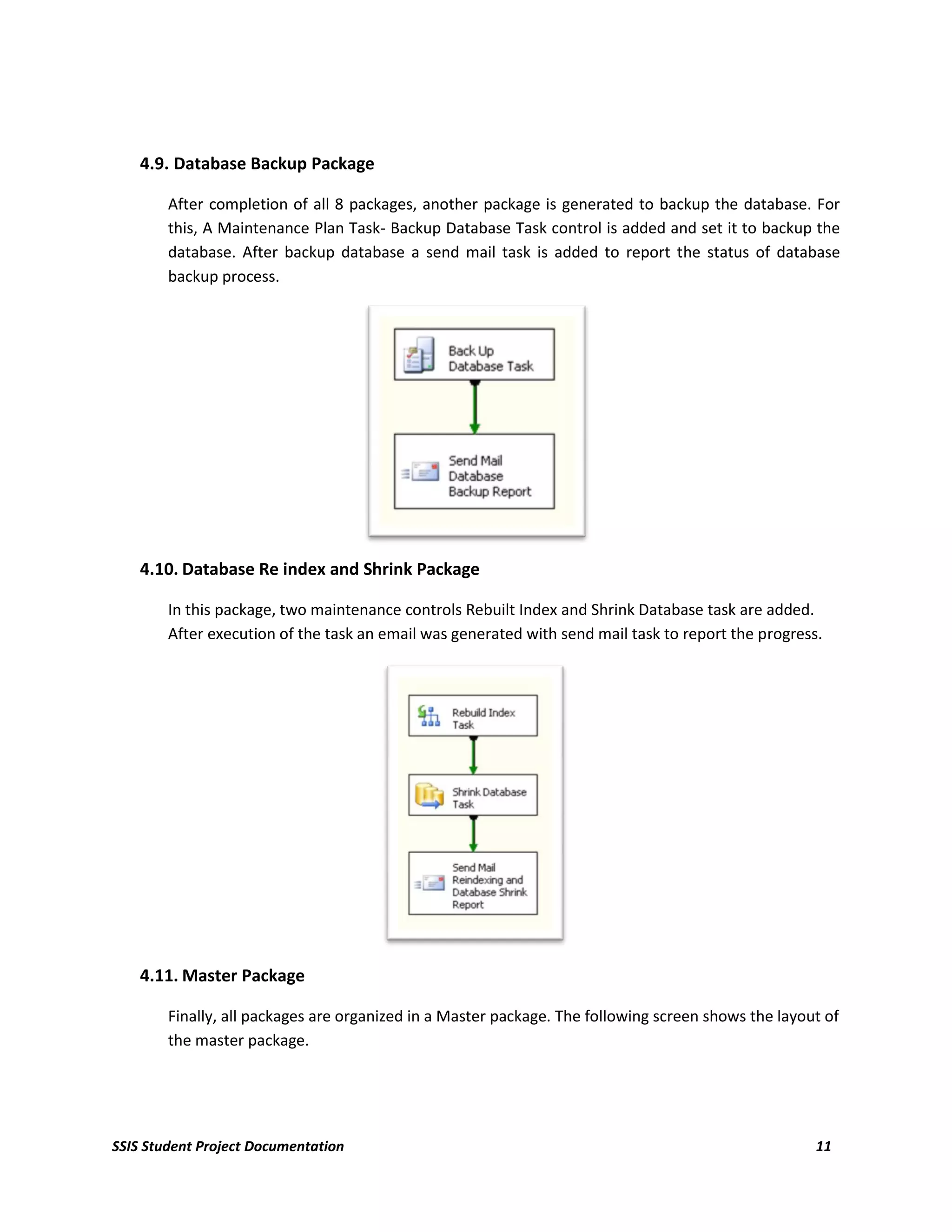
4.9. Database Backup Package

        After completion of all 8 packages, another package is generated to backup the database. For
        this, A Maintenance Plan Task- Backup Database Task control is added and set it to backup the
        database. After backup database a send mail task is added to report the status of database
        backup process.


    4.10. Database Re index and Shrink Package

        In this package, two maintenance controls Rebuilt Index and Shrink Database task are added.
        After execution of the task an email was generated with send mail task to report the progress.


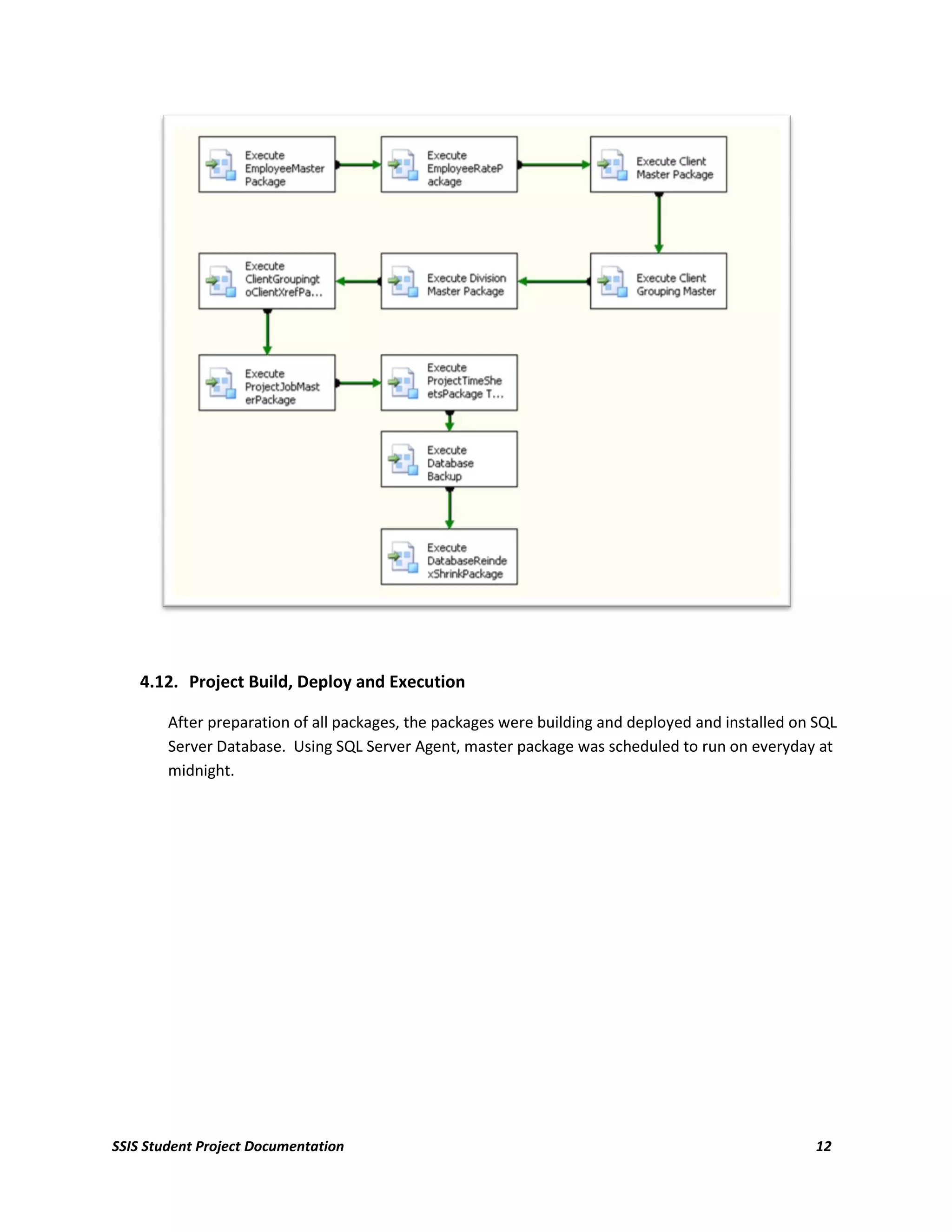
    4.11. Master Package

        Finally, all packages are organized in a Master package. The following screen shows the layout of
        the master package.


SSIS Student Project Documentation                                                                   11
4.12. Project Build, Deploy and Execution

        After preparation of all packages, the packages were building and deployed and installed on SQL
        Server Database. Using SQL Server Agent, master package was scheduled to run on everyday at
        midnight.


SSIS Student Project Documentation                                                                  12

A-Project Report- SSIS

  • 1.
    SetFocus Business Intelligence –MasterProgram SQL SERVER INTEGRATION SERVICE PORJECT DOCUMENTATION ON AllWorks, Inc. – a Ficticious Construction Company Submitted By Yubaraj Khanal (May,2009) 0
  • 2.
    Table of Contents 1. Introduction: ....................................................................................................................................... 2 2. Project Requirements: ........................................................................................................................ 2 3. Project Overview ................................................................................................................................. 2 4. Create SSIS Packages ........................................................................................................................... 2 4.1. Employee Master Package: ................................................................................................................. 3 4.2. Employee Rate Package ...................................................................................................................... 4 4.3. ClientMaster Package.......................................................................................................................... 4 4.4. ClientGrouping Master Package.......................................................................................................... 5 4.5. Division Master Package ..................................................................................................................... 6 4.6. Client grouping to client xref package ................................................................................................ 7 4.7. Project (Job)Master Package ............................................................................................................... 8 4.8. Project(Job)TimeSheetPackage ........................................................................................................... 9 4.9. Database Backup Package ................................................................................................................. 11 4.10. Database Re index and Shrink Package............................................................................................. 11 4.11. Master Package ................................................................................................................................. 11 4.12. Project Build, Deploy and Execution ................................................................................................. 12 SSIS Student Project Documentation 1
  • 3.
    1. Introduction: The project is for a fictitious construction company called AllWorks. The basic requirement of the project is to design and crate an ETL solution to update a SQL Server 2005 database from excel and flat file sources using SQL Server Integration Service. 2. Project Requirements: The major task of the project is to transfer the data from the different raw data sources (xls, csv and xml) to the SQL Server Database. Different packages are created to read source file and insert them into the AllWorksDBStudent SQL dataset. After execution of every package, an email should be generated that will send report containing no of rows inserted, updated or error while execution. All packages should be executed everyday at midnight and after execution a database should be backed up, re index and shrink. 3. Project Overview The source and destination of the data is shown in following table: Source Destination (AllWorksDBStudent File Details Database) Table Name Employees Sheet Employee Table Employees.xls Employeerates sheet EmployeeRates Table Clientlisting sheet Client Table Special grouping sheet ClientGroupings ClientGeographies.xls Division Definition sheet Division Table Special Groupings Sheet ClientGroupingXCliens Table ProjectMaster.xls ProjectMaster Sheet Project(“Job”)Master Table EmpTime####.csv Different files with .csv ext. EmployeeTimeSheet Table 4. Create SSIS Packages To integrate external sources of data into SQL server database, altogether (including mater package) 11 packages were created. Each data source was read by related component, data converted to the proper SQL supported type, check for validation and stored to the related tables in the database. Data was converted with the following rules: Source Data Type Converted Data Type Integer Four Byte Signed Inter (DT_14) Character/Varchar String(DT_STR) Date Date(DT_Date) or Database SSIS Student Project Documentation 2
  • 4.
    TimeStamp(DT_DBTIMESTAMP) Currency/General Numbers Numeric(DT_NUMERIC) Logical/Boolean Boolean(DT_BOOLEAN) 4.1. Employee Master Package: Steps 1. Data retrieves from excel (file:employees.xls, sheet: employees) using Data Flow Source- Excel Source. 2. Data is converted according to the requirements. 3. FullName column is added by using derived column. 4. Lookup Transformation is added to check with employee primary key. 5. A conditional split is used to determine either the record is new, existing and to be updated or will null values. 6. According to the condition, no of rows were counted and send to the destination. 7. An email report was generated that contains no of rows inserted, updated and error generated. SSIS Student Project Documentation 3
  • 5.
    4.2. Employee RatePackage Steps 1. Data retrieves from excel (file:employees.xls, sheet: employeerates) using Data Flow Source- Excel Source. 2. Data is converted according to the requirements. 3. A lookup Transformation is added to check the valid employeeid. 4. Another Lookup Transformation is added to check with employee primary key. 5. A conditional split is used to determine either the record is new, existing and to be updated or will null values. 6. According to the condition, no of rows were counted and send to the destination. 7. An email report was generated that contains no of rows inserted, updated and error generated. 4.3. ClientMaster Package Steps SSIS Student Project Documentation 4
  • 6.
    1. Data retrievesfrom excel (file: clientgeorgraphics.xls, sheet: clientlisting) using Data Flow Source- Excel Source. 2. Data is converted according to the requirements. 3. Lookup Transformation is added to check with client primary key. 4. A conditional split is used to determine either the record is new, existing and to be updated or will null values. 5. According to the condition, no of rows were counted and send to the destination. 6. An email report was generated that contains no of rows inserted, updated and error generated. 4.4. ClientGrouping Master Package Steps : 1. Data retrieves from excel (file:clientgeographics.xls, sheet:specialgroupings) using Data Flow Source- Excel Source. 2. Data is converted according to the requirements. 3. An Aggregate dataflow task is added and records are grouped by grouping no and grouping name. SSIS Student Project Documentation 5
  • 7.
    4. Lookup Transformationis added to check with group primary key. 5. A conditional split is used to determine either the record is new, existing and to be updated or will null values. 6. According to the condition, no of rows were counted and send to the destination. 7. An email report was generated that contains no of rows inserted, updated and error generated. 4.5. Division Master Package Steps : 1. Data retrieves from excel (file:clientgeographics.xls, sheet:divisiondefinitions) using Data Flow Source- Excel Source. 2. Data is converted according to the requirements. 3. An Aggregate dataflow task is added and records are grouped by division no and division descriptions. 4. Lookup Transformation is added to check with division primary key. 5. A conditional split is used to determine either the record is new, existing and to be updated or will null values. 6. According to the condition, no of rows were counted and send to the destination. 7. An email report was generated that contains no of rows inserted, updated and error generated. SSIS Student Project Documentation 6
  • 8.
    4.6. Client groupingto client xref package Steps 1. Data retrieves from excel (file:clientgeographics.xls, sheet:specialgroupings) using Data Flow Source- Excel Source. 2. Data is converted according to the requirements. 3. A Lookup transformation added to check valid group 4. Another Lookup Transformation is added to check with client primary key(client table). 5. A conditional split is used to determine either the record is new, existing and to be updated or will null values. 6. According to the condition, no of rows were counted and send to the destination. 7. An email report was generated that contains no of rows inserted, updated and error generated. SSIS Student Project Documentation 7
  • 9.
    4.7. Project (Job)MasterPackage 1. Data retrieves from excel (file:projectmaster.xls, sheet:projectmaster) using Data Flow Source- Excel Source. 2. Data is converted according to the requirements. 3. A Lookup Transformation is added to check for valid client (client table). 4. Another Lookup Transformation is added to check with job master primary key. 5. A conditional split is used to determine either the record is new, existing and to be updated or will null values. 6. According to the condition, no of rows were counted and send to the destination. 7. An email report was generated that contains no of rows inserted, updated and error generated. SSIS Student Project Documentation 8
  • 10.
    4.8. Project(Job)TimeSheetPackage 1. Data retrieves from different .csv files inside time folder. To retrieve and transform records from multiple .csv files, a For each loop container with Foreach File Enumerator is used. 2. Data is converted according to the requirements. 3. Lookup Transformation is added to check the valid job (Job Master Table). 4. A conditional split is used to determine the status of the job i.e. either the job is closed or active. 5. For closed jobs, a multicast is used to send the data to excel files and error log table. 6. For Active jobs, another Lookup transformation is added to check with employeepk, jobmasterpk and jobdate. 7. A conditional split is used to determine either the record is new, existing and to be updated or will null values. 8. According to the condition, no of rows were counted and send to the destination. 9. An email report was generated that contains no of rows inserted, updated and error generated. SSIS Student Project Documentation 9
  • 11.
    SSIS Student ProjectDocumentation 10
  • 12.
    4.9. Database BackupPackage After completion of all 8 packages, another package is generated to backup the database. For this, A Maintenance Plan Task- Backup Database Task control is added and set it to backup the database. After backup database a send mail task is added to report the status of database backup process. 4.10. Database Re index and Shrink Package In this package, two maintenance controls Rebuilt Index and Shrink Database task are added. After execution of the task an email was generated with send mail task to report the progress. 4.11. Master Package Finally, all packages are organized in a Master package. The following screen shows the layout of the master package. SSIS Student Project Documentation 11
  • 13.
    4.12. Project Build,Deploy and Execution After preparation of all packages, the packages were building and deployed and installed on SQL Server Database. Using SQL Server Agent, master package was scheduled to run on everyday at midnight. SSIS Student Project Documentation 12