Solving O365 Big Data
Challenges - Datastax Enterprise
Anubhav Kale
Senior Software Engineer
Anubhav.kale@Microsoft.com
Agenda
• Use cases
• Architecture
• Patterns and Best Practices
• Path forward
Office 365 – Productivity Services at scale
• 1.6 billion – Sessions / month
• 59% - Commercial seat growth in FY16 Q2
• 20.6 million - Consumer Subscribers
• >30 Million – iOS and Android devices run Outlook
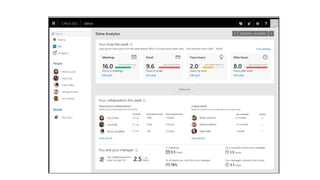
Delve Analytics
• Reinvent productivity through individual empowerment
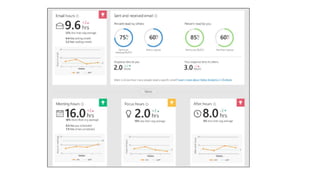
• How many hours do I spend in meetings ?
• Do I work late hours ?
• How many hours on email ?
• I sent an email announcing success to big group. Who read it ?
• How do two organizations collaborate ? Less / More ?
• Who are “spammers” ?
Proactive outreach
• Empower in-house analytics to make end users happy
• Proactively determine if a tenant (e.g. BestBuy, Starbucks) will churn
• Find out specific users that are impacted during a service incident
• For a user, is he happy overall ?
• Compete analysis
• Analyze product usage across different organization types (edu, healthcare..)
• Compare behavior of service across users
Move the needle from service health to user health.
How, where, what ?
• Cassandra 2.1.13 (DSE 4.8.5) running on Azure Linux VMs
• Apache Kafka as the intermediate queue
• Multiple Clusters to serve different teams / scale profiles
• Common management stack for all clusters
• Home grown internal and external monitoring, recovery
• Tooling for On Call Activities, Backups et. al.
• Datastax Ops Center does the heavy lifting
Architecture
Spark Streaming Spark Batch
Processing
Kafka
Cassandra Store
O365 servers
Apps/Clients
Commerce
systems
Support
systems
Serving
Admin Portal
Support Tools
Ad Hoc Querying
Azure Networking
• Public IP Addresses
• Allow geo-redundant replication over Internet
• Not secure
• Virtual Networks
• No bandwidth limit within a VNET, Allow replication via
1. High-Performance Gateway – Max 200Mbs.
2. Express Route – Max 10Gbs
3. VNET Peering (Public Preview) – No Limit
We use VNETs due to security requirements and dedicated
bandwidth guarantees
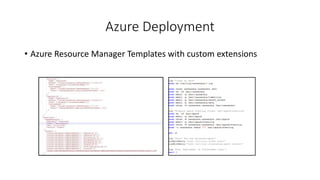
Azure Deployment
• Azure Resource Manager Templates with custom extensions
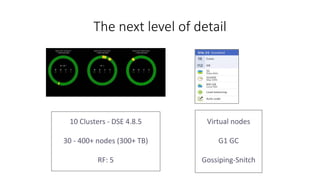
The next level of detail
10 Clusters - DSE 4.8.5
30 - 400+ nodes (300+ TB)
RF: 5
Virtual nodes
G1 GC
Gossiping-Snitch
Spark Patterns
• Batch Processing
• Generate common datasets that can be widely used
• Tune Cassandra.input.split.size to your needs
• Streaming
• Near Real Time applications
• Cache intermediate results
• Keep connections alive (keep_alive_ms)
Fail the job, not the cluster !
DataStax Enterprise (Cassandra) Patterns
• SSDs are ephemeral, losing them will lead to data loss
• Detect and fix automatically via replace_address mechanism
• Are you really rack-aware ?
• Azure will move VMs, this will destroy rack awareness
• Fix by removing and adding nodes
• Streaming is slow
• Set compaction and streamthroughput to high value
• Play with TCP Keep Alive settings
• JIRAs 4663 , 9766
DataStax Enterprise (Cassandra) Patterns
• Memory pressure
• Tune GC Settings
• Pay attention to Kernel logs
• Set OOM score for the process
• Heap dumps
• Big for big heaps (30G)
• Use appropriately sized OS disk
DataStax Enterprise (Cassandra) Patterns
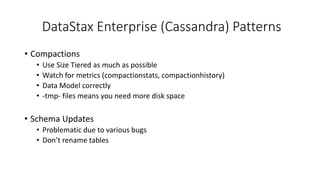
• Compactions
• Use Size Tiered as much as possible
• Watch for metrics (compactionstats, compactionhistory)
• Data Model correctly
• -tmp- files means you need more disk space
• Schema Updates
• Problematic due to various bugs
• Don’t rename tables
DataStax Enterprise (Cassandra) Patterns
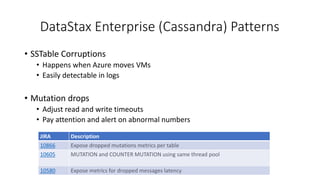
• SSTable Corruptions
• Happens when Azure moves VMs
• Easily detectable in logs
• Mutation drops
• Adjust read and write timeouts
• Pay attention and alert on abnormal numbers
JIRA Description
10866 Expose dropped mutations metrics per table
10605 MUTATION and COUNTER MUTATION using same thread pool
10580 Expose metrics for dropped messages latency
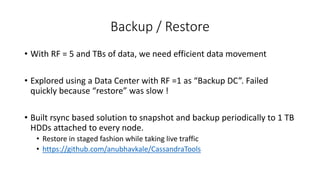
Backup / Restore
• With RF = 5 and TBs of data, we need efficient data movement
• Explored using a Data Center with RF =1 as “Backup DC”. Failed
quickly because “restore” was slow !
• Built rsync based solution to snapshot and backup periodically to 1 TB
HDDs attached to every node.
• Restore in staged fashion while taking live traffic
• https://github.com/anubhavkale/CassandraTools
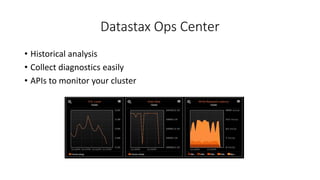
Datastax Ops Center
• Historical analysis
• Collect diagnostics easily
• APIs to monitor your cluster
Takeaways
• Heavily invest in automation (Chef, for instance)
• Deeply learn core concepts – leverage DSE Support !
• Iterate on data models
• Closely monitor metrics and alert
• Keep an eye on OSS JIRAs
Looking forward
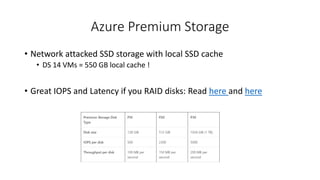
Azure Premium Storage
• Network attacked SSD storage with local SSD cache
• DS 14 VMs = 550 GB local cache !
• Great IOPS and Latency if you RAID disks: Read here and here
Questions ?
anubhav.kale@microsoft.com
https://blogs.msdn.microsoft.com/anubhavk/

Solving Office 365 Big Challenges using Cassandra + Spark

  • 1.
    Solving O365 BigData Challenges - Datastax Enterprise Anubhav Kale Senior Software Engineer Anubhav.kale@Microsoft.com
  • 2.
    Agenda • Use cases •Architecture • Patterns and Best Practices • Path forward
  • 3.
    Office 365 –Productivity Services at scale • 1.6 billion – Sessions / month • 59% - Commercial seat growth in FY16 Q2 • 20.6 million - Consumer Subscribers • >30 Million – iOS and Android devices run Outlook
  • 4.
    Delve Analytics • Reinventproductivity through individual empowerment • How many hours do I spend in meetings ? • Do I work late hours ? • How many hours on email ? • I sent an email announcing success to big group. Who read it ? • How do two organizations collaborate ? Less / More ? • Who are “spammers” ?
  • 7.
    Proactive outreach • Empowerin-house analytics to make end users happy • Proactively determine if a tenant (e.g. BestBuy, Starbucks) will churn • Find out specific users that are impacted during a service incident • For a user, is he happy overall ? • Compete analysis • Analyze product usage across different organization types (edu, healthcare..) • Compare behavior of service across users Move the needle from service health to user health.
  • 9.
    How, where, what? • Cassandra 2.1.13 (DSE 4.8.5) running on Azure Linux VMs • Apache Kafka as the intermediate queue • Multiple Clusters to serve different teams / scale profiles • Common management stack for all clusters • Home grown internal and external monitoring, recovery • Tooling for On Call Activities, Backups et. al. • Datastax Ops Center does the heavy lifting
  • 10.
    Architecture Spark Streaming SparkBatch Processing Kafka Cassandra Store O365 servers Apps/Clients Commerce systems Support systems Serving Admin Portal Support Tools Ad Hoc Querying
  • 11.
    Azure Networking • PublicIP Addresses • Allow geo-redundant replication over Internet • Not secure • Virtual Networks • No bandwidth limit within a VNET, Allow replication via 1. High-Performance Gateway – Max 200Mbs. 2. Express Route – Max 10Gbs 3. VNET Peering (Public Preview) – No Limit We use VNETs due to security requirements and dedicated bandwidth guarantees
  • 12.
    Azure Deployment • AzureResource Manager Templates with custom extensions
  • 13.
    The next levelof detail 10 Clusters - DSE 4.8.5 30 - 400+ nodes (300+ TB) RF: 5 Virtual nodes G1 GC Gossiping-Snitch
  • 14.
    Spark Patterns • BatchProcessing • Generate common datasets that can be widely used • Tune Cassandra.input.split.size to your needs • Streaming • Near Real Time applications • Cache intermediate results • Keep connections alive (keep_alive_ms) Fail the job, not the cluster !
  • 15.
    DataStax Enterprise (Cassandra)Patterns • SSDs are ephemeral, losing them will lead to data loss • Detect and fix automatically via replace_address mechanism • Are you really rack-aware ? • Azure will move VMs, this will destroy rack awareness • Fix by removing and adding nodes • Streaming is slow • Set compaction and streamthroughput to high value • Play with TCP Keep Alive settings • JIRAs 4663 , 9766
  • 16.
    DataStax Enterprise (Cassandra)Patterns • Memory pressure • Tune GC Settings • Pay attention to Kernel logs • Set OOM score for the process • Heap dumps • Big for big heaps (30G) • Use appropriately sized OS disk
  • 17.
    DataStax Enterprise (Cassandra)Patterns • Compactions • Use Size Tiered as much as possible • Watch for metrics (compactionstats, compactionhistory) • Data Model correctly • -tmp- files means you need more disk space • Schema Updates • Problematic due to various bugs • Don’t rename tables
  • 18.
    DataStax Enterprise (Cassandra)Patterns • SSTable Corruptions • Happens when Azure moves VMs • Easily detectable in logs • Mutation drops • Adjust read and write timeouts • Pay attention and alert on abnormal numbers JIRA Description 10866 Expose dropped mutations metrics per table 10605 MUTATION and COUNTER MUTATION using same thread pool 10580 Expose metrics for dropped messages latency
  • 19.
    Backup / Restore •With RF = 5 and TBs of data, we need efficient data movement • Explored using a Data Center with RF =1 as “Backup DC”. Failed quickly because “restore” was slow ! • Built rsync based solution to snapshot and backup periodically to 1 TB HDDs attached to every node. • Restore in staged fashion while taking live traffic • https://github.com/anubhavkale/CassandraTools
  • 20.
    Datastax Ops Center •Historical analysis • Collect diagnostics easily • APIs to monitor your cluster
  • 21.
  • 22.
    • Heavily investin automation (Chef, for instance) • Deeply learn core concepts – leverage DSE Support ! • Iterate on data models • Closely monitor metrics and alert • Keep an eye on OSS JIRAs
  • 23.
  • 24.
    Azure Premium Storage •Network attacked SSD storage with local SSD cache • DS 14 VMs = 550 GB local cache ! • Great IOPS and Latency if you RAID disks: Read here and here
  • 25.