















Anil Gupta
Omkar Nalawade
06/18/2018
Assumptions:
• Our audience have basic knowledge of HBase/Phoenix
• Actual performance improvement varies per your workload
• Due to time constraints, we are covering most important tuning tips
2
Agenda:
• Data Architecture at TRUECar
• Use Cases for Apache HBase/Phoenix
• Performance Optimization Techniques
 Cluster Settings
 Table Settings
 Data Modelling
 Instance Type
3
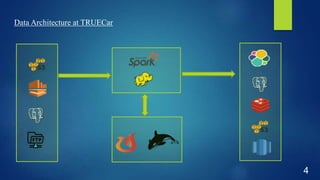
Data Architecture at TRUECar
4
5
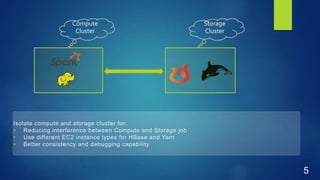
Storage
Cluster
Compute
Cluster
Isolate compute and storage cluster for:
• Reducing interference between Compute and Storage job
• Use different EC2 instance types for HBase and Yarn
• Better consistency and debugging capability
Use Cases for Apache HBase/Phoenix
• Data store for Historical Data
• Data store for highly unstructured data(primarily HBase)
• Data store for semi-structured data(dynamic columns of Phoenix)
• In-memory Cache for small datasets
• We try to denormalize data to avoid joins in HBase/Phoenix
6
Cluster Settings
• UPDATE_CACHE_FREQUENCY
• Default value is “Always”
• SYSTEM.CATALOG is queried for every instantiation of Statement/PreparedStatement
• Causes hotspot in SYSTEM.CATALOG
• “phoenix.default.update.cache.frequency”: 120000
• Can be set per Table
• Saw 5x performance improvement in some jobs
7
Table Settings
• Pre-splitting the table
• Pre-splitting the secondary index
• Bloom Filter
• Hints
• SMALL
• NO_CACHE
• IN_MEMORY
8
Pre-split! Pre-split! Pre-split!
• Without presplitting, Phoenix tables are seeded with 1 region
• Avoid hotspot writing data to new tables.
• Leads to better distribution of table data across cluster
• Significant performance improvement(few X) at initial data load of table
9
Pre-splitting Global Secondary Index
• Global Secondary Index data is stored in another Phoenix table.
• Without pre-splitting Index table can lead to:
 Hotspot in Index table
 Slow writes to primary table(even though its pre-splitted)
10
Bloom Filter
• It’s a light-weight in-memory structure to reduce the number of negative reads
• It can be enabled on Column Family:
 ROW(default): If table doesnt have a lot of Dynamic Columns
 ROWCOL: If table has lots of Dynamic Columns
11
We saw 2x performance improvement in Read in a table that had close to 40000 Dynamic Columns
Hints
12
NO_CACHE
• To avoid the results of query to populate HBase block cache
• Use it when adhoc/nigthly export of data
• Reduce unnecessary churn in LRU
13
SMALL HINT
 Data set:
 Main Table consists of 50 columns
 2 million rows
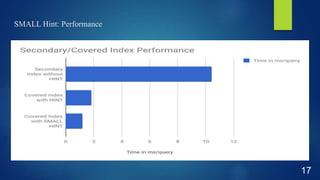
 Case 1: Secondary Index without HINT
 Secondary Index on Main Table to retrieve 2 columns
 CREATE TEST_IDX ON TEST_TABLE(COLUMN_1)
 Query: SELECT * FROM TEST_IDX WHERE COLUMN_1=100
 Performance: 10.44 ms/query
14
SMALL HINT
 Case 2: Covered Index with HINT
 Covered Index to retrieve 2 columns
 CREATE TEST_IDX ON TEST_TABLE(COLUMN_1) INCLUDE (COLUMN_2, COLUMN_3)
 SELECT COLUMN_2, COLUMN_3 FROM TEST_IDX WHERE COLUMN_1=100
 Query Performance: ~1.8 ms/query
15
SMALL HINT
 Case 3: Covered Index with SMALL HINT
 Covered Index with SMALL HINT to retrieve 2 columns
 SELECT /*+SMALL*/ COLUMN_2, COLUMN_3 FROM TEST_IDX WHERE COLUMN_1=100
 Query Performance: ~1.2 ms/query
16
SMALL Hint: Performance
17
IN_MEMORY Option
• Use in-memory option to cache small data sets.
• Fast reads(in single digit milliseconds)
• We try to restrict in memory option to data < 1 Gb
• Don’t forget to split the table
18
Data Modeling: Incremental Key
• Rows in Phoenix are sorted lexicographically by the row key
• Sequential Keys leads to hotspotting due to non-uniform read/write pattern
• Common example: SequenceId’s of RDBMS
19
Data Modeling: Incremental Key
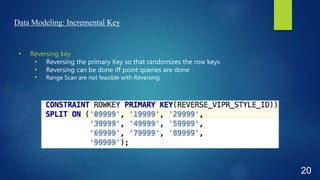
• Reversing key
• Reversing the primary Key so that randomizes the row keys
• Reversing can be done iff point queries are done
• Range Scan are not feasible with Reversing
20
Why Reversing key rather than Salting?
• Need to specify number of buckets at time to table creation
• Number of salt bucket stays same even if datasize keeps on growing
• Range scans are not feasible with salting too.
21
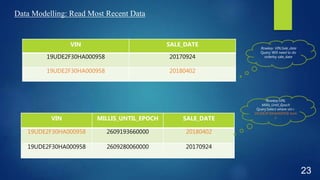
Data Modelling: Read Most Recent Data
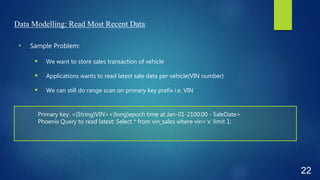
• Sample Problem:
 We want to store sales transaction of vehicle
 Applications wants to read latest sale data per vehicle(VIN number)
 We can still do range scan on primary key prefix i.e. VIN
22
Primary key: <(String)VIN><(long)epoch time at Jan-01-2100:00 - SaleDate>
Phoenix Query to read latest: Select * from vin_sales where vin=‘x’ limit 1;
Data Modelling: Read Most Recent Data
23
VIN SALE_DATE
19UDE2F30HA000958 20170924
19UDE2F30HA000958 20180402
VIN MILLIS_UNTIL_EPOCH SALE_DATE
19UDE2F30HA000958 2609193660000 20180402
19UDE2F30HA000958 2609280060000 20170924
Rowkey:VIN,
Millis_Until_Epoch
Query:Select where vin=
19UDE2F30HA000958 limit
1
Rowkey: VIN,Sale_date
Query: Will need to do
orderby sale_date
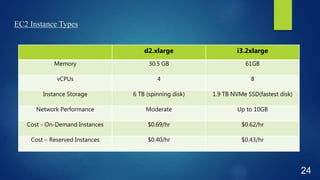
EC2 Instance Types
24
d2.xlarge i3.2xlarge
Memory 30.5 GB 61GB
vCPUs 4 8
Instance Storage 6 TB (spinning disk) 1.9 TB NVMe SSD(fastest disk)
Network Performance Moderate Up to 10GB
Cost - On-Demand Instances $0.69/hr $0.62/hr
Cost – Reserved Instances $0.40/hr $0.43/hr
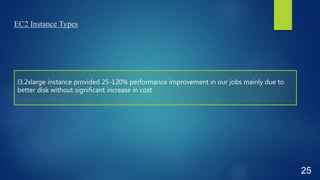
EC2 Instance Types
25
I3.2xlarge instance provided 25-120% performance improvement in our jobs mainly due to
better disk without significant increase in cost
Thanks & Questions
(PS:We are hiring!)
26

Tuning Apache Phoenix/HBase

  • 1.
  • 2.
    Assumptions: • Our audiencehave basic knowledge of HBase/Phoenix • Actual performance improvement varies per your workload • Due to time constraints, we are covering most important tuning tips 2
  • 3.
    Agenda: • Data Architectureat TRUECar • Use Cases for Apache HBase/Phoenix • Performance Optimization Techniques  Cluster Settings  Table Settings  Data Modelling  Instance Type 3
  • 4.
  • 5.
    5 Storage Cluster Compute Cluster Isolate compute andstorage cluster for: • Reducing interference between Compute and Storage job • Use different EC2 instance types for HBase and Yarn • Better consistency and debugging capability
  • 6.
    Use Cases forApache HBase/Phoenix • Data store for Historical Data • Data store for highly unstructured data(primarily HBase) • Data store for semi-structured data(dynamic columns of Phoenix) • In-memory Cache for small datasets • We try to denormalize data to avoid joins in HBase/Phoenix 6
  • 7.
    Cluster Settings • UPDATE_CACHE_FREQUENCY •Default value is “Always” • SYSTEM.CATALOG is queried for every instantiation of Statement/PreparedStatement • Causes hotspot in SYSTEM.CATALOG • “phoenix.default.update.cache.frequency”: 120000 • Can be set per Table • Saw 5x performance improvement in some jobs 7
  • 8.
    Table Settings • Pre-splittingthe table • Pre-splitting the secondary index • Bloom Filter • Hints • SMALL • NO_CACHE • IN_MEMORY 8
  • 9.
    Pre-split! Pre-split! Pre-split! •Without presplitting, Phoenix tables are seeded with 1 region • Avoid hotspot writing data to new tables. • Leads to better distribution of table data across cluster • Significant performance improvement(few X) at initial data load of table 9
  • 10.
    Pre-splitting Global SecondaryIndex • Global Secondary Index data is stored in another Phoenix table. • Without pre-splitting Index table can lead to:  Hotspot in Index table  Slow writes to primary table(even though its pre-splitted) 10
  • 11.
    Bloom Filter • It’sa light-weight in-memory structure to reduce the number of negative reads • It can be enabled on Column Family:  ROW(default): If table doesnt have a lot of Dynamic Columns  ROWCOL: If table has lots of Dynamic Columns 11 We saw 2x performance improvement in Read in a table that had close to 40000 Dynamic Columns
  • 12.
  • 13.
    NO_CACHE • To avoidthe results of query to populate HBase block cache • Use it when adhoc/nigthly export of data • Reduce unnecessary churn in LRU 13
  • 14.
    SMALL HINT  Dataset:  Main Table consists of 50 columns  2 million rows  Case 1: Secondary Index without HINT  Secondary Index on Main Table to retrieve 2 columns  CREATE TEST_IDX ON TEST_TABLE(COLUMN_1)  Query: SELECT * FROM TEST_IDX WHERE COLUMN_1=100  Performance: 10.44 ms/query 14
  • 15.
    SMALL HINT  Case2: Covered Index with HINT  Covered Index to retrieve 2 columns  CREATE TEST_IDX ON TEST_TABLE(COLUMN_1) INCLUDE (COLUMN_2, COLUMN_3)  SELECT COLUMN_2, COLUMN_3 FROM TEST_IDX WHERE COLUMN_1=100  Query Performance: ~1.8 ms/query 15
  • 16.
    SMALL HINT  Case3: Covered Index with SMALL HINT  Covered Index with SMALL HINT to retrieve 2 columns  SELECT /*+SMALL*/ COLUMN_2, COLUMN_3 FROM TEST_IDX WHERE COLUMN_1=100  Query Performance: ~1.2 ms/query 16
  • 17.
  • 18.
    IN_MEMORY Option • Usein-memory option to cache small data sets. • Fast reads(in single digit milliseconds) • We try to restrict in memory option to data < 1 Gb • Don’t forget to split the table 18
  • 19.
    Data Modeling: IncrementalKey • Rows in Phoenix are sorted lexicographically by the row key • Sequential Keys leads to hotspotting due to non-uniform read/write pattern • Common example: SequenceId’s of RDBMS 19
  • 20.
    Data Modeling: IncrementalKey • Reversing key • Reversing the primary Key so that randomizes the row keys • Reversing can be done iff point queries are done • Range Scan are not feasible with Reversing 20
  • 21.
    Why Reversing keyrather than Salting? • Need to specify number of buckets at time to table creation • Number of salt bucket stays same even if datasize keeps on growing • Range scans are not feasible with salting too. 21
  • 22.
    Data Modelling: ReadMost Recent Data • Sample Problem:  We want to store sales transaction of vehicle  Applications wants to read latest sale data per vehicle(VIN number)  We can still do range scan on primary key prefix i.e. VIN 22 Primary key: <(String)VIN><(long)epoch time at Jan-01-2100:00 - SaleDate> Phoenix Query to read latest: Select * from vin_sales where vin=‘x’ limit 1;
  • 23.
    Data Modelling: ReadMost Recent Data 23 VIN SALE_DATE 19UDE2F30HA000958 20170924 19UDE2F30HA000958 20180402 VIN MILLIS_UNTIL_EPOCH SALE_DATE 19UDE2F30HA000958 2609193660000 20180402 19UDE2F30HA000958 2609280060000 20170924 Rowkey:VIN, Millis_Until_Epoch Query:Select where vin= 19UDE2F30HA000958 limit 1 Rowkey: VIN,Sale_date Query: Will need to do orderby sale_date
  • 24.
    EC2 Instance Types 24 d2.xlargei3.2xlarge Memory 30.5 GB 61GB vCPUs 4 8 Instance Storage 6 TB (spinning disk) 1.9 TB NVMe SSD(fastest disk) Network Performance Moderate Up to 10GB Cost - On-Demand Instances $0.69/hr $0.62/hr Cost – Reserved Instances $0.40/hr $0.43/hr
  • 25.
    EC2 Instance Types 25 I3.2xlargeinstance provided 25-120% performance improvement in our jobs mainly due to better disk without significant increase in cost
  • 26.