SQL Server Integration ServicesAnd Data Mining
OverviewStandard Tasks in SSISSSIS PackagesData FlowWorking with SSIS in Data MiningData Mining TransformationsText Mining TransformationsSummary
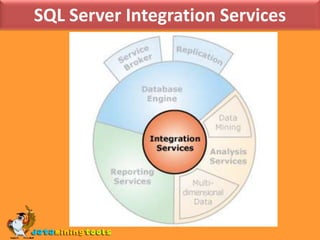
Overview of SSISSQL Server Integration Services (SSIS) is a component of the Microsoft SQL Server database software which can be used to perform a broad range of data migration tasks.SSIS is a platform for data integration and workflow applications. It features a fast and flexible data warehousing tool used for data extraction, transformation, and loading (ETL). The tool may also be used to automate maintenance of SQL Server databases and updates to multidimensional cube data.
SQL Server Integration Services
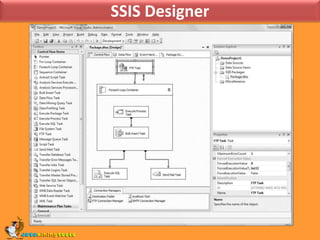
SSIS Designer
SSIS PackagesA package is the basic deployment and execution unit of an SSIS project.An SSIS package is the container for SSIS flows. You can create an SSIS package by right-clicking the SSIS Package folder in the Integration Services project folder and selecting the New SSIS Package menu item.An SSIS project may contain multiple packages. A package contains only one control flow, which may contain one or more data flows.In addition to control flow and data flow, a package contains SSIS connections and package variables.
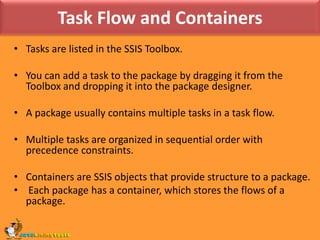
Task Flow and ContainersTasks are listed in the SSIS Toolbox. You can add a task to the package by dragging it from the Toolbox and dropping it into the package designer.A package usually contains multiple tasks in a task flow. Multiple tasks are organized in sequential order with precedence constraints.Containers are SSIS objects that provide structure to a package. Each package has a container, which stores the flows of a package.
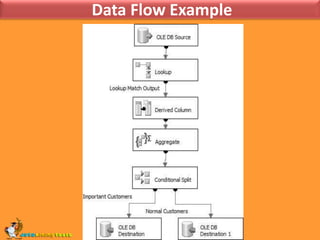
 Data Flow Example
How to Set the Properties of a Task or Container?To set the properties of a task or container by using theProperties window :In Business Intelligence Development Studio, open the Integration Services project that contains the package you want.
In Solution Explorer, double-click the package to open it.
Click the Control Flow tab.
On the design surface of the Control Flow tab, right-click the task or container, and then click Properties.
In the Properties window, update the property value.
Optionally, create property expressions to dynamically update the properties of the task or container.
To save the updated package, click Save Selected Items on the File menu.How to Set the Properties of a Task or Container?To set the properties of a task or container by using a task or container editor:In Business Intelligence Development Studio, open the Integration Services project that contains the package you want.
In Solution Explorer, double-click the package to open it.

MS SQL SERVER: SSIS and data mining

  • 1.
    SQL Server IntegrationServicesAnd Data Mining
  • 2.
    OverviewStandard Tasks inSSISSSIS PackagesData FlowWorking with SSIS in Data MiningData Mining TransformationsText Mining TransformationsSummary
  • 3.
    Overview of SSISSQLServer Integration Services (SSIS) is a component of the Microsoft SQL Server database software which can be used to perform a broad range of data migration tasks.SSIS is a platform for data integration and workflow applications. It features a fast and flexible data warehousing tool used for data extraction, transformation, and loading (ETL). The tool may also be used to automate maintenance of SQL Server databases and updates to multidimensional cube data.
  • 4.
  • 5.
  • 6.
    SSIS PackagesA packageis the basic deployment and execution unit of an SSIS project.An SSIS package is the container for SSIS flows. You can create an SSIS package by right-clicking the SSIS Package folder in the Integration Services project folder and selecting the New SSIS Package menu item.An SSIS project may contain multiple packages. A package contains only one control flow, which may contain one or more data flows.In addition to control flow and data flow, a package contains SSIS connections and package variables.
  • 7.
    Task Flow andContainersTasks are listed in the SSIS Toolbox. You can add a task to the package by dragging it from the Toolbox and dropping it into the package designer.A package usually contains multiple tasks in a task flow. Multiple tasks are organized in sequential order with precedence constraints.Containers are SSIS objects that provide structure to a package. Each package has a container, which stores the flows of a package.
  • 8.
    Data FlowExample
  • 9.
    How to Setthe Properties of a Task or Container?To set the properties of a task or container by using theProperties window :In Business Intelligence Development Studio, open the Integration Services project that contains the package you want.
  • 10.
    In Solution Explorer,double-click the package to open it.
  • 11.
  • 12.
    On the designsurface of the Control Flow tab, right-click the task or container, and then click Properties.
  • 13.
  • 14.
    Optionally, create propertyexpressions to dynamically update the properties of the task or container.
  • 15.
    To save theupdated package, click Save Selected Items on the File menu.How to Set the Properties of a Task or Container?To set the properties of a task or container by using a task or container editor:In Business Intelligence Development Studio, open the Integration Services project that contains the package you want.
  • 16.
    In Solution Explorer,double-click the package to open it.