• Cognizant 20-20 Insights


A Standardized Approach to
SSIS Migration
Within every migration project, interface issues emerge that create
maintenance complexities and unnecessary system down time. By
embracing common practices and tools, IT organizations can more quickly
and effectively move SSIS software to new and more modern platforms.

      Executive Summary                                      on the DBA; there is no way for the DBA to do
                                                             impact analysis of changes made to a particular
      SQL server integration services (SSIS) is the
                                                             configuration of server/location without much
      enterprise class extract-transform-load (ETL)
                                                             manual work.
      tool that accompanies Microsoft SQL2005/2008.
      The data transformation services (DTS) that            This white paper explains one such standardiza-
      existed with SQL 2000 was rewritten for SSIS in        tion that can be followed for the generic actions
      subsequent versions of the tool.                       of most SSIS jobs:
      To deliver an improved feature set, which primarily    •	 Configuration.
      consists of enhanced SQL 2008 database per-
      formance, existing DTS packages were migrated          •	 Error Handling.
      to SSIS 2008. Though there exist options/tools         •	 Monitoring.
      for migration of DTS to SSIS, the best-in-class
      approach to leverage SSIS’s improved function-         Configuration Standardization
      ality and avoid the complex logic of DTS (e.g.,        Most of the connection strings used in the SSIS
      ActiveX scripts) is to use the “complete rewrite” of   components as well as other change-prone
      DTS functionality in SSIS. Standardized processes      properties of any task in SSIS must be configured
      must be followed whenever such migrations              to enable an SSIS job that is transferable and
      occur to increase the maintainability of SSIS jobs     maintainable.
      after migration.
                                                             Challenges in Configuration Management
      Without a standardization, a single SSIS may have      •	 During SDLC of any SSIS, the tool must be
      multiple configuration files maintained in multiple      moved to work in different environments (DEV,
      or single locations — making the change to the           TEST and PROD predominantly). This results in
      configuration complex. Also changes (minor or            changing SSIS/Config files during every move,
      major) to the configuration have a dependency            which is always a time-consuming process.


      cognizant 20-20 insights | november 2012
•	 Post-production,  any expiring user ID                      failed. If the IT/support has access to the server,
               passwords, server migrations, database                       the job history can be viewed for the actual error
               migrations and resource movements necessi-                   message. If not, then there is a dependency on
               tate a configuration change of a related SSIS                the DBA for the error message to proceed with
               package.                                                     the actual resolution of the error.

             •	 Most servers/job rights would be held under a          The package should be designed in such a way
               DBA resulting in frequent requests to update            that it has tasks embedded to notify the target
               an SSIS configuration which leads to an actual          audience of the failure of the job with the error
               delay of the change and also appears as                 message. This will improve failure resolution
               overhead for IT and the support function.               efficiency.
                                       To overcome the above
        If required per the            challenges, rather than
                                                                       If required per the business, notifications should
                                                                       also be configured in the package to send success
   business, notifications             hard coding a package           of the job process to the desired audience. This can
should also be configured              configuration or having         also be done for monitoring highly critical jobs.
                                       the configuration in a
   in the package to send              file, we suggest holding        The package should have logging enabled and
        success of the job             all the configurations in       appropriate log type chosen such as log file or
    process to the desired             database tables and just        event viewer.
                                       use one single configura-
  audience. This can also              tion to connect to that         Proposed Design Solution
  be done for monitoring               database in a configu-          A new database must be created to hold the
       highly critical jobs.           ration file that will be a      SSIS’s configuration tables. It is a best practice to
                                       common configuration            have this database exclusively for configuration
             file across all SSIS packages for an application or       purposes only to avoid security restrictions.
             customers using the software.
                                                                       This database configuration will be created in an
             Error Handling And Monitoring                             XML configuration file and used across the SSIS
             If under any circumstance the package fails, then         packages as a generic configuration file.
             the target team should be informed of the failure.
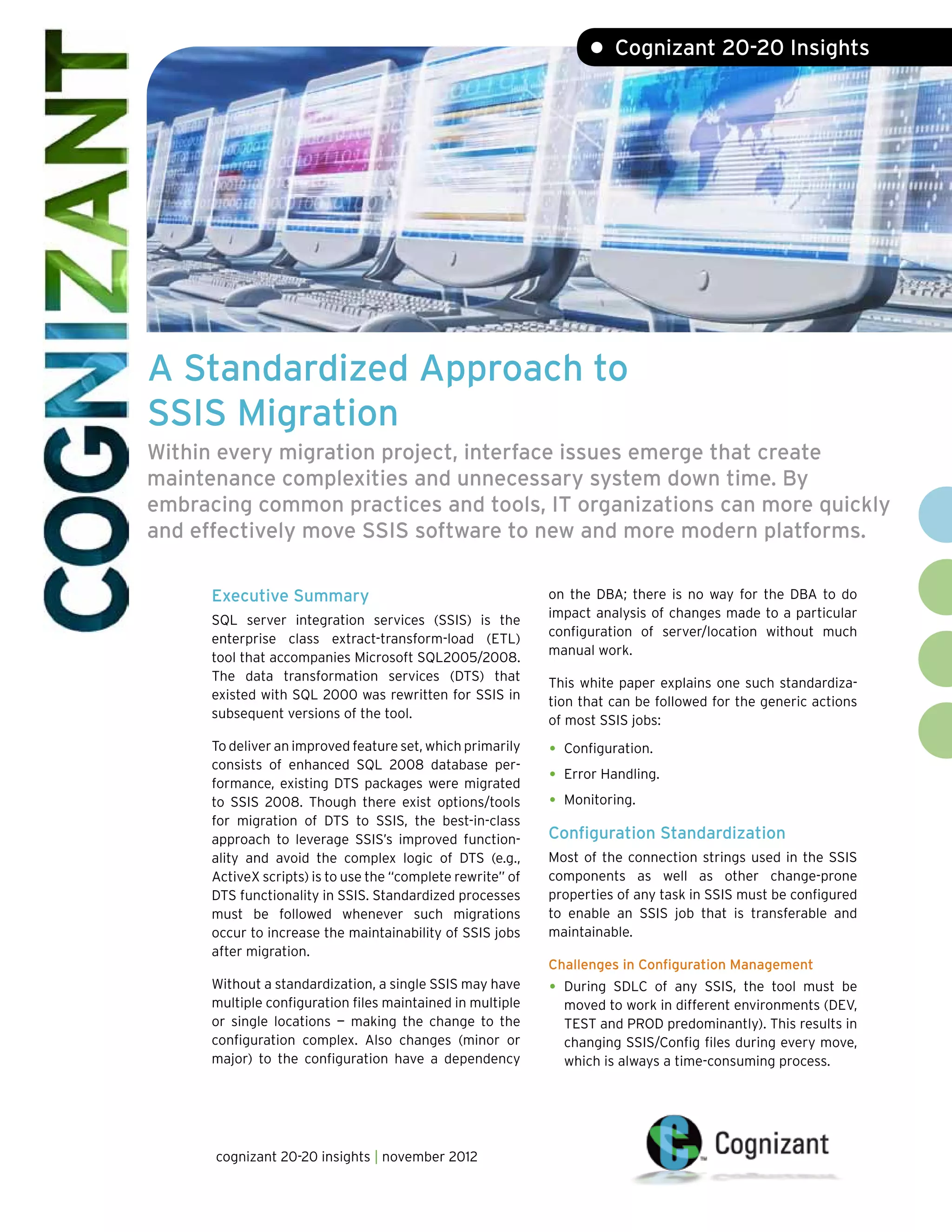
                                                                       Further properties/connections in the SSIS will
             Challenges During Job Failures                            be configured using an “SQL server configura-
                                                                       tion” type of SSIS in the new database table (see
             •	 If no error handling is embedded in the job, the       Figure 1).
               failure may exist unnoticed, resulting in critical
               business impact for the customer.
                                                                       Configuration Standardization
             •	 The SQL server agent can be configured to send         One table should be designed to hold only the con-
               an alert on failure, but it is just an alert with the   figurations such as connection strings, variables,
               name of the job and the particular step that            properties, log paths, etc. (see below).


             Configuring SSIS


                                                 All Other Connections & Parameters


                               SSIS                                                          APPConfig
                                                          1—XML                                 DB            6 Tables 1
                                                         Config file   AppConfig DB                            SP
                                                                        Connection


             Figure 1


                                      cognizant 20-20 insights          2
The “ConfiguredValue” column of the below table can be stored encrypted if the customer security
policies require encryption of the sensitive data in the configuration. See section “Securing Configura-
tions” for a detailed description of this approach.

                Table Name                                           SSIS_CONFIGURATIONS
 Column Name                 Data Type                                       Remarks
 ConfigurationFilter         nvarchar          Holds the value that links the table and the package.
 ConfiguredValue             nvarchar          Value of the parameter like DB name, password, etc.
 PackagePath                 nvarchar          Configuration path details.
 ConfiguredValueType         nvarchar          Data type.

This table will be used by the SSIS at runtime to configure its various properties.

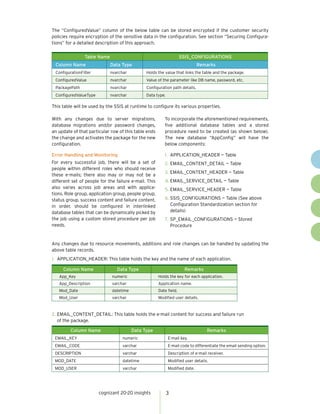
With any changes due to server migrations,                To incorporate the aforementioned requirements,
database migrations and/or password changes,              five additional database tables and a stored
an update of that particular row of this table ends       procedure need to be created (as shown below).
the change and activates the package for the new          The new database “AppConfig” will have the
configuration.                                            below components:

Error Handling and Monitoring                             1.	 APPLICATION_HEADER — Table
For every successful job, there will be a set of          2.	EMAIL_CONTENT_DETAIL — Table
people within different roles who should receive
                                                          3.	EMAIL_CONTENT_HEADER — Table
these e-mails; there also may or may not be a
different set of people for the failure e-mail. This      4.	EMAIL_SERVICE_DETAIL — Table
also varies across job areas and with applica-            5.	EMAIL_SERVICE_HEADER — Table
tions. Role group, application group, people group,
status group, success content and failure content,        6.	SSIS_CONFIGURATIONS — Table (See above
in order, should be configured in interlinked                Configuration Standardization section for
database tables that can be dynamically picked by            details)
the job using a custom stored procedure per job           7.	 SP_EMAIL_CONFIGURATIONS — Stored
needs.                                                        Procedure


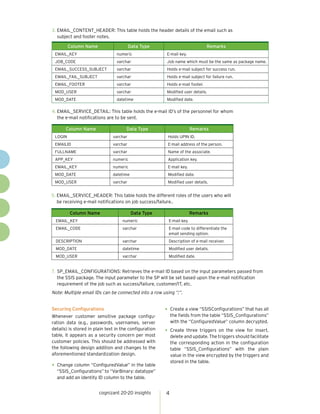
Any changes due to resource movements, additions and role changes can be handled by updating the
above table records.
1.	 APPLICATION_HEADER: This table holds the key and the name of each application.

     Column Name                Data Type                              Remarks
   App_Key                    numeric                  Holds the key for each application.
   App_Description            varchar                  Application name.
   Mod_Date                   datetime                 Date field.
   Mod_User                   varchar                  Modified user details.


2.	EMAIL_CONTENT_DETAIL: This table holds the e-mail content for success and failure run
   of the package.

         Column Name                     Data Type                               Remarks
 EMAIL_KEY                         numeric                  E-mail key.
 EMAIL_CODE                        varchar                  E-mail code to differentiate the email sending option.
 DESCRIPTION                       varchar                  Description of e-mail receiver.
 MOD_DATE                          datetime                 Modified user details.
 MOD_USER                          varchar                  Modified date.


                       cognizant 20-20 insights             3
3.	EMAIL_CONTENT_HEADER: This table holds the header details of the email such as
   subject and footer notes.

         Column Name                     Data Type                              Remarks
 EMAIL_KEY                       numeric                 E-mail key.
 JOB_CODE                        varchar                 Job name which must be the same as package name.
 EMAIL_SUCCESS_SUBJECT           varchar                 Holds e-mail subject for success run.
 EMAIL_FAIL_SUBJECT              varchar                 Holds e-mail subject for failure run.
 EMAIL_FOOTER                    varchar                 Holds e-mail footer.
 MOD_USER                        varchar                 Modified user details.
 MOD_DATE                        datetime                Modified date.

4.	EMAIL_SERVICE_DETAIL: This table holds the e-mail ID’s of the personnel for whom
   the e-mail notifications are to be sent.

       Column Name                    Data Type                        Remarks
 LOGIN                         varchar                   Holds UPIN ID.
 EMAILID                       varchar                   E-mail address of the person.
 FULLNAME                      varchar                   Name of the associate.
 APP_KEY                       numeric                   Application key.
 EMAIL_KEY                     numeric                   E-mail key.
 MOD_DATE                      datetime                  Modified date.
 MOD_USER                      varchar                   Modified user details.


5.	EMAIL_SERVICE_HEADER: This table holds the different roles of the users who will
   be receiving e-mail notifications on job success/failure..

         Column Name                      Data Type                    Remarks
  EMAIL_KEY                         numeric              E-mail key.
  EMAIL_CODE                        varchar              E-mail code to differentiate the
                                                         email sending option.
  DESCRIPTION                       varchar              Description of e-mail receiver.
  MOD_DATE                          datetime             Modified user details.
  MOD_USER                          varchar              Modified date.


7.	 SP_EMAIL_CONFIGURATIONS: Retrieves the e-mail ID based on the input parameters passed from
    the SSIS package. The input parameter to the SP will be set based upon the e-mail notification
    requirement of the job such as success/failure, customer/IT, etc.
Note: Multiple email IDs can be connected into a row using ”;”.


Securing Configurations                                 •	 Create a view “SSISConfigurations” that has all
Whenever customer sensitive package configu-                the fields from the table “SSIS_Configurations”
ration data (e.g., passwords, usernames, server             with the “ConfiguredValue” column decrypted.
details) is stored in plain text in the configuration
                                                        •	 Create three triggers on the view for insert,
table, it appears as a security concern per most            delete and update. The triggers should facilitate
customer policies. This should be addressed with            the corresponding action in the configuration
the following design addition and changes to the            table “SSIS_Configurations” with the plain
aforementioned standardization design.                      value in the view encrypted by the triggers and
                                                            stored in the table.
•	 Change column “ConfiguredValue” in the table
  “SSIS_Configurations” to “VarBinary: datatype”
  and add an identity ID column to the table.


                        cognizant 20-20 insights        4
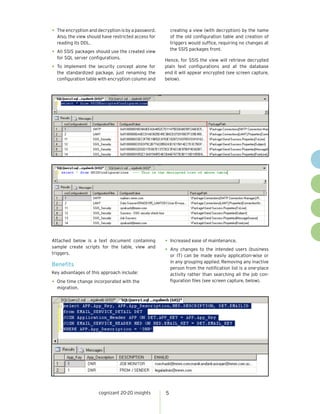
•	 The encryption and decryption is by a password.       creating a view (with decryption) by the name
  Also, the view should have restricted access for       of the old configuration table and creation of
  reading its DDL.                                       triggers would suffice, requiring no changes at
                                                         the SSIS packages front.
•	 All SSIS packages should use the created view
  for SQL server configurations.                     Hence, for SSIS the view will retrieve decrypted
•	 To implement the security concept alone for       plain text configurations and at the database
   the standardized package, just renaming the       end it will appear encrypted (see screen capture,
   configuration table with encryption column and    below).


Attached below is a text document containing         •	 Increased ease of maintenance.
sample create scripts for the table, view and
triggers.
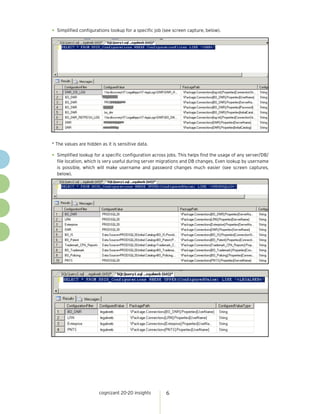
                                                     •	 Any changes to the intended users (business
                                                         or IT) can be made easily application-wise or
                                                         in any grouping applied. Removing any inactive
Benefits
                                                         person from the notification list is a one-place
Key advantages of this approach include:                 activity rather than searching all the job con-
•	 One time change incorporated with the                 figuration files (see screen capture, below).
  migration.


                      cognizant 20-20 insights       5
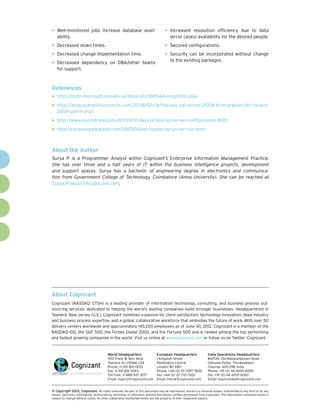
•	 Simplified configurations lookup for a specific job (see screen capture, below).


* The values are hidden as it is sensitive data.

•	 Simplified lookup for a specific configuration across jobs. This helps find the usage of any server/DB/
  file location, which is very useful during server migrations and DB changes. Even lookup by username
  is possible, which will make username and password changes much easier (see screen captures,
  below).


                       cognizant 20-20 insights         6
•	 Well-monitored            jobs increase database avail-                         •	 Increased   resolution efficiency due to data
   ability.                                                                            (error cases) availability for the desired people.

•	 Decreased down times.                                                           •	 Secured configurations.
•	 Decreased change implementation time.                                           •	 Security can be incorporated without change
                                                                                       to the existing packages.
•	 Decreased dependency on DBA/other teams
   for support.


References
•	 http://msdn.microsoft.com/en-us/library/cc768544(v=sql.100).aspx
•	 http://blog.scalabilityexperts.com/2008/02/14/the-key-sql-server-2008-bi-migration-dts-to-ssis-
   2008-part-1-of-2/

•	 http://www.jasonstrate.com/2011/01/31-days-of-ssis-sql-server-configuration-1831/
•	 http://curionorg.blogspot.com/2007/05/encrypted-sql-server-ssis.html

About the Author
Surya P. is a Programmer Analyst within Cognizant’s Enterprise Information Management Practice.
She has over three and a half years of IT within the business intelligence projects, development
and support spaces. Surya has a bachelor of engineering degree in electronics and communica-
tion from Government College of Technology, Coimbatore (Anna University). She can be reached at
Surya.Prakash3@cognizant.com.


About Cognizant
Cognizant (NASDAQ: CTSH) is a leading provider of information technology, consulting, and business process out-
sourcing services, dedicated to helping the world’s leading companies build stronger businesses. Headquartered in
Teaneck, New Jersey (U.S.), Cognizant combines a passion for client satisfaction, technology innovation, deep industry
and business process expertise, and a global, collaborative workforce that embodies the future of work. With over 50
delivery centers worldwide and approximately 145,200 employees as of June 30, 2012, Cognizant is a member of the
NASDAQ-100, the S&P 500, the Forbes Global 2000, and the Fortune 500 and is ranked among the top performing
and fastest growing companies in the world. Visit us online at www.cognizant.com or follow us on Twitter: Cognizant.


                                         World Headquarters                  European Headquarters                 India Operations Headquarters
                                         500 Frank W. Burr Blvd.             1 Kingdom Street                      #5/535, Old Mahabalipuram Road
                                         Teaneck, NJ 07666 USA               Paddington Central                    Okkiyam Pettai, Thoraipakkam
                                         Phone: +1 201 801 0233              London W2 6BD                         Chennai, 600 096 India
                                         Fax: +1 201 801 0243                Phone: +44 (0) 20 7297 7600           Phone: +91 (0) 44 4209 6000
                                         Toll Free: +1 888 937 3277          Fax: +44 (0) 20 7121 0102             Fax: +91 (0) 44 4209 6060
                                         Email: inquiry@cognizant.com        Email: infouk@cognizant.com           Email: inquiryindia@cognizant.com


©
­­ Copyright 2012, Cognizant. All rights reserved. No part of this document may be reproduced, stored in a retrieval system, transmitted in any form or by any
means, electronic, mechanical, photocopying, recording, or otherwise, without the express written permission from Cognizant. The information contained herein is
subject to change without notice. All other trademarks mentioned herein are the property of their respective owners.

A Standardized Approach to SSIS Migration

  • 1.
    • Cognizant 20-20Insights A Standardized Approach to SSIS Migration Within every migration project, interface issues emerge that create maintenance complexities and unnecessary system down time. By embracing common practices and tools, IT organizations can more quickly and effectively move SSIS software to new and more modern platforms. Executive Summary on the DBA; there is no way for the DBA to do impact analysis of changes made to a particular SQL server integration services (SSIS) is the configuration of server/location without much enterprise class extract-transform-load (ETL) manual work. tool that accompanies Microsoft SQL2005/2008. The data transformation services (DTS) that This white paper explains one such standardiza- existed with SQL 2000 was rewritten for SSIS in tion that can be followed for the generic actions subsequent versions of the tool. of most SSIS jobs: To deliver an improved feature set, which primarily • Configuration. consists of enhanced SQL 2008 database per- formance, existing DTS packages were migrated • Error Handling. to SSIS 2008. Though there exist options/tools • Monitoring. for migration of DTS to SSIS, the best-in-class approach to leverage SSIS’s improved function- Configuration Standardization ality and avoid the complex logic of DTS (e.g., Most of the connection strings used in the SSIS ActiveX scripts) is to use the “complete rewrite” of components as well as other change-prone DTS functionality in SSIS. Standardized processes properties of any task in SSIS must be configured must be followed whenever such migrations to enable an SSIS job that is transferable and occur to increase the maintainability of SSIS jobs maintainable. after migration. Challenges in Configuration Management Without a standardization, a single SSIS may have • During SDLC of any SSIS, the tool must be multiple configuration files maintained in multiple moved to work in different environments (DEV, or single locations — making the change to the TEST and PROD predominantly). This results in configuration complex. Also changes (minor or changing SSIS/Config files during every move, major) to the configuration have a dependency which is always a time-consuming process. cognizant 20-20 insights | november 2012
  • 2.
    • Post-production, any expiring user ID failed. If the IT/support has access to the server, passwords, server migrations, database the job history can be viewed for the actual error migrations and resource movements necessi- message. If not, then there is a dependency on tate a configuration change of a related SSIS the DBA for the error message to proceed with package. the actual resolution of the error. • Most servers/job rights would be held under a The package should be designed in such a way DBA resulting in frequent requests to update that it has tasks embedded to notify the target an SSIS configuration which leads to an actual audience of the failure of the job with the error delay of the change and also appears as message. This will improve failure resolution overhead for IT and the support function. efficiency. To overcome the above If required per the challenges, rather than If required per the business, notifications should also be configured in the package to send success business, notifications hard coding a package of the job process to the desired audience. This can should also be configured configuration or having also be done for monitoring highly critical jobs. the configuration in a in the package to send file, we suggest holding The package should have logging enabled and success of the job all the configurations in appropriate log type chosen such as log file or process to the desired database tables and just event viewer. use one single configura- audience. This can also tion to connect to that Proposed Design Solution be done for monitoring database in a configu- A new database must be created to hold the highly critical jobs. ration file that will be a SSIS’s configuration tables. It is a best practice to common configuration have this database exclusively for configuration file across all SSIS packages for an application or purposes only to avoid security restrictions. customers using the software. This database configuration will be created in an Error Handling And Monitoring XML configuration file and used across the SSIS If under any circumstance the package fails, then packages as a generic configuration file. the target team should be informed of the failure. Further properties/connections in the SSIS will Challenges During Job Failures be configured using an “SQL server configura- tion” type of SSIS in the new database table (see • If no error handling is embedded in the job, the Figure 1). failure may exist unnoticed, resulting in critical business impact for the customer. Configuration Standardization • The SQL server agent can be configured to send One table should be designed to hold only the con- an alert on failure, but it is just an alert with the figurations such as connection strings, variables, name of the job and the particular step that properties, log paths, etc. (see below). Configuring SSIS All Other Connections & Parameters SSIS APPConfig 1—XML DB 6 Tables 1 Config file AppConfig DB SP Connection Figure 1 cognizant 20-20 insights 2
  • 3.
    The “ConfiguredValue” columnof the below table can be stored encrypted if the customer security policies require encryption of the sensitive data in the configuration. See section “Securing Configura- tions” for a detailed description of this approach. Table Name SSIS_CONFIGURATIONS Column Name Data Type Remarks ConfigurationFilter nvarchar Holds the value that links the table and the package. ConfiguredValue nvarchar Value of the parameter like DB name, password, etc. PackagePath nvarchar Configuration path details. ConfiguredValueType nvarchar Data type. This table will be used by the SSIS at runtime to configure its various properties. With any changes due to server migrations, To incorporate the aforementioned requirements, database migrations and/or password changes, five additional database tables and a stored an update of that particular row of this table ends procedure need to be created (as shown below). the change and activates the package for the new The new database “AppConfig” will have the configuration. below components: Error Handling and Monitoring 1. APPLICATION_HEADER — Table For every successful job, there will be a set of 2. EMAIL_CONTENT_DETAIL — Table people within different roles who should receive 3. EMAIL_CONTENT_HEADER — Table these e-mails; there also may or may not be a different set of people for the failure e-mail. This 4. EMAIL_SERVICE_DETAIL — Table also varies across job areas and with applica- 5. EMAIL_SERVICE_HEADER — Table tions. Role group, application group, people group, status group, success content and failure content, 6. SSIS_CONFIGURATIONS — Table (See above in order, should be configured in interlinked Configuration Standardization section for database tables that can be dynamically picked by details) the job using a custom stored procedure per job 7. SP_EMAIL_CONFIGURATIONS — Stored needs. Procedure Any changes due to resource movements, additions and role changes can be handled by updating the above table records. 1. APPLICATION_HEADER: This table holds the key and the name of each application. Column Name Data Type Remarks App_Key numeric Holds the key for each application. App_Description varchar Application name. Mod_Date datetime Date field. Mod_User varchar Modified user details. 2. EMAIL_CONTENT_DETAIL: This table holds the e-mail content for success and failure run of the package. Column Name Data Type Remarks EMAIL_KEY numeric E-mail key. EMAIL_CODE varchar E-mail code to differentiate the email sending option. DESCRIPTION varchar Description of e-mail receiver. MOD_DATE datetime Modified user details. MOD_USER varchar Modified date. cognizant 20-20 insights 3
  • 4.
    3. EMAIL_CONTENT_HEADER: This tableholds the header details of the email such as subject and footer notes. Column Name Data Type Remarks EMAIL_KEY numeric E-mail key. JOB_CODE varchar Job name which must be the same as package name. EMAIL_SUCCESS_SUBJECT varchar Holds e-mail subject for success run. EMAIL_FAIL_SUBJECT varchar Holds e-mail subject for failure run. EMAIL_FOOTER varchar Holds e-mail footer. MOD_USER varchar Modified user details. MOD_DATE datetime Modified date. 4. EMAIL_SERVICE_DETAIL: This table holds the e-mail ID’s of the personnel for whom the e-mail notifications are to be sent. Column Name Data Type Remarks LOGIN varchar Holds UPIN ID. EMAILID varchar E-mail address of the person. FULLNAME varchar Name of the associate. APP_KEY numeric Application key. EMAIL_KEY numeric E-mail key. MOD_DATE datetime Modified date. MOD_USER varchar Modified user details. 5. EMAIL_SERVICE_HEADER: This table holds the different roles of the users who will be receiving e-mail notifications on job success/failure.. Column Name Data Type Remarks EMAIL_KEY numeric E-mail key. EMAIL_CODE varchar E-mail code to differentiate the email sending option. DESCRIPTION varchar Description of e-mail receiver. MOD_DATE datetime Modified user details. MOD_USER varchar Modified date. 7. SP_EMAIL_CONFIGURATIONS: Retrieves the e-mail ID based on the input parameters passed from the SSIS package. The input parameter to the SP will be set based upon the e-mail notification requirement of the job such as success/failure, customer/IT, etc. Note: Multiple email IDs can be connected into a row using ”;”. Securing Configurations • Create a view “SSISConfigurations” that has all Whenever customer sensitive package configu- the fields from the table “SSIS_Configurations” ration data (e.g., passwords, usernames, server with the “ConfiguredValue” column decrypted. details) is stored in plain text in the configuration • Create three triggers on the view for insert, table, it appears as a security concern per most delete and update. The triggers should facilitate customer policies. This should be addressed with the corresponding action in the configuration the following design addition and changes to the table “SSIS_Configurations” with the plain aforementioned standardization design. value in the view encrypted by the triggers and stored in the table. • Change column “ConfiguredValue” in the table “SSIS_Configurations” to “VarBinary: datatype” and add an identity ID column to the table. cognizant 20-20 insights 4
  • 5.
    • The encryptionand decryption is by a password. creating a view (with decryption) by the name Also, the view should have restricted access for of the old configuration table and creation of reading its DDL. triggers would suffice, requiring no changes at the SSIS packages front. • All SSIS packages should use the created view for SQL server configurations. Hence, for SSIS the view will retrieve decrypted • To implement the security concept alone for plain text configurations and at the database the standardized package, just renaming the end it will appear encrypted (see screen capture, configuration table with encryption column and below). Attached below is a text document containing • Increased ease of maintenance. sample create scripts for the table, view and triggers. • Any changes to the intended users (business or IT) can be made easily application-wise or in any grouping applied. Removing any inactive Benefits person from the notification list is a one-place Key advantages of this approach include: activity rather than searching all the job con- • One time change incorporated with the figuration files (see screen capture, below). migration. cognizant 20-20 insights 5
  • 6.
    • Simplified configurationslookup for a specific job (see screen capture, below). * The values are hidden as it is sensitive data. • Simplified lookup for a specific configuration across jobs. This helps find the usage of any server/DB/ file location, which is very useful during server migrations and DB changes. Even lookup by username is possible, which will make username and password changes much easier (see screen captures, below). cognizant 20-20 insights 6
  • 7.
    • Well-monitored jobs increase database avail- • Increased resolution efficiency due to data ability. (error cases) availability for the desired people. • Decreased down times. • Secured configurations. • Decreased change implementation time. • Security can be incorporated without change to the existing packages. • Decreased dependency on DBA/other teams for support. References • http://msdn.microsoft.com/en-us/library/cc768544(v=sql.100).aspx • http://blog.scalabilityexperts.com/2008/02/14/the-key-sql-server-2008-bi-migration-dts-to-ssis- 2008-part-1-of-2/ • http://www.jasonstrate.com/2011/01/31-days-of-ssis-sql-server-configuration-1831/ • http://curionorg.blogspot.com/2007/05/encrypted-sql-server-ssis.html About the Author Surya P. is a Programmer Analyst within Cognizant’s Enterprise Information Management Practice. She has over three and a half years of IT within the business intelligence projects, development and support spaces. Surya has a bachelor of engineering degree in electronics and communica- tion from Government College of Technology, Coimbatore (Anna University). She can be reached at Surya.Prakash3@cognizant.com. About Cognizant Cognizant (NASDAQ: CTSH) is a leading provider of information technology, consulting, and business process out- sourcing services, dedicated to helping the world’s leading companies build stronger businesses. Headquartered in Teaneck, New Jersey (U.S.), Cognizant combines a passion for client satisfaction, technology innovation, deep industry and business process expertise, and a global, collaborative workforce that embodies the future of work. With over 50 delivery centers worldwide and approximately 145,200 employees as of June 30, 2012, Cognizant is a member of the NASDAQ-100, the S&P 500, the Forbes Global 2000, and the Fortune 500 and is ranked among the top performing and fastest growing companies in the world. Visit us online at www.cognizant.com or follow us on Twitter: Cognizant. World Headquarters European Headquarters India Operations Headquarters 500 Frank W. Burr Blvd. 1 Kingdom Street #5/535, Old Mahabalipuram Road Teaneck, NJ 07666 USA Paddington Central Okkiyam Pettai, Thoraipakkam Phone: +1 201 801 0233 London W2 6BD Chennai, 600 096 India Fax: +1 201 801 0243 Phone: +44 (0) 20 7297 7600 Phone: +91 (0) 44 4209 6000 Toll Free: +1 888 937 3277 Fax: +44 (0) 20 7121 0102 Fax: +91 (0) 44 4209 6060 Email: inquiry@cognizant.com Email: infouk@cognizant.com Email: inquiryindia@cognizant.com © ­­ Copyright 2012, Cognizant. All rights reserved. No part of this document may be reproduced, stored in a retrieval system, transmitted in any form or by any means, electronic, mechanical, photocopying, recording, or otherwise, without the express written permission from Cognizant. The information contained herein is subject to change without notice. All other trademarks mentioned herein are the property of their respective owners.