John Buickerood Business Intelligence Portfolio Phone: 858.597.1730 Email: jbuickerood@hotmail.com
Table of Contents Introduction Transact SQL Project SSIS Project SSAS Project SSRS Project Performance Point Project
Introduc tion This portfolio contains examples of my development skills utilizing the MS SQl Server 2008 BI stack. It is a result of my work during the 12 week hands on experience with the SetFocus Master’s program. SetFocus utilizes Microsoft Official curriculum along with their own materials. T-SQL SSIS SSAS SSRS MDX Performance Point Server SharePoint In addition to the coursework and programming labs, the program included challenging real world projects.
Transact SQL  This project was based on the AdventureWorks2008 database. The example uses a function to retrieve the sales from the top 5 week ending dates for 2003. It then RANKS the sales and puts the results into a PIVOT table. Common Table Expressions are used extensively as temporary result sets.  The following three slides illustrate the T-SQL code and resulting output.
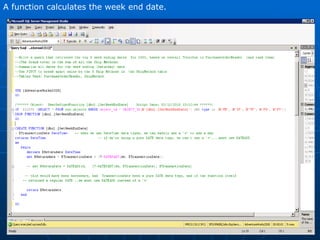
A function calculates the week end date.
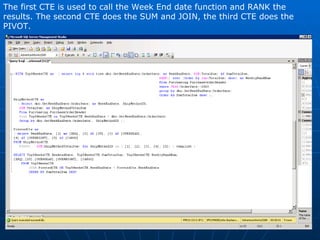
The first CTE is used to call the Week End date function and RANK the results. The second CTE does the SUM and JOIN, the third CTE does the PIVOT.
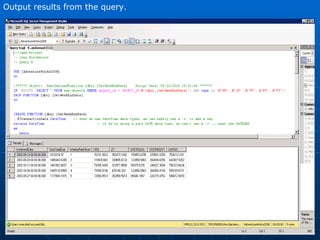
Output results from the query.
SSIS Project The project is for a fictitious construction company called  AllWorks .  SSIS is used build a database to track employee and customer information, timesheet and labor rates data, as well as job order information, job materials, and customer invoices.  This information is stored in Excel Spreadsheets, XML files, and csv files.  The following slides illustrate a sample of the SSIS tasks used to build the database from the source files. The flow of the tasks are:  1. Define where the data is coming from. 2. Change the data types of the incoming data to SQL Server compatible data types. 3. Match incoming data to existing table in database. 4. Determine whether the row is new or and update. 5. INSERT or UPDATE In addition to the data flow tasks, a VB.Net script task is used to keep a running total of INSERTED and UPDATED rows which the control flow task uses to email the results after completion .
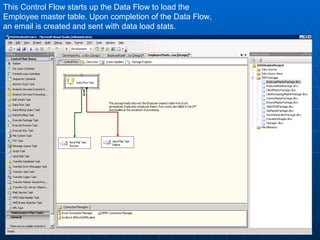
This Control Flow starts up the Data Flow to load the Employee master table. Upon completion of the Data Flow, an email is created and sent with data load stats.
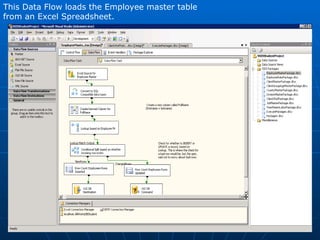
This Data Flow loads the Employee master table from an Excel Spreadsheet.
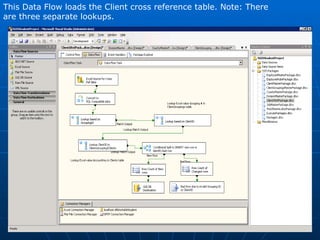
This Data Flow loads the Client cross reference table. Note: There are three separate lookups.
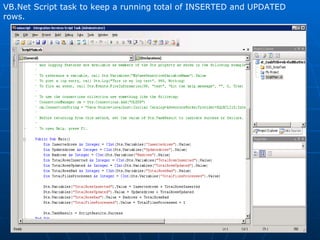
VB.Net Script task to keep a running total of INSERTED and UPDATED rows.
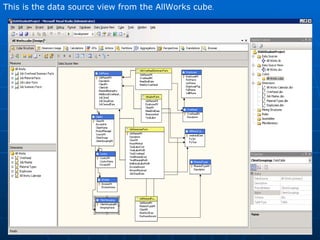
This is the data source view from the AllWorks cube .
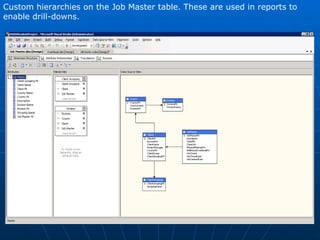
Custom hierarchies on the Job Master table. These are used in reports to enable drill-downs.
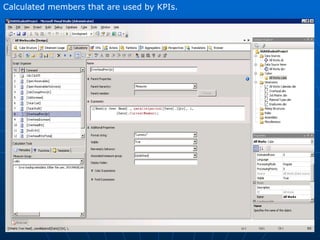
Calculated members that are used by KPIs.
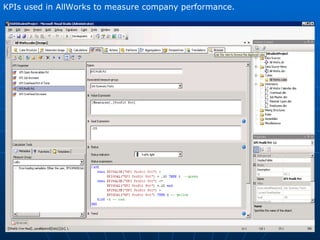
KPIs used in AllWorks to measure company performance.
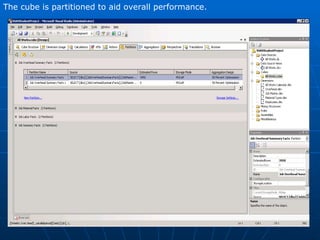
The cube is partitioned to aid overall performance.
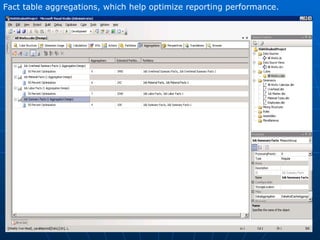
Fact table aggregations, which help optimize reporting performance.
SSRS This project was based on the Allworks OLAP cube and consisted of two tabular reports which are shown from within SSMS, they were also deployed to Sharepoint. Additionally, there is a SSRS line chart done for the final project that is included in this section.
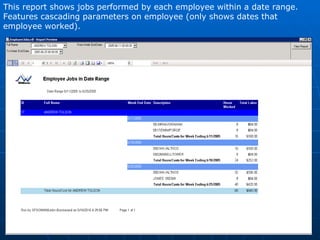
This report shows jobs performed by each employee within a date range.  Features cascading parameters on employee (only shows dates that  employee worked).
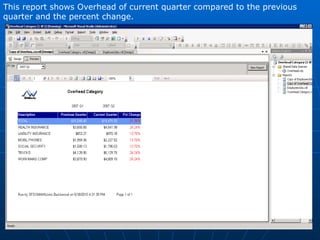
This report shows Overhead of current quarter compared to the previous quarter and the percent change.
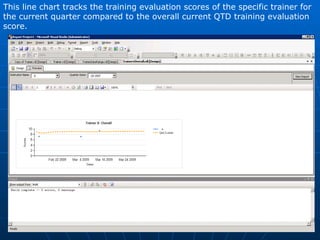
This line chart tracks the training evaluation scores of the specific trainer for the current quarter compared to the overall current QTD training evaluation score.
Performance Point Server The Final project involved a considerable amount of data modeling in order to integrate two databases into a Data Warehouse. The DW was used to build the OLAP cube.  PerformancePoint Server was used to create a dashboard containing a scorecard, several charts and some Excel dashboards all deployed to SharePoint.
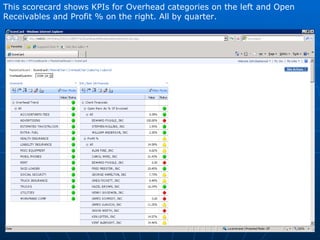
This scorecard shows KPIs for Overhead categories on the left and Open Receivables and Profit % on the right. All by quarter.
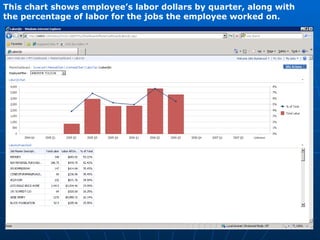
This chart shows employee’s labor dollars by quarter, along with the percentage of labor for the jobs the employee worked on.
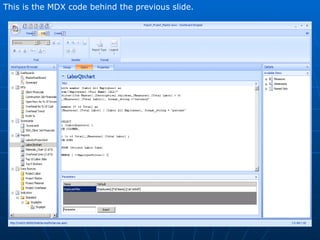
This is the MDX code behind the previous slide.
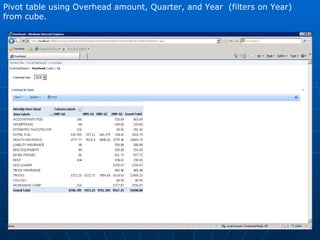
Pivot table using Overhead amount, Quarter, and Year  (filters on Year) from cube.
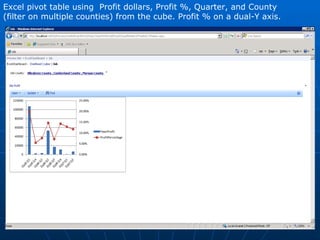
Excel pivot table using  Profit dollars, Profit %, Quarter, and County (filter on multiple counties) from the cube. Profit % on a dual-Y axis.
Experience Summary 20 Years I.T. experience Requirements gathering Data Modeling – Logical, Physical, Star, Snowflake SQL – Queries, Stored Procedures, Triggers MS Business Intelligence - SQL Server 2008 - Integration Services (SSIS) - Analysis Services (SSAS) - MDX Programming - Reporting Services (SSRS) - Excel and Excel Services - Performance Point Server - SharePoint

Ca 10 G1 John Buickerood Portfolio

  • 1.
    John Buickerood BusinessIntelligence Portfolio Phone: 858.597.1730 Email: jbuickerood@hotmail.com
  • 2.
    Table of ContentsIntroduction Transact SQL Project SSIS Project SSAS Project SSRS Project Performance Point Project
  • 3.
    Introduc tion Thisportfolio contains examples of my development skills utilizing the MS SQl Server 2008 BI stack. It is a result of my work during the 12 week hands on experience with the SetFocus Master’s program. SetFocus utilizes Microsoft Official curriculum along with their own materials. T-SQL SSIS SSAS SSRS MDX Performance Point Server SharePoint In addition to the coursework and programming labs, the program included challenging real world projects.
  • 4.
    Transact SQL This project was based on the AdventureWorks2008 database. The example uses a function to retrieve the sales from the top 5 week ending dates for 2003. It then RANKS the sales and puts the results into a PIVOT table. Common Table Expressions are used extensively as temporary result sets. The following three slides illustrate the T-SQL code and resulting output.
  • 5.
    A function calculatesthe week end date.
  • 6.
    The first CTEis used to call the Week End date function and RANK the results. The second CTE does the SUM and JOIN, the third CTE does the PIVOT.
  • 7.
  • 8.
    SSIS Project Theproject is for a fictitious construction company called AllWorks . SSIS is used build a database to track employee and customer information, timesheet and labor rates data, as well as job order information, job materials, and customer invoices. This information is stored in Excel Spreadsheets, XML files, and csv files. The following slides illustrate a sample of the SSIS tasks used to build the database from the source files. The flow of the tasks are: 1. Define where the data is coming from. 2. Change the data types of the incoming data to SQL Server compatible data types. 3. Match incoming data to existing table in database. 4. Determine whether the row is new or and update. 5. INSERT or UPDATE In addition to the data flow tasks, a VB.Net script task is used to keep a running total of INSERTED and UPDATED rows which the control flow task uses to email the results after completion .
  • 9.
    This Control Flowstarts up the Data Flow to load the Employee master table. Upon completion of the Data Flow, an email is created and sent with data load stats.
  • 10.
    This Data Flowloads the Employee master table from an Excel Spreadsheet.
  • 11.
    This Data Flowloads the Client cross reference table. Note: There are three separate lookups.
  • 12.
    VB.Net Script taskto keep a running total of INSERTED and UPDATED rows.
  • 13.
    This is thedata source view from the AllWorks cube .
  • 14.
    Custom hierarchies onthe Job Master table. These are used in reports to enable drill-downs.
  • 15.
    Calculated members thatare used by KPIs.
  • 16.
    KPIs used inAllWorks to measure company performance.
  • 17.
    The cube ispartitioned to aid overall performance.
  • 18.
    Fact table aggregations,which help optimize reporting performance.
  • 19.
    SSRS This projectwas based on the Allworks OLAP cube and consisted of two tabular reports which are shown from within SSMS, they were also deployed to Sharepoint. Additionally, there is a SSRS line chart done for the final project that is included in this section.
  • 20.
    This report showsjobs performed by each employee within a date range. Features cascading parameters on employee (only shows dates that employee worked).
  • 21.
    This report showsOverhead of current quarter compared to the previous quarter and the percent change.
  • 22.
    This line charttracks the training evaluation scores of the specific trainer for the current quarter compared to the overall current QTD training evaluation score.
  • 23.
    Performance Point ServerThe Final project involved a considerable amount of data modeling in order to integrate two databases into a Data Warehouse. The DW was used to build the OLAP cube. PerformancePoint Server was used to create a dashboard containing a scorecard, several charts and some Excel dashboards all deployed to SharePoint.
  • 24.
    This scorecard showsKPIs for Overhead categories on the left and Open Receivables and Profit % on the right. All by quarter.
  • 25.
    This chart showsemployee’s labor dollars by quarter, along with the percentage of labor for the jobs the employee worked on.
  • 26.
    This is theMDX code behind the previous slide.
  • 27.
    Pivot table usingOverhead amount, Quarter, and Year (filters on Year) from cube.
  • 28.
    Excel pivot tableusing Profit dollars, Profit %, Quarter, and County (filter on multiple counties) from the cube. Profit % on a dual-Y axis.
  • 29.
    Experience Summary 20Years I.T. experience Requirements gathering Data Modeling – Logical, Physical, Star, Snowflake SQL – Queries, Stored Procedures, Triggers MS Business Intelligence - SQL Server 2008 - Integration Services (SSIS) - Analysis Services (SSAS) - MDX Programming - Reporting Services (SSRS) - Excel and Excel Services - Performance Point Server - SharePoint