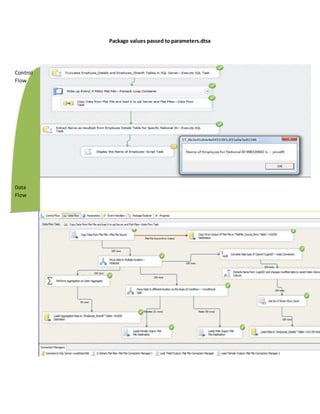
Package values passed to parameters.dtsx
Control
Flow
Data
Flow
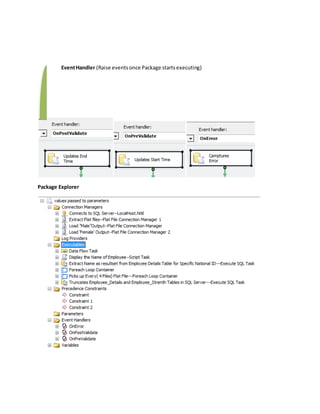
EventHandler (Raise events once Package startsexecuting)
Package Explorer
ConnectionUsed—
1. OLEDB Connection
2. FlatFile Connection
Control FlowTask Used—
1. Execute SQLTask
2. Data FlowTask
3. ScriptTask
Data Flow Task/Transformation Used—
1. FlatFile Source/Destination
2. OLEDB Destination
3. MulticastTransformation
4. Conditional SplitTransformation
5. Data ConversionTransformation
6. DerivedColumnTransformation
7. Row CountTransformation
Event Handler Used—
1. OnError
2. OnPrevalidate
3. OnPostValiadte
1-TruncatesEmployee_DetailsandEmployee_StrenthTablesinSQLServer--->
It uses‘Execute SQLTask’to Truncate Tables[Employee_Details] and[Employee_Strenth]in‘Nitil
Database’using‘ConnectstoSQL Server--LocalHost.Nitil’Connection
Truncate table [Employee_Details];
Truncate table [Employee_Strenth];
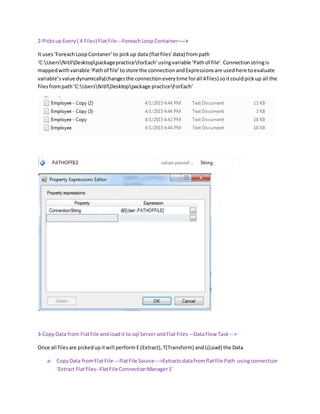
2-Picksup Every ( 4 Files) FlatFile---ForeachLoopContainer---->
It uses‘ForeachLoopContaner’ to pickup data (flatfiles’data) frompath
‘C:UsersNitilDesktoppackagepracticeForEach’usingvariable ‘Pathof file’.Connectionstringis
mappedwithvariable ‘Pathof file’tostore the connectionandExpressionsare usedhere toevaluate
variable’svalue dynamically(changesthe connectioneverytime forall 4files) soitcouldpickup all the
filesfrompath‘C:UsersNitilDesktoppackage practiceForEach’
3-CopyData from FlatFile andloadit to sql ServerandFlat Files---DataFlow Task--->
Once all filesare pickedupitwill performE (Extract), T(Transform) andL(Load) the Data
a- CopyData fromFlatFile---FlatFile Source--->Extractsdatafromflatfile Path usingconnection
‘Extract Flatfiles--FlatFile ConnectionManager1’
Note:‘fx’mentionedinconnectionthatmeansthisconnection isusingexpressions
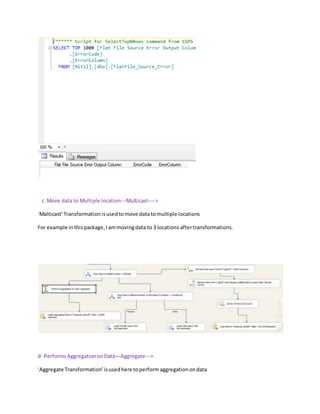
b.Copy Error OutputOf FlatFile to"FlatFile_Source_ErrorTable"---OLEDBDestination--->
If any error comes due to irrelevantdata(forExample datatype isnotmatchedwithflatfile source and
SQL destination Table) inflatfile thatwillloadintable ‘[Nitil].[dbo].[FlatFile_Source_Error]’ and
we can analyze the error byqueryingthe datafrom table
c. Move data to Multiple location---Multicast---->
‘Malticast’Transformationisusedtomove data tomultiple locations
For example inthispackage,Iammovingdata to 3 locations aftertransformations.
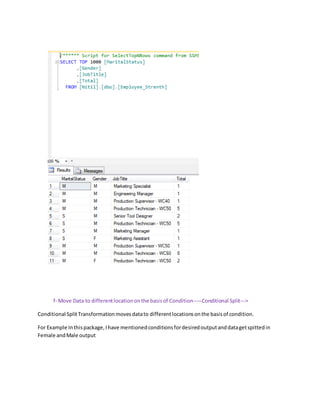
d- PerformsAggregationon Data—Aggregate--->
‘Aggregate Transformation’isusedhere toperformaggregationondata
For Example Inthispackage,Iam goingtofind‘Total employees’ foreachJob,genderandmarital
status.
e- Loads AggregatedDatato "Employee_Strenth"Table---OLEDBDestination--->
Once aggregationisdone data will loadtotable [Nitil].[dbo].[Employee_Strenth]
Belowoutputismentionedonce youquerythe datafrom ‘[Employee_Strenth]’
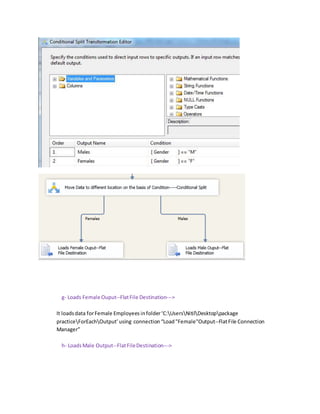
f- Move Data to differentlocationonthe basisof Condition-----Conditional Split--->
Conditional SplitTransformationmovesdatato differentlocationsonthe basisof condition.
For Example Inthispackage,Ihave mentionedconditionsfordesiredoutputanddatagetspittedin
Female andMale output
g- Loads Female Ouput--FlatFile Destination--->
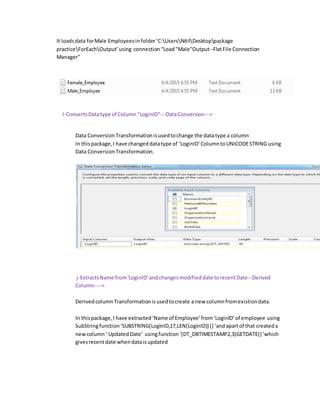
It loadsdata forFemale Employees infolder‘C:UsersNitilDesktoppackage
practiceForEachOutput’using connection“Load"Female"Output--FlatFile Connection
Manager”
h- LoadsMale Output--FlatFileDestination--->
It loadsdata forMale Employeesinfolder‘C:UsersNitilDesktoppackage
practiceForEachOutput’using connection“Load"Male"Output--FlatFile Connection
Manager”
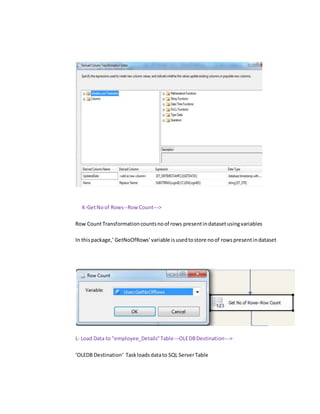
I-ConvertsDatatype of Column "LoginID"---DataConversion--->
Data ConversionTransformationisusedtochange the data type a column
In thispackage,I have changeddatatype of ‘LoginID’ColumntoUNICODESTRING using
Data ConversionTransformation.
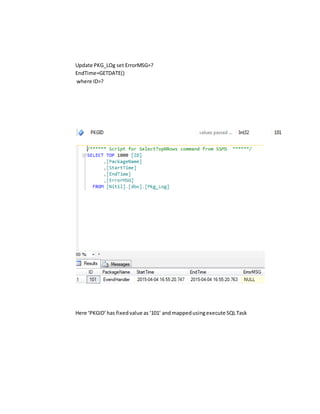
j-ExtractsName from'LoginID' andchangesmodifieddate torecentDate--Derived
Column---->
DerivedcolumnTransformationisusedtocreate a new columnfromexistiondata.
In thispackage,I have extracted‘Name of Employee’from‘LoginID’of employee using
SubStringfunction‘SUBSTRING(LoginID,17,LEN(LoginID)) () ‘andapartof that createda
newcolumn‘ UpdatedDate’ usingfunction‘(DT_DBTIMESTAMP2,3)GETDATE() ‘which
givesrecentdate whendataisupdated
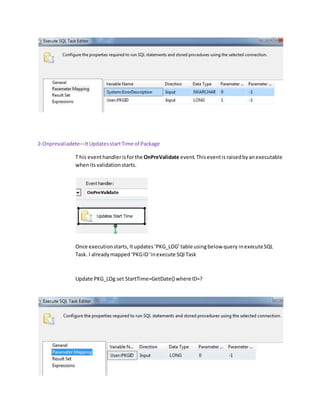
K-GetNoof Rows--Row Count--->
Row CountTransformationcountsnoof rows presentindatasetusingvariables
In thispackage,’ GetNoOfRows’variable isusedtostore noof rowspresentindataset
L- Load Data to "employee_Details"Table---OLEDBDestination--->
‘OLEDB Destination‘ Taskloadsdatato SQL ServerTable
In thispackage,Data getsloadedto‘[Nitil].[dbo].[Employee_Details]’ table.
You can see inbelowimage whatdatawouldgetqueriedonce yourunthe SELECT query.
3- Extract Name as resultset fromEmployeeDetailsTable forSpecificNationalID---Execute SQLTask---
Thisis a ‘execute SQLTask‘ whichexecutesbelow querybygettingvalueof InputParameter(NID) and
givesresultas‘Name’of Employee
select name from[Employee_Details] where [ NationalIDNumber] =?
4. Displaythe Name of Employee--ScriptTask
It isscript taskwhichread ‘Name‘of Employee anddisplayit.
I mentionedVBScriptbelow
Public Sub Main()
Dim Name As String = Dts.Variables("Name").Value
MsgBox("Name of Employee for National ID 998320692 is : " + Name)
Dts.TaskResult = ScriptResults.Success
End Sub
Apart of these Ihave Used 3 typesof ‘eventHandlers’ using‘ExecuteSQLTask
Once package runs eventsare raised
1. OnError: thiseventCaptureserrorsinPackages
In thispackage,I have createda table ‘PKG_Log’withcolumns
[ID],[PackageName],[StartTime],[EndTime],[ErrorMSG] so whenever package runs below query
will update the ‘PKG_Log’ table and give execution details.
Update PKG_LOg set ErrorMSG=?
EndTime=GETDATE()
where ID=?
Here ‘PKGID’has fixedvalue as‘101’ andmappedusingexecute SQLTask
2-Onprevaliadete—ItUpdatesstartTime of Package
T his eventhandlerisforthe OnPreValidate event.Thiseventis raisedbyanexecutable
whenits validationstarts.
Once executionstarts, Itupdates‘PKG_LOG’table usingbelow query inexecuteSQL
Task. I alreadymapped ‘PKGID‘inexecute SQl Task
Update PKG_LOg set StartTime=GetDate() whereID=?
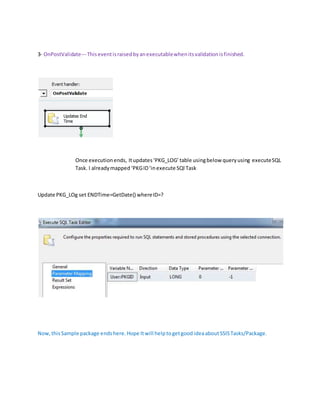
3- OnPostValidate---Thiseventisraisedbyanexecutablewhenitsvalidationisfinished.
Once executionends, Itupdates‘PKG_LOG’table usingbelow queryusing executeSQL
Task. I alreadymapped ‘PKGID‘inexecute SQl Task
Update PKG_LOg set ENDTime=GetDate() whereID=?
Now,thisSample package endshere.Hope Itwill helptogetgoodideaaboutSSISTasks/Package.
Belowyoucan finda small exampleof ScriptTaskin SSIS
Sample : Using Script Task
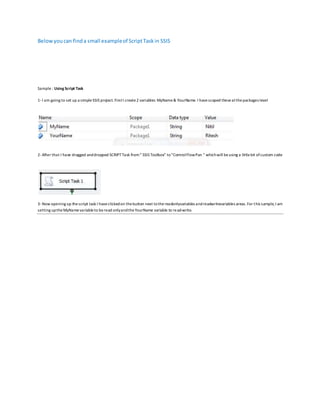
1-I am going to set up a simpleSSIS project. FirstI create2 variables: MyName& YourName. I havescoped theseatthepackages level
2-After that I have dragged anddropped SCRIPTTask from“ SSIS Toolbox” to“ControlFlowPan “ whichwill beusing a littlebit ofcustom code
3-Now opening up thescript task I haveclickedon thebutton next tothereadonlyvariables andreadwritevariables areas.For this sample,I am
setting uptheMyNamevariableto beread onlyandtheYourName variable to read-write.
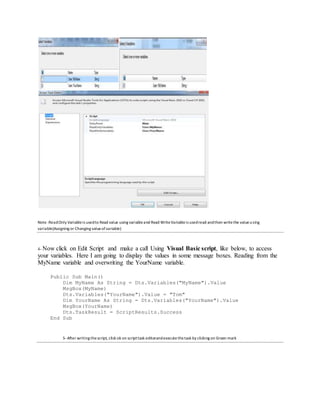
Note :ReadOnly Variableis usedto Read value using variableand Read WriteVariableis usedread andthen writethe valueusing
variable(Assigning or Changing valueofvariable)
4- Now click on Edit Script and make a call Using Visual Basic script, like below, to access
your variables. Here I am going to display the values in some message boxes. Reading from the
MyName variable and overwriting the YourName variable.
Public Sub Main()
Dim MyName As String = Dts.Variables("MyName").Value
MsgBox(MyName)
Dts.Variables("YourName").Value = "Tom"
Dim YourName As String = Dts.Variables("YourName").Value
MsgBox(YourName)
Dts.TaskResult = ScriptResults.Success
End Sub
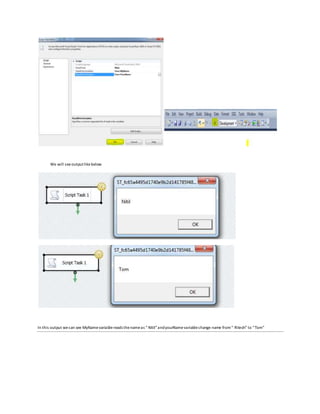
5-After writing thescript, click ok on scripttask editorandexecutethetask by clicking on Green mark
We will seeoutputlikebelow
In this output wecan see MyNamevariablereads thenameas “ Nitil”andyourNamevariablechange name from“ Ritesh” to “Tom”

A Complex SSIS Package

  • 1.
    Package values passedto parameters.dtsx Control Flow Data Flow
  • 2.
    EventHandler (Raise eventsonce Package startsexecuting) Package Explorer
  • 3.
    ConnectionUsed— 1. OLEDB Connection 2.FlatFile Connection Control FlowTask Used— 1. Execute SQLTask 2. Data FlowTask 3. ScriptTask Data Flow Task/Transformation Used— 1. FlatFile Source/Destination 2. OLEDB Destination 3. MulticastTransformation 4. Conditional SplitTransformation 5. Data ConversionTransformation 6. DerivedColumnTransformation 7. Row CountTransformation Event Handler Used— 1. OnError 2. OnPrevalidate 3. OnPostValiadte 1-TruncatesEmployee_DetailsandEmployee_StrenthTablesinSQLServer---> It uses‘Execute SQLTask’to Truncate Tables[Employee_Details] and[Employee_Strenth]in‘Nitil Database’using‘ConnectstoSQL Server--LocalHost.Nitil’Connection Truncate table [Employee_Details]; Truncate table [Employee_Strenth];
  • 4.
    2-Picksup Every (4 Files) FlatFile---ForeachLoopContainer----> It uses‘ForeachLoopContaner’ to pickup data (flatfiles’data) frompath ‘C:UsersNitilDesktoppackagepracticeForEach’usingvariable ‘Pathof file’.Connectionstringis mappedwithvariable ‘Pathof file’tostore the connectionandExpressionsare usedhere toevaluate variable’svalue dynamically(changesthe connectioneverytime forall 4files) soitcouldpickup all the filesfrompath‘C:UsersNitilDesktoppackage practiceForEach’ 3-CopyData from FlatFile andloadit to sql ServerandFlat Files---DataFlow Task---> Once all filesare pickedupitwill performE (Extract), T(Transform) andL(Load) the Data a- CopyData fromFlatFile---FlatFile Source--->Extractsdatafromflatfile Path usingconnection ‘Extract Flatfiles--FlatFile ConnectionManager1’
  • 5.
    Note:‘fx’mentionedinconnectionthatmeansthisconnection isusingexpressions b.Copy ErrorOutputOf FlatFile to"FlatFile_Source_ErrorTable"---OLEDBDestination---> If any error comes due to irrelevantdata(forExample datatype isnotmatchedwithflatfile source and SQL destination Table) inflatfile thatwillloadintable ‘[Nitil].[dbo].[FlatFile_Source_Error]’ and we can analyze the error byqueryingthe datafrom table
  • 6.
    c. Move datato Multiple location---Multicast----> ‘Malticast’Transformationisusedtomove data tomultiple locations For example inthispackage,Iammovingdata to 3 locations aftertransformations. d- PerformsAggregationon Data—Aggregate---> ‘Aggregate Transformation’isusedhere toperformaggregationondata
  • 7.
    For Example Inthispackage,Iamgoingtofind‘Total employees’ foreachJob,genderandmarital status. e- Loads AggregatedDatato "Employee_Strenth"Table---OLEDBDestination---> Once aggregationisdone data will loadtotable [Nitil].[dbo].[Employee_Strenth] Belowoutputismentionedonce youquerythe datafrom ‘[Employee_Strenth]’
  • 8.
    f- Move Datato differentlocationonthe basisof Condition-----Conditional Split---> Conditional SplitTransformationmovesdatato differentlocationsonthe basisof condition. For Example Inthispackage,Ihave mentionedconditionsfordesiredoutputanddatagetspittedin Female andMale output
  • 9.
    g- Loads FemaleOuput--FlatFile Destination---> It loadsdata forFemale Employees infolder‘C:UsersNitilDesktoppackage practiceForEachOutput’using connection“Load"Female"Output--FlatFile Connection Manager” h- LoadsMale Output--FlatFileDestination--->
  • 10.
    It loadsdata forMaleEmployeesinfolder‘C:UsersNitilDesktoppackage practiceForEachOutput’using connection“Load"Male"Output--FlatFile Connection Manager” I-ConvertsDatatype of Column "LoginID"---DataConversion---> Data ConversionTransformationisusedtochange the data type a column In thispackage,I have changeddatatype of ‘LoginID’ColumntoUNICODESTRING using Data ConversionTransformation. j-ExtractsName from'LoginID' andchangesmodifieddate torecentDate--Derived Column----> DerivedcolumnTransformationisusedtocreate a new columnfromexistiondata. In thispackage,I have extracted‘Name of Employee’from‘LoginID’of employee using SubStringfunction‘SUBSTRING(LoginID,17,LEN(LoginID)) () ‘andapartof that createda newcolumn‘ UpdatedDate’ usingfunction‘(DT_DBTIMESTAMP2,3)GETDATE() ‘which givesrecentdate whendataisupdated
  • 11.
    K-GetNoof Rows--Row Count---> RowCountTransformationcountsnoof rows presentindatasetusingvariables In thispackage,’ GetNoOfRows’variable isusedtostore noof rowspresentindataset L- Load Data to "employee_Details"Table---OLEDBDestination---> ‘OLEDB Destination‘ Taskloadsdatato SQL ServerTable
  • 12.
    In thispackage,Data getsloadedto‘[Nitil].[dbo].[Employee_Details]’table. You can see inbelowimage whatdatawouldgetqueriedonce yourunthe SELECT query.
  • 13.
    3- Extract Nameas resultset fromEmployeeDetailsTable forSpecificNationalID---Execute SQLTask--- Thisis a ‘execute SQLTask‘ whichexecutesbelow querybygettingvalueof InputParameter(NID) and givesresultas‘Name’of Employee select name from[Employee_Details] where [ NationalIDNumber] =?
  • 14.
    4. Displaythe Nameof Employee--ScriptTask It isscript taskwhichread ‘Name‘of Employee anddisplayit. I mentionedVBScriptbelow Public Sub Main() Dim Name As String = Dts.Variables("Name").Value MsgBox("Name of Employee for National ID 998320692 is : " + Name) Dts.TaskResult = ScriptResults.Success End Sub Apart of these Ihave Used 3 typesof ‘eventHandlers’ using‘ExecuteSQLTask Once package runs eventsare raised 1. OnError: thiseventCaptureserrorsinPackages In thispackage,I have createda table ‘PKG_Log’withcolumns [ID],[PackageName],[StartTime],[EndTime],[ErrorMSG] so whenever package runs below query will update the ‘PKG_Log’ table and give execution details.
  • 15.
    Update PKG_LOg setErrorMSG=? EndTime=GETDATE() where ID=? Here ‘PKGID’has fixedvalue as‘101’ andmappedusingexecute SQLTask
  • 16.
    2-Onprevaliadete—ItUpdatesstartTime of Package This eventhandlerisforthe OnPreValidate event.Thiseventis raisedbyanexecutable whenits validationstarts. Once executionstarts, Itupdates‘PKG_LOG’table usingbelow query inexecuteSQL Task. I alreadymapped ‘PKGID‘inexecute SQl Task Update PKG_LOg set StartTime=GetDate() whereID=?
  • 17.
    3- OnPostValidate---Thiseventisraisedbyanexecutablewhenitsvalidationisfinished. Once executionends,Itupdates‘PKG_LOG’table usingbelow queryusing executeSQL Task. I alreadymapped ‘PKGID‘inexecute SQl Task Update PKG_LOg set ENDTime=GetDate() whereID=? Now,thisSample package endshere.Hope Itwill helptogetgoodideaaboutSSISTasks/Package.
  • 18.
    Belowyoucan finda smallexampleof ScriptTaskin SSIS Sample : Using Script Task 1-I am going to set up a simpleSSIS project. FirstI create2 variables: MyName& YourName. I havescoped theseatthepackages level 2-After that I have dragged anddropped SCRIPTTask from“ SSIS Toolbox” to“ControlFlowPan “ whichwill beusing a littlebit ofcustom code 3-Now opening up thescript task I haveclickedon thebutton next tothereadonlyvariables andreadwritevariables areas.For this sample,I am setting uptheMyNamevariableto beread onlyandtheYourName variable to read-write.
  • 19.
    Note :ReadOnly Variableisusedto Read value using variableand Read WriteVariableis usedread andthen writethe valueusing variable(Assigning or Changing valueofvariable) 4- Now click on Edit Script and make a call Using Visual Basic script, like below, to access your variables. Here I am going to display the values in some message boxes. Reading from the MyName variable and overwriting the YourName variable. Public Sub Main() Dim MyName As String = Dts.Variables("MyName").Value MsgBox(MyName) Dts.Variables("YourName").Value = "Tom" Dim YourName As String = Dts.Variables("YourName").Value MsgBox(YourName) Dts.TaskResult = ScriptResults.Success End Sub 5-After writing thescript, click ok on scripttask editorandexecutethetask by clicking on Green mark
  • 20.
    We will seeoutputlikebelow Inthis output wecan see MyNamevariablereads thenameas “ Nitil”andyourNamevariablechange name from“ Ritesh” to “Tom”