Transforming Your Teaching
with Technology
Summer 2012
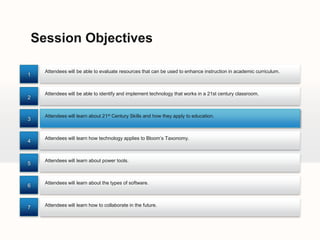
Session Objectives

      Attendees will be able to evaluate resources that can be used to enhance instruction in academic curriculum.
1


      Attendees will be able to identify and implement technology that works in a 21st century classroom.
2


      Attendees will learn about 21st Century Skills and how they apply to education.
3


      Attendees will learn how technology applies to Bloom’s Taxonomy.
4


      Attendees will learn about power tools.
5


      Attendees will learn about the types of software.
6


7     Attendees will learn how to collaborate in the future.
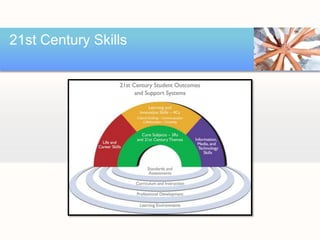
21st Century Skills
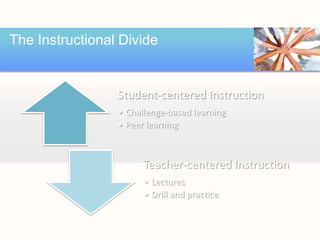
The Instructional Divide


                 Student-centered Instruction
                 • Challenge-based learning
                 • Peer learning


                       Teacher-centered Instruction
                       • Lectures
                       • Drill and practice
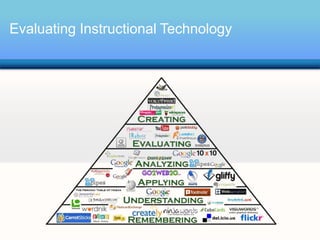
Evaluating Instructional Technology
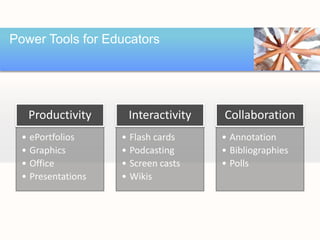
Power Tools for Educators


   Productivity      Interactivity   Collaboration
  • ePortfolios     • Flash cards    • Annotation
  • Graphics        • Podcasting     • Bibliographies
  • Office          • Screen casts   • Polls
  • Presentations   • Wikis
Productivity


 •   Dropbox
 •   Evernote
 •   glideOS
 •   Middlespot
 •   Photo Story
 •   ThinkFree Online
 •   Wetpaint
Integration Ideas


 • Dropbox
    – Online file storage
    – Document sharing with groups
 • Examples
    – Student submissions
    – Classroom resources
    – Group assignments
Integration Ideas


 • Middlespot
    – Online poster/collage tool
    – Similar to Glogster
 • Examples
    – Create posters on any topic
    – Career Collage
    – Peer teaching
Integration Ideas


 • Microsoft Photo Story 3
    – Brings digital photos to life
    – Creates movies for all formats
 • Examples
    – Body systems
    – New techniques/products
    – New public safety policies
Interactivity


• Calendar/Notes/To Do
  –   Evernote
  –   Google Calendar
  –   mySchoolog
  –   Remember the Milk
  –   Zotero
• Podcasting
  – ipadio – phlogging
  – PhOneCasting
• Poll Everywhere
           Podcasting: A series of digital media files that are released episodically and typically
           syndicated through the Web
Integration Ideas


 • Google Calendar
    – Online calendar
    – Calendar sharing
 • Examples
    –   Classroom calendar
    –   Group project scheduling
    –   Parent communication
    –   E-mail/SMS event reminders
Integration Ideas


 • ipadio
    – Podcasting or phlogging
    – Syndicated audio published by phone or
      computer
 • Examples
    – Student organization meetings
    – Interviews
    – Lectures
Integration Ideas


 • Poll Everywhere
    – Polling system
    – Classroom response system
    – Embeds into PowerPoint
 • Examples
    – “Bell ringers”
    – “Mini” formative assessments
    – Classroom attendance
Collaboration


 •   Diigo
 •   DimDim
 •   Google Docs
 •   PBWorks
 •   Skype
 •   Storybird
 •   SugarSync
Integration Ideas


 • Diigo - http://www.diigo.com/education
    – Social bookmarking and annotations
    – Share bookmarks and page notes
 • Examples
    – Classroom resources
    – Research prompts
    – Web Quests
Integration Ideas


 • Google Docs
    – Online Office Collaboration Suite
    – Office applications
 • Examples
    – Group assignments
    – Online surveys for mini-research projects
    – Peer review of projects
Integration Ideas


 • Skype
    – Internet and phone calls
    – Videoconferencing
 • Examples
    – Community partner connections
    – Homework hotline
    – Interviews
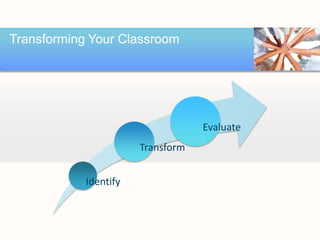
Transforming Your Classroom


                                   Evaluate
                       Transform


            Identify
Other Great Tools


 •   ClassDojo
 •   Livebinders
 •   OnLive Desktop
 •   Planbook
 •   Ediscio
 •   Doodle
 •   Citeulike
References


 •Use the MECA 2012 Diigo Group.

 •Contact sean.owen@rcu.msstate.edu to join the group.

 •Add your own bookmarks and comments.

 •Keep learning!
THANK YOU!


             Your Logo

SSILTT Session One

  • 1.
    Transforming Your Teaching withTechnology Summer 2012
  • 2.
    Session Objectives Attendees will be able to evaluate resources that can be used to enhance instruction in academic curriculum. 1 Attendees will be able to identify and implement technology that works in a 21st century classroom. 2 Attendees will learn about 21st Century Skills and how they apply to education. 3 Attendees will learn how technology applies to Bloom’s Taxonomy. 4 Attendees will learn about power tools. 5 Attendees will learn about the types of software. 6 7 Attendees will learn how to collaborate in the future.
  • 3.
  • 4.
    The Instructional Divide Student-centered Instruction • Challenge-based learning • Peer learning Teacher-centered Instruction • Lectures • Drill and practice
  • 5.
  • 6.
    Power Tools forEducators Productivity Interactivity Collaboration • ePortfolios • Flash cards • Annotation • Graphics • Podcasting • Bibliographies • Office • Screen casts • Polls • Presentations • Wikis
  • 7.
    Productivity • Dropbox • Evernote • glideOS • Middlespot • Photo Story • ThinkFree Online • Wetpaint
  • 8.
    Integration Ideas •Dropbox – Online file storage – Document sharing with groups • Examples – Student submissions – Classroom resources – Group assignments
  • 9.
    Integration Ideas •Middlespot – Online poster/collage tool – Similar to Glogster • Examples – Create posters on any topic – Career Collage – Peer teaching
  • 10.
    Integration Ideas •Microsoft Photo Story 3 – Brings digital photos to life – Creates movies for all formats • Examples – Body systems – New techniques/products – New public safety policies
  • 11.
    Interactivity • Calendar/Notes/To Do – Evernote – Google Calendar – mySchoolog – Remember the Milk – Zotero • Podcasting – ipadio – phlogging – PhOneCasting • Poll Everywhere Podcasting: A series of digital media files that are released episodically and typically syndicated through the Web
  • 12.
    Integration Ideas •Google Calendar – Online calendar – Calendar sharing • Examples – Classroom calendar – Group project scheduling – Parent communication – E-mail/SMS event reminders
  • 13.
    Integration Ideas •ipadio – Podcasting or phlogging – Syndicated audio published by phone or computer • Examples – Student organization meetings – Interviews – Lectures
  • 14.
    Integration Ideas •Poll Everywhere – Polling system – Classroom response system – Embeds into PowerPoint • Examples – “Bell ringers” – “Mini” formative assessments – Classroom attendance
  • 15.
    Collaboration • Diigo • DimDim • Google Docs • PBWorks • Skype • Storybird • SugarSync
  • 16.
    Integration Ideas •Diigo - http://www.diigo.com/education – Social bookmarking and annotations – Share bookmarks and page notes • Examples – Classroom resources – Research prompts – Web Quests
  • 17.
    Integration Ideas •Google Docs – Online Office Collaboration Suite – Office applications • Examples – Group assignments – Online surveys for mini-research projects – Peer review of projects
  • 18.
    Integration Ideas •Skype – Internet and phone calls – Videoconferencing • Examples – Community partner connections – Homework hotline – Interviews
  • 19.
    Transforming Your Classroom Evaluate Transform Identify
  • 20.
    Other Great Tools • ClassDojo • Livebinders • OnLive Desktop • Planbook • Ediscio • Doodle • Citeulike
  • 21.
    References •Use theMECA 2012 Diigo Group. •Contact sean.owen@rcu.msstate.edu to join the group. •Add your own bookmarks and comments. •Keep learning!
  • 22.
    THANK YOU! Your Logo