
SQL FUNCTIONS
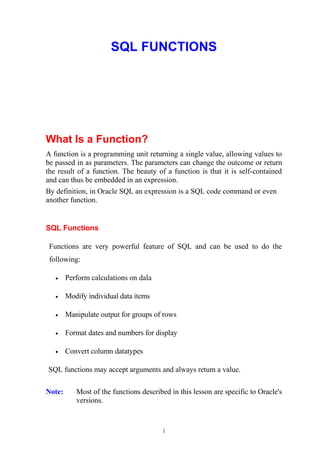
What Is a Function?
A function is a programming unit returning a single value, allowing values to
be passed in as parameters. The parameters can change the outcome or return
the result of a function. The beauty of a function is that it is self-contained
and can thus be embedded in an expression.
By definition, in Oracle SQL an expression is a SQL code command or even
another function.
SQL Functions
Functions are very powerful feature of SQL and can be used to do the
following:
• Perform calculations on dala
• Modify individual data items
• Manipulate output for groups of rows
• Format dates and numbers for display
• Convert column datatypes
SQL functions may accept arguments and always retum a value.
Note: Most of the functions described in this lesson are specific to Oracle's
versions.
1
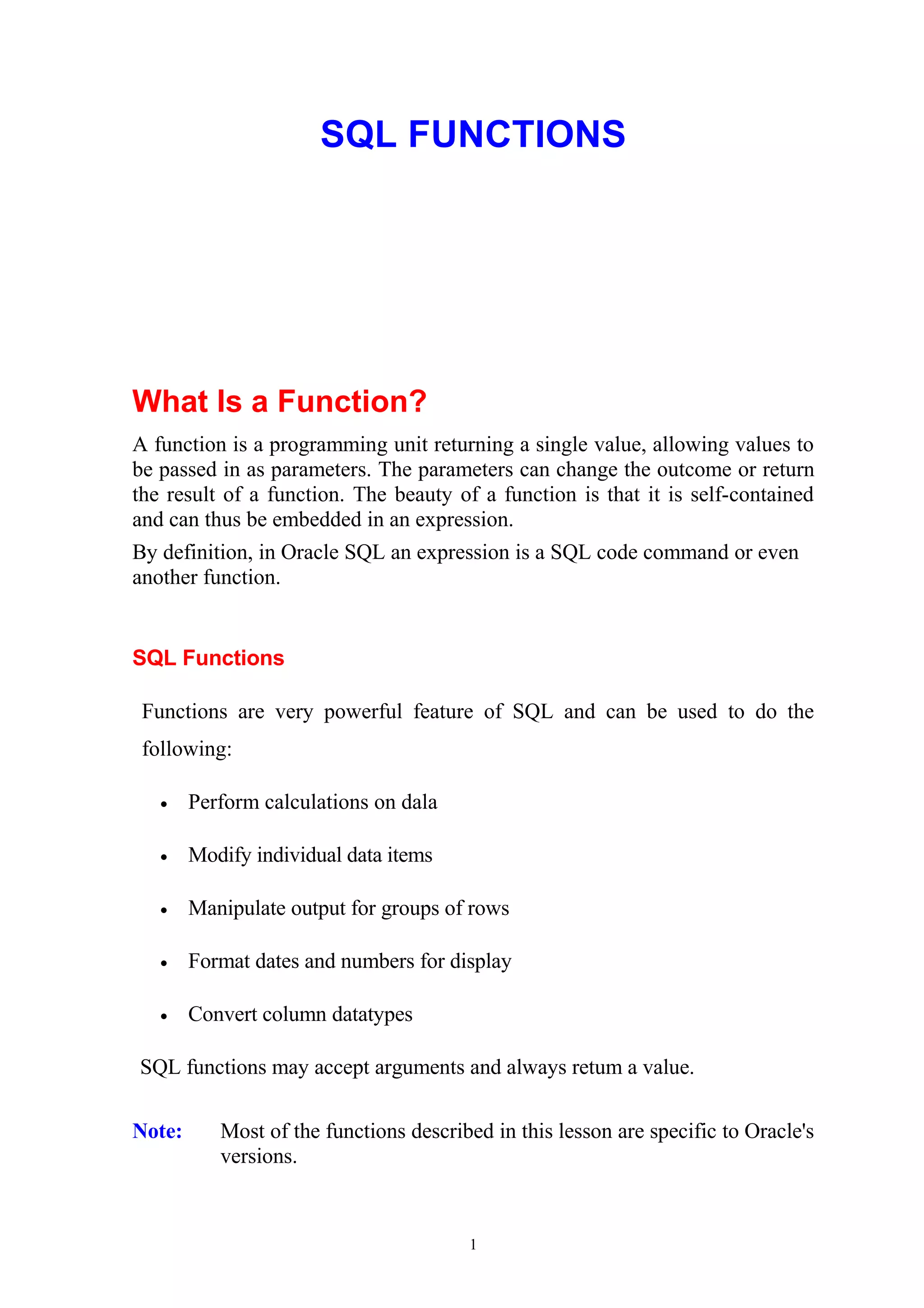
Types of Functions
In general, functions in Oracle SQL are divided into five groups, the first
group being the topic of this chapter, namely, single row functions. Other
function types are aggregate functions, which create groups of rows; analytic
functions, which also group but allow in-depth data analysis; object reference
functions, allowing access to special object pointers; and finally user-defined
functions, such as those you create using a programming language such as
PL/SQL.
• Single Row Functions— Single row functions can be used to execute
an operation on each row of a query. In other words, a single row
function can be used to execute the same operation for every row a
query retrieves.
• Aggregate Functions— These functions summarize repeating groups
in a row set into distinct groups, aggregating repetitive values into
items such as sums or averages.
• Analytic Functions— Unlike aggregates, which summarize repetitions
into unique items, analytics create subset summaries within aggregates.
• Object Reference Functions— These functions use pointers to
reference values. Commonly, object reference functions either
reference objects or dereference values from objects.
• User-Defined Functions— Custom functions can be built using
PL/SQL, allowing extension of the large library of Oracle SQL built-in
functionality. PL/SQL is beyond the scope of this book..
2
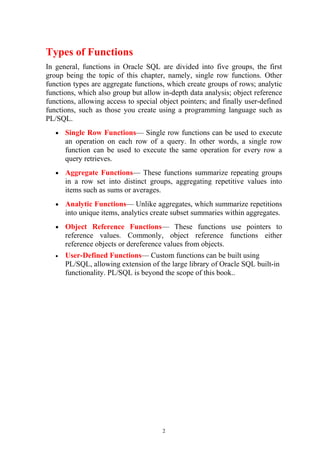
Single Row Functions
Now let's focus on the subject matter of this chapter. Recall that a single row
function was defined as a function that can be used to execute an operation on
each row of a query.
Let's start this journey by discovering the different classifications for single
row functions:
String Functions These functions take a string as a parameter
and return a number or a string.
Number Functions A number is passed in, usually returning a
number.
Datetime Functions These functions accept date value parameters.
Conversion Functions These functions convert between different
datatypes.
Miscellaneous Functions Odd functions fall into this category.
User-defined Functions Functions created by a user via PL/SQL
3
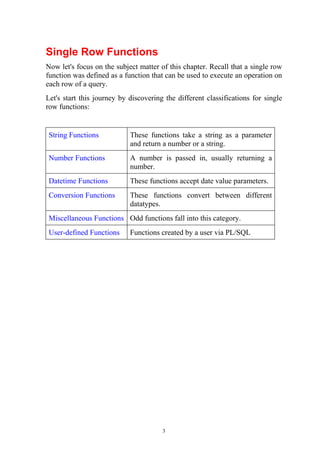
User-Defined Functions
A user-defined function is a function created by a user in addition to the
Oracle built-in functions. Believe it or not, sometimes the plethora of
available Oracle built-in functions will not suffice. Creating your own
functions can be done using PL/SQL.
4
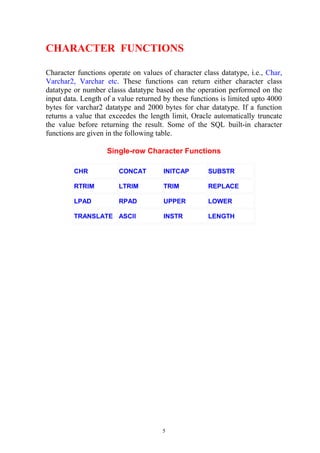
CHARACTER FUNCTIONS
Character functions operate on values of character class datatype, i.e., Char,
Varchar2, Varchar etc. These functions can return either character class
datatype or number classs datatype based on the operation performed on the
input data. Length of a value returned by these functions is limited upto 4000
bytes for varchar2 datatype and 2000 bytes for char datatype. If a function
returns a value that exceedes the length limit, Oracle automatically truncate
the value before returning the result. Some of the SQL built-in character
functions are given in the following table.
Single-row Character Functions
CHR CONCAT INITCAP SUBSTR
RTRIM LTRIM TRIM REPLACE
LPAD RPAD UPPER LOWER
TRANSLATE ASCII INSTR LENGTH
5
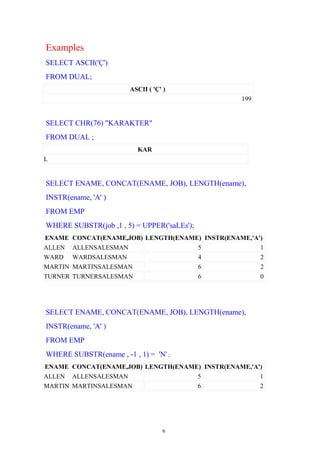
Examples
SELECT ASCII('Ç')
FROM DUAL;
ASCII ( 'Ç' )
199
SELECT CHR(76) "KARAKTER"
FROM DUAL ;
KAR
L
SELECT ENAME, CONCAT(ENAME, JOB), LENGTH(ename),
INSTR(ename, 'A' )
FROM EMP
WHERE SUBSTR(job ,1 , 5) = UPPER('saLEs');
ENAME CONCAT(ENAME,JOB) LENGTH(ENAME) INSTR(ENAME,'A')
ALLEN ALLENSALESMAN 5 1
WARD WARDSALESMAN 4 2
MARTIN MARTINSALESMAN 6 2
TURNER TURNERSALESMAN 6 0
SELECT ENAME, CONCAT(ENAME, JOB), LENGTH(ename),
INSTR(ename, 'A' )
FROM EMP
WHERE SUBSTR(ename , -1 , 1) = 'N' ;
ENAME CONCAT(ENAME,JOB) LENGTH(ENAME) INSTR(ENAME,'A')
ALLEN ALLENSALESMAN 5 1
MARTIN MARTINSALESMAN 6 2
6
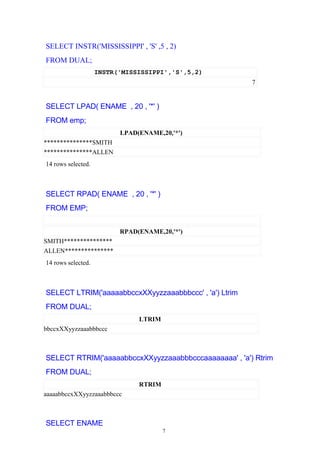
SELECT INSTR('MISSISSIPPI' , 'S' ,5 , 2)
FROM DUAL;
INSTR('MISSISSIPPI','S',5,2)
7
SELECT LPAD( ENAME , 20 , '*' )
FROM emp;
LPAD(ENAME,20,'*')
***************SMITH
***************ALLEN
14 rows selected.
SELECT RPAD( ENAME , 20 , '*' )
FROM EMP;
RPAD(ENAME,20,'*')
SMITH***************
ALLEN***************
14 rows selected.
SELECT LTRIM('aaaaabbccxXXyyzzaaabbbccc' , 'a') Ltrim
FROM DUAL;
LTRIM
bbccxXXyyzzaaabbbccc
SELECT RTRIM('aaaaabbccxXXyyzzaaabbbcccaaaaaaaa' , 'a') Rtrim
FROM DUAL;
RTRIM
aaaaabbccxXXyyzzaaabbbccc
SELECT ENAME
7
FROM EMP
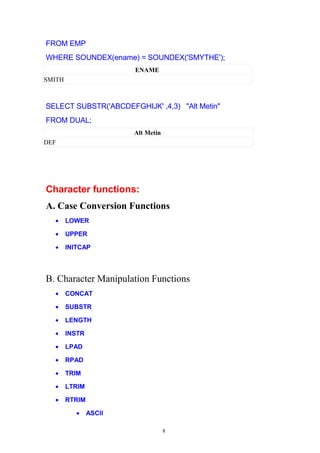
WHERE SOUNDEX(ename) = SOUNDEX('SMYTHE');
ENAME
SMITH
SELECT SUBSTR('ABCDEFGHIJK' ,4,3) "Alt Metin"
FROM DUAL;
Alt Metin
DEF
Character functions:
A. Case Conversion Functions
• LOWER
• UPPER
• INITCAP
B. Character Manipulation Functions
• CONCAT
• SUBSTR
• LENGTH
• INSTR
• LPAD
• RPAD
• TRIM
• LTRIM
• RTRIM
• ASCII
8
• CHR
• REPLACE
• TRANSLATE
9
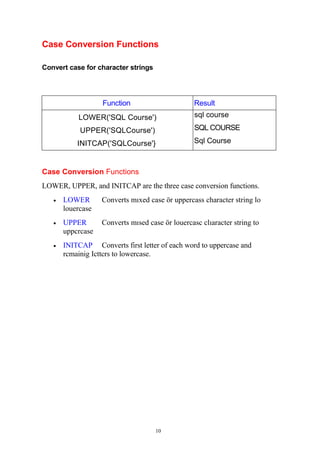
Case Conversion Functions
Convert case for character strings
Function Result
LOWER('SQL Course')
UPPER('SQLCourse')
INITCAP('SQLCourse'}
sql course
SQL COURSE
Sql Course
Case Conversion Functions
LOWER, UPPER, and INITCAP are the three case conversion functions.
• LOWER Converts mıxed case ör uppercass character string lo
louercase
• UPPER Converts mısed case ör louercasc clıaracter string to
uppcrcase
• INITCAP Converts first letter of each word to uppercase and
rcmainig Icttcrs to lowercase.
10
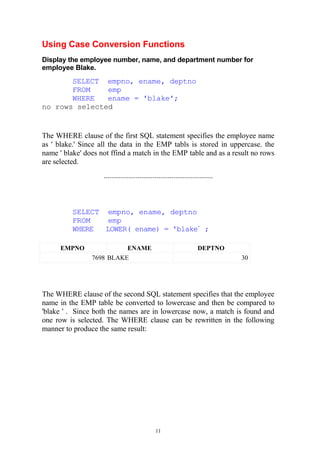
Using Case Conversion Functions
Display the employee number, name, and department number for
employee Blake.
SELECT empno, ename, deptno
FROM emp
WHERE ename = 'blake';
no rows selected
The WHERE clause of the first SQL statement specifies the employee name
as ' blake.' Since all the data in the EMP tabls is stored in uppercase. the
name ' blake' does not ffind a match in the EMP table and as a result no rows
are selected.
..........................................................
SELECT empno, ename, deptno
FROM emp
WHERE LOWER( ename) = 'blake’
;
EMPNO ENAME DEPTNO
7698 BLAKE 30
The WHERE clause of the second SQL statement specifies that the employee
name in the EMP table be converted to lowercase and then be compared to
'blake ' . Since both the names are in lowercase now, a match is found and
one row is selected. The WHERE clause can be rewritten in the following
manner to produce the same result:
11
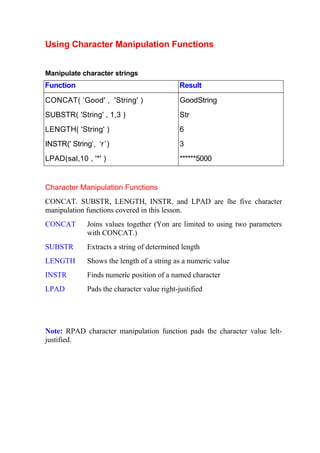
Using Character Manipulation Functions
Manipulate character strings
Function Result
CONCAT( ‘Good' , 'String' )
SUBSTR( 'String' , 1,3 )
LENGTH( 'String' )
INSTR(' String’, ‘r’)
LPAD(sal,10 , '*' )
GoodString
Str
6
3
******5000
Character Manipulation Functions
CONCAT. SUBSTR, LENGTH, INSTR. and LPAD are îhe five character
manipulation functions covered in this lesson.
CONCAT Joins values together (Yon are limited to using two parameters
with CONCAT.)
SUBSTR Extracts a string of determined length
LENGTH Shows the length of a string as a numeric value
INSTR Finds numerîc position of a named character
LPAD Pads the character value right-justified
Note: RPAD character manipulation function pads the character value lelt-
justified.
Using the Character Manipulation
Functions (continued)
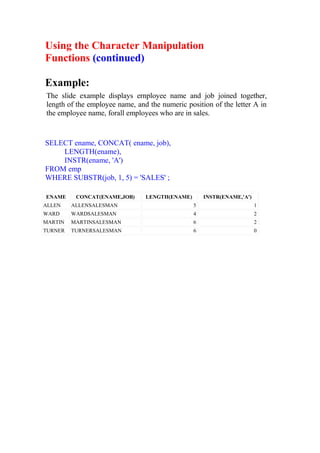
Example:
The slide example displays ernployee name and job joined together,
length of the employee name, and the numeric position of the letter A in
the employee name, forall employees who are in sales.
SELECT ename, CONCAT( ename, job),
LENGTH(ename),
INSTR(ename, 'A')
FROM emp
WHERE SUBSTR(job, 1, 5) = 'SALES' ;
ENAME CONCAT(ENAME,JOB) LENGTH(ENAME) INSTR(ENAME,'A')
ALLEN ALLENSALESMAN 5 1
WARD WARDSALESMAN 4 2
MARTIN MARTINSALESMAN 6 2
TURNER TURNERSALESMAN 6 0
Using the Character Manipulation
Functions (continued)
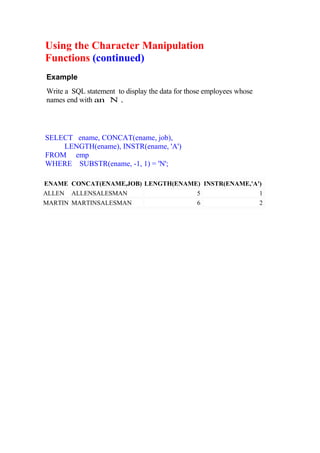
Example
Write a SQL statement to display the data for those employees whose
names end with an N .
SELECT ename, CONCAT(ename, job),
LENGTH(ename), INSTR(ename, 'A')
FROM emp
WHERE SUBSTR(ename, -1, 1) = 'N';
ENAME CONCAT(ENAME,JOB) LENGTH(ENAME) INSTR(ENAME,'A')
ALLEN ALLENSALESMAN 5 1
MARTIN MARTINSALESMAN 6 2

Sql functions

  • 1.
    SQL FUNCTIONS What Isa Function? A function is a programming unit returning a single value, allowing values to be passed in as parameters. The parameters can change the outcome or return the result of a function. The beauty of a function is that it is self-contained and can thus be embedded in an expression. By definition, in Oracle SQL an expression is a SQL code command or even another function. SQL Functions Functions are very powerful feature of SQL and can be used to do the following: • Perform calculations on dala • Modify individual data items • Manipulate output for groups of rows • Format dates and numbers for display • Convert column datatypes SQL functions may accept arguments and always retum a value. Note: Most of the functions described in this lesson are specific to Oracle's versions. 1
  • 2.
    Types of Functions Ingeneral, functions in Oracle SQL are divided into five groups, the first group being the topic of this chapter, namely, single row functions. Other function types are aggregate functions, which create groups of rows; analytic functions, which also group but allow in-depth data analysis; object reference functions, allowing access to special object pointers; and finally user-defined functions, such as those you create using a programming language such as PL/SQL. • Single Row Functions— Single row functions can be used to execute an operation on each row of a query. In other words, a single row function can be used to execute the same operation for every row a query retrieves. • Aggregate Functions— These functions summarize repeating groups in a row set into distinct groups, aggregating repetitive values into items such as sums or averages. • Analytic Functions— Unlike aggregates, which summarize repetitions into unique items, analytics create subset summaries within aggregates. • Object Reference Functions— These functions use pointers to reference values. Commonly, object reference functions either reference objects or dereference values from objects. • User-Defined Functions— Custom functions can be built using PL/SQL, allowing extension of the large library of Oracle SQL built-in functionality. PL/SQL is beyond the scope of this book.. 2
  • 3.
    Single Row Functions Nowlet's focus on the subject matter of this chapter. Recall that a single row function was defined as a function that can be used to execute an operation on each row of a query. Let's start this journey by discovering the different classifications for single row functions: String Functions These functions take a string as a parameter and return a number or a string. Number Functions A number is passed in, usually returning a number. Datetime Functions These functions accept date value parameters. Conversion Functions These functions convert between different datatypes. Miscellaneous Functions Odd functions fall into this category. User-defined Functions Functions created by a user via PL/SQL 3
  • 4.
    User-Defined Functions A user-definedfunction is a function created by a user in addition to the Oracle built-in functions. Believe it or not, sometimes the plethora of available Oracle built-in functions will not suffice. Creating your own functions can be done using PL/SQL. 4
  • 5.
    CHARACTER FUNCTIONS Character functionsoperate on values of character class datatype, i.e., Char, Varchar2, Varchar etc. These functions can return either character class datatype or number classs datatype based on the operation performed on the input data. Length of a value returned by these functions is limited upto 4000 bytes for varchar2 datatype and 2000 bytes for char datatype. If a function returns a value that exceedes the length limit, Oracle automatically truncate the value before returning the result. Some of the SQL built-in character functions are given in the following table. Single-row Character Functions CHR CONCAT INITCAP SUBSTR RTRIM LTRIM TRIM REPLACE LPAD RPAD UPPER LOWER TRANSLATE ASCII INSTR LENGTH 5
  • 6.
    Examples SELECT ASCII('Ç') FROM DUAL; ASCII( 'Ç' ) 199 SELECT CHR(76) "KARAKTER" FROM DUAL ; KAR L SELECT ENAME, CONCAT(ENAME, JOB), LENGTH(ename), INSTR(ename, 'A' ) FROM EMP WHERE SUBSTR(job ,1 , 5) = UPPER('saLEs'); ENAME CONCAT(ENAME,JOB) LENGTH(ENAME) INSTR(ENAME,'A') ALLEN ALLENSALESMAN 5 1 WARD WARDSALESMAN 4 2 MARTIN MARTINSALESMAN 6 2 TURNER TURNERSALESMAN 6 0 SELECT ENAME, CONCAT(ENAME, JOB), LENGTH(ename), INSTR(ename, 'A' ) FROM EMP WHERE SUBSTR(ename , -1 , 1) = 'N' ; ENAME CONCAT(ENAME,JOB) LENGTH(ENAME) INSTR(ENAME,'A') ALLEN ALLENSALESMAN 5 1 MARTIN MARTINSALESMAN 6 2 6
  • 7.
    SELECT INSTR('MISSISSIPPI' ,'S' ,5 , 2) FROM DUAL; INSTR('MISSISSIPPI','S',5,2) 7 SELECT LPAD( ENAME , 20 , '*' ) FROM emp; LPAD(ENAME,20,'*') ***************SMITH ***************ALLEN 14 rows selected. SELECT RPAD( ENAME , 20 , '*' ) FROM EMP; RPAD(ENAME,20,'*') SMITH*************** ALLEN*************** 14 rows selected. SELECT LTRIM('aaaaabbccxXXyyzzaaabbbccc' , 'a') Ltrim FROM DUAL; LTRIM bbccxXXyyzzaaabbbccc SELECT RTRIM('aaaaabbccxXXyyzzaaabbbcccaaaaaaaa' , 'a') Rtrim FROM DUAL; RTRIM aaaaabbccxXXyyzzaaabbbccc SELECT ENAME 7
  • 8.
    FROM EMP WHERE SOUNDEX(ename)= SOUNDEX('SMYTHE'); ENAME SMITH SELECT SUBSTR('ABCDEFGHIJK' ,4,3) "Alt Metin" FROM DUAL; Alt Metin DEF Character functions: A. Case Conversion Functions • LOWER • UPPER • INITCAP B. Character Manipulation Functions • CONCAT • SUBSTR • LENGTH • INSTR • LPAD • RPAD • TRIM • LTRIM • RTRIM • ASCII 8
  • 9.
  • 10.
    Case Conversion Functions Convertcase for character strings Function Result LOWER('SQL Course') UPPER('SQLCourse') INITCAP('SQLCourse'} sql course SQL COURSE Sql Course Case Conversion Functions LOWER, UPPER, and INITCAP are the three case conversion functions. • LOWER Converts mıxed case ör uppercass character string lo louercase • UPPER Converts mısed case ör louercasc clıaracter string to uppcrcase • INITCAP Converts first letter of each word to uppercase and rcmainig Icttcrs to lowercase. 10
  • 11.
    Using Case ConversionFunctions Display the employee number, name, and department number for employee Blake. SELECT empno, ename, deptno FROM emp WHERE ename = 'blake'; no rows selected The WHERE clause of the first SQL statement specifies the employee name as ' blake.' Since all the data in the EMP tabls is stored in uppercase. the name ' blake' does not ffind a match in the EMP table and as a result no rows are selected. .......................................................... SELECT empno, ename, deptno FROM emp WHERE LOWER( ename) = 'blake’ ; EMPNO ENAME DEPTNO 7698 BLAKE 30 The WHERE clause of the second SQL statement specifies that the employee name in the EMP table be converted to lowercase and then be compared to 'blake ' . Since both the names are in lowercase now, a match is found and one row is selected. The WHERE clause can be rewritten in the following manner to produce the same result: 11
  • 12.
    Using Character ManipulationFunctions Manipulate character strings Function Result CONCAT( ‘Good' , 'String' ) SUBSTR( 'String' , 1,3 ) LENGTH( 'String' ) INSTR(' String’, ‘r’) LPAD(sal,10 , '*' ) GoodString Str 6 3 ******5000 Character Manipulation Functions CONCAT. SUBSTR, LENGTH, INSTR. and LPAD are îhe five character manipulation functions covered in this lesson. CONCAT Joins values together (Yon are limited to using two parameters with CONCAT.) SUBSTR Extracts a string of determined length LENGTH Shows the length of a string as a numeric value INSTR Finds numerîc position of a named character LPAD Pads the character value right-justified Note: RPAD character manipulation function pads the character value lelt- justified.
  • 13.
    Using the CharacterManipulation Functions (continued) Example: The slide example displays ernployee name and job joined together, length of the employee name, and the numeric position of the letter A in the employee name, forall employees who are in sales. SELECT ename, CONCAT( ename, job), LENGTH(ename), INSTR(ename, 'A') FROM emp WHERE SUBSTR(job, 1, 5) = 'SALES' ; ENAME CONCAT(ENAME,JOB) LENGTH(ENAME) INSTR(ENAME,'A') ALLEN ALLENSALESMAN 5 1 WARD WARDSALESMAN 4 2 MARTIN MARTINSALESMAN 6 2 TURNER TURNERSALESMAN 6 0
  • 14.
    Using the CharacterManipulation Functions (continued) Example Write a SQL statement to display the data for those employees whose names end with an N . SELECT ename, CONCAT(ename, job), LENGTH(ename), INSTR(ename, 'A') FROM emp WHERE SUBSTR(ename, -1, 1) = 'N'; ENAME CONCAT(ENAME,JOB) LENGTH(ENAME) INSTR(ENAME,'A') ALLEN ALLENSALESMAN 5 1 MARTIN MARTINSALESMAN 6 2