5
Copyright © Oracle Corporation, 2001. All rights reserved.
Aggregating Data
Using Group Functions
5-2 Copyright © Oracle Corporation, 2001. All rights reserved.
Objectives
After completing this lesson, you should be able to
do the following:
• Identify the available group functions
• Describe the use of group functions
• Group data using the GROUP BY clause
• Include or exclude grouped rows by using the
HAVING clause
5-3 Copyright © Oracle Corporation, 2001. All rights reserved.
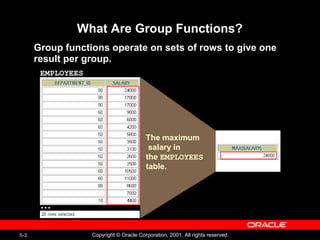
What Are Group Functions?
Group functions operate on sets of rows to give one
result per group.
EMPLOYEES
The maximum
salary in
the EMPLOYEES
table.
…
5-4 Copyright © Oracle Corporation, 2001. All rights reserved.
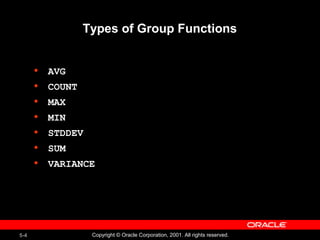
Types of Group Functions
• AVG
• COUNT
• MAX
• MIN
• STDDEV
• SUM
• VARIANCE
5-5 Copyright © Oracle Corporation, 2001. All rights reserved.
SELECT [column,] group_function(column), ...
FROM table
[WHERE condition]
[GROUP BY column]
[ORDER BY column];
Group Functions Syntax
5-6 Copyright © Oracle Corporation, 2001. All rights reserved.
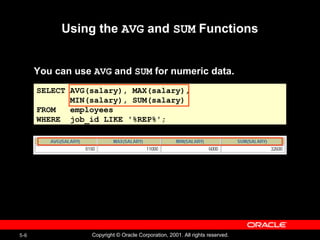
SELECT AVG(salary), MAX(salary),
MIN(salary), SUM(salary)
FROM employees
WHERE job_id LIKE '%REP%';
Using the AVG and SUM Functions
You can use AVG and SUM for numeric data.
5-7 Copyright © Oracle Corporation, 2001. All rights reserved.
Using the MIN and MAX Functions
You can use MIN and MAX for any data type.
SELECT MIN(hire_date), MAX(hire_date)
FROM employees;
5-8 Copyright © Oracle Corporation, 2001. All rights reserved.
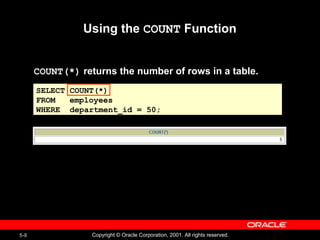
SELECT COUNT(*)
FROM employees
WHERE department_id = 50;
Using the COUNT Function
COUNT(*) returns the number of rows in a table.
5-9 Copyright © Oracle Corporation, 2001. All rights reserved.
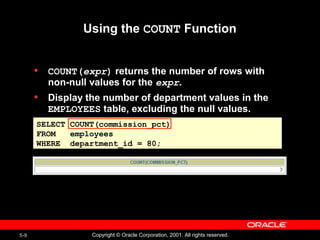
Using the COUNT Function
• COUNT(expr) returns the number of rows with
non-null values for the expr.
• Display the number of department values in the
EMPLOYEES table, excluding the null values.
SELECT COUNT(commission_pct)
FROM employees
WHERE department_id = 80;
5-10 Copyright © Oracle Corporation, 2001. All rights reserved.
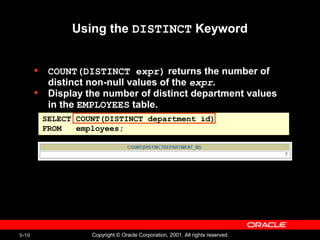
SELECT COUNT(DISTINCT department_id)
FROM employees;
Using the DISTINCT Keyword
• COUNT(DISTINCT expr) returns the number of
distinct non-null values of the expr.
• Display the number of distinct department values
in the EMPLOYEES table.
5-11 Copyright © Oracle Corporation, 2001. All rights reserved.
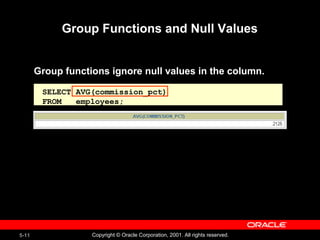
SELECT AVG(commission_pct)
FROM employees;
Group Functions and Null Values
Group functions ignore null values in the column.
5-12 Copyright © Oracle Corporation, 2001. All rights reserved.
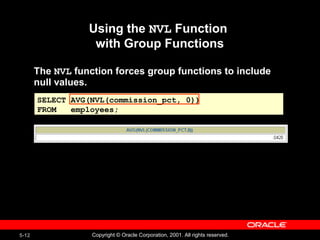
SELECT AVG(NVL(commission_pct, 0))
FROM employees;
Using the NVL Function
with Group Functions
The NVL function forces group functions to include
null values.
5-13 Copyright © Oracle Corporation, 2001. All rights reserved.
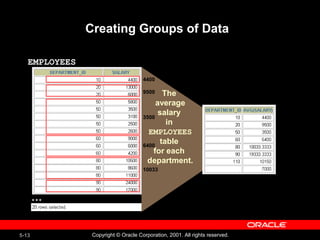
Creating Groups of Data
EMPLOYEES
The
average
salary
in
EMPLOYEES
table
for each
department.
4400
…
9500
3500
6400
10033
5-14 Copyright © Oracle Corporation, 2001. All rights reserved.
SELECT column, group_function(column)
FROM table
[WHERE condition]
[GROUP BY group_by_expression]
[ORDER BY column];
Creating Groups of Data:
The GROUP BY Clause Syntax
Divide rows in a table into smaller groups by using the
GROUP BY clause.
5-15 Copyright © Oracle Corporation, 2001. All rights reserved.
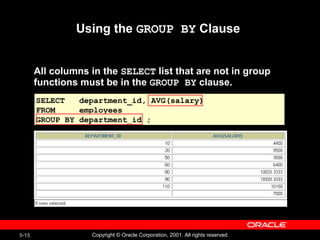
SELECT department_id, AVG(salary)
FROM employees
GROUP BY department_id ;
Using the GROUP BY Clause
All columns in the SELECT list that are not in group
functions must be in the GROUP BY clause.
5-16 Copyright © Oracle Corporation, 2001. All rights reserved.
Using the GROUP BY Clause
The GROUP BY column does not have to be in the
SELECT list.
SELECT AVG(salary)
FROM employees
GROUP BY department_id ;
5-17 Copyright © Oracle Corporation, 2001. All rights reserved.
Grouping by More Than One Column
EMPLOYEES
“Add up the
salaries in
the EMPLOYEES
table
for each job,
grouped by
department.
…
5-18 Copyright © Oracle Corporation, 2001. All rights reserved.
SELECT department_id dept_id, job_id, SUM(salary)
FROM employees
GROUP BY department_id, job_id ;
Using the GROUP BY Clause
on Multiple Columns
5-19 Copyright © Oracle Corporation, 2001. All rights reserved.
Illegal Queries
Using Group Functions
Any column or expression in the SELECT list that is
not an aggregate function must be in the GROUP BY
clause.
SELECT department_id, COUNT(last_name)
FROM employees;
SELECT department_id, COUNT(last_name)
FROM employees;
SELECT department_id, COUNT(last_name)
*
ERROR at line 1:
ORA-00937: not a single-group group function
SELECT department_id, COUNT(last_name)
*
ERROR at line 1:
ORA-00937: not a single-group group function
Column missing in the GROUP BY clause
5-20 Copyright © Oracle Corporation, 2001. All rights reserved.
Illegal Queries
Using Group Functions
• You cannot use the WHERE clause to restrict groups.
• You use the HAVING clause to restrict groups.
• You cannot use group functions in the WHERE clause.
SELECT department_id, AVG(salary)
FROM employees
WHERE AVG(salary) > 8000
GROUP BY department_id;
SELECT department_id, AVG(salary)
FROM employees
WHERE AVG(salary) > 8000
GROUP BY department_id;
WHERE AVG(salary) > 8000
*
ERROR at line 3:
ORA-00934: group function is not allowed here
WHERE AVG(salary) > 8000
*
ERROR at line 3:
ORA-00934: group function is not allowed here
Cannot use the WHERE clause to restrict groups
5-21 Copyright © Oracle Corporation, 2001. All rights reserved.
Excluding Group Results
The maximum
salary
per department
when it is
greater than
$10,000
EMPLOYEES
…
5-22 Copyright © Oracle Corporation, 2001. All rights reserved.
SELECT column, group_function
FROM table
[WHERE condition]
[GROUP BY group_by_expression]
[HAVING group_condition]
[ORDER BY column];
Excluding Group Results: The HAVING
Clause
Use the HAVING clause to restrict groups:
1. Rows are grouped.
2. The group function is applied.
3. Groups matching the HAVING clause are displayed.
5-23 Copyright © Oracle Corporation, 2001. All rights reserved.
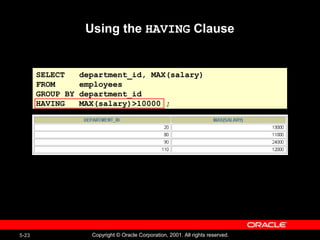
Using the HAVING Clause
SELECT department_id, MAX(salary)
FROM employees
GROUP BY department_id
HAVING MAX(salary)>10000 ;
5-24 Copyright © Oracle Corporation, 2001. All rights reserved.
SELECT job_id, SUM(salary) PAYROLL
FROM employees
WHERE job_id NOT LIKE '%REP%'
GROUP BY job_id
HAVING SUM(salary) > 13000
ORDER BY SUM(salary);
Using the HAVING Clause
5-25 Copyright © Oracle Corporation, 2001. All rights reserved.
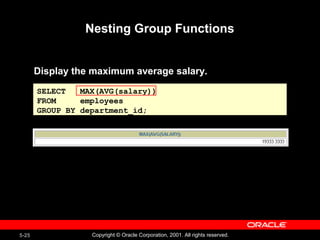
Nesting Group Functions
Display the maximum average salary.
SELECT MAX(AVG(salary))
FROM employees
GROUP BY department_id;
5-26 Copyright © Oracle Corporation, 2001. All rights reserved.
SELECT column, group_function(column)
FROM table
[WHERE condition]
[GROUP BY group_by_expression]
[HAVING group_condition]
[ORDER BY column];
Summary
In this lesson, you should have learned how to:
• Use the group functions COUNT, MAX, MIN, AVG
• Write queries that use the GROUP BY clause
• Write queries that use the HAVING clause
5-27 Copyright © Oracle Corporation, 2001. All rights reserved.
Practice 5 Overview
This practice covers the following topics:
• Writing queries that use the group functions
• Grouping by rows to achieve more than one result
• Excluding groups by using the HAVING clause

Aggregating Data Using Group Functions

  • 1.
    5 Copyright © OracleCorporation, 2001. All rights reserved. Aggregating Data Using Group Functions
  • 2.
    5-2 Copyright ©Oracle Corporation, 2001. All rights reserved. Objectives After completing this lesson, you should be able to do the following: • Identify the available group functions • Describe the use of group functions • Group data using the GROUP BY clause • Include or exclude grouped rows by using the HAVING clause
  • 3.
    5-3 Copyright ©Oracle Corporation, 2001. All rights reserved. What Are Group Functions? Group functions operate on sets of rows to give one result per group. EMPLOYEES The maximum salary in the EMPLOYEES table. …
  • 4.
    5-4 Copyright ©Oracle Corporation, 2001. All rights reserved. Types of Group Functions • AVG • COUNT • MAX • MIN • STDDEV • SUM • VARIANCE
  • 5.
    5-5 Copyright ©Oracle Corporation, 2001. All rights reserved. SELECT [column,] group_function(column), ... FROM table [WHERE condition] [GROUP BY column] [ORDER BY column]; Group Functions Syntax
  • 6.
    5-6 Copyright ©Oracle Corporation, 2001. All rights reserved. SELECT AVG(salary), MAX(salary), MIN(salary), SUM(salary) FROM employees WHERE job_id LIKE '%REP%'; Using the AVG and SUM Functions You can use AVG and SUM for numeric data.
  • 7.
    5-7 Copyright ©Oracle Corporation, 2001. All rights reserved. Using the MIN and MAX Functions You can use MIN and MAX for any data type. SELECT MIN(hire_date), MAX(hire_date) FROM employees;
  • 8.
    5-8 Copyright ©Oracle Corporation, 2001. All rights reserved. SELECT COUNT(*) FROM employees WHERE department_id = 50; Using the COUNT Function COUNT(*) returns the number of rows in a table.
  • 9.
    5-9 Copyright ©Oracle Corporation, 2001. All rights reserved. Using the COUNT Function • COUNT(expr) returns the number of rows with non-null values for the expr. • Display the number of department values in the EMPLOYEES table, excluding the null values. SELECT COUNT(commission_pct) FROM employees WHERE department_id = 80;
  • 10.
    5-10 Copyright ©Oracle Corporation, 2001. All rights reserved. SELECT COUNT(DISTINCT department_id) FROM employees; Using the DISTINCT Keyword • COUNT(DISTINCT expr) returns the number of distinct non-null values of the expr. • Display the number of distinct department values in the EMPLOYEES table.
  • 11.
    5-11 Copyright ©Oracle Corporation, 2001. All rights reserved. SELECT AVG(commission_pct) FROM employees; Group Functions and Null Values Group functions ignore null values in the column.
  • 12.
    5-12 Copyright ©Oracle Corporation, 2001. All rights reserved. SELECT AVG(NVL(commission_pct, 0)) FROM employees; Using the NVL Function with Group Functions The NVL function forces group functions to include null values.
  • 13.
    5-13 Copyright ©Oracle Corporation, 2001. All rights reserved. Creating Groups of Data EMPLOYEES The average salary in EMPLOYEES table for each department. 4400 … 9500 3500 6400 10033
  • 14.
    5-14 Copyright ©Oracle Corporation, 2001. All rights reserved. SELECT column, group_function(column) FROM table [WHERE condition] [GROUP BY group_by_expression] [ORDER BY column]; Creating Groups of Data: The GROUP BY Clause Syntax Divide rows in a table into smaller groups by using the GROUP BY clause.
  • 15.
    5-15 Copyright ©Oracle Corporation, 2001. All rights reserved. SELECT department_id, AVG(salary) FROM employees GROUP BY department_id ; Using the GROUP BY Clause All columns in the SELECT list that are not in group functions must be in the GROUP BY clause.
  • 16.
    5-16 Copyright ©Oracle Corporation, 2001. All rights reserved. Using the GROUP BY Clause The GROUP BY column does not have to be in the SELECT list. SELECT AVG(salary) FROM employees GROUP BY department_id ;
  • 17.
    5-17 Copyright ©Oracle Corporation, 2001. All rights reserved. Grouping by More Than One Column EMPLOYEES “Add up the salaries in the EMPLOYEES table for each job, grouped by department. …
  • 18.
    5-18 Copyright ©Oracle Corporation, 2001. All rights reserved. SELECT department_id dept_id, job_id, SUM(salary) FROM employees GROUP BY department_id, job_id ; Using the GROUP BY Clause on Multiple Columns
  • 19.
    5-19 Copyright ©Oracle Corporation, 2001. All rights reserved. Illegal Queries Using Group Functions Any column or expression in the SELECT list that is not an aggregate function must be in the GROUP BY clause. SELECT department_id, COUNT(last_name) FROM employees; SELECT department_id, COUNT(last_name) FROM employees; SELECT department_id, COUNT(last_name) * ERROR at line 1: ORA-00937: not a single-group group function SELECT department_id, COUNT(last_name) * ERROR at line 1: ORA-00937: not a single-group group function Column missing in the GROUP BY clause
  • 20.
    5-20 Copyright ©Oracle Corporation, 2001. All rights reserved. Illegal Queries Using Group Functions • You cannot use the WHERE clause to restrict groups. • You use the HAVING clause to restrict groups. • You cannot use group functions in the WHERE clause. SELECT department_id, AVG(salary) FROM employees WHERE AVG(salary) > 8000 GROUP BY department_id; SELECT department_id, AVG(salary) FROM employees WHERE AVG(salary) > 8000 GROUP BY department_id; WHERE AVG(salary) > 8000 * ERROR at line 3: ORA-00934: group function is not allowed here WHERE AVG(salary) > 8000 * ERROR at line 3: ORA-00934: group function is not allowed here Cannot use the WHERE clause to restrict groups
  • 21.
    5-21 Copyright ©Oracle Corporation, 2001. All rights reserved. Excluding Group Results The maximum salary per department when it is greater than $10,000 EMPLOYEES …
  • 22.
    5-22 Copyright ©Oracle Corporation, 2001. All rights reserved. SELECT column, group_function FROM table [WHERE condition] [GROUP BY group_by_expression] [HAVING group_condition] [ORDER BY column]; Excluding Group Results: The HAVING Clause Use the HAVING clause to restrict groups: 1. Rows are grouped. 2. The group function is applied. 3. Groups matching the HAVING clause are displayed.
  • 23.
    5-23 Copyright ©Oracle Corporation, 2001. All rights reserved. Using the HAVING Clause SELECT department_id, MAX(salary) FROM employees GROUP BY department_id HAVING MAX(salary)>10000 ;
  • 24.
    5-24 Copyright ©Oracle Corporation, 2001. All rights reserved. SELECT job_id, SUM(salary) PAYROLL FROM employees WHERE job_id NOT LIKE '%REP%' GROUP BY job_id HAVING SUM(salary) > 13000 ORDER BY SUM(salary); Using the HAVING Clause
  • 25.
    5-25 Copyright ©Oracle Corporation, 2001. All rights reserved. Nesting Group Functions Display the maximum average salary. SELECT MAX(AVG(salary)) FROM employees GROUP BY department_id;
  • 26.
    5-26 Copyright ©Oracle Corporation, 2001. All rights reserved. SELECT column, group_function(column) FROM table [WHERE condition] [GROUP BY group_by_expression] [HAVING group_condition] [ORDER BY column]; Summary In this lesson, you should have learned how to: • Use the group functions COUNT, MAX, MIN, AVG • Write queries that use the GROUP BY clause • Write queries that use the HAVING clause
  • 27.
    5-27 Copyright ©Oracle Corporation, 2001. All rights reserved. Practice 5 Overview This practice covers the following topics: • Writing queries that use the group functions • Grouping by rows to achieve more than one result • Excluding groups by using the HAVING clause

Editor's Notes

  • #2 Schedule:TimingTopic 35 minutesLecture 40 minutesPractice 75 minutesTotal
  • #3 Lesson Aim This lesson further addresses functions. It focuses on obtaining summary information, such as averages, for groups of rows. It discusses how to group rows in a table into smaller sets and how to specify search criteria for groups of rows.
  • #4 Group Functions Unlike single-row functions, group functions operate on sets of rows to give one result per group. These sets may be the whole table or the table split into groups.
  • #5 Group Functions (continued) Each of the functions accepts an argument. The following table identifies the options that you can use in the syntax:
  • #6 Guidelines for Using Group Functions DISTINCT makes the function consider only nonduplicate values; ALL makes it consider every value including duplicates. The default is ALL and therefore does not need to be specified. The data types for the functions with an expr argument may be CHAR, VARCHAR2, NUMBER, or DATE. All group functions ignore null values. To substitute a value for null values, use the NVL, NVL2, or COALESCE functions. The Oracle server implicitly sorts the result set in ascending order when using a GROUP BY clause. To override this default ordering, DESC can be used in an ORDER BY clause. Instructor Note Stress the use of DISTINCT and group functions ignoring null values. ALL is the default and is very rarely specified.
  • #7 Group Functions You can use AVG, SUM, MIN, and MAX functions against columns that can store numeric data. The example on the slide displays the average, highest, lowest, and sum of monthly salaries for all sales representatives.
  • #8 Group Functions (continued) You can use the MAX and MIN functions for any data type. The slide example displays the most junior and most senior employee. The following example displays the employee last name that is first and the employee last name that is the last in an alphabetized list of all employees. SELECT MIN(last_name), MAX(last_name) FROM employees; Note: AVG, SUM, VARIANCE, and STDDEV functions can be used only with numeric data types.
  • #9 The COUNT Function The COUNT function has three formats: COUNT(*) COUNT(expr) COUNT(DISTINCT expr) COUNT(*) returns the number of rows in a table that satisfy the criteria of the SELECT statement, including duplicate rows and rows containing null values in any of the columns. If a WHERE clause is included in the SELECT statement, COUNT(*) returns the number of rows that satisfies the condition in the WHERE clause. In contrast, COUNT(expr) returns the number of non-null values in the column identified by expr. COUNT(DISTINCT expr) returns the number of unique, non-null values in the column identified by expr. The slide example displays the number of employees in department 50. Instructor Note Demo: 5_count1.sql, 5_count2.sql Purpose: To illustrate using the COUNT(*) and COUNT(expr) functions
  • #10 The COUNT Function (continued) The slide example displays the number of employees in department 80 who can earn a commission. Example Display the number of department values in the EMPLOYEES table. SELECT COUNT(department_id) FROM employees;
  • #11 The DISTINCT Keyword Use the DISTINCT keyword to suppress the counting of any duplicate values within a column. The example on the slide displays the number of distinct department values in the EMPLOYEES table.
  • #12 Group Functions and Null Values All group functions ignore null values in the column. In the slide example, the average is calculated based only on the rows in the table where a valid value is stored in the COMMISSION_PCT column. The average is calculated as the total commission paid to all employees divided by the number of employees receiving a commission (four).
  • #13 Group Functions and Null Values (continued) The NVL function forces group functions to include null values. In the slide example, the average is calculated based on all rows in the table, regardless of whether null values are stored in the COMMISSION_PCT column. The average is calculated as the total commission paid to all employees divided by the total number of employees in the company (20).
  • #14 Groups of Data Until now, all group functions have treated the table as one large group of information. At times, you need to divide the table of information into smaller groups. This can be done by using the GROUP BY clause.
  • #15 The GROUP BY Clause You can use the GROUP BY clause to divide the rows in a table into groups. You can then use the group functions to return summary information for each group. In the syntax: group_by_expressionspecifies columns whose values determine the basis forgrouping rows Guidelines If you include a group function in a SELECT clause, you cannot select individual results as well, unless the individual column appears in the GROUP BY clause. You receive an error message if you fail to include the column list in the GROUP BY clause. Using a WHERE clause, you can exclude rows before dividing them into groups. You must include the columns in the GROUP BY clause. You cannot use a column alias in the GROUP BY clause. By default, rows are sorted by ascending order of the columns included in the GROUP BY list. You can override this by using the ORDER BY clause.
  • #16 The GROUP BY Clause (continued) When using the GROUP BY clause, make sure that all columns in the SELECT list that are not group functions are included in the GROUP BY clause. The example on the slide displays the department number and the average salary for each department. Here is how this SELECT statement, containing a GROUP BY clause, is evaluated: The SELECT clause specifies the columns to be retrieved: Department number column in the EMPLOYEES table The average of all the salaries in the group you specified in the GROUP BY clause The FROM clause specifies the tables that the database must access: the EMPLOYEES table. The WHERE clause specifies the rows to be retrieved. Since there is no WHERE clause, all rows are retrieved by default. The GROUP BY clause specifies how the rows should be grouped. The rows are being grouped by department number, so the AVG function that is being applied to the salary column will calculate the average salary for each department. Instructor Note Group results are sorted implicitly, on the grouping column. You can use ORDER BY to specify a different sort order, remembering to use only group functions, or the grouping column.
  • #17 The GROUP BY Clause (continued) The GROUP BY column does not have to be in the SELECT clause. For example, the SELECT statement on the slide displays the average salaries for each department without displaying the respective department numbers. Without the department numbers, however, the results do not look meaningful. You can use the group function in the ORDER BY clause. SELECT department_id, AVG(salary) FROM employees GROUP BY department_id ORDER BY AVG(salary); Instructor Note Demonstrate the query with and without the DEPARTMENT_ID column in the SELECT statement.
  • #18 Groups within Groups Sometimes you need to see results for groups within groups. The slide shows a report that displays the total salary being paid to each job title, within each department. The EMPLOYEES table is grouped first by department number and, within that grouping, by job title. For example, the four stock clerks in department 50 are grouped together and a single result (total salary) is produced for all stock clerks within the group. Instructor Note Demo: 5_order1.sql, 5_order2.sql Purpose: To illustrate ordering columns that are grouped by DEPARTMENT_ID first and ordering columns that are grouped by JOB_ID first.
  • #19 Groups within Groups (continued) You can return summary results for groups and subgroups by listing more than one GROUP BY column. You can determine the default sort order of the results by the order of the columns in the GROUP BY clause. Here is how the SELECT statement on the slide, containing a GROUP BY clause, is evaluated: The SELECT clause specifies the column to be retrieved: Department number in the EMPLOYEES table Job ID in the EMPLOYEES table The sum of all the salaries in the group that you specified in the GROUP BY clause The FROM clause specifies the tables that the database must access: the EMPLOYEES table. The GROUP BY clause specifies how you must group the rows: First, the rows are grouped by department number. Second, within the department number groups, the rows are grouped by job ID. So the SUM function is being applied to the salary column for all job IDs within each department number group.
  • #20 Illegal Queries Using Group Functions Whenever you use a mixture of individual items (DEPARTMENT_ID) and group functions (COUNT) in the same SELECT statement, you must include a GROUP BY clause that specifies the individual items (in this case, DEPARTMENT_ID). If the GROUP BY clause is missing, then the error message “not a single-group group function” appears and an asterisk (*) points to the offending column. You can correct the error on the slide by adding the GROUP BY clause. SELECT department_id, count(last_name) FROM employees GROUP BY department_id; Any column or expression in the SELECT list that is not an aggregate function must be in the GROUP BY clause. Instructor Note Demo: 5_error.sql Purpose: To illustrate executing a SELECT statement with no GROUP BY clause
  • #22 Restricting Group Results In the same way that you use the WHERE clause to restrict the rows that you select, you use the HAVING clause to restrict groups. To find the maximum salary of each department, but show only the departments that have a maximum salary of more than $10,000, you need to do the following: 1.Find the average salary for each department by grouping by department number. 2.Restrict the groups to those departments with a maximum salary greater than $10,000.
  • #23 The HAVING Clause You use the HAVING clause to specify which groups are to be displayed, and thus, you further restrict the groups on the basis of aggregate information. In the syntax: group_conditionrestricts the groups of rows returned to those groups for which the specified condition is true The Oracle server performs the following steps when you use the HAVING clause: 1.Rows are grouped. 2.The group function is applied to the group. 3.The groups that match the criteria in the HAVING clause are displayed. The HAVING clause can precede the GROUP BY clause, but it is recommended that you place the GROUP BY clause first because that is more logical. Groups are formed and group functions are calculated before the HAVING clause is applied to the groups in the SELECT list. Instructor Note The Oracle server evaluates the clauses in the following order: If the statement contains a WHERE clause, the server establishes the candidate rows. The server identifies the groups specified in the GROUP BY clause. The HAVING clause further restricts result groups that do not meet the group criteria in the HAVING clause.
  • #24 The HAVING Clause (continued) The slide example displays department numbers and maximum salaries for those departments whose maximum salary is greater than $10,000. You can use the GROUP BY clause without using a group function in the SELECT list. If you restrict rows based on the result of a group function, you must have a GROUP BY clause as well as the HAVING clause. The following example displays the department numbers and average salaries for those departments whose maximum salary is greater than $10,000: SELECT department_id, AVG(salary) FROM employees GROUP BY department_id HAVING max(salary)>10000;
  • #25 The HAVING Clause (continued) The slide example displays the job ID and total monthly salary for each job with a total payroll exceeding $13,000. The example excludes sales representatives and sorts the list by the total monthly salary. Instructor Note Demo: 5_job1.sql, 5_job2.sql Purpose: To illustrate using a WHERE clause to restrict rows by JOB_ID and using a HAVING clause to restrict groups by SUM(SALARY).
  • #26 Nesting Group Functions Group functions can be nested to a depth of two. The slide example displays the maximum average salary.
  • #27 Summary Seven group functions are available in SQL: AVG COUNT MAX MIN SUM STDDEV VARIANCE You can create subgroups by using the GROUP BY clause. Groups can be excluded using the HAVING clause. Place the HAVING and GROUP BY clauses after the WHERE clause in a statement. Place the ORDER BY clause last. The Oracle server evaluates the clauses in the following order: 1.If the statement contains a WHERE clause, the server establishes the candidate rows. 2.The server identifies the groups specified in the GROUP BY clause. 3.The HAVING clause further restricts result groups that do not meet the group criteria in the HAVING clause.
  • #28 Practice 5 Overview At the end of this practice, you should be familiar with using group functions and selecting groups of data. Paper-Based Questions For questions 1-3, circle either True or False. Note: Column aliases are used for the queries. Instructor Note Hint for Question #7: Advise the students to think about the MANAGER_ID column in EMPLOYEES when determining the number of managers, rather than the JOB_ID column.
  • #29 Practice 5 Determine the validity of the following three statements. Circle either True or False. 1.Group functions work across many rows to produce one result per group.True/False 2.Group functions include nulls in calculations.True/False 3.The WHERE clause restricts rows prior to inclusion in a group calculation.True/False 4.Display the highest, lowest, sum, and average salary of all employees. Label the columnsMaximum, Minimum, Sum, and Average, respectively. Round your results to the nearest whole number. Place your SQL statement in a text file named lab5_4.sql. 5.Modify the query in lab5_4.sql to display the minimum, maximum, sum, and average salary for each job type. Resave lab5_4.sql to lab5_5.sql. Run the statement in lab5_5.sql.
  • #30 Practice 5 (continued) 6.Write a query to display the number of people with the same job. 7.Determine the number of managers without listing them. Label the column Number ofManagers. Hint: Use the MANAGER_ID column to determine the number of managers. 8.Write a query that displays the difference between the highest and lowest salaries. Label the column DIFFERENCE. If you have time, complete the following exercises: 9.Display the manager number and the salary of the lowest paid employee for that manager.Exclude anyone whose manager is not known. Exclude any groups where the minimumsalary is $6,000 or less. Sort the output in descending order of salary.
  • #31 Practice 5 (continued) 10.Write a query to display each department’s name, location, number of employees, and the average salary for all employees in that department. Label the columns Name, Location, Number of People, and Salary, respectively. Round the average salary to two decimal places. If you want an extra challenge, complete the following exercises: 11.Create a query that will display the total number of employees and, of that total, the number of employees hired in 1995, 1996, 1997, and 1998. Create appropriate column headings. 12.Create a matrix query to display the job, the salary for that job based on department number, and the total salary for that job, for departments 20, 50, 80, and 90, giving each column an appropriate heading.