Business Information Systems Introduction to SQL Prithwis Mukerjee
Categories of SQL Data Retrieval Select Data Manipulation Language (DML) Insert Delete Update Transaction Control Commit Rollback Data Definition Language (DDL) Create Alter  Drop Data Control Grant Revoke
Basics of Retrieval - 1 : Projection & Selection Projection …. [ a subset of COLUMNS ] Select Emp_ID, LastName, Salary from Employee Select * from Employee Selection … [ a subset of ROWS ] Select * from Employee where Dept = ’40’
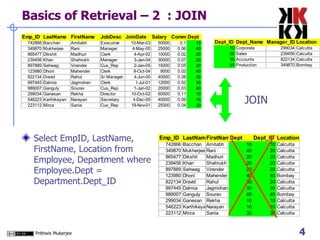
Basics of Retrieval – 2  : JOIN Select EmpID, LastName, FirstName, Location from Employee, Department where Employee.Dept = Department.Dept_ID JOIN
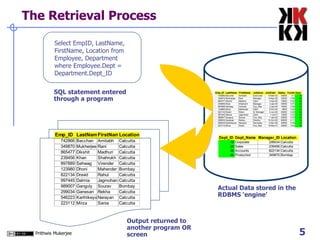
The Retrieval Process Select EmpID, LastName, FirstName, Location from Employee, Department where Employee.Dept = Department.Dept_ID SQL statement entered through a program Output returned to another program OR screen Actual Data stored in the RDBMS ‘engine’
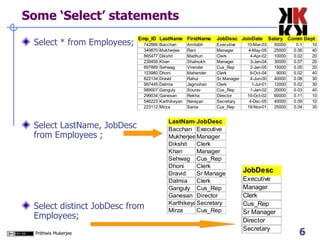
Some ‘Select’ statements Select * from Employees; Select LastName, JobDesc from Employees ; Select distinct JobDesc from Employees;
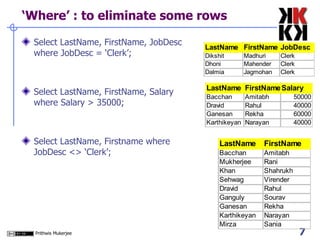
‘Where’ : to eliminate some rows Select LastName, FirstName, JobDesc where JobDesc = ‘Clerk’; Select LastName, FirstName, Salary where Salary > 35000; Select LastName, Firstname where JobDesc <> ‘Clerk’;
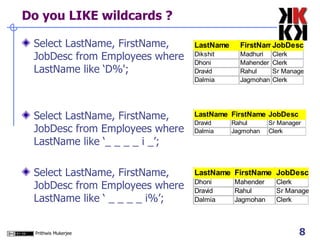
Do you LIKE wildcards ? Select LastName, FirstName, JobDesc from Employees where LastName like ‘D%'; Select LastName, FirstName, JobDesc from Employees where LastName like ‘_ _ _ _ i _’; Select LastName, FirstName, JobDesc from Employees where LastName like ‘ _ _ _ _ i%’;
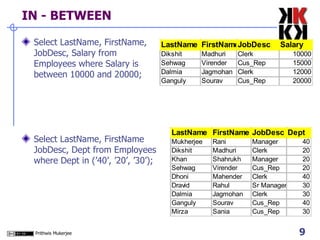
IN - BETWEEN Select LastName, FirstName, JobDesc, Salary from Employees where Salary is between 10000 and 20000; Select LastName, FirstName JobDesc, Dept from Employees where Dept in (’40’, ’20’, ’30’);
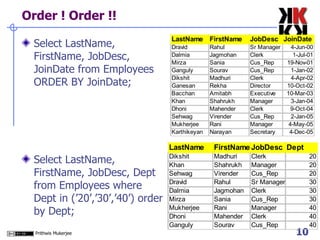
Order ! Order !!  Select LastName, FirstName, JobDesc, JoinDate from Employees ORDER BY JoinDate; Select LastName, FirstName, JobDesc, Dept from Employees where Dept in (’20’,’30’,’40’) order by Dept;
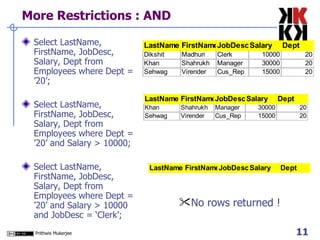
More Restrictions : AND Select LastName, FirstName, JobDesc, Salary, Dept from Employees where Dept = ’20’; Select LastName, FirstName, JobDesc, Salary, Dept from Employees where Dept = ’20’ and Salary > 10000; Select LastName, FirstName, JobDesc, Salary, Dept from Employees where Dept = ’20’ and Salary > 10000 and JobDesc = ‘Clerk’; No rows returned !
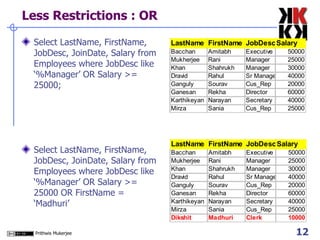
Less Restrictions : OR Select LastName, FirstName, JobDesc, JoinDate, Salary from Employees where JobDesc like ‘%Manager’ OR Salary >= 25000; Select LastName, FirstName, JobDesc, JoinDate, Salary from Employees where JobDesc like ‘%Manager’ OR Salary >= 25000 OR FirstName = ‘Madhuri’
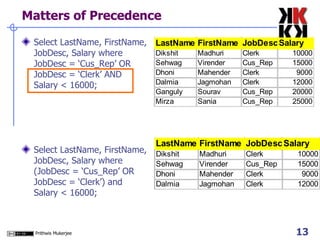
Matters of Precedence Select LastName, FirstName, JobDesc, Salary where JobDesc = ‘Cus_Rep’ OR JobDesc = ‘Clerk’ AND Salary < 16000; Select LastName, FirstName, JobDesc, Salary where (JobDesc = ‘Cus_Rep’ OR JobDesc = ‘Clerk’) and Salary < 16000;
Functions … Two kinds of functions …. Single row functions Manipulate data items from one row Accepts multiple arguments and return one value Arguments can be column value or expression Acts on one row Returns one result per row Can be nested Multiple row functions Works with data items from multiple rows Arguments can be column value or expressions Returns ONE result for a set of rows
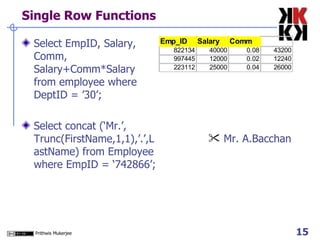
Single Row Functions Select EmpID, Salary, Comm, Salary+Comm*Salary from employee where DeptID = ’30’; Select concat (‘Mr.’, Trunc(FirstName,1,1),’.’,LastName) from Employee where EmpID = ‘742866’;  Mr. A.Bacchan
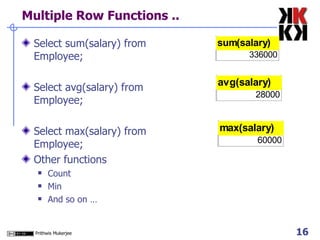
Multiple Row Functions .. Select sum(salary) from Employee; Select avg(salary) from Employee; Select max(salary) from Employee; Other functions Count Min  And so on …
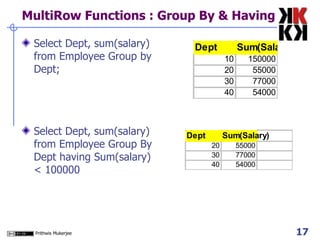
MultiRow Functions : Group By & Having  Select Dept, sum(salary) from Employee Group by Dept; Select Dept, sum(salary) from Employee Group By Dept having Sum(salary) < 100000
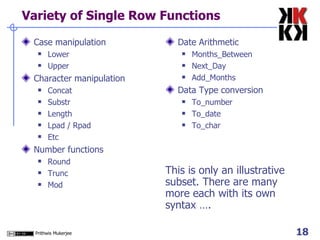
Variety of Single Row Functions Case manipulation Lower Upper Character manipulation Concat Substr Length Lpad / Rpad Etc Number functions Round Trunc Mod Date Arithmetic Months_Between Next_Day Add_Months Data Type conversion To_number To_date To_char This is only an illustrative subset. There are many more each with its own syntax ….
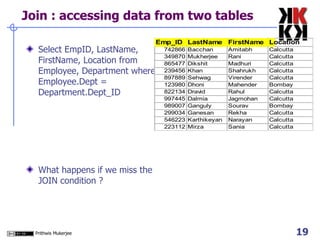
Join : accessing data from two tables Select EmpID, LastName, FirstName, Location from Employee, Department where Employee.Dept = Department.Dept_ID What happens if we miss the JOIN condition ?
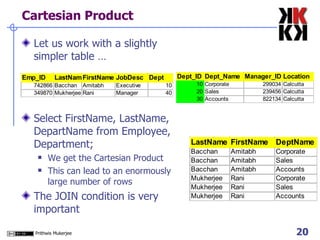
Cartesian Product Let us work with a slightly simpler table … Select FirstName, LastName, DepartName from Employee, Department; We get the Cartesian Product This can lead to an enormously large number of rows The JOIN condition is very important
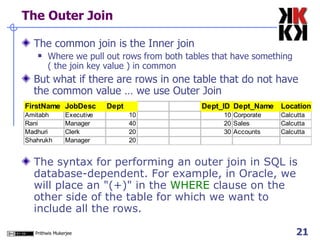
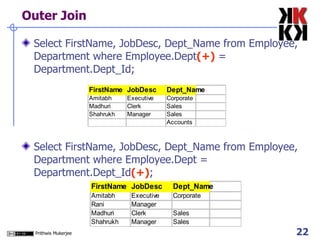
The Outer Join The common join is the Inner join Where we pull out rows from both tables that have something ( the join key value ) in common  But what if there are rows in one table that do not have the common value … we use Outer Join The syntax for performing an outer join in SQL is database-dependent. For example, in Oracle, we will place an &quot;(+)&quot; in the  WHERE  clause on the other side of the table for which we want to include all the rows.
Outer Join Select FirstName, JobDesc, Dept_Name from Employee, Department where Employee.Dept (+)  = Department.Dept_Id; Select FirstName, JobDesc, Dept_Name from Employee, Department where Employee.Dept = Department.Dept_Id (+) ;
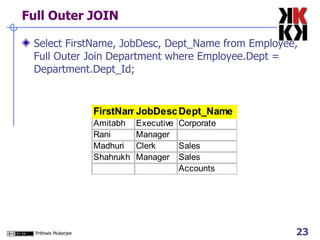
Full Outer JOIN Select FirstName, JobDesc, Dept_Name from Employee, Full Outer Join Department where Employee.Dept = Department.Dept_Id;
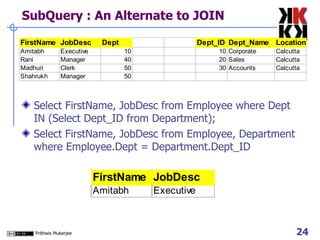
SubQuery : An Alternate to JOIN Select FirstName, JobDesc from Employee where Dept IN (Select Dept_ID from Department); Select FirstName, JobDesc from Employee, Department where Employee.Dept = Department.Dept_ID
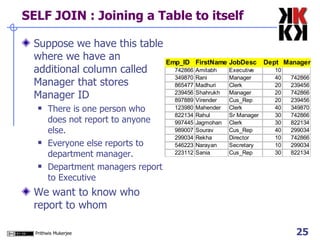
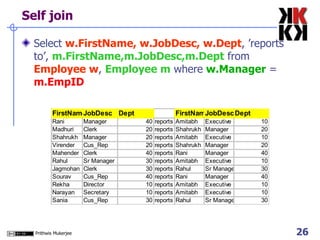
SELF JOIN : Joining a Table to itself Suppose we have this table where we have an additional column called Manager that stores Manager ID There is one person who does not report to anyone else.  Everyone else reports to department manager. Department managers report to Executive We want to know who report to whom
Self join Select  w.FirstName, w.JobDesc, w.Dept , ’reports to’,  m.FirstName,m.JobDesc,m.Dept  from  Employee w ,  Employee m  where  w.Manager  =  m.EmpID
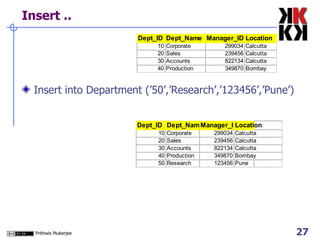
Insert .. Insert into Department (’50’,’Research’,’123456’,’Pune’)
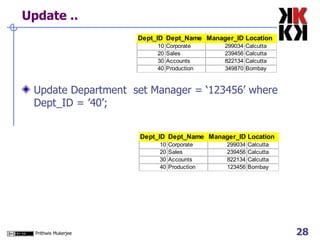
Update .. Update Department  set Manager = ‘123456’ where Dept_ID = ’40’;
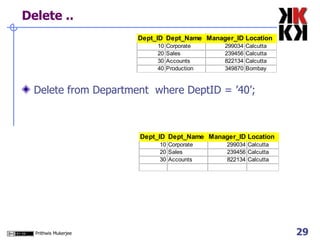
Delete .. Delete from Department  where DeptID = ’40’;
Create View Create View  myView  as ( Select ..... any SQL query simple or complex that we have learnt about so far .. ) Select * from  myView ;

BIS05 Introduction to SQL

  • 1.
    Business Information SystemsIntroduction to SQL Prithwis Mukerjee
  • 2.
    Categories of SQLData Retrieval Select Data Manipulation Language (DML) Insert Delete Update Transaction Control Commit Rollback Data Definition Language (DDL) Create Alter Drop Data Control Grant Revoke
  • 3.
    Basics of Retrieval- 1 : Projection & Selection Projection …. [ a subset of COLUMNS ] Select Emp_ID, LastName, Salary from Employee Select * from Employee Selection … [ a subset of ROWS ] Select * from Employee where Dept = ’40’
  • 4.
    Basics of Retrieval– 2 : JOIN Select EmpID, LastName, FirstName, Location from Employee, Department where Employee.Dept = Department.Dept_ID JOIN
  • 5.
    The Retrieval ProcessSelect EmpID, LastName, FirstName, Location from Employee, Department where Employee.Dept = Department.Dept_ID SQL statement entered through a program Output returned to another program OR screen Actual Data stored in the RDBMS ‘engine’
  • 6.
    Some ‘Select’ statementsSelect * from Employees; Select LastName, JobDesc from Employees ; Select distinct JobDesc from Employees;
  • 7.
    ‘Where’ : toeliminate some rows Select LastName, FirstName, JobDesc where JobDesc = ‘Clerk’; Select LastName, FirstName, Salary where Salary > 35000; Select LastName, Firstname where JobDesc <> ‘Clerk’;
  • 8.
    Do you LIKEwildcards ? Select LastName, FirstName, JobDesc from Employees where LastName like ‘D%'; Select LastName, FirstName, JobDesc from Employees where LastName like ‘_ _ _ _ i _’; Select LastName, FirstName, JobDesc from Employees where LastName like ‘ _ _ _ _ i%’;
  • 9.
    IN - BETWEENSelect LastName, FirstName, JobDesc, Salary from Employees where Salary is between 10000 and 20000; Select LastName, FirstName JobDesc, Dept from Employees where Dept in (’40’, ’20’, ’30’);
  • 10.
    Order ! Order!! Select LastName, FirstName, JobDesc, JoinDate from Employees ORDER BY JoinDate; Select LastName, FirstName, JobDesc, Dept from Employees where Dept in (’20’,’30’,’40’) order by Dept;
  • 11.
    More Restrictions :AND Select LastName, FirstName, JobDesc, Salary, Dept from Employees where Dept = ’20’; Select LastName, FirstName, JobDesc, Salary, Dept from Employees where Dept = ’20’ and Salary > 10000; Select LastName, FirstName, JobDesc, Salary, Dept from Employees where Dept = ’20’ and Salary > 10000 and JobDesc = ‘Clerk’; No rows returned !
  • 12.
    Less Restrictions :OR Select LastName, FirstName, JobDesc, JoinDate, Salary from Employees where JobDesc like ‘%Manager’ OR Salary >= 25000; Select LastName, FirstName, JobDesc, JoinDate, Salary from Employees where JobDesc like ‘%Manager’ OR Salary >= 25000 OR FirstName = ‘Madhuri’
  • 13.
    Matters of PrecedenceSelect LastName, FirstName, JobDesc, Salary where JobDesc = ‘Cus_Rep’ OR JobDesc = ‘Clerk’ AND Salary < 16000; Select LastName, FirstName, JobDesc, Salary where (JobDesc = ‘Cus_Rep’ OR JobDesc = ‘Clerk’) and Salary < 16000;
  • 14.
    Functions … Twokinds of functions …. Single row functions Manipulate data items from one row Accepts multiple arguments and return one value Arguments can be column value or expression Acts on one row Returns one result per row Can be nested Multiple row functions Works with data items from multiple rows Arguments can be column value or expressions Returns ONE result for a set of rows
  • 15.
    Single Row FunctionsSelect EmpID, Salary, Comm, Salary+Comm*Salary from employee where DeptID = ’30’; Select concat (‘Mr.’, Trunc(FirstName,1,1),’.’,LastName) from Employee where EmpID = ‘742866’; Mr. A.Bacchan
  • 16.
    Multiple Row Functions.. Select sum(salary) from Employee; Select avg(salary) from Employee; Select max(salary) from Employee; Other functions Count Min And so on …
  • 17.
    MultiRow Functions :Group By & Having Select Dept, sum(salary) from Employee Group by Dept; Select Dept, sum(salary) from Employee Group By Dept having Sum(salary) < 100000
  • 18.
    Variety of SingleRow Functions Case manipulation Lower Upper Character manipulation Concat Substr Length Lpad / Rpad Etc Number functions Round Trunc Mod Date Arithmetic Months_Between Next_Day Add_Months Data Type conversion To_number To_date To_char This is only an illustrative subset. There are many more each with its own syntax ….
  • 19.
    Join : accessingdata from two tables Select EmpID, LastName, FirstName, Location from Employee, Department where Employee.Dept = Department.Dept_ID What happens if we miss the JOIN condition ?
  • 20.
    Cartesian Product Letus work with a slightly simpler table … Select FirstName, LastName, DepartName from Employee, Department; We get the Cartesian Product This can lead to an enormously large number of rows The JOIN condition is very important
  • 21.
    The Outer JoinThe common join is the Inner join Where we pull out rows from both tables that have something ( the join key value ) in common But what if there are rows in one table that do not have the common value … we use Outer Join The syntax for performing an outer join in SQL is database-dependent. For example, in Oracle, we will place an &quot;(+)&quot; in the WHERE clause on the other side of the table for which we want to include all the rows.
  • 22.
    Outer Join SelectFirstName, JobDesc, Dept_Name from Employee, Department where Employee.Dept (+) = Department.Dept_Id; Select FirstName, JobDesc, Dept_Name from Employee, Department where Employee.Dept = Department.Dept_Id (+) ;
  • 23.
    Full Outer JOINSelect FirstName, JobDesc, Dept_Name from Employee, Full Outer Join Department where Employee.Dept = Department.Dept_Id;
  • 24.
    SubQuery : AnAlternate to JOIN Select FirstName, JobDesc from Employee where Dept IN (Select Dept_ID from Department); Select FirstName, JobDesc from Employee, Department where Employee.Dept = Department.Dept_ID
  • 25.
    SELF JOIN :Joining a Table to itself Suppose we have this table where we have an additional column called Manager that stores Manager ID There is one person who does not report to anyone else. Everyone else reports to department manager. Department managers report to Executive We want to know who report to whom
  • 26.
    Self join Select w.FirstName, w.JobDesc, w.Dept , ’reports to’, m.FirstName,m.JobDesc,m.Dept from Employee w , Employee m where w.Manager = m.EmpID
  • 27.
    Insert .. Insertinto Department (’50’,’Research’,’123456’,’Pune’)
  • 28.
    Update .. UpdateDepartment set Manager = ‘123456’ where Dept_ID = ’40’;
  • 29.
    Delete .. Deletefrom Department where DeptID = ’40’;
  • 30.
    Create View CreateView myView as ( Select ..... any SQL query simple or complex that we have learnt about so far .. ) Select * from myView ;