Special Permission in Linux.
 Special Permissions.
 Standard File Permissions.
 Special File Permissions.
 Set user identifier, Set group identifier, Sticky bit.
What is Special Permission?
The Setuid (or Setgid) Permission on an executable file means that the command will run as
the user (or group) of the file not as the user that ran the command.
Effects of special permission on files and directories:
Special Permission Effects on files Effect on directories
u+s (suid) File executes as the user that owns the
file, not the user that ran the file.
No effect
g+s (sgid) File executes as the group that owns
the file.
File newly created in the directory
have their group owner set to match
the group owner of the directory.
o+t (sticky) No effect Users with write on the directory can
only remove files that they own; they
cannot remove or force saves to files
owned by other users.
 Standard File Permissions:
 Read
 write
 execute
 Special File Permissions:
 The Setuid bit (set user identifier).
 The Setgid bit (set group identifier).
 The Sticky bit.
Special File Permissions:
 There are three special permission available in Linux.
1.Setuid (suid)
2.Setgid (sgid)
3.Sticky bit.
Symbolic Mode: Numeric Mode:
Special Permission Explicitly Representation Binary Representation
Setuid s 4
setgid s 2
Sticky bit t 1
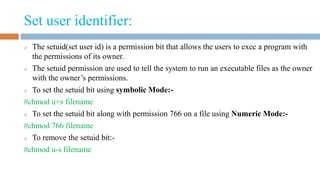
Set user identifier:
 The setuid(set user id) is a permission bit that allows the users to exec a program with
the permissions of its owner.
 The setuid permission are used to tell the system to run an executable files as the owner
with the owner’s permissions.
 To set the setuid bit using symbolic Mode:-
#chmod u+s filename
 To set the setuid bit along with permission 766 on a file using Numeric Mode:-
#chmod 766 filename
 To remove the setuid bit:-
#chmod u-s filename
Set group identifier and Sticky bit:
 The setgid(set group id) is a bit that allows the users to exec a program with the permissions of the group
owner.
 To set the setgid bit using symbolic Mode:-
#chmod g+s filename
 To set the setgid bit along with permission 766 on a file using Numeric Mode:-
#chmod 766 filename
 To remove the setgid bit:-
#chmod g-s filename
 Users with write on the directory can only remove files that they own;they cannot remove or force saves to
files owned by other users.
 To set the setgid bit using symbolic Mode:-
#chmod o+t filename
 To remove the setgid bit:-
#chmod o-t filename
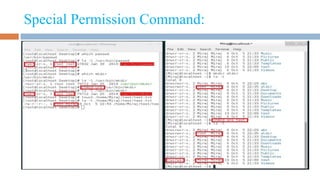
Special Permission Command:
Thanks

Special permission in linux.

  • 1.
    Special Permission inLinux.  Special Permissions.  Standard File Permissions.  Special File Permissions.  Set user identifier, Set group identifier, Sticky bit.
  • 2.
    What is SpecialPermission? The Setuid (or Setgid) Permission on an executable file means that the command will run as the user (or group) of the file not as the user that ran the command. Effects of special permission on files and directories: Special Permission Effects on files Effect on directories u+s (suid) File executes as the user that owns the file, not the user that ran the file. No effect g+s (sgid) File executes as the group that owns the file. File newly created in the directory have their group owner set to match the group owner of the directory. o+t (sticky) No effect Users with write on the directory can only remove files that they own; they cannot remove or force saves to files owned by other users.
  • 3.
     Standard FilePermissions:  Read  write  execute  Special File Permissions:  The Setuid bit (set user identifier).  The Setgid bit (set group identifier).  The Sticky bit.
  • 4.
    Special File Permissions: There are three special permission available in Linux. 1.Setuid (suid) 2.Setgid (sgid) 3.Sticky bit. Symbolic Mode: Numeric Mode: Special Permission Explicitly Representation Binary Representation Setuid s 4 setgid s 2 Sticky bit t 1
  • 5.
    Set user identifier: The setuid(set user id) is a permission bit that allows the users to exec a program with the permissions of its owner.  The setuid permission are used to tell the system to run an executable files as the owner with the owner’s permissions.  To set the setuid bit using symbolic Mode:- #chmod u+s filename  To set the setuid bit along with permission 766 on a file using Numeric Mode:- #chmod 766 filename  To remove the setuid bit:- #chmod u-s filename
  • 6.
    Set group identifierand Sticky bit:  The setgid(set group id) is a bit that allows the users to exec a program with the permissions of the group owner.  To set the setgid bit using symbolic Mode:- #chmod g+s filename  To set the setgid bit along with permission 766 on a file using Numeric Mode:- #chmod 766 filename  To remove the setgid bit:- #chmod g-s filename  Users with write on the directory can only remove files that they own;they cannot remove or force saves to files owned by other users.  To set the setgid bit using symbolic Mode:- #chmod o+t filename  To remove the setgid bit:- #chmod o-t filename
  • 7.
  • 8.