Downloaded 246 times

![Modifying the Permission
Modifying the Permission
[root@power_pc]# chmod <permission/weight> <file/dir>
Options:
Category u(owner) g(group) o(others)
Operators + - =
Permissions r w x
Weight 4 2 1](https://image.slidesharecdn.com/filepermission-150709133809-lva1-app6892/85/File-permission-in-linux-7-320.jpg)
![Example of Permission: Absolute
Applying permission to owner(u), group(g) and others(o) on file reports
[root@power_pc]# chmod 754 reports](https://image.slidesharecdn.com/filepermission-150709133809-lva1-app6892/85/File-permission-in-linux-8-320.jpg)
![Example of Permission: symbolic
Applying permission to owner(u), group(g) and others(o) on file reports
[root@power_pc]# chmod u=rwx, g=rx o=r reports](https://image.slidesharecdn.com/filepermission-150709133809-lva1-app6892/85/File-permission-in-linux-9-320.jpg)
![Changing Ownership
Changing ownership of a file or directory
[root@power_pc]# chown <user name/group name> <file/dir name>](https://image.slidesharecdn.com/filepermission-150709133809-lva1-app6892/85/File-permission-in-linux-10-320.jpg)

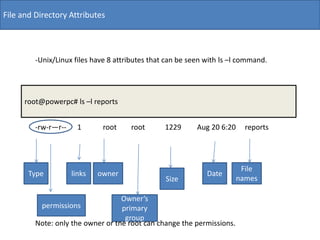
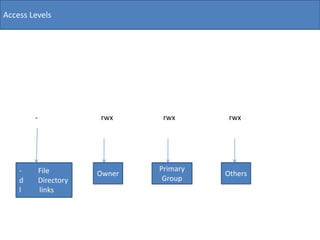
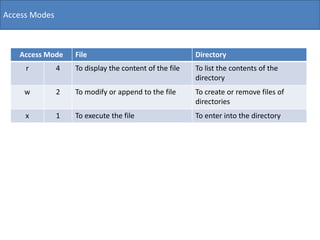
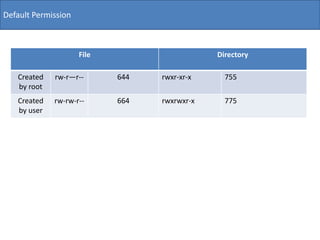
This document discusses basic file permissions in Linux/Unix. It covers the different file attributes seen in the ls -l command output including permissions, owner, group, size and date. It describes the rwx permissions for owner, group and others. It also explains how to modify permissions using chmod with absolute and symbolic modes, and how to change file ownership with chown.


