UNIX basics
and
The UNIX file system
--Omkar .G. Walavalkar
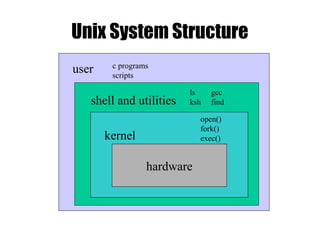
Unix System Structure
user
shell and utilities
kernel
hardware
c programs
scripts
ls
ksh
gcc
find
open()
fork()
exec()
What is a shell?
• The user interface to the operating system
• Functionality:
– Execute other programs
– Manage files
– Manage processes
• A program like any other
• Executed when you log on
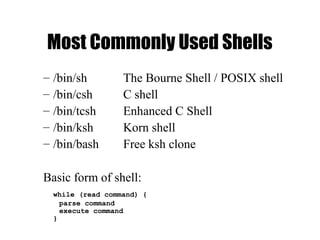
Most Commonly Used Shells
– /bin/sh The Bourne Shell / POSIX shell
– /bin/csh C shell
– /bin/tcsh Enhanced C Shell
– /bin/ksh Korn shell
– /bin/bash Free ksh clone
Basic form of shell:
while (read command) {
parse command
execute command
}
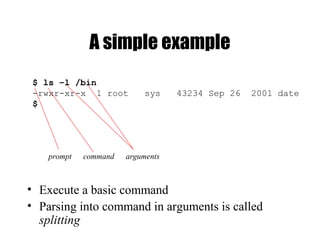
A simple example
• Execute a basic command
• Parsing into command in arguments is called
splitting
$ ls –l /bin
-rwxr-xr-x 1 root sys 43234 Sep 26 2001 date
$
prompt command arguments
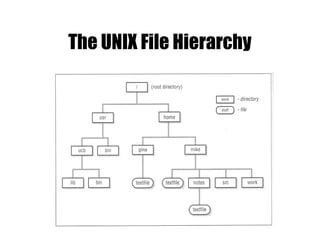
The UNIX File Hierarchy
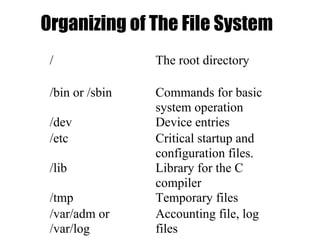
Organizing of The File System
/ The root directory
/bin or /sbin Commands for basic
system operation
/dev Device entries
/etc Critical startup and
configuration files.
/lib Library for the C
compiler
/tmp Temporary files
/var/adm or
/var/log
Accounting file, log
files
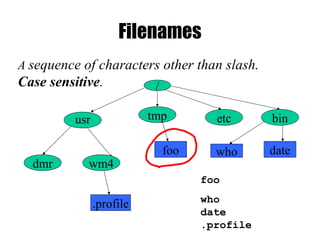
Filenames
/
tmp etc bin
dmr wm4
foo who date
usr
.profile
foo
who
date
.profile
A sequence of characters other than slash.
Case sensitive.
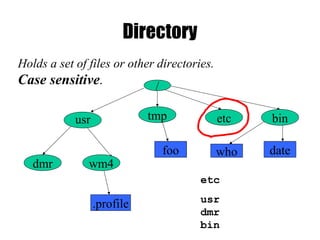
Directory
/
tmp etc bin
dmr wm4
foo who date
usr
.profile
etc
usr
dmr
bin
Holds a set of files or other directories.
Case sensitive.
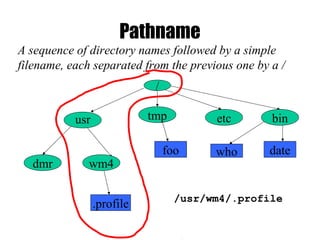
Pathname
/
tmp etc bin
dmr wm4
foo who date
usr
.profile /usr/wm4/.profile
A sequence of directory names followed by a simple
filename, each separated from the previous one by a /
Files and Directories
• Files are just a sequence of bytes
– No file types (data vs. executable)
– No sections
– Example of UNIX philosophy
• Directories are a list of files and status of the files:
– Creation date
– Attributes
– etc.
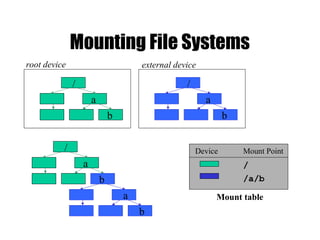
Mounting File Systems
Device Mount Point
/
/a/b
a
b
/
a
b
/
a
b
/
a
b
Mount table
root device external device
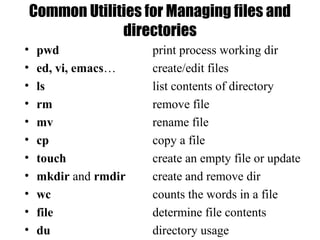
Common Utilities for Managing files and
directories
• pwd print process working dir
• ed, vi, emacs… create/edit files
• ls list contents of directory
• rm remove file
• mv rename file
• cp copy a file
• touch create an empty file or update
• mkdir and rmdir create and remove dir
• wc counts the words in a file
• file determine file contents
• du directory usage
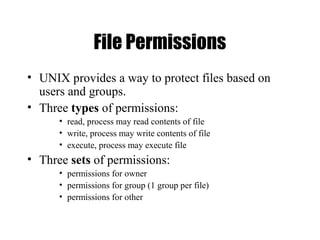
File Permissions
• UNIX provides a way to protect files based on
users and groups.
• Three types of permissions:
• read, process may read contents of file
• write, process may write contents of file
• execute, process may execute file
• Three sets of permissions:
• permissions for owner
• permissions for group (1 group per file)
• permissions for other
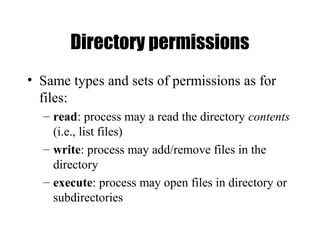
Directory permissions
• Same types and sets of permissions as for
files:
– read: process may a read the directory contents
(i.e., list files)
– write: process may add/remove files in the
directory
– execute: process may open files in directory or
subdirectories
Summary
• All UNIX file system are very similar.
• All file system have this concept of file tree.
– Transparent to user even mount point is
mapped to a remote file system.
• To communicate with devices, special
device files are used.
• More information check out the man pages.

Linux: Basics OF Linux

  • 1.
    UNIX basics and The UNIXfile system --Omkar .G. Walavalkar
  • 2.
    Unix System Structure user shelland utilities kernel hardware c programs scripts ls ksh gcc find open() fork() exec()
  • 3.
    What is ashell? • The user interface to the operating system • Functionality: – Execute other programs – Manage files – Manage processes • A program like any other • Executed when you log on
  • 4.
    Most Commonly UsedShells – /bin/sh The Bourne Shell / POSIX shell – /bin/csh C shell – /bin/tcsh Enhanced C Shell – /bin/ksh Korn shell – /bin/bash Free ksh clone Basic form of shell: while (read command) { parse command execute command }
  • 5.
    A simple example •Execute a basic command • Parsing into command in arguments is called splitting $ ls –l /bin -rwxr-xr-x 1 root sys 43234 Sep 26 2001 date $ prompt command arguments
  • 6.
    The UNIX FileHierarchy
  • 7.
    Organizing of TheFile System / The root directory /bin or /sbin Commands for basic system operation /dev Device entries /etc Critical startup and configuration files. /lib Library for the C compiler /tmp Temporary files /var/adm or /var/log Accounting file, log files
  • 8.
    Filenames / tmp etc bin dmrwm4 foo who date usr .profile foo who date .profile A sequence of characters other than slash. Case sensitive.
  • 9.
    Directory / tmp etc bin dmrwm4 foo who date usr .profile etc usr dmr bin Holds a set of files or other directories. Case sensitive.
  • 10.
    Pathname / tmp etc bin dmrwm4 foo who date usr .profile /usr/wm4/.profile A sequence of directory names followed by a simple filename, each separated from the previous one by a /
  • 11.
    Files and Directories •Files are just a sequence of bytes – No file types (data vs. executable) – No sections – Example of UNIX philosophy • Directories are a list of files and status of the files: – Creation date – Attributes – etc.
  • 12.
    Mounting File Systems DeviceMount Point / /a/b a b / a b / a b / a b Mount table root device external device
  • 13.
    Common Utilities forManaging files and directories • pwd print process working dir • ed, vi, emacs… create/edit files • ls list contents of directory • rm remove file • mv rename file • cp copy a file • touch create an empty file or update • mkdir and rmdir create and remove dir • wc counts the words in a file • file determine file contents • du directory usage
  • 14.
    File Permissions • UNIXprovides a way to protect files based on users and groups. • Three types of permissions: • read, process may read contents of file • write, process may write contents of file • execute, process may execute file • Three sets of permissions: • permissions for owner • permissions for group (1 group per file) • permissions for other
  • 15.
    Directory permissions • Sametypes and sets of permissions as for files: – read: process may a read the directory contents (i.e., list files) – write: process may add/remove files in the directory – execute: process may open files in directory or subdirectories
  • 16.
    Summary • All UNIXfile system are very similar. • All file system have this concept of file tree. – Transparent to user even mount point is mapped to a remote file system. • To communicate with devices, special device files are used. • More information check out the man pages.