Project Title
Linux Network manager & Editor
VIM
 What is Vim?
ļ‚§ Vim which stand for ā€œVi Improvedā€, is a text editor. It can be used
for editing any kind of text and is especially suited for editing
computer programs in Linux system.
ļ‚§ Vim previous version is Vi(Visual Interface).
ļ‚§ It supports scripting in multiple languages.
 Why we used Vim:
Because of,
o Vim is Free and Open Source
o Vim is Always Available
o Vim Is Well Documented
o Vim Is Very Customizable and Extensible
o Vim Has Portable Configurations
o Vim Uses Less Amount of System Resources
o Vim Supports All Programming Languages and File Formats
 Different version of vim:
ļ‚§ Vim- minimal : This version only provides vi and
related commands.
ļ‚§ Vim-enhanced : This package provides vim
commands.
ļ‚§ Vim- X11 : This provides gvim to use in graphical
window in a terminal.
 Primary modes of vim:
ļ‚§ Command mode : Used for copy , paste , undo and redo.
ļ‚§ Insert mode : Used for Replace and insert in editing .
ļ‚§ Ex mode : Used for save , quit and open files.
 Summary of saving file with Vim:
ļ‚§ :wq! = Save and quiet the curent file.
ļ‚§ : x = unsaved changes, then quit.
ļ‚§ : w = Save the current file and remain in editor.
ļ‚§ : w < filename> = Save the current file under a different file name.
ļ‚§ : q = Quit the current file and unsaved changes.
ļ‚§ :q! = Quit the current file,ignoring any unsaved changes.
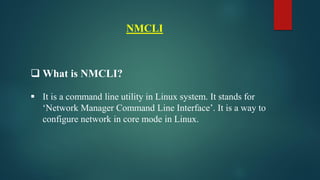
NMCLI
 What is NMCLI?
ļ‚§ It is a command line utility in Linux system. It stands for
ā€˜Network Manager Command Line Interface’. It is a way to
configure network in core mode in Linux.
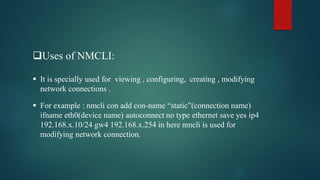
Uses of NMCLI:
ļ‚§ It is specially used for viewing , configuring, creating , modifying
network connections .
ļ‚§ For example : nmcli con add con-name ā€œstaticā€(connection name)
ifname eth0(device name) autoconnect no type ethernet save yes ip4
192.168.x.10/24 gw4 192.168.x.254 in here nmcli is used for
modifying network connection.
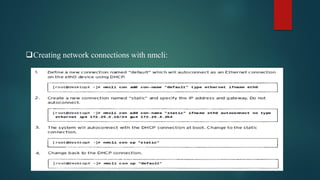
Creating network connections with nmcli:
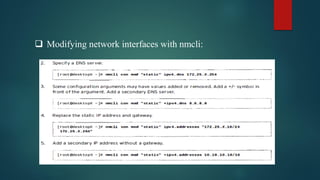
 Modifying network interfaces with nmcli:
Thank You !!

Linux network manager configuration

  • 1.
  • 2.
    VIM  What isVim? ļ‚§ Vim which stand for ā€œVi Improvedā€, is a text editor. It can be used for editing any kind of text and is especially suited for editing computer programs in Linux system. ļ‚§ Vim previous version is Vi(Visual Interface). ļ‚§ It supports scripting in multiple languages.
  • 3.
     Why weused Vim: Because of, o Vim is Free and Open Source o Vim is Always Available o Vim Is Well Documented o Vim Is Very Customizable and Extensible o Vim Has Portable Configurations o Vim Uses Less Amount of System Resources o Vim Supports All Programming Languages and File Formats
  • 4.
     Different versionof vim: ļ‚§ Vim- minimal : This version only provides vi and related commands. ļ‚§ Vim-enhanced : This package provides vim commands. ļ‚§ Vim- X11 : This provides gvim to use in graphical window in a terminal.  Primary modes of vim: ļ‚§ Command mode : Used for copy , paste , undo and redo. ļ‚§ Insert mode : Used for Replace and insert in editing . ļ‚§ Ex mode : Used for save , quit and open files.
  • 5.
     Summary ofsaving file with Vim: ļ‚§ :wq! = Save and quiet the curent file. ļ‚§ : x = unsaved changes, then quit. ļ‚§ : w = Save the current file and remain in editor. ļ‚§ : w < filename> = Save the current file under a different file name. ļ‚§ : q = Quit the current file and unsaved changes. ļ‚§ :q! = Quit the current file,ignoring any unsaved changes.
  • 6.
    NMCLI  What isNMCLI? ļ‚§ It is a command line utility in Linux system. It stands for ā€˜Network Manager Command Line Interface’. It is a way to configure network in core mode in Linux.
  • 7.
    Uses of NMCLI: ļ‚§It is specially used for viewing , configuring, creating , modifying network connections . ļ‚§ For example : nmcli con add con-name ā€œstaticā€(connection name) ifname eth0(device name) autoconnect no type ethernet save yes ip4 192.168.x.10/24 gw4 192.168.x.254 in here nmcli is used for modifying network connection.
  • 8.
  • 9.
     Modifying networkinterfaces with nmcli:
  • 10.