Developing Apps for SharePoint 2013
PAOLO PIALORSI, PIASYS
PAOLO@PIALORSI.COM

SHAREPOINT AND PROJECT CONFERENCE ADRIATICS 2013
ZAGREB, NOVEMBER 27-28 2013
sponsors
Something about me
• Consultant, project manager and trainer
• More than 40 Microsoft certification exams passed
• Microsoft Certified Solution Master – Charter SharePoint

• Focused on SharePoint since the beginning
• Author of 10 books about XML, SOAP, .NET, LINQ
and SharePoint
•
•
•

Microsoft SharePoint 2010 Developer Reference, Microsoft Press
Microsoft SharePoint 2013 Developer Reference, Microsoft Press
Build Windows 8 Apps with Microsoft Visual C# and
Visual Basic Step by Step, Microsoft Press

• Speaker at main IT conferences
Agenda
• Apps Model Overview
•
•
•
•
•

Architecture
Hosting Model
UI Options
App Manifest
Publishing apps

• App Security Model
• What’s new in Visual Studio 2013 RTM
APPS MODEL OVERVIEW
Once upon a time …
Farm solutions







Full trust solutions
File system access
GAC deploy
14 hive access
.NET managed code
Inherited from SP2007

Sandbox solutions






Partially trusted code
Limited API
.NET managed code
No access to file system
No calls to services

Apps





solutions model

New model apporiented
Deployed from
corporate catalog or
Office Store
Based on web
standards
No code with server
object mode!

apps model

SP2010
SP2013
A LAP AROUND THE APP MODEL
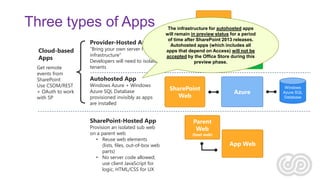
Three types of Apps
Provider-Hosted App
Cloud-based
Apps
Get remote
events from
SharePoint
Use CSOM/REST
+ OAuth to work
with SP

“Bring your own server hosting
infrastructure”
Developers will need to isolate
tenants

App Web

(optional)
The infrastructure for autohosted apps
will remain in preview status for a period
of time after SharePoint 2013 releases.
Autohosted apps (which includes all
SharePoint
apps that depend on Access) willHosted
Your not be
accepted by the Office Store during this
Web
Site
preview phase.

Autohosted App

Windows Azure + Windows
Azure SQL Database
provisioned invisibly as apps
are installed

SharePoint-Hosted App

Provision an isolated sub web
on a parent web
• Reuse web elements
(lists, files, out-of-box web
parts)
• No server code allowed;
use client JavaScript for
logic, HTML/CSS for UX

SharePoint
Web

Azure

Parent
Web

(host web)

App Web

Windows
Azure SQL
Database
Apps programming model
• Client-side pattern (ALL)
• HTML5, CSS, JavaScript
• Leverage Javascript libraries
like JQuery, KnockoutJs,
Angular, etc.

• Server-side pattern (CLOUD-ONLY)
• Use your own infrastructure
• Use your preferred language
(ASP.NET, PHP, JSP, ecc..)
• Use client-side object model
or REST to get info from SharePoint

• Hybrid pattern (CLOUD-ONLY)
• Mix-and-match client-side pattern with server-side pattern
Apps UI options
• Immersive full page - are like application pages, with
HTML, CSS, JavaScript
• Including SharePoint OOB controls in SharePoint-hosted apps

• Part - are simple IFRAMEs 
• UI Custom Actions - are SharePoint custom actions like
Ribbons or ECB item actions
A FIRST SAMPLE APP
App Manifest
• General
• Title, version, startup page, ecc.

• Permissions
• Permission required to run the app
• The end user installing the app will have to trust it

• Prerequisites
• Software prerequisites to correctly run the app

• Supported Locales
• EN-US is required to publish apps on the Office Store

• Remote Endpoints
• For declaring endpoints of remote services supporting the app
Options for publishing apps
• Office Store – You can build your app, submit to Microsoft for
approval and make the app publically available, with your
license policies, in order to be aquired by users with any
SharePoint environments
• Corporate App Catalog – You can put your app into a company
internal catalog, hosted on your SharePoint environment, in
order to make it available to your final users
What can we do in apps?
• Pages
• App Parts
• UI Extensions
• Content (lists, libraries, items)
• Workflows
• Remote Event Receivers
• Business Connectivity Services (OData)
• Etc.
A SAMPLE WORKFLOW-BASED APP
APPS SECURITY MODEL => OAUTH
OAuth
• OAuth is an open protocol for authenticating apps and allowing
secure API authorization from desktop and web applications
through a web based standard and simple technique.
• For example: authorize the printing app to read pictures from
my Facebook profile, or from my SkyDrive
OAuth Flow
STS (ACS)

7- Access token

2. Request
context token

Client

3. Signed
context token

6.
Refresh
token

8. Request –
Access token

1.
Request
4. Page - IFrame

SharePoint Server

5. Request IFrame
contents
10. IFrame contents

9. SharePoint data

Intranet.contoso.com
SharePoint 2013 Apps’ Authentication
Start
User
credentials
provided?

Is the
endpoint
outside of
an app
web?

Yes

No
OAuth
token
present?

No

Yes
Set user context

No

Yes

Is endpoint
CSOM?

No

Yes

Does the
token
include
user info?

Yes

Set app and user
context

No
Set App-Only
context

Use anonymous
context

End
App Permissions
• App are granted permissions
• App permissions are different from user permissions
• App permissions are granted as all or nothing
• App permissions have no permissions hierarchy
• this is different than user permissions which have a hierarchy inside a site
collection

• An app has default permissions
•
•
•
•

App has full control over app web but no other default permissions
App can include permission request in application manifest
Installing user grants/denies permissions during installation
If permission request denied, SharePoint does not install app
S2S High Trust Scenario
• High Trust != Full Trust
• Alternative to OAuth
• Leveraged by apps and infrastructural services
• Workflow Manager, Exchange, etc.

• Direct trust relationship between SP2013 and the external
service
• Based on X.509 certificates
• One certificate for each app (avoid sharing certs across apps)

• Available for Provider-hosted apps
• Supported by wizard of VS2012/VS2013
• A little bit «complicated» to configure, using PowerShell
WHAT’S NEW WITH VISUAL STUDIO
2013
Apps for SharePoint in VS2013 RTM
• New MVC5 template for App for SharePoint
• SharePointContext helper classes
• Independent from ACS or S2S
• Access token caching
• Object model wrapper

• App for SharePoint Web Toolkit via NuGet
• Available for VS2012, as well

• Workflow remote debugging via Azure Service Bus
Cloud Business Apps
• New project (solution) template
• Highly productive development experience
• Based on LightSwitch HTML client
• Can consume external data sources (SharePoint, SQL
Server, OData, ecc.)

• Multi-browser/multi-device
• Integrated with social features of SharePoint
• Support social feeds
• Does not yet support Yammer …

• Easy deployment/publishing of business apps
questions?
HTTP://WWW.SHAREPOINTREFERENCE.COM/BLOG/

@PAOLOPIA
thank you.
SHAREPOINT AND PROJECT CONFERENCE ADRIATICS 2013
ZAGREB, NOVEMBER 27-28 2013

Developing Apps for SharePoint 2013

  • 1.
    Developing Apps forSharePoint 2013 PAOLO PIALORSI, PIASYS PAOLO@PIALORSI.COM SHAREPOINT AND PROJECT CONFERENCE ADRIATICS 2013 ZAGREB, NOVEMBER 27-28 2013
  • 2.
  • 3.
    Something about me •Consultant, project manager and trainer • More than 40 Microsoft certification exams passed • Microsoft Certified Solution Master – Charter SharePoint • Focused on SharePoint since the beginning • Author of 10 books about XML, SOAP, .NET, LINQ and SharePoint • • • Microsoft SharePoint 2010 Developer Reference, Microsoft Press Microsoft SharePoint 2013 Developer Reference, Microsoft Press Build Windows 8 Apps with Microsoft Visual C# and Visual Basic Step by Step, Microsoft Press • Speaker at main IT conferences
  • 4.
    Agenda • Apps ModelOverview • • • • • Architecture Hosting Model UI Options App Manifest Publishing apps • App Security Model • What’s new in Visual Studio 2013 RTM
  • 5.
  • 6.
    Once upon atime … Farm solutions       Full trust solutions File system access GAC deploy 14 hive access .NET managed code Inherited from SP2007 Sandbox solutions      Partially trusted code Limited API .NET managed code No access to file system No calls to services Apps     solutions model New model apporiented Deployed from corporate catalog or Office Store Based on web standards No code with server object mode! apps model SP2010 SP2013
  • 7.
    A LAP AROUNDTHE APP MODEL
  • 8.
    Three types ofApps Provider-Hosted App Cloud-based Apps Get remote events from SharePoint Use CSOM/REST + OAuth to work with SP “Bring your own server hosting infrastructure” Developers will need to isolate tenants App Web (optional) The infrastructure for autohosted apps will remain in preview status for a period of time after SharePoint 2013 releases. Autohosted apps (which includes all SharePoint apps that depend on Access) willHosted Your not be accepted by the Office Store during this Web Site preview phase. Autohosted App Windows Azure + Windows Azure SQL Database provisioned invisibly as apps are installed SharePoint-Hosted App Provision an isolated sub web on a parent web • Reuse web elements (lists, files, out-of-box web parts) • No server code allowed; use client JavaScript for logic, HTML/CSS for UX SharePoint Web Azure Parent Web (host web) App Web Windows Azure SQL Database
  • 9.
    Apps programming model •Client-side pattern (ALL) • HTML5, CSS, JavaScript • Leverage Javascript libraries like JQuery, KnockoutJs, Angular, etc. • Server-side pattern (CLOUD-ONLY) • Use your own infrastructure • Use your preferred language (ASP.NET, PHP, JSP, ecc..) • Use client-side object model or REST to get info from SharePoint • Hybrid pattern (CLOUD-ONLY) • Mix-and-match client-side pattern with server-side pattern
  • 10.
    Apps UI options •Immersive full page - are like application pages, with HTML, CSS, JavaScript • Including SharePoint OOB controls in SharePoint-hosted apps • Part - are simple IFRAMEs  • UI Custom Actions - are SharePoint custom actions like Ribbons or ECB item actions
  • 11.
  • 12.
    App Manifest • General •Title, version, startup page, ecc. • Permissions • Permission required to run the app • The end user installing the app will have to trust it • Prerequisites • Software prerequisites to correctly run the app • Supported Locales • EN-US is required to publish apps on the Office Store • Remote Endpoints • For declaring endpoints of remote services supporting the app
  • 13.
    Options for publishingapps • Office Store – You can build your app, submit to Microsoft for approval and make the app publically available, with your license policies, in order to be aquired by users with any SharePoint environments • Corporate App Catalog – You can put your app into a company internal catalog, hosted on your SharePoint environment, in order to make it available to your final users
  • 14.
    What can wedo in apps? • Pages • App Parts • UI Extensions • Content (lists, libraries, items) • Workflows • Remote Event Receivers • Business Connectivity Services (OData) • Etc.
  • 15.
  • 16.
  • 17.
    OAuth • OAuth isan open protocol for authenticating apps and allowing secure API authorization from desktop and web applications through a web based standard and simple technique. • For example: authorize the printing app to read pictures from my Facebook profile, or from my SkyDrive
  • 18.
    OAuth Flow STS (ACS) 7-Access token 2. Request context token Client 3. Signed context token 6. Refresh token 8. Request – Access token 1. Request 4. Page - IFrame SharePoint Server 5. Request IFrame contents 10. IFrame contents 9. SharePoint data Intranet.contoso.com
  • 19.
    SharePoint 2013 Apps’Authentication Start User credentials provided? Is the endpoint outside of an app web? Yes No OAuth token present? No Yes Set user context No Yes Is endpoint CSOM? No Yes Does the token include user info? Yes Set app and user context No Set App-Only context Use anonymous context End
  • 20.
    App Permissions • Appare granted permissions • App permissions are different from user permissions • App permissions are granted as all or nothing • App permissions have no permissions hierarchy • this is different than user permissions which have a hierarchy inside a site collection • An app has default permissions • • • • App has full control over app web but no other default permissions App can include permission request in application manifest Installing user grants/denies permissions during installation If permission request denied, SharePoint does not install app
  • 21.
    S2S High TrustScenario • High Trust != Full Trust • Alternative to OAuth • Leveraged by apps and infrastructural services • Workflow Manager, Exchange, etc. • Direct trust relationship between SP2013 and the external service • Based on X.509 certificates • One certificate for each app (avoid sharing certs across apps) • Available for Provider-hosted apps • Supported by wizard of VS2012/VS2013 • A little bit «complicated» to configure, using PowerShell
  • 22.
    WHAT’S NEW WITHVISUAL STUDIO 2013
  • 23.
    Apps for SharePointin VS2013 RTM • New MVC5 template for App for SharePoint • SharePointContext helper classes • Independent from ACS or S2S • Access token caching • Object model wrapper • App for SharePoint Web Toolkit via NuGet • Available for VS2012, as well • Workflow remote debugging via Azure Service Bus
  • 24.
    Cloud Business Apps •New project (solution) template • Highly productive development experience • Based on LightSwitch HTML client • Can consume external data sources (SharePoint, SQL Server, OData, ecc.) • Multi-browser/multi-device • Integrated with social features of SharePoint • Support social feeds • Does not yet support Yammer … • Easy deployment/publishing of business apps
  • 25.
  • 26.
    thank you. SHAREPOINT ANDPROJECT CONFERENCE ADRIATICS 2013 ZAGREB, NOVEMBER 27-28 2013

Editor's Notes

  • #8 Show marketplace: Office Store, install, trusting, etc. => Weather Bamboo SolutionsShow corporate App Catalog
  • #9 http://msdn.microsoft.com/en-us/library/office/jj220035.aspx – 22/10/2013http://msdn.microsoft.com/en-us/library/office/jj591603.aspx – 4/6/2013http://msdn.microsoft.com/en-us/library/office/jj938162.aspx – 5/2/2013
  • #11 ECB =Edit Control Block
  • #12 1) Show Contacts sample app => Full Page, App Part, Ribbon2) Create simple SharePoint-hosted AppProvision new library of documentsChange home page to show the libraryDeploy and start the appShow App Manifest
  • #16 Back to the first sample appProvision approval workflow against the documents of the libraryDeploy and start the appShow the workflow running
  • #24 http://blogs.msdn.com/b/officeapps/archive/2013/10/17/announcing-visual-studio-2013-rtm.aspx