




Ivan Sanders
Ivan Sanders is a SharePoint MVP/MCT Author and independent consultant with
more than 15 years of broad-based hands-on experience with the design and
development of mission-critical applications that include Business Intelligence
Dashboards in the enterprise and deployment of Microsoft products, while
delivering nothing but Microsoft SharePoint solutions since 2004.
Ivan is active in the SharePoint Community through the MSDN and TechNet
forums, Codeplex, and GitHub, Teched and PDC Birds of a Feather, Build,
SharePoint Saturday, SharePoint Conferences, SharePoint ShopTalk, INETA,
GITCA, and Local Southern California User Groups.
twitter http://twitter.com/iasanders,
LinkedIn http://www.linkedin.com/in/iasanders,
Blog http://msmvps.com/blogs/ivansanders
Email: ivan@dimension-si.com
Consultants see “interesting issues”
• The “G” word (no not God)
• “Best Practices” Architecture Permissions Content
• Minimum requirements
• 3rd Party Tools
• Content Management
• Governance
• Definition
• Goals
• Platform
• Chaos as an Opportunity
• Architecture
• Guidelines & Tenets
• Scaleability
• Information Architecture
• Business Critical Apps
• Line of Business
• Search
• Business intelligence
• Social
“Best Practices” Minimum requirements
• Administrators should always know how to automate the farm Build
• Developers should know how to package and deliver features
• Designers should know that SharePoint Designer no longer has a design canvas
• Business Intelligence Analysts should know how to create PowerPivot,
PowerMap,PowerView, and PowerQuery using Excel
• DBAs / Administrators should know how to script your SQL Always ON Cluster and
provision the correct size and number of volumes
• Pre-size ContentDBs to 100GBs and do not let grow beyond 200GB
• Be Agile in everything you do
• If you have public facing site hire and outside services firm to perform PEN testing twice
per year and FIX all of the issues Level 2-5 immediately
• Disable SSL2, and SSL3 use TLS 1.2
• Test your Disaster recovery plan
• Monitor the search query logs for how people use search
“Best Practices” 3rd Party Tools
• Use Vyapin Software SPDockit to create your as Built Documents and Adherence to Best
Practices
• Use Metalogix Control Point to restrict URL Depth, ensuring users are added to Groups,
Reporting ion Site Owners administrative privilege changes, restrict item level
permissions except where necessary
• Use Metalogix Content Matrix or MetaVis to migrate your content from previous
versions
• Be Agile in everything you do
• Use Team Foundation Server or GitHub for All Code include scripts and Documentation
• Use Codeplex.com to find free tools like ULSViewer and Search Diagnotics
• Use Codeplex to find examples, demos, builds with labs and other training material
• Use Github.com/OfficeDev to discover guidance examples and traning materials for
developers
• Know what and how people use SharePoint. Use a simple WebSite Statistics Tool like
Web Expert and create a site and publish the HTML reports on site usage
“Best Practices” Content Manageent
• Know your companies Document Lifecycle
• Always Create and Share Content Types, Site Columns, and use the managed metadata
Store to capture the Business Terms and Aliases used every day
• Fix the navigation and branding on the search result page
• Change the Search result Hover Panel to use the edit item Hover panel
• Create Refiners using Managed Properties
• Use Continuous Crawls where possible and plan for the additional WFE for Crawls
• Plan for and Enable the BLOB Cache to play videos more quickly
• Only use item level permissions if necessary
• Use Vyapin Software SPDockit to create your as Built Documents and Adherence to Best
Practices
• Use Metalogix Control Point to restrict URL Depth, ensuring users are added to Groups,
Reporting ion Site Owners administrative privilege changes.
• Use Metalogix Content Matrix or MetaVis to migrate your content from previous
versions
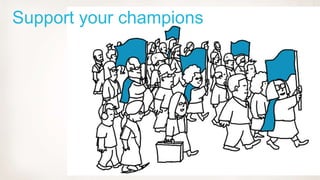
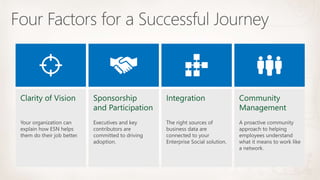
Support your champions
•
•
•
•
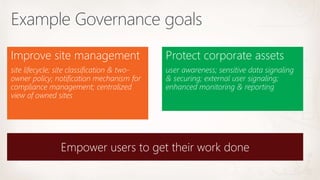
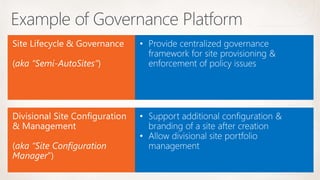
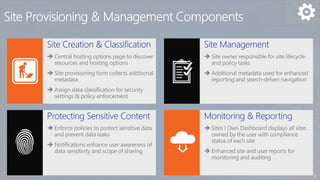
Improve site management Protect corporate assets
K
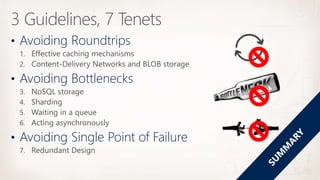
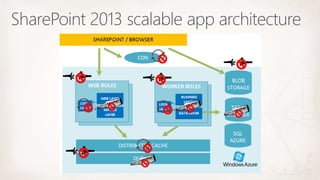
• Avoiding Roundtrips
• Avoiding Bottlenecks
• Avoiding Single Point of Failure
•
•
•
•
•
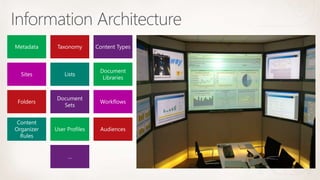
Metadata Taxonomy Content Types
Sites Lists
Document
Libraries
Folders
Document
Sets
Workflows
Content
Organizer
Rules
User Profiles Audiences
…
•
•
•
•
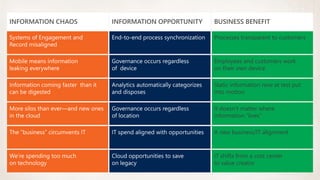
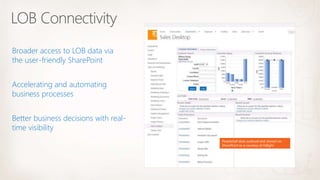
PeopleSoft data surfaced and shared via
SharePoint as a courtesy of Inflight.
Broader access to LOB data via
the user-friendly SharePoint
Better business decisions with real-
time visibility
Accelerating and automating
business processes
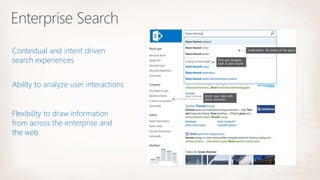
Contextual and intent driven
search experiences
Flexibility to draw information
from across the enterprise and
the web
Ability to analyze user interactions
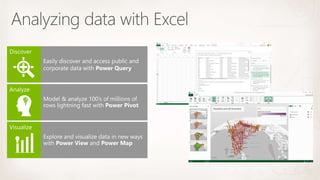
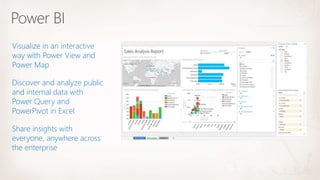
Visualize in an interactive
way with Power View and
Power Map
Share insights with
everyone, anywhere across
the enterprise
Discover and analyze public
and internal data with
Power Query and
PowerPivot in Excel
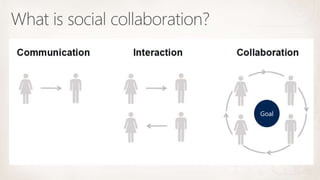
Goal
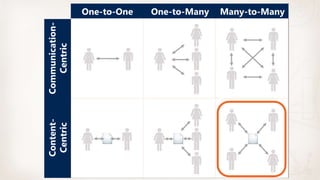
One-to-One One-to-Many Many-to-Many
Communication-
Centric
Content-
Centric
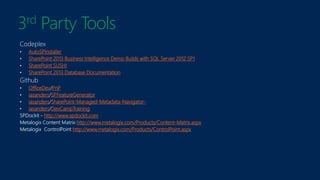
3rd Party Tools
AutoSPInstaller
SharePoint 2013 Business Intelligence Demo Builds with SQL Server 2012 SP1
SharePoint SUSHI
SharePoint 2013 Database Documentation
OfficeDev PnP
iasanders SPFeatureGenerator
iasanders SharePoint-Managed-Metadata-Navigator-
iasanders DevCampTraining
http://www.spdockit.com
http://www.metalogix.com/Products/Content-Matrix.aspx
http://www.metalogix.com/Products/ControlPoint.aspx
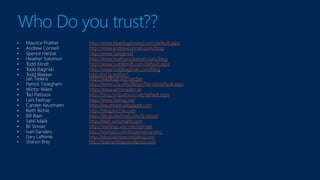
Who Do you trust??
http://www.bluedoglimited.com/default.aspx
http://www.andrewconnell.com/blog
http://www.harbar.net
http://www.heathersolomon.com/blog
http://www.toddklindt.com/default.aspx
http://www.toddbaginski.com/blog
http://bit.ly/edlSm5
http://weblogs.asp.net/jan
http://www.u2u.info/Blogs/Patrick/default.aspx
http://www.wictorwilen.se
http://blog.tedpattison.net/default.aspx
http://www.fastrup.net
http://keutmann.blogspot.com
http://blog.krichie.com
http://blogs.technet.com/b/wbaer
http://blah.winsmarts.com
http://weblogs.asp.net/bsimser
http://msmvps.com/blogs/ivansanders
http://blog.falchionconsulting.com
http://shannonbray.wordpress.com
#OCSPUG SharePoint 2013 Best Practices

#OCSPUG SharePoint 2013 Best Practices

  • 4.
    Ivan Sanders Ivan Sandersis a SharePoint MVP/MCT Author and independent consultant with more than 15 years of broad-based hands-on experience with the design and development of mission-critical applications that include Business Intelligence Dashboards in the enterprise and deployment of Microsoft products, while delivering nothing but Microsoft SharePoint solutions since 2004. Ivan is active in the SharePoint Community through the MSDN and TechNet forums, Codeplex, and GitHub, Teched and PDC Birds of a Feather, Build, SharePoint Saturday, SharePoint Conferences, SharePoint ShopTalk, INETA, GITCA, and Local Southern California User Groups. twitter http://twitter.com/iasanders, LinkedIn http://www.linkedin.com/in/iasanders, Blog http://msmvps.com/blogs/ivansanders Email: ivan@dimension-si.com
  • 6.
    Consultants see “interestingissues” • The “G” word (no not God) • “Best Practices” Architecture Permissions Content • Minimum requirements • 3rd Party Tools • Content Management • Governance • Definition • Goals • Platform • Chaos as an Opportunity • Architecture • Guidelines & Tenets • Scaleability • Information Architecture • Business Critical Apps • Line of Business • Search • Business intelligence • Social
  • 8.
    “Best Practices” Minimumrequirements • Administrators should always know how to automate the farm Build • Developers should know how to package and deliver features • Designers should know that SharePoint Designer no longer has a design canvas • Business Intelligence Analysts should know how to create PowerPivot, PowerMap,PowerView, and PowerQuery using Excel • DBAs / Administrators should know how to script your SQL Always ON Cluster and provision the correct size and number of volumes • Pre-size ContentDBs to 100GBs and do not let grow beyond 200GB • Be Agile in everything you do • If you have public facing site hire and outside services firm to perform PEN testing twice per year and FIX all of the issues Level 2-5 immediately • Disable SSL2, and SSL3 use TLS 1.2 • Test your Disaster recovery plan • Monitor the search query logs for how people use search
  • 9.
    “Best Practices” 3rdParty Tools • Use Vyapin Software SPDockit to create your as Built Documents and Adherence to Best Practices • Use Metalogix Control Point to restrict URL Depth, ensuring users are added to Groups, Reporting ion Site Owners administrative privilege changes, restrict item level permissions except where necessary • Use Metalogix Content Matrix or MetaVis to migrate your content from previous versions • Be Agile in everything you do • Use Team Foundation Server or GitHub for All Code include scripts and Documentation • Use Codeplex.com to find free tools like ULSViewer and Search Diagnotics • Use Codeplex to find examples, demos, builds with labs and other training material • Use Github.com/OfficeDev to discover guidance examples and traning materials for developers • Know what and how people use SharePoint. Use a simple WebSite Statistics Tool like Web Expert and create a site and publish the HTML reports on site usage
  • 10.
    “Best Practices” ContentManageent • Know your companies Document Lifecycle • Always Create and Share Content Types, Site Columns, and use the managed metadata Store to capture the Business Terms and Aliases used every day • Fix the navigation and branding on the search result page • Change the Search result Hover Panel to use the edit item Hover panel • Create Refiners using Managed Properties • Use Continuous Crawls where possible and plan for the additional WFE for Crawls • Plan for and Enable the BLOB Cache to play videos more quickly • Only use item level permissions if necessary • Use Vyapin Software SPDockit to create your as Built Documents and Adherence to Best Practices • Use Metalogix Control Point to restrict URL Depth, ensuring users are added to Groups, Reporting ion Site Owners administrative privilege changes. • Use Metalogix Content Matrix or MetaVis to migrate your content from previous versions
  • 11.
  • 13.
  • 14.
    Improve site managementProtect corporate assets
  • 16.
  • 20.
    • Avoiding Roundtrips •Avoiding Bottlenecks • Avoiding Single Point of Failure
  • 22.
  • 23.
    Metadata Taxonomy ContentTypes Sites Lists Document Libraries Folders Document Sets Workflows Content Organizer Rules User Profiles Audiences …
  • 24.
  • 26.
    PeopleSoft data surfacedand shared via SharePoint as a courtesy of Inflight. Broader access to LOB data via the user-friendly SharePoint Better business decisions with real- time visibility Accelerating and automating business processes
  • 27.
    Contextual and intentdriven search experiences Flexibility to draw information from across the enterprise and the web Ability to analyze user interactions
  • 29.
    Visualize in aninteractive way with Power View and Power Map Share insights with everyone, anywhere across the enterprise Discover and analyze public and internal data with Power Query and PowerPivot in Excel
  • 30.
  • 31.
  • 36.
    3rd Party Tools AutoSPInstaller SharePoint2013 Business Intelligence Demo Builds with SQL Server 2012 SP1 SharePoint SUSHI SharePoint 2013 Database Documentation OfficeDev PnP iasanders SPFeatureGenerator iasanders SharePoint-Managed-Metadata-Navigator- iasanders DevCampTraining http://www.spdockit.com http://www.metalogix.com/Products/Content-Matrix.aspx http://www.metalogix.com/Products/ControlPoint.aspx
  • 37.
    Who Do youtrust?? http://www.bluedoglimited.com/default.aspx http://www.andrewconnell.com/blog http://www.harbar.net http://www.heathersolomon.com/blog http://www.toddklindt.com/default.aspx http://www.toddbaginski.com/blog http://bit.ly/edlSm5 http://weblogs.asp.net/jan http://www.u2u.info/Blogs/Patrick/default.aspx http://www.wictorwilen.se http://blog.tedpattison.net/default.aspx http://www.fastrup.net http://keutmann.blogspot.com http://blog.krichie.com http://blogs.technet.com/b/wbaer http://blah.winsmarts.com http://weblogs.asp.net/bsimser http://msmvps.com/blogs/ivansanders http://blog.falchionconsulting.com http://shannonbray.wordpress.com