

SharePoint 2013: App or Not to App

Walkthrough of SharePoint 2013 Apps
-- why you should use apps over farm solutions
Session Evaluations
• Schedule and evaluate each session you attend via our mobile

app that can be used across devices at
http://spsaturday.cloudapp.net

• You will be able to evaluate a session 25 minutes before the

scheduled end time
• Evaluations are stored anonymously and your feedback is
appreciated
• The app will be the only method available to submit session
evaluations for the event and we hope you find it intuitive and
convenient
Room Survey
• Have seen SharePoint 2013?
• Installed on-prem Or O365?
• Currently a C# developer?
• Know Web-Dev Technologies (HTML5, CSS3, JS, jQuery)?
• Used JS-CSOM for SharePoint 2010?
Agenda
•
•
•
•

Introduction to SharePoint 2013 apps
Deployment options and design patterns
Technologies used in app development
Building a SharePoint-hosted app
setting the scene
Introducing the new SharePoint app
framework
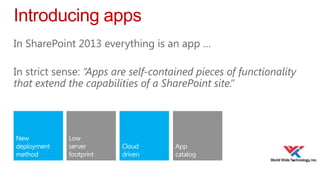
Introducing apps
In SharePoint 2013 everything is an app …
In strict sense: “Apps are self-contained pieces of functionality
that extend the capabilities of a SharePoint site.”
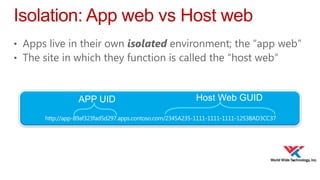
Isolation: App web vs Host web
• Apps live in their own isolated environment; the “app web”
• The site in which they function is called the “host web”

APP UID

Host Web GUID
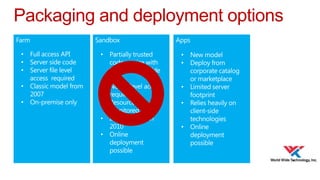
Packaging and deployment options
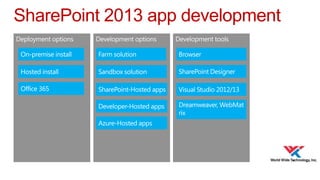
SharePoint 2013 app development
Demo
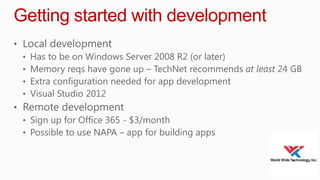
Getting started with development
• Local development
• Has to be on Windows Server 2008 R2 (or later)
• Memory reqs have gone up – TechNet recommends at least 24 GB
• Extra configuration needed for app development
• Visual Studio 2012
• Remote development
• Sign up for Office 365 - $3/month
• Possible to use NAPA – app for building apps
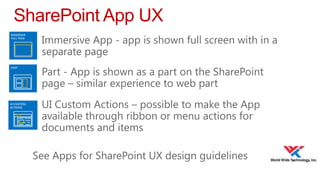
SharePoint App UX
• Immersive App - app is shown full screen with in a

separate page

• Part - App is shown as a part on the SharePoint

page – similar experience to web part

• UI Custom Actions – possible to make the App

available through ribbon or menu actions for
documents and items

See Apps for SharePoint UX design guidelines
Demo
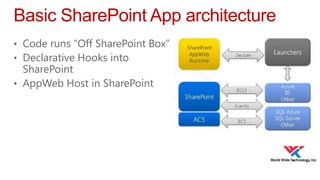
Basic SharePoint App architecture
• Code runs “Off SharePoint Box”
• Declarative Hooks into

SharePoint
• AppWeb Host in SharePoint
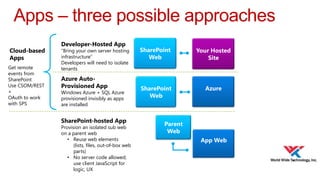
Apps – three possible approaches
Cloud-based
Apps
Get remote
events from
SharePoint
Use CSOM/REST
+
OAuth to work
with SPS

Developer-Hosted App

“Bring your own server hosting
infrastructure”
Developers will need to isolate
tenants

Azure AutoProvisioned App

Windows Azure + SQL Azure
provisioned invisibly as apps
are installed

SharePoint-hosted App

Provision an isolated sub web
on a parent web
• Reuse web elements
(lists, files, out-of-box web
parts)
• No server code allowed;
use client JavaScript for
logic, UX

SharePoint
Web

Your Hosted
Site

SharePoint
Web

Azure

Parent
Web
App Web
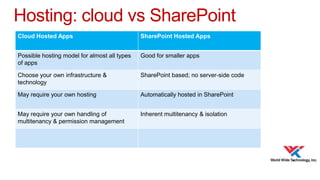
Hosting: cloud vs SharePoint
Cloud Hosted Apps

SharePoint Hosted Apps

Possible hosting model for almost all types
of apps

Good for smaller apps

Choose your own infrastructure &
technology

SharePoint based; no server-side code

May require your own hosting

Automatically hosted in SharePoint

May require your own handling of
multitenancy & permission management

Inherent multitenancy & isolation
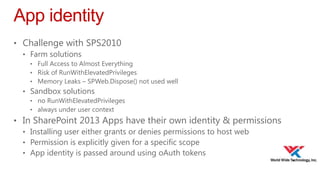
App identity
• Challenge with SPS2010
• Farm solutions
• Full Access to Almost Everything
• Risk of RunWithElevatedPrivileges
• Memory Leaks – SPWeb.Dispose() not used well

• Sandbox solutions
• no RunWithElevatedPrivileges
• always under user context

• In SharePoint 2013 Apps have their own identity & permissions
• Installing user either grants or denies permissions to host web
• Permission is explicitly given for a specific scope
• App identity is passed around using oAuth tokens
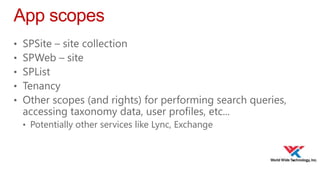
App scopes
•
•
•
•
•

SPSite – site collection
SPWeb – site
SPList
Tenancy
Other scopes (and rights) for performing search queries,
accessing taxonomy data, user profiles, etc...
• Potentially other services like Lync, Exchange
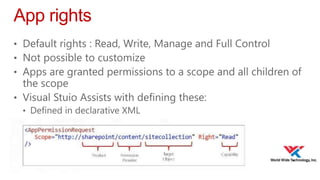
App rights
• Default rights : Read, Write, Manage and Full Control
• Not possible to customize
• Apps are granted permissions to a scope and all children of

the scope
• Visual Stuio Assists with defining these:
• Defined in declarative XML
Access Control Service (ACS)
• ACS required with oAuth implementation in SharePoint

2013
• How is the ACS server configured as the authentication
server?
• Automatically done for sites in Office 365 Preview
• On-premise farms, a trust to ACS must be configured. Possible to

avoid when using Server-to-server (S2S) trust
Demo
SharePoint 2013 REST API and CSOM
• Apps connect to SharePoint using
• SharePoint 2013 Client Side Object Model (CSOM)
• SharePoint 2013 REST API
• Javascript cross-domain library (SP.RequestExecutor.js)
• Main investments in 2013
• Client.svc is extended with REST capabilities
• Easier for javascript and non .NET code
• Implemented in accordance with oData protocol
• Programming style is largely unchanged

• New APIs for SharePoint Server functionality
• User Profiles, Search, Taxonomy, Feeds, ....
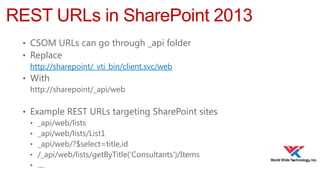
REST URLs in SharePoint 2013
• CSOM URLs can go through _api folder
• Replace
http://sharepoint/_vti_bin/client.svc/web
• With
http://sharepoint/_api/web
• Example REST URLs targeting SharePoint sites
• _api/web/lists
• _api/web/lists/List1
• _api/web/?$select=title,id
• /_api/web/lists/getByTitle('Consultants')/Items
• ....
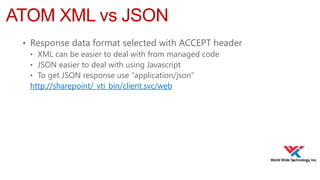
ATOM XML vs JSON
• Response data format selected with ACCEPT header
• XML can be easier to deal with from managed code
• JSON easier to deal with using Javascript
• To get JSON response use “application/json”
http://sharepoint/_vti_bin/client.svc/web
Demo
Exploring SPS 2013 REST API
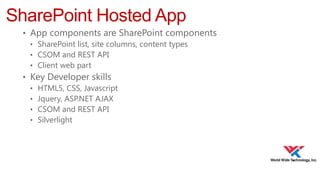
SharePoint Hosted App
• App components are SharePoint components
• SharePoint list, site columns, content types
• CSOM and REST API
• Client web part
• Key Developer skills
• HTML5, CSS, Javascript
• Jquery, ASP.NET AJAX
• CSOM and REST API
• Silverlight
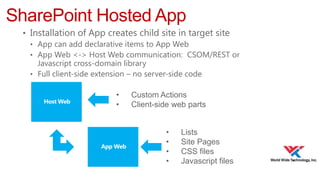
SharePoint Hosted App
• Installation of App creates child site in target site
• App can add declarative items to App Web
• App Web <-> Host Web communication: CSOM/REST or
Javascript cross-domain library
• Full client-side extension – no server-side code
•
•

Custom Actions
Client-side web parts
•
•
•
•

Lists
Site Pages
CSS files
Javascript files
Demo
Building a SharePoint Hosted App
Housekeeping
• Follow SharePoint Saturday St. Louis on Twitter

@spsstlouis and hashtag #spsstl
• Play “Sponsor Bingo” to register for your chance to
win one of the many great giveaways at the end of
the day
• Schedule and evaluate each session you attend via
our mobile app that can be used across devices at
http://spsaturday.cloudapp.net
Thanks to Our Sponsors!
SharePoint 2013 App or Not to App

SharePoint 2013 App or Not to App

  • 1.
    SharePoint 2013: Appor Not to App Walkthrough of SharePoint 2013 Apps -- why you should use apps over farm solutions
  • 2.
    Session Evaluations • Scheduleand evaluate each session you attend via our mobile app that can be used across devices at http://spsaturday.cloudapp.net • You will be able to evaluate a session 25 minutes before the scheduled end time • Evaluations are stored anonymously and your feedback is appreciated • The app will be the only method available to submit session evaluations for the event and we hope you find it intuitive and convenient
  • 3.
    Room Survey • Haveseen SharePoint 2013? • Installed on-prem Or O365? • Currently a C# developer? • Know Web-Dev Technologies (HTML5, CSS3, JS, jQuery)? • Used JS-CSOM for SharePoint 2010?
  • 4.
    Agenda • • • • Introduction to SharePoint2013 apps Deployment options and design patterns Technologies used in app development Building a SharePoint-hosted app
  • 5.
    setting the scene Introducingthe new SharePoint app framework
  • 6.
    Introducing apps In SharePoint2013 everything is an app … In strict sense: “Apps are self-contained pieces of functionality that extend the capabilities of a SharePoint site.”
  • 7.
    Isolation: App webvs Host web • Apps live in their own isolated environment; the “app web” • The site in which they function is called the “host web” APP UID Host Web GUID
  • 8.
  • 9.
  • 10.
  • 11.
    Getting started withdevelopment • Local development • Has to be on Windows Server 2008 R2 (or later) • Memory reqs have gone up – TechNet recommends at least 24 GB • Extra configuration needed for app development • Visual Studio 2012 • Remote development • Sign up for Office 365 - $3/month • Possible to use NAPA – app for building apps
  • 12.
    SharePoint App UX •Immersive App - app is shown full screen with in a separate page • Part - App is shown as a part on the SharePoint page – similar experience to web part • UI Custom Actions – possible to make the App available through ribbon or menu actions for documents and items See Apps for SharePoint UX design guidelines
  • 13.
  • 15.
    Basic SharePoint Apparchitecture • Code runs “Off SharePoint Box” • Declarative Hooks into SharePoint • AppWeb Host in SharePoint
  • 16.
    Apps – threepossible approaches Cloud-based Apps Get remote events from SharePoint Use CSOM/REST + OAuth to work with SPS Developer-Hosted App “Bring your own server hosting infrastructure” Developers will need to isolate tenants Azure AutoProvisioned App Windows Azure + SQL Azure provisioned invisibly as apps are installed SharePoint-hosted App Provision an isolated sub web on a parent web • Reuse web elements (lists, files, out-of-box web parts) • No server code allowed; use client JavaScript for logic, UX SharePoint Web Your Hosted Site SharePoint Web Azure Parent Web App Web
  • 17.
    Hosting: cloud vsSharePoint Cloud Hosted Apps SharePoint Hosted Apps Possible hosting model for almost all types of apps Good for smaller apps Choose your own infrastructure & technology SharePoint based; no server-side code May require your own hosting Automatically hosted in SharePoint May require your own handling of multitenancy & permission management Inherent multitenancy & isolation
  • 18.
    App identity • Challengewith SPS2010 • Farm solutions • Full Access to Almost Everything • Risk of RunWithElevatedPrivileges • Memory Leaks – SPWeb.Dispose() not used well • Sandbox solutions • no RunWithElevatedPrivileges • always under user context • In SharePoint 2013 Apps have their own identity & permissions • Installing user either grants or denies permissions to host web • Permission is explicitly given for a specific scope • App identity is passed around using oAuth tokens
  • 19.
    App scopes • • • • • SPSite –site collection SPWeb – site SPList Tenancy Other scopes (and rights) for performing search queries, accessing taxonomy data, user profiles, etc... • Potentially other services like Lync, Exchange
  • 20.
    App rights • Defaultrights : Read, Write, Manage and Full Control • Not possible to customize • Apps are granted permissions to a scope and all children of the scope • Visual Stuio Assists with defining these: • Defined in declarative XML
  • 21.
    Access Control Service(ACS) • ACS required with oAuth implementation in SharePoint 2013 • How is the ACS server configured as the authentication server? • Automatically done for sites in Office 365 Preview • On-premise farms, a trust to ACS must be configured. Possible to avoid when using Server-to-server (S2S) trust
  • 22.
  • 24.
    SharePoint 2013 RESTAPI and CSOM • Apps connect to SharePoint using • SharePoint 2013 Client Side Object Model (CSOM) • SharePoint 2013 REST API • Javascript cross-domain library (SP.RequestExecutor.js) • Main investments in 2013 • Client.svc is extended with REST capabilities • Easier for javascript and non .NET code • Implemented in accordance with oData protocol • Programming style is largely unchanged • New APIs for SharePoint Server functionality • User Profiles, Search, Taxonomy, Feeds, ....
  • 25.
    REST URLs inSharePoint 2013 • CSOM URLs can go through _api folder • Replace http://sharepoint/_vti_bin/client.svc/web • With http://sharepoint/_api/web • Example REST URLs targeting SharePoint sites • _api/web/lists • _api/web/lists/List1 • _api/web/?$select=title,id • /_api/web/lists/getByTitle('Consultants')/Items • ....
  • 26.
    ATOM XML vsJSON • Response data format selected with ACCEPT header • XML can be easier to deal with from managed code • JSON easier to deal with using Javascript • To get JSON response use “application/json” http://sharepoint/_vti_bin/client.svc/web
  • 27.
  • 29.
    SharePoint Hosted App •App components are SharePoint components • SharePoint list, site columns, content types • CSOM and REST API • Client web part • Key Developer skills • HTML5, CSS, Javascript • Jquery, ASP.NET AJAX • CSOM and REST API • Silverlight
  • 30.
    SharePoint Hosted App •Installation of App creates child site in target site • App can add declarative items to App Web • App Web <-> Host Web communication: CSOM/REST or Javascript cross-domain library • Full client-side extension – no server-side code • • Custom Actions Client-side web parts • • • • Lists Site Pages CSS files Javascript files
  • 31.
  • 33.
    Housekeeping • Follow SharePointSaturday St. Louis on Twitter @spsstlouis and hashtag #spsstl • Play “Sponsor Bingo” to register for your chance to win one of the many great giveaways at the end of the day • Schedule and evaluate each session you attend via our mobile app that can be used across devices at http://spsaturday.cloudapp.net
  • 34.
    Thanks to OurSponsors!

Editor's Notes

  • #2 Splash
  • #3 Session Eval
  • #4 Have seen SharePoint 2013?Installed on-prem Or O365?Currently a C# developer?Know Web-Dev Technologies (HTML5, CSS3, JS, jQuery)?Used JS-CSOM for SharePoint 2010?
  • #5 AgendaIntroHow does it look from and End User perspective.DeploymentTypes of AppsTechnologiesSharePoint Hosted Apps – JavaScript, jQuery, Rest APIDemosDone using Office 365
  • #6 Setting the scene
  • #7 Lists – Library are apps.Apps are targeted at specific business scenariosNew Development MethodPrevious: Farm / SandboxNow deploy to Development SiteLow server footprintAllow extension of SharePoint, minimal impact.Apps Cloud drive (on-prem = private cloud)App CatalogMonetizationSelective apps by Admins
  • #8 IsolationAPP1UID : unique ID given to each app installation in tenancy – makes each app domain uniqueGUIDAPP1: Name of the SPWeb under which the app is installed – allows devs to plugin
  • #9 Deployment OptionsFarmSandboxAppsGo away Sandbox
  • #10 App DevDeploy optionsDevelopment OptionsDevelopment Tools
  • #11 Demo – Apps End User
  • #12 Getting Started Dev
  • #13 App UXSharePoint Marketplace requires SharePoint UX design guidelines for approval.
  • #14 Demo Hello World
  • #15 Bigger picture – deploy options, app identity, design paterns
  • #16 Architecture
  • #17 Hosting Options
  • #18 Cloudvs Hosted
  • #19 App Identity
  • #20 ScopesAn app uses permission requests to specify the permissions that it needsThe requests specify both the rights and scope which are neededScopes indicate where in the SharePoint hierarchy a permission request applies. SharePoint supports four different content scopes:SPSite—site collectionSPWeb—websiteSPList—listTenancy—the tenancy scope is at http://&lt;sharepointserver&gt;/&lt;content&gt;/&lt;tenant&gt;/There are also scopes for things like performing search queries, accessing taxonomy data, user profiles, etc.
  • #21 App RightsPermission rights indicate what an app is permitted to do within a scope. SharePoint supports four rights levels for content (there are others for things like search, term store, etc.):Read-OnlyWriteManageFull ControlUnlike SharePoint user roles, these rights levels are not customizableIf an app is granted permission to a scope, the permission applies to all children of the scopeIf an app is granted perms to an SPWeb, the app is also granted perms to each SPList in the SPWeb, and all SPListItems in each list, but NOT each subweb
  • #22 ACSPermission rights indicate what an app is permitted to do within a scope. SharePoint supports four rights levels for content (there are others for things like search, term store, etc.):Read-OnlyWriteManageFull ControlUnlike SharePoint user roles, these rights levels are not customizableIf an app is granted permission to a scope, the permission applies to all children of the scopeIf an app is granted perms to an SPWeb, the app is also granted perms to each SPList in the SPWeb, and all SPListItems in each list, but NOT each subweb
  • #23 Demo – App Permissions
  • #24 Basic techREST / CSOM API
  • #25 CSOM / REST API
  • #29 Building hosted app
  • #30 Hosted app concepts
  • #31 Hosted app architecture
  • #32 Demo – build sharepoint hosted app
  • #33 summary
  • #34 housekeeping
  • #35 sponsors
  • #36 questions