SharePoint 2013 apps, brief
overview
SharePoint 2013 development
overview
development
options
farm solution
sandbox solution
SharePoint hosted app
provider hosted app
Microsoft Azure hosted app
deployment
options
on premise farm installation
Office 365
SharePoint Online
hosted installation
development
tools
web browser
SharePoint Designer 2013
Visual Studio 2012
"Napa" Office 365
Development Tools
Eclipse, Dreamweaver…
SharePoint
2013 apps
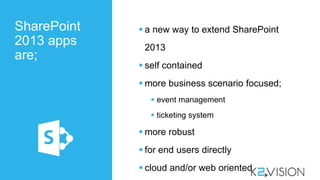
are;
 a new way to extend SharePoint
2013
 self contained
 more business scenario focused;
 event management
 ticketing system
 more robust
 for end users directly
 cloud and/or web oriented
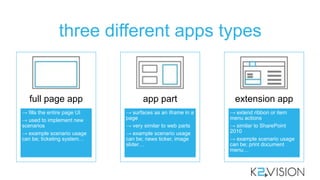
three different apps types
→ fills the entire page UI
→ used to implement new
scenarios
→ example scenario usage
can be; ticketing system…
full page app
→ surfaces as an iframe in a
page
→ very similar to web parts
→ example scenario usage
can be; news ticker, image
slider…
app part
→ extend ribbon or item
menu actions
→ similar to SharePoint
2010
→ example scenario usage
can be; print document
menu…
extension app
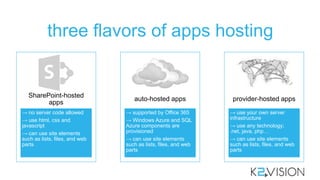
three flavors of apps hosting
→ no server code allowed
→ use html, css and
javascript
→ can use site elements
such as lists, files, and web
parts
SharePoint-hosted
apps
→ supported by Office 365
→ Windows Azure and SQL
Azure components are
provisioned
→ can use site elements
such as lists, files, and web
parts
auto-hosted apps
→ use your own server
infrastructure
→ use any technology;
.net, java, php…
→ can use site elements
such as lists, files, and web
parts
provider-hosted apps
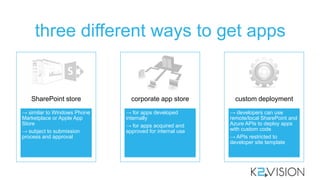
three different ways to get apps
→ similar to Windows Phone
Marketplace or Apple App
Store
→ subject to submission
process and approval
SharePoint store
→ for apps developed
internally
→ for apps acquired and
approved for internal use
corporate app store
→ developers can use
remote/local SharePoint and
Azure APIs to deploy apps
with custom code
→ APIs restricted to
developer site template
custom deployment
SP2013 apps programming model
client
SharePoint
HTML apps
JavaScript Client Object
Model
.NET Client Object
Model
REST services
_api/web _api/lists _api/item _api/search
_api
SharePoint
2013 apps
boundaries
 cannot run server-side code in SharePoint
environment
 custom code can only execute in the
client, cloud or on premise
 cannot access SharePoint server-side object
model
 cannot change SharePoint standard definitions
(like list definition, site definition…) or other
apps
 cannot use some SharePoint components and
services
 cannot provide/execute administrative tasks for
SharePoint
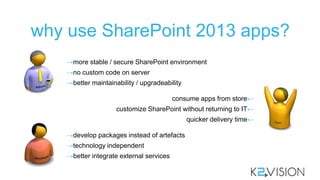
why use SharePoint 2013 apps?
→more stable / secure SharePoint environment
→no custom code on server
→better maintainability / upgradeability
←consume apps from store
←customize SharePoint without returning to IT
←quicker delivery time
→develop packages instead of artefacts
→technology independent
→better integrate external services
SharePoint 2013 apps facts
PROS CONS
no custom code on server
reduced ramp-up time to build applications
use hosting platform features
buy instead of build
re-finance the development by reselling apps
limitation when modifying/using SP functions
support can get messy if store is not restricted
corporate data in the cloud
you get what you buy, no more no less

SharePoint 2013 apps overview

  • 1.
    SharePoint 2013 apps,brief overview
  • 2.
    SharePoint 2013 development overview development options farmsolution sandbox solution SharePoint hosted app provider hosted app Microsoft Azure hosted app deployment options on premise farm installation Office 365 SharePoint Online hosted installation development tools web browser SharePoint Designer 2013 Visual Studio 2012 "Napa" Office 365 Development Tools Eclipse, Dreamweaver…
  • 3.
    SharePoint 2013 apps are;  anew way to extend SharePoint 2013  self contained  more business scenario focused;  event management  ticketing system  more robust  for end users directly  cloud and/or web oriented
  • 4.
    three different appstypes → fills the entire page UI → used to implement new scenarios → example scenario usage can be; ticketing system… full page app → surfaces as an iframe in a page → very similar to web parts → example scenario usage can be; news ticker, image slider… app part → extend ribbon or item menu actions → similar to SharePoint 2010 → example scenario usage can be; print document menu… extension app
  • 5.
    three flavors ofapps hosting → no server code allowed → use html, css and javascript → can use site elements such as lists, files, and web parts SharePoint-hosted apps → supported by Office 365 → Windows Azure and SQL Azure components are provisioned → can use site elements such as lists, files, and web parts auto-hosted apps → use your own server infrastructure → use any technology; .net, java, php… → can use site elements such as lists, files, and web parts provider-hosted apps
  • 6.
    three different waysto get apps → similar to Windows Phone Marketplace or Apple App Store → subject to submission process and approval SharePoint store → for apps developed internally → for apps acquired and approved for internal use corporate app store → developers can use remote/local SharePoint and Azure APIs to deploy apps with custom code → APIs restricted to developer site template custom deployment
  • 7.
    SP2013 apps programmingmodel client SharePoint HTML apps JavaScript Client Object Model .NET Client Object Model REST services _api/web _api/lists _api/item _api/search _api
  • 8.
    SharePoint 2013 apps boundaries  cannotrun server-side code in SharePoint environment  custom code can only execute in the client, cloud or on premise  cannot access SharePoint server-side object model  cannot change SharePoint standard definitions (like list definition, site definition…) or other apps  cannot use some SharePoint components and services  cannot provide/execute administrative tasks for SharePoint
  • 9.
    why use SharePoint2013 apps? →more stable / secure SharePoint environment →no custom code on server →better maintainability / upgradeability ←consume apps from store ←customize SharePoint without returning to IT ←quicker delivery time →develop packages instead of artefacts →technology independent →better integrate external services
  • 10.
    SharePoint 2013 appsfacts PROS CONS no custom code on server reduced ramp-up time to build applications use hosting platform features buy instead of build re-finance the development by reselling apps limitation when modifying/using SP functions support can get messy if store is not restricted corporate data in the cloud you get what you buy, no more no less