Noorez Khamis
@nkhamis
http://www.khamis.net
Speaker Bio


              twitter: @nkhamis blog: Rez’s SharePoint Blog Spot -
              http://www.khamis.net
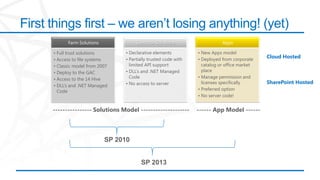
First things first – we aren’t losing anything! (yet)
            Farm Solutions             Sandbox Solutions                     Apps

      • Full trust solutions      • Declarative elements          • New Apps model
                                  • Partially trusted code with   • Deployed from corporate
                                                                                               Cloud Hosted
      • Access to file systems
      • Classic model from 2007     limited API support             catalog or office market
      • Deploy to the GAC         • DLL’s and .NET Managed          place
      • Access to the 14 Hive       Code                          • Manage permission and
                                  • No access to server             licenses specifically      SharePoint Hosted
      • DLL’s and .NET Managed
        Code                                                      • Preferred option
                                                                  • No server code!


      ---------------- Solutions Model --------------------       ------ App Model ------
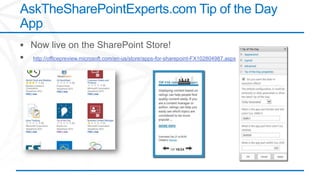
AskTheSharePointExperts.com Tip of the Day
App

  http://officepreview.microsoft.com/en-us/store/apps-for-sharepoint-FX102804987.aspx
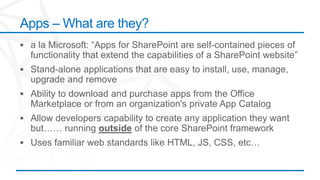
Apps – What are they?
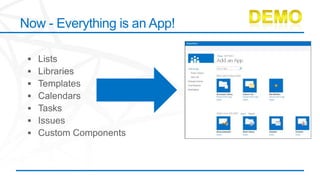
Now - Everything is an App!
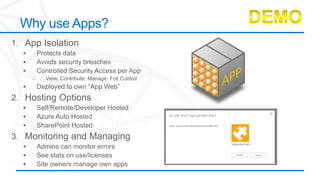
Why use Apps?
Why did Microsoft go down the “App Route”?
           Get our code out of SharePoint!
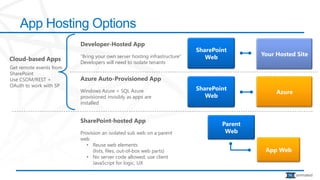
App Hosting Options
                         Developer-Hosted App
                                                                          SharePoint
                         “Bring your own server hosting infrastructure”                    Your Hosted Site
Cloud-based Apps                                                             Web
                         Developers will need to isolate tenants
Get remote events from
SharePoint
Use CSOM/REST +          Azure Auto-Provisioned App
OAuth to work with SP
                         Windows Azure + SQL Azure                        SharePoint
                                                                                                Azure
                         provisioned invisibly as apps are                   Web
                         installed


                         SharePoint-hosted App
                                                                                  Parent
                         Provision an isolated sub web on a parent                 Web
                         web
                            • Reuse web elements
                               (lists, files, out-of-box web parts)                         App Web
                            • No server code allowed; use client
                               JavaScript for logic, UX

                                                                                                        animated
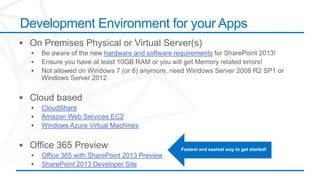
Development Environment for your Apps

                       hardware and software requirements


   CloudShare
   Amazon Web Services EC2
   Windows Azure Virtual Machines


   Office 365 with SharePoint 2013 Preview
   SharePoint 2013 Developer Site
App creation options


    http://www.elumenotion.com/Blog/Lists/Posts/Post.aspx?ID=
    155
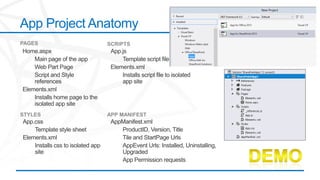
App Project Anatomy
PAGES                              SCRIPTS
Home.aspx                           App.js
    Main page of the app                Template script file
    Web Part Page                   Elements.xml
    Script and Style                    Installs script file to isolated
    references                          app site
Elements.xml
    Installs home page to the
    isolated app site
STYLES                             APP MANIFEST
App.css                             AppManifest.xml
    Template style sheet               ProductID, Version, Title
Elements.xml                           Tile and StartPage Urls
    Installs css to isolated app       AppEvent Urls: Installed, Uninstalling,
    site                               Upgraded
                                       App Permission requests
App UI Access Options
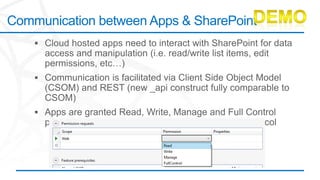
Communication between Apps & SharePoint
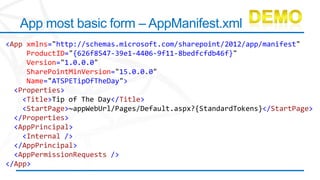
App most basic form – AppManifest.xml
<App xmlns="http://schemas.microsoft.com/sharepoint/2012/app/manifest"
     ProductID="{626f8547-39e1-4406-9f11-8bedfcfdb46f}"
     Version="1.0.0.0"
     SharePointMinVersion="15.0.0.0"
     Name="ATSPETipOfTheDay">
  <Properties>
    <Title>Tip of The Day</Title>
    <StartPage>~appWebUrl/Pages/Default.aspx?{StandardTokens}</StartPage>
  </Properties>
  <AppPrincipal>
    <Internal />
  </AppPrincipal>
  <AppPermissionRequests />
</App>
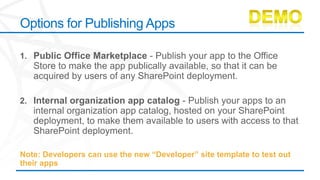
Options for Publishing Apps


Note: Developers can use the new “Developer” site template to test out
their apps
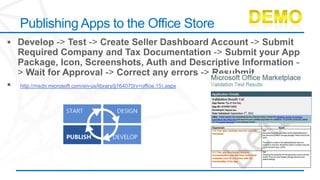
Publishing Apps to the Office Store


http://msdn.microsoft.com/en-us/library/jj164070(v=office.15).aspx
Apps for Office and SharePoint Contest


            http://officeappcontest.com/
Demo
http://social.technet.microsoft.com/wiki/contents/articles/12444.sharepoint-2013-apps-
overview-and-resources-for-developers.aspx
http://www.andrewconnell.com/blog/archive/2012/07/16/understanding-sharepoint-2013-apps-
aka-apps-101.aspx
http://msdn.microsoft.com/en-us/library/jj163980(v=office.15).aspx