Cloud-Based App Development
Using SharePoint 2013, Office 365 and Azure
Agenda
• Introducing the App Model
•
•
•
•
•

Complexity and Problems in SharePoint
Why Apps?
What is the App Model?
Evolution of SharePoint Customization Scenarios
Installation and App URL:s

• App Architecture
•
•
•
•
•
•

The 3 Architectural Types
Choosing App Design and Shapes
Design and Branding
App Scope
App Models
Installation
Tobias Lekman
• Enterprise Architect working with SharePoint and Cloud Solutions
• Microsoft Certified Trainer
• SharePoint experience: 10 years, 15000+ hrs, >100 projects
• Used SharePoint since SP2001, actively specialized since SP2003
and up
• BizTalk, Commerce, UAG, ISA, Navision, AX, SQL…
• MCPD, MCTP, MCITP (SharePoint 2003/2007/2010/2013)
• V-TSP SharePoint Microsoft
Introducing the App Model
Cloud-Based App Development using SharePoint 2013, Office 365 and Azure
Complexity in SharePoint
• SharePoint is complex and contains many technical concepts and components
•
•
•
•
•
•
•

Pages
Lists
Libraries
Sites
Views
Web Parts
Master Pages, site columns, index, etc etc…
What problems do we face today?
• Full-trust code customizations on the server (farm solutions)
•
•
•
•

Main cause of outages
Large and complex deployments
Requires administrator access to servers
Not possible in shared hosting environments

• Sandbox
• Possible in shared hosting environments
• PoorAPI, poor performance and scalaility

• You need to be an expert on the SharePoint API in both scenarios
• Poor quality API
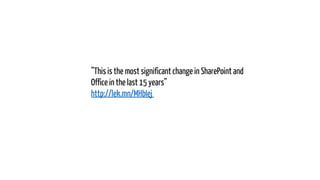
”This is the most significant change in SharePoint and
Office in the last 15 years”
http://lek.mn/MHbIej
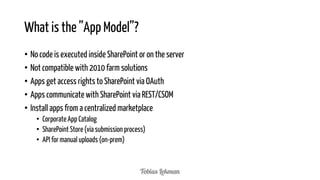
What is the ”App Model”?
• No code is executed inside SharePoint or on the server
• Not compatible with 2010 farm solutions
• Apps get access rights to SharePoint via OAuth
• Apps communicate with SharePoint via REST/CSOM
• Install apps from a centralized marketplace
• Corporate App Catalog
• SharePoint Store (via submission process)
• API for manual uploads (on-prem)
App Fundamentals
Apps are a fundamentally different approach to extending SharePoint functionality!
• Built on scenarios
• Event Tracking
• Process Management

• Robust
• Built-in framework for installation, upgrade and uninstallation

• Apps are created with end users in mind
• Cloud and web optimized
User Experience
• ”Everything is an App”
• List of external contacts
• Expense form
• Shared Document Library
• ”View All Content” => ”Site Contents” shows all ”Apps”, e.g. functionality, lists and links to internal
”App Catalog” and ”SharePoint Store”
Evolution of SharePoint Customizations
_api

_vti_bin

_vti_bin

Declar. App &
Workflow Events

_api

CSOM

CSOM
App Benefits
• No code on the server
• Simplified upgrade of SharePoint (SP16)
• Works in shared hosting environments

• Shortened learning roadmap
• Isolation
• Private, public and hybrid cloud solutions

• Open for ALL web technologies, you can use .NET, Java, PHP as long as it’s web based
• 24/7 deployments
Scenarios
Full-Trust

Use Client-Side SharePoint API
Use Server-Side SharePoint API
Use Remote Services
App-based Permissions (OAuth2)
On-Premise Deployment Friendly
Hosted Deployment Friendly
Distribution via Marketplace

SharePoint Provided Schematics for Install / Upgrade
/ Uninstall

Sandbox

Apps
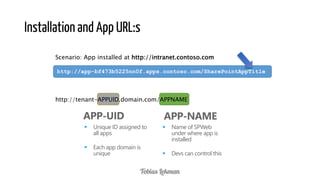
Installation and App URL:s
Scenario: App installed at http://intranet.contoso.com
http://app-bf473b5225nn0f.apps.contoso.com/SharePointAppTitle

http://tenant-APPUID.domain.com/APPNAME

APP-UID


Unique ID assigned to
all apps



Each app domain is
unique

APP-NAME


Name of SPWeb
under where app is
installed



Devs can control this
Demo: Using SharePoint Store in Office 365
Cloud-Based App Development using SharePoint 2013, Office 365 and Azure

23/02/2014

15
App Architecture
Cloud-Based App Development using SharePoint 2013, Office 365 and Azure

23/02/2014

16
The 3 Architectural Types
Provider-Hosted App
“Bring your own server hosting
infrastructure”

Cloud-based Apps
Get remote
events from
SharePoint
Use
CSOM/REST +
OAuth to work
with SP

Your Hosted Site

SharePoint Web

Windows Azure
Websites

Autohosted App
Windows Azure + SQL Azure
provisioned invisibly as apps are
installed

SharePoint
Web

SharePoint-Hosted App
Provision an isolated sub web
on a parent web
• Reuse web elements
(lists, files, out-of-box
web parts)
• No server code allowed;
use client JavaScript for
logic, UX

Parent
Web
App Web
(from WSP)
Val av app-design och former
Shape

Description

Example

Full-page app

The app creates a new scenario
for the user

Process
Management,
Budgeting

“App Part”

Creates app gadgets that can be
added and controlled by the
user

Weather,
News Summary

“Extension App”

Adds commands to documents
and list items

Visualize documents,
Send to offline
printer
App-design and branding
• UX guide for
SharePoint 2013 Apps
• Alternative
• App template
• ASPX page (hosted) in SharePoint
• app.masterpage: includes AppWeb chrome
• Default alternative from Visual Studio tooling

• Chrome control
• Custom Chrome

• NOTE: Requires“Back to Site” link at top left corner

App Chrome
Options

App
Template
Chrome
Control
Custom
Chrome
App Scope
• Web Scope
• Register and use resources from parent site
(SPWeb, SPSite)

• Tenant Scope
• Can register start page, “custom actions”
from Site Collection, Managed Path, Template
Type
• (SharePoint-hosted tenant scope is not
supported)
Demo: Creating SharePoint Hosted Apps
Cloud-Based App Development using SharePoint 2013, Office 365 and Azure

23/02/2014

21
App Model Type 1: SharePoint Hosted
• Exists completely within SharePoint SPWeb
• Use CAML declared SP components
• Business logic executes on the client (jQuery, Knockout etc)

23/02/2014

22
App Model Type 2: Cloud Hosted
• Cloud hosted app mainly exists outside of SharePoint
• Can utilize SharePoint components (libraries)
• Communictes via CSOM / REST
• Get access rights to SharePoint via OAuth

• Business logic is executed outside of SharePoint
• On-prem web app in separate IIS
• Windows Azure
• Third party
Installation
• Install via PowerShell
• Install in development site using Visual Studio
• Install in SharePoint Store (via submission)
• Install in App Catalog (internal corporate)
Demo: Installing our App
Cloud-Based App Development using SharePoint 2013, Office 365 and Azure

23/02/2014

25
Summary
Introducing the App Model
Complexity and Problems in SharePoint
Why Apps?
What is the App Model?
Evolution of SharePoint Customization Scenarios
Installation and App URL:s

App Architecture
The 3 Architectural Types
Choosing App Design and Shapes
Design and Branding
App Scope
App Models
Installation
Further Info
• Create SharePoint 2013 development site on Office 365: http://msdn.microsoft.com/enus/library/fp179924.aspx
• How to install a SharePoint App: http://lek.mn/VeKlHG
• Corporate News App: http://corporatenewsapp.codeplex.com
Questions?

23/02/2014

28
Thank you!

Cloud-Based App Development using SharePoint 2013, Office 365 and Azure

  • 1.
    Cloud-Based App Development UsingSharePoint 2013, Office 365 and Azure
  • 2.
    Agenda • Introducing theApp Model • • • • • Complexity and Problems in SharePoint Why Apps? What is the App Model? Evolution of SharePoint Customization Scenarios Installation and App URL:s • App Architecture • • • • • • The 3 Architectural Types Choosing App Design and Shapes Design and Branding App Scope App Models Installation
  • 3.
    Tobias Lekman • EnterpriseArchitect working with SharePoint and Cloud Solutions • Microsoft Certified Trainer • SharePoint experience: 10 years, 15000+ hrs, >100 projects • Used SharePoint since SP2001, actively specialized since SP2003 and up • BizTalk, Commerce, UAG, ISA, Navision, AX, SQL… • MCPD, MCTP, MCITP (SharePoint 2003/2007/2010/2013) • V-TSP SharePoint Microsoft
  • 4.
    Introducing the AppModel Cloud-Based App Development using SharePoint 2013, Office 365 and Azure
  • 5.
    Complexity in SharePoint •SharePoint is complex and contains many technical concepts and components • • • • • • • Pages Lists Libraries Sites Views Web Parts Master Pages, site columns, index, etc etc…
  • 6.
    What problems dowe face today? • Full-trust code customizations on the server (farm solutions) • • • • Main cause of outages Large and complex deployments Requires administrator access to servers Not possible in shared hosting environments • Sandbox • Possible in shared hosting environments • PoorAPI, poor performance and scalaility • You need to be an expert on the SharePoint API in both scenarios • Poor quality API
  • 7.
    ”This is themost significant change in SharePoint and Office in the last 15 years” http://lek.mn/MHbIej
  • 8.
    What is the”App Model”? • No code is executed inside SharePoint or on the server • Not compatible with 2010 farm solutions • Apps get access rights to SharePoint via OAuth • Apps communicate with SharePoint via REST/CSOM • Install apps from a centralized marketplace • Corporate App Catalog • SharePoint Store (via submission process) • API for manual uploads (on-prem)
  • 9.
    App Fundamentals Apps area fundamentally different approach to extending SharePoint functionality! • Built on scenarios • Event Tracking • Process Management • Robust • Built-in framework for installation, upgrade and uninstallation • Apps are created with end users in mind • Cloud and web optimized
  • 10.
    User Experience • ”Everythingis an App” • List of external contacts • Expense form • Shared Document Library • ”View All Content” => ”Site Contents” shows all ”Apps”, e.g. functionality, lists and links to internal ”App Catalog” and ”SharePoint Store”
  • 11.
    Evolution of SharePointCustomizations _api _vti_bin _vti_bin Declar. App & Workflow Events _api CSOM CSOM
  • 12.
    App Benefits • Nocode on the server • Simplified upgrade of SharePoint (SP16) • Works in shared hosting environments • Shortened learning roadmap • Isolation • Private, public and hybrid cloud solutions • Open for ALL web technologies, you can use .NET, Java, PHP as long as it’s web based • 24/7 deployments
  • 13.
    Scenarios Full-Trust Use Client-Side SharePointAPI Use Server-Side SharePoint API Use Remote Services App-based Permissions (OAuth2) On-Premise Deployment Friendly Hosted Deployment Friendly Distribution via Marketplace SharePoint Provided Schematics for Install / Upgrade / Uninstall Sandbox Apps
  • 14.
    Installation and AppURL:s Scenario: App installed at http://intranet.contoso.com http://app-bf473b5225nn0f.apps.contoso.com/SharePointAppTitle http://tenant-APPUID.domain.com/APPNAME APP-UID  Unique ID assigned to all apps  Each app domain is unique APP-NAME  Name of SPWeb under where app is installed  Devs can control this
  • 15.
    Demo: Using SharePointStore in Office 365 Cloud-Based App Development using SharePoint 2013, Office 365 and Azure 23/02/2014 15
  • 16.
    App Architecture Cloud-Based AppDevelopment using SharePoint 2013, Office 365 and Azure 23/02/2014 16
  • 17.
    The 3 ArchitecturalTypes Provider-Hosted App “Bring your own server hosting infrastructure” Cloud-based Apps Get remote events from SharePoint Use CSOM/REST + OAuth to work with SP Your Hosted Site SharePoint Web Windows Azure Websites Autohosted App Windows Azure + SQL Azure provisioned invisibly as apps are installed SharePoint Web SharePoint-Hosted App Provision an isolated sub web on a parent web • Reuse web elements (lists, files, out-of-box web parts) • No server code allowed; use client JavaScript for logic, UX Parent Web App Web (from WSP)
  • 18.
    Val av app-designoch former Shape Description Example Full-page app The app creates a new scenario for the user Process Management, Budgeting “App Part” Creates app gadgets that can be added and controlled by the user Weather, News Summary “Extension App” Adds commands to documents and list items Visualize documents, Send to offline printer
  • 19.
    App-design and branding •UX guide for SharePoint 2013 Apps • Alternative • App template • ASPX page (hosted) in SharePoint • app.masterpage: includes AppWeb chrome • Default alternative from Visual Studio tooling • Chrome control • Custom Chrome • NOTE: Requires“Back to Site” link at top left corner App Chrome Options App Template Chrome Control Custom Chrome
  • 20.
    App Scope • WebScope • Register and use resources from parent site (SPWeb, SPSite) • Tenant Scope • Can register start page, “custom actions” from Site Collection, Managed Path, Template Type • (SharePoint-hosted tenant scope is not supported)
  • 21.
    Demo: Creating SharePointHosted Apps Cloud-Based App Development using SharePoint 2013, Office 365 and Azure 23/02/2014 21
  • 22.
    App Model Type1: SharePoint Hosted • Exists completely within SharePoint SPWeb • Use CAML declared SP components • Business logic executes on the client (jQuery, Knockout etc) 23/02/2014 22
  • 23.
    App Model Type2: Cloud Hosted • Cloud hosted app mainly exists outside of SharePoint • Can utilize SharePoint components (libraries) • Communictes via CSOM / REST • Get access rights to SharePoint via OAuth • Business logic is executed outside of SharePoint • On-prem web app in separate IIS • Windows Azure • Third party
  • 24.
    Installation • Install viaPowerShell • Install in development site using Visual Studio • Install in SharePoint Store (via submission) • Install in App Catalog (internal corporate)
  • 25.
    Demo: Installing ourApp Cloud-Based App Development using SharePoint 2013, Office 365 and Azure 23/02/2014 25
  • 26.
    Summary Introducing the AppModel Complexity and Problems in SharePoint Why Apps? What is the App Model? Evolution of SharePoint Customization Scenarios Installation and App URL:s App Architecture The 3 Architectural Types Choosing App Design and Shapes Design and Branding App Scope App Models Installation
  • 27.
    Further Info • CreateSharePoint 2013 development site on Office 365: http://msdn.microsoft.com/enus/library/fp179924.aspx • How to install a SharePoint App: http://lek.mn/VeKlHG • Corporate News App: http://corporatenewsapp.codeplex.com
  • 28.
  • 29.