
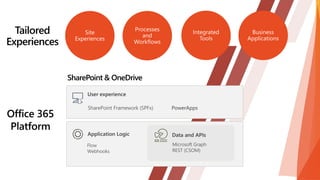




SharePoint in the Enterprise
Microsoft Graph and SharePoint Framework
New cool stuff in SharePoint Framework
SharePoint and Teams enterprise development model
Building portal experiences in SharePoint
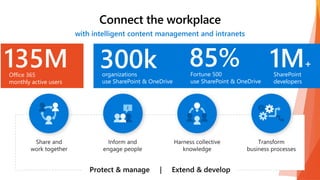
135MOffice 365
monthly active users
1M+
SharePoint
developers
85%Fortune 500
use SharePoint & OneDrive
300korganizations
use SharePoint & OneDrive
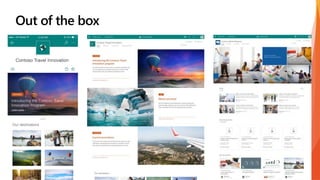
Out of the box
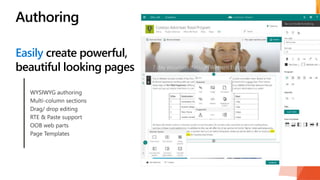
Easily create powerful,
beautiful looking pages
Authoring
WYSIWYG authoring
Multi-column sections
Drag/ drop editing
RTE & Paste support
OOB web parts
Page Templates
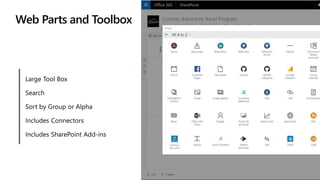
Web Parts and Toolbox
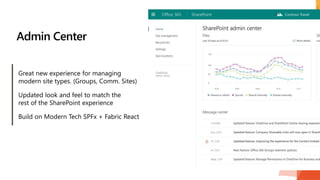
Admin Center
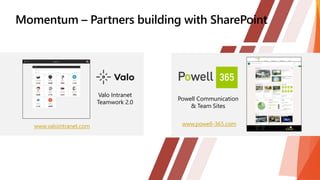
Powell Communication
& Team Sites
Valo Intranet
Teamwork 2.0
www.valointranet.com www.powell-365.com

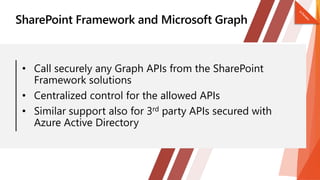
• Call securely any Graph APIs from the SharePoint
Framework solutions
• Centralized control for the allowed APIs
• Similar support also for 3rd party APIs secured with
Azure Active Directory
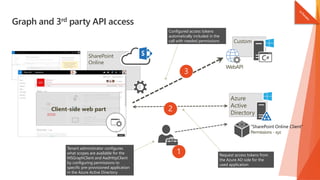
Graph and 3rd party API access
SharePoint
Online
Client-side web part
Azure
Active
Directory
Custom
WebAPI
"SharePoint Online Client“
Permissions - xyz
Tenant administrator configures
what scopes are available for the
MSGraphClient and AadHttpClient
by configuring permissions to
specific pre-provisioned application
in the Azure Active Directory.
1
3
2
Configured access tokens
automatically included in the
call with needed permissions
Request access tokens from
the Azure AD side for the
used application
• General Availability of Web and Graph APIs in
SharePoint Framework
• Deploy SharePoint Framework Extensions
across your Tenancy
• Dialog Framework Updates
• Enable SharePoint Framework extensions globally
in your tenant
• Filter extension enablement based on site and list type
• Centralized control for the tenant administrators
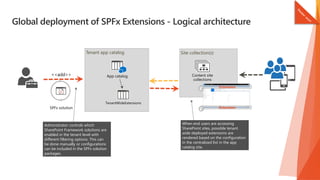
Global deployment of SPFx Extensions - Logical architecture
js
Tenant app catalog Site collection(s)
Extension
Extension
Administrator controls which
SharePoint Framework solutions are
enabled in the tenant level with
different filtering options. This can
be done manually or configurations
can be included in the SPFx solution
packages.
When end users are accessing
SharePoint sites, possible tenant
wide deployed extensions are
rendered based on the configuration
in the centralized list in the app
catalog site.
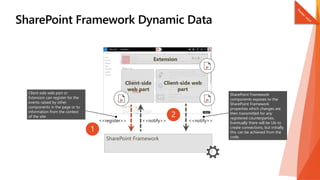
• Share data easily between components in the page
• Can be used by web parts and extensions
• Also page or list context available
• Initially only code based support, but UI level
association coming later
• Think as classic web part to web part connections, but including extensions
SharePoint Framework
Client-side
web part
Client-side web
part
SharePoint Framework
components exposes to the
SharePoint Framework
properties which changes are
then transmitted for any
registered counterparties.
Eventually there will be UIs to
create connections, but initially
this can be achieved from the
code.
Client side web part or
Extension can register for the
events raised by other
components in the page or to
information from the context
of the site.
1
2
Extension
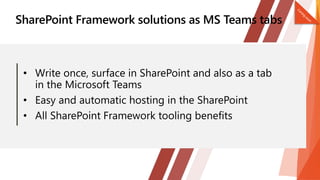
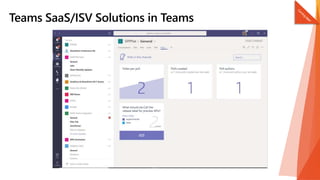
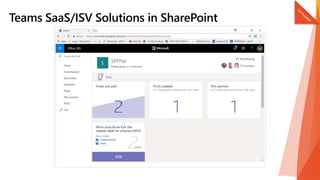
• Write once, surface in SharePoint and also as a tab
in the Microsoft Teams
• Easy and automatic hosting in the SharePoint
• All SharePoint Framework tooling benefits
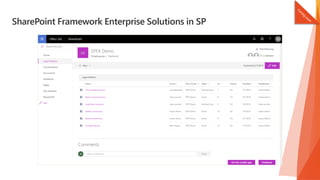
SharePoint Framework Enterprise Solutions in SP
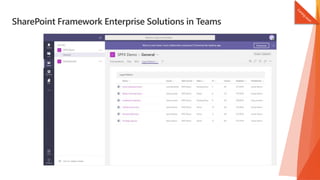
SharePoint Framework Enterprise Solutions in Teams
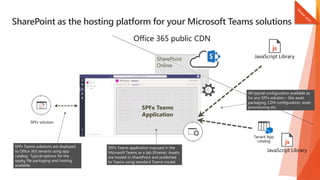
SharePoint as the hosting platform for your Microsoft Teams solutions
SharePoint
Online
js
JavaScript Library
js
JavaScript Library
Office 365 public CDN
js
SPFx Teams solutions are deployed
to Office 365 tenants using app
catalog- Typical options for the
sppkg file packaging and hosting
available.
All typical configuration available as
for any SPFx solution – like asset
packaging, CDN configuration, asset
provisioning etc.SPFx Teams
Application
SPFx Teams application exposed in the
Microsoft Teams as a tab (IFrame). Assets
are hosted in SharePoint and published
to Teams using standard Teams model.
• Open-source solution available in GitHub
• >10 web parts, >5 extensions, >3 Site Designs with
automatic tenant wide deployment
• Initially with PowerShell, self-service site by Ignite
• Demonstrates end-to-end solution design for modern
SharePoint solution
SharePoint as Development Platform for the Modern Intranet

SharePoint as Development Platform for the Modern Intranet

  • 2.
    SharePoint in theEnterprise Microsoft Graph and SharePoint Framework New cool stuff in SharePoint Framework SharePoint and Teams enterprise development model Building portal experiences in SharePoint
  • 3.
    135MOffice 365 monthly activeusers 1M+ SharePoint developers 85%Fortune 500 use SharePoint & OneDrive 300korganizations use SharePoint & OneDrive
  • 4.
  • 5.
    Easily create powerful, beautifullooking pages Authoring WYSIWYG authoring Multi-column sections Drag/ drop editing RTE & Paste support OOB web parts Page Templates
  • 6.
  • 7.
  • 9.
    Powell Communication & TeamSites Valo Intranet Teamwork 2.0 www.valointranet.com www.powell-365.com
  • 10.
  • 12.
    • Call securelyany Graph APIs from the SharePoint Framework solutions • Centralized control for the allowed APIs • Similar support also for 3rd party APIs secured with Azure Active Directory
  • 13.
    Graph and 3rdparty API access SharePoint Online Client-side web part Azure Active Directory Custom WebAPI "SharePoint Online Client“ Permissions - xyz Tenant administrator configures what scopes are available for the MSGraphClient and AadHttpClient by configuring permissions to specific pre-provisioned application in the Azure Active Directory. 1 3 2 Configured access tokens automatically included in the call with needed permissions Request access tokens from the Azure AD side for the used application
  • 15.
    • General Availabilityof Web and Graph APIs in SharePoint Framework • Deploy SharePoint Framework Extensions across your Tenancy • Dialog Framework Updates
  • 16.
    • Enable SharePointFramework extensions globally in your tenant • Filter extension enablement based on site and list type • Centralized control for the tenant administrators
  • 17.
    Global deployment ofSPFx Extensions - Logical architecture js Tenant app catalog Site collection(s) Extension Extension Administrator controls which SharePoint Framework solutions are enabled in the tenant level with different filtering options. This can be done manually or configurations can be included in the SPFx solution packages. When end users are accessing SharePoint sites, possible tenant wide deployed extensions are rendered based on the configuration in the centralized list in the app catalog site.
  • 19.
    • Share dataeasily between components in the page • Can be used by web parts and extensions • Also page or list context available • Initially only code based support, but UI level association coming later • Think as classic web part to web part connections, but including extensions
  • 20.
    SharePoint Framework Client-side web part Client-sideweb part SharePoint Framework components exposes to the SharePoint Framework properties which changes are then transmitted for any registered counterparties. Eventually there will be UIs to create connections, but initially this can be achieved from the code. Client side web part or Extension can register for the events raised by other components in the page or to information from the context of the site. 1 2 Extension
  • 23.
    • Write once,surface in SharePoint and also as a tab in the Microsoft Teams • Easy and automatic hosting in the SharePoint • All SharePoint Framework tooling benefits
  • 24.
  • 25.
  • 28.
    SharePoint as thehosting platform for your Microsoft Teams solutions SharePoint Online js JavaScript Library js JavaScript Library Office 365 public CDN js SPFx Teams solutions are deployed to Office 365 tenants using app catalog- Typical options for the sppkg file packaging and hosting available. All typical configuration available as for any SPFx solution – like asset packaging, CDN configuration, asset provisioning etc.SPFx Teams Application SPFx Teams application exposed in the Microsoft Teams as a tab (IFrame). Assets are hosted in SharePoint and published to Teams using standard Teams model.
  • 31.
    • Open-source solutionavailable in GitHub • >10 web parts, >5 extensions, >3 Site Designs with automatic tenant wide deployment • Initially with PowerShell, self-service site by Ignite • Demonstrates end-to-end solution design for modern SharePoint solution

Editor's Notes

  • #2 Presentación personal, historia y actual Iniciemos la sesión, buen día a todos. En esta sesión hablaremos de SharePoint Framework y Desarrollo en SharePoint. Mi nombre es Haaron Gonzalez, soy consultor SharePoint y Office 365 para B-Logic, empresa dedicada a ofrecer servicios profesionales de consultoría en temas de infraestructura y desarrollo, claro encima de Azure y Office 365. Tenemos presencia en Ciudad de México, León, Guadalajara y próximamente en USA. He tenido la oportunidad de trabajar dentro y fuera del país en implementaciones empresariales de SharePoint y Office 365 ayudando a los clientes a comprender que características funcionan mejor para enfrentar desafíos de negocio. Soy miembro activo de la Comunidad SharePoint México y constantemente ofrezco conferencias y contribuciones. Tengo canal de Youtube, twitter y facebiij,.
  • #3 De que se hablara hoy, se inicia con introducción y después aspectos técnicos Por fin, hablaremos de temas relacionados con desarrollo en Office y SharePoint. Office y SharePoint ya tienen historia recorrida en cuanto a desarrollo, así que veremos lo mas nuevo en el tema, pero antes de explorar temas técnicos, veamos primero el contexto referente a lo que significa sitios y listas modernas y porque esto es un parteaguas en nuestra evolución como desarrolladores. Platiquemos pues de donde esta SharePoint empresarialmente hablando El valor de Microsoft Graph y SharePoint Framework Lo nuevo y reluciente de SPFX La visión en cuanto a usar SharePoint y Teams como modelo de desarrollo Construccion de experinecias de portales SharePopoint
  • #4 Donde estamos y tamaño de SharePoint, parte de este numero es SharePoint, Justo decir que parte de estos desarrolladores son on-premises . Interesante ver el interés por el aspecto moderno de sharepoint Hablamos del momento, hablemos de el tamaño que tiene SharePoint. En Office 365 tenemos 135 millones de usuarios activos al MES, importante mencionar que SharePoint influye de manera masiva en el uso de Office 365 300,000 organizaciones utilizan SharePoint y OneDrive, si se preguntan porque siempre hablamos de SharePoint y OneDrive juntos, es porque literalmente ambos productos son parte del mismo equipo y parte de la misma organización y centro de costos 85% de estos 300,000 son empresas Chipotludas Y tenemos mas de 1 millón de programadores SharePoint allá afuera, claro que muchos de estos programadores siguen están on-premises y otros en la nube, claro porque la raíz de SharePoint es on-premises desde 2001, 2007 (2008 nos movimos a la nube), 2010, 2013, 2016 y recientemente liberado 2019 Bueno pues en este viaje tenemos personas con mas de 10 años de experiencia en este producto Es muy interesante ver la expectativa y emoción cuando empezamos a liberar las nuevas experiencias y el nuevo modelo de desarrollo en donde las personas están interesadas y motivadas a aprender.
  • #5 4
  • #6 Tenemos un nuevo modelo de composición de paginas nativo que facilita la creación de paginas visualmente atractivas Tenemos editores mejorados Seleccionador de elementos Soporte de edición de texto rico y también de pegado Marcos de pagina para mejor acomodamiento de contenido
  • #7 6
  • #8 Incluido nueva experiencia para administrar SharePoint. El punto es : En el 2010 se introdujo el tema de soluciones sandbox En 2013 se introdujo el tema de Add Ins Y ahora decimos SharePoint Framework Cada 3 o 4 años hemos introducido un nuevo modelo que los programadores deberían aprender Bueno pues con SharePoint Framework es completamente diferente La razón de porque es diferente porque los del equipo de producto usaron SHarePoint Frmaework para programar la experiencias modernas Así que apostamos nuestro futuro en SharePoint Framework y tu como programador tienes las mismas capacidades, puntos de extensibilidad y acceso a nuestras APIs que nosotros. Y esto es realmente un cambio de juego en la historia de SharePoint asi que si te preguntas si deberías aprender a ustilizar SharePoint Framework la respuesta es absoliutamente.
  • #9 Veamos en practica el look and feel y sobre todo comprendamos que no se ve como SharePoint clásico Responsivo Creación de noticia Mas fluido, no hace postbacks, modificaciones en la pagina, selección de marco, refrescar Lo paneles de propiedades que se tienen, son los mismos que programadores podemos usar No hay diferencia en las capacidades de desarrollo de Microsoft con nuestras posibilidades de desarrollo
  • #10 9
  • #11 Microsoft Build 2017
  • #12 Veamos lo nueo y relucionte y akgunas de las areas donde se esta anunciando nuevas capacidades
  • #13 Esto no es nuevo,. Pero se tiene una manera segura de invocar Graph APIs de Microsoft dentro de SharePoint Framaework El punto es que SharePoint es un tanto distinto comparado con una Single nPage Application corriendo en Azure En una apicacion simlente eres tu y la aplicacion como tal En sharepont temenos unaopagina y multiples web aprts y es por ello que se tiene que incrementar la autorización de un webpart Es por ello que tememos que contar con un mecanismo de control que le permita al administrador de la suscripción aprobar el uso de ciertos opciones , esa es la capa adicional, cuando estamos instalado una solucion SFx Podemos invocar el alcance de alguna funciones,
  • #14 Técnicamente lo que sucede con n web part de SharePoint framework y nuestra APIs de Graph, es que un administrador de la suscripción configura los privilegios que nuestro web part necesita Cuando un web part de SHarePoint Framework requiere un permiso, automáticamente platica con Azure AD EN resumen, se tiene una capa de permisos a nvel adminsitracion para otorgarle los permisos que se necesitan a nuestros eb parts de SPFx
  • #15 Mostrar codigo donde se especifican que permisos se necesitan Mostrar la UI de Admin donde se aporueban los permisos Mostraar codigo donde se invoca el graph Mostrar pagina personal que miuestre info ue se accede a Graph