Spark SQL Beyond Official
Documentation
David Vrba Ph.D.
Senior ML Engineer
About Myself
▪ Senior ML Engineer at Socialbakers
▪ developing and optimizing Spark jobs
▪ productionalizing Spark applications and deploying ML
models
▪ Spark Trainer
▪ 1-day, 2-days trainings
▪ reach out to me at https://www.linkedin.com/in/vrba-
david/
▪ Writer
▪ publishing articles at medium
▪ follow me at https://medium.com/@vrba.dave
Goal
▪ Knowledge sharing
▪ Free continuation of my previous talk
▪ Physical Plans in Spark SQL
▪ https://databricks.com/session_eu19/physical-plans-in-spark-sql
▪ Describe the non-obvious behavior of some Spark features
▪ Go beyond the documentation
▪ Focus on practical aspects of Spark SQL
Topics
▪ Statistics
▪ Saving data in sorted state to a file format
Statistics
▪ How to see them
▪ How they are computed
▪ Where they are used
▪ What to be careful about
Statistics - how to see them
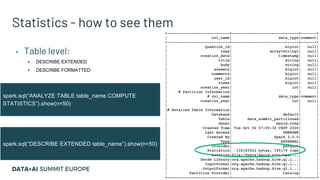
▪ Table level:
▪ DESCRIBE EXTENDED
▪ DESCRIBE FORMATTED
spark.sql(“DESCRIBE EXTENDED table_name”).show(n=50)
spark.sql(“ANALYZE TABLE table_name COMPUTE
STATISTICS”).show(n=50)
Statistics - how to see them
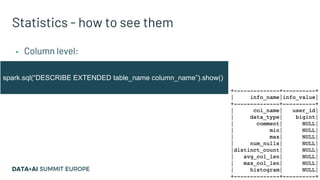
▪ Column level:
spark.sql(“DESCRIBE EXTENDED table_name column_name”).show()
Statistics - how to see them
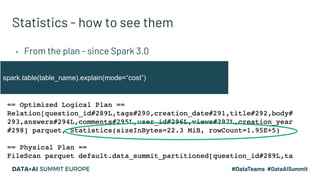
▪ From the plan - since Spark 3.0
spark.table(table_name).explain(mode=“cost”)
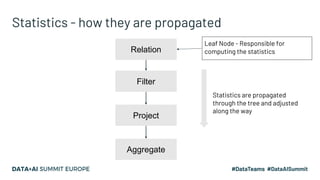
Statistics - how they are propagated
Relation
Filter
Project
Aggregate
Leaf Node - Responsible for
computing the statistics
Statistics are propagated
through the tree and adjusted
along the way
Statistics - how they are propagated
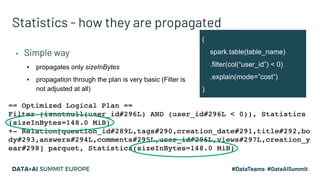
▪ Simple way
▪ propagates only sizeInBytes
▪ propagation through the plan is very basic (Filter is
not adjusted at all)
(
spark.table(table_name)
.filter(col(“user_id”) < 0)
.explain(mode=”cost”)
)
spark.conf.set(“spark.sql.cbo.enabled”, True)
Statistics - how they are propagated
▪ More advanced
▪ propagates sizeInBytes and rowCount + column level
▪ since Spark 2.2
▪ better propagation through plan (selectivity for Filter)
▪ CBO has to be enabled (by default OFF)
▪ works with metastore
No change in Filter statistics - it
requires column stats to be computed
Statistics - how they are propagated
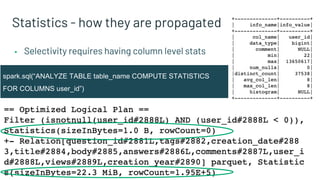
▪ Selectivity requires having column level stats
spark.sql(“ANALYZE TABLE table_name COMPUTE STATISTICS
FOR COLUMNS user_id”)
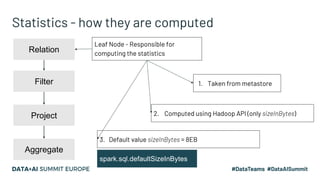
Statistics - how they are computed
Relation
Filter
Project
Aggregate
Leaf Node - Responsible for
computing the statistics
1. Taken from metastore
2. Computed using Hadoop API (only sizeInBytes)
3. Default value sizeInBytes = 8EB
spark.sql.defaultSizeInBytes
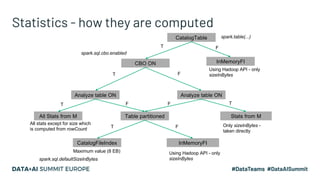
Statistics - how they are computed
CBO ON
Analyze table ON
Table partitionedAll Stats from M
CatalogFileIndex InMemoryFI
T
T
T F
F
Analyze table ON
Stats from M
TF
F
CatalogTable
InMemoryFI
FT
Using Hadoop API - only
sizeInBytes
Using Hadoop API - only
sizeInBytes
Only sizeInBytes -
taken directly
All stats except for size which
is computed from rowCount
Maximum value (8 EB)
spark.table(...)
spark.sql.defaultSizeInBytes
spark.sql.cbo.enabled
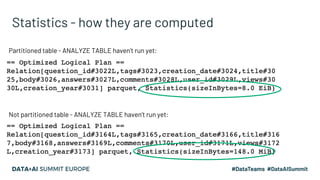
Statistics - how they are computed
Partitioned table - ANALYZE TABLE haven’t run yet:
Not partitioned table - ANALYZE TABLE haven’t run yet:
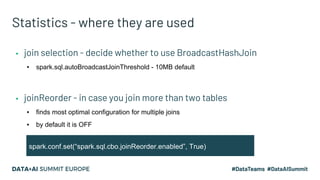
Statistics - where they are used
▪ joinReorder - in case you join more than two tables
▪ finds most optimal configuration for multiple joins
▪ by default it is OFF
spark.conf.set(“spark.sql.cbo.joinReorder.enabled”, True)
▪ join selection - decide whether to use BroadcastHashJoin
▪ spark.sql.autoBroadcastJoinThreshold - 10MB default
Saving data in a sorted state to a file format
▪ Functions for sorting
▪ How to save in sorted state
Sorting in Spark SQL
▪ orderBy / sort
▪ DataFrame transformation
▪ samples data in separate job
▪ creates a shuffle to achieve global sort
▪ sortWithinPartitions
▪ DataFrame transformation
▪ sorts each partition
▪ sortBy
▪ called on DataFrameWriter after calling write
▪ used together with bucketing - sorts each bucket
▪ requires using saveAsTable
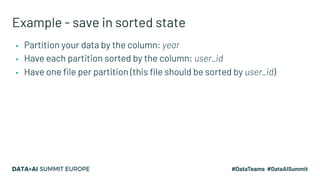
Example - save in sorted state
▪ Partition your data by the column: year
▪ Have each partition sorted by the column: user_id
▪ Have one file per partition (this file should be sorted by user_id)
Example - save in sorted state
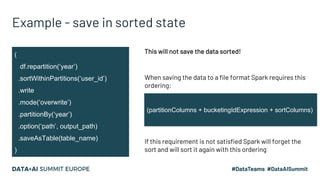
(
df.repartition(‘year’)
.sortWithinPartitions(‘user_id’)
.write
.mode(‘overwrite’)
.partitionBy(‘year’)
.option(‘path’, output_path)
.saveAsTable(table_name)
)
This will not save the data sorted!
When saving the data to a file format Spark requires this
ordering:
(partitionColumns + bucketingIdExpression + sortColumns)
If this requirement is not satisfied Spark will forget the
sort and will sort it again with this ordering
Example - save in sorted state
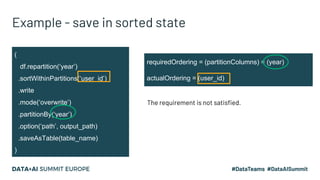
(
df.repartition(‘year’)
.sortWithinPartitions(‘user_id’)
.write
.mode(‘overwrite’)
.partitionBy(‘year’)
.option(‘path’, output_path)
.saveAsTable(table_name)
)
requiredOrdering = (partitionColumns) = (year)
actualOrdering = (user_id)
The requirement is not satisfied.
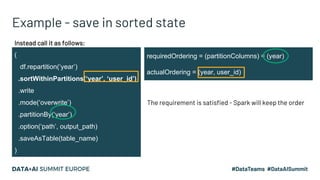
Example - save in sorted state
(
df.repartition(‘year’)
.sortWithinPartitions(‘year’, ‘user_id’)
.write
.mode(‘overwrite’)
.partitionBy(‘year’)
.option(‘path’, output_path)
.saveAsTable(table_name)
)
requiredOrdering = (partitionColumns) = (year)
actualOrdering = (year, user_id)
The requirement is satisfied - Spark will keep the order
Instead call it as follows:
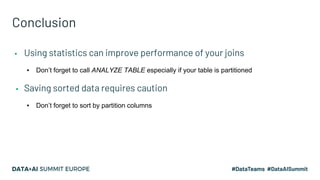
Conclusion
▪ Using statistics can improve performance of your joins
▪ Don’t forget to call ANALYZE TABLE especially if your table is partitioned
▪ Saving sorted data requires caution
▪ Don’t forget to sort by partition columns
Feedback
Your feedback is important to us.
Don’t forget to rate
and review the sessions.

Spark SQL Beyond Official Documentation

  • 1.
    Spark SQL BeyondOfficial Documentation David Vrba Ph.D. Senior ML Engineer
  • 2.
    About Myself ▪ SeniorML Engineer at Socialbakers ▪ developing and optimizing Spark jobs ▪ productionalizing Spark applications and deploying ML models ▪ Spark Trainer ▪ 1-day, 2-days trainings ▪ reach out to me at https://www.linkedin.com/in/vrba- david/ ▪ Writer ▪ publishing articles at medium ▪ follow me at https://medium.com/@vrba.dave
  • 3.
    Goal ▪ Knowledge sharing ▪Free continuation of my previous talk ▪ Physical Plans in Spark SQL ▪ https://databricks.com/session_eu19/physical-plans-in-spark-sql ▪ Describe the non-obvious behavior of some Spark features ▪ Go beyond the documentation ▪ Focus on practical aspects of Spark SQL
  • 4.
    Topics ▪ Statistics ▪ Savingdata in sorted state to a file format
  • 5.
    Statistics ▪ How tosee them ▪ How they are computed ▪ Where they are used ▪ What to be careful about
  • 6.
    Statistics - howto see them ▪ Table level: ▪ DESCRIBE EXTENDED ▪ DESCRIBE FORMATTED spark.sql(“DESCRIBE EXTENDED table_name”).show(n=50) spark.sql(“ANALYZE TABLE table_name COMPUTE STATISTICS”).show(n=50)
  • 7.
    Statistics - howto see them ▪ Column level: spark.sql(“DESCRIBE EXTENDED table_name column_name”).show()
  • 8.
    Statistics - howto see them ▪ From the plan - since Spark 3.0 spark.table(table_name).explain(mode=“cost”)
  • 9.
    Statistics - howthey are propagated Relation Filter Project Aggregate Leaf Node - Responsible for computing the statistics Statistics are propagated through the tree and adjusted along the way
  • 10.
    Statistics - howthey are propagated ▪ Simple way ▪ propagates only sizeInBytes ▪ propagation through the plan is very basic (Filter is not adjusted at all) ( spark.table(table_name) .filter(col(“user_id”) < 0) .explain(mode=”cost”) )
  • 11.
    spark.conf.set(“spark.sql.cbo.enabled”, True) Statistics -how they are propagated ▪ More advanced ▪ propagates sizeInBytes and rowCount + column level ▪ since Spark 2.2 ▪ better propagation through plan (selectivity for Filter) ▪ CBO has to be enabled (by default OFF) ▪ works with metastore No change in Filter statistics - it requires column stats to be computed
  • 12.
    Statistics - howthey are propagated ▪ Selectivity requires having column level stats spark.sql(“ANALYZE TABLE table_name COMPUTE STATISTICS FOR COLUMNS user_id”)
  • 13.
    Statistics - howthey are computed Relation Filter Project Aggregate Leaf Node - Responsible for computing the statistics 1. Taken from metastore 2. Computed using Hadoop API (only sizeInBytes) 3. Default value sizeInBytes = 8EB spark.sql.defaultSizeInBytes
  • 14.
    Statistics - howthey are computed CBO ON Analyze table ON Table partitionedAll Stats from M CatalogFileIndex InMemoryFI T T T F F Analyze table ON Stats from M TF F CatalogTable InMemoryFI FT Using Hadoop API - only sizeInBytes Using Hadoop API - only sizeInBytes Only sizeInBytes - taken directly All stats except for size which is computed from rowCount Maximum value (8 EB) spark.table(...) spark.sql.defaultSizeInBytes spark.sql.cbo.enabled
  • 15.
    Statistics - howthey are computed Partitioned table - ANALYZE TABLE haven’t run yet: Not partitioned table - ANALYZE TABLE haven’t run yet:
  • 16.
    Statistics - wherethey are used ▪ joinReorder - in case you join more than two tables ▪ finds most optimal configuration for multiple joins ▪ by default it is OFF spark.conf.set(“spark.sql.cbo.joinReorder.enabled”, True) ▪ join selection - decide whether to use BroadcastHashJoin ▪ spark.sql.autoBroadcastJoinThreshold - 10MB default
  • 17.
    Saving data ina sorted state to a file format ▪ Functions for sorting ▪ How to save in sorted state
  • 18.
    Sorting in SparkSQL ▪ orderBy / sort ▪ DataFrame transformation ▪ samples data in separate job ▪ creates a shuffle to achieve global sort ▪ sortWithinPartitions ▪ DataFrame transformation ▪ sorts each partition ▪ sortBy ▪ called on DataFrameWriter after calling write ▪ used together with bucketing - sorts each bucket ▪ requires using saveAsTable
  • 19.
    Example - savein sorted state ▪ Partition your data by the column: year ▪ Have each partition sorted by the column: user_id ▪ Have one file per partition (this file should be sorted by user_id)
  • 20.
    Example - savein sorted state ( df.repartition(‘year’) .sortWithinPartitions(‘user_id’) .write .mode(‘overwrite’) .partitionBy(‘year’) .option(‘path’, output_path) .saveAsTable(table_name) ) This will not save the data sorted! When saving the data to a file format Spark requires this ordering: (partitionColumns + bucketingIdExpression + sortColumns) If this requirement is not satisfied Spark will forget the sort and will sort it again with this ordering
  • 21.
    Example - savein sorted state ( df.repartition(‘year’) .sortWithinPartitions(‘user_id’) .write .mode(‘overwrite’) .partitionBy(‘year’) .option(‘path’, output_path) .saveAsTable(table_name) ) requiredOrdering = (partitionColumns) = (year) actualOrdering = (user_id) The requirement is not satisfied.
  • 22.
    Example - savein sorted state ( df.repartition(‘year’) .sortWithinPartitions(‘year’, ‘user_id’) .write .mode(‘overwrite’) .partitionBy(‘year’) .option(‘path’, output_path) .saveAsTable(table_name) ) requiredOrdering = (partitionColumns) = (year) actualOrdering = (year, user_id) The requirement is satisfied - Spark will keep the order Instead call it as follows:
  • 23.
    Conclusion ▪ Using statisticscan improve performance of your joins ▪ Don’t forget to call ANALYZE TABLE especially if your table is partitioned ▪ Saving sorted data requires caution ▪ Don’t forget to sort by partition columns
  • 24.
    Feedback Your feedback isimportant to us. Don’t forget to rate and review the sessions.