planning Group Members Seo Chai Yong Lee Siew Ling Ji Tian Hui
Planning Planning and costing is one stage of a multimedia project Proper project planning is a important as planning the layout and content. Before start to render graphics, sounds, and other components, the plans should be in place which to ensure that the necessary skills and resources are available
Process Of Making Multimedia Idea analysis Pre-testing Task planning Development Delivery
Planning & Costing Program  Goals Outline Logic Flow Chart Storyboard
Making Multimedia There have four development phases of making multimedia which are: Discovery Phase Design Phase Prototype Phase Production Phase
Importance of Planning To avoid misinterpretation in development multimedia project because Provide guidance for bug fixes and update
Essentials of Good Planning Personnel Multimedia Team Process management System Development Lifecycle Documentation Product evaluation
Program Goals into Storyboard Program Goals Outline Logic Flow Chart Storyboard Program script or concept Plan User interface Prepare Scripts for narrations, text, video Consider Copyrights Music, audio, video production planning Prepare project time lines and budget
Process Management Use the System Development Lifecycle There have many type of System Development life cycle which are waterfall, prototyping, spiral, linear and incremental
Waterfall Development Method
Documentation There have four parts of the documentation for the multimedia project which are  a) Requirement document Overall product blueprint State that what is to be done and not how the project has been done b) Flow charts Logical progression through the product Navigation
c) Storyboard Tasks, objects, events and contents of the product Scene-by-scene d) Test documentation How, what and who to test the documentation
Flowchart A graphical ‘sketch’ of the presentation and the possible paths the user can take Menu Topic 1 Topic 2 Topic 3 Exit
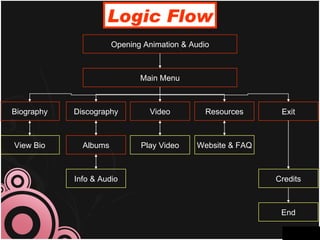
Logic Flow Opening Animation & Audio Main Menu View Bio Albums Play Video Website & FAQ Biography Discography Video Resources Exit Info & Audio Credits End
Storyboard A graphical representation Of the user screen layout
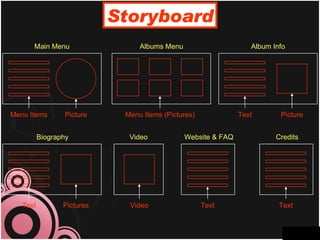
Storyboard Main Menu Menu Items Picture Albums Menu Menu Items (Pictures) Album Info Text Picture Biography Text Pictures Video Video Website & FAQ Text Credits Text

Multimedia Planning

  • 1.
    planning Group MembersSeo Chai Yong Lee Siew Ling Ji Tian Hui
  • 2.
    Planning Planning andcosting is one stage of a multimedia project Proper project planning is a important as planning the layout and content. Before start to render graphics, sounds, and other components, the plans should be in place which to ensure that the necessary skills and resources are available
  • 3.
    Process Of MakingMultimedia Idea analysis Pre-testing Task planning Development Delivery
  • 4.
    Planning & CostingProgram Goals Outline Logic Flow Chart Storyboard
  • 5.
    Making Multimedia Therehave four development phases of making multimedia which are: Discovery Phase Design Phase Prototype Phase Production Phase
  • 6.
    Importance of PlanningTo avoid misinterpretation in development multimedia project because Provide guidance for bug fixes and update
  • 7.
    Essentials of GoodPlanning Personnel Multimedia Team Process management System Development Lifecycle Documentation Product evaluation
  • 8.
    Program Goals intoStoryboard Program Goals Outline Logic Flow Chart Storyboard Program script or concept Plan User interface Prepare Scripts for narrations, text, video Consider Copyrights Music, audio, video production planning Prepare project time lines and budget
  • 9.
    Process Management Usethe System Development Lifecycle There have many type of System Development life cycle which are waterfall, prototyping, spiral, linear and incremental
  • 10.
  • 11.
    Documentation There havefour parts of the documentation for the multimedia project which are a) Requirement document Overall product blueprint State that what is to be done and not how the project has been done b) Flow charts Logical progression through the product Navigation
  • 12.
    c) Storyboard Tasks,objects, events and contents of the product Scene-by-scene d) Test documentation How, what and who to test the documentation
  • 13.
    Flowchart A graphical‘sketch’ of the presentation and the possible paths the user can take Menu Topic 1 Topic 2 Topic 3 Exit
  • 14.
    Logic Flow OpeningAnimation & Audio Main Menu View Bio Albums Play Video Website & FAQ Biography Discography Video Resources Exit Info & Audio Credits End
  • 15.
    Storyboard A graphicalrepresentation Of the user screen layout
  • 16.
    Storyboard Main MenuMenu Items Picture Albums Menu Menu Items (Pictures) Album Info Text Picture Biography Text Pictures Video Video Website & FAQ Text Credits Text