Microsoft Excel Shortcut Keys
Ctrl+A Select All None
Ctrl+B Bold Format, Cells, Font, Font Style,
Bold
Ctrl+C Copy Edit, Copy
Ctrl+D Fill Down Edit, Fill, Down
Ctrl+F Find Edit, Find
Ctrl+G Go to Edit, Go to
Ctrl+H Replace Edit, Replace
Ctrl+I Italic Format, Cells, Font, Font Style,
Italic
Ctrl+K Insert Hyperlink Insert, Hyperlink
Ctrl+N New Workbook File, New
Ctrl+O Open File, Open
Ctrl+P Print File, Print
Ctrl+R Fill Right Edit, Fill Right
Ctrl+S Save File, Save
Ctrl+U Underline Format, Cells, Font, Underline,
Single
Ctrl+V Paste Edit, Paste
Ctrl W Close File, Close
Ctrl+X Cut Edit, Cut
Ctrl+Y Repeat Edit, Repeat
Ctrl+Z Undo Edit, Undo
F1 Help Help, Contents and Index
F2 Edit None
F3 Paste Name Insert, Name, Paste
F4 Repeat last action Edit, Repeat. Works while not in
Edit mode.
F4 While typing a formula, switch
between absolute/relative refs
None
F5 Goto Edit, Goto
F6 Next Pane None
F7 Spell check Tools, Spelling
F8 Extend mode None
F9 Recalculate all workbooks Tools, Options, Calculation,
Calc,Now
F10 Activate Menubar N/A
F11 New Chart Insert, Chart
F12 Save As File, Save As
Ctrl+: Insert Current Time None
Ctrl+; Insert Current Date None
Ctrl+" Copy Value from Cell Above Edit, Paste Special, Value
Ctrl+’ Copy Fromula from Cell Above Edit, Copy
Shift Hold down shift for additional
functions in Excel’s menu
none
Shift+F1 What’s This? Help, What’s This?
Shift+F2 Edit cell comment Insert, Edit Comments
Shift+F3 Paste function into formula Insert, Function
Shift+F4 Find Next Edit, Find, Find Next
Shift+F5 Find Edit, Find, Find Next
Shift+F6 Previous Pane None
Shift+F8 Add to selection None
Shift+F9 Calculate active worksheet Calc Sheet
Shift+F10 Display shortcut menu None
Shift+F11 New worksheet Insert, Worksheet
Shift+F12 Save File, Save
Ctrl+F3 Define name Insert, Names, Define
Ctrl+F4 Close File, Close
Ctrl+F5 XL, Restore window size Restore
Ctrl+F6 Next workbook window Window, ...
Shift+Ctrl+F6 Previous workbook window Window, ...
Ctrl+F7 Move window XL, Move
Ctrl+F8 Resize window XL, Size
Ctrl+F9 Minimize workbook XL, Minimize
Ctrl+F10 Maximize or restore window XL, Maximize
Ctrl+F11 Inset 4.0 Macro sheet None in Excel 97. In versions prior
to 97 - Insert, Macro, 4.0 Macro
Ctrl+F12 File Open File, Open
Alt+F1 Insert Chart Insert, Chart...
Alt+F2 Save As File, Save As
Alt+F4 Exit File, Exit
Alt+F8 Macro dialog box Tools, Macro, Macros in Excel 97
Tools,Macros - in earlier versions
Alt+F11 Visual Basic Editor Tools, Macro, Visual Basic Editor
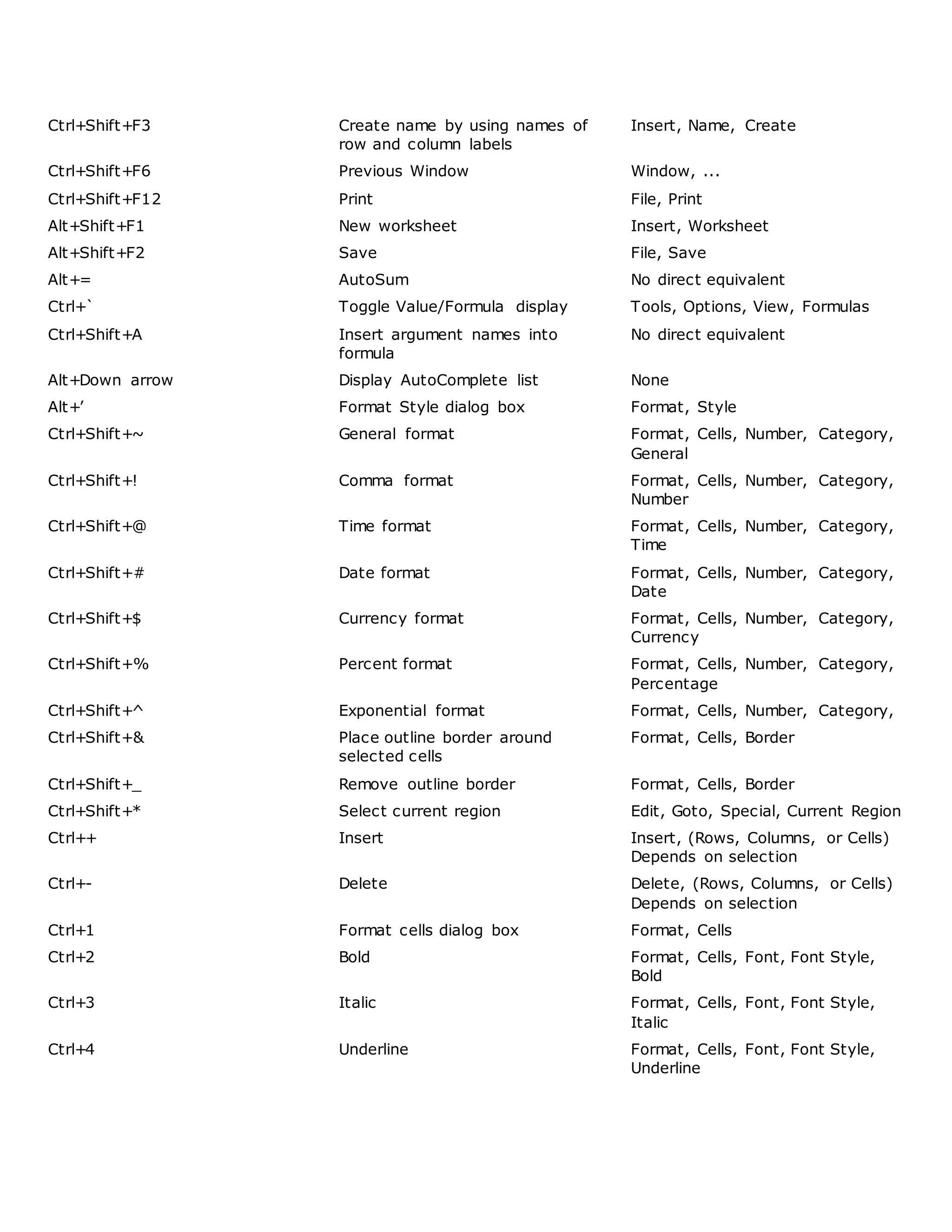
Ctrl+Shift+F3 Create name by using names of
row and column labels
Insert, Name, Create
Ctrl+Shift+F6 Previous Window Window, ...
Ctrl+Shift+F12 Print File, Print
Alt+Shift+F1 New worksheet Insert, Worksheet
Alt+Shift+F2 Save File, Save
Alt+= AutoSum No direct equivalent
Ctrl+` Toggle Value/Formula display Tools, Options, View, Formulas
Ctrl+Shift+A Insert argument names into
formula
No direct equivalent
Alt+Down arrow Display AutoComplete list None
Alt+’ Format Style dialog box Format, Style
Ctrl+Shift+~ General format Format, Cells, Number, Category,
General
Ctrl+Shift+! Comma format Format, Cells, Number, Category,
Number
Ctrl+Shift+@ Time format Format, Cells, Number, Category,
Time
Ctrl+Shift+# Date format Format, Cells, Number, Category,
Date
Ctrl+Shift+$ Currency format Format, Cells, Number, Category,
Currency
Ctrl+Shift+% Percent format Format, Cells, Number, Category,
Percentage
Ctrl+Shift+^ Exponential format Format, Cells, Number, Category,
Ctrl+Shift+& Place outline border around
selected cells
Format, Cells, Border
Ctrl+Shift+_ Remove outline border Format, Cells, Border
Ctrl+Shift+* Select current region Edit, Goto, Special, Current Region
Ctrl++ Insert Insert, (Rows, Columns, or Cells)
Depends on selection
Ctrl+- Delete Delete, (Rows, Columns, or Cells)
Depends on selection
Ctrl+1 Format cells dialog box Format, Cells
Ctrl+2 Bold Format, Cells, Font, Font Style,
Bold
Ctrl+3 Italic Format, Cells, Font, Font Style,
Italic
Ctrl+4 Underline Format, Cells, Font, Font Style,
Underline
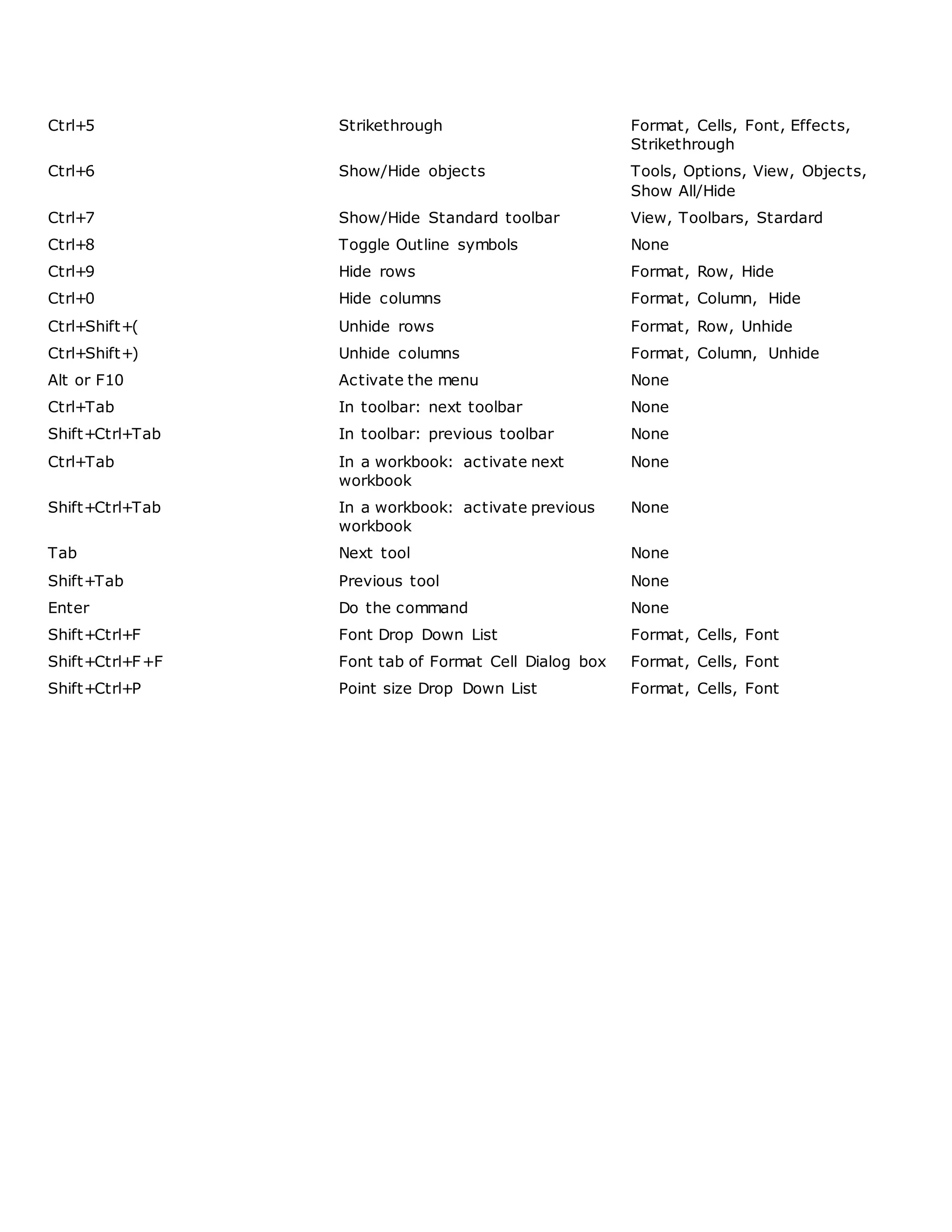
Ctrl+5 Strikethrough Format, Cells, Font, Effects,
Strikethrough
Ctrl+6 Show/Hide objects Tools, Options, View, Objects,
Show All/Hide
Ctrl+7 Show/Hide Standard toolbar View, Toolbars, Stardard
Ctrl+8 Toggle Outline symbols None
Ctrl+9 Hide rows Format, Row, Hide
Ctrl+0 Hide columns Format, Column, Hide
Ctrl+Shift+( Unhide rows Format, Row, Unhide
Ctrl+Shift+) Unhide columns Format, Column, Unhide
Alt or F10 Activate the menu None
Ctrl+Tab In toolbar: next toolbar None
Shift+Ctrl+Tab In toolbar: previous toolbar None
Ctrl+Tab In a workbook: activate next
workbook
None
Shift+Ctrl+Tab In a workbook: activate previous
workbook
None
Tab Next tool None
Shift+Tab Previous tool None
Enter Do the command None
Shift+Ctrl+F Font Drop Down List Format, Cells, Font
Shift+Ctrl+F+F Font tab of Format Cell Dialog box Format, Cells, Font
Shift+Ctrl+P Point size Drop Down List Format, Cells, Font

Ms excel short key

  • 1.
    Microsoft Excel ShortcutKeys Ctrl+A Select All None Ctrl+B Bold Format, Cells, Font, Font Style, Bold Ctrl+C Copy Edit, Copy Ctrl+D Fill Down Edit, Fill, Down Ctrl+F Find Edit, Find Ctrl+G Go to Edit, Go to Ctrl+H Replace Edit, Replace Ctrl+I Italic Format, Cells, Font, Font Style, Italic Ctrl+K Insert Hyperlink Insert, Hyperlink Ctrl+N New Workbook File, New Ctrl+O Open File, Open Ctrl+P Print File, Print Ctrl+R Fill Right Edit, Fill Right Ctrl+S Save File, Save Ctrl+U Underline Format, Cells, Font, Underline, Single Ctrl+V Paste Edit, Paste Ctrl W Close File, Close Ctrl+X Cut Edit, Cut Ctrl+Y Repeat Edit, Repeat Ctrl+Z Undo Edit, Undo F1 Help Help, Contents and Index F2 Edit None F3 Paste Name Insert, Name, Paste F4 Repeat last action Edit, Repeat. Works while not in Edit mode. F4 While typing a formula, switch between absolute/relative refs None F5 Goto Edit, Goto F6 Next Pane None F7 Spell check Tools, Spelling F8 Extend mode None F9 Recalculate all workbooks Tools, Options, Calculation, Calc,Now F10 Activate Menubar N/A
  • 2.
    F11 New ChartInsert, Chart F12 Save As File, Save As Ctrl+: Insert Current Time None Ctrl+; Insert Current Date None Ctrl+" Copy Value from Cell Above Edit, Paste Special, Value Ctrl+’ Copy Fromula from Cell Above Edit, Copy Shift Hold down shift for additional functions in Excel’s menu none Shift+F1 What’s This? Help, What’s This? Shift+F2 Edit cell comment Insert, Edit Comments Shift+F3 Paste function into formula Insert, Function Shift+F4 Find Next Edit, Find, Find Next Shift+F5 Find Edit, Find, Find Next Shift+F6 Previous Pane None Shift+F8 Add to selection None Shift+F9 Calculate active worksheet Calc Sheet Shift+F10 Display shortcut menu None Shift+F11 New worksheet Insert, Worksheet Shift+F12 Save File, Save Ctrl+F3 Define name Insert, Names, Define Ctrl+F4 Close File, Close Ctrl+F5 XL, Restore window size Restore Ctrl+F6 Next workbook window Window, ... Shift+Ctrl+F6 Previous workbook window Window, ... Ctrl+F7 Move window XL, Move Ctrl+F8 Resize window XL, Size Ctrl+F9 Minimize workbook XL, Minimize Ctrl+F10 Maximize or restore window XL, Maximize Ctrl+F11 Inset 4.0 Macro sheet None in Excel 97. In versions prior to 97 - Insert, Macro, 4.0 Macro Ctrl+F12 File Open File, Open Alt+F1 Insert Chart Insert, Chart... Alt+F2 Save As File, Save As Alt+F4 Exit File, Exit Alt+F8 Macro dialog box Tools, Macro, Macros in Excel 97 Tools,Macros - in earlier versions Alt+F11 Visual Basic Editor Tools, Macro, Visual Basic Editor
  • 3.
    Ctrl+Shift+F3 Create nameby using names of row and column labels Insert, Name, Create Ctrl+Shift+F6 Previous Window Window, ... Ctrl+Shift+F12 Print File, Print Alt+Shift+F1 New worksheet Insert, Worksheet Alt+Shift+F2 Save File, Save Alt+= AutoSum No direct equivalent Ctrl+` Toggle Value/Formula display Tools, Options, View, Formulas Ctrl+Shift+A Insert argument names into formula No direct equivalent Alt+Down arrow Display AutoComplete list None Alt+’ Format Style dialog box Format, Style Ctrl+Shift+~ General format Format, Cells, Number, Category, General Ctrl+Shift+! Comma format Format, Cells, Number, Category, Number Ctrl+Shift+@ Time format Format, Cells, Number, Category, Time Ctrl+Shift+# Date format Format, Cells, Number, Category, Date Ctrl+Shift+$ Currency format Format, Cells, Number, Category, Currency Ctrl+Shift+% Percent format Format, Cells, Number, Category, Percentage Ctrl+Shift+^ Exponential format Format, Cells, Number, Category, Ctrl+Shift+& Place outline border around selected cells Format, Cells, Border Ctrl+Shift+_ Remove outline border Format, Cells, Border Ctrl+Shift+* Select current region Edit, Goto, Special, Current Region Ctrl++ Insert Insert, (Rows, Columns, or Cells) Depends on selection Ctrl+- Delete Delete, (Rows, Columns, or Cells) Depends on selection Ctrl+1 Format cells dialog box Format, Cells Ctrl+2 Bold Format, Cells, Font, Font Style, Bold Ctrl+3 Italic Format, Cells, Font, Font Style, Italic Ctrl+4 Underline Format, Cells, Font, Font Style, Underline
  • 4.
    Ctrl+5 Strikethrough Format,Cells, Font, Effects, Strikethrough Ctrl+6 Show/Hide objects Tools, Options, View, Objects, Show All/Hide Ctrl+7 Show/Hide Standard toolbar View, Toolbars, Stardard Ctrl+8 Toggle Outline symbols None Ctrl+9 Hide rows Format, Row, Hide Ctrl+0 Hide columns Format, Column, Hide Ctrl+Shift+( Unhide rows Format, Row, Unhide Ctrl+Shift+) Unhide columns Format, Column, Unhide Alt or F10 Activate the menu None Ctrl+Tab In toolbar: next toolbar None Shift+Ctrl+Tab In toolbar: previous toolbar None Ctrl+Tab In a workbook: activate next workbook None Shift+Ctrl+Tab In a workbook: activate previous workbook None Tab Next tool None Shift+Tab Previous tool None Enter Do the command None Shift+Ctrl+F Font Drop Down List Format, Cells, Font Shift+Ctrl+F+F Font tab of Format Cell Dialog box Format, Cells, Font Shift+Ctrl+P Point size Drop Down List Format, Cells, Font