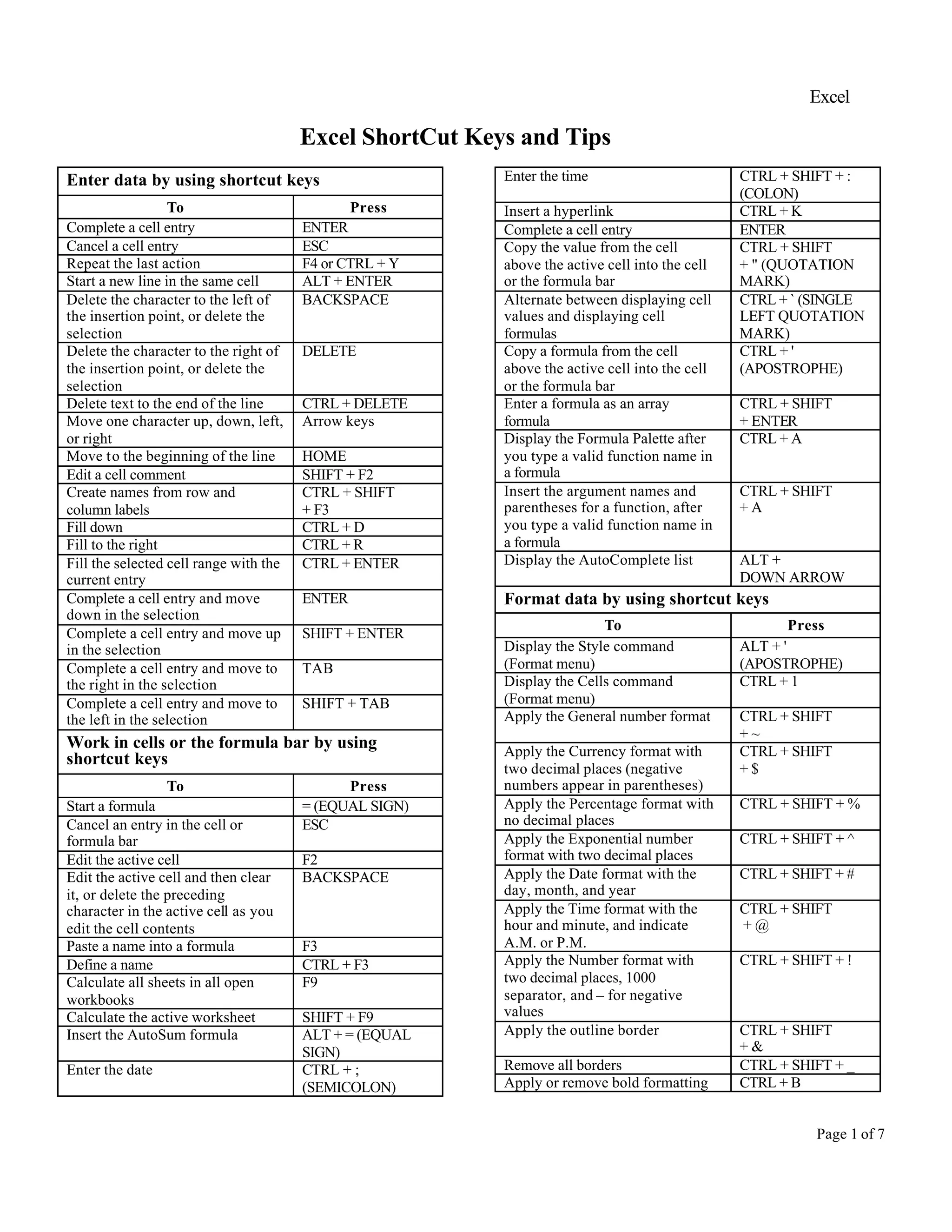
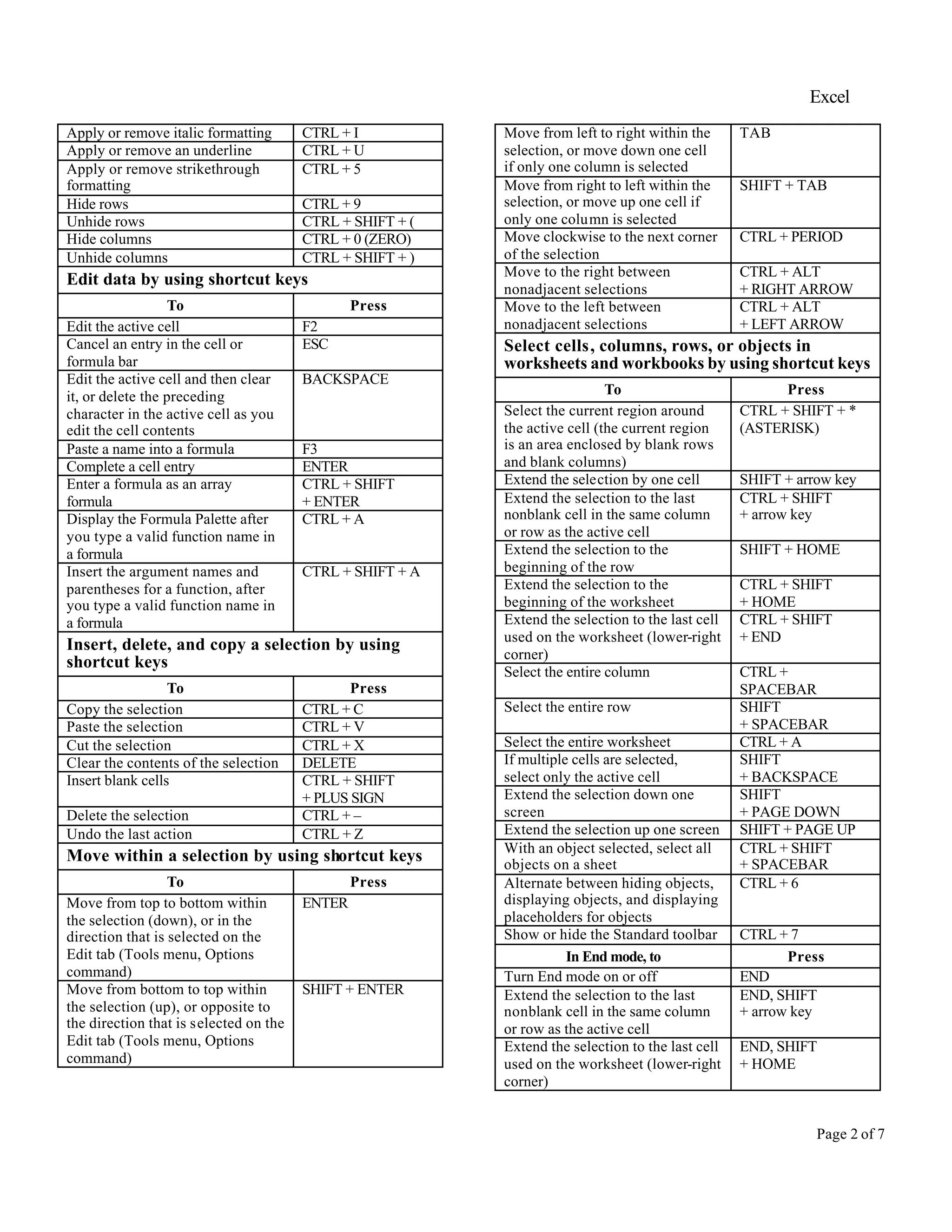
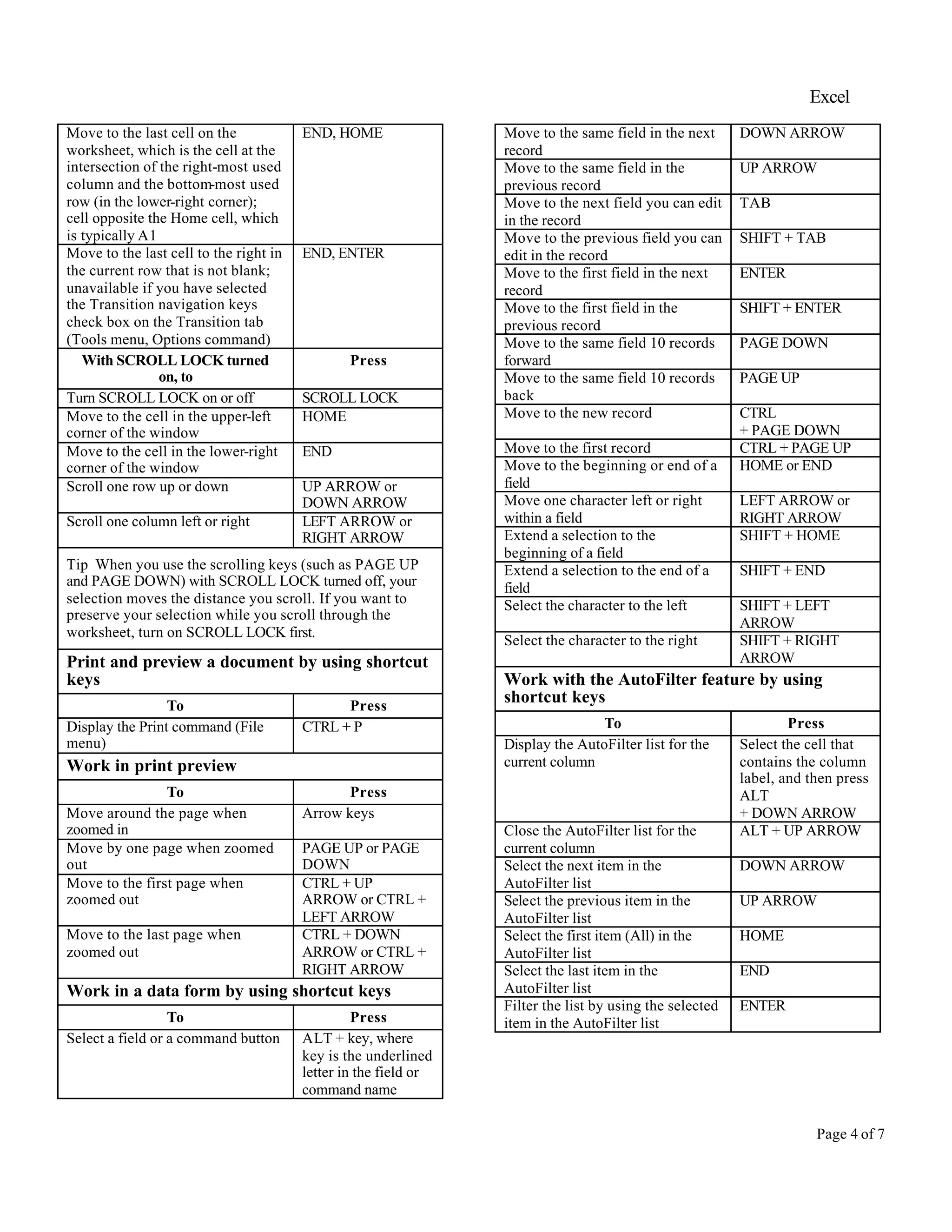
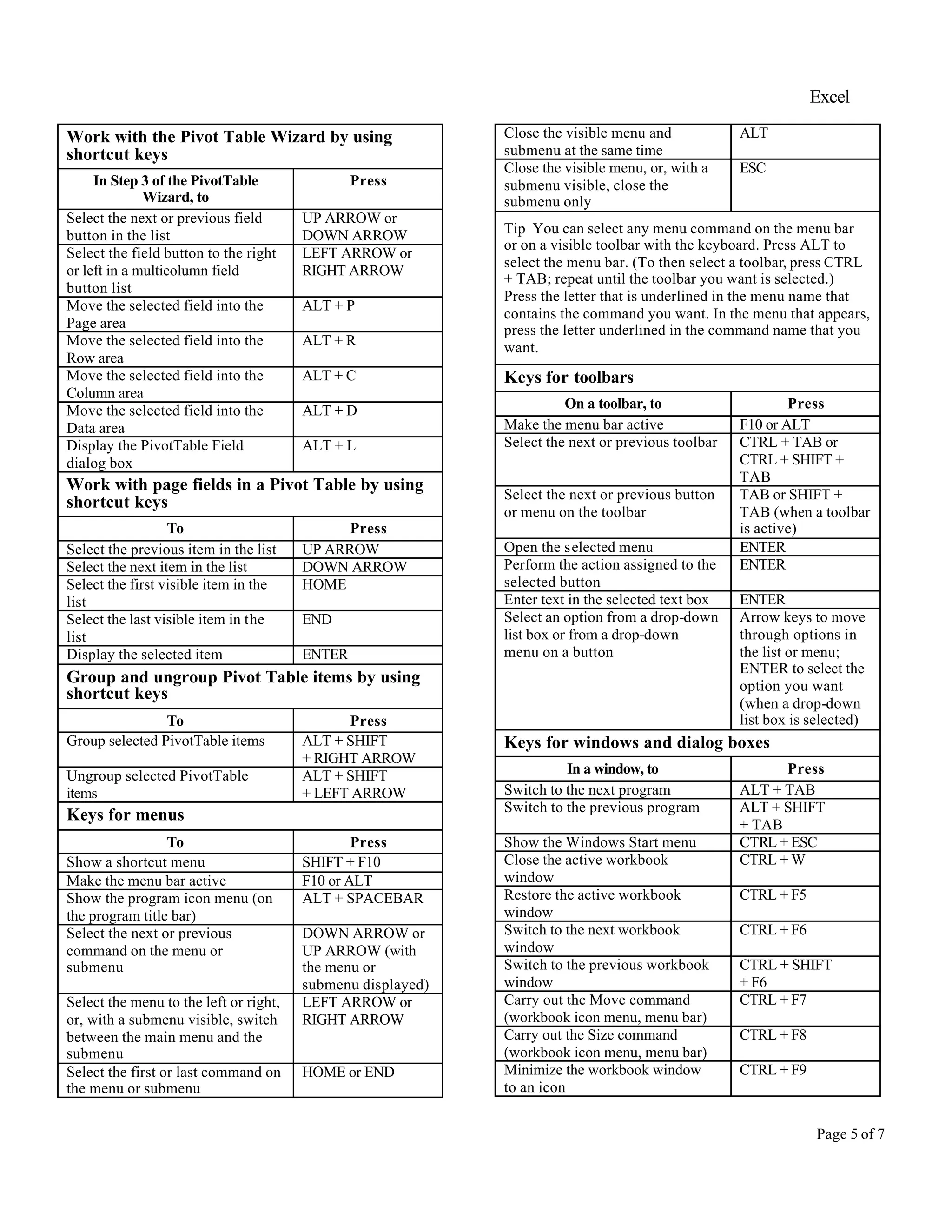
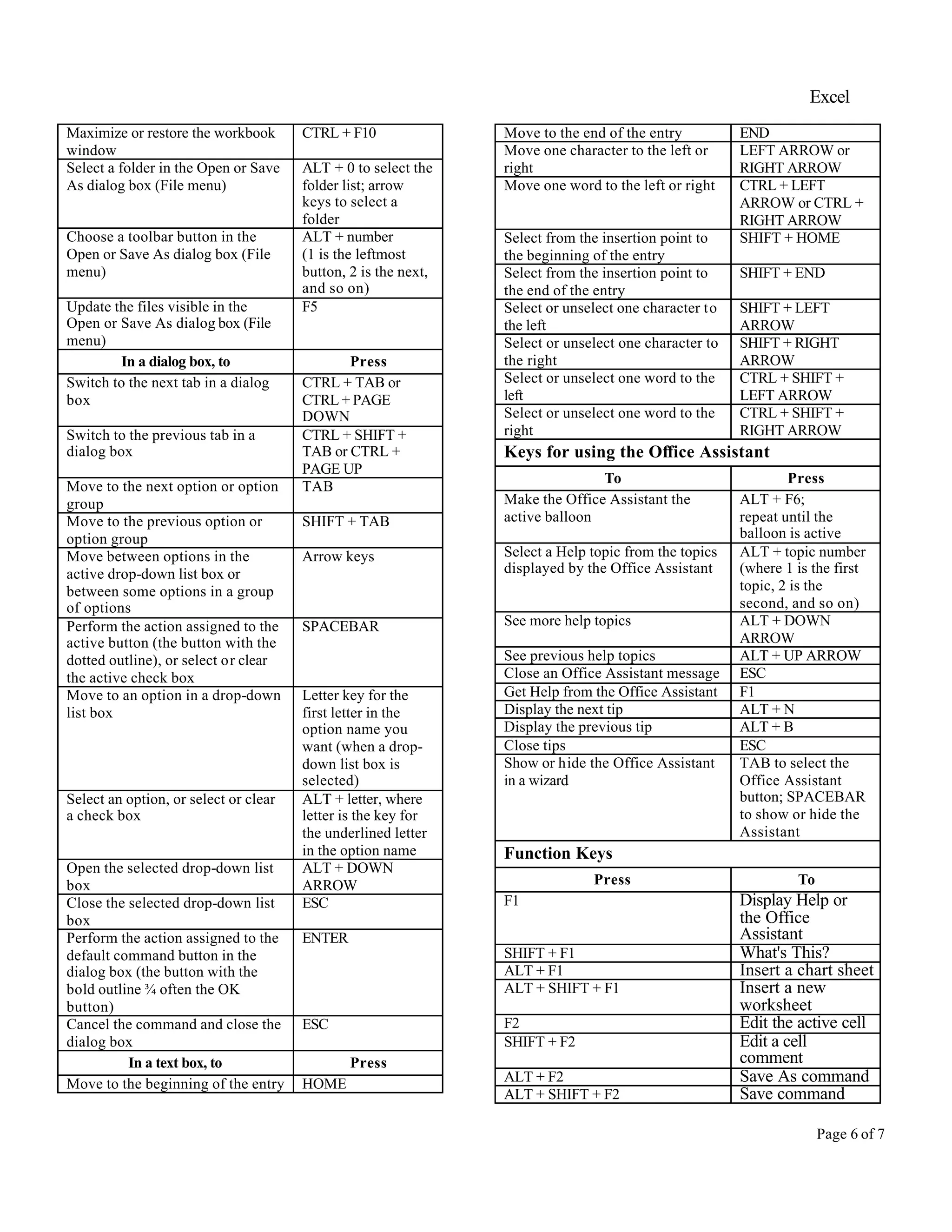
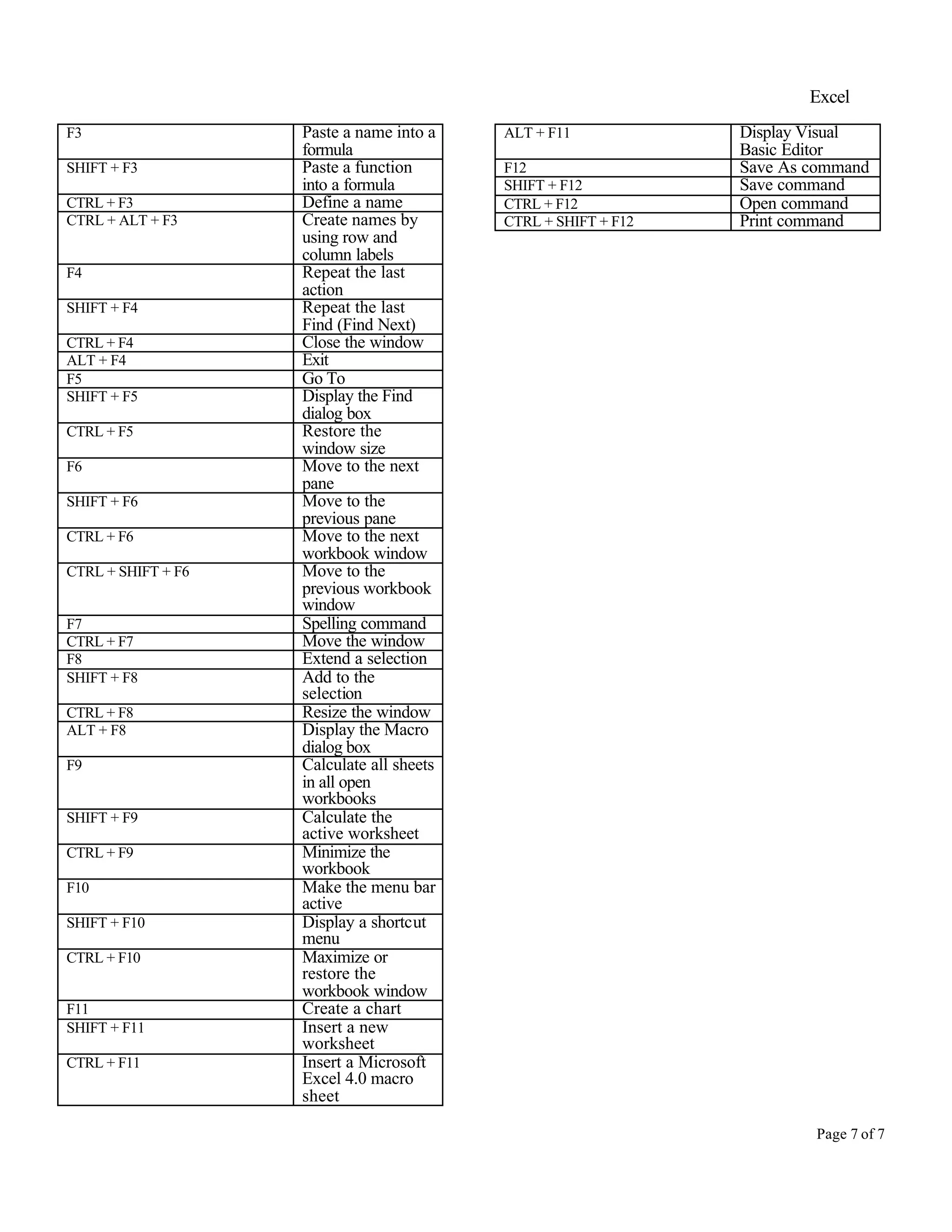
This document provides shortcuts for navigating, editing, formatting and working with Excel. It includes shortcuts for entering and editing cell data, working with formulas, selecting cells and ranges, moving around worksheets, printing, using AutoFilter and PivotTables, and more. Shortcuts are listed for common tasks like copying/pasting, undoing actions, navigating within cells using arrow keys, navigating between sheets and workbooks, and formatting cells. The document is intended to help users work more efficiently in Excel by utilizing keyboard shortcuts.
![Excel
Page 3 of 7
Extend the selection to the last cell
in the current row; this keystroke
is unavailable if you selected the
Transition navigation keys check
box on the Transition tab (Tools
menu, Options command)
END, SHIFT
+ ENTER
With SCROLL LOCK on, to Press
Turn SCROLL LOCK on or off SCROLL LOCK
Scroll the screen up or down one
row
UP ARROW or
DOWN ARROW
Scroll the screen left or right one
column
LEFT ARROW or
RIGHT ARROW
Extend the selection to the cell in
the upper-left corner of the
window
SHIFT + HOME
Extend the selection to the cell in
the lower-right corner of the
window
SHIFT + END
Tip When you use the scrolling keys (such as PAGE UP
and PAGE DOWN) with SCROLL LOCK turned off, your
selection moves the distance you scroll. If you want to
keep the same selection as you scroll, turn on SCROLL
LOCK first.
Select cells with special characteristics by using
shortcut keys
To Press
Select the current region around
the active cell (the current region
is an area enclosed by blank rows
and blank columns)
CTRL + SHIFT + *
(ASTERISK)
Select the current array, which is
the array that the active cell
belongs to
CTRL + /
Select all cells with comments CTRL + SHIFT
+ O (the letter O)
Select cells whose contents are
different from the comparison cell
in each row (for each row, the
comparison cell is in the same
column as the active cell)
CTRL +
Select cells whose contents are
different from the comparison cell
in each column (for each column,
the comparison cell is in the same
row as the active cell)
CTRL + SHIFT + |
Select only cells that are directly
referred to by formulas in the
selection
CTRL + [
Select all cells that are directly or
indirectly referred to by formulas
in the selection
CTRL + SHIFT + {
Select only cells with formulas
that refer directly to the active cell
CTRL + ]
Select all cells with formulas that
refer directly or indirectly to the
active cell
CTRL + SHIFT + }
Select only visible cells in the
current selection
ALT
+ SEMICOLON
Select chart items by using shortcut keys
To Press
Select the previous group of items DOWN ARROW
Select the next group of items UP ARROW
Select the next item within the
group
RIGHT ARROW
Select the previous item within the
group
LEFT ARROW
Move and scroll on a worksheet or workbook by
using shortcut keys
To Press
Move one cell in a given direction Arrow key
Move to the edge of the current
data region
CTRL + arrow key
Move between unlocked cells on a
protected worksheet
TAB
Move to the beginning of the row HOME
Move to the beginning of the
worksheet
CTRL + HOME
Move to the last cell on the
worksheet, which is the cell at the
intersection of the right-most used
column and the bottom-most used
row (in the lower-right corner);
cell opposite the Home cell, which
is typically A1
CTRL + END
Move down one screen PAGE DOWN
Move up one screen PAGE UP
Move one screen to the right ALT
+ PAGE DOWN
Move one screen to the left ALT + PAGE UP
Move to the next sheet in the
workbook
CTRL
+ PAGE DOWN
Move to the previous sheet in the
workbook
CTRL + PAGE UP
Move to the next workbook or
window
CTRL + F6 or
CTRL + TAB
Move to the previous workbook or
window
CTRL + SHIFT
+ F6 or CTRL
+ SHIFT + TAB
Move to the next pane F6
Move to the previous pane SHIFT + F6
Scroll to display the active cell CTRL
+ BACKSPACE
In End mode, to Press
Turn End mode on or off END
Move by one block of data within
a row or column
END, arrow key](https://image.slidesharecdn.com/excelshortcutkeys-161215100617/75/Excel-shortcut-keys-3-2048.jpg)


![Computer shortcuts (qt)[1]](https://cdn.slidesharecdn.com/ss_thumbnails/computershortcutsqt1-160814113952-thumbnail.jpg?width=640&height=640&fit=bounds)


![[DSC Europe 25] Dragana Ilic - AI for Big Data in Astronomy.pptx](https://cdn.slidesharecdn.com/ss_thumbnails/8palya86qaatvjhva1ms-2-dragana-ilic-ai-ilic-251208151906-652b819c-thumbnail.jpg?width=640&height=640&fit=bounds)
![[DSC Europe 25] Petar Zivanov - AI meets documents From chatbots to AI-powere...](https://cdn.slidesharecdn.com/ss_thumbnails/xer2bb6nrdc8pdpev0pc-8-251204082258-7c2fa4a1-thumbnail.jpg?width=640&height=640&fit=bounds)

![[DSC Europe 25] Marija Vlajkovic & Andrea Radonjanin - Integration of AI tool...](https://cdn.slidesharecdn.com/ss_thumbnails/qf1jrglttoc3bm8s3aop-final-integration-of-ai-tools-251208151905-394f3a6a-thumbnail.jpg?width=640&height=640&fit=bounds)
![[DSC Europe 25] Jim Sterne - Adopting Generative AI Capabilities Into the Ent...](https://cdn.slidesharecdn.com/ss_thumbnails/sxhpofuorcagxsaulkmt-3-251204082258-7e66bc48-thumbnail.jpg?width=640&height=640&fit=bounds)

![[DSC Europe 25] Boris Perkovic - Lost in performance.pptx](https://cdn.slidesharecdn.com/ss_thumbnails/uq5hrp7vsuahqkxzifux-1-251204082258-fd2ee09d-thumbnail.jpg?width=640&height=640&fit=bounds)
![[DSC Europe 25] Dragan Vucic - Building the Learning Organization - How AI Tr...](https://cdn.slidesharecdn.com/ss_thumbnails/8brigo2sbu6qur6gxrra-7-251205085715-6ae07d24-thumbnail.jpg?width=640&height=640&fit=bounds)
![[DSC Europe 25] Max Talanov - Non digital NNs.pptx](https://cdn.slidesharecdn.com/ss_thumbnails/wif8tr3gtua74qvtopke-non-digital-nns-251205090438-26b0eea6-thumbnail.jpg?width=640&height=640&fit=bounds)