ZFS 101
(aka ZFS is Cool and Why You
Should be Using It)
Dru Lavigne
Documentation Lead, iXsystems
Flourish, April 1, 2016
Outline
Discuss ZFS features and describe the available
management utilities for the following
FreeBSD-based operating systems:
FreeNAS 9.10: open source NAS (Network
Attached Storage)
PC-BSD 10.3: open source desktop (GUI) or
server (CLI)
History of ZFS
Modern filesystem specifically designed to add
features not available in traditional filesystems
Originally developed at Sun with the intent to
open source. After the Oracle acquisition, open
source development continued and the
original engineers founded OpenZFS (open-
zfs.org) which is under active development
OpenZFS uses feature flags instead of versions
What is ZFS?
128-bit COW (Copy on Write) filesystem and
logical volume manager with a maximum
pool/file size of 16 exabytes
In a traditional Unix filesystem, you need to
define the partition size and mount point at
filesystem creation time
In ZFS, you instead feed disks to a “pool” and
create filesystems from the pool as needed
Pool
Root (parent) volume which can be logically
sub-divided as needed
The number of disks added at a time is known
as a “vdev”
To optimize performance and resilvering time,
number of disks per vdev is limited
As more capacity is needed, add identical
vdevs-- these will be striped into the pool
RAIDZ
RAIDZ* levels designed to overcome hardware
RAID limitations such as the write-hole and
corrupt data written over time before the
controller provides an alert
Designed for commodity disks so no RAID
controller is needed
Can also be used with a RAID controller, but it
typically should be put into JBOD mode
RAIDZ1
Parity blocks are distributed across all disks
Up to one disk can fail per vdev without losing
pool
Pool can be lost if second disk in a vdev fails
before resilver completes
RAIDZ2
Double-parity solution similar to RAID6
Parity blocks are distributed across all disks
Up to two disks can fail per vdev without losing
pool, with no restrictions on which disks can
fail
RAIDZ3
Triple-parity solution
Parity blocks are distributed across all disks
Up to three disks can fail per vdev without
losing pool, with no restrictions on which disks
can fail
Create Pool on FreeNAS
Create Pool on PC-BSD
ZIL
Effectively a filesystem journal that stores sync
writes until they are committed to the pool
A dedicated SSD as a secondary log device
(SLOG) can increase synchronous write
performance, will have no effect on
asynchronous writes
FreeNAS includes the zilstat CLI utility to help
determine if system would benefit from a SLOG
ARC and L2ARC
Read cache in RAM. If high misses continue for
cached reads, the system needs to be tuned.
Freenas adds ARC stats to top(1) and includes
arc_summary.py and arcstat.py tools for ARC
monitoring
Optional, secondary ARC can be installed on
SSD or disk in order to increase random read
performance. Always add as much RAM as
possible first.
Adding SLOG/L2ARC on FreeNAS
Adding SLOG/L2ARC
During PC-BSD Install
Adding SLOG/L2ARC
Using PC-BSD Disk Manager
Datasets
As needed, pool can be divided into additional,
dynamically sized filesystems known as
datasets
Permissions and properties such as quotas and
compression can be set on a per-dataset level
A well thought out design can optimize storage
for the type of data being stored
Properties
Dozens of configurable properties such as:
atime (access time), canmount, compression,
copies, dedup, exec, quota, userquota,
groupquota, readonly, recordsize, reservation,
setuid, etc.
Descriptions can be found at
http://www.freebsd.org/cgi/man.cgi?query=zfs
Adding Dataset on FreeNAS
Adding Dataset During
PC-BSD Installation
Adding Dataset Using PC-BSD
Disk Manager
Zvols
Pool can also be divided into zvols which are
essentially, a virtual, raw block device
Ideal for iSCSI device extents or for hosting
foreign file systems
Regardless of the filesytem the zvol is
formatted with by the iSCSI initiator, the
underlying disk blocks still benefit from all of
the features provided by ZFS
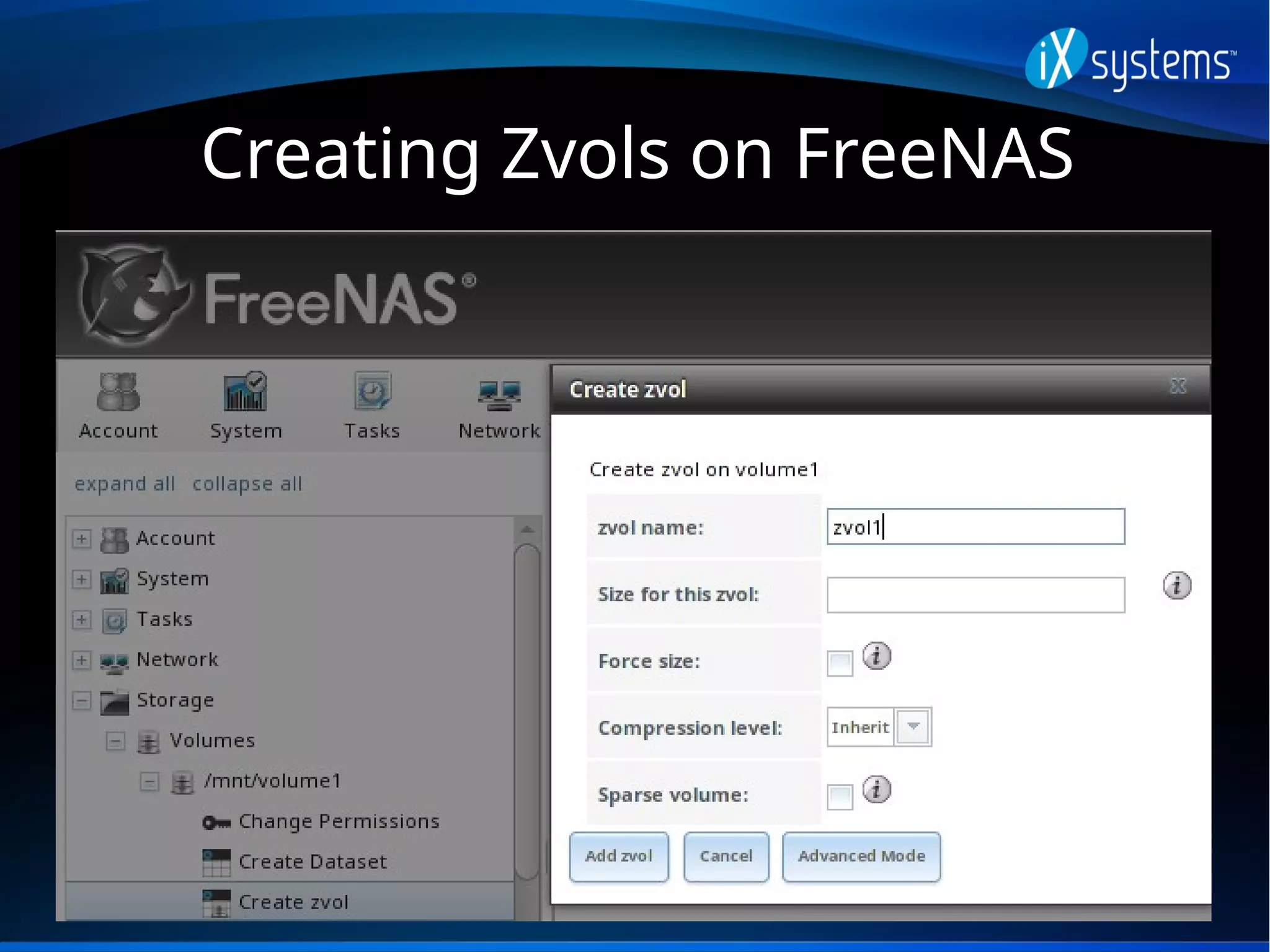
Creating Zvols on FreeNAS
Snapshots
Provide low cost, instantaneous, read-only,
point-in-time image of the specified pool,
dataset, or zvol
Initial size (of local copy) is 0 bytes as COW,
snapshot increases in size as changes are
written to disk
Can be replicated to another system
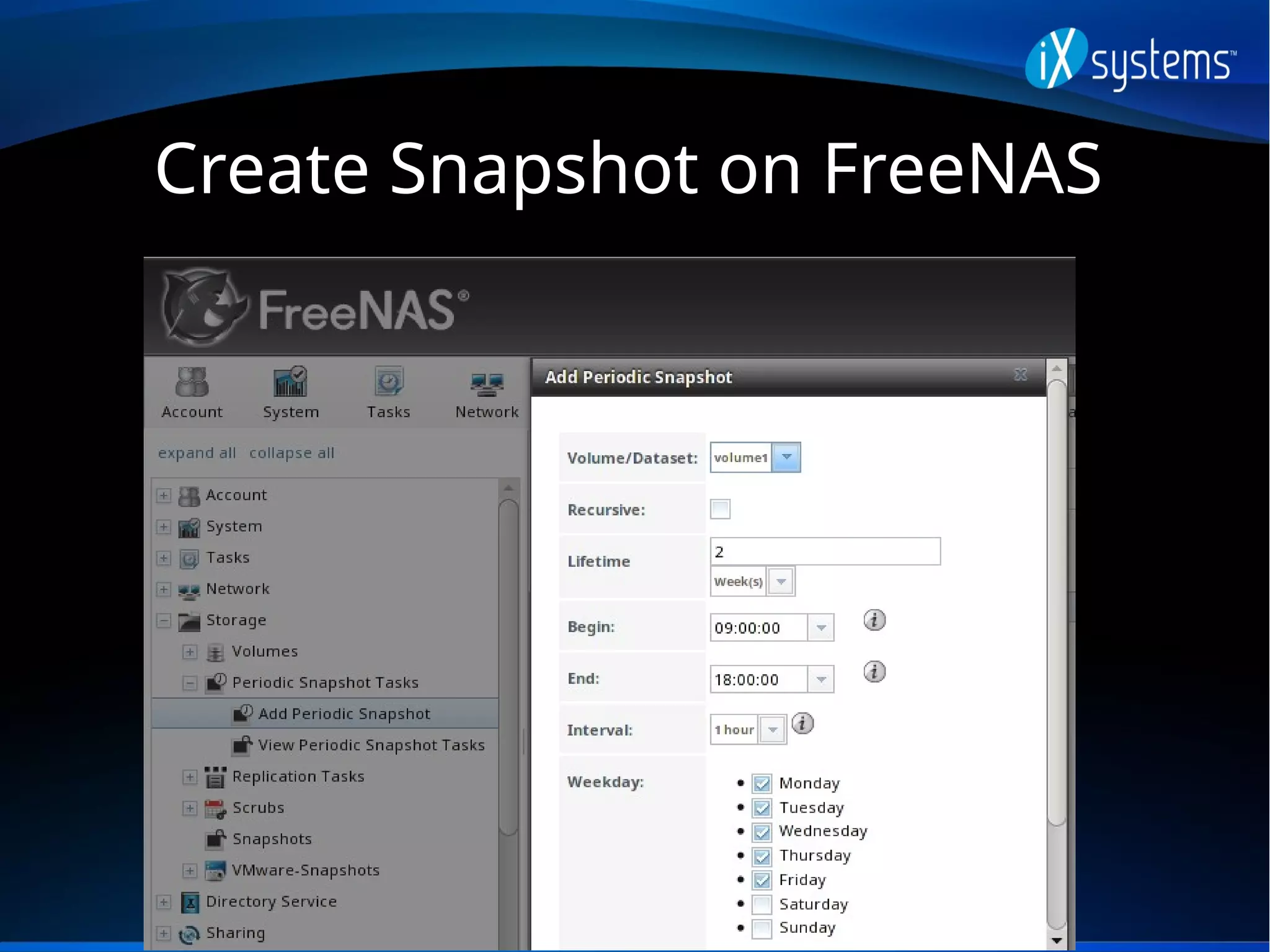
Create Snapshot on FreeNAS
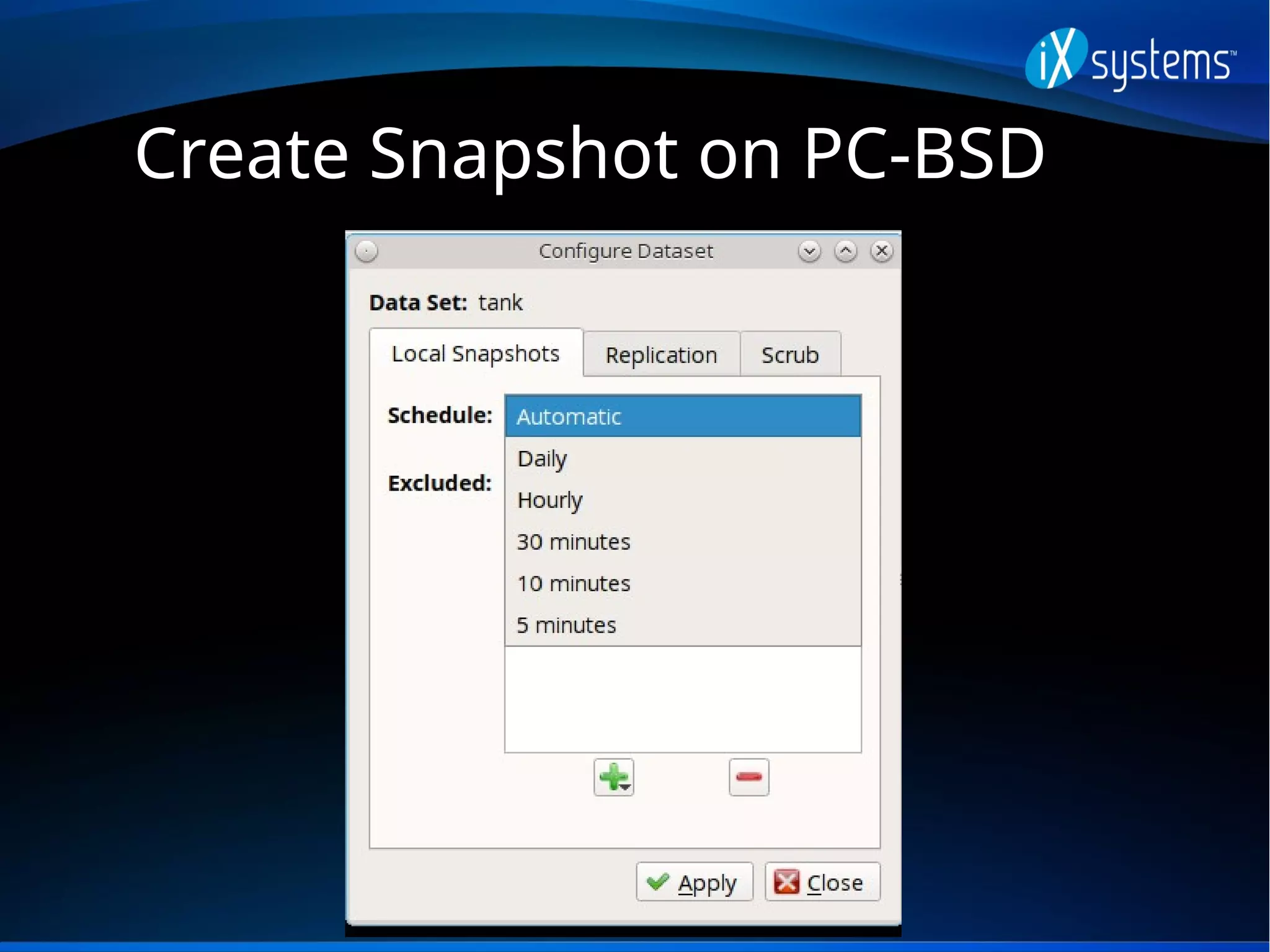
Create Snapshot on PC-BSD
Snapshot Restore
In PC-BSD, the Life Preserver utility provides a
snapshot browser for finding and restoring
copies of earlier versions of files
It can also automate the replication of local
snapshots to another system or to a FreeNAS
system over SSH
A remote snapshot can be used to perform an
operating system restore from a PC-BSD install
media, should the system become unusable
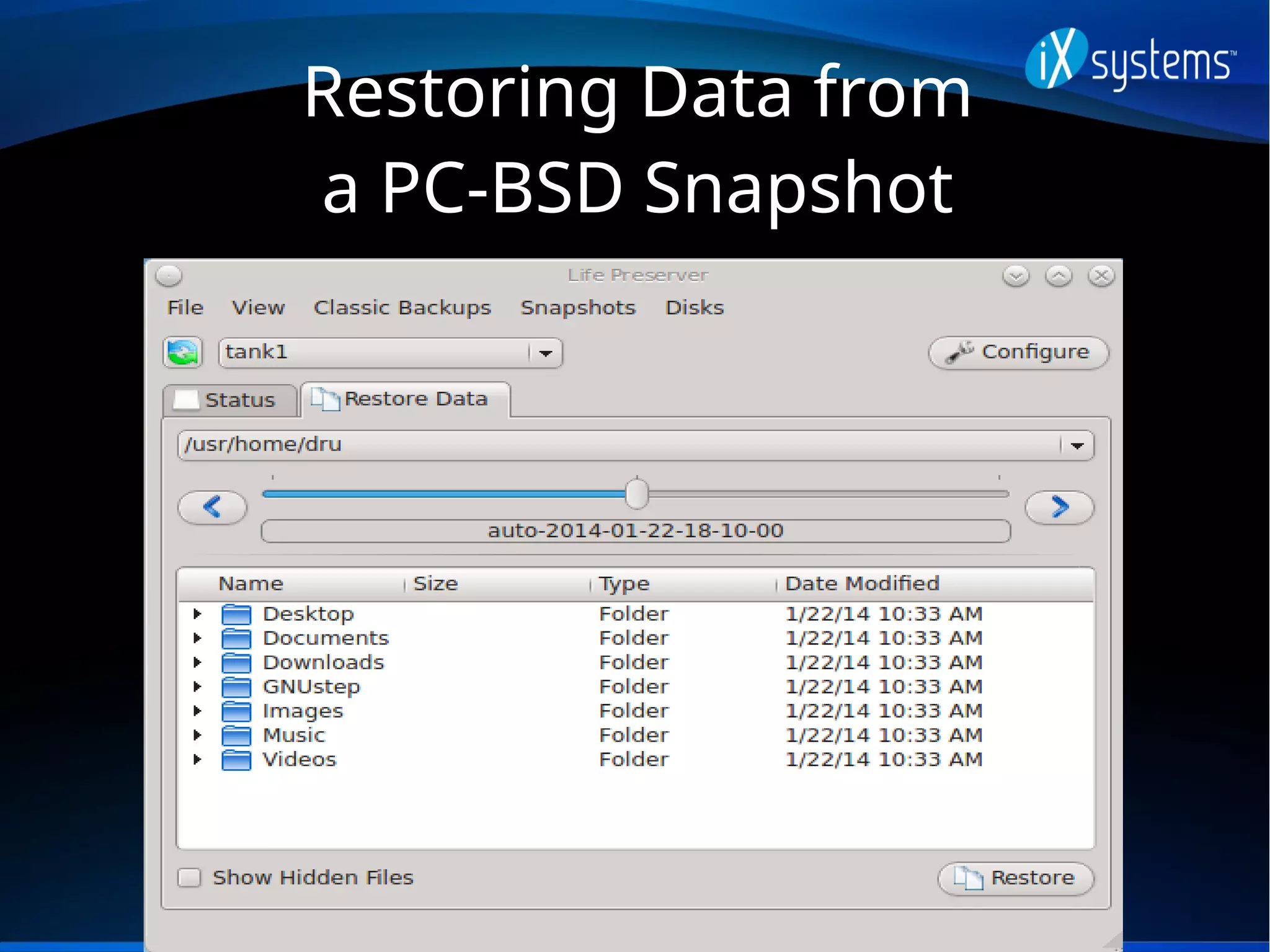
Restoring Data from
a PC-BSD Snapshot
Restoring the OS From
a Remote Snapshot
Scrubs
ZFS was designed to be self-healing; it creates
and verifies checksums as data is written to
disk
A scrub verifies the checksum in each disk
block and attempts to correct data as
necessary
Reading the scrub results can provide an early
indication of possible disk failure
Scrubs
In FreeNAS, a scrub is automatically scheduled
to run every Sunday at midnight whenever a
pool/volume is created (this can be edited)
The results of the last scrub can be viewed
from Volume Status or by typing “zpool status”,
and a scrub can be started now from View
Volumes
In PC-BSD, a scrub can be started from Life
Preserver
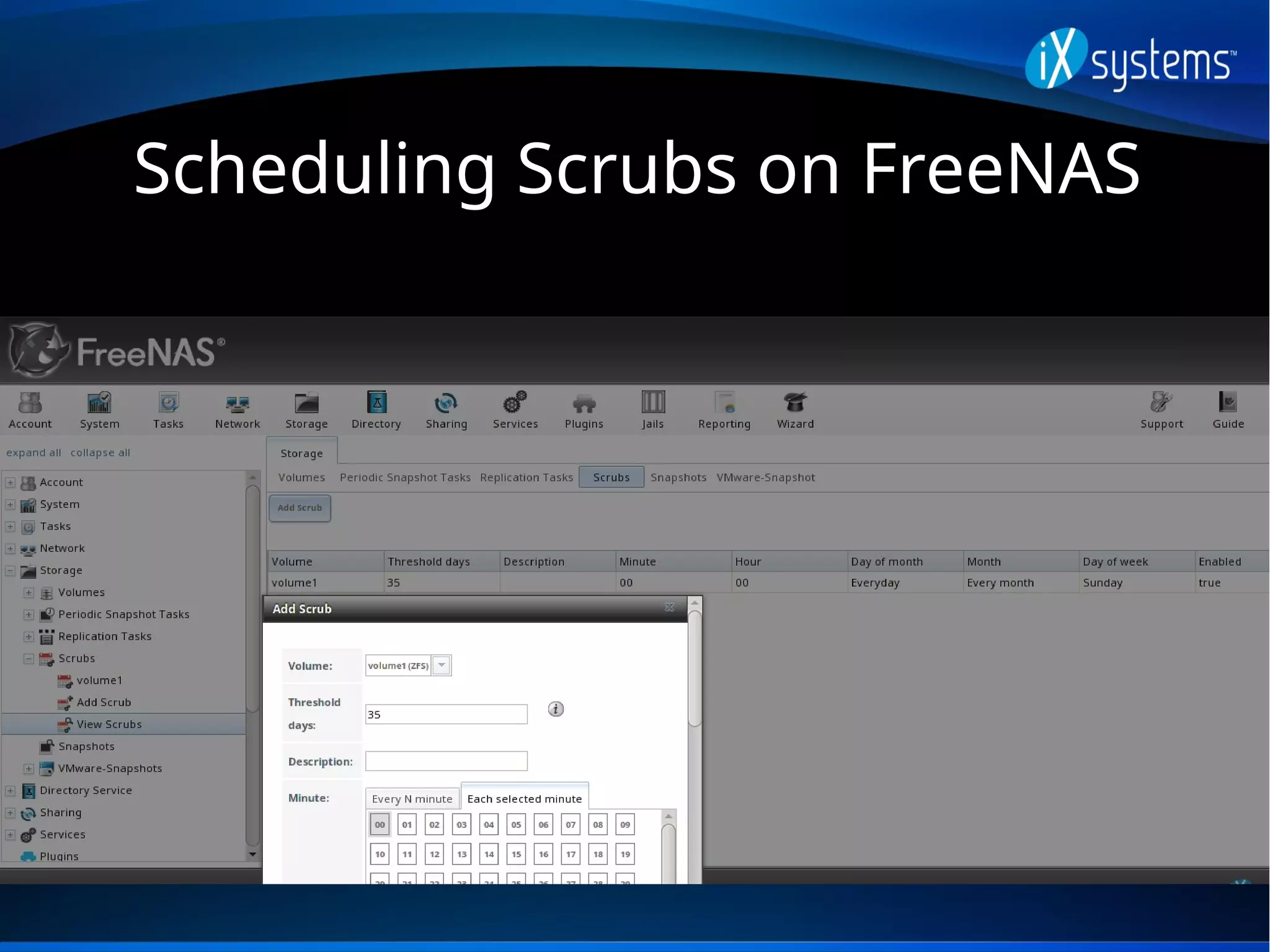
Scheduling Scrubs on FreeNAS
Starting a Scrub on PC-BSD
Deduplication
ZFS property which avoids writing duplicate
data
Can improve storage efficiency at the price of
performance—compression is often the better
choice
Dedup tables must fit into L2ARC, rule of
thumb is at least 5 GB RAM/L2ARC per TB of
storage to be deduplicated
Boot Environments
A snapshot of the dataset the operating system
resides on is automatically taken before an
operating system or software upgrades and
added to the boot menu
Should the upgrade fail, simply reboot and
select the previous boot environment from the
boot menu (essentially go back in time to
before the upgrade occurred)
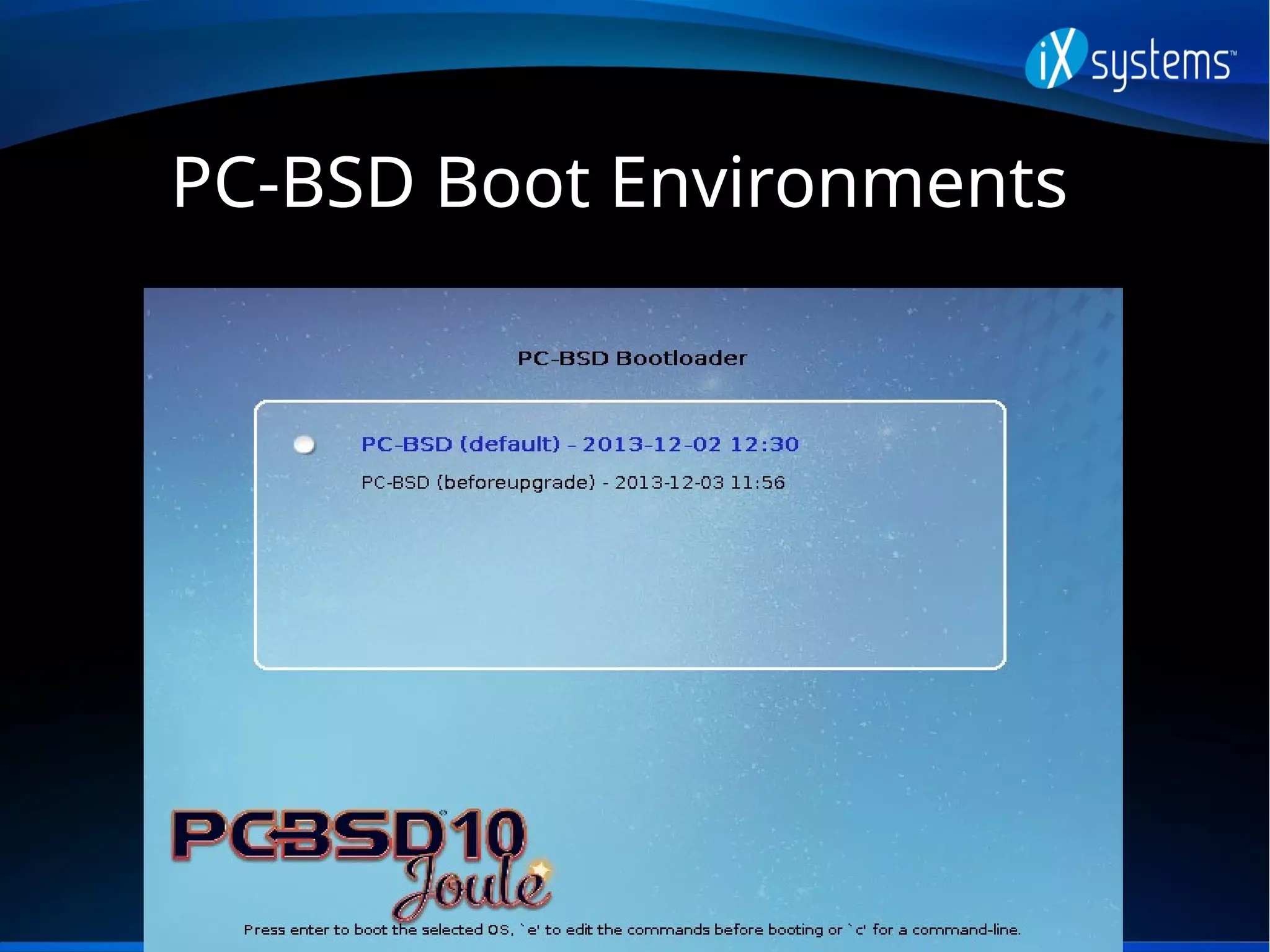
PC-BSD Boot Environments
FreeNAS Boot Environments
Additional Resources
PC-BSD Users Handbook: doc.pcbsd.org
FreeNAS User Guide: doc.freenas.org
Becoming a ZFS Ninja:
https://blogs.oracle.com/video/entry/becomin
g_a_zfs_ninja
Questions
Contact:
dru@freebsd.org
URL to Slides:
http://slideshare.net/dlavigne/flourish16

Flourish16

  • 1.
    ZFS 101 (aka ZFSis Cool and Why You Should be Using It) Dru Lavigne Documentation Lead, iXsystems Flourish, April 1, 2016
  • 2.
    Outline Discuss ZFS featuresand describe the available management utilities for the following FreeBSD-based operating systems: FreeNAS 9.10: open source NAS (Network Attached Storage) PC-BSD 10.3: open source desktop (GUI) or server (CLI)
  • 3.
    History of ZFS Modernfilesystem specifically designed to add features not available in traditional filesystems Originally developed at Sun with the intent to open source. After the Oracle acquisition, open source development continued and the original engineers founded OpenZFS (open- zfs.org) which is under active development OpenZFS uses feature flags instead of versions
  • 4.
    What is ZFS? 128-bitCOW (Copy on Write) filesystem and logical volume manager with a maximum pool/file size of 16 exabytes In a traditional Unix filesystem, you need to define the partition size and mount point at filesystem creation time In ZFS, you instead feed disks to a “pool” and create filesystems from the pool as needed
  • 5.
    Pool Root (parent) volumewhich can be logically sub-divided as needed The number of disks added at a time is known as a “vdev” To optimize performance and resilvering time, number of disks per vdev is limited As more capacity is needed, add identical vdevs-- these will be striped into the pool
  • 6.
    RAIDZ RAIDZ* levels designedto overcome hardware RAID limitations such as the write-hole and corrupt data written over time before the controller provides an alert Designed for commodity disks so no RAID controller is needed Can also be used with a RAID controller, but it typically should be put into JBOD mode
  • 7.
    RAIDZ1 Parity blocks aredistributed across all disks Up to one disk can fail per vdev without losing pool Pool can be lost if second disk in a vdev fails before resilver completes
  • 8.
    RAIDZ2 Double-parity solution similarto RAID6 Parity blocks are distributed across all disks Up to two disks can fail per vdev without losing pool, with no restrictions on which disks can fail
  • 9.
    RAIDZ3 Triple-parity solution Parity blocksare distributed across all disks Up to three disks can fail per vdev without losing pool, with no restrictions on which disks can fail
  • 10.
  • 11.
  • 12.
    ZIL Effectively a filesystemjournal that stores sync writes until they are committed to the pool A dedicated SSD as a secondary log device (SLOG) can increase synchronous write performance, will have no effect on asynchronous writes FreeNAS includes the zilstat CLI utility to help determine if system would benefit from a SLOG
  • 13.
    ARC and L2ARC Readcache in RAM. If high misses continue for cached reads, the system needs to be tuned. Freenas adds ARC stats to top(1) and includes arc_summary.py and arcstat.py tools for ARC monitoring Optional, secondary ARC can be installed on SSD or disk in order to increase random read performance. Always add as much RAM as possible first.
  • 14.
  • 15.
  • 16.
  • 17.
    Datasets As needed, poolcan be divided into additional, dynamically sized filesystems known as datasets Permissions and properties such as quotas and compression can be set on a per-dataset level A well thought out design can optimize storage for the type of data being stored
  • 18.
    Properties Dozens of configurableproperties such as: atime (access time), canmount, compression, copies, dedup, exec, quota, userquota, groupquota, readonly, recordsize, reservation, setuid, etc. Descriptions can be found at http://www.freebsd.org/cgi/man.cgi?query=zfs
  • 19.
  • 20.
  • 21.
    Adding Dataset UsingPC-BSD Disk Manager
  • 22.
    Zvols Pool can alsobe divided into zvols which are essentially, a virtual, raw block device Ideal for iSCSI device extents or for hosting foreign file systems Regardless of the filesytem the zvol is formatted with by the iSCSI initiator, the underlying disk blocks still benefit from all of the features provided by ZFS
  • 23.
  • 24.
    Snapshots Provide low cost,instantaneous, read-only, point-in-time image of the specified pool, dataset, or zvol Initial size (of local copy) is 0 bytes as COW, snapshot increases in size as changes are written to disk Can be replicated to another system
  • 25.
  • 26.
  • 27.
    Snapshot Restore In PC-BSD,the Life Preserver utility provides a snapshot browser for finding and restoring copies of earlier versions of files It can also automate the replication of local snapshots to another system or to a FreeNAS system over SSH A remote snapshot can be used to perform an operating system restore from a PC-BSD install media, should the system become unusable
  • 28.
    Restoring Data from aPC-BSD Snapshot
  • 29.
    Restoring the OSFrom a Remote Snapshot
  • 30.
    Scrubs ZFS was designedto be self-healing; it creates and verifies checksums as data is written to disk A scrub verifies the checksum in each disk block and attempts to correct data as necessary Reading the scrub results can provide an early indication of possible disk failure
  • 31.
    Scrubs In FreeNAS, ascrub is automatically scheduled to run every Sunday at midnight whenever a pool/volume is created (this can be edited) The results of the last scrub can be viewed from Volume Status or by typing “zpool status”, and a scrub can be started now from View Volumes In PC-BSD, a scrub can be started from Life Preserver
  • 32.
  • 33.
  • 34.
    Deduplication ZFS property whichavoids writing duplicate data Can improve storage efficiency at the price of performance—compression is often the better choice Dedup tables must fit into L2ARC, rule of thumb is at least 5 GB RAM/L2ARC per TB of storage to be deduplicated
  • 35.
    Boot Environments A snapshotof the dataset the operating system resides on is automatically taken before an operating system or software upgrades and added to the boot menu Should the upgrade fail, simply reboot and select the previous boot environment from the boot menu (essentially go back in time to before the upgrade occurred)
  • 36.
  • 37.
  • 38.
  • 39.
  • 40.
    Additional Resources PC-BSD UsersHandbook: doc.pcbsd.org FreeNAS User Guide: doc.freenas.org Becoming a ZFS Ninja: https://blogs.oracle.com/video/entry/becomin g_a_zfs_ninja
  • 41.