SIG 2  SOHO Honeynet Hacking Linksys router for fun and profit
What we will cover The history of the project? Theory of operation Getting and hacking the hardware Custom firmware and OpenWRT VPN Firewall and routing Call for participation
History of the project Officially started 11 th  January 2005 Real work started beginning of March Project leader: Michael Boman Project members: Rick Zhong Eugene Teo
Project goals Using cheap off-the-shelf hardware to increase the network size of honeynets Make use of everyday people's always-on Internet (IE: Cable / ADSL) Make the system as simple as possible to configure and maintain Must not interfere with normal Internet usage
 
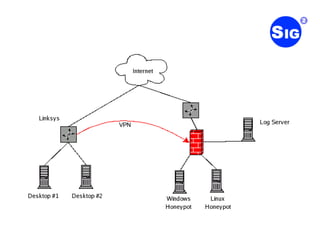
Theory of Operation Use a router running Linux Open Source = Easy to Customize Linux has a wide range of already existing tools Project members are already familiar with Linux Establish a VPN to central honeynet Redirect all traffic that should have been dropped by the firewall to central honeynet
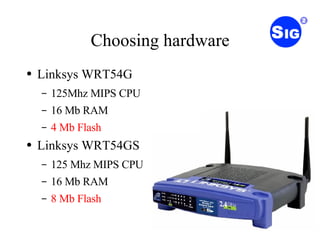
Choosing hardware Linksys WRT54G 125Mhz MIPS CPU 16 Mb RAM 4 Mb Flash Linksys WRT54GS 125 Mhz MIPS CPU 16 Mb RAM 8 Mb Flash
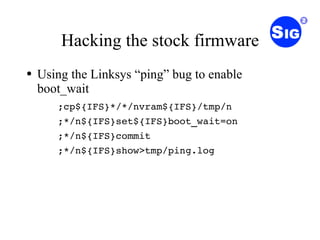
Hacking the stock firmware Using the Linksys “ping” bug to enable boot_wait ;cp${IFS}*/*/nvram${IFS}/tmp/n ;*/n${IFS}set${IFS}boot_wait=on ;*/n${IFS}commit ;*/n${IFS}show>tmp/ping.log
Uploading custom firmware Configure tftp client Power cycle the router Upload the firmware using tftp
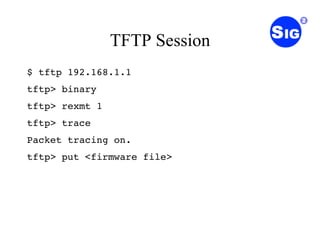
TFTP Session $ tftp 192.168.1.1 tftp> binary tftp> rexmt 1 tftp> trace Packet tracing on. tftp> put <firmware file>
First boot Boot router in failsafe mode Run the firstboot script to initialize the jffs2 partition
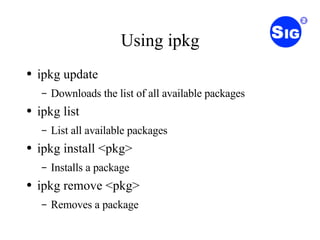
Using ipkg ipkg update Downloads the list of all available packages ipkg list List all available packages ipkg install <pkg> Installs a package ipkg remove <pkg> Removes a package
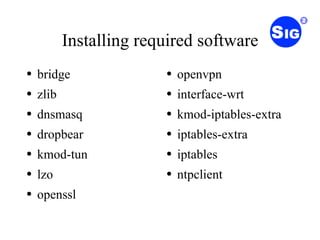
Installing required software bridge zlib dnsmasq dropbear kmod-tun lzo openssl openvpn interface-wrt kmod-iptables-extra iptables-extra iptables ntpclient
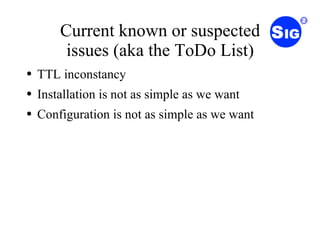
Current known or suspected issues (aka the ToDo List) TTL inconstancy Installation is not as simple as we want Configuration is not as simple as we want
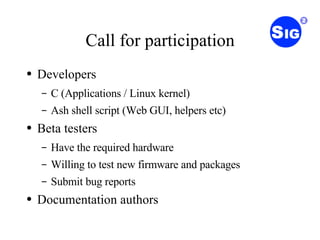
Call for participation Developers C (Applications / Linux kernel) Ash shell script (Web GUI, helpers etc) Beta testers Have the required hardware Willing to test new firmware and packages Submit bug reports Documentation authors
Thank you Any questions?
URLs http://proxy.11a.nu/iwfc-soho-honeynet/  (temporarily project home) http://iwfc.security.org.sg/ http://www.openwrt.org/

SoHo Honeypot (LUGS)

  • 1.
    SIG 2 SOHO Honeynet Hacking Linksys router for fun and profit
  • 2.
    What we willcover The history of the project? Theory of operation Getting and hacking the hardware Custom firmware and OpenWRT VPN Firewall and routing Call for participation
  • 3.
    History of theproject Officially started 11 th January 2005 Real work started beginning of March Project leader: Michael Boman Project members: Rick Zhong Eugene Teo
  • 4.
    Project goals Usingcheap off-the-shelf hardware to increase the network size of honeynets Make use of everyday people's always-on Internet (IE: Cable / ADSL) Make the system as simple as possible to configure and maintain Must not interfere with normal Internet usage
  • 5.
  • 6.
    Theory of OperationUse a router running Linux Open Source = Easy to Customize Linux has a wide range of already existing tools Project members are already familiar with Linux Establish a VPN to central honeynet Redirect all traffic that should have been dropped by the firewall to central honeynet
  • 7.
    Choosing hardware LinksysWRT54G 125Mhz MIPS CPU 16 Mb RAM 4 Mb Flash Linksys WRT54GS 125 Mhz MIPS CPU 16 Mb RAM 8 Mb Flash
  • 8.
    Hacking the stockfirmware Using the Linksys “ping” bug to enable boot_wait ;cp${IFS}*/*/nvram${IFS}/tmp/n ;*/n${IFS}set${IFS}boot_wait=on ;*/n${IFS}commit ;*/n${IFS}show>tmp/ping.log
  • 9.
    Uploading custom firmwareConfigure tftp client Power cycle the router Upload the firmware using tftp
  • 10.
    TFTP Session $tftp 192.168.1.1 tftp> binary tftp> rexmt 1 tftp> trace Packet tracing on. tftp> put <firmware file>
  • 11.
    First boot Bootrouter in failsafe mode Run the firstboot script to initialize the jffs2 partition
  • 12.
    Using ipkg ipkgupdate Downloads the list of all available packages ipkg list List all available packages ipkg install <pkg> Installs a package ipkg remove <pkg> Removes a package
  • 13.
    Installing required softwarebridge zlib dnsmasq dropbear kmod-tun lzo openssl openvpn interface-wrt kmod-iptables-extra iptables-extra iptables ntpclient
  • 14.
    Current known orsuspected issues (aka the ToDo List) TTL inconstancy Installation is not as simple as we want Configuration is not as simple as we want
  • 15.
    Call for participationDevelopers C (Applications / Linux kernel) Ash shell script (Web GUI, helpers etc) Beta testers Have the required hardware Willing to test new firmware and packages Submit bug reports Documentation authors
  • 16.
    Thank you Anyquestions?
  • 17.
    URLs http://proxy.11a.nu/iwfc-soho-honeynet/ (temporarily project home) http://iwfc.security.org.sg/ http://www.openwrt.org/