SOFTWARE
MAINTENANCE
UNIT-II
Problem Resolution
• Introduction
• High level overview of activities in problem resolution
-Categorising the problem
-Prioritising the problem
-Reproducing the problem
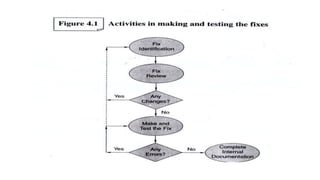
-Making and testing the fix
-Scheduling the fix for release
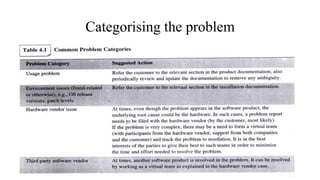
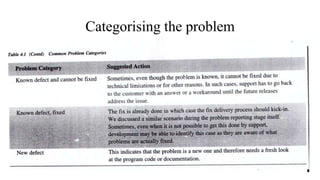
Categorising the problem
Prioritising the problem
• Severity of the problem
-Severity 1
-Severity 2
-Severity 3
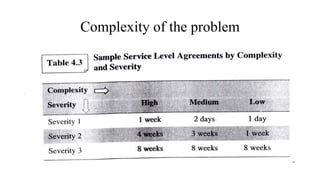
• Complexity of the problem
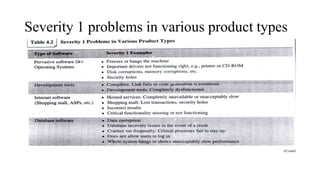
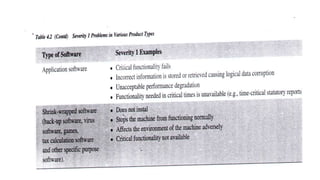
Severity 1 problems in various product types
Complexity of the problem
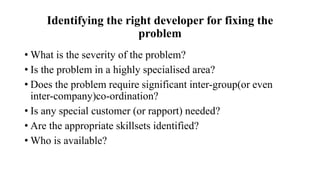
Identifying the right developer for fixing the
problem
• What is the severity of the problem?
• Is the problem in a highly specialised area?
• Does the problem require significant inter-group(or even
inter-company)co-ordination?
• Is any special customer (or rapport) needed?
• Are the appropriate skillsets identified?
• Who is available?
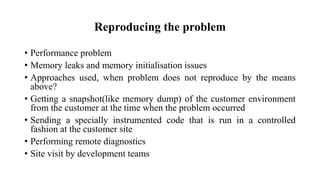
Reproducing the problem
• Performance problem
• Memory leaks and memory initialisation issues
• Approaches used, when problem does not reproduce by the means
above?
• Getting a snapshot(like memory dump) of the customer environment
from the customer at the time when the problem occurred
• Sending a specially instrumented code that is run in a controlled
fashion at the customer site
• Performing remote diagnostics
• Site visit by development teams
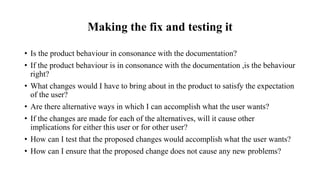
Making the fix and testing it
• Is the product behaviour in consonance with the documentation?
• If the product behaviour is in consonance with the documentation ,is the behaviour
right?
• What changes would I have to bring about in the product to satisfy the expectation
of the user?
• Are there alternative ways in which I can accomplish what the user wants?
• If the changes are made for each of the alternatives, will it cause other
implications for either this user or for other user?
• How can I test that the proposed changes would accomplish what the user wants?
• How can I ensure that the proposed change does not cause any new problems?
Three types of documentation &
Scheduling for release
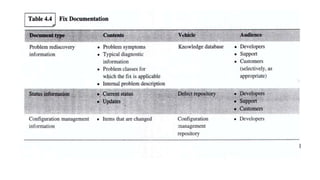
• Problem rediscovery documentation
• Status documentation
• Configuration management documentation
Skill sets needed for the various roles during
problem fixing
• The specific skills required by maintenance team are:
• Good product usage knowledge
• Problem solving ability
• Good debugging skills
• Ability to work with source code not written by them
• Good attitude
• Good communication skills
Challenges, Best practices and Pitfalls
• Whose problem is it?
• The original developer may not be available for comments or review
• Inability to reproduce the problem and lack of access to the customer
• Best Practices:
• Introducing customer supplied test cases in test suites
• Documentation standards
• Configuration management
• Effective SQA practices
• pitfalls
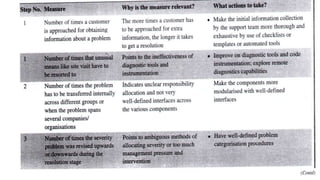
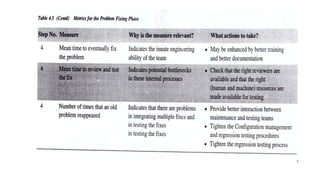
Measurements of Effectiveness in problem
resolution
• The steps of problem resolution needs to be improved are:
• Having a fully reproducible case from the customer
• Assigning responsibility to the appropriate organisation
• Choosing the right way to prioritise problems
• Time taken for the developer to provide a solution
Fix Distribution
• Introduction
• A High Level Overview of activities in fix distribution
• Choosing the method of distribution
A High level overview of activities in fix
distribution
• Choosing the method of distribution
• Fix distribution
• Preparing the shipment unit
• Testing the shipment unit
• Scheduling the fix for release
Choosing the method of distribution
• Methods of distribution:
-Distributing the individual fixes
-Proactive distribution of individual fixes
-Patch bundles
• For each methods of distribution, we examine the following questions
-When would this method be useful?
-What is involved in using this method?
-What are some of the drawbacks in using this method?
Distributing the individual fixes
• Scenarios
-Show-stopper bug
-Inability to wait for the ‘patch bundle’
-Strong business case
• How are individual fixes installed?
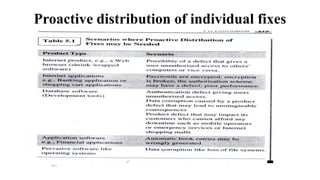
Proactive distribution of individual fixes
Patch bundles
• Quality
• Ease of deployment
• Simpler configuration management
-Patch order
-Interdependency
-Complexity
• Reduced overall cost
• Better chance of customer acceptance
Patch bundles
• Frequency of patch bundles
-When is the next product’s major version due?
-Number of bugs in the product
-Complexity of installation of the patch bundle
• Release criteria of a patch bundle
-The number of known defects in the patch bundle
-The nature of known defects in the bundle
-The bug fixes that must make it to the patch bundle
-The timeframe for releasing the patch bundle
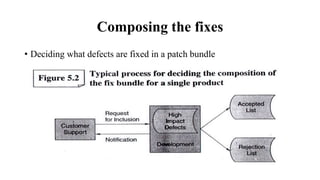
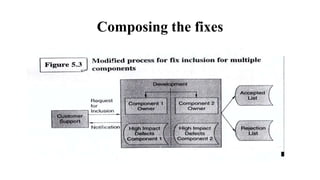
Composing the fixes
• Deciding what defects are fixed in a patch bundle
Composing the fixes
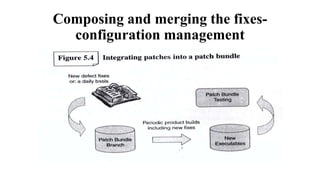
Composing and merging the fixes-
configuration management
Preparing documentation for the bundle
• Two parts in this documentation
-Bill of materials
-Readme file
• Preparing the shipment unit
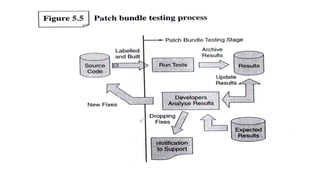
Testing the shipment unit
• Test process
-making available the latest product test
-Install testing
-Running tests
-Analysing test results
-Cleaning up after test runs
• Test Frequency
• Testing multiple components
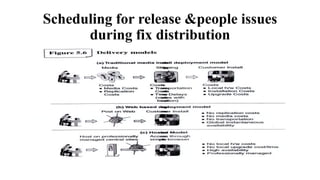
Scheduling for release &people issues
during fix distribution
Challenges, best practices and pitfalls
• Challenges
Patch bundle schedules
Resource issues
Too many individual fixes
• Best practices
High impact defects list
Pre-published patch bundle schedules
Install problems checklist
Tool for identifying inter-dependence of fixes
Challenges, best practices and pitfalls
• Pitfalls
 Feature inclusion in patch bundles
 Separate patch bundles
• Tools for the fix distribution phase
 Installer Enhancements
Provide the same look and feel as the product’s installation software
Install with minimal questions
Perform the basic checks on the target system to ensure that the install will go through successfully
Be capable of handling multiple products or components
Facilitate replication
De-install capability in case the patch bundle has unforeseen problems
 Test results tracker
 Fix inclusion tracker
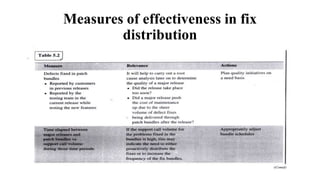
Measures of effectiveness in fix
distribution
SOFTWARE MAINTENANCE -2

SOFTWARE MAINTENANCE -2

  • 1.
  • 2.
    Problem Resolution • Introduction •High level overview of activities in problem resolution -Categorising the problem -Prioritising the problem -Reproducing the problem -Making and testing the fix -Scheduling the fix for release
  • 3.
  • 4.
  • 5.
    Prioritising the problem •Severity of the problem -Severity 1 -Severity 2 -Severity 3 • Complexity of the problem
  • 6.
    Severity 1 problemsin various product types
  • 8.
  • 9.
    Identifying the rightdeveloper for fixing the problem • What is the severity of the problem? • Is the problem in a highly specialised area? • Does the problem require significant inter-group(or even inter-company)co-ordination? • Is any special customer (or rapport) needed? • Are the appropriate skillsets identified? • Who is available?
  • 10.
    Reproducing the problem •Performance problem • Memory leaks and memory initialisation issues • Approaches used, when problem does not reproduce by the means above? • Getting a snapshot(like memory dump) of the customer environment from the customer at the time when the problem occurred • Sending a specially instrumented code that is run in a controlled fashion at the customer site • Performing remote diagnostics • Site visit by development teams
  • 11.
    Making the fixand testing it • Is the product behaviour in consonance with the documentation? • If the product behaviour is in consonance with the documentation ,is the behaviour right? • What changes would I have to bring about in the product to satisfy the expectation of the user? • Are there alternative ways in which I can accomplish what the user wants? • If the changes are made for each of the alternatives, will it cause other implications for either this user or for other user? • How can I test that the proposed changes would accomplish what the user wants? • How can I ensure that the proposed change does not cause any new problems?
  • 13.
    Three types ofdocumentation & Scheduling for release • Problem rediscovery documentation • Status documentation • Configuration management documentation
  • 15.
    Skill sets neededfor the various roles during problem fixing • The specific skills required by maintenance team are: • Good product usage knowledge • Problem solving ability • Good debugging skills • Ability to work with source code not written by them • Good attitude • Good communication skills
  • 16.
    Challenges, Best practicesand Pitfalls • Whose problem is it? • The original developer may not be available for comments or review • Inability to reproduce the problem and lack of access to the customer • Best Practices: • Introducing customer supplied test cases in test suites • Documentation standards • Configuration management • Effective SQA practices • pitfalls
  • 17.
    Measurements of Effectivenessin problem resolution • The steps of problem resolution needs to be improved are: • Having a fully reproducible case from the customer • Assigning responsibility to the appropriate organisation • Choosing the right way to prioritise problems • Time taken for the developer to provide a solution
  • 20.
    Fix Distribution • Introduction •A High Level Overview of activities in fix distribution • Choosing the method of distribution
  • 21.
    A High leveloverview of activities in fix distribution • Choosing the method of distribution • Fix distribution • Preparing the shipment unit • Testing the shipment unit • Scheduling the fix for release
  • 22.
    Choosing the methodof distribution • Methods of distribution: -Distributing the individual fixes -Proactive distribution of individual fixes -Patch bundles • For each methods of distribution, we examine the following questions -When would this method be useful? -What is involved in using this method? -What are some of the drawbacks in using this method?
  • 23.
    Distributing the individualfixes • Scenarios -Show-stopper bug -Inability to wait for the ‘patch bundle’ -Strong business case • How are individual fixes installed?
  • 24.
    Proactive distribution ofindividual fixes
  • 25.
    Patch bundles • Quality •Ease of deployment • Simpler configuration management -Patch order -Interdependency -Complexity • Reduced overall cost • Better chance of customer acceptance
  • 26.
    Patch bundles • Frequencyof patch bundles -When is the next product’s major version due? -Number of bugs in the product -Complexity of installation of the patch bundle • Release criteria of a patch bundle -The number of known defects in the patch bundle -The nature of known defects in the bundle -The bug fixes that must make it to the patch bundle -The timeframe for releasing the patch bundle
  • 27.
    Composing the fixes •Deciding what defects are fixed in a patch bundle
  • 28.
  • 29.
    Composing and mergingthe fixes- configuration management
  • 30.
    Preparing documentation forthe bundle • Two parts in this documentation -Bill of materials -Readme file • Preparing the shipment unit
  • 31.
    Testing the shipmentunit • Test process -making available the latest product test -Install testing -Running tests -Analysing test results -Cleaning up after test runs • Test Frequency • Testing multiple components
  • 33.
    Scheduling for release&people issues during fix distribution
  • 34.
    Challenges, best practicesand pitfalls • Challenges Patch bundle schedules Resource issues Too many individual fixes • Best practices High impact defects list Pre-published patch bundle schedules Install problems checklist Tool for identifying inter-dependence of fixes
  • 35.
    Challenges, best practicesand pitfalls • Pitfalls  Feature inclusion in patch bundles  Separate patch bundles • Tools for the fix distribution phase  Installer Enhancements Provide the same look and feel as the product’s installation software Install with minimal questions Perform the basic checks on the target system to ensure that the install will go through successfully Be capable of handling multiple products or components Facilitate replication De-install capability in case the patch bundle has unforeseen problems  Test results tracker  Fix inclusion tracker
  • 36.
    Measures of effectivenessin fix distribution