Software Testing
(Manual Testing)
What is Software
 Computer instruction or data
 Various kinds of programs used to operate computer
 Anything that can be stored electronically
 Set of instruction used to manage and control various
function
What is Testing
 Testing means checking
 Testing is find out how well something works
What is Software Testing
 Process of identify correctness, completeness, security,
quality of developed s/w application
 s/w testing is an activity whether to check whether
actual result match with expected result
 Process of executing program or application or s/w
with intent of finding s/w bugs
Why Software Testing is important
 Point out defects & error that were made during
development phase
 It’s essential to make sure the customer reliability &
their satisfaction in the application
 To prove s/w has no faults (s/w can’t be 100% defect
free)
 If s/w is with defect it can’t be used by clients
 s/w testing is important because s/w bugs could be
expensive or even dangerous
Example
1. China, airline airbus A300 crashed due to s/w bug 16th
Apr,1994 killing 264 people
2. Canada, Therac -25 radiation therapy which is used on
cancer ,due to high radiation doses patient dead
• Find defects
• GET them fixed from developer
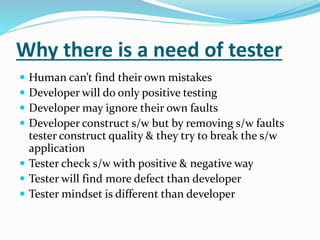
Why there is a need of tester
 Human can’t find their own mistakes
 Developer will do only positive testing
 Developer may ignore their own faults
 Developer construct s/w but by removing s/w faults
tester construct quality & they try to break the s/w
application
 Tester check s/w with positive & negative way
 Tester will find more defect than developer
 Tester mindset is different than developer
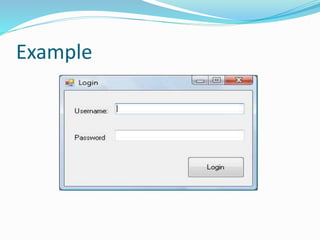
Example
What are the qualities of a good
s/w tester
 Analytical skills
 Technical skills
 Good verbal & written communication
 Great attitude-test to break
 Willingness to learn & suggest process improvement
 Passion of testing
 Ability to apply basic fundamental knowledge
 Out of box thinking
Role of Tester
 To understand requirements
 To write test scenario & test case
 Execute test cases
 To make defect report
SDLC (Software Development Life Cycle)
 It is a process used by s/w industry to design, develop and
test high quality s/w
 SDLC aims is to be produce a high quality s/w that meets
customer expectations, completed within time and cost
1.Requirement Gathering and Analysis
2.Design
3.Coding
4.Testing
5.Deployment
6.Maintenance
1.Requirement Gathering and Analysis
Requirement-need of customer
Gathering-collection of requirement
Analysis-doing detail study
 Business Analyst(BA) person gather all the requirement
from customer
 BA is a domain expert.
 BRS & SRS document created here
BRS(Business Requirement Specification)
SRS(Software Requirement Specification)
2.Design
• Done by s/w designer
• HLD & LLD document created here
HLD(High Level Design)-structural design
LLD(Low Level Design)-program level design
• Designing the application as per the requirement
• Designing the application is nothing but deriving the
functional flow, alternate flow, how many modules
that we are handling, data flow etc
3.Coding
 Done by s/w developer(coder)
 Source code(.exe file) document created here
4.Testing
 Done by s/w tester
 Test Plan, Test Scenario, Test Case, Defect Report
document created here
 Test plan: Test plan is a document with information on
scope of the project, Approach, Schedule of testing
activities, Resources or manpower required, Risk
issues, Features to be tested and not to be tested, Test
tools & environment requirements
 Test Scenario: Is nothing but what to test, Test
scenario is prepared based on the test cases and test
scripts with the sequence of execution
Contin…..
Test Case: This document is prepared by the tester with
the sequence of steps to test the behavior of feature/
Functionality/ Non-Functionality of the application
It consists of test case Id, Test case name, conditions or
actions, environment, expected, results, actual results,
pass/Fail
Which steps have to follow (Test case)
5.Deployment
Done by Installation Team.
User Manual document created here
6.Maintenance
 Done by Configuration Management Team
 Change Request Document created here
 When customer starts using developed system then actual
problem comes up & needs to solve time to time the
process is where the care is taken for the developed product
is known as maintenance(upgrade , enhancement , bug
fixing)
 If the OS version changes it may necessary to introduce
some changes in the program
 New modules are to be added to the existing system this is
nothing but the enhancement
MODEL’s
 Waterfall Model
 Multi-waterfall Model
 Spiral Model
 Agile Model
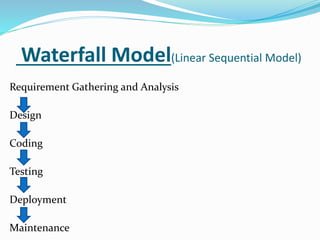
Waterfall Model(Linear Sequential Model)
Requirement Gathering and Analysis
Design
Coding
Testing
Deployment
Maintenance
 Waterfall means rainfalls, once it goes down it can’t be
revert back
 When 1st phase is finish then and then only we will
jump to next phase
 After design phase we cant go back to RGA phase
 Only used when customer is cleared about his
requirement
Advantage
Good for small project
Required less budget & time
Disadvantage
Not good for large project
Future adjustment is not possible
Defects are carry forwarded
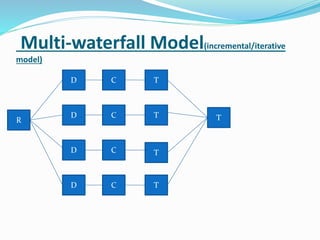
Multi-waterfall Model(incremental/iterative
model)
R
D
D
D
D C
C
C
C
T
T
T
T
T
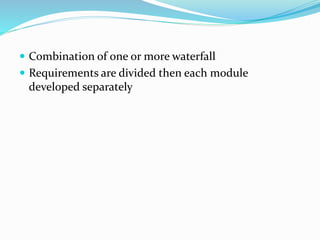
 Combination of one or more waterfall
 Requirements are divided then each module
developed separately
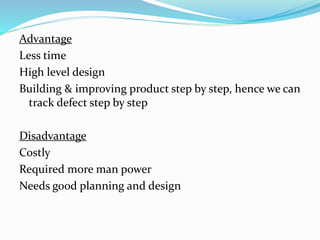
Advantage
Less time
High level design
Building & improving product step by step, hence we can
track defect step by step
Disadvantage
Costly
Required more man power
Needs good planning and design
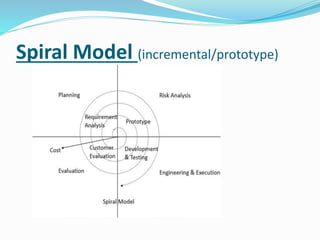
Spiral Model (incremental/prototype)
 In this model product undergoes each phase
repeatedly calls spiral
 Changes are done but product is not release till
customer is not satisfied
 This model is used only when customer is not clear
about his requirement
Advantage
Rollback is possible
Importance is place on risk
s/w get ready in early stage
Disadvantage
Not good for small project
Need expertise
costly
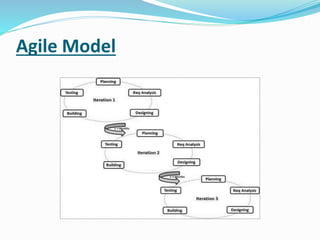
Agile Model
 Type of incremental model
 You can release your product and can get feedback
 Very fast development done in agile
 Used in critical application
Advantage
 Customer satisfaction by rapid continuously delivery of
useful s/w
 User’s, developer’s, tester’s constantly interact with each
other
 Face to face conversation is the best form of
communication
 Regular adaption to changing circumstances
 Even late changes in requirement’s are welcome
Disadvantage
• Problems in designing and documentation
QMS(Quality Management System)
Definition of Quality
 Measuring customer satisfaction is difficult because
customer can’t clearly specify in numeric values what
makes them satisfied
 Meeting requirement, expectation and need of customer.
 s/w being free from defect
 Quality in a product or service is not what supplier put’s
in. It is what the customer get out and is willing to pay for.
 Measurement of correctness and completeness of your
product
 Quality product is one which is fit for use to perform
it’s intended function , with reasonable cost & within
time
IEEE, CMMI, ISO , ANSI, Six Sigma ( Motorola )
QA(Quality Assurance)
QA ensures that approaches , techniques , methods &
process are designed for the project are implemented
correctly
QC(Quality Check)
QA ensures that approaches , techniques , methods &
process are designed for the project are following
correctly
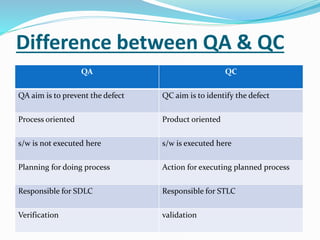
Difference between QA & QC
QA QC
QA aim is to prevent the defect QC aim is to identify the defect
Process oriented Product oriented
s/w is not executed here s/w is executed here
Planning for doing process Action for executing planned process
Responsible for SDLC Responsible for STLC
Verification validation
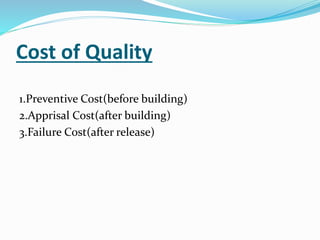
Cost of Quality
1.Preventive Cost(before building)
2.Apprisal Cost(after building)
3.Failure Cost(after release)
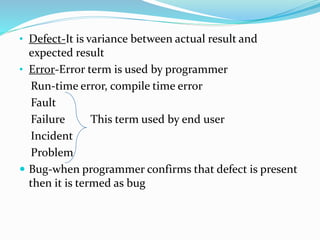
• Defect-It is variance between actual result and
expected result
• Error-Error term is used by programmer
Run-time error, compile time error
Fault
Failure This term used by end user
Incident
Problem
 Bug-when programmer confirms that defect is present
then it is termed as bug
Defect categories
1.Functional Defect
A. wrong
B. missing
C. extra
2.Non-Functional Defect
GUI, performance, security related defects
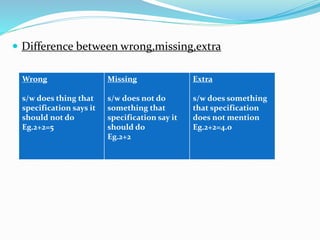
 Difference between wrong,missing,extra
Wrong
s/w does thing that
specification says it
should not do
Eg.2+2=5
Missing
s/w does not do
something that
specification say it
should do
Eg.2+2
Extra
s/w does something
that specification
does not mention
Eg.2+2=4.0
Methods of Testing
1.Black Box Testing
2.White Box Testing
Black Box Testing
 It's software testing method in which the internal structure
of the item being tested is not known to the tester.
 Also known as behavior testing.
Techniques of Black Box
1.ECP
2.BVA
3.Error Guessing
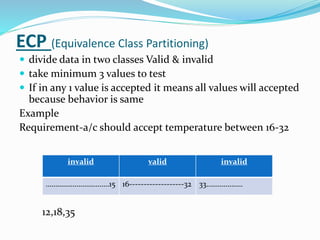
ECP (Equivalence Class Partitioning)
 divide data in two classes Valid & invalid
 take minimum 3 values to test
 If in any 1 value is accepted it means all values will accepted
because behavior is same
Example
Requirement-a/c should accept temperature between 16-32
12,18,35
invalid valid invalid
……………………………15 16-------------------32 33……………….
Advantage
 It reduces no. of i/p data & test cases also
 It saves your time without affecting test coverage
 As per tester experience they found lot of defect at
boundary that’s why BVA come into the picture
 There is a chances of misplace the operators
by developer.
E.g. if temp>16
Then accepted
If temp<32
Then accepted
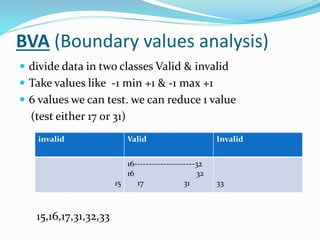
BVA (Boundary values analysis)
 divide data in two classes Valid & invalid
 Take values like -1 min +1 & -1 max +1
 6 values we can test. we can reduce 1 value
(test either 17 or 31)
15,16,17,31,32,33
invalid Valid Invalid
15
16---------------------32
16 32
17 31 33
Error Guessing
 Done by anyone, fresher as well as experience people
 Experience people will find more defect that fresher
 As they will concentrating on boundaries.
 Random Testing is done during this.
 No document is followed
White Box Testing
 It's software testing method in which the internal
structure of the item being tested is known to the
tester.
 generally it is done by developer.
 White Box Testing also known as Clear Box Testing,
Open Box Testing, Glass Box Testing, Transparent Box
Testing, Code-Based Testing or Structural Testing.
STLC (Software Testing Life Cycle)
 Software Testing Life Cycle (STLC) is the process used
to improve the quality of the product.
1.Test Planning & Control
2.Test Analysis & Design
3.Test Implementation & Execution
4.Evaluating Exit Criteria & Reporting
5.Test Closure Activity
1.Test Planning & Control
 Planning is very important to achieve goal within time.
 Test plan is a document created by test manager
 In this document he will mention when to start testing,
when to stop testing, scheduling , approaches.
 To make test plan document he will refer SRS,
development plan, project plan.
 SRS-technical document
 development plan-when to start testing
 project plan-when to stop testing
 In control phase sr. person will take a follow up of Jr.
they are following test plan document or not if they are
not following document if they are not following sr.
person can take action or give suggestion
2.Test Analysis & Design
 Sr. tester will analyze SRS document
 Testable requirement funded here.
 Test scenario document created by Sr. tester
 Sr. person will set up the environment according to
client expectation
3.Test Implementation & Execution
In this phase sr. tester will create test case by referring
scenario document & in execution Jr. person will
execute test case. Jr. tester will create execution log in
which he will mention how many test case are pass &
how many are fail.
Jr. person will create defect report document in which
he will mention all failed test cases.
4.Evaluating Exit Criteria & Reporting
 Exit criteria means when to stop testing , that criteria
is mentioned in test plan document
 In this phase Jr. tester will evaluate execution log, if he
achieve the desired quality of product, he will exit
testing activity & reporting he will create summary
report of defect
5.Test Closure Activity
In this phase whatever documents is created in above 4
phases will submitted to a concern person & he will
make a track list of a defect for a future reference
Thank You..

1st module.....

  • 1.
  • 2.
    What is Software Computer instruction or data  Various kinds of programs used to operate computer  Anything that can be stored electronically  Set of instruction used to manage and control various function
  • 3.
    What is Testing Testing means checking  Testing is find out how well something works
  • 4.
    What is SoftwareTesting  Process of identify correctness, completeness, security, quality of developed s/w application  s/w testing is an activity whether to check whether actual result match with expected result  Process of executing program or application or s/w with intent of finding s/w bugs
  • 5.
    Why Software Testingis important  Point out defects & error that were made during development phase  It’s essential to make sure the customer reliability & their satisfaction in the application  To prove s/w has no faults (s/w can’t be 100% defect free)  If s/w is with defect it can’t be used by clients  s/w testing is important because s/w bugs could be expensive or even dangerous
  • 6.
    Example 1. China, airlineairbus A300 crashed due to s/w bug 16th Apr,1994 killing 264 people 2. Canada, Therac -25 radiation therapy which is used on cancer ,due to high radiation doses patient dead
  • 7.
    • Find defects •GET them fixed from developer
  • 8.
    Why there isa need of tester  Human can’t find their own mistakes  Developer will do only positive testing  Developer may ignore their own faults  Developer construct s/w but by removing s/w faults tester construct quality & they try to break the s/w application  Tester check s/w with positive & negative way  Tester will find more defect than developer  Tester mindset is different than developer
  • 9.
  • 10.
    What are thequalities of a good s/w tester  Analytical skills  Technical skills  Good verbal & written communication  Great attitude-test to break  Willingness to learn & suggest process improvement  Passion of testing  Ability to apply basic fundamental knowledge  Out of box thinking
  • 11.
    Role of Tester To understand requirements  To write test scenario & test case  Execute test cases  To make defect report
  • 12.
    SDLC (Software DevelopmentLife Cycle)  It is a process used by s/w industry to design, develop and test high quality s/w  SDLC aims is to be produce a high quality s/w that meets customer expectations, completed within time and cost 1.Requirement Gathering and Analysis 2.Design 3.Coding 4.Testing 5.Deployment 6.Maintenance
  • 13.
    1.Requirement Gathering andAnalysis Requirement-need of customer Gathering-collection of requirement Analysis-doing detail study  Business Analyst(BA) person gather all the requirement from customer  BA is a domain expert.  BRS & SRS document created here BRS(Business Requirement Specification) SRS(Software Requirement Specification)
  • 14.
    2.Design • Done bys/w designer • HLD & LLD document created here HLD(High Level Design)-structural design LLD(Low Level Design)-program level design • Designing the application as per the requirement • Designing the application is nothing but deriving the functional flow, alternate flow, how many modules that we are handling, data flow etc
  • 15.
    3.Coding  Done bys/w developer(coder)  Source code(.exe file) document created here
  • 16.
    4.Testing  Done bys/w tester  Test Plan, Test Scenario, Test Case, Defect Report document created here  Test plan: Test plan is a document with information on scope of the project, Approach, Schedule of testing activities, Resources or manpower required, Risk issues, Features to be tested and not to be tested, Test tools & environment requirements  Test Scenario: Is nothing but what to test, Test scenario is prepared based on the test cases and test scripts with the sequence of execution
  • 17.
    Contin….. Test Case: Thisdocument is prepared by the tester with the sequence of steps to test the behavior of feature/ Functionality/ Non-Functionality of the application It consists of test case Id, Test case name, conditions or actions, environment, expected, results, actual results, pass/Fail Which steps have to follow (Test case)
  • 18.
    5.Deployment Done by InstallationTeam. User Manual document created here
  • 19.
    6.Maintenance  Done byConfiguration Management Team  Change Request Document created here  When customer starts using developed system then actual problem comes up & needs to solve time to time the process is where the care is taken for the developed product is known as maintenance(upgrade , enhancement , bug fixing)  If the OS version changes it may necessary to introduce some changes in the program  New modules are to be added to the existing system this is nothing but the enhancement
  • 20.
    MODEL’s  Waterfall Model Multi-waterfall Model  Spiral Model  Agile Model
  • 21.
    Waterfall Model(Linear SequentialModel) Requirement Gathering and Analysis Design Coding Testing Deployment Maintenance
  • 22.
     Waterfall meansrainfalls, once it goes down it can’t be revert back  When 1st phase is finish then and then only we will jump to next phase  After design phase we cant go back to RGA phase  Only used when customer is cleared about his requirement
  • 23.
    Advantage Good for smallproject Required less budget & time Disadvantage Not good for large project Future adjustment is not possible Defects are carry forwarded
  • 24.
  • 25.
     Combination ofone or more waterfall  Requirements are divided then each module developed separately
  • 26.
    Advantage Less time High leveldesign Building & improving product step by step, hence we can track defect step by step Disadvantage Costly Required more man power Needs good planning and design
  • 27.
  • 28.
     In thismodel product undergoes each phase repeatedly calls spiral  Changes are done but product is not release till customer is not satisfied  This model is used only when customer is not clear about his requirement
  • 29.
    Advantage Rollback is possible Importanceis place on risk s/w get ready in early stage Disadvantage Not good for small project Need expertise costly
  • 30.
  • 31.
     Type ofincremental model  You can release your product and can get feedback  Very fast development done in agile  Used in critical application
  • 32.
    Advantage  Customer satisfactionby rapid continuously delivery of useful s/w  User’s, developer’s, tester’s constantly interact with each other  Face to face conversation is the best form of communication  Regular adaption to changing circumstances  Even late changes in requirement’s are welcome Disadvantage • Problems in designing and documentation
  • 33.
    QMS(Quality Management System) Definitionof Quality  Measuring customer satisfaction is difficult because customer can’t clearly specify in numeric values what makes them satisfied  Meeting requirement, expectation and need of customer.  s/w being free from defect  Quality in a product or service is not what supplier put’s in. It is what the customer get out and is willing to pay for.  Measurement of correctness and completeness of your product
  • 34.
     Quality productis one which is fit for use to perform it’s intended function , with reasonable cost & within time IEEE, CMMI, ISO , ANSI, Six Sigma ( Motorola ) QA(Quality Assurance) QA ensures that approaches , techniques , methods & process are designed for the project are implemented correctly QC(Quality Check) QA ensures that approaches , techniques , methods & process are designed for the project are following correctly
  • 35.
    Difference between QA& QC QA QC QA aim is to prevent the defect QC aim is to identify the defect Process oriented Product oriented s/w is not executed here s/w is executed here Planning for doing process Action for executing planned process Responsible for SDLC Responsible for STLC Verification validation
  • 36.
    Cost of Quality 1.PreventiveCost(before building) 2.Apprisal Cost(after building) 3.Failure Cost(after release)
  • 37.
    • Defect-It isvariance between actual result and expected result • Error-Error term is used by programmer Run-time error, compile time error Fault Failure This term used by end user Incident Problem  Bug-when programmer confirms that defect is present then it is termed as bug
  • 38.
    Defect categories 1.Functional Defect A.wrong B. missing C. extra 2.Non-Functional Defect GUI, performance, security related defects
  • 39.
     Difference betweenwrong,missing,extra Wrong s/w does thing that specification says it should not do Eg.2+2=5 Missing s/w does not do something that specification say it should do Eg.2+2 Extra s/w does something that specification does not mention Eg.2+2=4.0
  • 40.
    Methods of Testing 1.BlackBox Testing 2.White Box Testing Black Box Testing  It's software testing method in which the internal structure of the item being tested is not known to the tester.  Also known as behavior testing. Techniques of Black Box 1.ECP 2.BVA 3.Error Guessing
  • 41.
    ECP (Equivalence ClassPartitioning)  divide data in two classes Valid & invalid  take minimum 3 values to test  If in any 1 value is accepted it means all values will accepted because behavior is same Example Requirement-a/c should accept temperature between 16-32 12,18,35 invalid valid invalid ……………………………15 16-------------------32 33……………….
  • 42.
    Advantage  It reducesno. of i/p data & test cases also  It saves your time without affecting test coverage
  • 43.
     As pertester experience they found lot of defect at boundary that’s why BVA come into the picture  There is a chances of misplace the operators by developer. E.g. if temp>16 Then accepted If temp<32 Then accepted
  • 44.
    BVA (Boundary valuesanalysis)  divide data in two classes Valid & invalid  Take values like -1 min +1 & -1 max +1  6 values we can test. we can reduce 1 value (test either 17 or 31) 15,16,17,31,32,33 invalid Valid Invalid 15 16---------------------32 16 32 17 31 33
  • 45.
    Error Guessing  Doneby anyone, fresher as well as experience people  Experience people will find more defect that fresher  As they will concentrating on boundaries.  Random Testing is done during this.  No document is followed
  • 46.
    White Box Testing It's software testing method in which the internal structure of the item being tested is known to the tester.  generally it is done by developer.  White Box Testing also known as Clear Box Testing, Open Box Testing, Glass Box Testing, Transparent Box Testing, Code-Based Testing or Structural Testing.
  • 47.
    STLC (Software TestingLife Cycle)  Software Testing Life Cycle (STLC) is the process used to improve the quality of the product. 1.Test Planning & Control 2.Test Analysis & Design 3.Test Implementation & Execution 4.Evaluating Exit Criteria & Reporting 5.Test Closure Activity
  • 48.
    1.Test Planning &Control  Planning is very important to achieve goal within time.  Test plan is a document created by test manager  In this document he will mention when to start testing, when to stop testing, scheduling , approaches.  To make test plan document he will refer SRS, development plan, project plan.  SRS-technical document  development plan-when to start testing  project plan-when to stop testing
  • 49.
     In controlphase sr. person will take a follow up of Jr. they are following test plan document or not if they are not following document if they are not following sr. person can take action or give suggestion
  • 50.
    2.Test Analysis &Design  Sr. tester will analyze SRS document  Testable requirement funded here.  Test scenario document created by Sr. tester  Sr. person will set up the environment according to client expectation
  • 51.
    3.Test Implementation &Execution In this phase sr. tester will create test case by referring scenario document & in execution Jr. person will execute test case. Jr. tester will create execution log in which he will mention how many test case are pass & how many are fail. Jr. person will create defect report document in which he will mention all failed test cases.
  • 52.
    4.Evaluating Exit Criteria& Reporting  Exit criteria means when to stop testing , that criteria is mentioned in test plan document  In this phase Jr. tester will evaluate execution log, if he achieve the desired quality of product, he will exit testing activity & reporting he will create summary report of defect
  • 53.
    5.Test Closure Activity Inthis phase whatever documents is created in above 4 phases will submitted to a concern person & he will make a track list of a defect for a future reference
  • 54.