Week 4
   Understanding the power behind social
    media marketing.

   Start casing your nets by setting up as many
    social media sites as possible

   Tie all available sites into one management
    system
   Understanding Facebook

   Set up your Fan Page
     Timeline Banner - 850 px W x 315 px H


   Understanding the new timeline

   Learning about site analytics
   Learning Analytics
   Building Your Inbound Leads
     Find a niche
     Start connecting
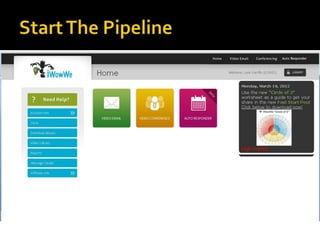
     Invite them into your pipeline
   Hash Tags
   QR Codes
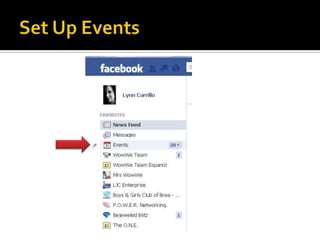
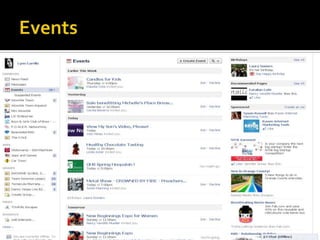
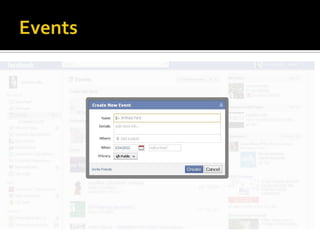
   Events
   Short Links
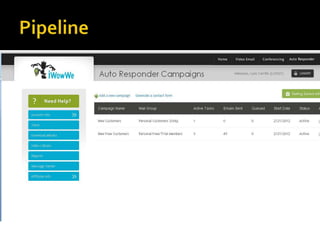
   Campaigns
     Where do you put your leads once your have them
     Understanding Auto Generators
     Building forms for lead captures
     Marketing with QR Codes
Definition: The # symbol, called a hashtag, is used to mark
  keywords or topics in a Tweet. It was created organically
  by Twitter users as a way to categorize messages.
Hashtags: Helping you find interesting Tweets
 People use the hashtag symbol # before relevant
  keywords in their Tweet to categorize those Tweets to
  show more easily in Twitter Search
 Clicking on a hashtagged word in any message shows you
  all other Tweets in that category
 Hashtags can occur anywhere in the Tweet
 Hashtagged words that become very popular are often
  Trending Topics
Example: In the Tweet below,
@twitter added the hashtag before the phrase "thankyousteve".
The word is now a link to search results for all Tweets containing
  "#thankyousteve" in the message.
Using hashtags
 If you Tweet with a hashtag on a public account, anyone who does
  a search for that hashtag may find your Tweet
 Don't #spam #with #hashtags. Don't over-tag a single Tweet.
  (Best practices recommend using no more than 3 hashtags per
  Tweet.)
 Use hashtags only on Tweets relevant to the topic
   Here are just a few symbols that you may find when reading someone’s
    Tweets. Using these symbols are also a great way to get your posts noticed
    and will assist you in showing up in the Twitter search engine.

       - This is the way that Twitter identifies who you are talking to.
    @LynnCarrillo is my Twitter account. Think about it as if you were talking in
    short hand. i.e. Instead of…You can follow me at LynnCarrillo you can
    express it like this… Follow me@LynnCarrillo.

       ReTweet. You can also look at it the same as forwarding or reposting
    someone else’s Tweet

       Hash Tag – Using a hash tag is a way to get your Tweets to stand out to
    those that are searching for your subject. i.e. #business or
    #businesswomen. Anyone that types business into the search engine will see
    posts that contain that word.
Trending Topics – Type at the end of your Tweet. You can
type this in the Twitter search engine and find topics are being
discussed. If you have it on your post, your blog article or post will
show up as well.
      – Hump Day Friends Follow – Tell people about the friends
you hooked up with or the business that you want to share. The
more you talk about others, the more people will follow you.
     – Friends Friday. This is a great way to let others know about
the people or businesses that you like to follow.
    – Now Following. Let other people know what your interests
or who you like to follow. This is a great way to get more people to
look your way and maybe even connect with people that have the
same likes.
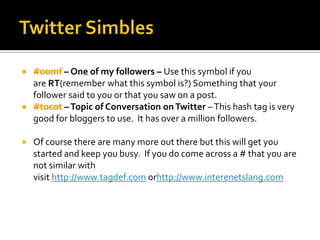
– One of my followers – Use this symbol if you
    are RT(remember what this symbol is?) Something that your
    follower said to you or that you saw on a post.
           – Topic of Conversation on Twitter – This hash tag is very
    good for bloggers to use. It has over a million followers.

   Of course there are many more out there but this will get you
    started and keep you busy. If you do come across a # that you are
    not similar with
    visit http://www.tagdef.com orhttp://www.interenetslang.com
   Find Friends
     OpenBook.org (Facebook)
     Build Events
     Posts
Social media week 4
Social media week 4
Social media week 4
Social media week 4
Social media week 4
Social media week 4

Social media week 4

  • 1.
  • 2.
    Understanding the power behind social media marketing.  Start casing your nets by setting up as many social media sites as possible  Tie all available sites into one management system
  • 3.
    Understanding Facebook  Set up your Fan Page  Timeline Banner - 850 px W x 315 px H  Understanding the new timeline  Learning about site analytics
  • 4.
    Learning Analytics  Building Your Inbound Leads  Find a niche  Start connecting  Invite them into your pipeline
  • 5.
    Hash Tags  QR Codes  Events  Short Links  Campaigns  Where do you put your leads once your have them  Understanding Auto Generators  Building forms for lead captures  Marketing with QR Codes
  • 6.
    Definition: The #symbol, called a hashtag, is used to mark keywords or topics in a Tweet. It was created organically by Twitter users as a way to categorize messages. Hashtags: Helping you find interesting Tweets  People use the hashtag symbol # before relevant keywords in their Tweet to categorize those Tweets to show more easily in Twitter Search  Clicking on a hashtagged word in any message shows you all other Tweets in that category  Hashtags can occur anywhere in the Tweet  Hashtagged words that become very popular are often Trending Topics
  • 7.
    Example: In theTweet below, @twitter added the hashtag before the phrase "thankyousteve". The word is now a link to search results for all Tweets containing "#thankyousteve" in the message. Using hashtags  If you Tweet with a hashtag on a public account, anyone who does a search for that hashtag may find your Tweet  Don't #spam #with #hashtags. Don't over-tag a single Tweet. (Best practices recommend using no more than 3 hashtags per Tweet.)  Use hashtags only on Tweets relevant to the topic
  • 8.
    Here are just a few symbols that you may find when reading someone’s Tweets. Using these symbols are also a great way to get your posts noticed and will assist you in showing up in the Twitter search engine. - This is the way that Twitter identifies who you are talking to. @LynnCarrillo is my Twitter account. Think about it as if you were talking in short hand. i.e. Instead of…You can follow me at LynnCarrillo you can express it like this… Follow me@LynnCarrillo. ReTweet. You can also look at it the same as forwarding or reposting someone else’s Tweet Hash Tag – Using a hash tag is a way to get your Tweets to stand out to those that are searching for your subject. i.e. #business or #businesswomen. Anyone that types business into the search engine will see posts that contain that word.
  • 9.
    Trending Topics –Type at the end of your Tweet. You can type this in the Twitter search engine and find topics are being discussed. If you have it on your post, your blog article or post will show up as well. – Hump Day Friends Follow – Tell people about the friends you hooked up with or the business that you want to share. The more you talk about others, the more people will follow you. – Friends Friday. This is a great way to let others know about the people or businesses that you like to follow. – Now Following. Let other people know what your interests or who you like to follow. This is a great way to get more people to look your way and maybe even connect with people that have the same likes.
  • 10.
    – One ofmy followers – Use this symbol if you are RT(remember what this symbol is?) Something that your follower said to you or that you saw on a post. – Topic of Conversation on Twitter – This hash tag is very good for bloggers to use. It has over a million followers.  Of course there are many more out there but this will get you started and keep you busy. If you do come across a # that you are not similar with visit http://www.tagdef.com orhttp://www.interenetslang.com
  • 11.
    Find Friends  OpenBook.org (Facebook)  Build Events  Posts