Twitter for Business


 Presented by: Leslie Hughes
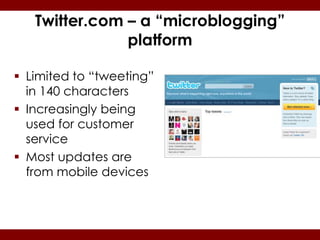
Twitter.com – a “microblogging”
               platform

 Limited to “tweeting”
  in 140 characters
 Increasingly being
  used for customer
  service
 Most updates are
  from mobile devices
Agenda

   What is Twitter?
   How You Can Use Twitter
   Twitter Terminology
   Getting Started
   What to Tweet About
   Advanced Search
   What the Tweet is a Twitter Party?
   Best Practices and Crisis Scenarios
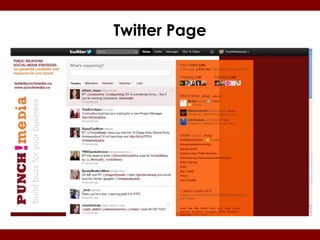
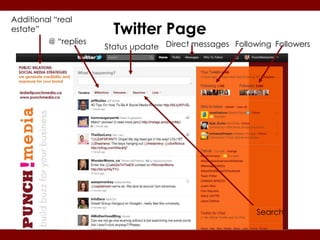
Twitter Page
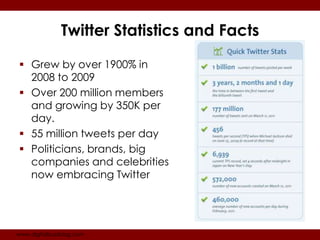
Twitter Statistics and Facts

 Grew by over 1900% in
  2008 to 2009
 Over 200 million members
  and growing by 350K per
  day.
 55 million tweets per day
 Politicians, brands, big
  companies and celebrities
  now embracing Twitter


www.digitalbuzzblog.com
How You Can Use Twitter
   Connect with strangers/build alliances
   Promote your brand
   Create buzz - events, promotions, free trials:
   Customer relations
   Crisis management
   Issue/charity advocacy and awareness
   Increasing sales (use sales messages sparingly!)
   Track what people are saying about your business.
   Calls-to-action to other content you’ve created.
   Create relationships with journalists and influential
    people.
Twitter Terminology
 Handle: Twitter username ie. @punchmediadotca
 @ = replies: Refer to someone using @ symbol. Will allow
  them to know you’re tweeting with them or re-tweeting
  their content.
 RT = “re-tweet”: You are sharing someone else’s tweet
  with your followers and giving original person credit.
 DM = Direct message. Private messages. You can only
  DM if you both follow each other
 # (hashtag): easier to follow trend thread. i.e.
  #JapanDisaster
 Bit.ly Tiny.cc Ow.ly: way to turn a very long URL into a
  shorter version to fit within 140 character requirement.
  (Note: Bit.ly tracks clicks)
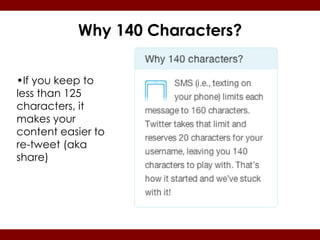
Why 140 Characters?


•If you keep to
less than 125
characters, it
makes your
content easier to
re-tweet (aka
share)
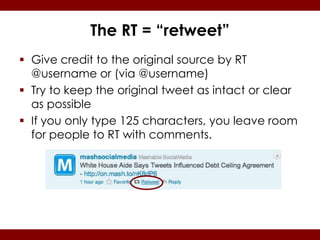
The RT = “retweet”
 Give credit to the original source by RT
  @username or (via @username)
 Try to keep the original tweet as intact or clear
  as possible
 If you only type 125 characters, you leave room
  for people to RT with comments.
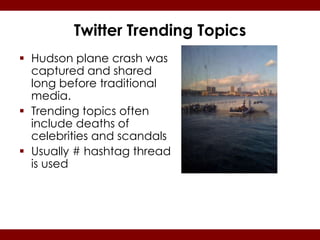
Twitter Trending Topics
 Hudson plane crash was
  captured and shared
  long before traditional
  media.
 Trending topics often
  include deaths of
  celebrities and scandals
 Usually # hashtag thread
  is used
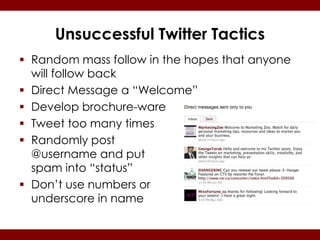
Unsuccessful Twitter Tactics
 Random mass follow in the hopes that anyone
  will follow back
 Direct Message a “Welcome”
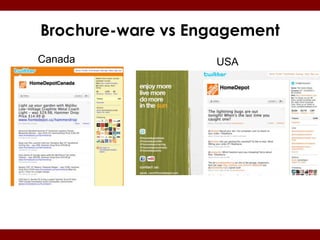
 Develop brochure-ware
 Tweet too many times
 Randomly post
  @username and put
  spam into “status”
 Don’t use numbers or
  underscore in name
Brochure-ware vs Engagement
Canada             USA
Additional “real
estate”                 Twitter Page
         @ “replies
                      Status update Direct messages Following Followers


                                                          Search
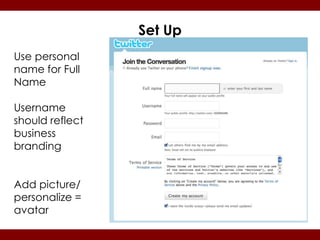
Set Up
Use personal
name for Full
Name

Username
should reflect
business
branding


Add picture/
personalize =
avatar
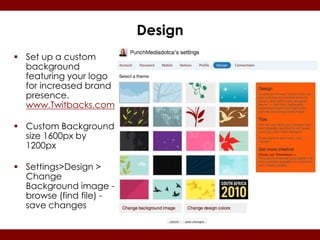
Design
 Set up a custom
  background
  featuring your logo
  for increased brand
  presence.
  www.Twitbacks.com

 Custom Background
  size 1600px by
  1200px

 Settings>Design >
  Change
  Background image -
  browse (find file) -
  save changes
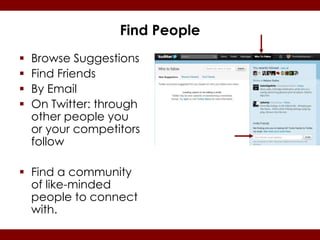
Find People
   Browse Suggestions
   Find Friends
   By Email
   On Twitter: through
    other people you
    or your competitors
    follow

 Find a community
  of like-minded
  people to connect
  with.
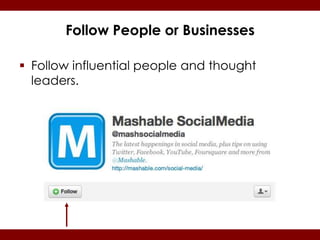
Follow People or Businesses

 Follow influential people and thought
  leaders.
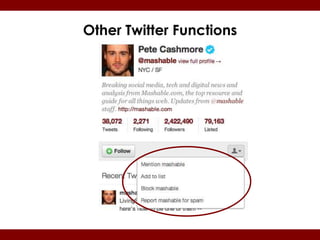
Other Twitter Functions
Getting Started: I

 Start by using Twitter Search to follow
  relevant people (and competitors)
 Note: following is not reciprocal
 Add a picture to show you’re a real
  person
 Be personal, interesting, conversational
Getting Started: II
 Build list slowly
 Note: You don’t have to read every
  tweet.

 70/20/10 rule = 70% Good info, 20% RT
  10% self promotion.
Things You Can Tweet About
 Job postings
 Exclusive “Twitter” coupons or deals
 Behind-the-scenes of your company
 Sneak peeks of projects or events
 Links to your articles/blogs or other
  content
 How-to’s: instructional videos or stories
 News: especially breaking news
Things You Can Tweet About
   Respond to customer service issues.
   Warnings: scams or viruses.
   Freebies and contests.
   Observations.
   Books you’re reading
   What you’re watching on TV.
   Join conversations.
   Re-tweet other people’s content.
Lists
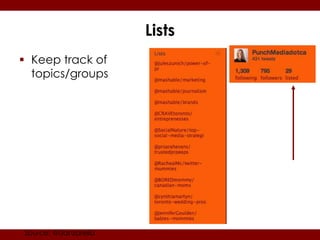
 Keep track of
  topics/groups


Source: @danzarella
Hashtag #
 Purpose is to follow a thread
 Group chat/tweetup (use
  TweetGrid.com or Tweetchat.com)
 Ask a question and collect ideas
 Share an experience (#olympics)
 Popular #FollowFriday or #FF =
  recommended people to follow
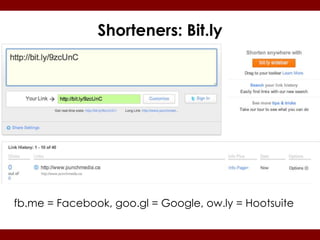
Shorteners: Bit.ly


fb.me = Facebook, goo.gl = Google, ow.ly = Hootsuite
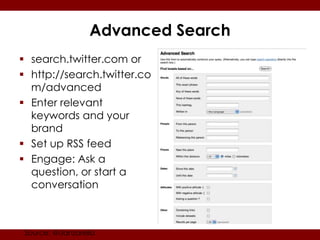
Advanced Search
 search.twitter.com or
 http://search.twitter.co
  m/advanced
 Enter relevant
  keywords and your
  brand
 Set up RSS feed
 Engage: Ask a
  question, or start a
  conversation


 Source: @danzarella
Useful Tools & Tips

 TwitterGrader: ww.tweet.grader.com
 Klout: www.klout.com
 Friend or Follow: www.friendorfollow.com
  Find out who is following you/who isn’t/who
  has the most followers etc.
 Ask “Please RT” (sparingly!)
 Hootsuite, Tweetdeck, Co-Tweet
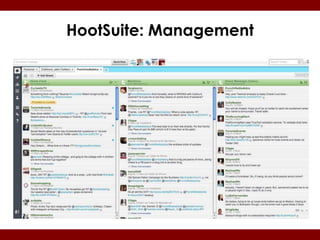
HootSuite: Management
Tweet Ups and Twitter Parties

 TweetUps: Twitter friends get together in real
  life.

 Twitter Parties: Twitter people gather
  together at a designated time to chat
  online. Sometimes sponsored and prizes are
  given.
What can happen on Twitter…
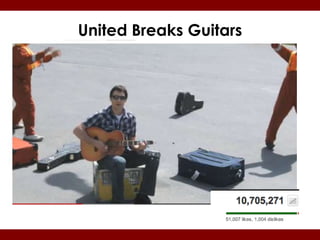
United Breaks Guitars
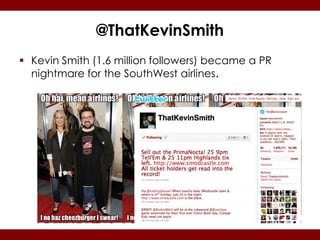
@ThatKevinSmith
 Kevin Smith (1.6 million followers) became a PR
  nightmare for the SouthWest airlines.
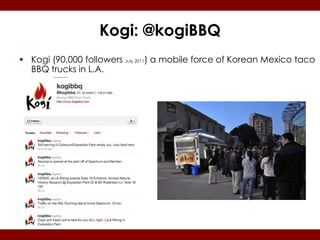
Kogi: @kogiBBQ
 Kogi (90,000 followers July 2011) a mobile force of Korean Mexico taco
  BBQ trucks in L.A.
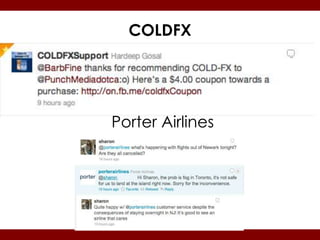
COLDFX


Porter Airlines
How to get lots of followers

 Put your Twitter logo on your website,
  handle on business card etc.
 Make your tweets re-tweetable = kick ass
  content. Be a thought leader.
 Be public (not private profile).
 Engage - a lot.
Next Steps

 Begin tweeting
 Follow relevant people & “talk” to them!
 Measure your goals against your
  benchmarks/strategy but remember
  “sentiment” cannot be measured.
 Identify “Brand Ambassadors” or key
  influencers who will help you spread your
  word. Reward them.
Be sure to…..

 Follow us:
  www.facebook.com/punchmediadotca
 Tweet with us:
  www.twitter.com/punchmediadotca
 Learn from us: www.punchmedia.wordpress.com

 Learn MORE from us:
  www.punchmedia.ca/email.html

Twitter for Business

  • 1.
    Twitter for Business Presented by: Leslie Hughes
  • 2.
    Twitter.com – a“microblogging” platform  Limited to “tweeting” in 140 characters  Increasingly being used for customer service  Most updates are from mobile devices
  • 3.
    Agenda  What is Twitter?  How You Can Use Twitter  Twitter Terminology  Getting Started  What to Tweet About  Advanced Search  What the Tweet is a Twitter Party?  Best Practices and Crisis Scenarios
  • 4.
  • 5.
    Twitter Statistics andFacts  Grew by over 1900% in 2008 to 2009  Over 200 million members and growing by 350K per day.  55 million tweets per day  Politicians, brands, big companies and celebrities now embracing Twitter www.digitalbuzzblog.com
  • 6.
    How You CanUse Twitter  Connect with strangers/build alliances  Promote your brand  Create buzz - events, promotions, free trials:  Customer relations  Crisis management  Issue/charity advocacy and awareness  Increasing sales (use sales messages sparingly!)  Track what people are saying about your business.  Calls-to-action to other content you’ve created.  Create relationships with journalists and influential people.
  • 7.
    Twitter Terminology  Handle:Twitter username ie. @punchmediadotca  @ = replies: Refer to someone using @ symbol. Will allow them to know you’re tweeting with them or re-tweeting their content.  RT = “re-tweet”: You are sharing someone else’s tweet with your followers and giving original person credit.  DM = Direct message. Private messages. You can only DM if you both follow each other  # (hashtag): easier to follow trend thread. i.e. #JapanDisaster  Bit.ly Tiny.cc Ow.ly: way to turn a very long URL into a shorter version to fit within 140 character requirement. (Note: Bit.ly tracks clicks)
  • 8.
    Why 140 Characters? •Ifyou keep to less than 125 characters, it makes your content easier to re-tweet (aka share)
  • 9.
    The RT =“retweet”  Give credit to the original source by RT @username or (via @username)  Try to keep the original tweet as intact or clear as possible  If you only type 125 characters, you leave room for people to RT with comments.
  • 10.
    Twitter Trending Topics Hudson plane crash was captured and shared long before traditional media.  Trending topics often include deaths of celebrities and scandals  Usually # hashtag thread is used
  • 11.
    Unsuccessful Twitter Tactics Random mass follow in the hopes that anyone will follow back  Direct Message a “Welcome”  Develop brochure-ware  Tweet too many times  Randomly post @username and put spam into “status”  Don’t use numbers or underscore in name
  • 12.
  • 13.
    Additional “real estate” Twitter Page @ “replies Status update Direct messages Following Followers Search
  • 14.
    Set Up Use personal namefor Full Name Username should reflect business branding Add picture/ personalize = avatar
  • 15.
    Design  Set upa custom background featuring your logo for increased brand presence. www.Twitbacks.com  Custom Background size 1600px by 1200px  Settings>Design > Change Background image - browse (find file) - save changes
  • 16.
    Find People  Browse Suggestions  Find Friends  By Email  On Twitter: through other people you or your competitors follow  Find a community of like-minded people to connect with.
  • 17.
    Follow People orBusinesses  Follow influential people and thought leaders.
  • 18.
  • 19.
    Getting Started: I Start by using Twitter Search to follow relevant people (and competitors)  Note: following is not reciprocal  Add a picture to show you’re a real person  Be personal, interesting, conversational
  • 20.
    Getting Started: II Build list slowly  Note: You don’t have to read every tweet.  70/20/10 rule = 70% Good info, 20% RT 10% self promotion.
  • 21.
    Things You CanTweet About  Job postings  Exclusive “Twitter” coupons or deals  Behind-the-scenes of your company  Sneak peeks of projects or events  Links to your articles/blogs or other content  How-to’s: instructional videos or stories  News: especially breaking news
  • 22.
    Things You CanTweet About  Respond to customer service issues.  Warnings: scams or viruses.  Freebies and contests.  Observations.  Books you’re reading  What you’re watching on TV.  Join conversations.  Re-tweet other people’s content.
  • 23.
    Lists  Keep trackof topics/groups Source: @danzarella
  • 24.
    Hashtag #  Purposeis to follow a thread  Group chat/tweetup (use TweetGrid.com or Tweetchat.com)  Ask a question and collect ideas  Share an experience (#olympics)  Popular #FollowFriday or #FF = recommended people to follow
  • 25.
    Shorteners: Bit.ly fb.me =Facebook, goo.gl = Google, ow.ly = Hootsuite
  • 26.
    Advanced Search  search.twitter.comor  http://search.twitter.co m/advanced  Enter relevant keywords and your brand  Set up RSS feed  Engage: Ask a question, or start a conversation Source: @danzarella
  • 27.
    Useful Tools &Tips  TwitterGrader: ww.tweet.grader.com  Klout: www.klout.com  Friend or Follow: www.friendorfollow.com Find out who is following you/who isn’t/who has the most followers etc.  Ask “Please RT” (sparingly!)  Hootsuite, Tweetdeck, Co-Tweet
  • 28.
  • 29.
    Tweet Ups andTwitter Parties  TweetUps: Twitter friends get together in real life.  Twitter Parties: Twitter people gather together at a designated time to chat online. Sometimes sponsored and prizes are given.
  • 30.
    What can happenon Twitter…
  • 31.
  • 32.
    @ThatKevinSmith  Kevin Smith(1.6 million followers) became a PR nightmare for the SouthWest airlines.
  • 33.
    Kogi: @kogiBBQ  Kogi(90,000 followers July 2011) a mobile force of Korean Mexico taco BBQ trucks in L.A.
  • 34.
  • 35.
    How to getlots of followers  Put your Twitter logo on your website, handle on business card etc.  Make your tweets re-tweetable = kick ass content. Be a thought leader.  Be public (not private profile).  Engage - a lot.
  • 36.
    Next Steps  Begintweeting  Follow relevant people & “talk” to them!  Measure your goals against your benchmarks/strategy but remember “sentiment” cannot be measured.  Identify “Brand Ambassadors” or key influencers who will help you spread your word. Reward them.
  • 37.
    Be sure to….. Follow us: www.facebook.com/punchmediadotca  Tweet with us: www.twitter.com/punchmediadotca  Learn from us: www.punchmedia.wordpress.com  Learn MORE from us: www.punchmedia.ca/email.html