Social Media Monitoring for Journalists
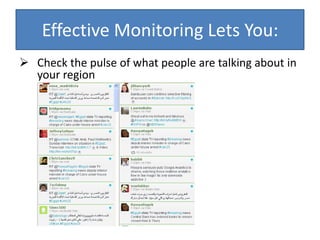
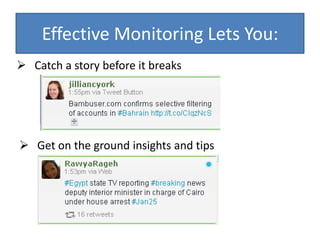
Effective Monitoring Lets You:Check the pulse of what people are talking about in your regionEffective Monitoring Lets You:Catch a story before it breaks
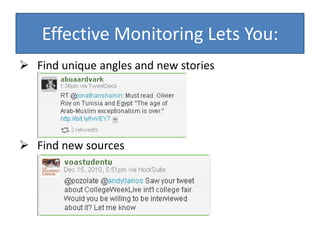
Get on the ground insights and tips Effective Monitoring Lets You:Find unique angles and new stories
Find new sourcesCommon ComplaintsTwitter:There’s too much information – I can’t read all of it!You shouldn’t try to consume all of it – the key is to find tools to help you filter, browse and scanPeople are talking about mundane things like what they had for lunch – I don’t care!Yes, some people do, but many don’t and we will focus on finding those peopleBlogs:They’re biased – I don’t want to know what they think!
They don’t know what they’re talking about – they’re not journalists!Some are, some aren’t – either way they can be a valuable resource for understanding the opinions out there and finding new/interesting sources to talk about themUsing the right tricks and tools helps you cut down on the noise and use the tools for what you really need them for – getting tips and finding sources
For Google and Twitter, we’ll look at tools/tips for:Locating specific information or sourcesBrowsing and staying on top of news before it breaks
Twitter: “Micro-blogging”Short updatesLots of linksEasy to identify influencersYou don’t have to be a member to use Twitter search, but you do for the other features we’ll discuss
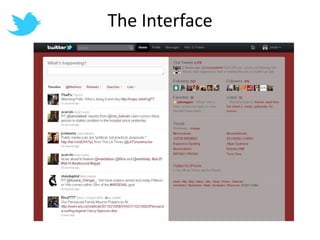
The Interface
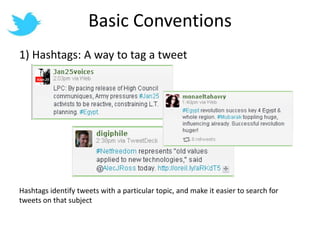
Basic Conventions1) Hashtags: A way to tag a tweetHashtags identify tweets with a particular topic, and make it easier to search for tweets on that subject
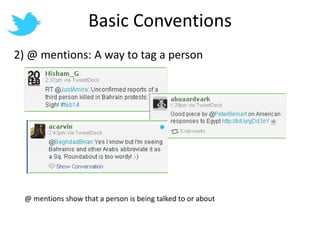
Basic Conventions2) @ mentions: A way to tag a person@ mentions show that a person is being talked to or about
Twitter Search:When you need to find someone or something specific
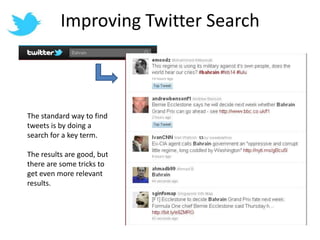
Improving Twitter SearchThe standard way to find tweets is by doing a search for a key term.The results are good, but there are some tricks to get even more relevant results.
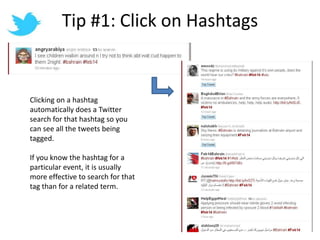
Tip #1: Click on HashtagsClicking on a hashtag automatically does a Twitter search for that hashtag so you can see all the tweets being tagged.If you know the hashtag for a particular event, it is usually more effective to search for that tag than for a related term.
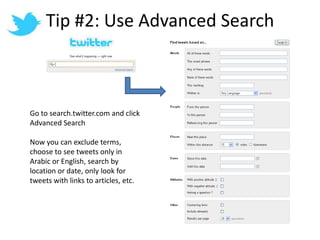
Tip #2: Use Advanced SearchGo to search.twitter.com and click Advanced SearchNow you can exclude terms, choose to see tweets only in Arabic or English, search by location or date, only look for tweets with links to articles, etc.
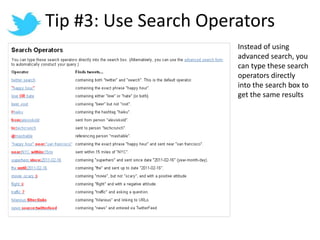
Tip #3: Use Search OperatorsInstead of using advanced search, you can type these search operators directly into the search box to get the same results
Twitter Browsing:To keep your finger on the pulse and get new ideas
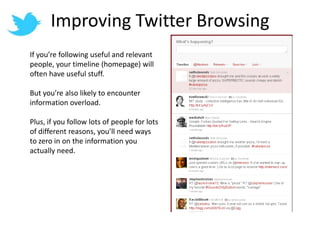
Improving Twitter BrowsingIf you’re following useful and relevant people, your timeline (homepage) will often have useful stuff.But you’re also likely to encounter information overload.Plus, if you follow lots of people for lots of different reasons, you’ll need ways to zero in on the information you actually need.
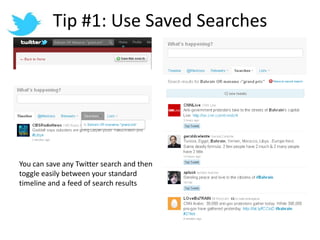
Tip #1: Use Saved SearchesYou can save any Twitter search and then toggle easily between your standard timeline and a feed of search results
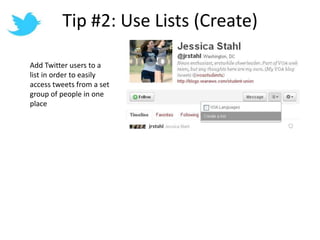
Tip #2: Use Lists (Create)Add Twitter users to a list in order to easily access tweets from a set group of people in one place
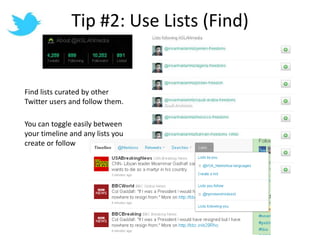
Tip #2: Use Lists (Find)Find lists curated by other Twitter users and follow them.You can toggle easily between your timeline and any lists you create or follow
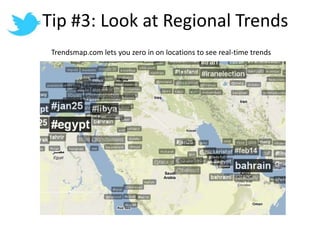
Tip #3: Look at Regional TrendsTrendsmap.com lets you zero in on locations to see real-time trends
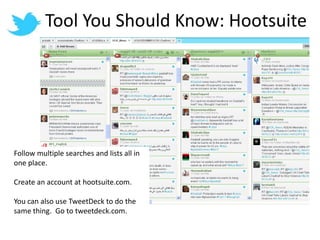
Tool You Should Know: HootsuiteFollow multiple searches and lists all in one place.Create an account at hootsuite.com.You can also use TweetDeck to do the same thing.  Go to tweetdeck.com.
Who/What is Important?Evaluate authority by looking at:Top Tweets – Twitter’s algorithm for deciding who is importantWho is being retweeted and @mentionedWhere a person is physically locatedHow many lists a person is on and who has listed themThe number of followers and ratio of following to followers
News and BlogsBlogs and other non-mainstream news sources often have information first.They can also offer new viewpoints and perspectives.
Google Search:Finding specific information or sources
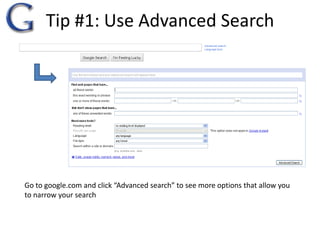
Tip #1: Use Advanced Search Go to google.com and click “Advanced search” to see more options that allow you to narrow your search
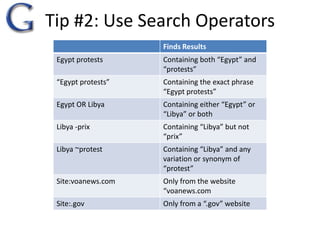
Tip #2: Use Search Operators 
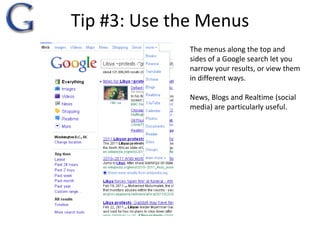
Tip #3: Use the MenusThe menus along the top and sides of a Google search let you narrow your results, or view them in different ways.News, Blogs and Realtime (social media) are particularly useful.
Google Browsing:Staying on top of new developments and ideas
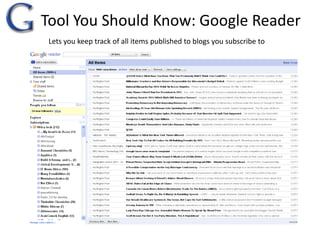
Tool You Should Know: Google ReaderLets you keep track of all items published to blogs you subscribe to
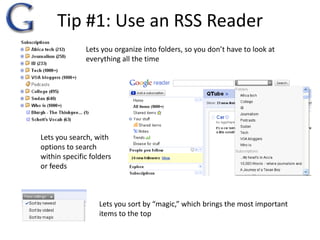
Tip #1: Use an RSS ReaderLets you organize into folders, so you don’t have to look at everything all the timeLets you search, with options to search within specific folders or feedsLets you sort by “magic,” which brings the most important items to the top
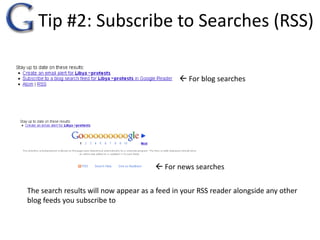
Tip #2: Subscribe to Searches (RSS) For blog searches For news searchesThe search results will now appear as a feed in your RSS reader alongside any other blog feeds you subscribe to
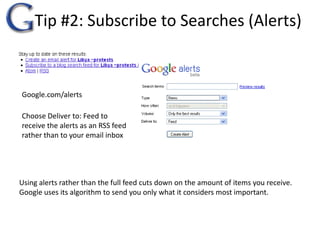
Tip #2: Subscribe to Searches (Alerts)Google.com/alertsChoose Deliver to: Feed to receive the alerts as an RSS feed rather than to your email inboxUsing alerts rather than the full feed cuts down on the amount of items you receive.  Google uses its algorithm to send you only what it considers most important.
Who/What is Important?Evaluate authority by looking at:Google Reader “magic” sortingWho blogs are linking to and debating withWho is being tweeted, retweeted and @mentionedWhere a person is physically located
How to Build Your New SourcesFollow a few tweeters and blogs that you already know and trust:	@acarvin	@sultanalqassemi	globalvoicesonline.org2) See who the bloggers and tweeters you trust are trusting (linking to, debating, retweeting)3) Follow a few lists/searches and start getting a sense for who pops up often as an authoritative figure

Social media for reporting

  • 1.
  • 2.
    Effective Monitoring LetsYou:Check the pulse of what people are talking about in your regionEffective Monitoring Lets You:Catch a story before it breaks
  • 3.
    Get on theground insights and tips Effective Monitoring Lets You:Find unique angles and new stories
  • 4.
    Find new sourcesCommonComplaintsTwitter:There’s too much information – I can’t read all of it!You shouldn’t try to consume all of it – the key is to find tools to help you filter, browse and scanPeople are talking about mundane things like what they had for lunch – I don’t care!Yes, some people do, but many don’t and we will focus on finding those peopleBlogs:They’re biased – I don’t want to know what they think!
  • 5.
    They don’t knowwhat they’re talking about – they’re not journalists!Some are, some aren’t – either way they can be a valuable resource for understanding the opinions out there and finding new/interesting sources to talk about themUsing the right tricks and tools helps you cut down on the noise and use the tools for what you really need them for – getting tips and finding sources
  • 6.
    For Google andTwitter, we’ll look at tools/tips for:Locating specific information or sourcesBrowsing and staying on top of news before it breaks
  • 7.
    Twitter: “Micro-blogging”Short updatesLotsof linksEasy to identify influencersYou don’t have to be a member to use Twitter search, but you do for the other features we’ll discuss
  • 8.
  • 9.
    Basic Conventions1) Hashtags:A way to tag a tweetHashtags identify tweets with a particular topic, and make it easier to search for tweets on that subject
  • 10.
    Basic Conventions2) @mentions: A way to tag a person@ mentions show that a person is being talked to or about
  • 11.
    Twitter Search:When youneed to find someone or something specific
  • 12.
    Improving Twitter SearchThestandard way to find tweets is by doing a search for a key term.The results are good, but there are some tricks to get even more relevant results.
  • 13.
    Tip #1: Clickon HashtagsClicking on a hashtag automatically does a Twitter search for that hashtag so you can see all the tweets being tagged.If you know the hashtag for a particular event, it is usually more effective to search for that tag than for a related term.
  • 14.
    Tip #2: UseAdvanced SearchGo to search.twitter.com and click Advanced SearchNow you can exclude terms, choose to see tweets only in Arabic or English, search by location or date, only look for tweets with links to articles, etc.
  • 15.
    Tip #3: UseSearch OperatorsInstead of using advanced search, you can type these search operators directly into the search box to get the same results
  • 16.
    Twitter Browsing:To keepyour finger on the pulse and get new ideas
  • 17.
    Improving Twitter BrowsingIfyou’re following useful and relevant people, your timeline (homepage) will often have useful stuff.But you’re also likely to encounter information overload.Plus, if you follow lots of people for lots of different reasons, you’ll need ways to zero in on the information you actually need.
  • 18.
    Tip #1: UseSaved SearchesYou can save any Twitter search and then toggle easily between your standard timeline and a feed of search results
  • 19.
    Tip #2: UseLists (Create)Add Twitter users to a list in order to easily access tweets from a set group of people in one place
  • 20.
    Tip #2: UseLists (Find)Find lists curated by other Twitter users and follow them.You can toggle easily between your timeline and any lists you create or follow
  • 21.
    Tip #3: Lookat Regional TrendsTrendsmap.com lets you zero in on locations to see real-time trends
  • 22.
    Tool You ShouldKnow: HootsuiteFollow multiple searches and lists all in one place.Create an account at hootsuite.com.You can also use TweetDeck to do the same thing. Go to tweetdeck.com.
  • 23.
    Who/What is Important?Evaluateauthority by looking at:Top Tweets – Twitter’s algorithm for deciding who is importantWho is being retweeted and @mentionedWhere a person is physically locatedHow many lists a person is on and who has listed themThe number of followers and ratio of following to followers
  • 24.
    News and BlogsBlogsand other non-mainstream news sources often have information first.They can also offer new viewpoints and perspectives.
  • 25.
    Google Search:Finding specificinformation or sources
  • 26.
    Tip #1: UseAdvanced Search Go to google.com and click “Advanced search” to see more options that allow you to narrow your search
  • 27.
    Tip #2: UseSearch Operators 
  • 28.
    Tip #3: Usethe MenusThe menus along the top and sides of a Google search let you narrow your results, or view them in different ways.News, Blogs and Realtime (social media) are particularly useful.
  • 29.
    Google Browsing:Staying ontop of new developments and ideas
  • 30.
    Tool You ShouldKnow: Google ReaderLets you keep track of all items published to blogs you subscribe to
  • 31.
    Tip #1: Usean RSS ReaderLets you organize into folders, so you don’t have to look at everything all the timeLets you search, with options to search within specific folders or feedsLets you sort by “magic,” which brings the most important items to the top
  • 32.
    Tip #2: Subscribeto Searches (RSS) For blog searches For news searchesThe search results will now appear as a feed in your RSS reader alongside any other blog feeds you subscribe to
  • 33.
    Tip #2: Subscribeto Searches (Alerts)Google.com/alertsChoose Deliver to: Feed to receive the alerts as an RSS feed rather than to your email inboxUsing alerts rather than the full feed cuts down on the amount of items you receive. Google uses its algorithm to send you only what it considers most important.
  • 34.
    Who/What is Important?Evaluateauthority by looking at:Google Reader “magic” sortingWho blogs are linking to and debating withWho is being tweeted, retweeted and @mentionedWhere a person is physically located
  • 35.
    How to BuildYour New SourcesFollow a few tweeters and blogs that you already know and trust: @acarvin @sultanalqassemi globalvoicesonline.org2) See who the bloggers and tweeters you trust are trusting (linking to, debating, retweeting)3) Follow a few lists/searches and start getting a sense for who pops up often as an authoritative figure