




Qt Technology Overview
for: MedAcuity
April 2020
› The Qt Company
› Value of Qt
› Qt Releases and Roadmap
› Qt Design Tools
23 April 2020 © The Qt Company2
Agenda
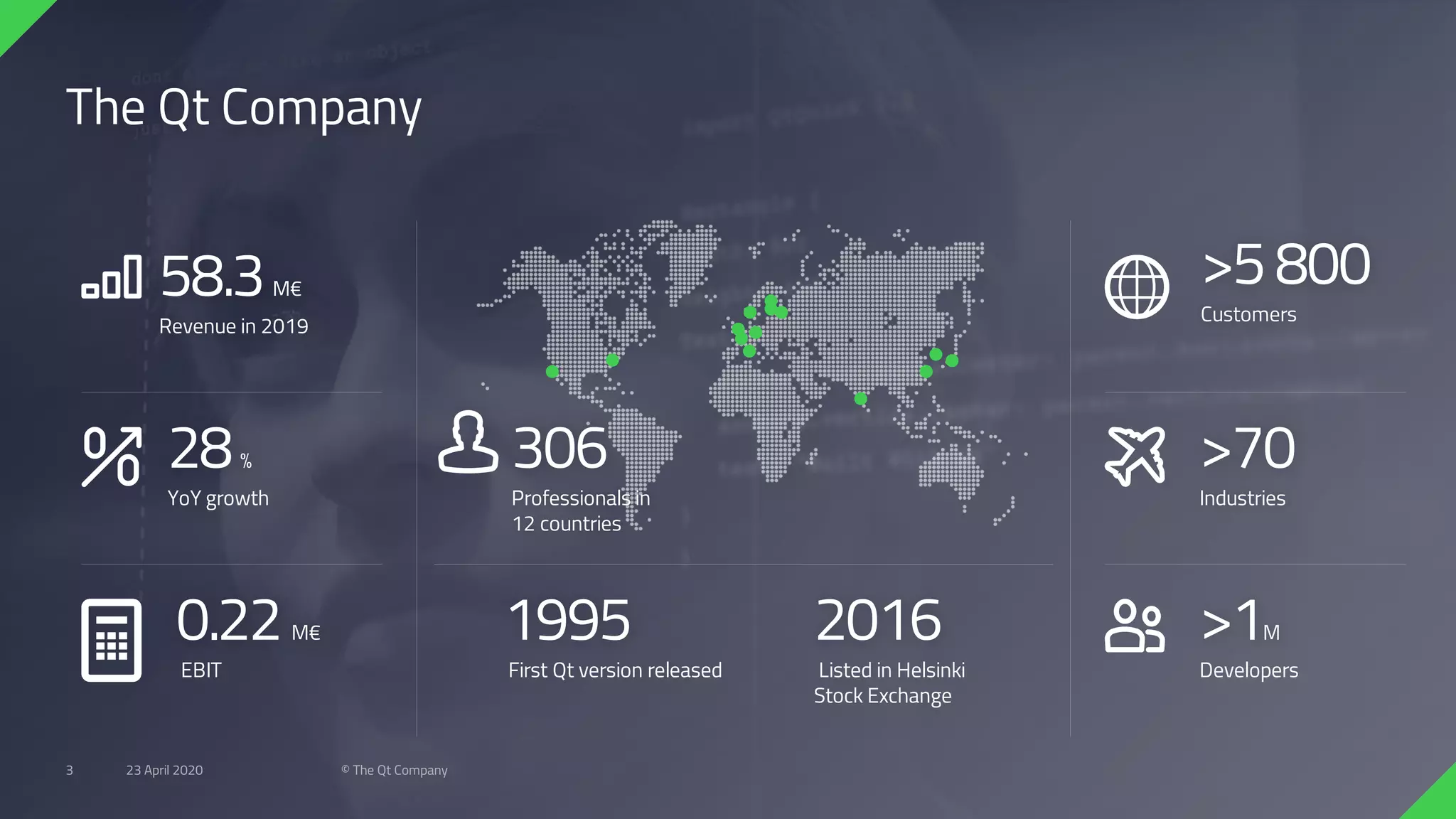
The Qt Company
58.3M€
Revenue in 2019
28%
YoY growth
0.22M€
EBIT
306
Professionals in
12 countries
>5800
Customers
>70
Industries
>1M
Developers
1995
First Qt version released
2016
Listed in Helsinki
Stock Exchange
23 April 2020 © The Qt Company3
#2
Cost
savings
#3
Time to
market
#4
Fast
applications
#5
Developer
experience
#7
Community
#8
Cross-platform
capability
#9
Languages
#10
Flexible
framework
#1
Great
UX
#6
Libraries
and tools
Top 10 Reasons to develop with
23 April 2020 © The Qt Company4
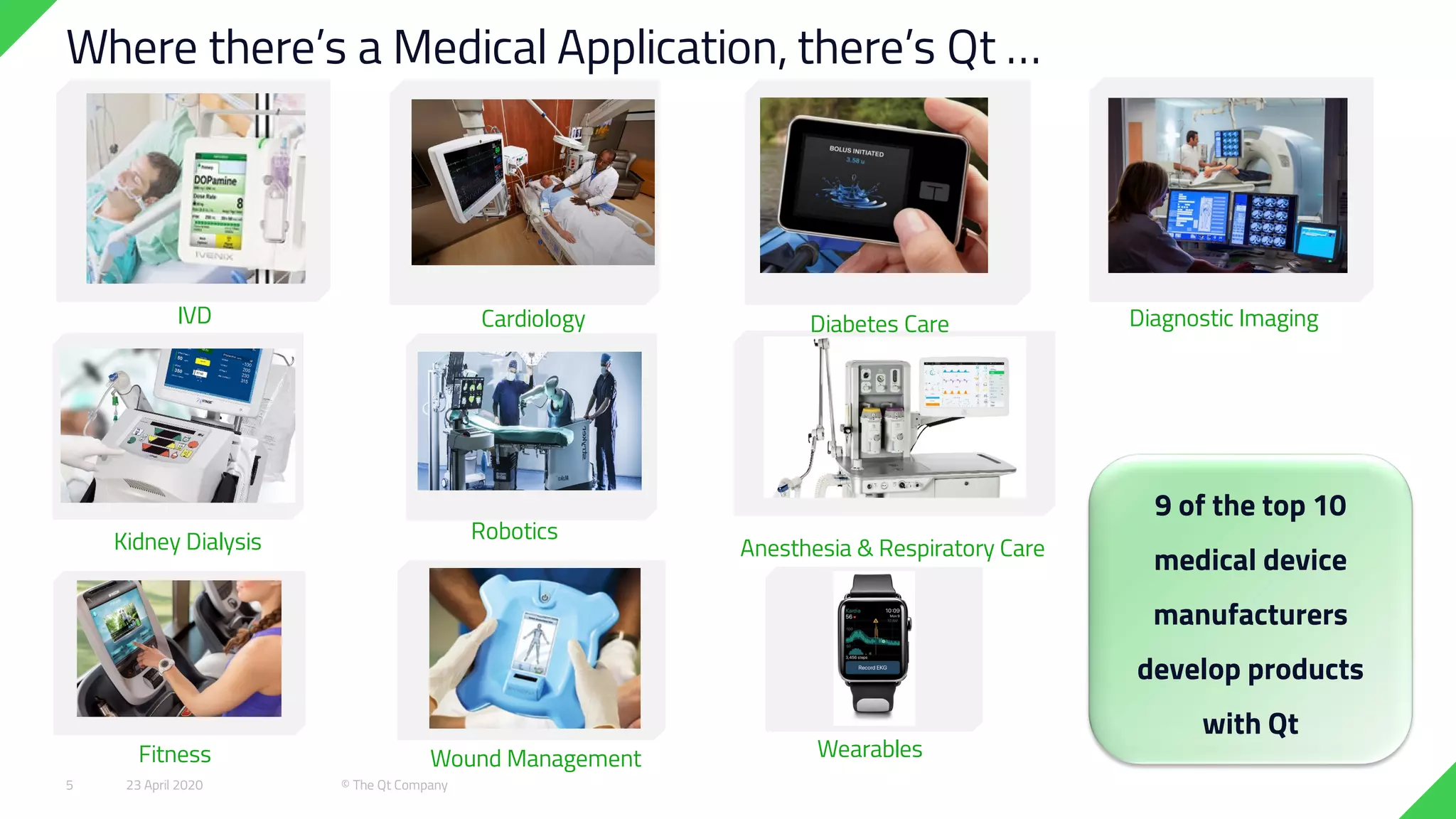
Cardiology
Where there’s a Medical Application, there’s Qt …
Kidney Dialysis
Diagnostic ImagingDiabetes Care
WearablesWound Management
Anesthesia & Respiratory Care
Fitness
IVD
Robotics
9 of the top 10
medical device
manufacturers
develop products
with Qt
23 April 2020 © The Qt Company5
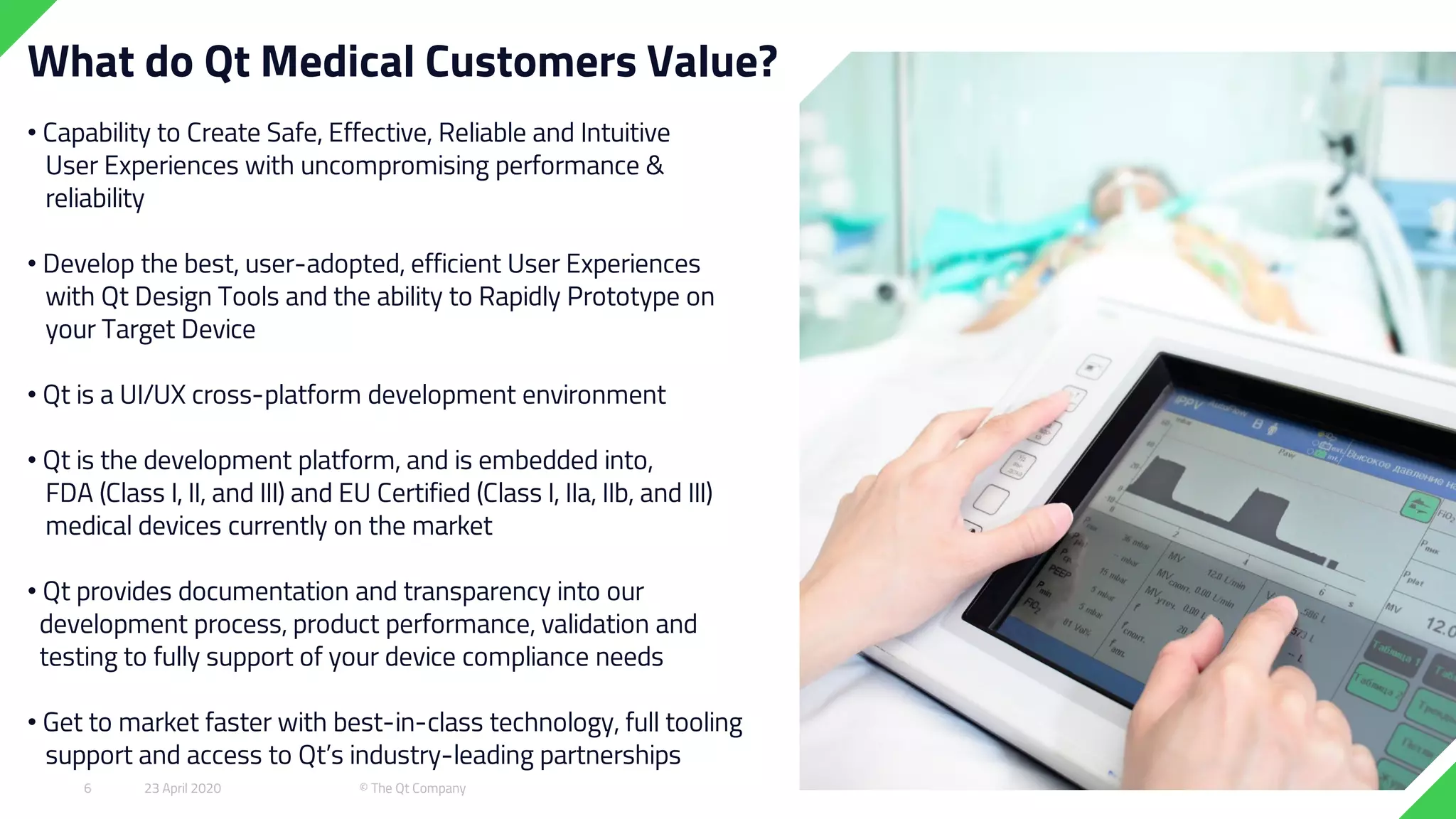
What do Qt Medical Customers Value?
• Capability to Create Safe, Effective, Reliable and Intuitive
User Experiences with uncompromising performance &
reliability
• Develop the best, user-adopted, efficient User Experiences
with Qt Design Tools and the ability to Rapidly Prototype on
your Target Device
• Qt is a UI/UX cross-platform development environment
• Qt is the development platform, and is embedded into,
FDA (Class I, II, and III) and EU Certified (Class I, IIa, IIb, and III)
medical devices currently on the market
• Qt provides documentation and transparency into our
development process, product performance, validation and
testing to fully support of your device compliance needs
• Get to market faster with best-in-class technology, full tooling
support and access to Qt’s industry-leading partnerships
23 April 2020 © The Qt Company6
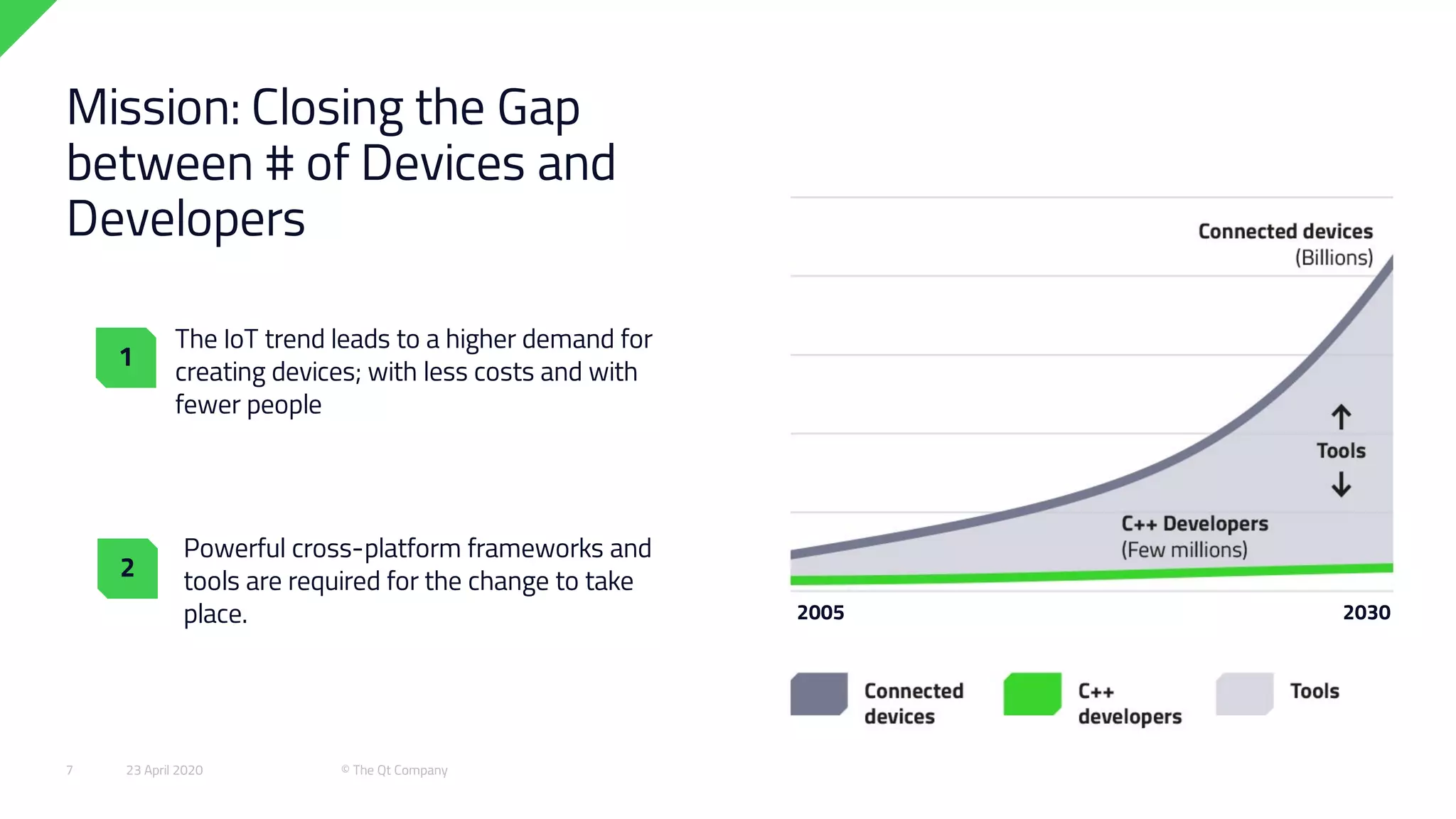
The IoT trend leads to a higher demand for
creating devices; with less costs and with
fewer people
Powerful cross-platform frameworks and
tools are required for the change to take
place.
Mission: Closing the Gap
between # of Devices and
Developers
1
2
2005 2030
23 April 2020 © The Qt Company7
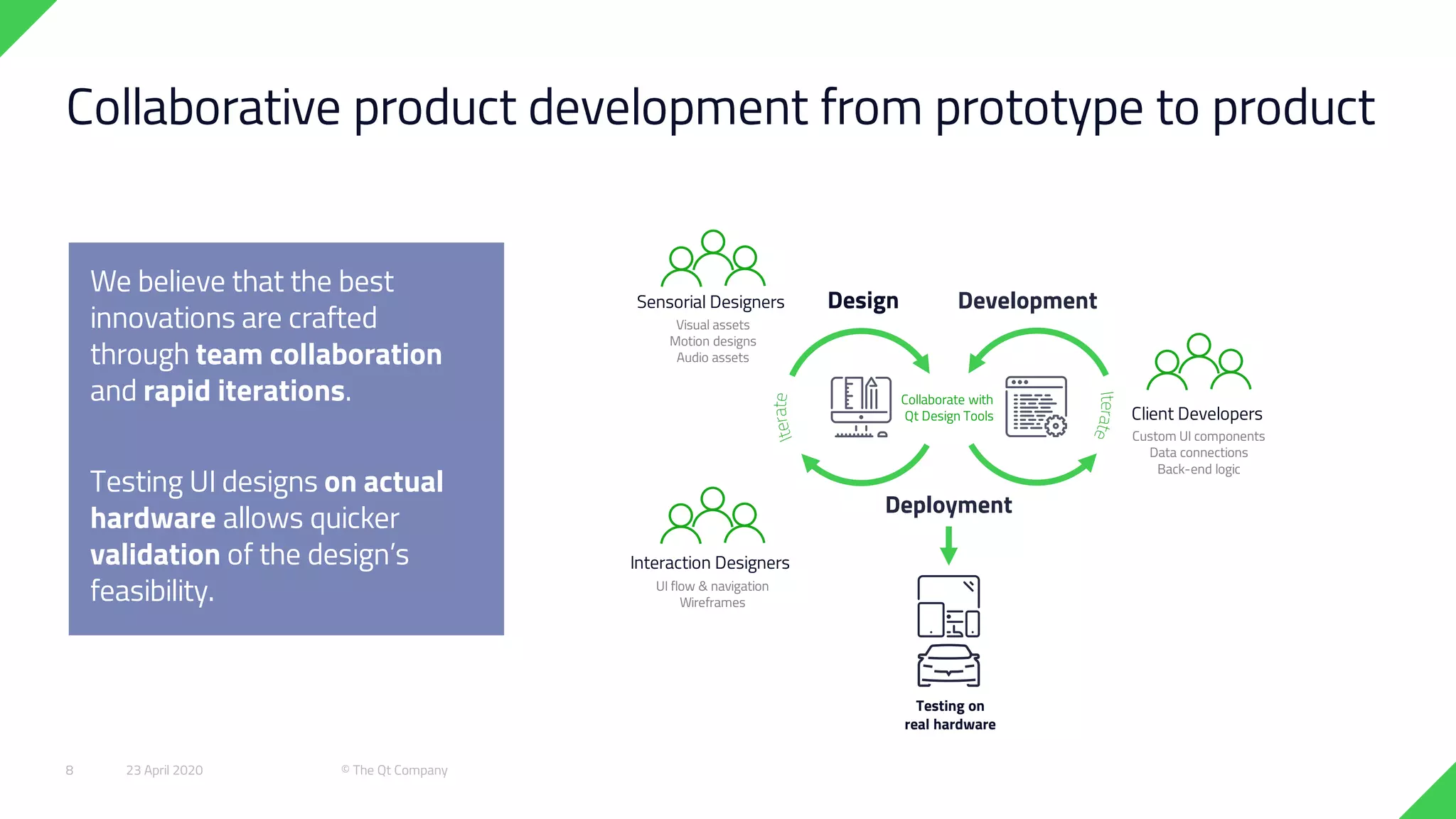
Collaborative product development from prototype to product
Design Development
Deployment
Testing on
real hardware
Interaction Designers
Client Developers
Custom UI components
Data connections
Back-end logic
Sensorial Designers
Visual assets
Motion designs
Audio assets
UI flow & navigation
Wireframes
Collaborate with
Qt Design Tools
We believe that the best
innovations are crafted
through team collaboration
and rapid iterations.
Testing UI designs on actual
hardware allows quicker
validation of the design’s
feasibility.
23 April 2020 © The Qt Company8
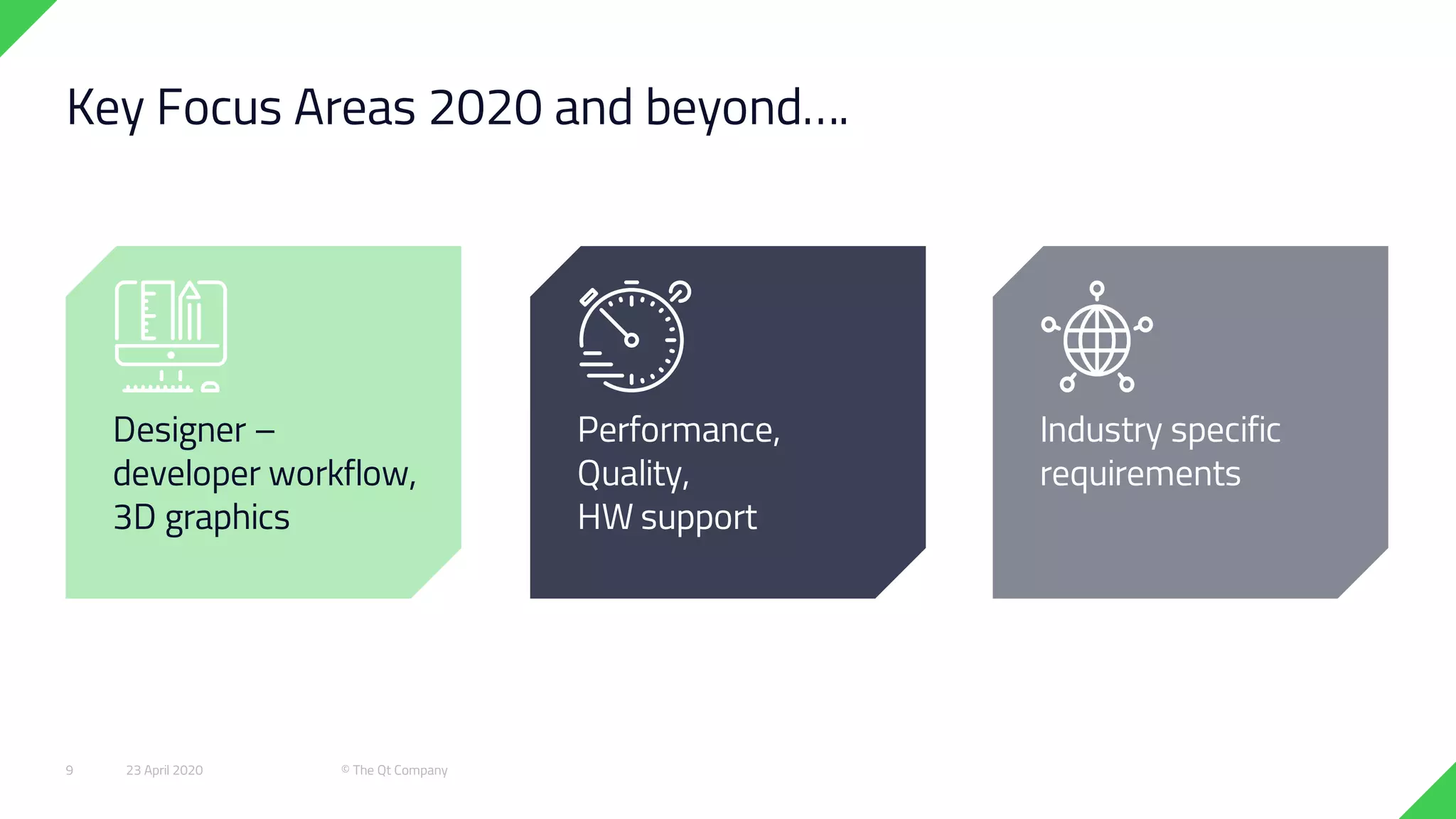
Key Focus Areas 2020 and beyond….
Industry specific
requirements
Designer –
developer workflow,
3D graphics
Performance,
Quality,
HW support
23 April 2020 © The Qt Company9
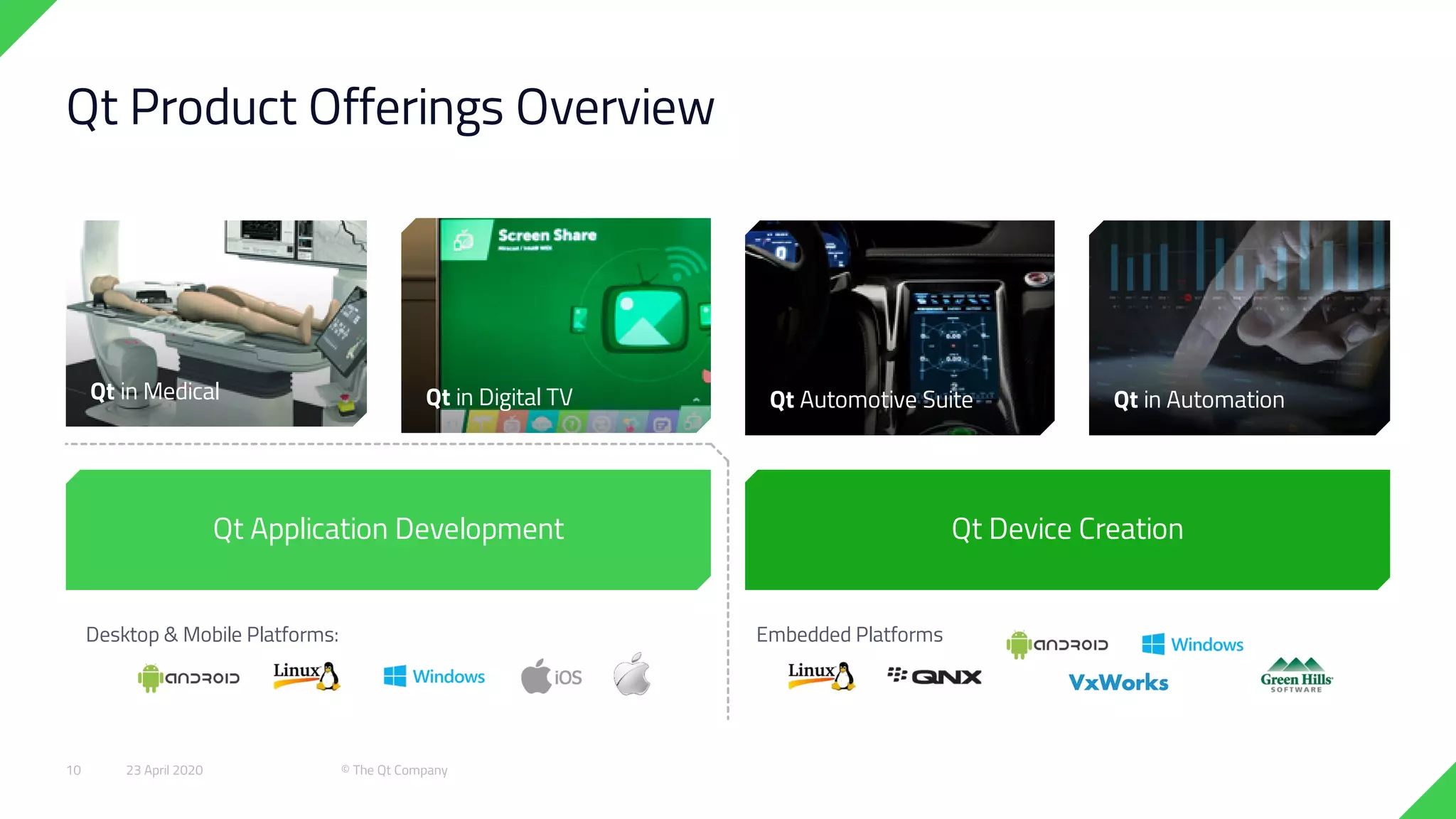
Embedded PlatformsDesktop & Mobile Platforms:
Qt Device Creation
Qt in Automation
Qt Product Offerings Overview
Qt Automotive SuiteQt in Digital TVQt in Medical
Qt Application Development
23 April 2020 © The Qt Company10
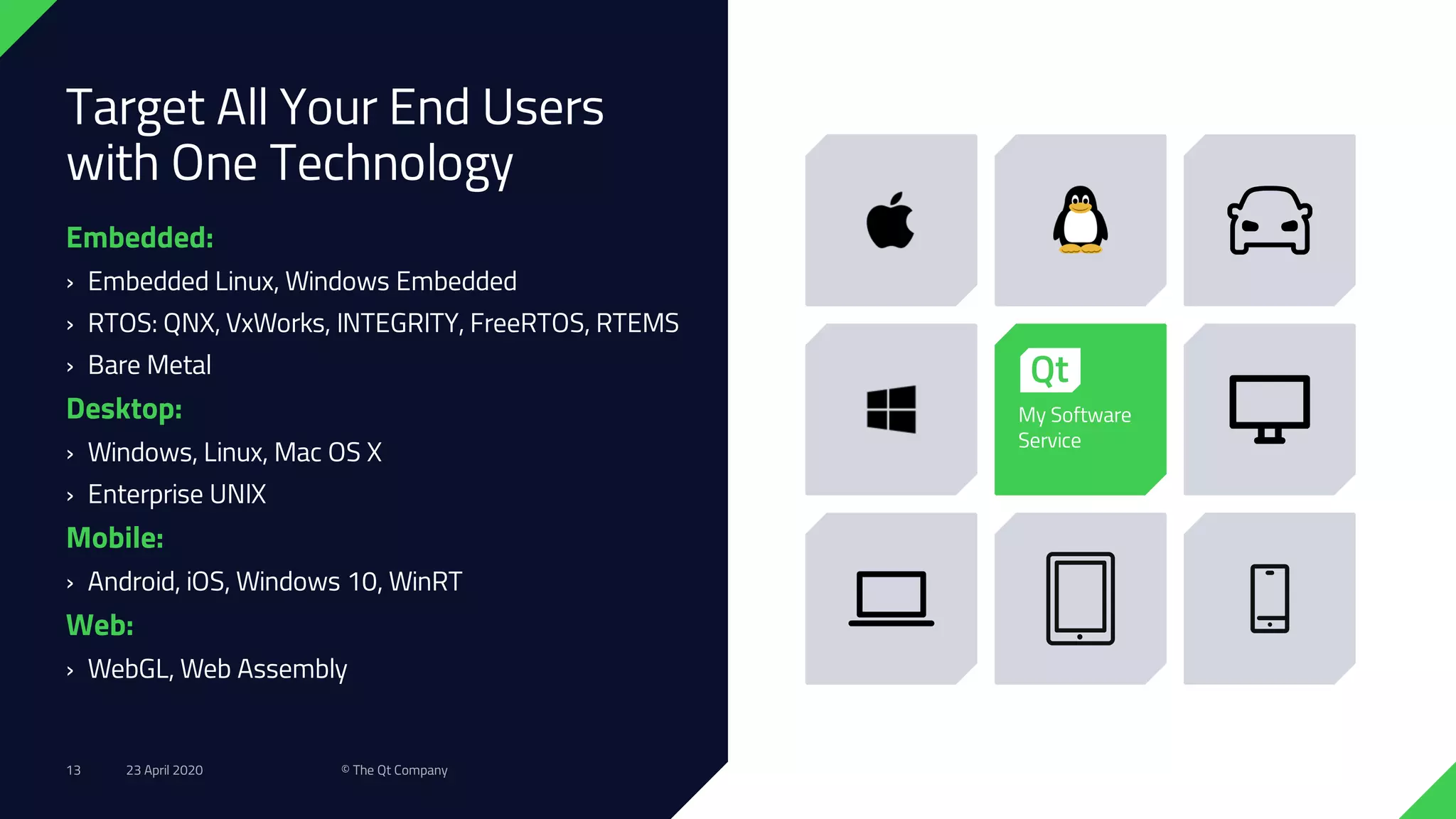
Target All Your End Users
with One Technology
Embedded:
› Embedded Linux, Windows Embedded
› RTOS: QNX, VxWorks, INTEGRITY, FreeRTOS, RTEMS
› Bare Metal
Desktop:
› Windows, Linux, Mac OS X
› Enterprise UNIX
Mobile:
› Android, iOS, Windows 10, WinRT
Web:
› WebGL, Web Assembly
My Software
Service
23 April 2020 © The Qt Company13
Qt Releases & Roadmap
23 April 2020 © The Qt Company14
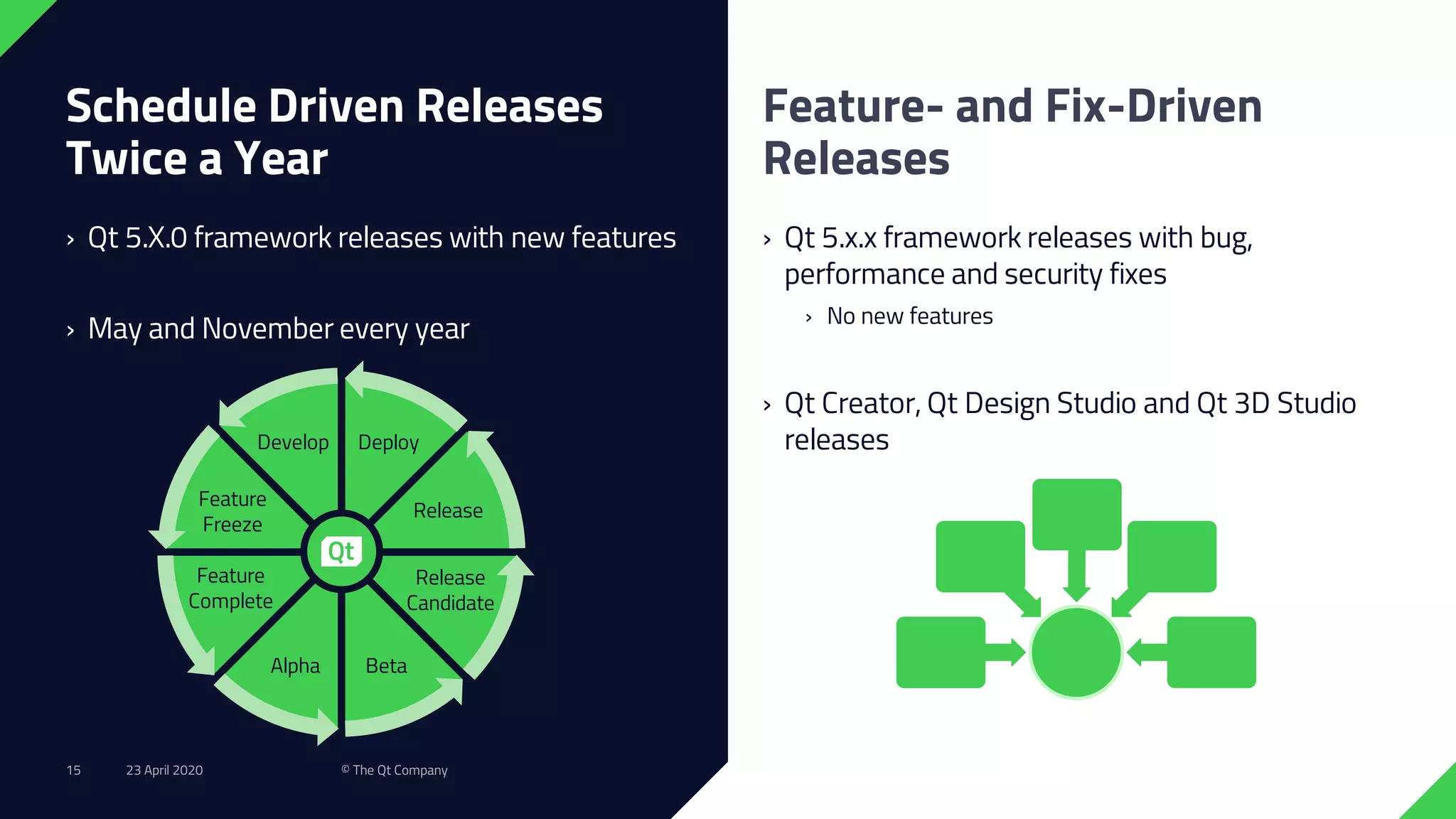
Schedule Driven Releases
Twice a Year
› Qt 5.X.0 framework releases with new features
› May and November every year
› Qt 5.x.x framework releases with bug,
performance and security fixes
› No new features
› Qt Creator, Qt Design Studio and Qt 3D Studio
releases
Feature- and Fix-Driven
Releases
Develop
Feature
Freeze
Feature
Complete
Alpha Beta
Release
Candidate
Release
Deploy
23 April 2020 © The Qt Company15
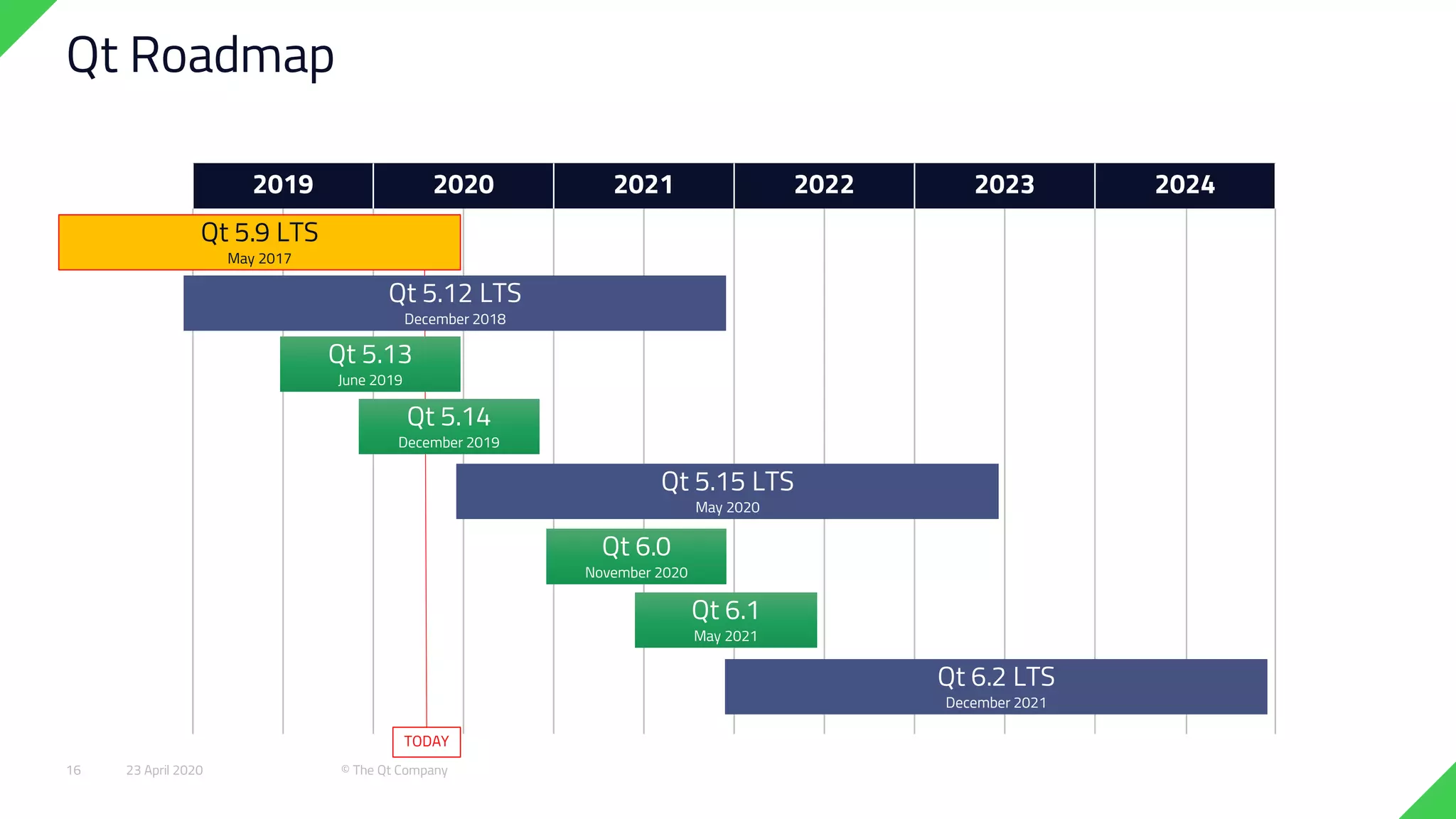
2019 2020 2021 2022 2023 2024
TODAY
Qt Roadmap
Qt 5.13
June 2019
Qt 5.14
December 2019
Qt 5.12 LTS
December 2018
Qt 6.2 LTS
December 2021
Qt 5.15 LTS
May 2020
Qt 6.0
November 2020
Qt 6.1
May 2021
Qt 5.9 LTS
May 2017
23 April 2020 © The Qt Company16
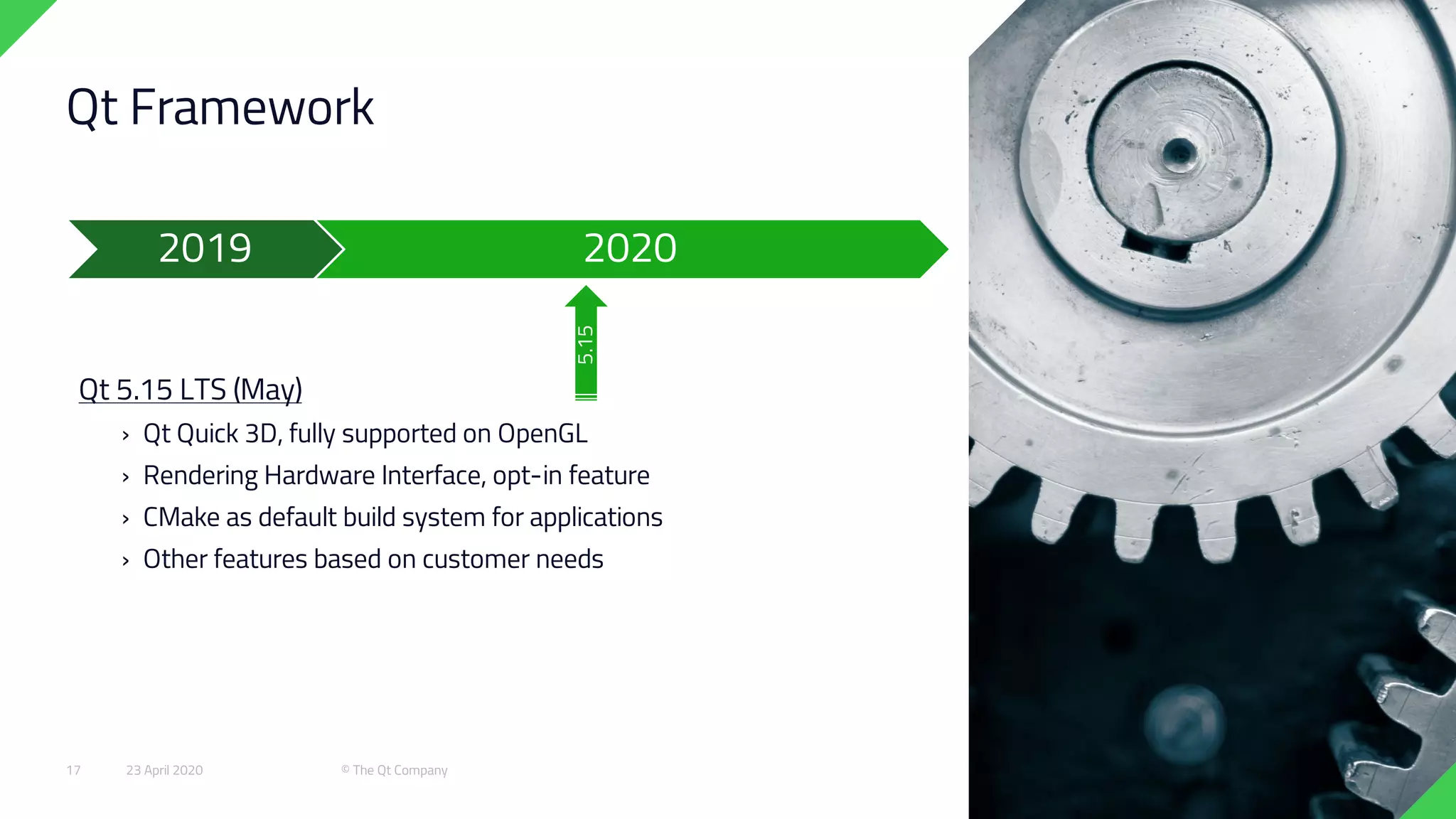
Qt Framework
Qt 5.15 LTS (May)
› Qt Quick 3D, fully supported on OpenGL
› Rendering Hardware Interface, opt-in feature
› CMake as default build system for applications
› Other features based on customer needs
5.15
20202019
23 April 2020 © The Qt Company17
Qt Framework
Qt 6.0 (November)
› Qt Quick 3D and Rendering Hardware Interface
› QML 3
› C++ 17
› Enhanced C++ APIs
› New property system and binding engine
› CMake as build system
› Unified theming support
› Better modularity and Qt Marketplace as delivery channel for some
modules
6.0
20202019
23 April 2020 © The Qt Company18
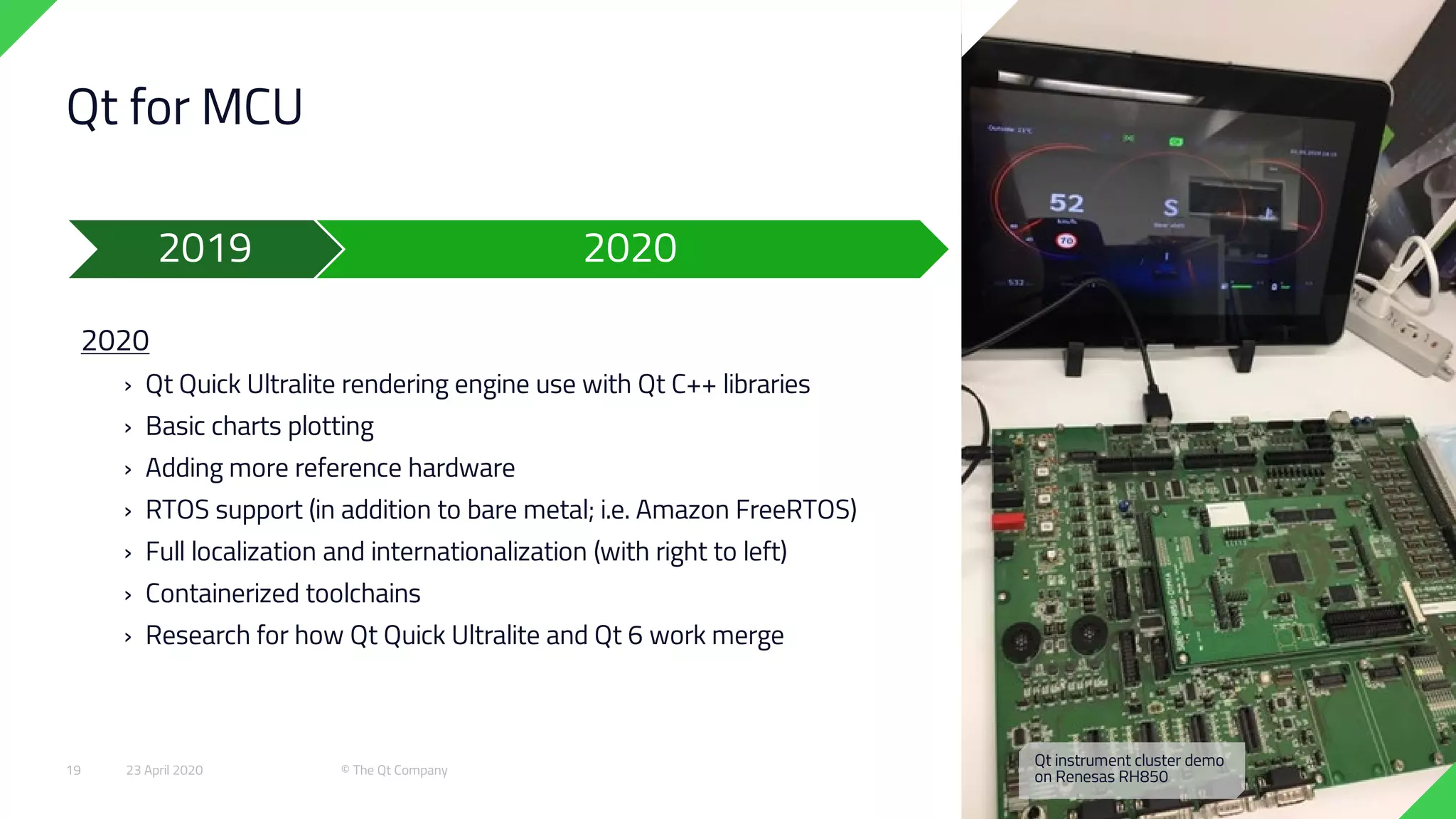
Qt for MCU
2020
› Qt Quick Ultralite rendering engine use with Qt C++ libraries
› Basic charts plotting
› Adding more reference hardware
› RTOS support (in addition to bare metal; i.e. Amazon FreeRTOS)
› Full localization and internationalization (with right to left)
› Containerized toolchains
› Research for how Qt Quick Ultralite and Qt 6 work merge
20202019
Qt instrument cluster demo
on Renesas RH85023 April 2020 © The Qt Company19
Developer Experience
Developer Experience Improvements
› New improved installer user experience (December 2019)
› Qt Account facelift (September 2019)
› Improved Qt Creator on-boarding (4.11, December 2019)
› A default kit + default project as the first view
› Help notifications
› Documentation improvements (September 2019)
2019 2020
23 April 2020 © The Qt Company20
Qt Design Tools
23 April 2020 © The Qt Company21
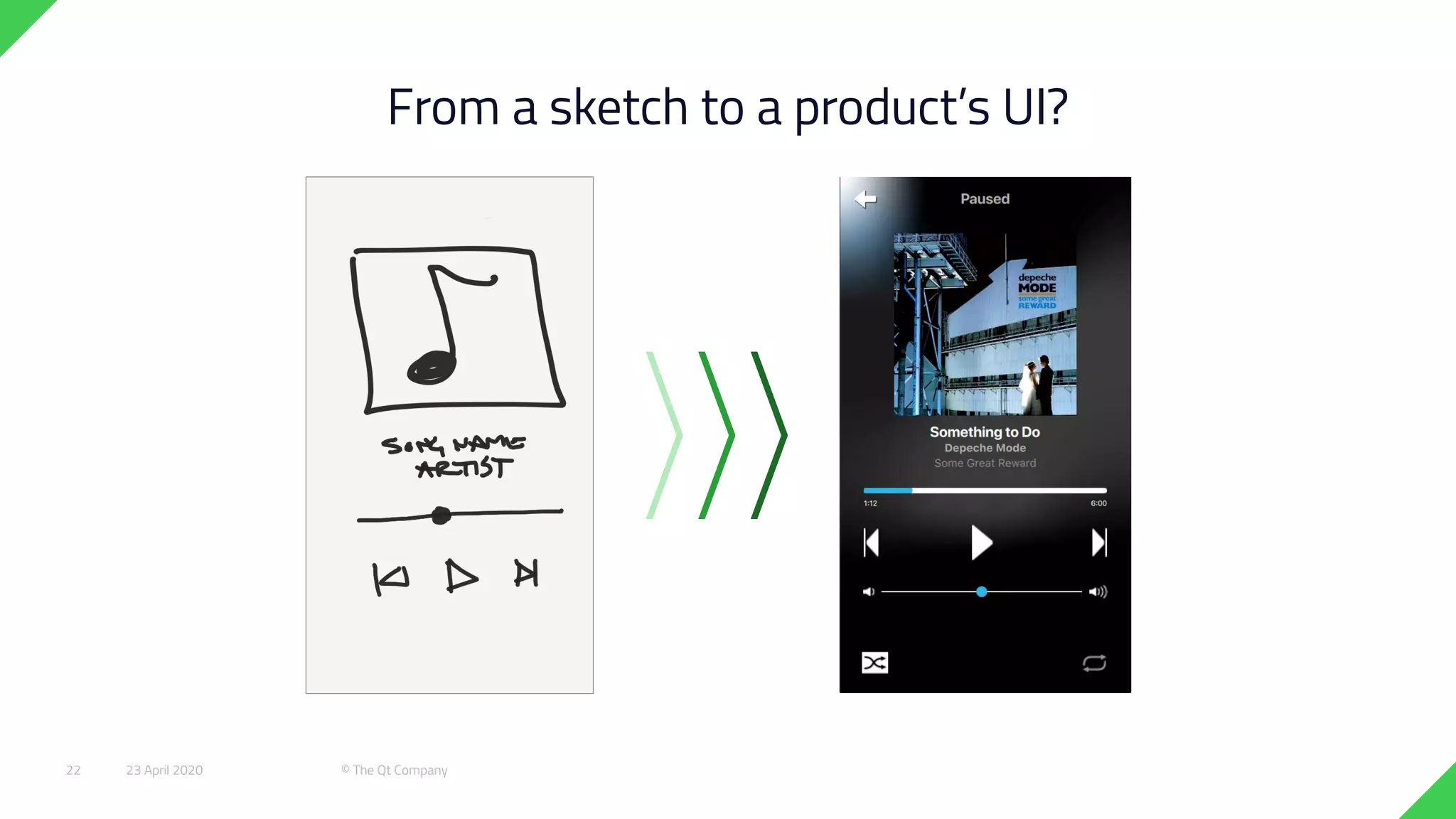
From a sketch to a product’s UI?
23 April 2020 © The Qt Company22
LiveOps
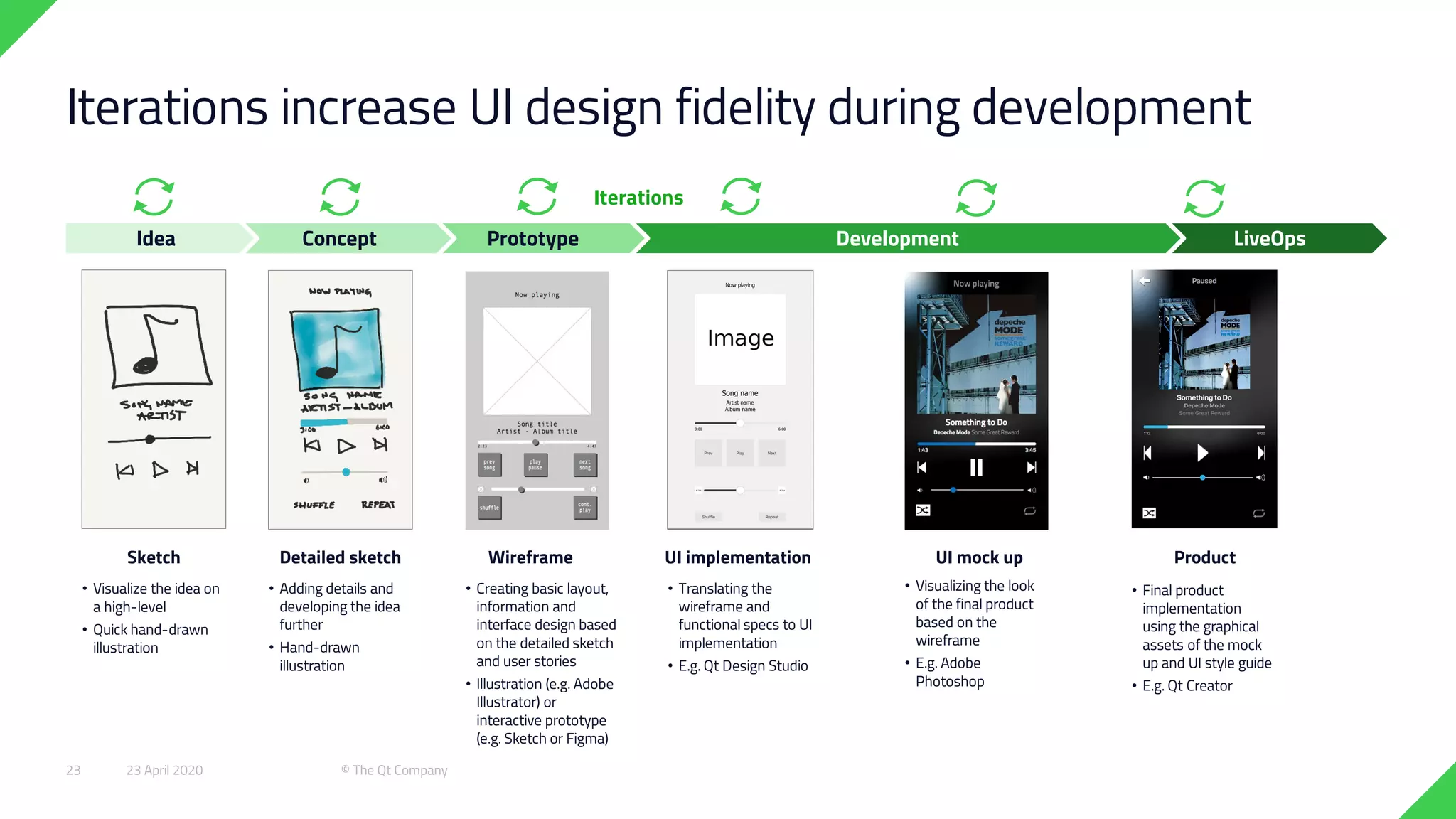
Iterations increase UI design fidelity during development
DevelopmentPrototype
• Visualize the idea on
a high-level
• Quick hand-drawn
illustration
• Visualizing the look
of the final product
based on the
wireframe
• E.g. Adobe
Photoshop
• Creating basic layout,
information and
interface design based
on the detailed sketch
and user stories
• Illustration (e.g. Adobe
Illustrator) or
interactive prototype
(e.g. Sketch or Figma)
• Final product
implementation
using the graphical
assets of the mock
up and UI style guide
• E.g. Qt Creator
• Translating the
wireframe and
functional specs to UI
implementation
• E.g. Qt Design Studio
• Adding details and
developing the idea
further
• Hand-drawn
illustration
ConceptIdea
Sketch Wireframe UI mock up ProductUI implementationDetailed sketch
Iterations
23 April 2020 © The Qt Company23
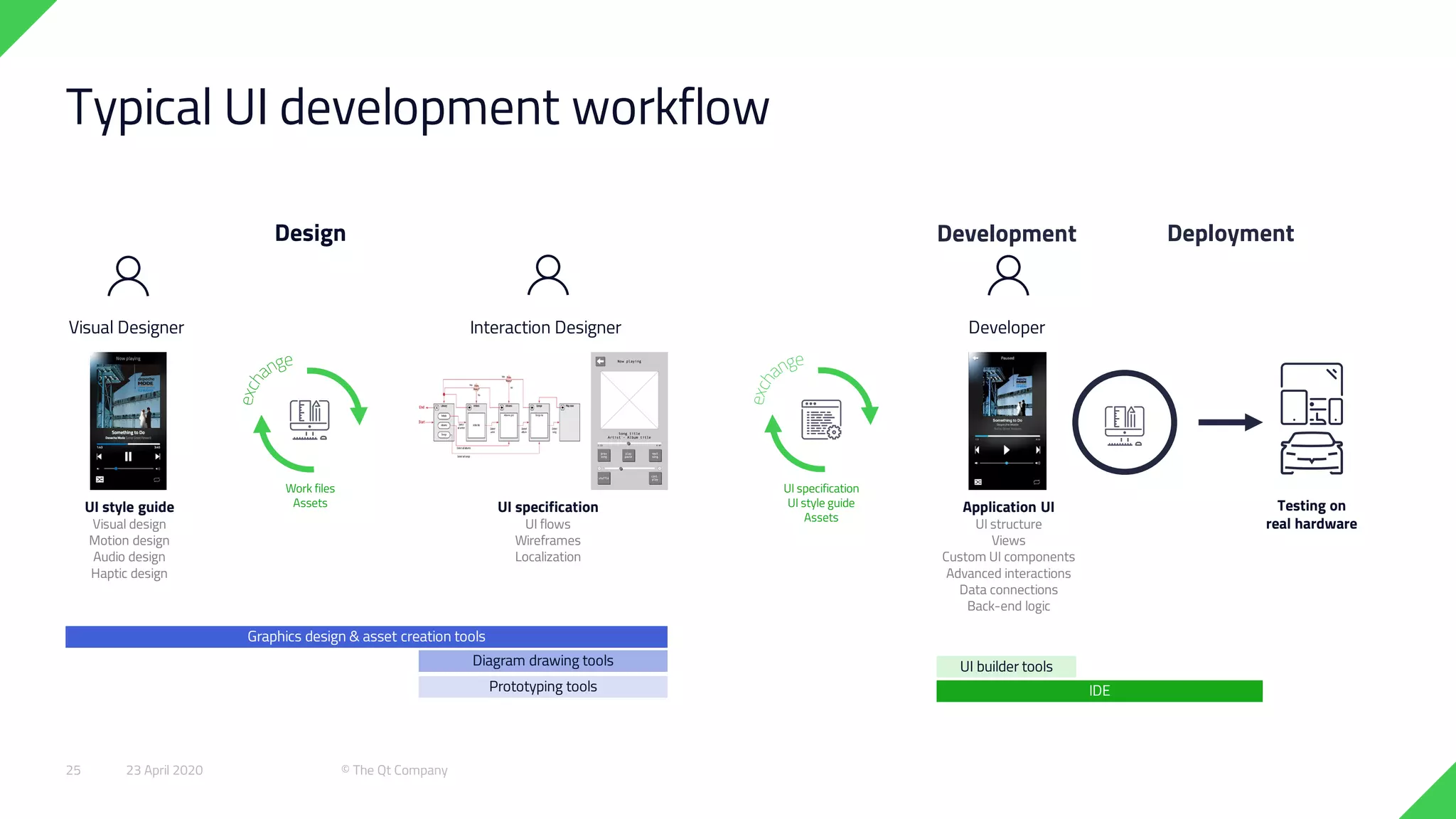
Typical UI development workflow
Design Development
Visual Designer Interaction Designer Developer
UI specification
UI flows
Wireframes
Localization
UI style guide
Visual design
Motion design
Audio design
Haptic design
Application UI
UI structure
Views
Custom UI components
Advanced interactions
Data connections
Back-end logic
Deployment
UI specification
UI style guide
Assets
Work files
Assets Testing on
real hardware
Graphics design & asset creation tools
Diagram drawing tools UI builder tools
IDEPrototyping tools
23 April 2020 © The Qt Company25
Graphics design & asset creation tools
Diagram drawing tools UI builder tools
IDEPrototyping tools
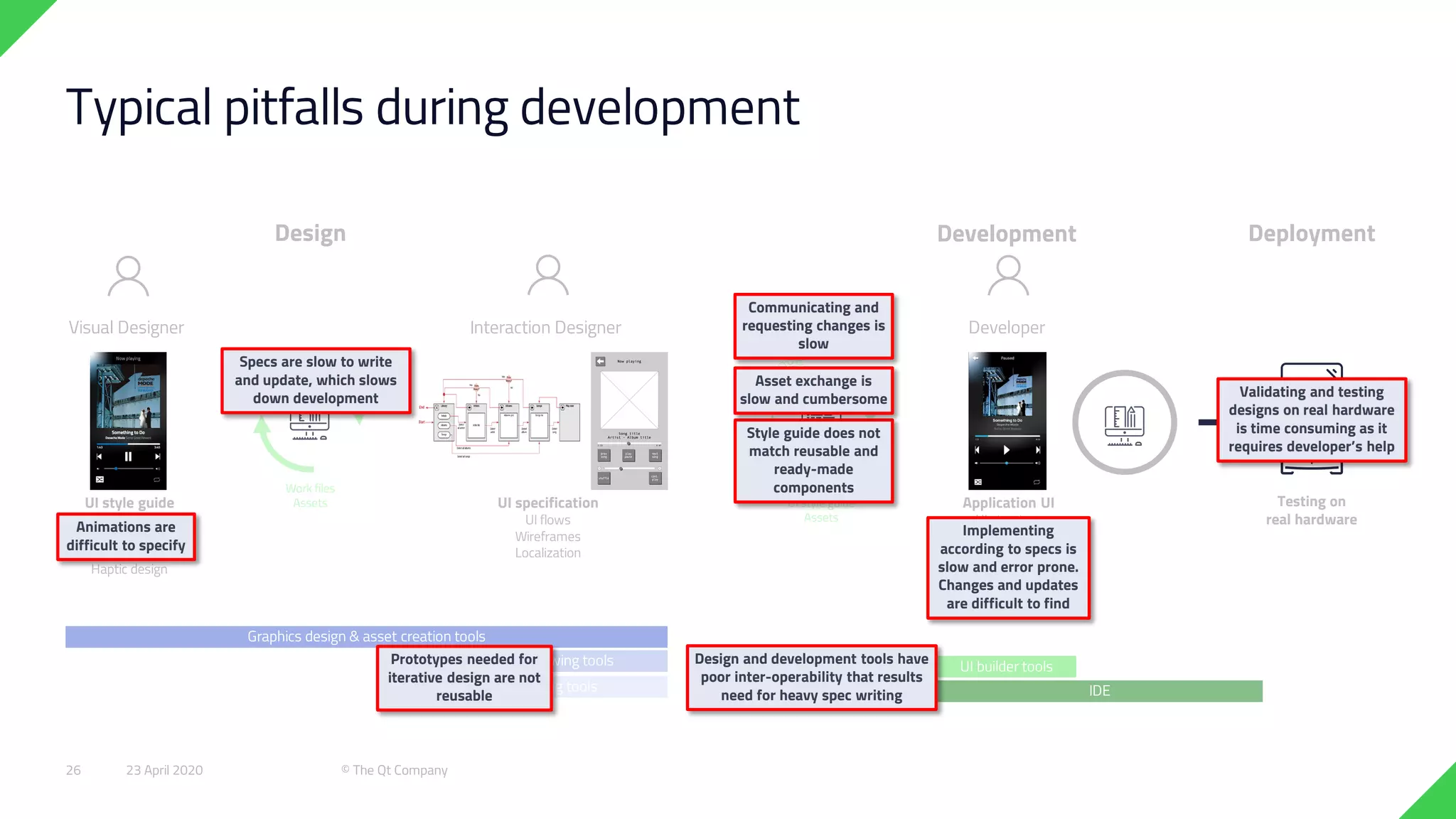
Typical pitfalls during development
Design Development
Visual Designer Interaction Designer Developer
UI specification
UI flows
Wireframes
Localization
UI style guide
Visual design
Motion design
Audio design
Haptic design
Application UI
UI structure
Views
Custom UI components
Advanced interactions
Data connections
Back-end logic
Deployment
UI specification
UI style guide
Assets
Work files
Assets Testing on
real hardware
Validating and testing
designs on real hardware
is time consuming as it
requires developer’s help
Prototypes needed for
iterative design are not
reusable
Implementing
according to specs is
slow and error prone.
Changes and updates
are difficult to find
Style guide does not
match reusable and
ready-made
components
Animations are
difficult to specify
Asset exchange is
slow and cumbersome
Communicating and
requesting changes is
slow
Design and development tools have
poor inter-operability that results
need for heavy spec writing
Specs are slow to write
and update, which slows
down development
23 April 2020 © The Qt Company26
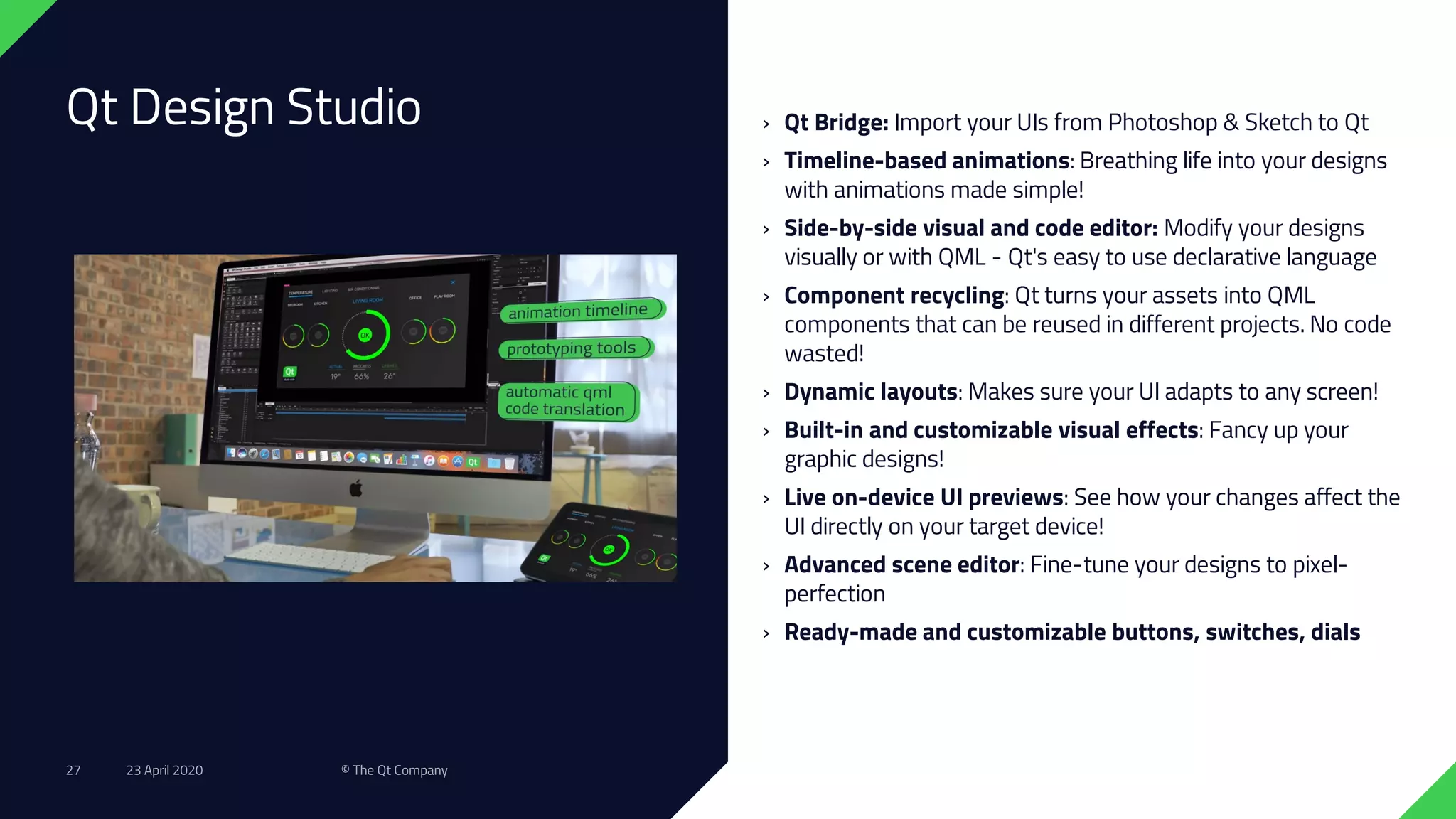
Qt Design Studio › Qt Bridge: Import your UIs from Photoshop & Sketch to Qt
› Timeline-based animations: Breathing life into your designs
with animations made simple!
› Side-by-side visual and code editor: Modify your designs
visually or with QML - Qt's easy to use declarative language
› Component recycling: Qt turns your assets into QML
components that can be reused in different projects. No code
wasted!
› Dynamic layouts: Makes sure your UI adapts to any screen!
› Built-in and customizable visual effects: Fancy up your
graphic designs!
› Live on-device UI previews: See how your changes affect the
UI directly on your target device!
› Advanced scene editor: Fine-tune your designs to pixel-
perfection
› Ready-made and customizable buttons, switches, dials
23 April 2020 © The Qt Company27
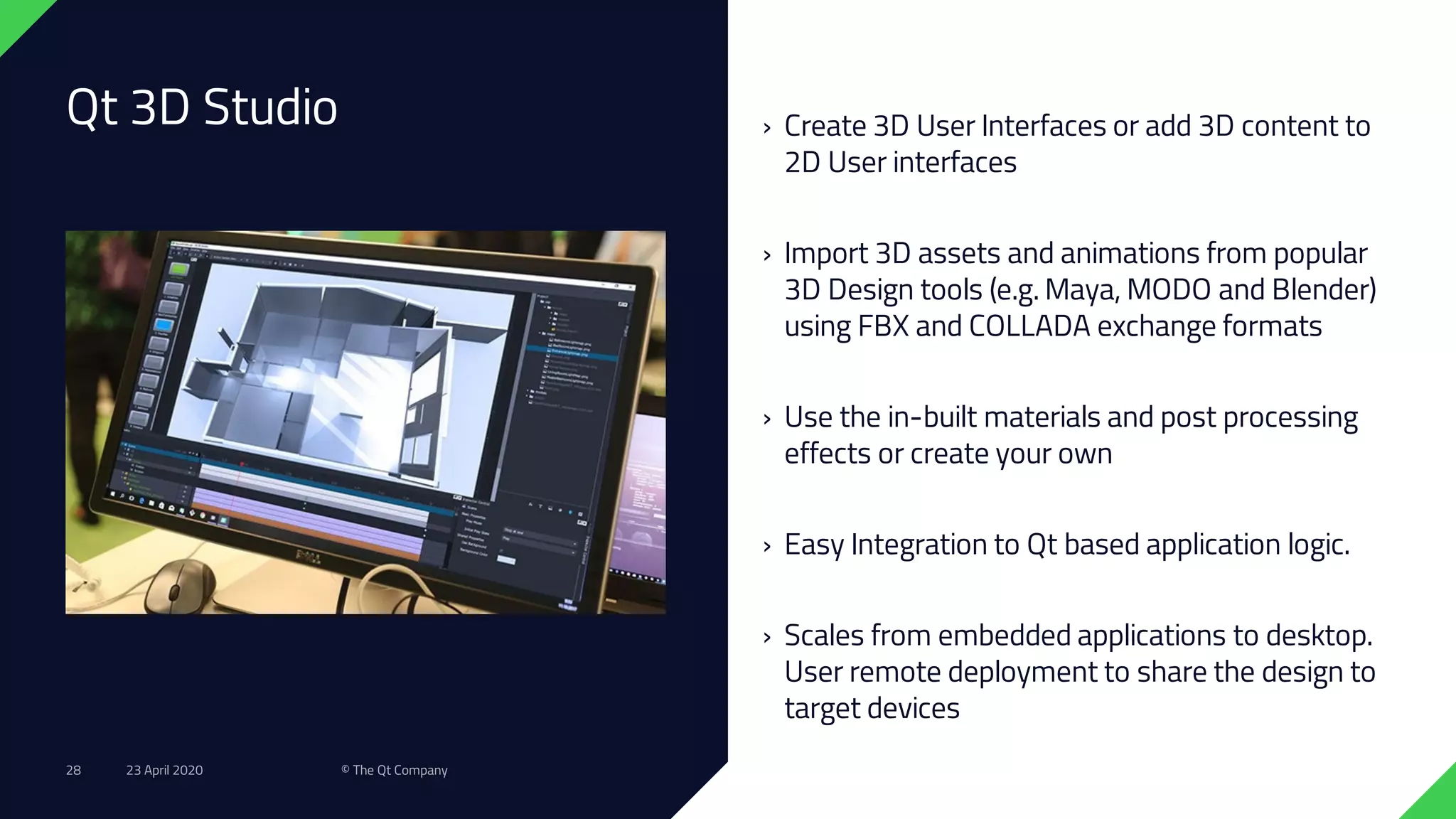
Qt 3D Studio › Create 3D User Interfaces or add 3D content to
2D User interfaces
› Import 3D assets and animations from popular
3D Design tools (e.g. Maya, MODO and Blender)
using FBX and COLLADA exchange formats
› Use the in-built materials and post processing
effects or create your own
› Easy Integration to Qt based application logic.
› Scales from embedded applications to desktop.
User remote deployment to share the design to
target devices
23 April 2020 © The Qt Company28
In summary….
23 April 2020 © The Qt Company29
Shorter Time-to-Market
All in One -
Framework
Powerful & Modern
Development Framework
Code Once, Deploy
Everywhere
Cross-Platform
Integrated Development
Tools
Productive
development
environment
Cross-Platform IDE,
Qt Creator
23 April 2020 © The Qt Company30
Thank you!
Helpful Links:
https://www.qt.io/qt-for-the-medical-industry-webinar-usa
https://doc.qt.io/
https://resources.qt.io/
https://www.qt.io/blog
23 April 2020 © The Qt Company31

Qt Technology Overview for: MedAcuity

  • 1.
    Qt Technology Overview for:MedAcuity April 2020
  • 2.
    › The QtCompany › Value of Qt › Qt Releases and Roadmap › Qt Design Tools 23 April 2020 © The Qt Company2 Agenda
  • 3.
    The Qt Company 58.3M€ Revenuein 2019 28% YoY growth 0.22M€ EBIT 306 Professionals in 12 countries >5800 Customers >70 Industries >1M Developers 1995 First Qt version released 2016 Listed in Helsinki Stock Exchange 23 April 2020 © The Qt Company3
  • 4.
  • 5.
    Cardiology Where there’s aMedical Application, there’s Qt … Kidney Dialysis Diagnostic ImagingDiabetes Care WearablesWound Management Anesthesia & Respiratory Care Fitness IVD Robotics 9 of the top 10 medical device manufacturers develop products with Qt 23 April 2020 © The Qt Company5
  • 6.
    What do QtMedical Customers Value? • Capability to Create Safe, Effective, Reliable and Intuitive User Experiences with uncompromising performance & reliability • Develop the best, user-adopted, efficient User Experiences with Qt Design Tools and the ability to Rapidly Prototype on your Target Device • Qt is a UI/UX cross-platform development environment • Qt is the development platform, and is embedded into, FDA (Class I, II, and III) and EU Certified (Class I, IIa, IIb, and III) medical devices currently on the market • Qt provides documentation and transparency into our development process, product performance, validation and testing to fully support of your device compliance needs • Get to market faster with best-in-class technology, full tooling support and access to Qt’s industry-leading partnerships 23 April 2020 © The Qt Company6
  • 7.
    The IoT trendleads to a higher demand for creating devices; with less costs and with fewer people Powerful cross-platform frameworks and tools are required for the change to take place. Mission: Closing the Gap between # of Devices and Developers 1 2 2005 2030 23 April 2020 © The Qt Company7
  • 8.
    Collaborative product developmentfrom prototype to product Design Development Deployment Testing on real hardware Interaction Designers Client Developers Custom UI components Data connections Back-end logic Sensorial Designers Visual assets Motion designs Audio assets UI flow & navigation Wireframes Collaborate with Qt Design Tools We believe that the best innovations are crafted through team collaboration and rapid iterations. Testing UI designs on actual hardware allows quicker validation of the design’s feasibility. 23 April 2020 © The Qt Company8
  • 9.
    Key Focus Areas2020 and beyond…. Industry specific requirements Designer – developer workflow, 3D graphics Performance, Quality, HW support 23 April 2020 © The Qt Company9
  • 10.
    Embedded PlatformsDesktop &Mobile Platforms: Qt Device Creation Qt in Automation Qt Product Offerings Overview Qt Automotive SuiteQt in Digital TVQt in Medical Qt Application Development 23 April 2020 © The Qt Company10
  • 11.
    Target All YourEnd Users with One Technology Embedded: › Embedded Linux, Windows Embedded › RTOS: QNX, VxWorks, INTEGRITY, FreeRTOS, RTEMS › Bare Metal Desktop: › Windows, Linux, Mac OS X › Enterprise UNIX Mobile: › Android, iOS, Windows 10, WinRT Web: › WebGL, Web Assembly My Software Service 23 April 2020 © The Qt Company13
  • 12.
    Qt Releases &Roadmap 23 April 2020 © The Qt Company14
  • 13.
    Schedule Driven Releases Twicea Year › Qt 5.X.0 framework releases with new features › May and November every year › Qt 5.x.x framework releases with bug, performance and security fixes › No new features › Qt Creator, Qt Design Studio and Qt 3D Studio releases Feature- and Fix-Driven Releases Develop Feature Freeze Feature Complete Alpha Beta Release Candidate Release Deploy 23 April 2020 © The Qt Company15
  • 14.
    2019 2020 20212022 2023 2024 TODAY Qt Roadmap Qt 5.13 June 2019 Qt 5.14 December 2019 Qt 5.12 LTS December 2018 Qt 6.2 LTS December 2021 Qt 5.15 LTS May 2020 Qt 6.0 November 2020 Qt 6.1 May 2021 Qt 5.9 LTS May 2017 23 April 2020 © The Qt Company16
  • 15.
    Qt Framework Qt 5.15LTS (May) › Qt Quick 3D, fully supported on OpenGL › Rendering Hardware Interface, opt-in feature › CMake as default build system for applications › Other features based on customer needs 5.15 20202019 23 April 2020 © The Qt Company17
  • 16.
    Qt Framework Qt 6.0(November) › Qt Quick 3D and Rendering Hardware Interface › QML 3 › C++ 17 › Enhanced C++ APIs › New property system and binding engine › CMake as build system › Unified theming support › Better modularity and Qt Marketplace as delivery channel for some modules 6.0 20202019 23 April 2020 © The Qt Company18
  • 17.
    Qt for MCU 2020 ›Qt Quick Ultralite rendering engine use with Qt C++ libraries › Basic charts plotting › Adding more reference hardware › RTOS support (in addition to bare metal; i.e. Amazon FreeRTOS) › Full localization and internationalization (with right to left) › Containerized toolchains › Research for how Qt Quick Ultralite and Qt 6 work merge 20202019 Qt instrument cluster demo on Renesas RH85023 April 2020 © The Qt Company19
  • 18.
    Developer Experience Developer ExperienceImprovements › New improved installer user experience (December 2019) › Qt Account facelift (September 2019) › Improved Qt Creator on-boarding (4.11, December 2019) › A default kit + default project as the first view › Help notifications › Documentation improvements (September 2019) 2019 2020 23 April 2020 © The Qt Company20
  • 19.
    Qt Design Tools 23April 2020 © The Qt Company21
  • 20.
    From a sketchto a product’s UI? 23 April 2020 © The Qt Company22
  • 21.
    LiveOps Iterations increase UIdesign fidelity during development DevelopmentPrototype • Visualize the idea on a high-level • Quick hand-drawn illustration • Visualizing the look of the final product based on the wireframe • E.g. Adobe Photoshop • Creating basic layout, information and interface design based on the detailed sketch and user stories • Illustration (e.g. Adobe Illustrator) or interactive prototype (e.g. Sketch or Figma) • Final product implementation using the graphical assets of the mock up and UI style guide • E.g. Qt Creator • Translating the wireframe and functional specs to UI implementation • E.g. Qt Design Studio • Adding details and developing the idea further • Hand-drawn illustration ConceptIdea Sketch Wireframe UI mock up ProductUI implementationDetailed sketch Iterations 23 April 2020 © The Qt Company23
  • 22.
    Typical UI developmentworkflow Design Development Visual Designer Interaction Designer Developer UI specification UI flows Wireframes Localization UI style guide Visual design Motion design Audio design Haptic design Application UI UI structure Views Custom UI components Advanced interactions Data connections Back-end logic Deployment UI specification UI style guide Assets Work files Assets Testing on real hardware Graphics design & asset creation tools Diagram drawing tools UI builder tools IDEPrototyping tools 23 April 2020 © The Qt Company25
  • 23.
    Graphics design &asset creation tools Diagram drawing tools UI builder tools IDEPrototyping tools Typical pitfalls during development Design Development Visual Designer Interaction Designer Developer UI specification UI flows Wireframes Localization UI style guide Visual design Motion design Audio design Haptic design Application UI UI structure Views Custom UI components Advanced interactions Data connections Back-end logic Deployment UI specification UI style guide Assets Work files Assets Testing on real hardware Validating and testing designs on real hardware is time consuming as it requires developer’s help Prototypes needed for iterative design are not reusable Implementing according to specs is slow and error prone. Changes and updates are difficult to find Style guide does not match reusable and ready-made components Animations are difficult to specify Asset exchange is slow and cumbersome Communicating and requesting changes is slow Design and development tools have poor inter-operability that results need for heavy spec writing Specs are slow to write and update, which slows down development 23 April 2020 © The Qt Company26
  • 24.
    Qt Design Studio› Qt Bridge: Import your UIs from Photoshop & Sketch to Qt › Timeline-based animations: Breathing life into your designs with animations made simple! › Side-by-side visual and code editor: Modify your designs visually or with QML - Qt's easy to use declarative language › Component recycling: Qt turns your assets into QML components that can be reused in different projects. No code wasted! › Dynamic layouts: Makes sure your UI adapts to any screen! › Built-in and customizable visual effects: Fancy up your graphic designs! › Live on-device UI previews: See how your changes affect the UI directly on your target device! › Advanced scene editor: Fine-tune your designs to pixel- perfection › Ready-made and customizable buttons, switches, dials 23 April 2020 © The Qt Company27
  • 25.
    Qt 3D Studio› Create 3D User Interfaces or add 3D content to 2D User interfaces › Import 3D assets and animations from popular 3D Design tools (e.g. Maya, MODO and Blender) using FBX and COLLADA exchange formats › Use the in-built materials and post processing effects or create your own › Easy Integration to Qt based application logic. › Scales from embedded applications to desktop. User remote deployment to share the design to target devices 23 April 2020 © The Qt Company28
  • 26.
    In summary…. 23 April2020 © The Qt Company29
  • 27.
    Shorter Time-to-Market All inOne - Framework Powerful & Modern Development Framework Code Once, Deploy Everywhere Cross-Platform Integrated Development Tools Productive development environment Cross-Platform IDE, Qt Creator 23 April 2020 © The Qt Company30
  • 28.