Gated Clock & Design Ware Handling On FPGA Prototype Platforms Einav ShmaryhTexas Instruments
AgendaIntroductionTI OverviewTI Design ChallengesSummary
IntroductionTexas Instruments WCS design connectivity solutions for the cellular market: Bluetooth, WLAN, GPS, GNSS, NFC and FMMotorola Droid XGPS, WLAN, Bluetooth®,FMRIMPlaybook GPS, WLAN, Bluetooth®,FMNokia C7 GPS, WLAN, Bluetooth®,FMLGEUptimus3D WLAN/Bluetooth®
FPGA Prototype – TargetsAt Speed RF connection to the FPGA, FPGA prototype designs work at speed (ARM Cortex M3 at 80MHz). The FPGA platform is connected to an RF device which performs: GPS fix location from a satellite at real time WLAN AP link or Bluetooth wirelessReal time FW development & Debug before Tape OutReal time FW/HW integration before Tape OutEnables the ability to demonstrate the ASIC chip 2-3 weeks after chip arrival (with ROM base solution) with mature FW
TI FPGA Design Complexity   Includes 7 different CPUs (ARM 7, Cortex M3)Multiple paths with more than 100 logic levels between FFsMultiple clock dividers (dynamic & static) => needs to be synchronizeMultiple Interfaces which include RF (BT=> wireless, GPS => to the satellite) Usage of multiple Design WaresDynamic power switchingReal Time - Close timing up to 80MHz
Design Challenges Moving Toward FPGAOur Design encountered 3 main challenges: FPGA vs. ASIC - Clock Tree  Design Ware Implementation in FPGAFPGA Flow  
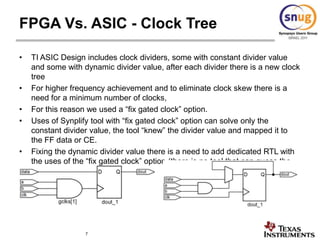
FPGA Vs. ASIC - Clock Tree TI ASIC Design includes clock dividers, some with constant divider value and some with dynamic divider value, after each divider there is a new clock tree  For higher frequency achievement and to eliminate clock skew there is a need for a minimum number of clocks, For this reason we used a “fix gated clock” option.Uses of Synplify tool with “fix gated clock” option can solve only the constant divider value, the tool “knew” the divider value and mapped it to the FF data or CE. Fixing the dynamic divider value there is a need to add dedicated RTL with the uses of the “fix gated clock” option (there is no tool that can guess the  divider value)
FPGA vs. ASIC - Clock Tree The next figure shows RTL with constant divider value & with Synplify“fix gated clock” option.
FPGA Vs. ASIC - Clock Tree With dynamic divider value , Synplify Implementation breaks the clock tree and, now, the clocks are no longer aligned (there is no Synthesis tool that can “guess” the divider value)
FPGA vs. ASIC - Clock Tree Uses dedicated RTL with the “fix gated clock” tool option to solve the dynamic divider value clock tree
FPGA Vs. ASIC - Clock Tree Synplify Implementation , Fix the clock tree.
Advantages:With one clock the tool can close higher frequencyEliminate clock skew Better turnaround time Simplify the constraints Less RTL changes (all the “swallow” RTL is in the ASIC RTL) Disadvantage:     1. The clock duty cycle has changed - might create timing path if using           falling edge  => theseclocks need special code (fall detected)FPGA Vs. ASIC - Clock Tree
Design WaresSynplify Premier Recognizes DesignWare Automatically
Equivalent RTL substituted from built-in library
Mapped to FPGA just like other RTL
True DesignWare components used if available (& licensed)
Exact same IP as SoCDesign WaresTI ASIC design uses DW (Design wares) from Synopsys, like PCIe , USB HSIC. These DWs are integrated in the TI design TI FPGA prototype which uses Synopsys DW encountered two issues:1. FPGA DW  implementation, there are two option to synthesis the DW into FPGASynthesizing the DW with Synplify Premier  tool – The tool synthesizes the DW as a black box using the Synopsys Library Use ASIC Net List of the DW instead of the Synopsys DW IP and use Synplify  Pro toolUses Synplify Premier is more FPGA friendly    Uses Synplify Premier  tool Achieve more then 60% timing closer
Design Wares 2.   FixGated Clock with DW      Use of Fix Gated Clock option with DW “breaks” the clock tree (add BUFG)          in the DW clock start pointRTL view with the same example (changing one FF to DW)Net list view
FPGA Flow To achieve best timing closure and fast turnaround time:Minimize design changes in the original RTL code for FPGAEducate RTL designers to write RTL “FPGA friendly” (e.g. add “ifdefs” in the RTL with extra pipe or changed clocks …)Participate in ASIC architecture from the start to understand how the FPGA can emulate the design betterScripts-based working flow to avoid editing bugs and faster turnaround time

Snug

  • 1.
    Gated Clock &Design Ware Handling On FPGA Prototype Platforms Einav ShmaryhTexas Instruments
  • 2.
  • 3.
    IntroductionTexas Instruments WCSdesign connectivity solutions for the cellular market: Bluetooth, WLAN, GPS, GNSS, NFC and FMMotorola Droid XGPS, WLAN, Bluetooth®,FMRIMPlaybook GPS, WLAN, Bluetooth®,FMNokia C7 GPS, WLAN, Bluetooth®,FMLGEUptimus3D WLAN/Bluetooth®
  • 4.
    FPGA Prototype –TargetsAt Speed RF connection to the FPGA, FPGA prototype designs work at speed (ARM Cortex M3 at 80MHz). The FPGA platform is connected to an RF device which performs: GPS fix location from a satellite at real time WLAN AP link or Bluetooth wirelessReal time FW development & Debug before Tape OutReal time FW/HW integration before Tape OutEnables the ability to demonstrate the ASIC chip 2-3 weeks after chip arrival (with ROM base solution) with mature FW
  • 5.
    TI FPGA DesignComplexity Includes 7 different CPUs (ARM 7, Cortex M3)Multiple paths with more than 100 logic levels between FFsMultiple clock dividers (dynamic & static) => needs to be synchronizeMultiple Interfaces which include RF (BT=> wireless, GPS => to the satellite) Usage of multiple Design WaresDynamic power switchingReal Time - Close timing up to 80MHz
  • 6.
    Design Challenges MovingToward FPGAOur Design encountered 3 main challenges: FPGA vs. ASIC - Clock Tree Design Ware Implementation in FPGAFPGA Flow  
  • 7.
    FPGA Vs. ASIC- Clock Tree TI ASIC Design includes clock dividers, some with constant divider value and some with dynamic divider value, after each divider there is a new clock tree For higher frequency achievement and to eliminate clock skew there is a need for a minimum number of clocks, For this reason we used a “fix gated clock” option.Uses of Synplify tool with “fix gated clock” option can solve only the constant divider value, the tool “knew” the divider value and mapped it to the FF data or CE. Fixing the dynamic divider value there is a need to add dedicated RTL with the uses of the “fix gated clock” option (there is no tool that can guess the divider value)
  • 8.
    FPGA vs. ASIC- Clock Tree The next figure shows RTL with constant divider value & with Synplify“fix gated clock” option.
  • 9.
    FPGA Vs. ASIC- Clock Tree With dynamic divider value , Synplify Implementation breaks the clock tree and, now, the clocks are no longer aligned (there is no Synthesis tool that can “guess” the divider value)
  • 10.
    FPGA vs. ASIC- Clock Tree Uses dedicated RTL with the “fix gated clock” tool option to solve the dynamic divider value clock tree
  • 11.
    FPGA Vs. ASIC- Clock Tree Synplify Implementation , Fix the clock tree.
  • 12.
    Advantages:With one clockthe tool can close higher frequencyEliminate clock skew Better turnaround time Simplify the constraints Less RTL changes (all the “swallow” RTL is in the ASIC RTL) Disadvantage: 1. The clock duty cycle has changed - might create timing path if using falling edge => theseclocks need special code (fall detected)FPGA Vs. ASIC - Clock Tree
  • 13.
    Design WaresSynplify PremierRecognizes DesignWare Automatically
  • 14.
    Equivalent RTL substitutedfrom built-in library
  • 15.
    Mapped to FPGAjust like other RTL
  • 16.
    True DesignWare componentsused if available (& licensed)
  • 17.
    Exact same IPas SoCDesign WaresTI ASIC design uses DW (Design wares) from Synopsys, like PCIe , USB HSIC. These DWs are integrated in the TI design TI FPGA prototype which uses Synopsys DW encountered two issues:1. FPGA DW implementation, there are two option to synthesis the DW into FPGASynthesizing the DW with Synplify Premier tool – The tool synthesizes the DW as a black box using the Synopsys Library Use ASIC Net List of the DW instead of the Synopsys DW IP and use Synplify Pro toolUses Synplify Premier is more FPGA friendly Uses Synplify Premier tool Achieve more then 60% timing closer
  • 18.
    Design Wares 2. FixGated Clock with DW Use of Fix Gated Clock option with DW “breaks” the clock tree (add BUFG) in the DW clock start pointRTL view with the same example (changing one FF to DW)Net list view
  • 19.
    FPGA Flow Toachieve best timing closure and fast turnaround time:Minimize design changes in the original RTL code for FPGAEducate RTL designers to write RTL “FPGA friendly” (e.g. add “ifdefs” in the RTL with extra pipe or changed clocks …)Participate in ASIC architecture from the start to understand how the FPGA can emulate the design betterScripts-based working flow to avoid editing bugs and faster turnaround time