Professional Development
 PowerPoint Presentation
   Brandman University
       Smart Board


        Amal Khoury
         EDUU 564
   Prof.Deborah Van Ourkerk
Foundation for that training and
           knowledge assessment
 This training is for the teachers in my school to enable them to fully utilize
  the smart board application.
 The training will be on how to implement the smart board with its
  applications and functions to assist both teachers and students.
 The duration of this training will be for 6 hours split into 3 days; 2 hours a
  day for 3 days.
 The training will include the following;
 Advantages of implementing the smart board for the students and
  teachers
 Introducing the smart board’s applications, tool and software
 How to benefit from the smart board applications in lesson planning
Smart Board : Composition & Applications
An Overview:
 SMART Board is an interactive whiteboard developed by SMART
   Technologies. When introduced in 1991, it was the first interactive
   whiteboard to provide touch control of computer applications and
   annotation over standard Microsoft Windows applications.
 The SMART Board digital ink operates by using an active digitizer that
   controls the PC input for writing capabilities such as drawing or
   handwriting. The SMART Board uses passive pen tools, which means that
   no technology is housed in the pen tool to use digital ink or determine
   color. All digital ink options can be selected from the SMART Board Pen
   Tray.
 Big screen to watch movies, easy to write on, arrange, add images, use
   digital ink for smooth writing and enjoy the colors you want.
 Easy to add audio, pictures, illustration and can save for use later.
Smart Board Advantages

   A Tool For All Ages
   Multiple applications
   Increased Attention From Students
   It Makes Teaching Easier
   Students Like It
   It has a top quality and a great quantity
   Easy to Use for Teachers and students
   No Wiring or Ceiling Mounts Required to Easily Install
   Easily Integrates Classroom Peripherals
   Theft-proof
   Easy to See
   Solid, Durable Construction
It is Easy to Use
Click here for a tutorial video on how it is easy
 to use the smart board and its numerous
 applications.
Click here for an additional comprehensive
 Tutorial video.
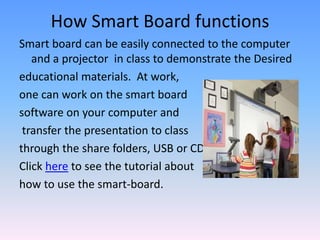
How Smart Board functions
Smart board can be easily connected to the computer
   and a projector in class to demonstrate the Desired
educational materials. At work,
one can work on the smart board
software on your computer and
 transfer the presentation to class
through the share folders, USB or CD.
Click here to see the tutorial about
how to use the smart-board.
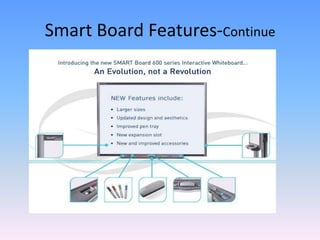
Smart Board Features
Touch system and touch Recognition
Calibration:- Help you to adjust pictures and images
 on the board.
SMART Notebook software included
Eraser and stylus help you to write and erase.
Audio System:- helps you to Adjust the tune and
 sound volume.
Connection panel:- that operate and turns off the
 board.
Save function as it has USB cables and extenders
Smart Board Features-Continue
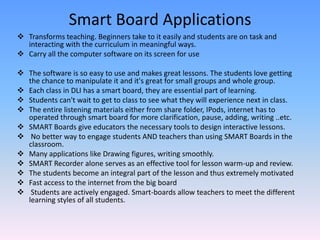
Smart Board Applications
 Transforms teaching. Beginners take to it easily and students are on task and
  interacting with the curriculum in meaningful ways.
 Carry all the computer software on its screen for use

 The software is so easy to use and makes great lessons. The students love getting
  the chance to manipulate it and it's great for small groups and whole group.
 Each class in DLI has a smart board, they are essential part of learning.
 Students can't wait to get to class to see what they will experience next in class.
 The entire listening materials either from share folder, IPods, internet has to
  operated through smart board for more clarification, pause, adding, writing ..etc.
 SMART Boards give educators the necessary tools to design interactive lessons.
 No better way to engage students AND teachers than using SMART Boards in the
  classroom.
 Many applications like Drawing figures, writing smoothly.
 SMART Recorder alone serves as an effective tool for lesson warm-up and review.
 The students become an integral part of the lesson and thus extremely motivated
 Fast access to the internet from the big board
 Students are actively engaged. Smart-boards allow teachers to meet the different
  learning styles of all students.
student feedback on smart board
The SIR II report is an easy-to-use rating tool that offers:
 Reliable insight into students' perspectives on eight dimensions of college
   instruction
 Actionable data that can be used to identify pinpoint teaching strengths
   and find improvement opportunities across disciplines, courses and
   classes
 Valuable national comparative data for comprehensive understanding,
   confident decision making and program improvement
 A free best practices compendium of suggestions on how to improve
   college teaching based on the literature of effective teaching and input
   from highly rated teachers
 Flexibility with three easy-to-administer formats so you can choose the
   one that best suits
   your needs
 Detailed information on teacher effectiveness for accreditation
References
http://www.ets.org/c/sir_ii/16659/index.html?WT.ac
 =sirii_20700_g_cl&gclid=CJzeye6fyrUCFYdxQgodqCQ
 Asw
http://www.youtube.com/watch?v=0U05WeXPGlkht
http://www.youtube.com/watch?v=kcRJW-arn48
http://www.teachsmartlearningsystem.com/compon
 ents.asp
https://resources.online.nwtc.edu/mediaservices/sm
 artboard.htm
http://www.teacheronlinetraining.com/why%20a%2
 0SMART%20Board.pdf

Professional development power_point_presentation1

  • 1.
    Professional Development PowerPointPresentation Brandman University Smart Board Amal Khoury EDUU 564 Prof.Deborah Van Ourkerk
  • 2.
    Foundation for thattraining and knowledge assessment  This training is for the teachers in my school to enable them to fully utilize the smart board application.  The training will be on how to implement the smart board with its applications and functions to assist both teachers and students.  The duration of this training will be for 6 hours split into 3 days; 2 hours a day for 3 days.  The training will include the following;  Advantages of implementing the smart board for the students and teachers  Introducing the smart board’s applications, tool and software  How to benefit from the smart board applications in lesson planning
  • 3.
    Smart Board :Composition & Applications An Overview:  SMART Board is an interactive whiteboard developed by SMART Technologies. When introduced in 1991, it was the first interactive whiteboard to provide touch control of computer applications and annotation over standard Microsoft Windows applications.  The SMART Board digital ink operates by using an active digitizer that controls the PC input for writing capabilities such as drawing or handwriting. The SMART Board uses passive pen tools, which means that no technology is housed in the pen tool to use digital ink or determine color. All digital ink options can be selected from the SMART Board Pen Tray.  Big screen to watch movies, easy to write on, arrange, add images, use digital ink for smooth writing and enjoy the colors you want.  Easy to add audio, pictures, illustration and can save for use later.
  • 4.
    Smart Board Advantages  A Tool For All Ages  Multiple applications  Increased Attention From Students  It Makes Teaching Easier  Students Like It  It has a top quality and a great quantity  Easy to Use for Teachers and students  No Wiring or Ceiling Mounts Required to Easily Install  Easily Integrates Classroom Peripherals  Theft-proof  Easy to See  Solid, Durable Construction
  • 5.
    It is Easyto Use Click here for a tutorial video on how it is easy to use the smart board and its numerous applications. Click here for an additional comprehensive Tutorial video.
  • 6.
    How Smart Boardfunctions Smart board can be easily connected to the computer and a projector in class to demonstrate the Desired educational materials. At work, one can work on the smart board software on your computer and transfer the presentation to class through the share folders, USB or CD. Click here to see the tutorial about how to use the smart-board.
  • 7.
    Smart Board Features Touchsystem and touch Recognition Calibration:- Help you to adjust pictures and images on the board. SMART Notebook software included Eraser and stylus help you to write and erase. Audio System:- helps you to Adjust the tune and sound volume. Connection panel:- that operate and turns off the board. Save function as it has USB cables and extenders
  • 8.
  • 9.
    Smart Board Applications Transforms teaching. Beginners take to it easily and students are on task and interacting with the curriculum in meaningful ways.  Carry all the computer software on its screen for use  The software is so easy to use and makes great lessons. The students love getting the chance to manipulate it and it's great for small groups and whole group.  Each class in DLI has a smart board, they are essential part of learning.  Students can't wait to get to class to see what they will experience next in class.  The entire listening materials either from share folder, IPods, internet has to operated through smart board for more clarification, pause, adding, writing ..etc.  SMART Boards give educators the necessary tools to design interactive lessons.  No better way to engage students AND teachers than using SMART Boards in the classroom.  Many applications like Drawing figures, writing smoothly.  SMART Recorder alone serves as an effective tool for lesson warm-up and review.  The students become an integral part of the lesson and thus extremely motivated  Fast access to the internet from the big board  Students are actively engaged. Smart-boards allow teachers to meet the different learning styles of all students.
  • 10.
    student feedback onsmart board The SIR II report is an easy-to-use rating tool that offers:  Reliable insight into students' perspectives on eight dimensions of college instruction  Actionable data that can be used to identify pinpoint teaching strengths and find improvement opportunities across disciplines, courses and classes  Valuable national comparative data for comprehensive understanding, confident decision making and program improvement  A free best practices compendium of suggestions on how to improve college teaching based on the literature of effective teaching and input from highly rated teachers  Flexibility with three easy-to-administer formats so you can choose the one that best suits your needs  Detailed information on teacher effectiveness for accreditation
  • 11.