1
FAMOUS QUOTE
2
In this presentation we have
the intention of resolving
day to day problem of
people around this world ,
to make their lives more
happier and easier .
3
INTRODUCTION
Physical Object + Controller, Sensor and Actuators + Internet = Internet of Things
4
Hardware and Software
Requirements
1. IC 74HC190
2. Sensors
3. Processing Units
4. Mobile Application
5. Cloud System
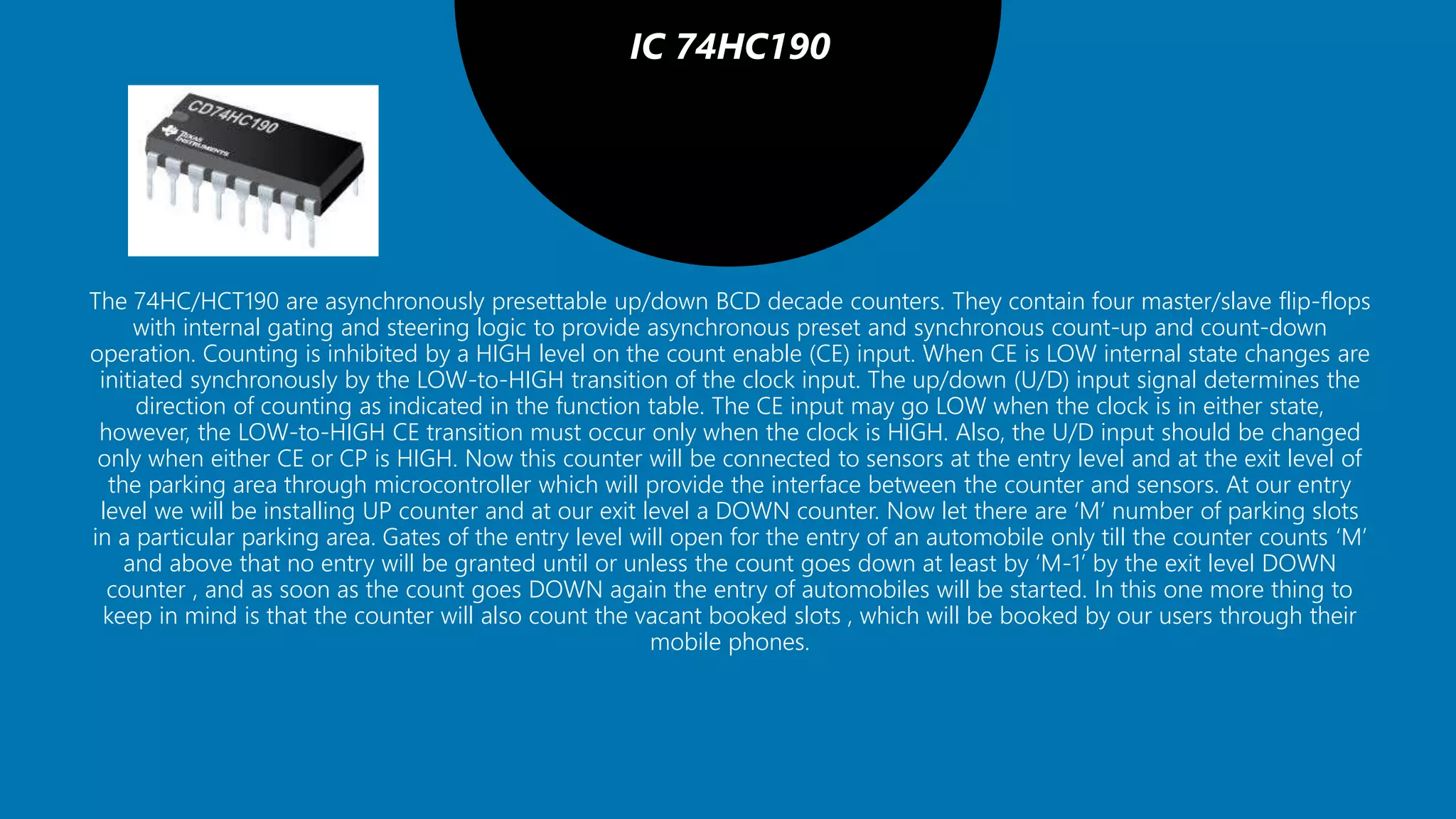
IC 74HC190
The 74HC/HCT190 are asynchronously presettable up/down BCD decade counters. They contain four master/slave flip-flops
with internal gating and steering logic to provide asynchronous preset and synchronous count-up and count-down
operation. Counting is inhibited by a HIGH level on the count enable (CE) input. When CE is LOW internal state changes are
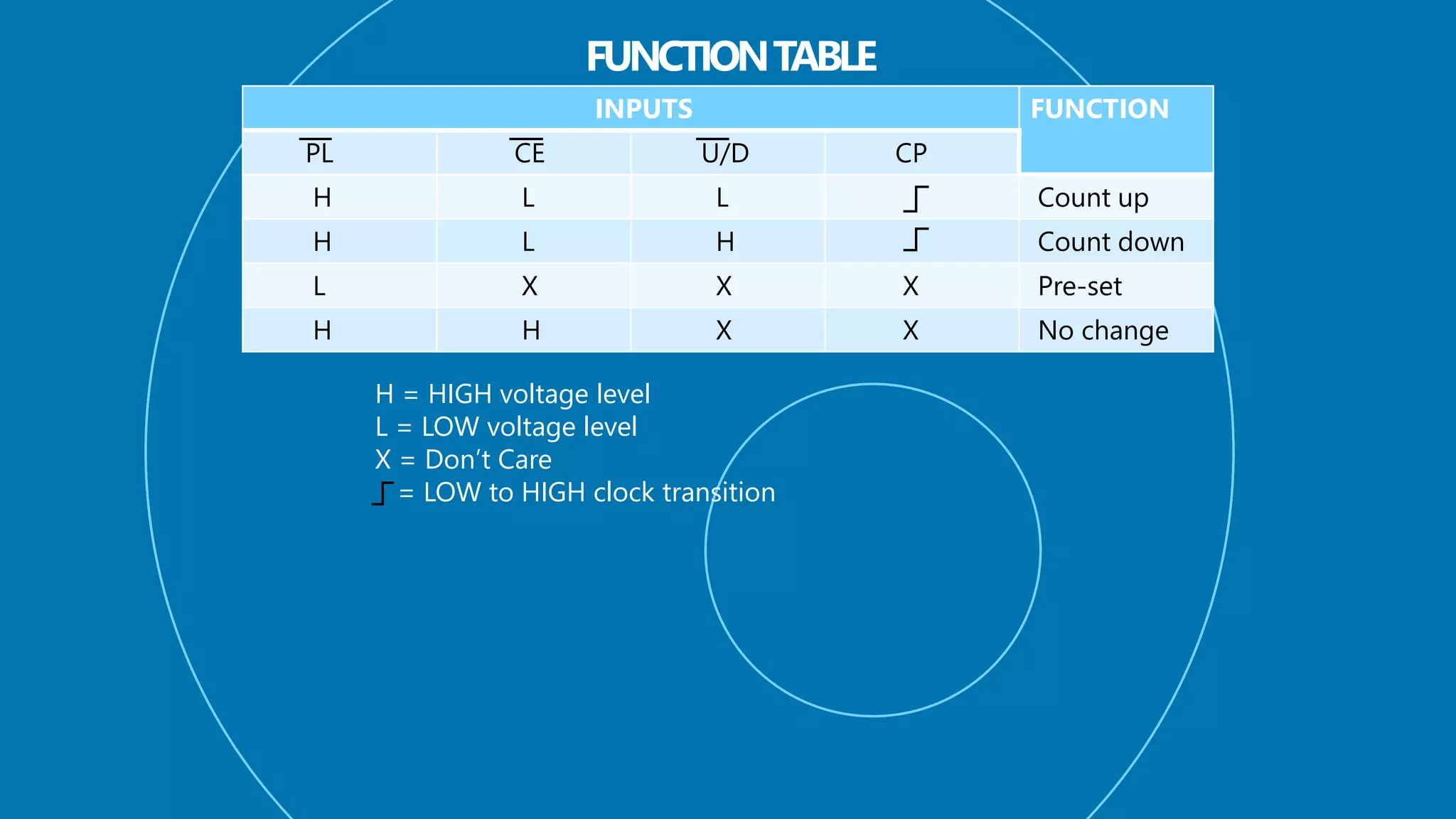
initiated synchronously by the LOW-to-HIGH transition of the clock input. The up/down (U/D) input signal determines the
direction of counting as indicated in the function table. The CE input may go LOW when the clock is in either state,
however, the LOW-to-HIGH CE transition must occur only when the clock is HIGH. Also, the U/D input should be changed
only when either CE or CP is HIGH. Now this counter will be connected to sensors at the entry level and at the exit level of
the parking area through microcontroller which will provide the interface between the counter and sensors. At our entry
level we will be installing UP counter and at our exit level a DOWN counter. Now let there are ‘M’ number of parking slots
in a particular parking area. Gates of the entry level will open for the entry of an automobile only till the counter counts ‘M’
and above that no entry will be granted until or unless the count goes down at least by ‘M-1’ by the exit level DOWN
counter , and as soon as the count goes DOWN again the entry of automobiles will be started. In this one more thing to
keep in mind is that the counter will also count the vacant booked slots , which will be booked by our users through their
mobile phones.
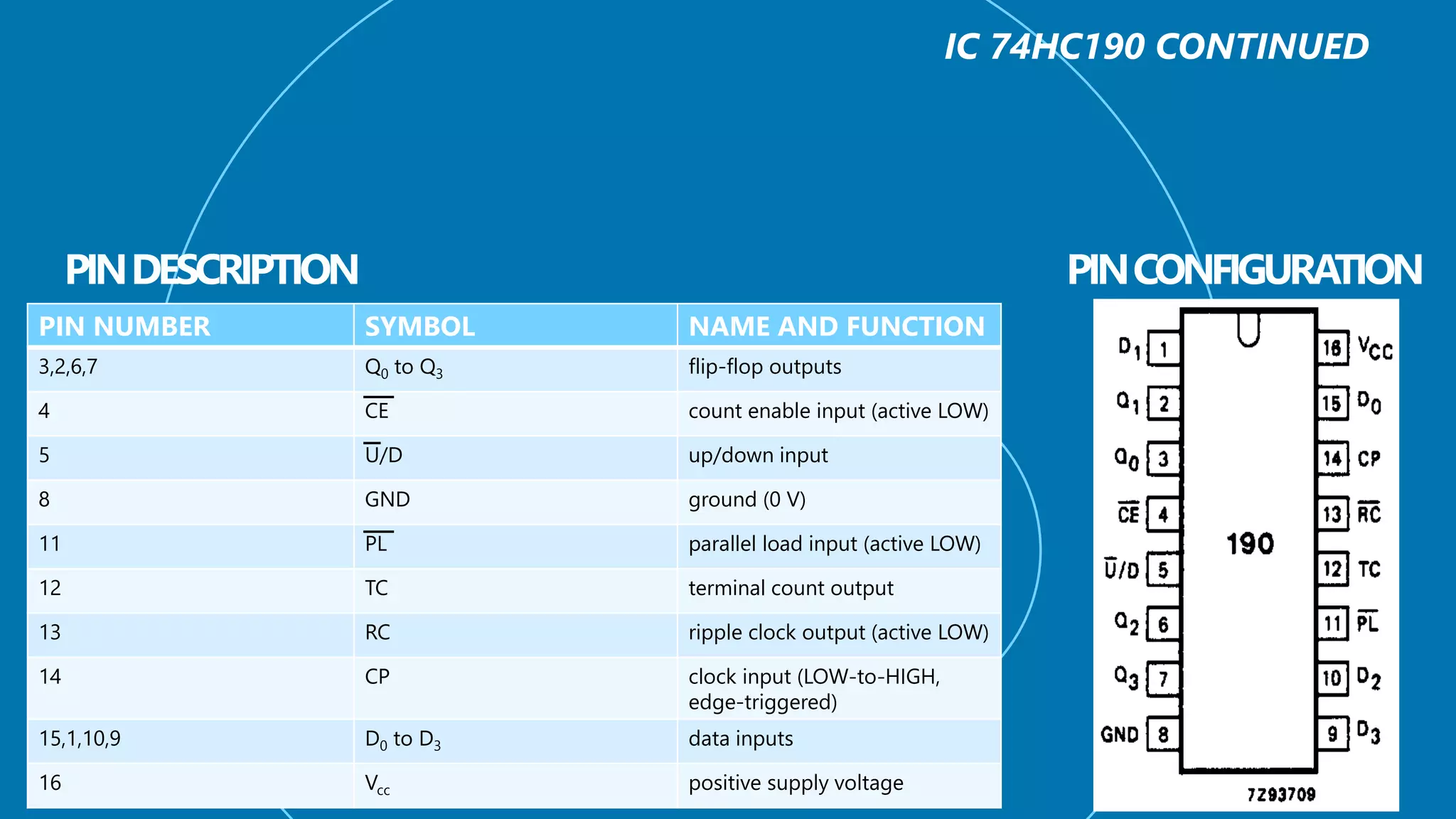
PIN NUMBER SYMBOL NAME AND FUNCTION
3,2,6,7 Q0 to Q3 flip-flop outputs
4 CE count enable input (active LOW)
5 U/D up/down input
8 GND ground (0 V)
11 PL parallel load input (active LOW)
12 TC terminal count output
13 RC ripple clock output (active LOW)
14 CP clock input (LOW-to-HIGH,
edge-triggered)
15,1,10,9 D0 to D3 data inputs
16 Vcc positive supply voltage
INPUTS FUNCTION
PL CE U/D CP
H L L Count up
H L H Count down
L X X X Pre-set
H H X X No change
H = HIGH voltage level
L = LOW voltage level
X = Don’t Care
= LOW to HIGH clock transition
SENSORS
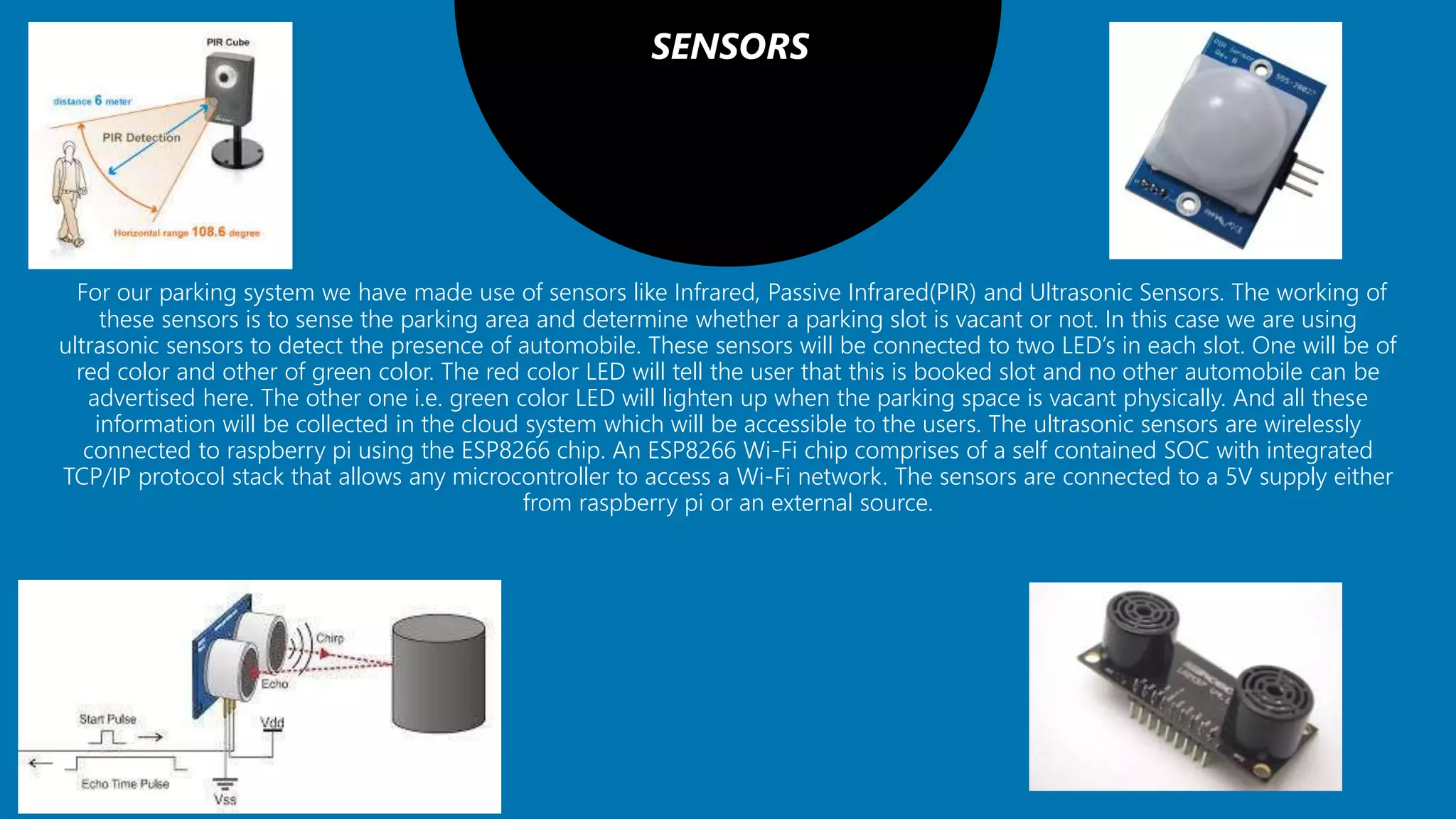
For our parking system we have made use of sensors like Infrared, Passive Infrared(PIR) and Ultrasonic Sensors. The working of
these sensors is to sense the parking area and determine whether a parking slot is vacant or not. In this case we are using
ultrasonic sensors to detect the presence of automobile. These sensors will be connected to two LED’s in each slot. One will be of
red color and other of green color. The red color LED will tell the user that this is booked slot and no other automobile can be
advertised here. The other one i.e. green color LED will lighten up when the parking space is vacant physically. And all these
information will be collected in the cloud system which will be accessible to the users. The ultrasonic sensors are wirelessly
connected to raspberry pi using the ESP8266 chip. An ESP8266 Wi-Fi chip comprises of a self contained SOC with integrated
TCP/IP protocol stack that allows any microcontroller to access a Wi-Fi network. The sensors are connected to a 5V supply either
from raspberry pi or an external source.
PROCESSING UNITS
It comprises of Raspberry pi which is a processor on chip. The processing unit acts like an intermediate between the sensors and
cloud. All the sensors are wirelessly connected to the processing unit. A single raspberry pi unit comprises of 26 GPIO pins i.e. 26
different sensors can be connected to it. However we can increase this number by attaching a multiplexer (MUX) to it. It is
essential that the ground of raspberry pi and sensors must be connected in order to transfer data using the GPIO pins. There is a
python script running on the chip that checks the status of various GPIO pins and updates this information onto the cloud. Data
collected from various sensors is sent to the raspberry pi through the esp8266 chip. The raspberry pi then transmits this data to
the IBM MQTT Server through MQTT protocol over a channel. MQTT[15] (Message Queue Telemetry Transport) Protocol is a
publish-subscribe based "light weight" messaging protocol that is used on top of the TCP/IP protocol. It is designed to establish
connections across remote locations where limited amount of data needs to be transferred or in cases of low bandwidth
availability.
MOBILE APPLICATIONS
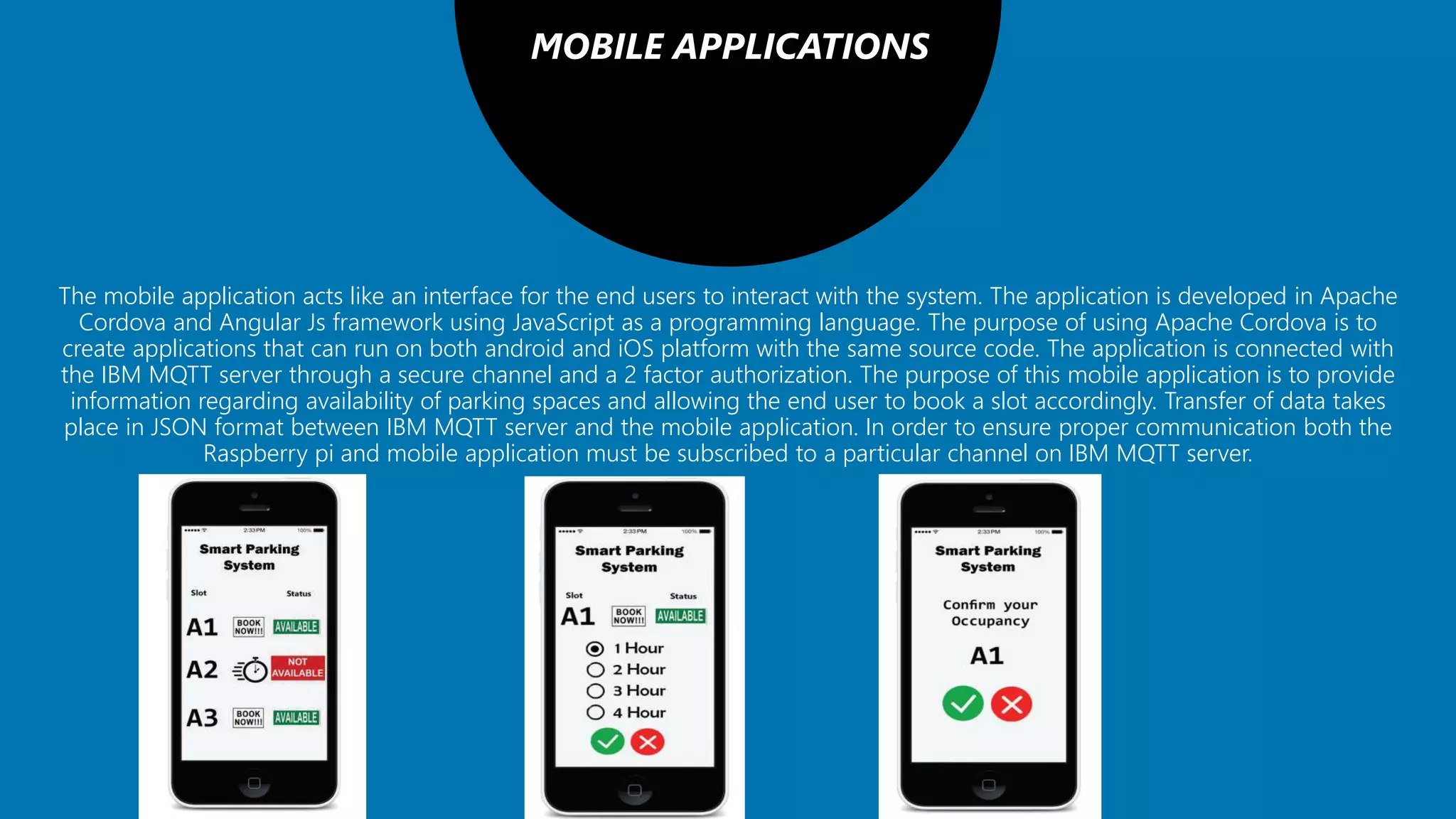
The mobile application acts like an interface for the end users to interact with the system. The application is developed in Apache
Cordova and Angular Js framework using JavaScript as a programming language. The purpose of using Apache Cordova is to
create applications that can run on both android and iOS platform with the same source code. The application is connected with
the IBM MQTT server through a secure channel and a 2 factor authorization. The purpose of this mobile application is to provide
information regarding availability of parking spaces and allowing the end user to book a slot accordingly. Transfer of data takes
place in JSON format between IBM MQTT server and the mobile application. In order to ensure proper communication both the
Raspberry pi and mobile application must be subscribed to a particular channel on IBM MQTT server.
CLOUD SYSTEM
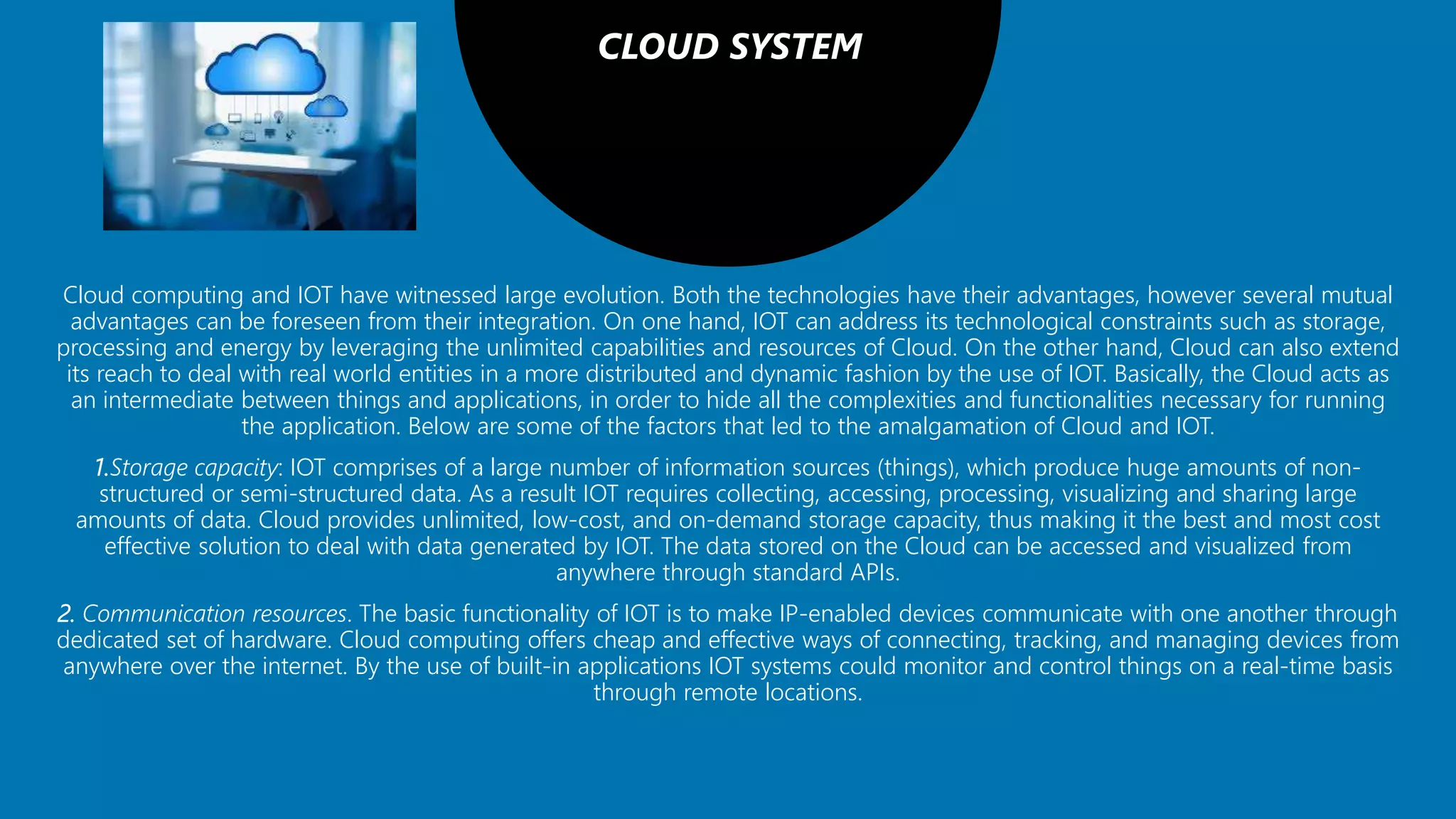
Cloud computing and IOT have witnessed large evolution. Both the technologies have their advantages, however several mutual
advantages can be foreseen from their integration. On one hand, IOT can address its technological constraints such as storage,
processing and energy by leveraging the unlimited capabilities and resources of Cloud. On the other hand, Cloud can also extend
its reach to deal with real world entities in a more distributed and dynamic fashion by the use of IOT. Basically, the Cloud acts as
an intermediate between things and applications, in order to hide all the complexities and functionalities necessary for running
the application. Below are some of the factors that led to the amalgamation of Cloud and IOT.
1.Storage capacity: IOT comprises of a large number of information sources (things), which produce huge amounts of non-
structured or semi-structured data. As a result IOT requires collecting, accessing, processing, visualizing and sharing large
amounts of data. Cloud provides unlimited, low-cost, and on-demand storage capacity, thus making it the best and most cost
effective solution to deal with data generated by IOT. The data stored on the Cloud can be accessed and visualized from
anywhere through standard APIs.
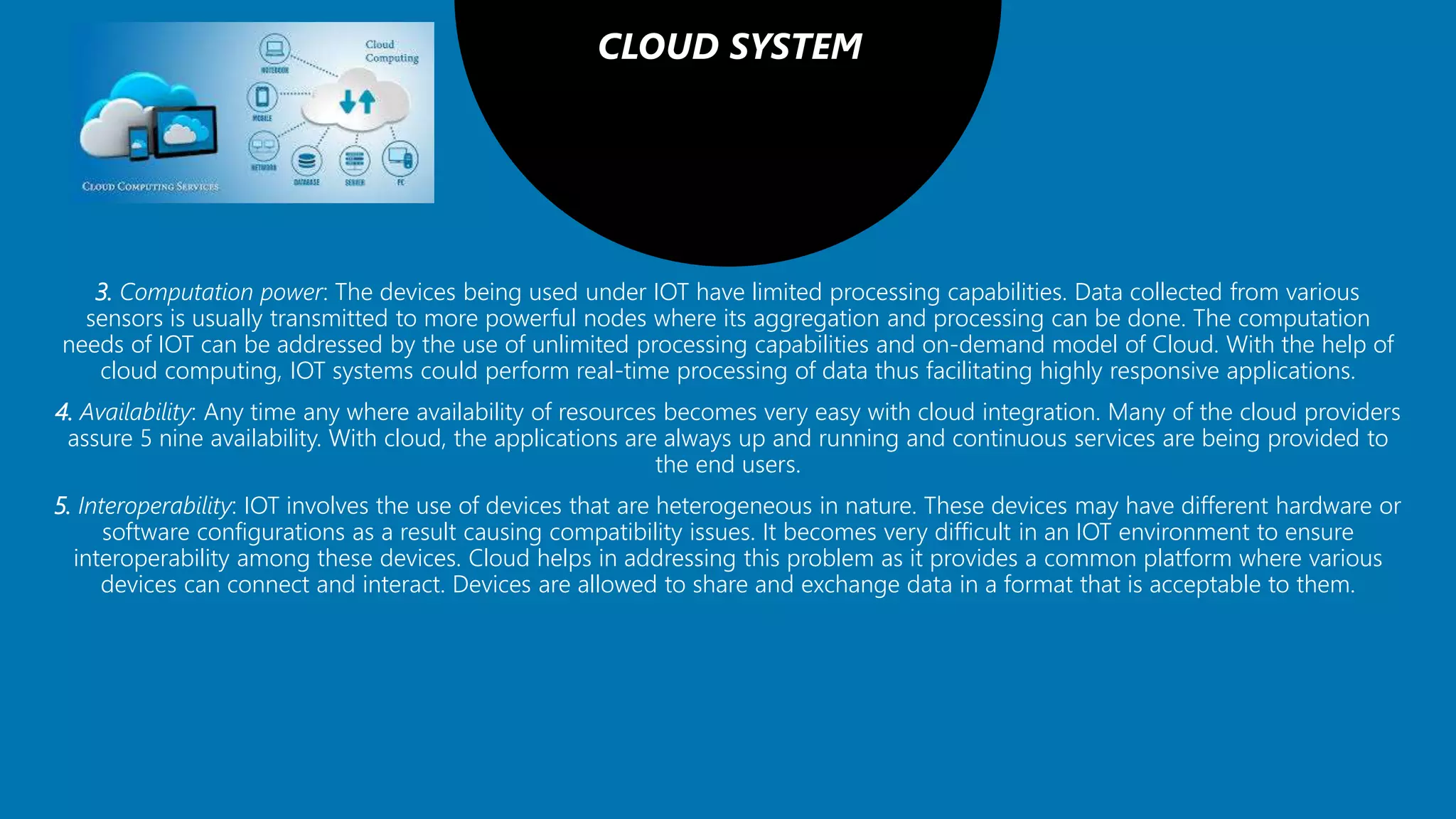
2. Communication resources. The basic functionality of IOT is to make IP-enabled devices communicate with one another through
dedicated set of hardware. Cloud computing offers cheap and effective ways of connecting, tracking, and managing devices from
anywhere over the internet. By the use of built-in applications IOT systems could monitor and control things on a real-time basis
through remote locations.
CLOUD SYSTEM
3. Computation power: The devices being used under IOT have limited processing capabilities. Data collected from various
sensors is usually transmitted to more powerful nodes where its aggregation and processing can be done. The computation
needs of IOT can be addressed by the use of unlimited processing capabilities and on-demand model of Cloud. With the help of
cloud computing, IOT systems could perform real-time processing of data thus facilitating highly responsive applications.
4. Availability: Any time any where availability of resources becomes very easy with cloud integration. Many of the cloud providers
assure 5 nine availability. With cloud, the applications are always up and running and continuous services are being provided to
the end users.
5. Interoperability: IOT involves the use of devices that are heterogeneous in nature. These devices may have different hardware or
software configurations as a result causing compatibility issues. It becomes very difficult in an IOT environment to ensure
interoperability among these devices. Cloud helps in addressing this problem as it provides a common platform where various
devices can connect and interact. Devices are allowed to share and exchange data in a format that is acceptable to them.
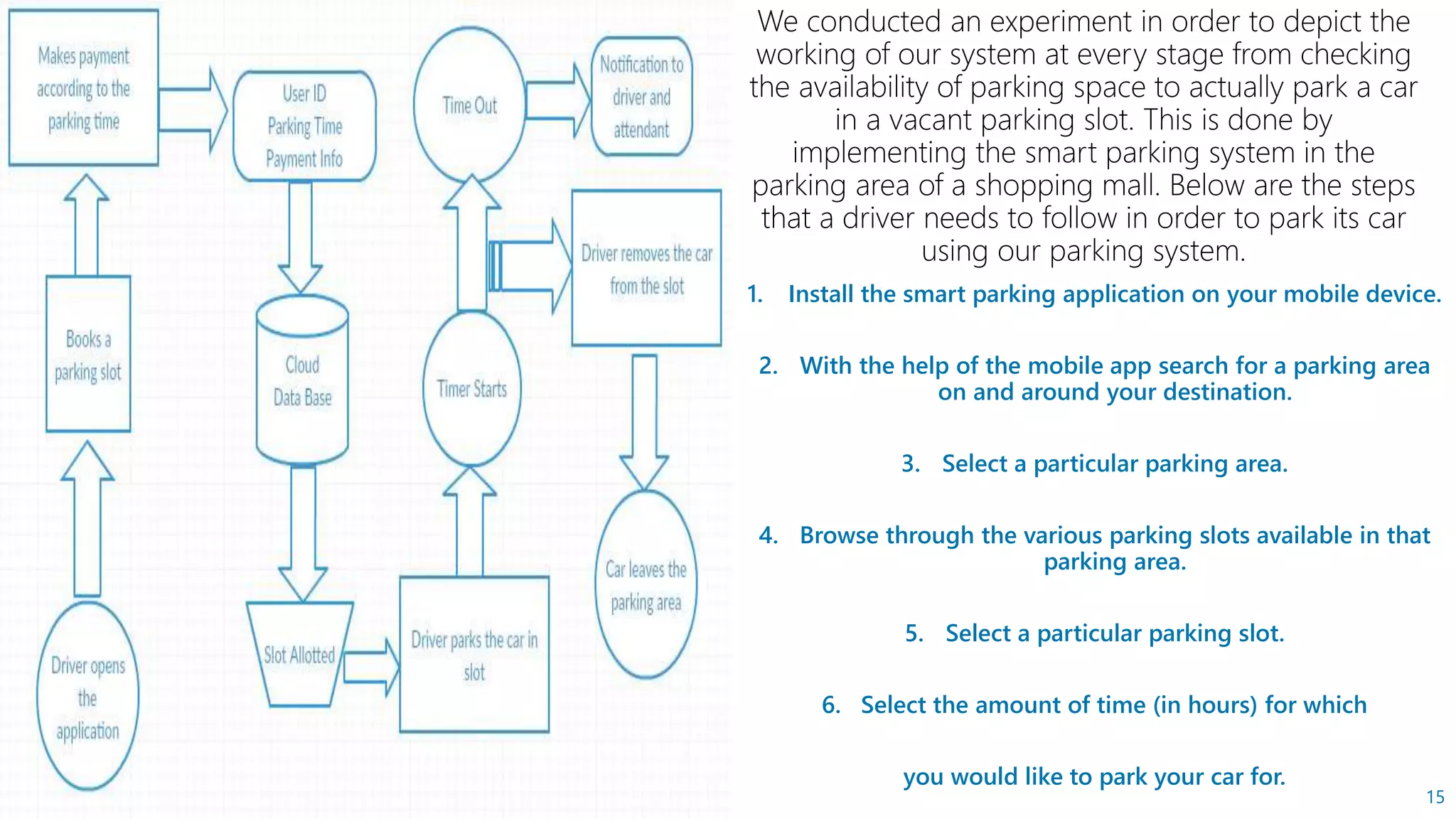
In the previous section we discussed about the architecture
and technical stack related to the smart parking system. In this
section we talk about the implementation and working of the
system in a real world scenario. The complete process of
booking a parking slot, parking a car in that slot and leaving
the parking area is explained with the help of the following
flow chart.
1. Install the smart parking application on your mobile device.
2. With the help of the mobile app search for a parking area
on and around your destination.
3. Select a particular parking area.
4. Browse through the various parking slots available in that
parking area.
5. Select a particular parking slot.
6. Select the amount of time (in hours) for which
you would like to park your car for.
15
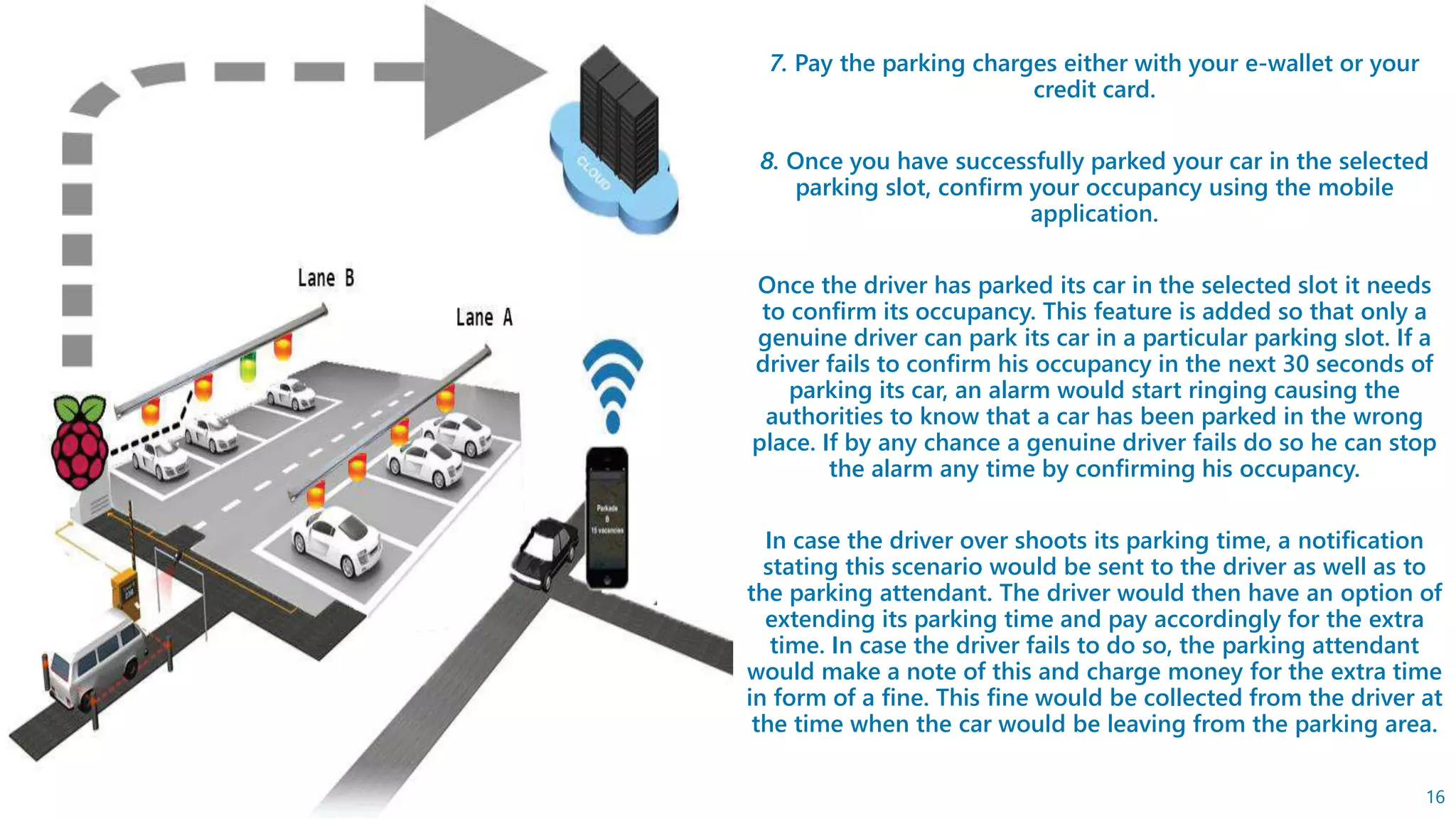
7. Pay the parking charges either with your e-wallet or your
credit card.
8. Once you have successfully parked your car in the selected
parking slot, confirm your occupancy using the mobile
application.
Once the driver has parked its car in the selected slot it needs
to confirm its occupancy. This feature is added so that only a
genuine driver can park its car in a particular parking slot. If a
driver fails to confirm his occupancy in the next 30 seconds of
parking its car, an alarm would start ringing causing the
authorities to know that a car has been parked in the wrong
place. If by any chance a genuine driver fails do so he can stop
the alarm any time by confirming his occupancy.
In case the driver over shoots its parking time, a notification
stating this scenario would be sent to the driver as well as to
the parking attendant. The driver would then have an option of
extending its parking time and pay accordingly for the extra
time. In case the driver fails to do so, the parking attendant
would make a note of this and charge money for the extra time
in form of a fine. This fine would be collected from the driver at
the time when the car would be leaving from the parking area.
16
17
The concept of Smart Cities have always been a dream for humanity. Since the past couple of years large
advancements have been made in making smart cities a reality. The growth of Internet of Things and Cloud
technologies have give rise to new possibilities in terms of smart cities. Smart parking facilities and traffic
management systems have always been at the core of constructing smart cities. These type of
advancements in technology give rise to the development of the nation. In this presentation, we address
the issue of parking and present an IOT based Cloud integrated smart parking system. The system that we
propose provides real time information regarding availability of parking slots in a parking area. Users from
remote locations could book a parking slot for them by the use of our mobile application. The efforts
made in this presentation are indented to improve the parking facilities of a city and thereby aiming to
enhance the quality of life of its people.
THANK YOU

Smart parking system using IOT

  • 1.
  • 2.
  • 3.
    In this presentationwe have the intention of resolving day to day problem of people around this world , to make their lives more happier and easier . 3
  • 4.
    INTRODUCTION Physical Object +Controller, Sensor and Actuators + Internet = Internet of Things 4
  • 5.
    Hardware and Software Requirements 1.IC 74HC190 2. Sensors 3. Processing Units 4. Mobile Application 5. Cloud System
  • 6.
    IC 74HC190 The 74HC/HCT190are asynchronously presettable up/down BCD decade counters. They contain four master/slave flip-flops with internal gating and steering logic to provide asynchronous preset and synchronous count-up and count-down operation. Counting is inhibited by a HIGH level on the count enable (CE) input. When CE is LOW internal state changes are initiated synchronously by the LOW-to-HIGH transition of the clock input. The up/down (U/D) input signal determines the direction of counting as indicated in the function table. The CE input may go LOW when the clock is in either state, however, the LOW-to-HIGH CE transition must occur only when the clock is HIGH. Also, the U/D input should be changed only when either CE or CP is HIGH. Now this counter will be connected to sensors at the entry level and at the exit level of the parking area through microcontroller which will provide the interface between the counter and sensors. At our entry level we will be installing UP counter and at our exit level a DOWN counter. Now let there are ‘M’ number of parking slots in a particular parking area. Gates of the entry level will open for the entry of an automobile only till the counter counts ‘M’ and above that no entry will be granted until or unless the count goes down at least by ‘M-1’ by the exit level DOWN counter , and as soon as the count goes DOWN again the entry of automobiles will be started. In this one more thing to keep in mind is that the counter will also count the vacant booked slots , which will be booked by our users through their mobile phones.
  • 7.
    PIN NUMBER SYMBOLNAME AND FUNCTION 3,2,6,7 Q0 to Q3 flip-flop outputs 4 CE count enable input (active LOW) 5 U/D up/down input 8 GND ground (0 V) 11 PL parallel load input (active LOW) 12 TC terminal count output 13 RC ripple clock output (active LOW) 14 CP clock input (LOW-to-HIGH, edge-triggered) 15,1,10,9 D0 to D3 data inputs 16 Vcc positive supply voltage
  • 8.
    INPUTS FUNCTION PL CEU/D CP H L L Count up H L H Count down L X X X Pre-set H H X X No change H = HIGH voltage level L = LOW voltage level X = Don’t Care = LOW to HIGH clock transition
  • 9.
    SENSORS For our parkingsystem we have made use of sensors like Infrared, Passive Infrared(PIR) and Ultrasonic Sensors. The working of these sensors is to sense the parking area and determine whether a parking slot is vacant or not. In this case we are using ultrasonic sensors to detect the presence of automobile. These sensors will be connected to two LED’s in each slot. One will be of red color and other of green color. The red color LED will tell the user that this is booked slot and no other automobile can be advertised here. The other one i.e. green color LED will lighten up when the parking space is vacant physically. And all these information will be collected in the cloud system which will be accessible to the users. The ultrasonic sensors are wirelessly connected to raspberry pi using the ESP8266 chip. An ESP8266 Wi-Fi chip comprises of a self contained SOC with integrated TCP/IP protocol stack that allows any microcontroller to access a Wi-Fi network. The sensors are connected to a 5V supply either from raspberry pi or an external source.
  • 10.
    PROCESSING UNITS It comprisesof Raspberry pi which is a processor on chip. The processing unit acts like an intermediate between the sensors and cloud. All the sensors are wirelessly connected to the processing unit. A single raspberry pi unit comprises of 26 GPIO pins i.e. 26 different sensors can be connected to it. However we can increase this number by attaching a multiplexer (MUX) to it. It is essential that the ground of raspberry pi and sensors must be connected in order to transfer data using the GPIO pins. There is a python script running on the chip that checks the status of various GPIO pins and updates this information onto the cloud. Data collected from various sensors is sent to the raspberry pi through the esp8266 chip. The raspberry pi then transmits this data to the IBM MQTT Server through MQTT protocol over a channel. MQTT[15] (Message Queue Telemetry Transport) Protocol is a publish-subscribe based "light weight" messaging protocol that is used on top of the TCP/IP protocol. It is designed to establish connections across remote locations where limited amount of data needs to be transferred or in cases of low bandwidth availability.
  • 11.
    MOBILE APPLICATIONS The mobileapplication acts like an interface for the end users to interact with the system. The application is developed in Apache Cordova and Angular Js framework using JavaScript as a programming language. The purpose of using Apache Cordova is to create applications that can run on both android and iOS platform with the same source code. The application is connected with the IBM MQTT server through a secure channel and a 2 factor authorization. The purpose of this mobile application is to provide information regarding availability of parking spaces and allowing the end user to book a slot accordingly. Transfer of data takes place in JSON format between IBM MQTT server and the mobile application. In order to ensure proper communication both the Raspberry pi and mobile application must be subscribed to a particular channel on IBM MQTT server.
  • 12.
    CLOUD SYSTEM Cloud computingand IOT have witnessed large evolution. Both the technologies have their advantages, however several mutual advantages can be foreseen from their integration. On one hand, IOT can address its technological constraints such as storage, processing and energy by leveraging the unlimited capabilities and resources of Cloud. On the other hand, Cloud can also extend its reach to deal with real world entities in a more distributed and dynamic fashion by the use of IOT. Basically, the Cloud acts as an intermediate between things and applications, in order to hide all the complexities and functionalities necessary for running the application. Below are some of the factors that led to the amalgamation of Cloud and IOT. 1.Storage capacity: IOT comprises of a large number of information sources (things), which produce huge amounts of non- structured or semi-structured data. As a result IOT requires collecting, accessing, processing, visualizing and sharing large amounts of data. Cloud provides unlimited, low-cost, and on-demand storage capacity, thus making it the best and most cost effective solution to deal with data generated by IOT. The data stored on the Cloud can be accessed and visualized from anywhere through standard APIs. 2. Communication resources. The basic functionality of IOT is to make IP-enabled devices communicate with one another through dedicated set of hardware. Cloud computing offers cheap and effective ways of connecting, tracking, and managing devices from anywhere over the internet. By the use of built-in applications IOT systems could monitor and control things on a real-time basis through remote locations.
  • 13.
    CLOUD SYSTEM 3. Computationpower: The devices being used under IOT have limited processing capabilities. Data collected from various sensors is usually transmitted to more powerful nodes where its aggregation and processing can be done. The computation needs of IOT can be addressed by the use of unlimited processing capabilities and on-demand model of Cloud. With the help of cloud computing, IOT systems could perform real-time processing of data thus facilitating highly responsive applications. 4. Availability: Any time any where availability of resources becomes very easy with cloud integration. Many of the cloud providers assure 5 nine availability. With cloud, the applications are always up and running and continuous services are being provided to the end users. 5. Interoperability: IOT involves the use of devices that are heterogeneous in nature. These devices may have different hardware or software configurations as a result causing compatibility issues. It becomes very difficult in an IOT environment to ensure interoperability among these devices. Cloud helps in addressing this problem as it provides a common platform where various devices can connect and interact. Devices are allowed to share and exchange data in a format that is acceptable to them.
  • 14.
    In the previoussection we discussed about the architecture and technical stack related to the smart parking system. In this section we talk about the implementation and working of the system in a real world scenario. The complete process of booking a parking slot, parking a car in that slot and leaving the parking area is explained with the help of the following flow chart.
  • 15.
    1. Install thesmart parking application on your mobile device. 2. With the help of the mobile app search for a parking area on and around your destination. 3. Select a particular parking area. 4. Browse through the various parking slots available in that parking area. 5. Select a particular parking slot. 6. Select the amount of time (in hours) for which you would like to park your car for. 15
  • 16.
    7. Pay theparking charges either with your e-wallet or your credit card. 8. Once you have successfully parked your car in the selected parking slot, confirm your occupancy using the mobile application. Once the driver has parked its car in the selected slot it needs to confirm its occupancy. This feature is added so that only a genuine driver can park its car in a particular parking slot. If a driver fails to confirm his occupancy in the next 30 seconds of parking its car, an alarm would start ringing causing the authorities to know that a car has been parked in the wrong place. If by any chance a genuine driver fails do so he can stop the alarm any time by confirming his occupancy. In case the driver over shoots its parking time, a notification stating this scenario would be sent to the driver as well as to the parking attendant. The driver would then have an option of extending its parking time and pay accordingly for the extra time. In case the driver fails to do so, the parking attendant would make a note of this and charge money for the extra time in form of a fine. This fine would be collected from the driver at the time when the car would be leaving from the parking area. 16
  • 17.
    17 The concept ofSmart Cities have always been a dream for humanity. Since the past couple of years large advancements have been made in making smart cities a reality. The growth of Internet of Things and Cloud technologies have give rise to new possibilities in terms of smart cities. Smart parking facilities and traffic management systems have always been at the core of constructing smart cities. These type of advancements in technology give rise to the development of the nation. In this presentation, we address the issue of parking and present an IOT based Cloud integrated smart parking system. The system that we propose provides real time information regarding availability of parking slots in a parking area. Users from remote locations could book a parking slot for them by the use of our mobile application. The efforts made in this presentation are indented to improve the parking facilities of a city and thereby aiming to enhance the quality of life of its people.
  • 18.

Editor's Notes

  • #2 To use this title animation slide with a new image simply 1) move the top semi-transparent shape to the side, 2) delete placeholder image, 3) click on the picture icon to add a new picture, 4) Move semi-transparent shape back to original position, 5) Update text on slide.