

Simple Web Browser
PROJECT TITLE
Group Name: STML
Md . Sohag
Em@il : sohag.0315@gmail.com
Daffodil international University
Presented by:
OBJECTIVE
To use basic concept of java.
To Create graphical user interfaces with
various user-interface controls.
To know how web browser work.
INTRODUCTION
Web browser is key to internet these days ,at least for
more tasks . There are many browsers for every platform
and operating System. Here we make a simple browser.
FEATURES
This browser was quite simple.
Browse http:// sites.
We can open new window without closing other window.
Search anything.
Download Files save download menu.
Use private window to private Browsing.
personalize Browser with extra functionality or style use
add-ons
6
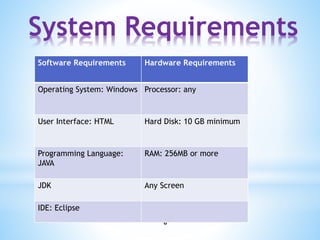
Software Requirements Hardware Requirements
Operating System: Windows Processor: any
User Interface: HTML Hard Disk: 10 GB minimum
Programming Language:
JAVA
RAM: 256MB or more
JDK Any Screen
IDE: Eclipse
System Requirements
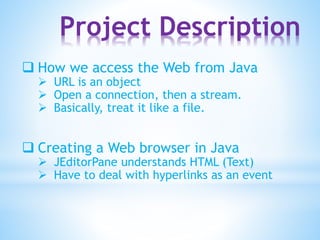
Project Description
 How we access the Web from Java
 URL is an object
 Open a connection, then a stream.
 Basically, treat it like a file.
 Creating a Web browser in Java
 JEditorPane understands HTML (Text)
 Have to deal with hyperlinks as an event
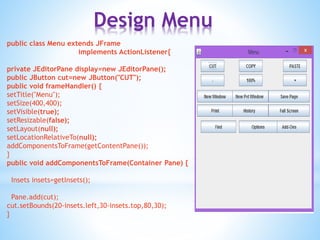
Design Menu
public class Menu extends JFrame
implements ActionListener{
private JEditorPane display=new JEditorPane();
public JButton cut=new JButton("CUT");
public void frameHandler() {
setTitle("Menu");
setSize(400,400);
setVisible(true);
setResizable(false);
setLayout(null);
setLocationRelativeTo(null);
addComponentsToFrame(getContentPane());
}
public void addComponentsToFrame(Container Pane) {
Insets insets=getInsets();
Pane.add(cut);
cut.setBounds(20-insets.left,30-insets.top,80,30);
}
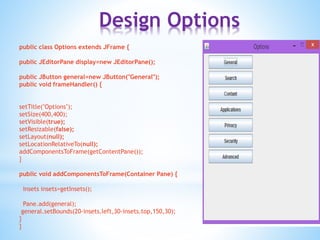
Design Options
public class Options extends JFrame {
public JEditorPane display=new JEditorPane();
public JButton general=new JButton("General");
public void frameHandler() {
setTitle("Options");
setSize(400,400);
setVisible(true);
setResizable(false);
setLayout(null);
setLocationRelativeTo(null);
addComponentsToFrame(getContentPane());
}
public void addComponentsToFrame(Container Pane) {
Insets insets=getInsets();
Pane.add(general);
general.setBounds(20-insets.left,30-insets.top,150,30);
}
}
*
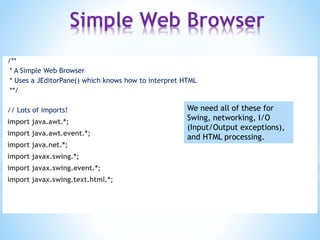
/**
* A Simple Web Browser
* Uses a JEditorPane() which knows how to interpret HTML
**/
// Lots of imports!
import java.awt.*;
import java.awt.event.*;
import java.net.*;
import javax.swing.*;
import javax.swing.event.*;
import javax.swing.text.html.*;
We need all of these for
Swing, networking, I/O
(Input/Output exceptions),
and HTML processing.
Simple Web Browser
*
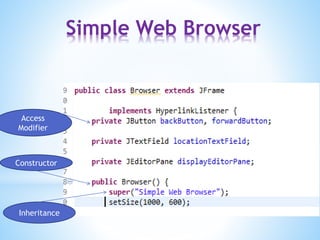
public class Browser extends JFrame {
/// Fields
/** A field for the URL to be entered **/
private JTextField locationTextField;
private JEditorPane displayEditorPane;
Simple Web Browser
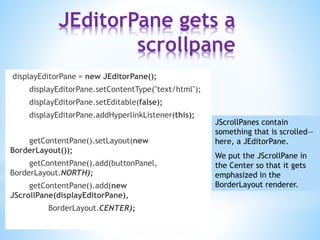
JEditorPane gets a
scrollpane
JScrollPanes contain
something that is scrolled—
here, a JEditorPane.
We put the JScrollPane in
the Center so that it gets
emphasized in the
BorderLayout renderer.
displayEditorPane = new JEditorPane();
displayEditorPane.setContentType("text/html");
displayEditorPane.setEditable(false);
displayEditorPane.addHyperlinkListener(this);
getContentPane().setLayout(new
BorderLayout());
getContentPane().add(buttonPanel,
BorderLayout.NORTH);
getContentPane().add(new
JScrollPane(displayEditorPane),
BorderLayout.CENTER);
*
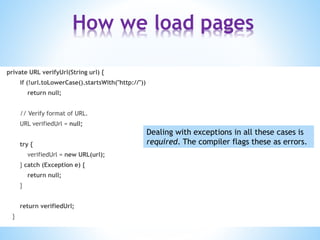
private URL verifyUrl(String url) {
if (!url.toLowerCase().startsWith("http://"))
return null;
// Verify format of URL.
URL verifiedUrl = null;
try {
verifiedUrl = new URL(url);
} catch (Exception e) {
return null;
}
return verifiedUrl;
}
Dealing with exceptions in all these cases is
required. The compiler flags these as errors.
How we load pages
*
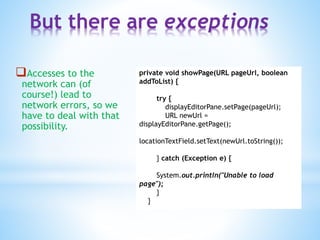
Accesses to the
network can (of
course!) lead to
network errors, so we
have to deal with that
possibility.
private void showPage(URL pageUrl, boolean
addToList) {
try {
displayEditorPane.setPage(pageUrl);
URL newUrl =
displayEditorPane.getPage();
locationTextField.setText(newUrl.toString());
} catch (Exception e) {
System.out.println("Unable to load
page");
}
}
But there are exceptions
Inheritance
Constructor
Access
Modifier
Simple Web Browser
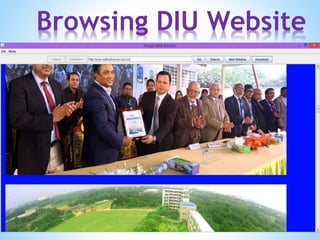
Browsing DIU Website
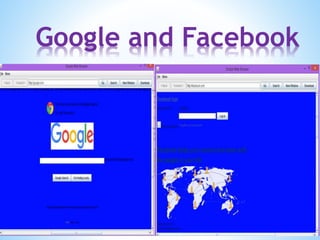
Google and Facebook
Reasons of choosing
this project
 Curiosity
Integral part of internet users
It is one of the software that we use most
during internet surfing for visiting web sites or
reaching out to any information available.
Benefits Of The Project
 After doing this project we know how a
web browser work.
 know many features of GUI.
Getting more idea about basic concepts of
java
Getting more experience about making any
project.
Conclusion
Easier to develop
More useful for the users
Easier to maintains and keep secure
Easier to grow as grow
Be Not Afraid Of Falling Be Afraid Of Not Trying

Simple web browser

  • 1.
  • 2.
    Group Name: STML Md. Sohag Em@il : sohag.0315@gmail.com Daffodil international University Presented by:
  • 3.
    OBJECTIVE To use basicconcept of java. To Create graphical user interfaces with various user-interface controls. To know how web browser work.
  • 4.
    INTRODUCTION Web browser iskey to internet these days ,at least for more tasks . There are many browsers for every platform and operating System. Here we make a simple browser.
  • 5.
    FEATURES This browser wasquite simple. Browse http:// sites. We can open new window without closing other window. Search anything. Download Files save download menu. Use private window to private Browsing. personalize Browser with extra functionality or style use add-ons
  • 6.
    6 Software Requirements HardwareRequirements Operating System: Windows Processor: any User Interface: HTML Hard Disk: 10 GB minimum Programming Language: JAVA RAM: 256MB or more JDK Any Screen IDE: Eclipse System Requirements
  • 7.
    Project Description  Howwe access the Web from Java  URL is an object  Open a connection, then a stream.  Basically, treat it like a file.  Creating a Web browser in Java  JEditorPane understands HTML (Text)  Have to deal with hyperlinks as an event
  • 8.
    Design Menu public classMenu extends JFrame implements ActionListener{ private JEditorPane display=new JEditorPane(); public JButton cut=new JButton("CUT"); public void frameHandler() { setTitle("Menu"); setSize(400,400); setVisible(true); setResizable(false); setLayout(null); setLocationRelativeTo(null); addComponentsToFrame(getContentPane()); } public void addComponentsToFrame(Container Pane) { Insets insets=getInsets(); Pane.add(cut); cut.setBounds(20-insets.left,30-insets.top,80,30); }
  • 9.
    Design Options public classOptions extends JFrame { public JEditorPane display=new JEditorPane(); public JButton general=new JButton("General"); public void frameHandler() { setTitle("Options"); setSize(400,400); setVisible(true); setResizable(false); setLayout(null); setLocationRelativeTo(null); addComponentsToFrame(getContentPane()); } public void addComponentsToFrame(Container Pane) { Insets insets=getInsets(); Pane.add(general); general.setBounds(20-insets.left,30-insets.top,150,30); } }
  • 10.
    * /** * A SimpleWeb Browser * Uses a JEditorPane() which knows how to interpret HTML **/ // Lots of imports! import java.awt.*; import java.awt.event.*; import java.net.*; import javax.swing.*; import javax.swing.event.*; import javax.swing.text.html.*; We need all of these for Swing, networking, I/O (Input/Output exceptions), and HTML processing. Simple Web Browser
  • 11.
    * public class Browserextends JFrame { /// Fields /** A field for the URL to be entered **/ private JTextField locationTextField; private JEditorPane displayEditorPane; Simple Web Browser
  • 12.
    JEditorPane gets a scrollpane JScrollPanescontain something that is scrolled— here, a JEditorPane. We put the JScrollPane in the Center so that it gets emphasized in the BorderLayout renderer. displayEditorPane = new JEditorPane(); displayEditorPane.setContentType("text/html"); displayEditorPane.setEditable(false); displayEditorPane.addHyperlinkListener(this); getContentPane().setLayout(new BorderLayout()); getContentPane().add(buttonPanel, BorderLayout.NORTH); getContentPane().add(new JScrollPane(displayEditorPane), BorderLayout.CENTER);
  • 13.
    * private URL verifyUrl(Stringurl) { if (!url.toLowerCase().startsWith("http://")) return null; // Verify format of URL. URL verifiedUrl = null; try { verifiedUrl = new URL(url); } catch (Exception e) { return null; } return verifiedUrl; } Dealing with exceptions in all these cases is required. The compiler flags these as errors. How we load pages
  • 14.
    * Accesses to the networkcan (of course!) lead to network errors, so we have to deal with that possibility. private void showPage(URL pageUrl, boolean addToList) { try { displayEditorPane.setPage(pageUrl); URL newUrl = displayEditorPane.getPage(); locationTextField.setText(newUrl.toString()); } catch (Exception e) { System.out.println("Unable to load page"); } } But there are exceptions
  • 15.
  • 16.
  • 17.
  • 18.
    Reasons of choosing thisproject  Curiosity Integral part of internet users It is one of the software that we use most during internet surfing for visiting web sites or reaching out to any information available.
  • 19.
    Benefits Of TheProject  After doing this project we know how a web browser work.  know many features of GUI. Getting more idea about basic concepts of java Getting more experience about making any project.
  • 20.
    Conclusion Easier to develop Moreuseful for the users Easier to maintains and keep secure Easier to grow as grow
  • 21.
    Be Not AfraidOf Falling Be Afraid Of Not Trying