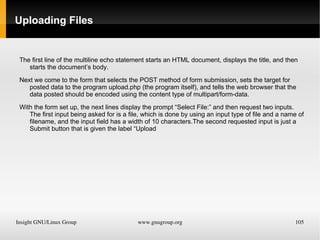
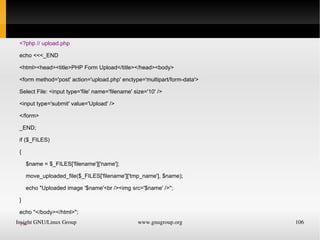
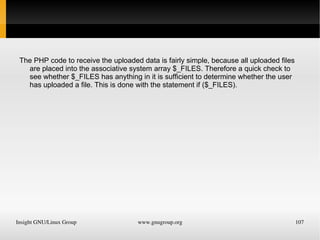
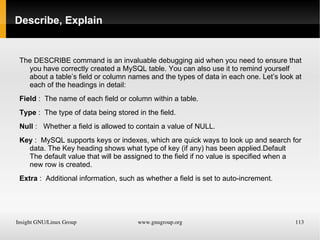
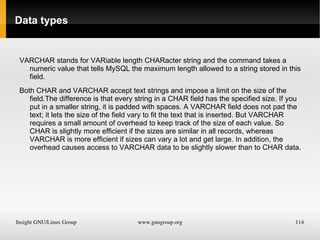
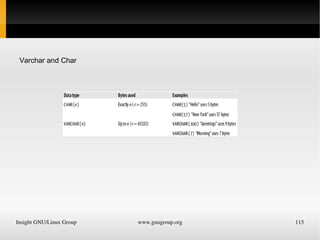
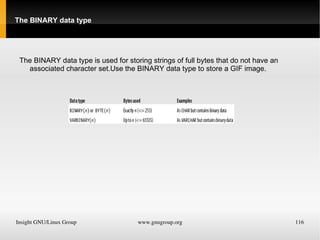
PHP Basics GnuGroup India ILG-Insight GNU/Linux Group Prepared By:Jagjit Phull
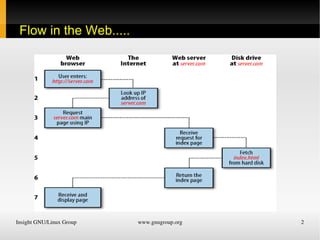
Flow in the Web.....
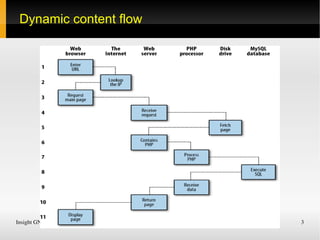
Dynamic content flow
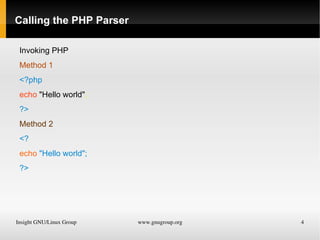
Calling the PHP Parser Invoking PHP Method 1 <?php echo  &quot;Hello world&quot; ; ?> Method 2 <? echo  &quot;Hello world&quot;; ?>
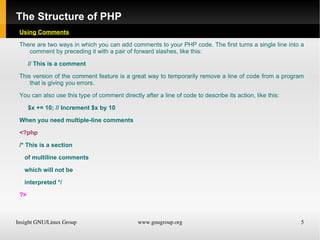
The Structure of PHP Using Comments There are two ways in which you can add comments to your PHP code. The first turns a single line into a comment by preceding it with a pair of forward slashes, like this: // This is a comment This version of the comment feature is a great way to temporarily remove a line of code from a program that is giving you errors. You can also use this type of comment directly after a line of code to describe its action, like this: $x += 10; // Increment $x by 10 When you need multiple-line comments <?php /* This is a section of multiline comments which will not be interpreted */ ?>
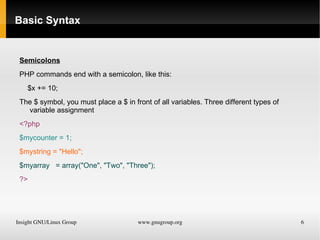
Basic Syntax Semicolons
PHP commands end with a semicolon, like this:
$x += 10;
The $ symbol, you must place a $ in front of all variables. Three different types of variable assignment
<?php
$mycounter = 1;
$mystring = &quot;Hello&quot;;
$myarray  = array(&quot;One&quot;, &quot;Two&quot;, &quot;Three&quot;);
?>
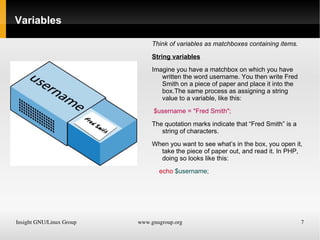
Variables Think of variables as matchboxes containing items.
String variables
Imagine you have a matchbox on which you have written the word username. You then write Fred Smith on a piece of paper and place it into the box.The same process as assigning a string value to a variable, like this:
$username = &quot;Fred Smith&quot;;
The quotation marks indicate that “Fred Smith” is a string of characters.
When you want to see what’s in the box, you open it, take the piece of paper out, and read it. In PHP, doing so looks like this:
echo   $username;
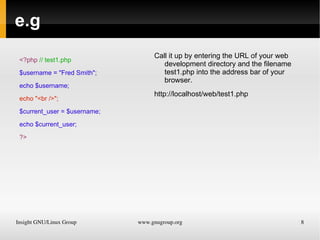
e.g <?php  // test1.php $username = &quot;Fred Smith&quot;; echo $username; echo &quot;<br />&quot;; $current_user = $username; echo $current_user; ?> Call it up by entering the URL of your web development directory and the filename test1.php into the address bar of your browser.
http://localhost/web/test1.php
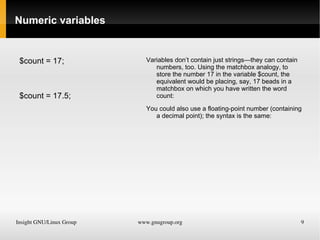
Numeric variables $count = 17;
$count = 17.5; Variables don’t contain just strings—they can contain numbers, too. Using the matchbox analogy, to store the number 17 in the variable $count, the equivalent would be placing, say, 17 beads in a matchbox on which you have written the word count:
You could also use a floating-point number (containing a decimal point); the syntax is the same:
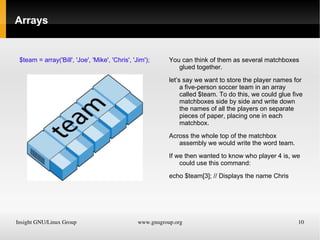
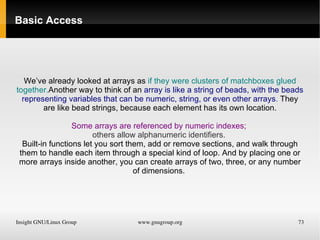
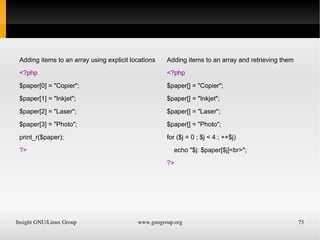
Arrays $team = array('Bill', 'Joe', 'Mike', 'Chris', 'Jim'); You can think of them as several matchboxes glued together.
let’s say we want to store the player names for a five-person soccer team in an array called $team. To do this, we could glue five matchboxes side by side and write down the names of all the players on separate pieces of paper, placing one in each matchbox.
Across the whole top of the matchbox assembly we would write the word team.
If we then wanted to know who player 4 is, we could use this command:
echo $team[3]; // Displays the name Chris
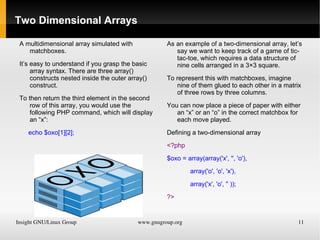
Two Dimensional Arrays A multidimensional array simulated with matchboxes.
It’s easy to understand if you grasp the basic array syntax. There are three array() constructs nested inside the outer array() construct.
To then return the third element in the second row of this array, you would use the following PHP command, which will display an “x”:
echo $oxo[1][2]; As an example of a two-dimensional array, let’s say we want to keep track of a game of tic-tac-toe, which requires a data structure of nine cells arranged in a 3×3 square.
To represent this with matchboxes, imagine nine of them glued to each other in a matrix of three rows by three columns.
You can now place a piece of paper with either an “x” or an “o” in the correct matchbox for each move played.
Defining a two-dimensional array
<?php
$oxo = array(array('x', '', 'o'),
array('o', 'o', 'x'),
array('x', 'o', '' ));
?>
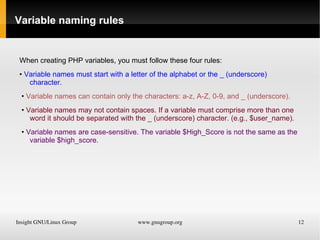
Variable naming rules When creating PHP variables, you must follow these four rules: •  Variable names must start with a letter of the alphabet or the _ (underscore)  character. •  Variable names can contain only the characters: a-z, A-Z, 0-9, and _ (underscore). •  Variable names may not contain spaces. If a variable must comprise more than one word it should be separated with the _ (underscore) character. (e.g., $user_name). •   Variable names are case-sensitive. The variable $High_Score is not the same as the  variable $high_score.
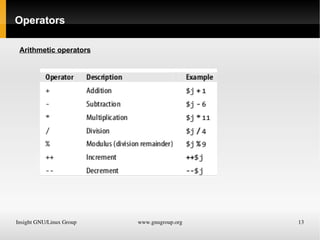
Operators Arithmetic operators
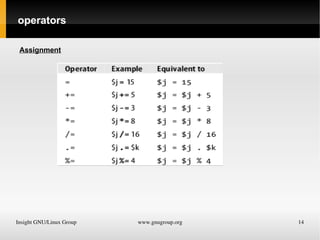
operators Assignment
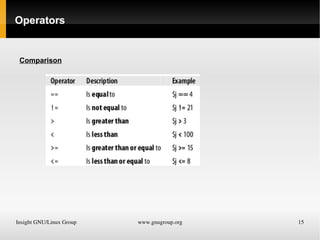
Operators Comparison
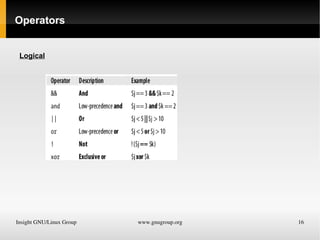
Operators Logical
Variable Assignment The syntax to assign a value to a variable is always  variable = value Or To reassign the value to another variable, it is other
variable = variable.
Variable incrementing and decrementing
Adding or subtracting 1 is a common operation that PHP provides special operators for it. You can use one of the following in place of the += and -= operators:
++$x;
--$y;
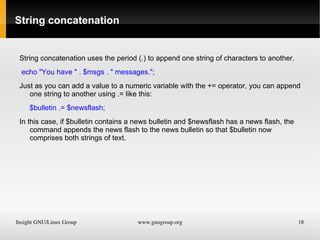
String concatenation String concatenation uses the period (.) to append one string of characters to another.
echo &quot;You have &quot; . $msgs . &quot; messages.&quot;;
Just as you can add a value to a numeric variable with the += operator, you can append one string to another using .= like this:
$bulletin .= $newsflash;
In this case, if $bulletin contains a news bulletin and $newsflash has a news flash, the command appends the news flash to the news bulletin so that $bulletin now comprises both strings of text.
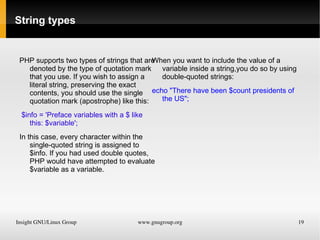
String types PHP supports two types of strings that are denoted by the type of quotation mark that you use. If you wish to assign a literal string, preserving the exact contents, you should use the single quotation mark (apostrophe) like this: $info = 'Preface variables with a $ like this: $variable'; In this case, every character within the single-quoted string is assigned to $info. If you had used double quotes, PHP would have attempted to evaluate $variable as a variable. When you want to include the value of a variable inside a string,you do so by using double-quoted strings: echo &quot;There have been $count presidents of the US&quot;;
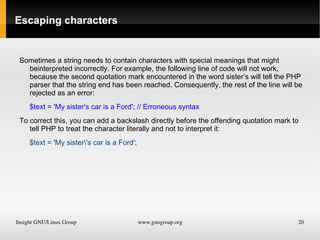
Escaping characters Sometimes a string needs to contain characters with special meanings that might beinterpreted incorrectly. For example, the following line of code will not work, because the second quotation mark encountered in the word sister’s will tell the PHP parser that the string end has been reached. Consequently, the rest of the line will be rejected as an error:
$text = 'My sister's car is a Ford'; // Erroneous syntax
To correct this, you can add a backslash directly before the offending quotation mark to tell PHP to treat the character literally and not to interpret it:
$text = 'My sister\'s car is a Ford';
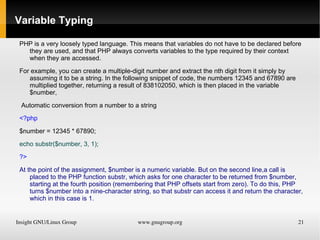
Variable Typing PHP is a very loosely typed language. This means that variables do not have to be declared before they are used, and that PHP always converts variables to the type required by their context when they are accessed.
For example, you can create a multiple-digit number and extract the nth digit from it simply by assuming it to be a string. In the following snippet of code, the numbers 12345 and 67890 are multiplied together, returning a result of 838102050, which is then placed in the variable $number,
Automatic conversion from a number to a string
<?php
$number = 12345 * 67890;
echo substr($number, 3, 1);
?>
At the point of the assignment, $number is a numeric variable. But on the second line,a call is placed to the PHP function substr, which asks for one character to be returned from $number, starting at the fourth position (remembering that PHP offsets start from zero). To do this, PHP turns $number into a nine-character string, so that substr can access it and return the character, which in this case is 1.
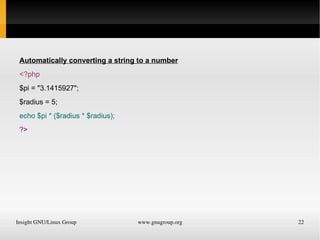
Automatically converting a string to a number
<?php
$pi = &quot;3.1415927&quot;;
$radius = 5;
echo $pi * ($radius * $radius);
?>
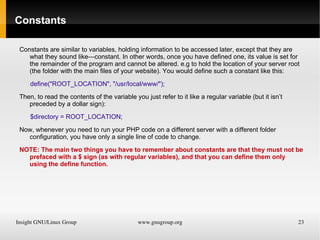
Constants Constants are similar to variables, holding information to be accessed later, except that they are what they sound like—constant. In other words, once you have defined one, its value is set for the remainder of the program and cannot be altered. e.g to hold the location of your server root (the folder with the main files of your website). You would define such a constant like this:
define(&quot;ROOT_LOCATION&quot;, &quot;/usr/local/www/&quot;);
Then, to read the contents of the variable you just refer to it like a regular variable (but it isn’t preceded by a dollar sign):
$directory = ROOT_LOCATION;
Now, whenever you need to run your PHP code on a different server with a different folder configuration, you have only a single line of code to change.
NOTE: The main two things you have to remember about constants are that they must not be prefaced with a $ sign (as with regular variables), and that you can define them only using the define function.
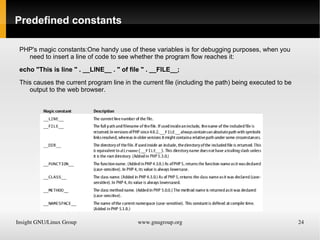
Predefined constants PHP's magic constants:One handy use of these variables is for debugging purposes, when you need to insert a line of code to see whether the program flow reaches it:
echo &quot;This is line &quot; . __LINE__ . &quot; of file &quot; . __FILE__;
This causes the current program line in the current file (including the path) being executed to be output to the web browser.
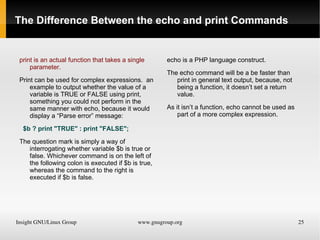
The Difference Between the echo and print Commands print is an actual function that takes a single parameter.
Print can be used for complex expressions.  an example to output whether the value of a variable is TRUE or FALSE using print, something you could not perform in the same manner with echo, because it would display a “Parse error” message:
$b ? print &quot;TRUE&quot; : print &quot;FALSE&quot;;
The question mark is simply a way of interrogating whether variable $b is true or false. Whichever command is on the left of the following colon is executed if $b is true, whereas the command to the right is executed if $b is false. echo is a PHP language construct.
The echo command will be a be faster than print in general text output, because, not being a function, it doesn’t set a return value.
As it isn’t a function, echo cannot be used as part of a more complex expression.
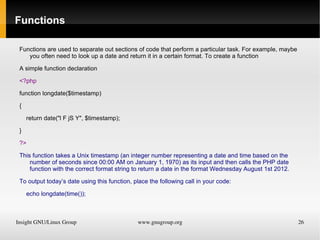
Functions Functions are used to separate out sections of code that perform a particular task. For example, maybe you often need to look up a date and return it in a certain format. To create a function
A simple function declaration
<?php
function longdate($timestamp)
{
return date(&quot;l F jS Y&quot;, $timestamp);
}
?>
This function takes a Unix timestamp (an integer number representing a date and time based on the number of seconds since 00:00 AM on January 1, 1970) as its input and then calls the PHP date function with the correct format string to return a date in the format Wednesday August 1st 2012.
To output today’s date using this function, place the following call in your code:
echo longdate(time());
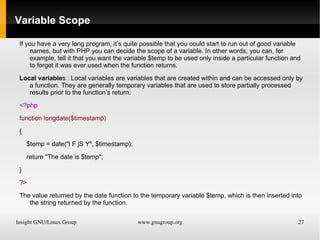
Variable Scope If you have a very long program, it’s quite possible that you could start to run out of good variable names, but with PHP you can decide the scope of a variable. In other words, you can, for example, tell it that you want the variable $temp to be used only inside a particular function and to forget it was ever used when the function returns.
Local variable s : Local variables are variables that are created within and can be accessed only by a function. They are generally temporary variables that are used to store partially processed results prior to the function’s return.
<?php
function longdate($timestamp)
{
$temp = date(&quot;l F jS Y&quot;, $timestamp);
return &quot;The date is $temp&quot;;
}
?>
The value returned by the date function to the temporary variable $temp, which is then inserted into the string returned by the function.
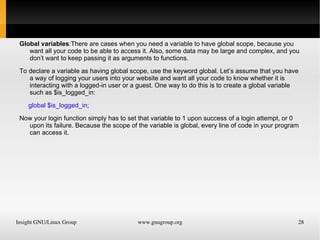
Global variables :There are cases when you need a variable to have global scope, because you want all your code to be able to access it. Also, some data may be large and complex, and you don’t want to keep passing it as arguments to functions.
To declare a variable as having global scope, use the keyword global. Let’s assume that you have a way of logging your users into your website and want all your code to know whether it is interacting with a logged-in user or a guest. One way to do this is to create a global variable such as $is_logged_in:
global $is_logged_in;
Now your login function simply has to set that variable to 1 upon success of a login attempt, or 0 upon its failure. Because the scope of the variable is global, every line of code in your program can access it.
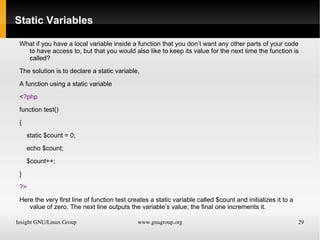
Static Variables What if you have a local variable inside a function that you don’t want any other parts of your code to have access to, but that you would also like to keep its value for the next time the function is called?
The solution is to declare a static variable,
A function using a static variable
<?php
function test()
{
static $count = 0;
echo $count;
$count++;
}
?>
Here the very first line of function test creates a static variable called $count and initializes it to a value of zero. The next line outputs the variable’s value; the final one increments it.
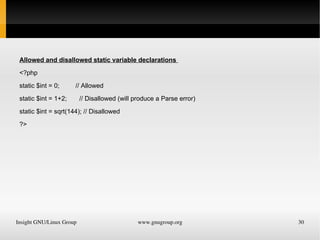
Allowed and disallowed static variable declarations
<?php
static $int = 0;  // Allowed
static $int = 1+2;  // Disallowed (will produce a Parse error)
static $int = sqrt(144); // Disallowed
?>
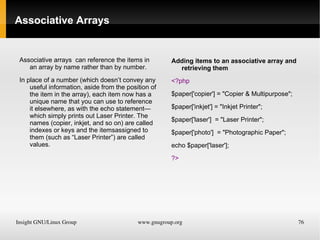
Superglobal variables Starting with PHP 4.1.0, several predefined variables are available. These are known as superglobal variables, which means that they are provided by the PHP environment but are global within the program, accessible absolutely everywhere. These superglobals contain lots of useful information about the currently running program and its environment They are structured as associative arrays.
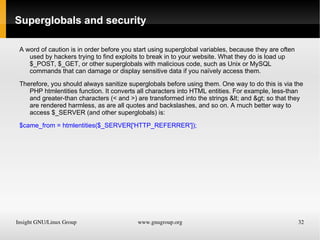
Superglobals and security A word of caution is in order before you start using superglobal variables, because they are often used by hackers trying to find exploits to break in to your website. What they do is load up $_POST, $_GET, or other superglobals with malicious code, such as Unix or MySQL commands that can damage or display sensitive data if you naïvely access them.
Therefore, you should always sanitize superglobals before using them. One way to do this is via the PHP htmlentities function. It converts all characters into HTML entities. For example, less-than and greater-than characters (< and >) are transformed into the strings &lt; and &gt; so that they are rendered harmless, as are all quotes and backslashes, and so on. A much better way to access $_SERVER (and other superglobals) is:
$came_from = htmlentities($_SERVER['HTTP_REFERRER']);
Expressions and Control Flow in PHP
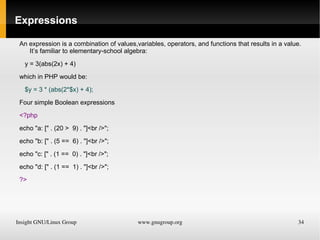
Expressions An expression is a combination of values,variables, operators, and functions that results in a value. It’s familiar to elementary-school algebra:
y = 3(abs(2x) + 4)
which in PHP would be:
$y = 3 * (abs(2*$x) + 4);
Four simple Boolean expressions
<?php
echo &quot;a: [&quot; . (20 >  9) . &quot;]<br />&quot;;
echo &quot;b: [&quot; . (5 ==  6) . &quot;]<br />&quot;;
echo &quot;c: [&quot; . (1 ==  0) . &quot;]<br />&quot;;
echo &quot;d: [&quot; . (1 ==  1) . &quot;]<br />&quot;;
?>
Literals and Variables The simplest form of an expression is a literal, which simply means something that evaluates to itself, such as the number 73 or the string “Hello”. An expression could also simply be a variable, which evaluates to the value that has been assigned to it. They are both types of expressions, because they return a value. Five types of literals
<?php
$myname = &quot;Brian&quot;;
$myage = 37;
echo &quot;a: &quot; . 73  .  &quot;<br  />&quot;; // Numeric literal
echo &quot;b: &quot; . &quot;Hello&quot;  .  &quot;<br  />&quot;; // String literal
echo &quot;c: &quot; . FALSE  .  &quot;<br  />&quot;; // Constant literal
echo &quot;d: &quot; . $myname  .  &quot;<br  />&quot;; // Variable string literal
echo &quot;e: &quot; . $myage  .  &quot;<br  />&quot;; // Variable numeric literal
?>
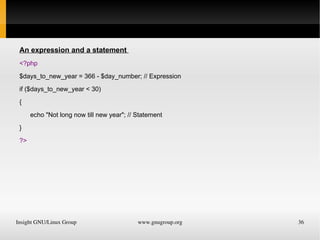
An expression and a statement
<?php
$days_to_new_year = 366 - $day_number; // Expression
if ($days_to_new_year < 30)
{
echo &quot;Not long now till new year&quot;; // Statement
}
?>
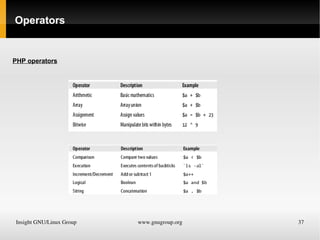
Operators PHP operators
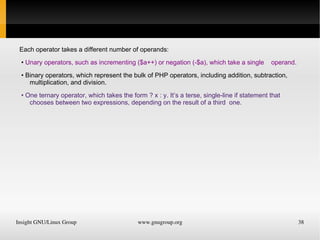
Each operator takes a different number of operands:
•  Unary operators, such as incrementing ($a++) or negation (-$a), which take a single  operand.
•  Binary operators, which represent the bulk of PHP operators, including addition, subtraction, multiplication, and division.
•  One ternary operator, which takes the form ? x : y. It’s a terse, single-line if statement that chooses between two expressions, depending on the result of a third  one.
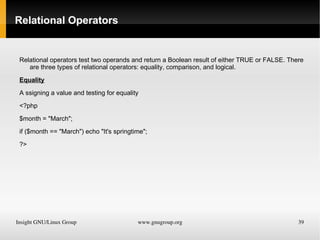
Relational Operators Relational operators test two operands and return a Boolean result of either TRUE or FALSE. There are three types of relational operators: equality, comparison, and logical.
Equality
A ssigning a value and testing for equality
<?php
$month = &quot;March&quot;;
if ($month == &quot;March&quot;) echo &quot;It's springtime&quot;;
?>
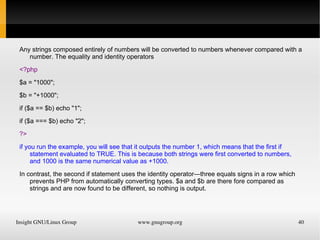
Any strings composed entirely of numbers will be converted to numbers whenever compared with a number. The equality and identity operators <?php $a = &quot;1000&quot;; $b = &quot;+1000&quot;; if ($a == $b) echo &quot;1&quot;; if ($a === $b) echo &quot;2&quot;; ?> if you run the example, you will see that it outputs the number 1, which means that the first if statement evaluated to TRUE. This is because both strings were first converted to numbers, and 1000 is the same numerical value as +1000.
In contrast, the second if statement uses the identity operator—three equals signs in a row which prevents PHP from automatically converting types. $a and $b are there fore compared as strings and are now found to be different, so nothing is output.
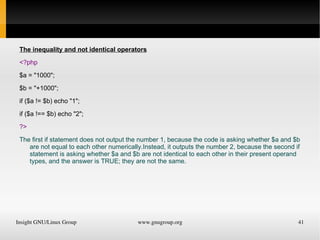
The inequality and not identical operators
<?php
$a = &quot;1000&quot;;
$b = &quot;+1000&quot;;
if ($a != $b) echo &quot;1&quot;;
if ($a !== $b) echo &quot;2&quot;;
?>
The first if statement does not output the number 1, because the code is asking whether $a and $b are not equal to each other numerically.Instead, it outputs the number 2, because the second if statement is asking whether $a and $b are not identical to each other in their present operand types, and the answer is TRUE; they are not the same.
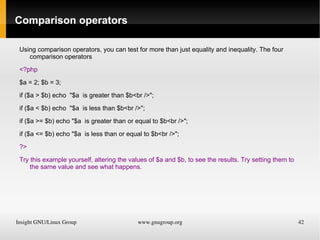
Comparison operators Using comparison operators, you can test for more than just equality and inequality. The four comparison operators
<?php
$a = 2; $b = 3;
if ($a > $b) echo  &quot;$a  is greater than $b<br />&quot;;
if ($a < $b) echo  &quot;$a  is less than $b<br />&quot;;
if ($a >= $b) echo &quot;$a  is greater than or equal to $b<br />&quot;;
if ($a <= $b) echo &quot;$a  is less than or equal to $b<br />&quot;;
?>
Try this example yourself, altering the values of $a and $b, to see the results. Try setting them to the same value and see what happens.
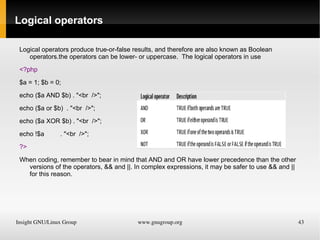
Logical operators Logical operators produce true-or-false results, and therefore are also known as Boolean operators.the operators can be lower- or uppercase.  The logical operators in use
<?php
$a = 1; $b = 0;
echo ($a AND $b) . &quot;<br  />&quot;;
echo ($a or $b)  . &quot;<br  />&quot;;
echo ($a XOR $b) . &quot;<br  />&quot;;
echo !$a  . &quot;<br  />&quot;;
?>
When coding, remember to bear in mind that AND and OR have lower precedence than the other versions of the operators, && and ||. In complex expressions, it may be safer to use && and || for this reason.
Conditionals
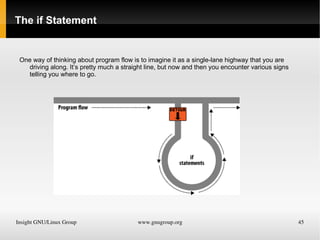
The if Statement One way of thinking about program flow is to imagine it as a single-lane highway that you are driving along. It’s pretty much a straight line, but now and then you encounter various signs telling you where to go.
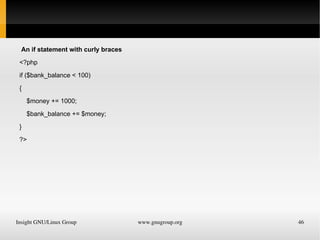
An if statement with curly braces
<?php
if ($bank_balance < 100)
{
$money += 1000;
$bank_balance += $money;
}

Php Learning show

  • 1.
    PHP Basics GnuGroupIndia ILG-Insight GNU/Linux Group Prepared By:Jagjit Phull
  • 2.
    Flow in theWeb.....
  • 3.
  • 4.
    Calling the PHPParser Invoking PHP Method 1 <?php echo &quot;Hello world&quot; ; ?> Method 2 <? echo &quot;Hello world&quot;; ?>
  • 5.
    The Structure ofPHP Using Comments There are two ways in which you can add comments to your PHP code. The first turns a single line into a comment by preceding it with a pair of forward slashes, like this: // This is a comment This version of the comment feature is a great way to temporarily remove a line of code from a program that is giving you errors. You can also use this type of comment directly after a line of code to describe its action, like this: $x += 10; // Increment $x by 10 When you need multiple-line comments <?php /* This is a section of multiline comments which will not be interpreted */ ?>
  • 6.
  • 7.
    PHP commands endwith a semicolon, like this:
  • 8.
  • 9.
    The $ symbol,you must place a $ in front of all variables. Three different types of variable assignment
  • 10.
  • 11.
  • 12.
  • 13.
    $myarray =array(&quot;One&quot;, &quot;Two&quot;, &quot;Three&quot;);
  • 14.
  • 15.
    Variables Think ofvariables as matchboxes containing items.
  • 16.
  • 17.
    Imagine you havea matchbox on which you have written the word username. You then write Fred Smith on a piece of paper and place it into the box.The same process as assigning a string value to a variable, like this:
  • 18.
  • 19.
    The quotation marksindicate that “Fred Smith” is a string of characters.
  • 20.
    When you wantto see what’s in the box, you open it, take the piece of paper out, and read it. In PHP, doing so looks like this:
  • 21.
    echo $username;
  • 22.
    e.g <?php // test1.php $username = &quot;Fred Smith&quot;; echo $username; echo &quot;<br />&quot;; $current_user = $username; echo $current_user; ?> Call it up by entering the URL of your web development directory and the filename test1.php into the address bar of your browser.
  • 23.
  • 24.
  • 25.
    $count = 17.5;Variables don’t contain just strings—they can contain numbers, too. Using the matchbox analogy, to store the number 17 in the variable $count, the equivalent would be placing, say, 17 beads in a matchbox on which you have written the word count:
  • 26.
    You could alsouse a floating-point number (containing a decimal point); the syntax is the same:
  • 27.
    Arrays $team =array('Bill', 'Joe', 'Mike', 'Chris', 'Jim'); You can think of them as several matchboxes glued together.
  • 28.
    let’s say wewant to store the player names for a five-person soccer team in an array called $team. To do this, we could glue five matchboxes side by side and write down the names of all the players on separate pieces of paper, placing one in each matchbox.
  • 29.
    Across the wholetop of the matchbox assembly we would write the word team.
  • 30.
    If we thenwanted to know who player 4 is, we could use this command:
  • 31.
    echo $team[3]; //Displays the name Chris
  • 32.
    Two Dimensional ArraysA multidimensional array simulated with matchboxes.
  • 33.
    It’s easy tounderstand if you grasp the basic array syntax. There are three array() constructs nested inside the outer array() construct.
  • 34.
    To then returnthe third element in the second row of this array, you would use the following PHP command, which will display an “x”:
  • 35.
    echo $oxo[1][2]; Asan example of a two-dimensional array, let’s say we want to keep track of a game of tic-tac-toe, which requires a data structure of nine cells arranged in a 3×3 square.
  • 36.
    To represent thiswith matchboxes, imagine nine of them glued to each other in a matrix of three rows by three columns.
  • 37.
    You can nowplace a piece of paper with either an “x” or an “o” in the correct matchbox for each move played.
  • 38.
  • 39.
  • 40.
  • 41.
  • 42.
  • 43.
  • 44.
    Variable naming rulesWhen creating PHP variables, you must follow these four rules: • Variable names must start with a letter of the alphabet or the _ (underscore) character. • Variable names can contain only the characters: a-z, A-Z, 0-9, and _ (underscore). • Variable names may not contain spaces. If a variable must comprise more than one word it should be separated with the _ (underscore) character. (e.g., $user_name). • Variable names are case-sensitive. The variable $High_Score is not the same as the variable $high_score.
  • 45.
  • 46.
  • 47.
  • 48.
  • 49.
    Variable Assignment Thesyntax to assign a value to a variable is always variable = value Or To reassign the value to another variable, it is other
  • 50.
  • 51.
  • 52.
    Adding or subtracting1 is a common operation that PHP provides special operators for it. You can use one of the following in place of the += and -= operators:
  • 53.
  • 54.
  • 55.
    String concatenation Stringconcatenation uses the period (.) to append one string of characters to another.
  • 56.
    echo &quot;You have&quot; . $msgs . &quot; messages.&quot;;
  • 57.
    Just as youcan add a value to a numeric variable with the += operator, you can append one string to another using .= like this:
  • 58.
  • 59.
    In this case,if $bulletin contains a news bulletin and $newsflash has a news flash, the command appends the news flash to the news bulletin so that $bulletin now comprises both strings of text.
  • 60.
    String types PHPsupports two types of strings that are denoted by the type of quotation mark that you use. If you wish to assign a literal string, preserving the exact contents, you should use the single quotation mark (apostrophe) like this: $info = 'Preface variables with a $ like this: $variable'; In this case, every character within the single-quoted string is assigned to $info. If you had used double quotes, PHP would have attempted to evaluate $variable as a variable. When you want to include the value of a variable inside a string,you do so by using double-quoted strings: echo &quot;There have been $count presidents of the US&quot;;
  • 61.
    Escaping characters Sometimesa string needs to contain characters with special meanings that might beinterpreted incorrectly. For example, the following line of code will not work, because the second quotation mark encountered in the word sister’s will tell the PHP parser that the string end has been reached. Consequently, the rest of the line will be rejected as an error:
  • 62.
    $text = 'Mysister's car is a Ford'; // Erroneous syntax
  • 63.
    To correct this,you can add a backslash directly before the offending quotation mark to tell PHP to treat the character literally and not to interpret it:
  • 64.
    $text = 'Mysister\'s car is a Ford';
  • 65.
    Variable Typing PHPis a very loosely typed language. This means that variables do not have to be declared before they are used, and that PHP always converts variables to the type required by their context when they are accessed.
  • 66.
    For example, youcan create a multiple-digit number and extract the nth digit from it simply by assuming it to be a string. In the following snippet of code, the numbers 12345 and 67890 are multiplied together, returning a result of 838102050, which is then placed in the variable $number,
  • 67.
    Automatic conversion froma number to a string
  • 68.
  • 69.
  • 70.
  • 71.
  • 72.
    At the pointof the assignment, $number is a numeric variable. But on the second line,a call is placed to the PHP function substr, which asks for one character to be returned from $number, starting at the fourth position (remembering that PHP offsets start from zero). To do this, PHP turns $number into a nine-character string, so that substr can access it and return the character, which in this case is 1.
  • 73.
    Automatically converting astring to a number
  • 74.
  • 75.
  • 76.
  • 77.
    echo $pi *($radius * $radius);
  • 78.
  • 79.
    Constants Constants aresimilar to variables, holding information to be accessed later, except that they are what they sound like—constant. In other words, once you have defined one, its value is set for the remainder of the program and cannot be altered. e.g to hold the location of your server root (the folder with the main files of your website). You would define such a constant like this:
  • 80.
  • 81.
    Then, to readthe contents of the variable you just refer to it like a regular variable (but it isn’t preceded by a dollar sign):
  • 82.
  • 83.
    Now, whenever youneed to run your PHP code on a different server with a different folder configuration, you have only a single line of code to change.
  • 84.
    NOTE: The maintwo things you have to remember about constants are that they must not be prefaced with a $ sign (as with regular variables), and that you can define them only using the define function.
  • 85.
    Predefined constants PHP'smagic constants:One handy use of these variables is for debugging purposes, when you need to insert a line of code to see whether the program flow reaches it:
  • 86.
    echo &quot;This isline &quot; . __LINE__ . &quot; of file &quot; . __FILE__;
  • 87.
    This causes thecurrent program line in the current file (including the path) being executed to be output to the web browser.
  • 88.
    The Difference Betweenthe echo and print Commands print is an actual function that takes a single parameter.
  • 89.
    Print can beused for complex expressions. an example to output whether the value of a variable is TRUE or FALSE using print, something you could not perform in the same manner with echo, because it would display a “Parse error” message:
  • 90.
    $b ? print&quot;TRUE&quot; : print &quot;FALSE&quot;;
  • 91.
    The question markis simply a way of interrogating whether variable $b is true or false. Whichever command is on the left of the following colon is executed if $b is true, whereas the command to the right is executed if $b is false. echo is a PHP language construct.
  • 92.
    The echo commandwill be a be faster than print in general text output, because, not being a function, it doesn’t set a return value.
  • 93.
    As it isn’ta function, echo cannot be used as part of a more complex expression.
  • 94.
    Functions Functions areused to separate out sections of code that perform a particular task. For example, maybe you often need to look up a date and return it in a certain format. To create a function
  • 95.
    A simple functiondeclaration
  • 96.
  • 97.
  • 98.
  • 99.
    return date(&quot;l FjS Y&quot;, $timestamp);
  • 100.
  • 101.
  • 102.
    This function takesa Unix timestamp (an integer number representing a date and time based on the number of seconds since 00:00 AM on January 1, 1970) as its input and then calls the PHP date function with the correct format string to return a date in the format Wednesday August 1st 2012.
  • 103.
    To output today’sdate using this function, place the following call in your code:
  • 104.
  • 105.
    Variable Scope Ifyou have a very long program, it’s quite possible that you could start to run out of good variable names, but with PHP you can decide the scope of a variable. In other words, you can, for example, tell it that you want the variable $temp to be used only inside a particular function and to forget it was ever used when the function returns.
  • 106.
    Local variable s: Local variables are variables that are created within and can be accessed only by a function. They are generally temporary variables that are used to store partially processed results prior to the function’s return.
  • 107.
  • 108.
  • 109.
  • 110.
    $temp = date(&quot;lF jS Y&quot;, $timestamp);
  • 111.
    return &quot;The dateis $temp&quot;;
  • 112.
  • 113.
  • 114.
    The value returnedby the date function to the temporary variable $temp, which is then inserted into the string returned by the function.
  • 115.
    Global variables :Thereare cases when you need a variable to have global scope, because you want all your code to be able to access it. Also, some data may be large and complex, and you don’t want to keep passing it as arguments to functions.
  • 116.
    To declare avariable as having global scope, use the keyword global. Let’s assume that you have a way of logging your users into your website and want all your code to know whether it is interacting with a logged-in user or a guest. One way to do this is to create a global variable such as $is_logged_in:
  • 117.
  • 118.
    Now your loginfunction simply has to set that variable to 1 upon success of a login attempt, or 0 upon its failure. Because the scope of the variable is global, every line of code in your program can access it.
  • 119.
    Static Variables Whatif you have a local variable inside a function that you don’t want any other parts of your code to have access to, but that you would also like to keep its value for the next time the function is called?
  • 120.
    The solution isto declare a static variable,
  • 121.
    A function usinga static variable
  • 122.
  • 123.
  • 124.
  • 125.
  • 126.
  • 127.
  • 128.
  • 129.
  • 130.
    Here the veryfirst line of function test creates a static variable called $count and initializes it to a value of zero. The next line outputs the variable’s value; the final one increments it.
  • 131.
    Allowed and disallowedstatic variable declarations
  • 132.
  • 133.
    static $int =0; // Allowed
  • 134.
    static $int =1+2; // Disallowed (will produce a Parse error)
  • 135.
    static $int =sqrt(144); // Disallowed
  • 136.
  • 137.
    Superglobal variables Startingwith PHP 4.1.0, several predefined variables are available. These are known as superglobal variables, which means that they are provided by the PHP environment but are global within the program, accessible absolutely everywhere. These superglobals contain lots of useful information about the currently running program and its environment They are structured as associative arrays.
  • 138.
    Superglobals and securityA word of caution is in order before you start using superglobal variables, because they are often used by hackers trying to find exploits to break in to your website. What they do is load up $_POST, $_GET, or other superglobals with malicious code, such as Unix or MySQL commands that can damage or display sensitive data if you naïvely access them.
  • 139.
    Therefore, you shouldalways sanitize superglobals before using them. One way to do this is via the PHP htmlentities function. It converts all characters into HTML entities. For example, less-than and greater-than characters (< and >) are transformed into the strings &lt; and &gt; so that they are rendered harmless, as are all quotes and backslashes, and so on. A much better way to access $_SERVER (and other superglobals) is:
  • 140.
  • 141.
  • 142.
    Expressions An expressionis a combination of values,variables, operators, and functions that results in a value. It’s familiar to elementary-school algebra:
  • 143.
  • 144.
    which in PHPwould be:
  • 145.
    $y = 3* (abs(2*$x) + 4);
  • 146.
  • 147.
  • 148.
    echo &quot;a: [&quot;. (20 > 9) . &quot;]<br />&quot;;
  • 149.
    echo &quot;b: [&quot;. (5 == 6) . &quot;]<br />&quot;;
  • 150.
    echo &quot;c: [&quot;. (1 == 0) . &quot;]<br />&quot;;
  • 151.
    echo &quot;d: [&quot;. (1 == 1) . &quot;]<br />&quot;;
  • 152.
  • 153.
    Literals and VariablesThe simplest form of an expression is a literal, which simply means something that evaluates to itself, such as the number 73 or the string “Hello”. An expression could also simply be a variable, which evaluates to the value that has been assigned to it. They are both types of expressions, because they return a value. Five types of literals
  • 154.
  • 155.
  • 156.
  • 157.
    echo &quot;a: &quot;. 73 . &quot;<br />&quot;; // Numeric literal
  • 158.
    echo &quot;b: &quot;. &quot;Hello&quot; . &quot;<br />&quot;; // String literal
  • 159.
    echo &quot;c: &quot;. FALSE . &quot;<br />&quot;; // Constant literal
  • 160.
    echo &quot;d: &quot;. $myname . &quot;<br />&quot;; // Variable string literal
  • 161.
    echo &quot;e: &quot;. $myage . &quot;<br />&quot;; // Variable numeric literal
  • 162.
  • 163.
    An expression anda statement
  • 164.
  • 165.
    $days_to_new_year = 366- $day_number; // Expression
  • 166.
  • 167.
  • 168.
    echo &quot;Not longnow till new year&quot;; // Statement
  • 169.
  • 170.
  • 171.
  • 172.
    Each operator takesa different number of operands:
  • 173.
    • Unaryoperators, such as incrementing ($a++) or negation (-$a), which take a single operand.
  • 174.
    • Binaryoperators, which represent the bulk of PHP operators, including addition, subtraction, multiplication, and division.
  • 175.
    • Oneternary operator, which takes the form ? x : y. It’s a terse, single-line if statement that chooses between two expressions, depending on the result of a third one.
  • 176.
    Relational Operators Relationaloperators test two operands and return a Boolean result of either TRUE or FALSE. There are three types of relational operators: equality, comparison, and logical.
  • 177.
  • 178.
    A ssigning avalue and testing for equality
  • 179.
  • 180.
  • 181.
    if ($month ==&quot;March&quot;) echo &quot;It's springtime&quot;;
  • 182.
  • 183.
    Any strings composedentirely of numbers will be converted to numbers whenever compared with a number. The equality and identity operators <?php $a = &quot;1000&quot;; $b = &quot;+1000&quot;; if ($a == $b) echo &quot;1&quot;; if ($a === $b) echo &quot;2&quot;; ?> if you run the example, you will see that it outputs the number 1, which means that the first if statement evaluated to TRUE. This is because both strings were first converted to numbers, and 1000 is the same numerical value as +1000.
  • 184.
    In contrast, thesecond if statement uses the identity operator—three equals signs in a row which prevents PHP from automatically converting types. $a and $b are there fore compared as strings and are now found to be different, so nothing is output.
  • 185.
    The inequality andnot identical operators
  • 186.
  • 187.
  • 188.
  • 189.
    if ($a !=$b) echo &quot;1&quot;;
  • 190.
    if ($a !==$b) echo &quot;2&quot;;
  • 191.
  • 192.
    The first ifstatement does not output the number 1, because the code is asking whether $a and $b are not equal to each other numerically.Instead, it outputs the number 2, because the second if statement is asking whether $a and $b are not identical to each other in their present operand types, and the answer is TRUE; they are not the same.
  • 193.
    Comparison operators Usingcomparison operators, you can test for more than just equality and inequality. The four comparison operators
  • 194.
  • 195.
    $a = 2;$b = 3;
  • 196.
    if ($a >$b) echo &quot;$a is greater than $b<br />&quot;;
  • 197.
    if ($a <$b) echo &quot;$a is less than $b<br />&quot;;
  • 198.
    if ($a >=$b) echo &quot;$a is greater than or equal to $b<br />&quot;;
  • 199.
    if ($a <=$b) echo &quot;$a is less than or equal to $b<br />&quot;;
  • 200.
  • 201.
    Try this exampleyourself, altering the values of $a and $b, to see the results. Try setting them to the same value and see what happens.
  • 202.
    Logical operators Logicaloperators produce true-or-false results, and therefore are also known as Boolean operators.the operators can be lower- or uppercase. The logical operators in use
  • 203.
  • 204.
    $a = 1;$b = 0;
  • 205.
    echo ($a AND$b) . &quot;<br />&quot;;
  • 206.
    echo ($a or$b) . &quot;<br />&quot;;
  • 207.
    echo ($a XOR$b) . &quot;<br />&quot;;
  • 208.
    echo !$a . &quot;<br />&quot;;
  • 209.
  • 210.
    When coding, rememberto bear in mind that AND and OR have lower precedence than the other versions of the operators, && and ||. In complex expressions, it may be safer to use && and || for this reason.
  • 211.
  • 212.
    The if StatementOne way of thinking about program flow is to imagine it as a single-lane highway that you are driving along. It’s pretty much a straight line, but now and then you encounter various signs telling you where to go.
  • 213.
    An if statementwith curly braces
  • 214.
  • 215.
  • 216.
  • 217.
  • 218.
  • 219.