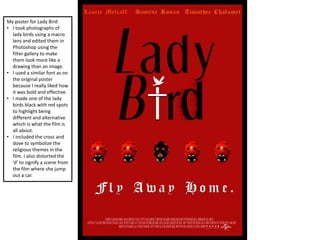
My poster for Lady Bird:
• I took photographs of
lady birds using a macro
lens and edited them in
Photoshop using the
filter gallery to make
them look more like a
drawing than an image.
• I used a similar font as on
the original poster
because I really liked how
it was bold and effective.
• I made one of the lady
birds black with red spots
to highlight being
different and alternative
which is what the film is
all about.
• I included the cross and
dove to symbolize the
religious themes in the
film. I also distorted the
‘d’ to signify a scene from
the film where she jump
out a car.
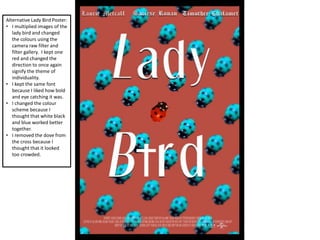
Alternative Lady Bird Poster:
• I multiplied images of the
lady bird and changed
the colours using the
camera raw filter and
filter gallery. I kept one
red and changed the
direction to once again
signify the theme of
individuality.
• I kept the same font
because I liked how bold
and eye catching it was.
• I changed the colour
scheme because I
thought that white black
and blue worked better
together.
• I removed the dove from
the cross because I
thought that it looked
too crowded.
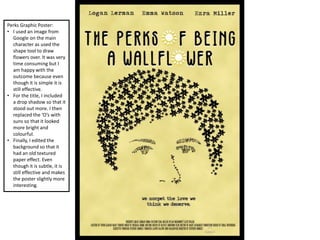
Perks Graphic Poster:
• I used an image from
Google on the main
character as used the
shape tool to draw
flowers over. It was very
time consuming but I
am happy with the
outcome because even
though it is simple it is
still effective.
• For the title, I included
a drop shadow so that it
stood out more. I then
replaced the ‘O’s with
suns so that it looked
more bright and
colourful.
• Finally, I edited the
background so that it
had an old textured
paper effect. Even
though it is subtle, it is
still effective and makes
the poster slightly more
interesting.
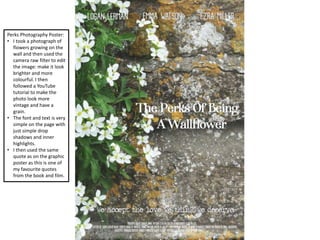
Perks Photography Poster:
• I took a photograph of
flowers growing on the
wall and then used the
camera raw filter to edit
the image: make it look
brighter and more
colourful. I then
followed a YouTube
tutorial to make the
photo look more
vintage and have a
grain.
• The font and text is very
simple on the page with
just simple drop
shadows and inner
highlights.
• I then used the same
quote as on the graphic
poster as this is one of
my favourite quotes
from the book and film.
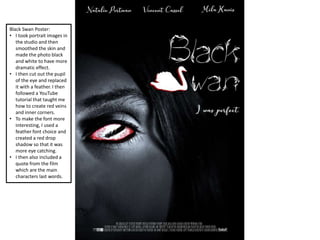
Black Swan Poster:
• I took portrait images in
the studio and then
smoothed the skin and
made the photo black
and white to have more
dramatic effect.
• I then cut out the pupil
of the eye and replaced
it with a feather. I then
followed a YouTube
tutorial that taught me
how to create red veins
and inner corners.
• To make the font more
interesting, I used a
feather font choice and
created a red drop
shadow so that it was
more eye catching.
• I then also included a
quote from the film
which are the main
characters last words.
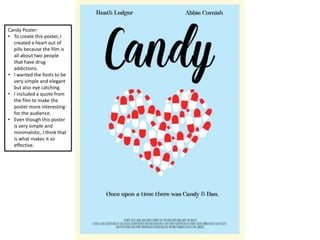
Candy Poster:
• To create this poster, I
created a heart out of
pills because the film is
all about two people
that have drug
addictions.
• I wanted the fonts to be
very simple and elegant
but also eye catching.
• I included a quote from
the film to make the
poster more interesting
for the audience.
• Even though this poster
is very simple and
minimalistic, I think that
is what makes it so
effective.
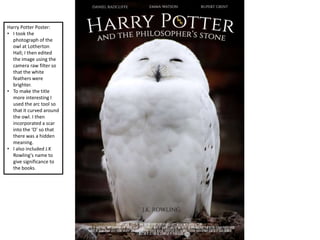
Harry Potter Poster:
• I took the
photograph of the
owl at Lotherton
Hall; I then edited
the image using the
camera raw filter so
that the white
feathers were
brighter.
• To make the title
more interesting I
used the arc tool so
that it curved around
the owl. I then
incorporated a scar
into the ‘O’ so that
there was a hidden
meaning.
• I also included J.K
Rowling's name to
give significance to
the books.
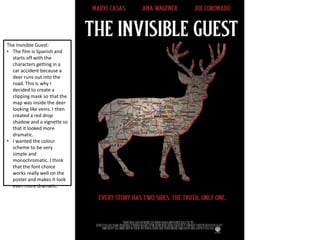
The Invisible Guest:
• The film is Spanish and
starts off with the
characters getting in a
car accident because a
deer runs out into the
road. This is why I
decided to create a
clipping mask so that the
map was inside the deer
looking like veins. I then
created a red drop
shadow and a vignette so
that it looked more
dramatic.
• I wanted the colour
scheme to be very
simple and
monochromatic. I think
that the font choice
works really well on the
poster and makes it look
even more dramatic.

Show

  • 1.
    My poster forLady Bird: • I took photographs of lady birds using a macro lens and edited them in Photoshop using the filter gallery to make them look more like a drawing than an image. • I used a similar font as on the original poster because I really liked how it was bold and effective. • I made one of the lady birds black with red spots to highlight being different and alternative which is what the film is all about. • I included the cross and dove to symbolize the religious themes in the film. I also distorted the ‘d’ to signify a scene from the film where she jump out a car.
  • 2.
    Alternative Lady BirdPoster: • I multiplied images of the lady bird and changed the colours using the camera raw filter and filter gallery. I kept one red and changed the direction to once again signify the theme of individuality. • I kept the same font because I liked how bold and eye catching it was. • I changed the colour scheme because I thought that white black and blue worked better together. • I removed the dove from the cross because I thought that it looked too crowded.
  • 3.
    Perks Graphic Poster: •I used an image from Google on the main character as used the shape tool to draw flowers over. It was very time consuming but I am happy with the outcome because even though it is simple it is still effective. • For the title, I included a drop shadow so that it stood out more. I then replaced the ‘O’s with suns so that it looked more bright and colourful. • Finally, I edited the background so that it had an old textured paper effect. Even though it is subtle, it is still effective and makes the poster slightly more interesting.
  • 4.
    Perks Photography Poster: •I took a photograph of flowers growing on the wall and then used the camera raw filter to edit the image: make it look brighter and more colourful. I then followed a YouTube tutorial to make the photo look more vintage and have a grain. • The font and text is very simple on the page with just simple drop shadows and inner highlights. • I then used the same quote as on the graphic poster as this is one of my favourite quotes from the book and film.
  • 5.
    Black Swan Poster: •I took portrait images in the studio and then smoothed the skin and made the photo black and white to have more dramatic effect. • I then cut out the pupil of the eye and replaced it with a feather. I then followed a YouTube tutorial that taught me how to create red veins and inner corners. • To make the font more interesting, I used a feather font choice and created a red drop shadow so that it was more eye catching. • I then also included a quote from the film which are the main characters last words.
  • 6.
    Candy Poster: • Tocreate this poster, I created a heart out of pills because the film is all about two people that have drug addictions. • I wanted the fonts to be very simple and elegant but also eye catching. • I included a quote from the film to make the poster more interesting for the audience. • Even though this poster is very simple and minimalistic, I think that is what makes it so effective.
  • 7.
    Harry Potter Poster: •I took the photograph of the owl at Lotherton Hall; I then edited the image using the camera raw filter so that the white feathers were brighter. • To make the title more interesting I used the arc tool so that it curved around the owl. I then incorporated a scar into the ‘O’ so that there was a hidden meaning. • I also included J.K Rowling's name to give significance to the books.
  • 8.
    The Invisible Guest: •The film is Spanish and starts off with the characters getting in a car accident because a deer runs out into the road. This is why I decided to create a clipping mask so that the map was inside the deer looking like veins. I then created a red drop shadow and a vignette so that it looked more dramatic. • I wanted the colour scheme to be very simple and monochromatic. I think that the font choice works really well on the poster and makes it look even more dramatic.