1
PHPConf Taiwan 2015
2
2015-11-01-a p45 VALUME -> VOLUME @date
3
4
5
6
7
machine
compose
8
9
10
鯨⿂搬運的貨櫃
在你還在打包的時候
貨櫃早就部署好了
你有想過這個嗎?
沒有
因為你只會想到你⾃⼰。
Foundation
11
Host OS
Hypervisor
Guest OS
…
Foundation
12
Linux Kernel
Linux Distribution FS
…
Foundation
13
Linux Kernel
Linux Distribution FS
…
Base Image FS
….
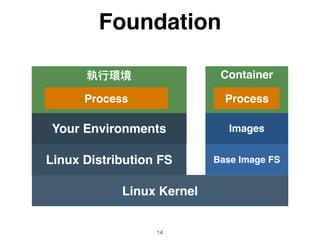
Foundation
14
Linux Kernel
Your Environments
Container
Linux Distribution FS Base Image FS
….
Foundation
15
Linux Kernel
Linux Distribution FS
Your Environments
Base Image FS
Images
Container
Process Process
Image
16
Linux Kernel
Base Image
Image Layer A
Image Layer B
Image
17
Linux Kernel
Base Image
Image Layer A
Image
Layer B
Image Layer
Image
Layer C
Image
Layer
Image
Layer
Image
18
Linux Kernel
Ubuntu
PHP 5.5
Apache
PHP 7
Nginx Apache Nginx
Image
19
Linux Kernel
Ubuntu
PHP 5.5
Apache
PHP 7
Nginx Apache Nginx
CentOS
Container
20
Images
Container
Container
Container
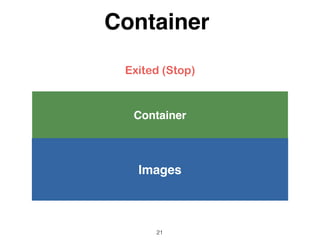
21
Images
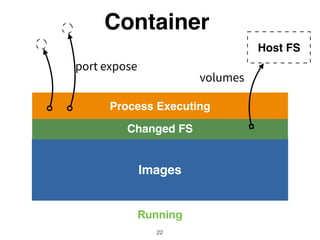
Process Executing
Running
Container
Container
22
Images
Exited (Stop)
Container
23
Images
Changed FS
Process Executing
Host FS
Running
Container
Container
24
Images
Changed FS
Host FS
Exited (Stop)
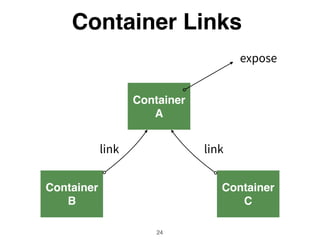
Container
A
Container Links
25
Container
B
Container
C
App
Container Links
26
SQL DB Redis
Links Contributes
27
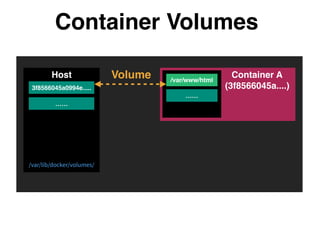
Container Volumes
3f8566045a0994e.....
Host /var/www/html
……
……
Container A
(3f8566045a....)
Volume
Container Volumes
Host /var/www/html
……
……
Volume
/var/www/html
……
Container B
Volume

From
3f8566045a0994e.....
Container A
(3f8566045a....)
Container Volumes
Host
……
3f8566045a0994e.....
Container Volumes
Custom Directory
Host /var/www/html
……
……
Container A
Volume
Volume Contributes
32
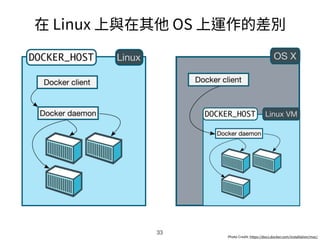
33
34
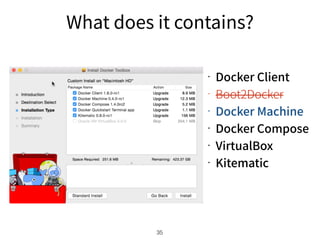
35
36
37
38
40
FROM php:7-apache

MAINTAINER<Ruoshi Ling <foo@bar.tw>


RUN apt-get update


ADD ./script.php /app/


ENTRYPOINT php

CMD ["app/script.php"]
41
Skills (1)
42
RUN apt-get update 

&& apt-get install -y 

wget  

curl 

php5 

&& echo "Installed basic packages"
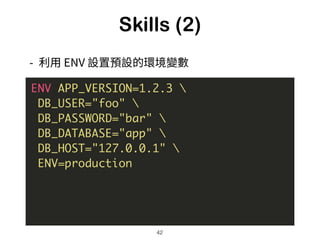
Skills (2)
43
ENV APP_VERSION=1.2.3 

DB_USER="foo" 

DB_PASSWORD="bar" 

DB_DATABASE="app" 

DB_HOST="127.0.0.1" 

ENV=production
Skills (3)
44
ENV SETUP_DIR="/var/cache/app"


COPY assets/setup/ ${SETUP_DIR}/


RUN bash ${SETUP_DIR}/install.sh
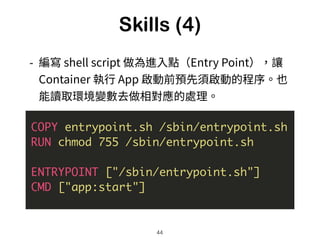
Skills (4)
45
COPY entrypoint.sh /sbin/entrypoint.sh

RUN chmod 755 /sbin/entrypoint.sh


ENTRYPOINT ["/sbin/entrypoint.sh"]

CMD ["app:start"]
Skills (5)
46
#!/bin/bash

ln -sf /data/db /var/lib/mysql

ln -sf /data/uploads /app/uploads
......

VOLUME ["/data"]

ENTRYPOINT ["/sbin/entrypoint.sh"]
Contributes
47
48
compose
swarm
machine
49
docker machine
50
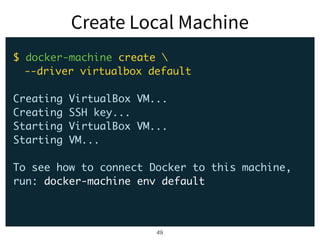
$ docker-machine create 
--driver virtualbox default
Creating VirtualBox VM...
Creating SSH key...
Starting VirtualBox VM...
Starting VM...
To see how to connect Docker to this machine,
run: docker-machine env default
51
$ docker-machine env default

export DOCKER_TLS_VERIFY="1"
export DOCKER_HOST="tcp://192.168.99.100:2376"
export DOCKER_CERT_PATH="/Users/fntsr/.docker/
machine/machines/default"
export DOCKER_MACHINE_NAME="default"
# Run this command to configure your shell:
# eval "$(docker-machine env default)"
$ eval "$(docker-machine env default)"
52
$ docker version
Client:
Version: 1.8.2
....
Server:
Version: 1.8.2
API version: 1.20
Go version: go1.4.2
Git commit: 0a8c2e3
Built: Thu Sep 10 19:10:10 UTC 2015
OS/Arch: linux/amd64
53
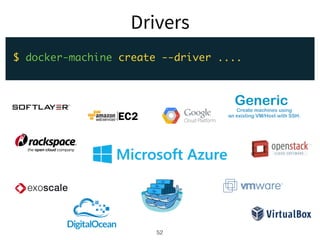
$ docker-machine create --driver ....
Generic
Create machines using
an existing VM/Host with SSH.
54
55
docker compose
56
自從會用 Docker
Compose 後,我
就不再下指令了呢。
認同請分享
身體健康、萬事如意、南無阿彌陀佛
有緣認識你真好
57
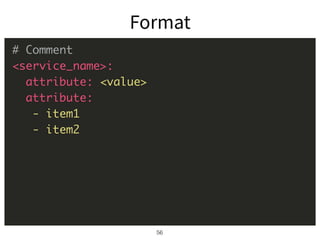
# Comment
<service_name>:
attribute: <value>
attribute:
- item1
- item2
58
# docker-compose.yml
web:
image: php:7-fpm
ports:
- "5566:80"
volumes:
- .:/app
59
# create container(s)
$ docker-compose up -d
# start container(s)
$ docker-compose start
# stop container(s)
$ docker-compose stop
# remove container(s)
$ docker-compose rm
60
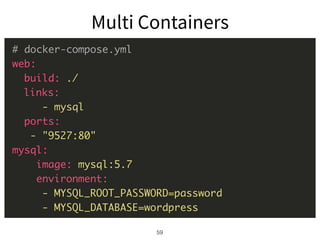
# docker-compose.yml
web:
build: ./
links:
- mysql
ports:
- "9527:80"
mysql:
image: mysql:5.7
environment:
- MYSQL_ROOT_PASSWORD=password
- MYSQL_DATABASE=wordpress
61
# development.yml
web:
extends:
file: docker-compose.yml
service: web
environment:
- ENV=development
- DB=sqlite3
Skills (1)
62
# docker-compose.yml
web:
....
environment:
- DB_USER=elephant

- DB_PASSWORD=ilovePHPfOEvEr

- DB_DATABASE=elephant
Skills (2)
63
# docker-compose.yml
web:
volumes:
- ./app:/app
db:
volumes:
- ./db:/var/lib/mysql
Skills (3)
64
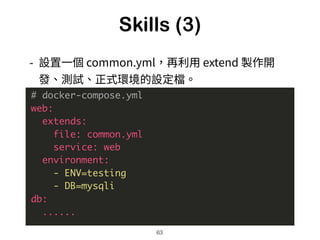
# docker-compose.yml
web:
extends:
file: common.yml
service: web
environment:
- ENV=testing
- DB=mysqli
db:
......
Skills (4)
65
# docker-compose.yml
web:
....
restart: always
`docker run`
66
67
68
69
web:
image: wordpress
links:
- db
environment:
- WORDPRESS_DB_PASSWORD=password
ports:
- "9527:80"
db:
image: mysql:5.7
environment:
- MYSQL_ROOT_PASSWORD=password
- MYSQL_DATABASE=wordpress
70
71
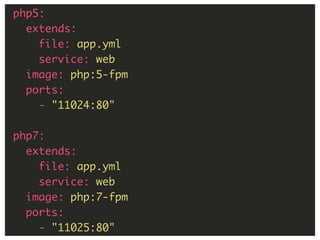
php5:
extends:
file: app.yml
service: web
image: php:5-fpm
ports:
- "11024:80"
php7:
extends:
file: app.yml
service: web
image: php:7-fpm
ports:
- "11025:80"
72
73

當專案漸趕,當遷移也不再那麼難 (Ship Your Projects with Docker EcoSystem)