Docker
AcademyPRO
Today’s
agenda
Multi-machine swarm
Alternatives
Moby Project
Tools
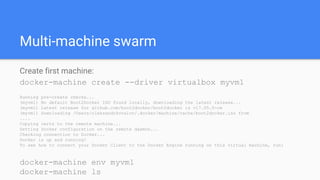
Multi-machine swarm
Create first machine:
docker-machine create --driver virtualbox myvm1
Running pre-create checks...
(myvm1) No default Boot2Docker ISO found locally, downloading the latest release...
(myvm1) Latest release for github.com/boot2docker/boot2docker is v17.05.0-ce
(myvm1) Downloading /Users/oleksandrkovalov/.docker/machine/cache/boot2docker.iso from
....
Copying certs to the remote machine...
Setting Docker configuration on the remote daemon...
Checking connection to Docker...
Docker is up and running!
To see how to connect your Docker Client to the Docker Engine running on this virtual machine, run:
docker-machine env myvm1
docker-machine ls
Boot2Docker
Boot2Docker is a lightweight Linux distribution made specifically to run Docker
containers. It runs completely from RAM, is a small ~38MB download and
boots in ~5s.
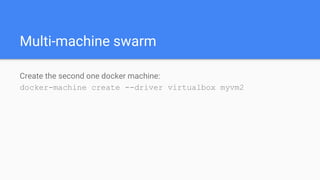
Multi-machine swarm
Create the second one docker machine:
docker-machine create --driver virtualbox myvm2
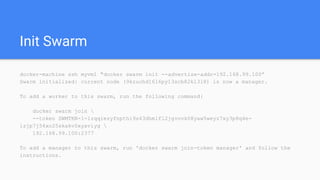
Init Swarm
docker-machine ssh myvm1 "docker swarm init --advertise-addr=192.168.99.100”
Swarm initialized: current node (9kzuohd16l6py13scb82kl3l8) is now a manager.
To add a worker to this swarm, run the following command:
docker swarm join 
--token SWMTKN-1-1zqqiezyfnpthi9s43dhmlfl2jgvovk08yaw5weyz7xy3p8q4e-
1zjp7j54xo25skakv0xyaviyg 
192.168.99.100:2377
To add a manager to this swarm, run 'docker swarm join-token manager' and follow the
instructions.
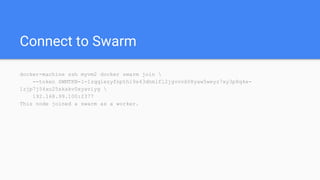
Connect to Swarm
docker-machine ssh myvm2 docker swarm join 
--token SWMTKN-1-1zqqiezyfnpthi9s43dhmlfl2jgvovk08yaw5weyz7xy3p8q4e-
1zjp7j54xo25skakv0xyaviyg 
192.168.99.100:2377
This node joined a swarm as a worker.
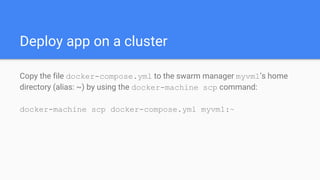
Deploy app on a cluster
Copy the file docker-compose.yml to the swarm manager myvm1’s home
directory (alias: ~) by using the docker-machine scp command:
docker-machine scp docker-compose.yml myvm1:~
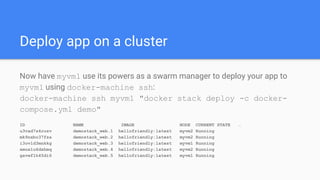
Deploy app on a cluster
Now have myvm1 use its powers as a swarm manager to deploy your app to
myvm1 using docker-machine ssh:
docker-machine ssh myvm1 "docker stack deploy -c docker-
compose.yml demo"
ID NAME IMAGE NODE CURRENT STATE …
u3vad7s4ruzv demostack_web.1 hellofriendly:latest myvm2 Running
mk9nxbc37fza demostack_web.2 hellofriendly:latest myvm2 Running
i3ovld3mnkkg demostack_web.3 hellofriendly:latest myvm1 Running
xmux1u6dxhmq demostack_web.4 hellofriendly:latest myvm2 Running
gavwf1h45di6 demostack_web.5 hellofriendly:latest myvm1 Running
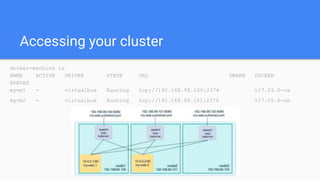
Accessing your cluster
docker-machine ls
NAME ACTIVE DRIVER STATE URL SWARM DOCKER
ERRORS
myvm1 - virtualbox Running tcp://192.168.99.100:2376 v17.05.0-ce
myvm2 - virtualbox Running tcp://192.168.99.101:2376 v17.05.0-ce
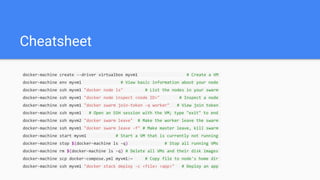
Cheatsheet
docker-machine create --driver virtualbox myvm1 # Create a VM
docker-machine env myvm1 # View basic information about your node
docker-machine ssh myvm1 "docker node ls" # List the nodes in your swarm
docker-machine ssh myvm1 "docker node inspect <node ID>" # Inspect a node
docker-machine ssh myvm1 "docker swarm join-token -q worker" # View join token
docker-machine ssh myvm1 # Open an SSH session with the VM; type "exit" to end
docker-machine ssh myvm2 "docker swarm leave" # Make the worker leave the swarm
docker-machine ssh myvm1 "docker swarm leave -f" # Make master leave, kill swarm
docker-machine start myvm1 # Start a VM that is currently not running
docker-machine stop $(docker-machine ls -q) # Stop all running VMs
docker-machine rm $(docker-machine ls -q) # Delete all VMs and their disk images
docker-machine scp docker-compose.yml myvm1:~ # Copy file to node's home dir
docker-machine ssh myvm1 "docker stack deploy -c <file> <app>" # Deploy an app
Docker Swarm
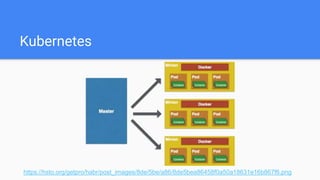
Kubernetes
Kubernetes
https://hsto.org/getpro/habr/post_images/8de/5be/a86/8de5bea86458f0a50a18631e16b867f6.png
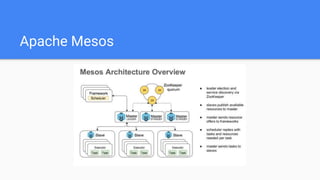
Apache Mesos
Apache Mesos
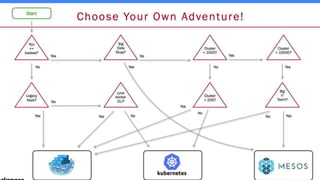
Choose right instrument
Let’s Google!
https://www.google.com.ua/search?q=github+docker%2Fdocker&oq=github+f
ocker%2Fd&aqs=chrome.1.69i57j0l5.5880j0j7&sourceid=chrome&ie=UTF-8
Moby Project
Docker (the company) decided to differentiate Docker (the commercial
software products Docker CE and Docker EE) from Docker (the open source
project).
So at DockerCon in Austin, Texas, on Tuesday, the container bellwether
announced the Moby Project – a new name for the open-source software from
which the commercial versions of Docker are derived. Moby also serves as a
starting point to create customized container software for specific
infrastructure.
Moby Project
https://twitter.com/solomonstre/status/855918630915133440/photo/1?ref_sr
c=twsrc%5Etfw&ref_url=http%3A%2F%2Fwww.networkworld.com%2Farticle%2
F3193904%2Fopen-source-tools%2Fwhat-is-dockers-moby-project.html
Moby Project
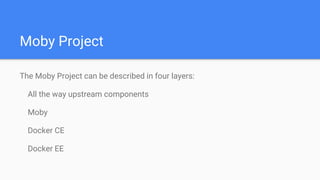
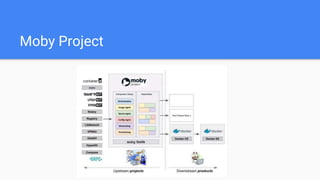
The Moby Project can be described in four layers:
All the way upstream components
Moby
Docker CE
Docker EE
Moby Project
Moby Project
Users unaffected. Users will still interact with Docker in the same way.
Application developers looking for an easy way to run their applications in
containers may look to Docker CE.
Enterprise IT looking for a ready-to-use, commercially supported container
platform may look to Docker EE.
Nothing changes for these users. The command line remains the same. Docker
can now leverage the ecosystem to innovate faster for them.
System builders looking to leverage components of the Moby Project may
Moby Summary
https://mobyproject.org/#moby-and-docker
….
The Moby project provides a command-line tool called moby which assembles
components. Currently it assembles bootable OS images, but soon it will also
be used by Docker for assembling Docker out of components, many of which
will be independent projects.
….
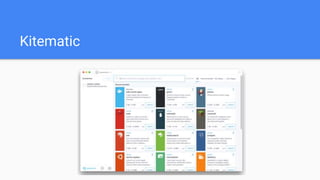
Kitematic
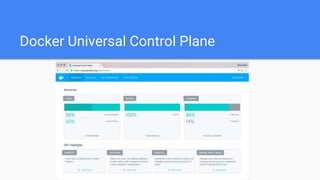
Docker Universal Control Plane
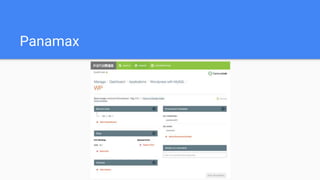
Panamax
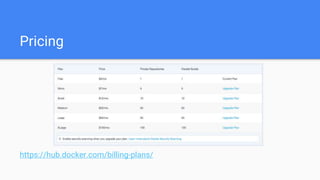
Pricing
https://hub.docker.com/billing-plans/
Any questions?
The end
of the course :)

Academy PRO: Docker. Lecture 4

  • 1.
  • 2.
  • 3.
    Multi-machine swarm Create firstmachine: docker-machine create --driver virtualbox myvm1 Running pre-create checks... (myvm1) No default Boot2Docker ISO found locally, downloading the latest release... (myvm1) Latest release for github.com/boot2docker/boot2docker is v17.05.0-ce (myvm1) Downloading /Users/oleksandrkovalov/.docker/machine/cache/boot2docker.iso from .... Copying certs to the remote machine... Setting Docker configuration on the remote daemon... Checking connection to Docker... Docker is up and running! To see how to connect your Docker Client to the Docker Engine running on this virtual machine, run: docker-machine env myvm1 docker-machine ls
  • 4.
    Boot2Docker Boot2Docker is alightweight Linux distribution made specifically to run Docker containers. It runs completely from RAM, is a small ~38MB download and boots in ~5s.
  • 5.
    Multi-machine swarm Create thesecond one docker machine: docker-machine create --driver virtualbox myvm2
  • 6.
    Init Swarm docker-machine sshmyvm1 "docker swarm init --advertise-addr=192.168.99.100” Swarm initialized: current node (9kzuohd16l6py13scb82kl3l8) is now a manager. To add a worker to this swarm, run the following command: docker swarm join --token SWMTKN-1-1zqqiezyfnpthi9s43dhmlfl2jgvovk08yaw5weyz7xy3p8q4e- 1zjp7j54xo25skakv0xyaviyg 192.168.99.100:2377 To add a manager to this swarm, run 'docker swarm join-token manager' and follow the instructions.
  • 7.
    Connect to Swarm docker-machinessh myvm2 docker swarm join --token SWMTKN-1-1zqqiezyfnpthi9s43dhmlfl2jgvovk08yaw5weyz7xy3p8q4e- 1zjp7j54xo25skakv0xyaviyg 192.168.99.100:2377 This node joined a swarm as a worker.
  • 8.
    Deploy app ona cluster Copy the file docker-compose.yml to the swarm manager myvm1’s home directory (alias: ~) by using the docker-machine scp command: docker-machine scp docker-compose.yml myvm1:~
  • 9.
    Deploy app ona cluster Now have myvm1 use its powers as a swarm manager to deploy your app to myvm1 using docker-machine ssh: docker-machine ssh myvm1 "docker stack deploy -c docker- compose.yml demo" ID NAME IMAGE NODE CURRENT STATE … u3vad7s4ruzv demostack_web.1 hellofriendly:latest myvm2 Running mk9nxbc37fza demostack_web.2 hellofriendly:latest myvm2 Running i3ovld3mnkkg demostack_web.3 hellofriendly:latest myvm1 Running xmux1u6dxhmq demostack_web.4 hellofriendly:latest myvm2 Running gavwf1h45di6 demostack_web.5 hellofriendly:latest myvm1 Running
  • 10.
    Accessing your cluster docker-machinels NAME ACTIVE DRIVER STATE URL SWARM DOCKER ERRORS myvm1 - virtualbox Running tcp://192.168.99.100:2376 v17.05.0-ce myvm2 - virtualbox Running tcp://192.168.99.101:2376 v17.05.0-ce
  • 11.
    Cheatsheet docker-machine create --drivervirtualbox myvm1 # Create a VM docker-machine env myvm1 # View basic information about your node docker-machine ssh myvm1 "docker node ls" # List the nodes in your swarm docker-machine ssh myvm1 "docker node inspect <node ID>" # Inspect a node docker-machine ssh myvm1 "docker swarm join-token -q worker" # View join token docker-machine ssh myvm1 # Open an SSH session with the VM; type "exit" to end docker-machine ssh myvm2 "docker swarm leave" # Make the worker leave the swarm docker-machine ssh myvm1 "docker swarm leave -f" # Make master leave, kill swarm docker-machine start myvm1 # Start a VM that is currently not running docker-machine stop $(docker-machine ls -q) # Stop all running VMs docker-machine rm $(docker-machine ls -q) # Delete all VMs and their disk images docker-machine scp docker-compose.yml myvm1:~ # Copy file to node's home dir docker-machine ssh myvm1 "docker stack deploy -c <file> <app>" # Deploy an app
  • 12.
  • 13.
  • 14.
  • 15.
  • 16.
  • 17.
  • 19.
  • 20.
    Moby Project Docker (thecompany) decided to differentiate Docker (the commercial software products Docker CE and Docker EE) from Docker (the open source project). So at DockerCon in Austin, Texas, on Tuesday, the container bellwether announced the Moby Project – a new name for the open-source software from which the commercial versions of Docker are derived. Moby also serves as a starting point to create customized container software for specific infrastructure.
  • 21.
  • 22.
    Moby Project The MobyProject can be described in four layers: All the way upstream components Moby Docker CE Docker EE
  • 23.
  • 24.
    Moby Project Users unaffected.Users will still interact with Docker in the same way. Application developers looking for an easy way to run their applications in containers may look to Docker CE. Enterprise IT looking for a ready-to-use, commercially supported container platform may look to Docker EE. Nothing changes for these users. The command line remains the same. Docker can now leverage the ecosystem to innovate faster for them. System builders looking to leverage components of the Moby Project may
  • 25.
    Moby Summary https://mobyproject.org/#moby-and-docker …. The Mobyproject provides a command-line tool called moby which assembles components. Currently it assembles bootable OS images, but soon it will also be used by Docker for assembling Docker out of components, many of which will be independent projects. ….
  • 26.
  • 27.
  • 28.
  • 29.
  • 30.
  • 31.
    The end of thecourse :)