docker 原理與實作
果凍
簡介
● 任職於迎廣科技
○ python
○ openstack
● http://about.me/ya790206
● http://blog.blackwhite.tw/
● https://github.com/ya790206/call_seq
Agenda
● linux kernel namespace
● seccomp
● cgroup
● lxc
● docker
docker
● lightweight,
portable, self-
sufficient containers.
● the process running
in the container is
isolated from the
process running in
the other container.
Linux startup process
● Linux startup process
○ Boot loader ->
○ Kernel ->
○ Init process
● Difference between
Linux distros:
○ package manager
○ init
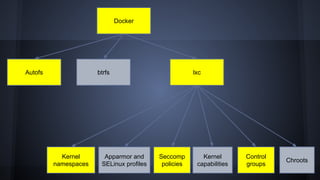
Docker
Autofs lxc
Kernel
namespaces
Apparmor and
SELinux profiles
Seccomp
policies
Control
groups
Kernel
capabilities
Chroots
btrfs
kernel namespace
● The purpose of each namespace is to wrap
a particular global system resource in an
abstraction that makes it appear to the
processes within the namespace that they
have their own isolated instance of the
global resource.
● Private view
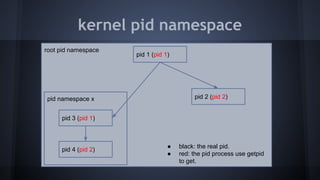
kernel pid namespace
root pid namespace
pid 1 (pid 1)
pid namespace x pid 2 (pid 2)
pid 3 (pid 1)
pid 4 (pid 2)
● black: the real pid.
● red: the pid process use getpid
to get.
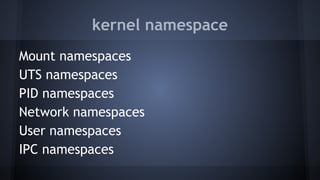
kernel namespace
Mount namespaces
UTS namespaces
PID namespaces
Network namespaces
User namespaces
IPC namespaces
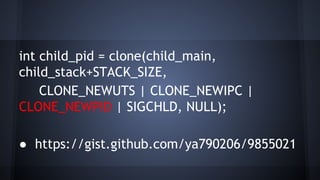
int child_pid = clone(child_main,
child_stack+STACK_SIZE,
CLONE_NEWUTS | CLONE_NEWIPC |
CLONE_NEWPID | SIGCHLD, NULL);
● https://gist.github.com/ya790206/9855021
尾巴沒藏好
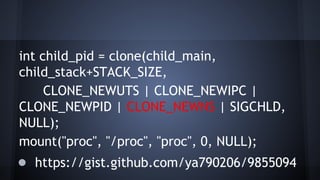
int child_pid = clone(child_main,
child_stack+STACK_SIZE,
CLONE_NEWUTS | CLONE_NEWIPC |
CLONE_NEWPID | CLONE_NEWNS | SIGCHLD,
NULL);
mount("proc", "/proc", "proc", 0, NULL);
● https://gist.github.com/ya790206/9855094
seccomp
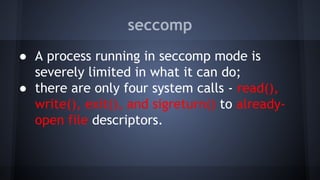
● A process running in seccomp mode is
severely limited in what it can do;
● there are only four system calls - read(),
write(), exit(), and sigreturn() to already-
open file descriptors.
libseccomp example
https://gist.github.
com/ya790206/9579145
cgroup
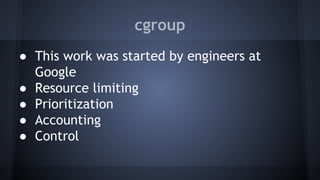
● This work was started by engineers at
Google
● Resource limiting
● Prioritization
● Accounting
● Control
cgroup
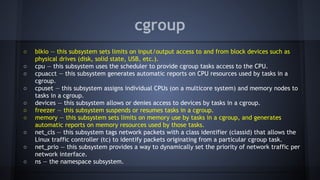
○ blkio — this subsystem sets limits on input/output access to and from block devices such as
physical drives (disk, solid state, USB, etc.).
○ cpu — this subsystem uses the scheduler to provide cgroup tasks access to the CPU.
○ cpuacct — this subsystem generates automatic reports on CPU resources used by tasks in a
cgroup.
○ cpuset — this subsystem assigns individual CPUs (on a multicore system) and memory nodes to
tasks in a cgroup.
○ devices — this subsystem allows or denies access to devices by tasks in a cgroup.
○ freezer — this subsystem suspends or resumes tasks in a cgroup.
○ memory — this subsystem sets limits on memory use by tasks in a cgroup, and generates
automatic reports on memory resources used by those tasks.

○ net_cls — this subsystem tags network packets with a class identifier (classid) that allows the
Linux traffic controller (tc) to identify packets originating from a particular cgroup task.
○ net_prio — this subsystem provides a way to dynamically set the priority of network traffic per
network interface.
○ ns — the namespace subsystem.
cgroup freezer
● The cgroup freezer is useful to batch job
management system which start
and stop sets of tasks in order to schedule
the resources of a machine
according to the desires of a system
administrator.
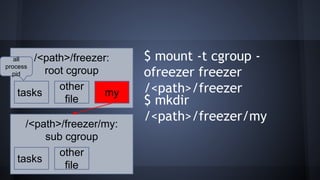
$ mount -t cgroup -
ofreezer freezer
/<path>/freezer
/<path>/freezer:
root cgroup
tasks
other
file
my
/<path>/freezer/my:
sub cgroup
tasks
other
file
$ mkdir
/<path>/freezer/my
all
process
pid
cgroup freezer
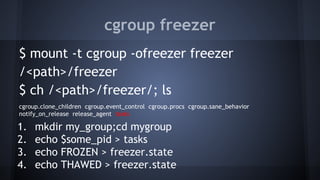
$ mount -t cgroup -ofreezer freezer
/<path>/freezer
$ ch /<path>/freezer/; ls
cgroup.clone_children cgroup.event_control cgroup.procs cgroup.sane_behavior
notify_on_release release_agent tasks
1. mkdir my_group;cd mygroup
2. echo $some_pid > tasks
3. echo FROZEN > freezer.state
4. echo THAWED > freezer.state
other cgroup
● memory cgroup:
○ limit process memoroy usage.
○ show various statistics
● blkio cgroup:
○ change widget
○ show various statistics
lxc
● LXC is a userspace interface for the Linux
kernel containment features.
● Container templates
● A set of standard tools to control the
containers
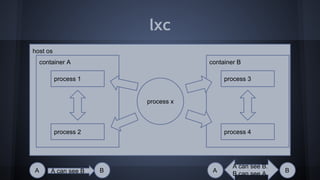
lxc
host os
container A
process 1
process 2
container B
process 3
process 4
process x
A can see BA B A B
A can see B.
B can see A.
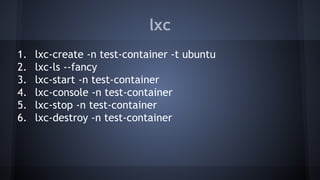
lxc
1. lxc-create -n test-container -t ubuntu
2. lxc-ls --fancy
3. lxc-start -n test-container
4. lxc-console -n test-container
5. lxc-stop -n test-container
6. lxc-destroy -n test-container
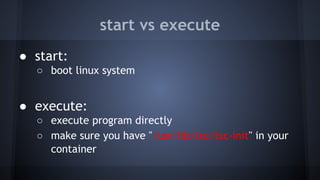
start vs execute
● start:
○ boot linux system
● execute:
○ execute program directly
○ make sure you have "/usr/lib/lxc/lxc-init" in your
container
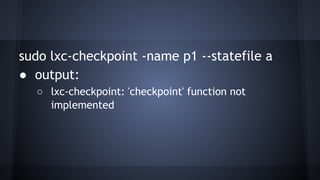
sudo lxc-checkpoint -name p1 --statefile a
● output:
○ lxc-checkpoint: 'checkpoint' function not
implemented
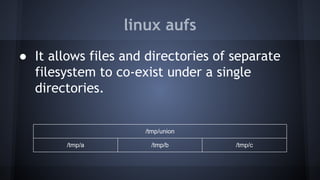
linux aufs
● It allows files and directories of separate
filesystem to co-exist under a single
directories.
/tmp/union
/tmp/a /tmp/b /tmp/c
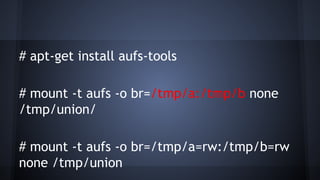
# apt-get install aufs-tools
# mount -t aufs -o br=/tmp/a:/tmp/b none
/tmp/union/
# mount -t aufs -o br=/tmp/a=rw:/tmp/b=rw
none /tmp/union
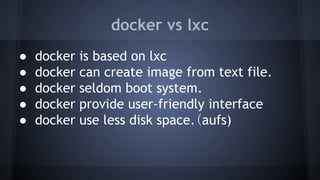
docker vs lxc
● docker is based on lxc
● docker can create image from text file.
● docker seldom boot system.
● docker provide user-friendly interface
● docker use less disk space.(aufs)
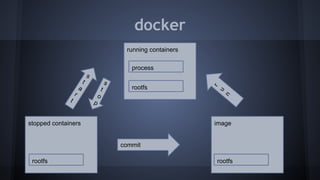
docker
running containers
process
rootfs
stopped containers
rootfs
image
commit
r
u
n
s
t
o
p
s
t
a
r
t
rootfs
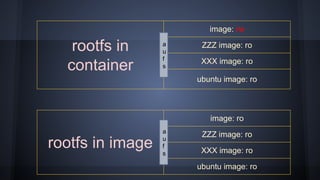
rootfs in
container
image: rw
ZZZ image: ro
XXX image: ro
ubuntu image: ro
rootfs in image
image: ro
ZZZ image: ro
XXX image: ro
ubuntu image: ro
a
u
f
s
a
u
f
s
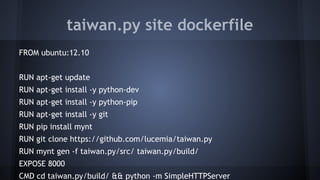
taiwan.py site dockerfile
FROM ubuntu:12.10
RUN apt-get update
RUN apt-get install -y python-dev
RUN apt-get install -y python-pip
RUN apt-get install -y git
RUN pip install mynt
RUN git clone https://github.com/lucemia/taiwan.py
RUN mynt gen -f taiwan.py/src/ taiwan.py/build/
EXPOSE 8000
CMD cd taiwan.py/build/ && python -m SimpleHTTPServer
How to run
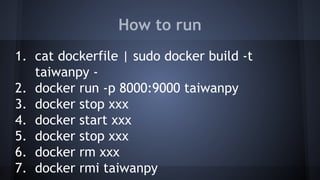
1. cat dockerfile | sudo docker build -t
taiwanpy -
2. docker run -p 8000:9000 taiwanpy
3. docker stop xxx
4. docker start xxx
5. docker stop xxx
6. docker rm xxx
7. docker rmi taiwanpy
simple docker shell
● https://github.
com/ya790206/misc_tools/tree/ma
ster/docker_wrapper
Summary
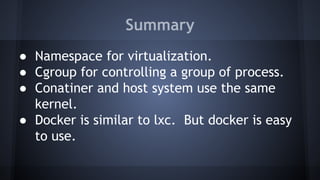
● Namespace for virtualization.
● Cgroup for controlling a group of process.
● Conatiner and host system use the same
kernel.
● Docker is similar to lxc. But docker is easy
to use.
Question
Thank you
參考資料 - kernel namespace
● Namespaces in operation, part 1:
namespaces overview
● PaaS under the hood, episode 1: kernel
namespaces
● Introduction to Linux namespaces – Part 1:
UTS
參考資料 - cgruop
● cgroup
● http://en.wikipedia.
org/wiki/Cgroups
參考書目
● Linux Kernel Hacks:改善效能、提昇開發效率
及節能的技巧與工具

Docker 原理與實作

  • 1.
  • 2.
    簡介 ● 任職於迎廣科技 ○ python ○openstack ● http://about.me/ya790206 ● http://blog.blackwhite.tw/ ● https://github.com/ya790206/call_seq
  • 3.
    Agenda ● linux kernelnamespace ● seccomp ● cgroup ● lxc ● docker
  • 4.
    docker ● lightweight, portable, self- sufficientcontainers. ● the process running in the container is isolated from the process running in the other container.
  • 5.
    Linux startup process ●Linux startup process ○ Boot loader -> ○ Kernel -> ○ Init process ● Difference between Linux distros: ○ package manager ○ init
  • 6.
    Docker Autofs lxc Kernel namespaces Apparmor and SELinuxprofiles Seccomp policies Control groups Kernel capabilities Chroots btrfs
  • 7.
    kernel namespace ● Thepurpose of each namespace is to wrap a particular global system resource in an abstraction that makes it appear to the processes within the namespace that they have their own isolated instance of the global resource. ● Private view
  • 8.
    kernel pid namespace rootpid namespace pid 1 (pid 1) pid namespace x pid 2 (pid 2) pid 3 (pid 1) pid 4 (pid 2) ● black: the real pid. ● red: the pid process use getpid to get.
  • 9.
    kernel namespace Mount namespaces UTSnamespaces PID namespaces Network namespaces User namespaces IPC namespaces
  • 10.
    int child_pid =clone(child_main, child_stack+STACK_SIZE, CLONE_NEWUTS | CLONE_NEWIPC | CLONE_NEWPID | SIGCHLD, NULL); ● https://gist.github.com/ya790206/9855021
  • 11.
  • 12.
    int child_pid =clone(child_main, child_stack+STACK_SIZE, CLONE_NEWUTS | CLONE_NEWIPC | CLONE_NEWPID | CLONE_NEWNS | SIGCHLD, NULL); mount("proc", "/proc", "proc", 0, NULL); ● https://gist.github.com/ya790206/9855094
  • 13.
    seccomp ● A processrunning in seccomp mode is severely limited in what it can do; ● there are only four system calls - read(), write(), exit(), and sigreturn() to already- open file descriptors.
  • 14.
  • 15.
    cgroup ● This workwas started by engineers at Google ● Resource limiting ● Prioritization ● Accounting ● Control
  • 16.
    cgroup ○ blkio —this subsystem sets limits on input/output access to and from block devices such as physical drives (disk, solid state, USB, etc.). ○ cpu — this subsystem uses the scheduler to provide cgroup tasks access to the CPU. ○ cpuacct — this subsystem generates automatic reports on CPU resources used by tasks in a cgroup. ○ cpuset — this subsystem assigns individual CPUs (on a multicore system) and memory nodes to tasks in a cgroup. ○ devices — this subsystem allows or denies access to devices by tasks in a cgroup. ○ freezer — this subsystem suspends or resumes tasks in a cgroup. ○ memory — this subsystem sets limits on memory use by tasks in a cgroup, and generates automatic reports on memory resources used by those tasks. ○ net_cls — this subsystem tags network packets with a class identifier (classid) that allows the Linux traffic controller (tc) to identify packets originating from a particular cgroup task. ○ net_prio — this subsystem provides a way to dynamically set the priority of network traffic per network interface. ○ ns — the namespace subsystem.
  • 17.
    cgroup freezer ● Thecgroup freezer is useful to batch job management system which start and stop sets of tasks in order to schedule the resources of a machine according to the desires of a system administrator.
  • 18.
    $ mount -tcgroup - ofreezer freezer /<path>/freezer /<path>/freezer: root cgroup tasks other file my /<path>/freezer/my: sub cgroup tasks other file $ mkdir /<path>/freezer/my all process pid
  • 19.
    cgroup freezer $ mount-t cgroup -ofreezer freezer /<path>/freezer $ ch /<path>/freezer/; ls cgroup.clone_children cgroup.event_control cgroup.procs cgroup.sane_behavior notify_on_release release_agent tasks 1. mkdir my_group;cd mygroup 2. echo $some_pid > tasks 3. echo FROZEN > freezer.state 4. echo THAWED > freezer.state
  • 20.
    other cgroup ● memorycgroup: ○ limit process memoroy usage. ○ show various statistics ● blkio cgroup: ○ change widget ○ show various statistics
  • 21.
    lxc ● LXC isa userspace interface for the Linux kernel containment features. ● Container templates ● A set of standard tools to control the containers
  • 22.
    lxc host os container A process1 process 2 container B process 3 process 4 process x A can see BA B A B A can see B. B can see A.
  • 23.
    lxc 1. lxc-create -ntest-container -t ubuntu 2. lxc-ls --fancy 3. lxc-start -n test-container 4. lxc-console -n test-container 5. lxc-stop -n test-container 6. lxc-destroy -n test-container
  • 24.
    start vs execute ●start: ○ boot linux system ● execute: ○ execute program directly ○ make sure you have "/usr/lib/lxc/lxc-init" in your container
  • 25.
    sudo lxc-checkpoint -namep1 --statefile a ● output: ○ lxc-checkpoint: 'checkpoint' function not implemented
  • 26.
    linux aufs ● Itallows files and directories of separate filesystem to co-exist under a single directories. /tmp/union /tmp/a /tmp/b /tmp/c
  • 27.
    # apt-get installaufs-tools # mount -t aufs -o br=/tmp/a:/tmp/b none /tmp/union/ # mount -t aufs -o br=/tmp/a=rw:/tmp/b=rw none /tmp/union
  • 28.
    docker vs lxc ●docker is based on lxc ● docker can create image from text file. ● docker seldom boot system. ● docker provide user-friendly interface ● docker use less disk space.(aufs)
  • 29.
  • 30.
    rootfs in container image: rw ZZZimage: ro XXX image: ro ubuntu image: ro rootfs in image image: ro ZZZ image: ro XXX image: ro ubuntu image: ro a u f s a u f s
  • 31.
    taiwan.py site dockerfile FROMubuntu:12.10 RUN apt-get update RUN apt-get install -y python-dev RUN apt-get install -y python-pip RUN apt-get install -y git RUN pip install mynt RUN git clone https://github.com/lucemia/taiwan.py RUN mynt gen -f taiwan.py/src/ taiwan.py/build/ EXPOSE 8000 CMD cd taiwan.py/build/ && python -m SimpleHTTPServer
  • 32.
    How to run 1.cat dockerfile | sudo docker build -t taiwanpy - 2. docker run -p 8000:9000 taiwanpy 3. docker stop xxx 4. docker start xxx 5. docker stop xxx 6. docker rm xxx 7. docker rmi taiwanpy
  • 33.
    simple docker shell ●https://github. com/ya790206/misc_tools/tree/ma ster/docker_wrapper
  • 34.
    Summary ● Namespace forvirtualization. ● Cgroup for controlling a group of process. ● Conatiner and host system use the same kernel. ● Docker is similar to lxc. But docker is easy to use.
  • 35.
  • 36.
  • 37.
    參考資料 - kernelnamespace ● Namespaces in operation, part 1: namespaces overview ● PaaS under the hood, episode 1: kernel namespaces ● Introduction to Linux namespaces – Part 1: UTS
  • 38.
    參考資料 - cgruop ●cgroup ● http://en.wikipedia. org/wiki/Cgroups
  • 39.
    參考書目 ● Linux KernelHacks:改善效能、提昇開發效率 及節能的技巧與工具