

Mind to Matter: A way to model how you work in SharePointJames TramelSolutions ArchitectPlanet Technologies
Why Listen to me?Many, many SharePoint implementations and upgradesA lot of non-cs EducationMCTS, MCITP SP 2010Business experienceDB, Dev, Inf, and Admin training, education and experience
What is SharePointWhat does it do?How does it work?Why does it work?Have you ever seen it not work?
Collaboration Gone WrongContent ChaosEmail as personal CMSIslands of informationCan’t find anything, Don’t learn anythingJust like a web version of my file shares and paperworkCollaboration hasn’t changedInstitutional memory not enhancedHow did they do that?
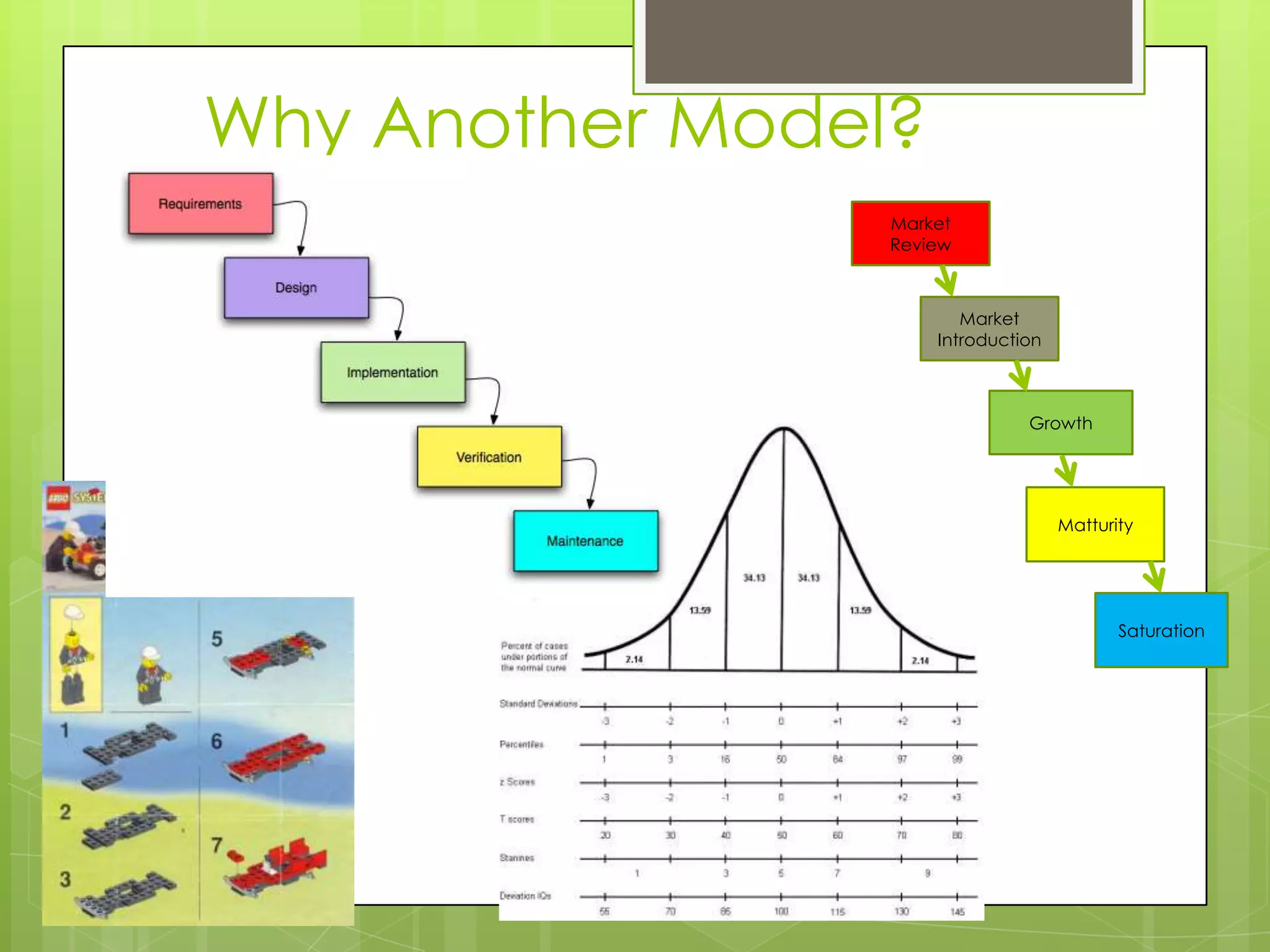
Why Another Model?MarketReviewMarket IntroductionGrowthMatturitySaturation
How to Model SharePointDoes it need a model?  Why?What kind of model?How is the model developed?How is the model revisited?
A SharePoint modelInformation architecture, information management and information governance are the cornerstonesBuilt around youThese ideas and planning them are in just about every book on SharePoint
Information Architecture, Management and GovernanceWhat is IA?What is IM?What is IG?
Formal DefinitionsInformation architecture (IA) is the art of expressing a model or concept of information used in activities that require explicit details of complex systemsInformation management (IM) is the collection and management of information from one or more sources and the distribution of that information to one or more audiencesInformation Governance is the set of policies, role, responsibilities, and processes that guide, direct, and control how an organization's business divisions and IT teams cooperate to achieve business goals.
IA ExamplesThe Anatomy of a Large-Scale Hypertextual Web Search EngineFaceted Metadata for Image Search and BrowsingFacetag: Integrating Bottom-up and Top-down Classification in a Social Tagging System
Who does IA and When?“Here's what I've come to understand: What IA has been about from the beginning is designing context with hyperlinks. That is, shaping contextual experience with connections afforded by the new, digital layer of the web.” Answer:  You do
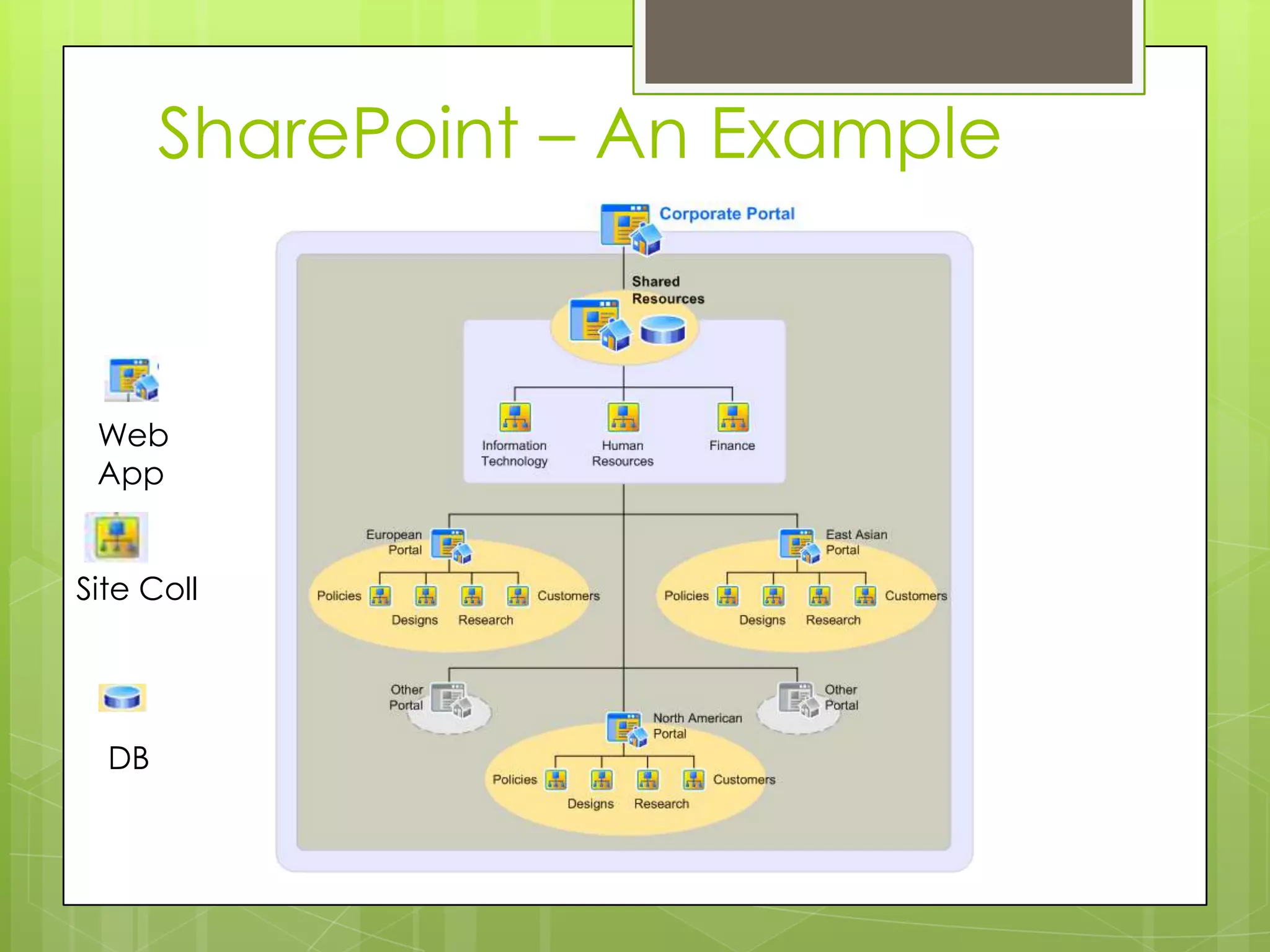
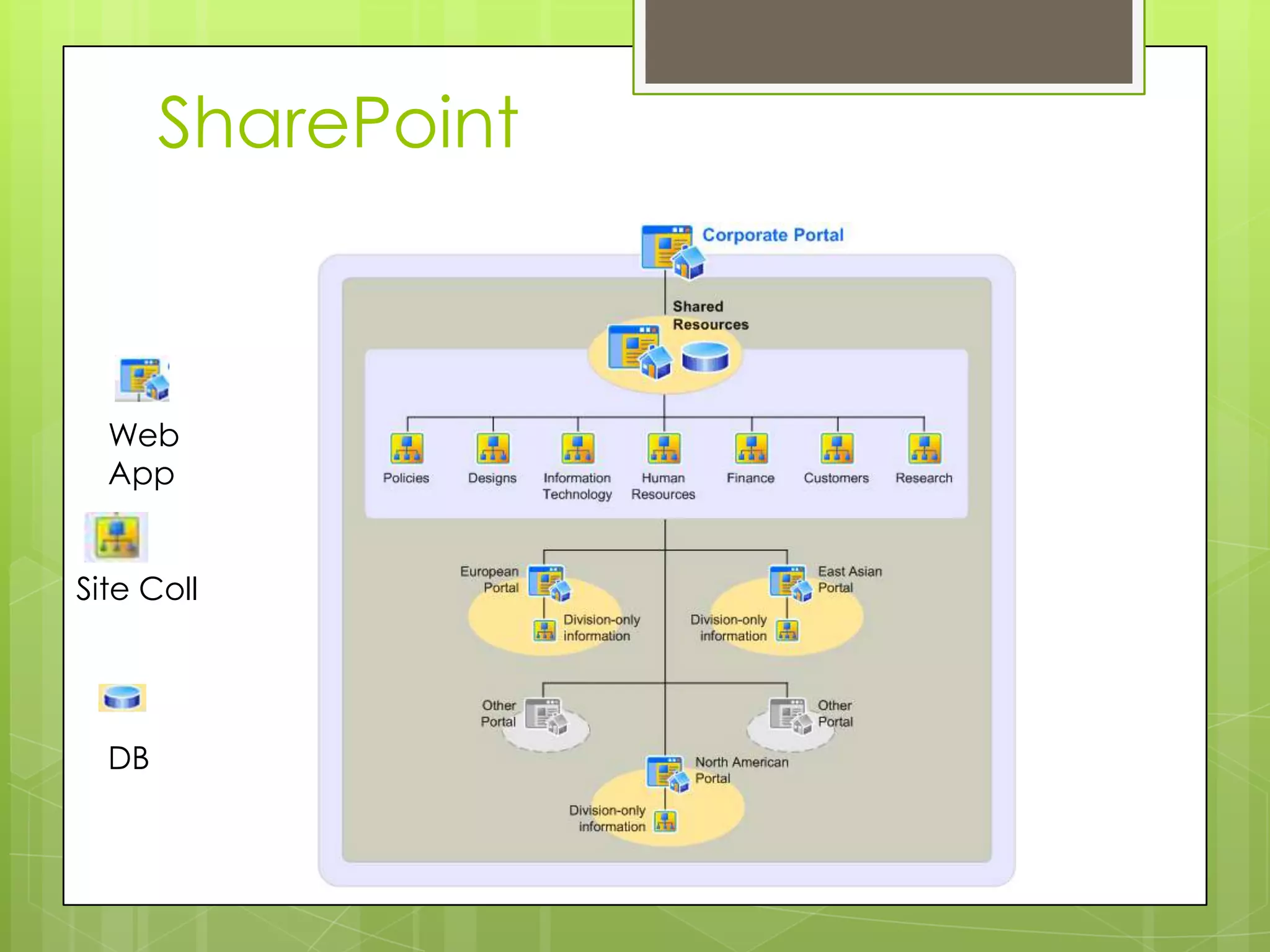
SharePoint – An ExampleWeb AppSite CollDB
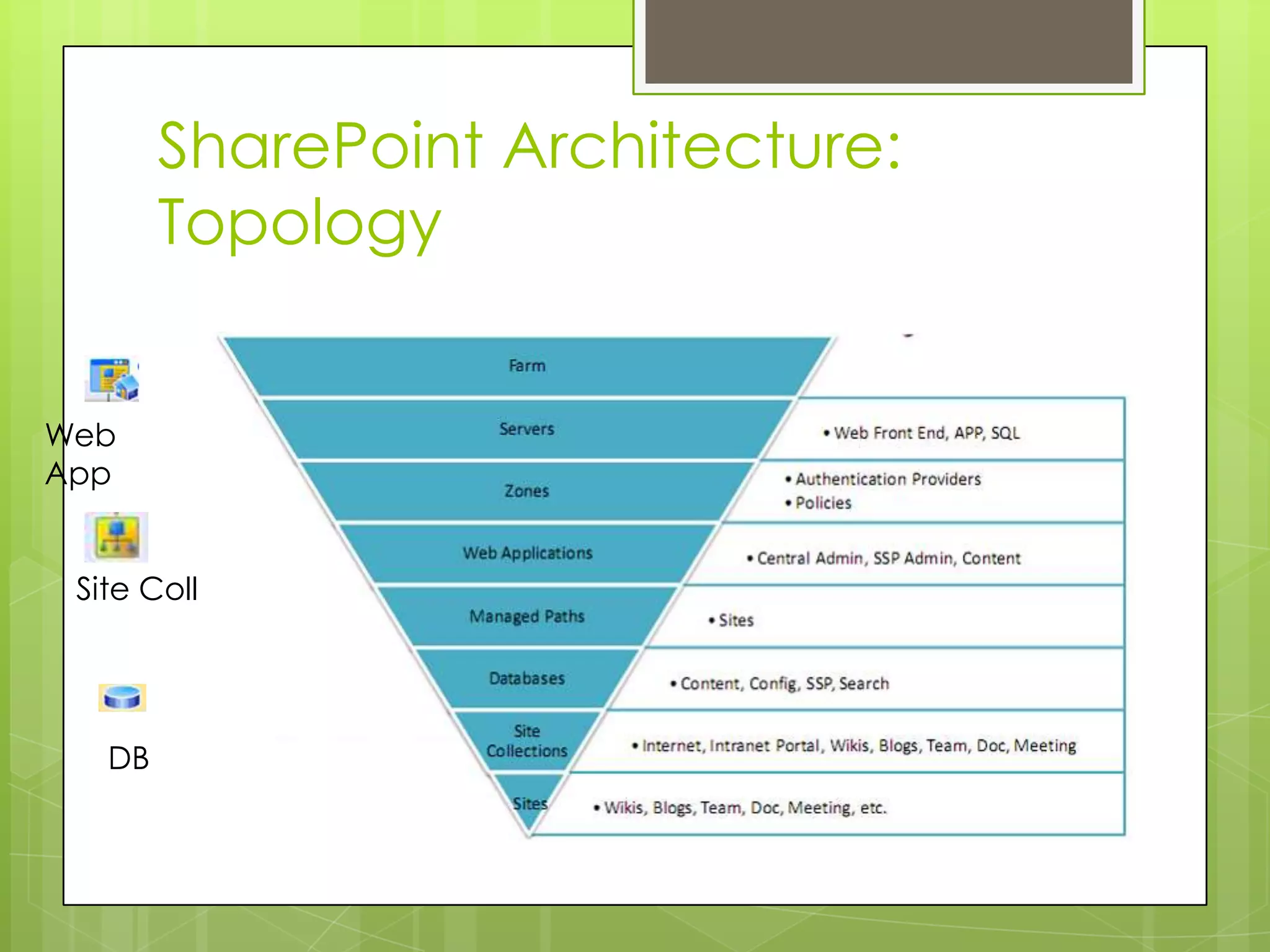
SharePoint Architecture: TopologyWeb AppSite CollDB
DemoCreate a farmCreate a Web AppCreate a Site CollectionCreate a list
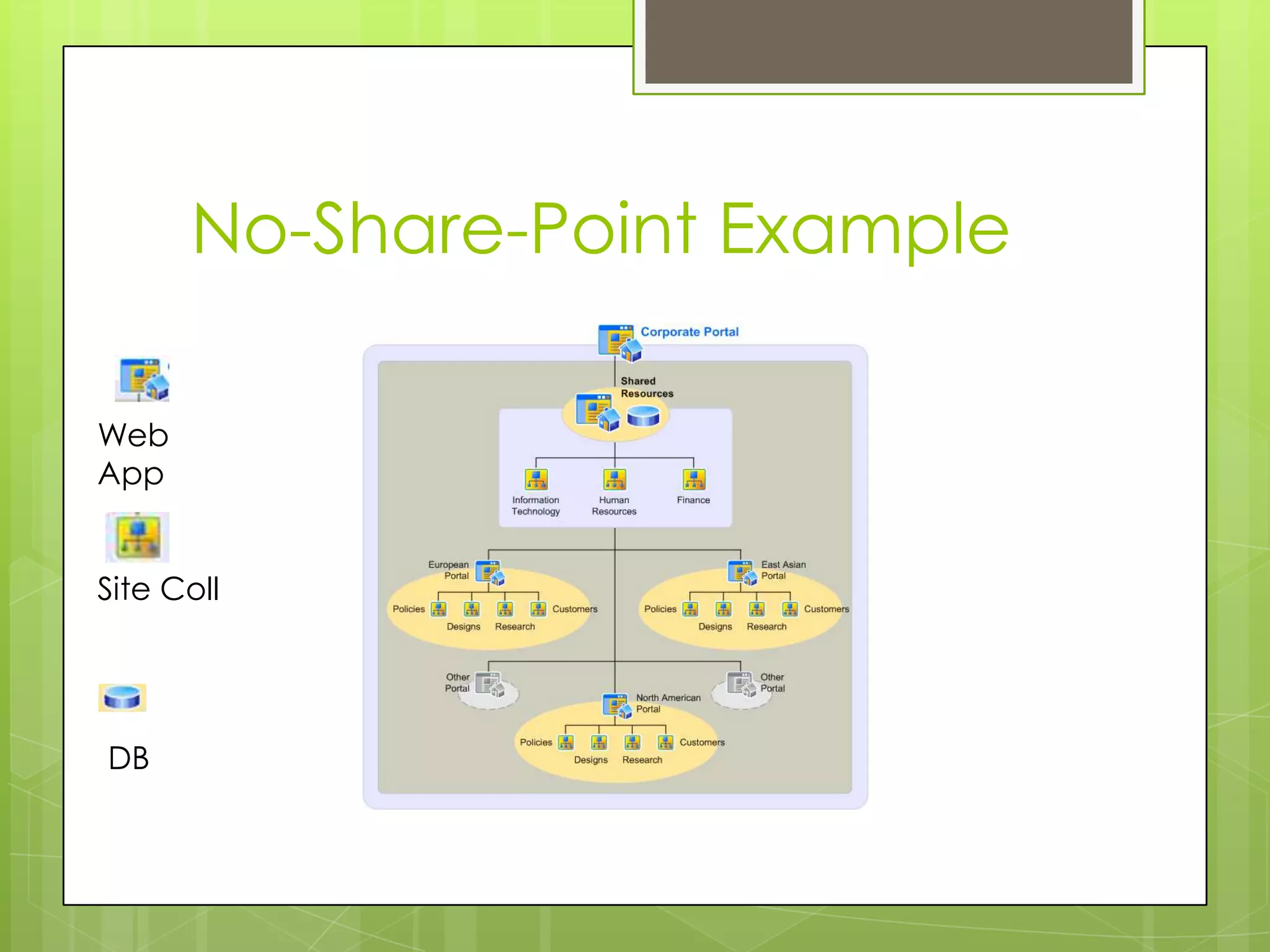
No-Share-Point ExampleWeb AppSite CollDB
SP Information ArchitectureInformation architecture in SharePoint Server 2010 is the organization of information in an enterprise — its documents, lists, Web sites, and Web pages — to maximize the information's usability and manageability.
IA Factors for SharePointHow to find informationHow information is stored and retrievedHow users navigate to informationHow data will be presented in the site. How redundant or overlapping information isWhat templates are used for creating informationHow My Site Web sites fit into the information architectureHow the site will be structured and divided into a set of subsites.
SharePointWeb AppSite CollDB
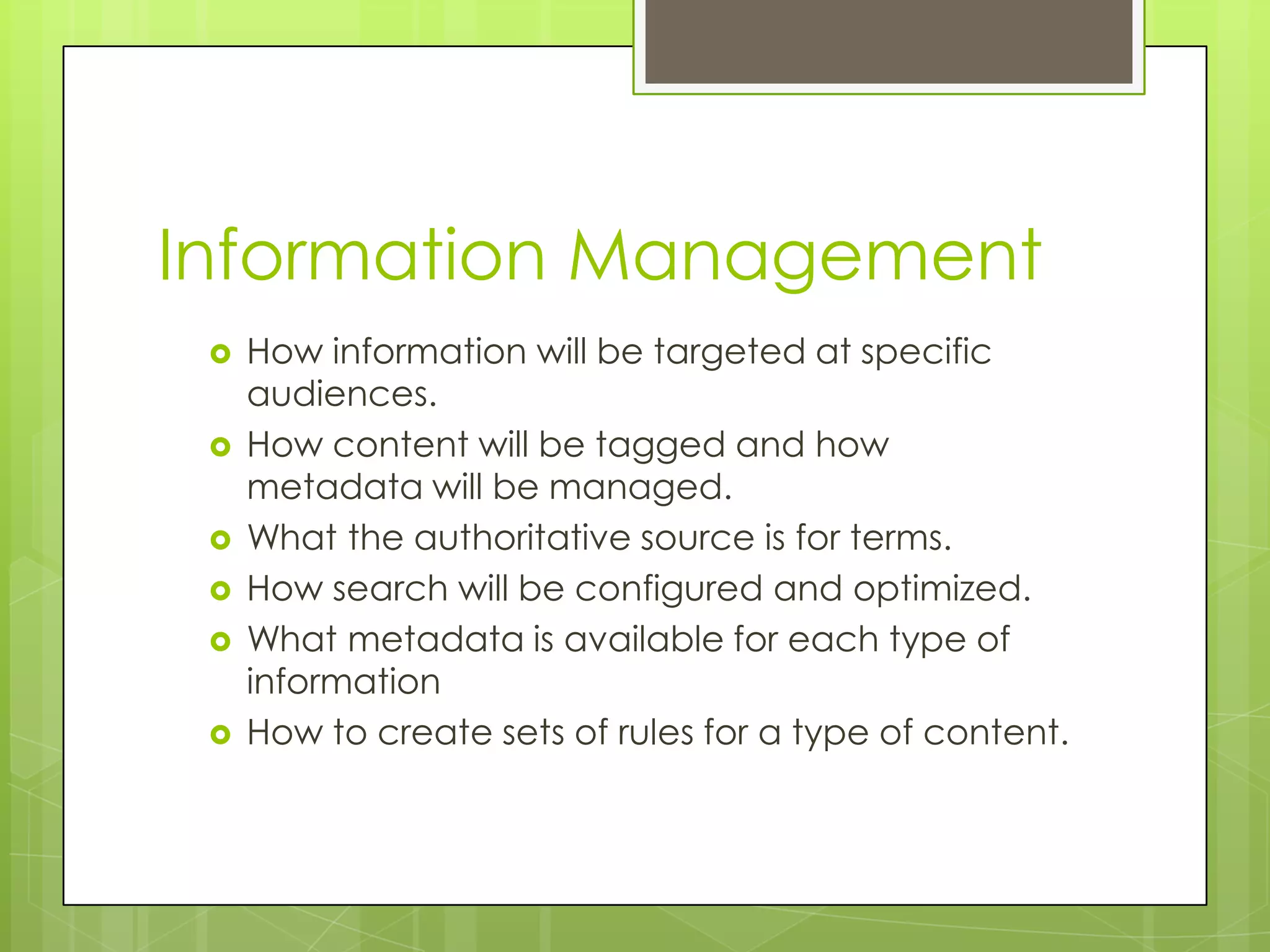
SP Information ManagementInformation management in SharePoint Server 2010 comprises organizing, retrieving, acquiring, and maintaining information. Information ManagementHow information will be targeted at specific audiences. How content will be tagged and how metadata will be managed. What the authoritative source is for terms. How search will be configured and optimized. What metadata is available for each type of informationHow to create sets of rules for a type of content.
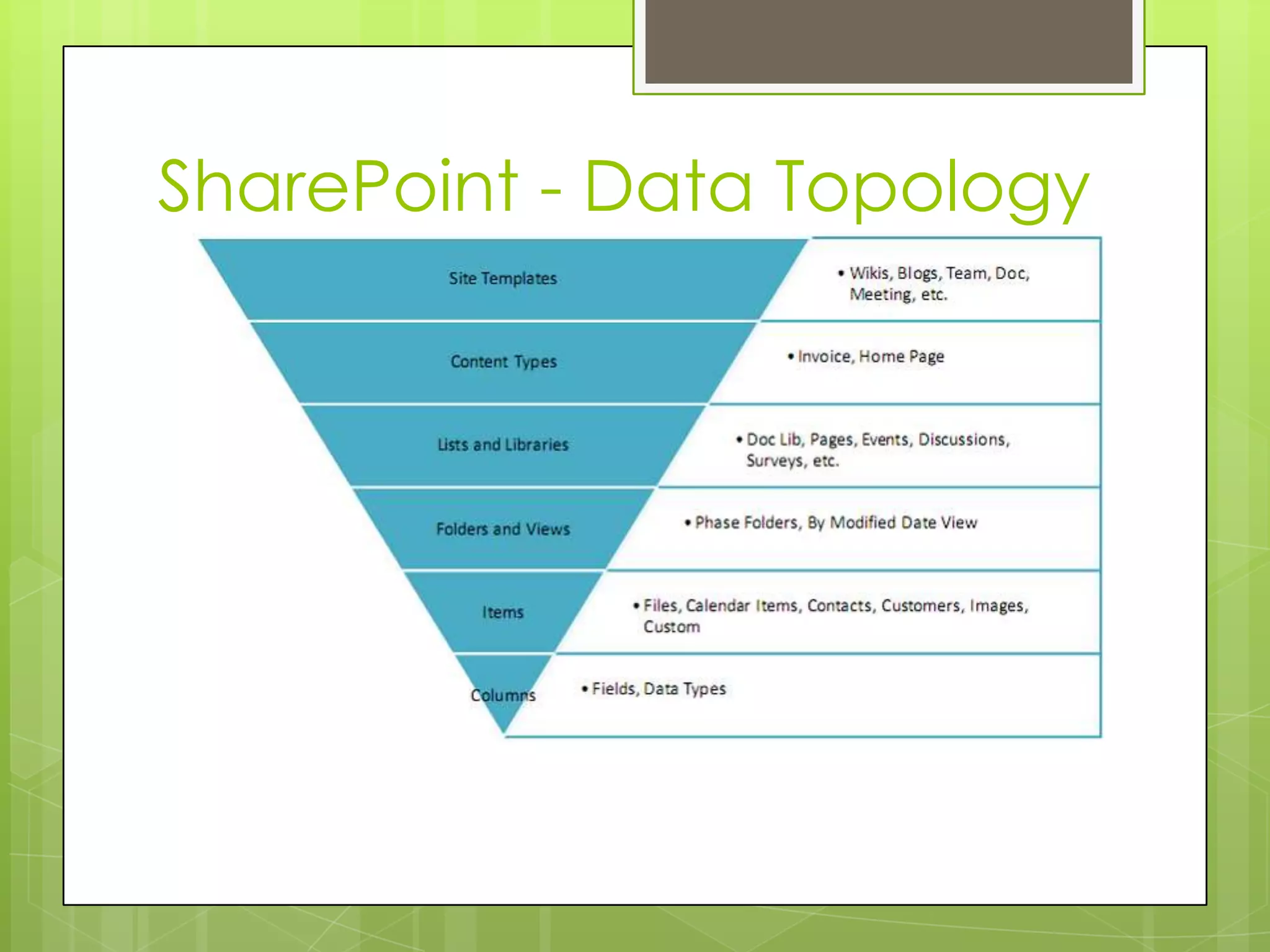
SharePoint - Data Topology
NormalizationNormalization is the process of organizing data to minimize redundancy.  The goal of database normalization is to decompose relations with anomalies in order to produce smaller, well-structured relations.Objectives of normalization1. To free the collection of relations from undesirable insertion, update and deletion dependencies;2. To reduce the need for restructuring the collection of relations as new types of data are introduced, and thus increase the life span of application programs;3. To make the relational model more informative to users;4. To make the collection of relations neutral to the query statistics, where these statistics are liable to change as time goes by.
Data NormalizationIt’s a Process1NF, 2Nf – BCNF – every non trivial functional dependency is a dependency on a super keyEach table is a single subject, no data stored in more than 1 table, no anomolies, all attributes have a key
SharePoint NormalizationUse the tools – that’s why they’re thereManaged MetadataContent TypesSearchUser Profile ServicePerformance PointBCS
Metadata and TaxonomyWhat is metadata in general?What is Managed metadata - a hierarchical collection of centrally managed terms that you can define and then use as attributes for items in Microsoft SharePoint Server 2010. A user's role determines how the user can work with managed metadata.
Managed MetadataImport your metadataOrganize information based on Content
Content TypesA reusable collection of metadataContent types enable enterprises to organize, manage, and handle content in a consistent way. They define the attributes of a type of list item, document, or folder. Important for consistency, reusability and centralityTogether with metadata, you seamlessly begin to integrate work
SP Information GovernanceInformation Governance is the set of policies, roles, responsibilities, and processes that guide, direct, and control how an organization's business divisions and IT teams cooperate to achieve business goals.
SP Information GovernanceStreamlining the deployment of products and technologies, such as SharePoint Server 2010.Helping protect your enterprise from security threats or noncompliance liability.Helping ensure the best return on your investment in technologies, for example, by enforcing best practices in content management or information architecture.
Implement IGDetermine initial principles and goalsClassify the business information / contentDevelop an education strategyDevelop an ongoing plan
ConclusionYou need a model – your own modelCreating the model should be rely on IA, IM and IG.You need expertise in your company and outside of your companyYou need to invest in yourself and understand your own informationYou need to know how SharePoint works, and works for you.  SharePoint should fit you, not the other way around.By planning how you work you can implement or re-implement SharePoint highly successfully, vastly increasing success and knowledge
Q and A
ReferencesTechnetMSDNMicrosoft PressWikipediaDatabase Systems: Rob and Coronel, Thompson.The Anatomy of a Large-Scale Hypertextual  Web Search Engineepoint slide next Sergey Brin and Lawrence Page Computer Science Department, Stanford UniversityFaceted Metadata for Image Search and Browsing Yee, Swearingen, Li, Hearst Computer Science Division School of Information Management and Systems, University of CaliforniaE. Quintarelli, A. Resmini, L. Rosati - FaceTag: Integrating Bottom-up and Top-down Classification in a Social Tagging System – ItalyLego image: http://lego.wikia.com/wiki/File:6538_Building_Instructions_1.pngNormal curve: http://mypages.valdosta.edu/mwhatley/3900/curve.htm
Mind to Matter: A Way to Model How You Work in SharePoint #SPSTCDC

Mind to Matter: A Way to Model How You Work in SharePoint #SPSTCDC

  • 1.
    Mind to Matter:A way to model how you work in SharePointJames TramelSolutions ArchitectPlanet Technologies
  • 2.
    Why Listen tome?Many, many SharePoint implementations and upgradesA lot of non-cs EducationMCTS, MCITP SP 2010Business experienceDB, Dev, Inf, and Admin training, education and experience
  • 3.
    What is SharePointWhatdoes it do?How does it work?Why does it work?Have you ever seen it not work?
  • 4.
    Collaboration Gone WrongContentChaosEmail as personal CMSIslands of informationCan’t find anything, Don’t learn anythingJust like a web version of my file shares and paperworkCollaboration hasn’t changedInstitutional memory not enhancedHow did they do that?
  • 5.
    Why Another Model?MarketReviewMarketIntroductionGrowthMatturitySaturation
  • 6.
    How to ModelSharePointDoes it need a model? Why?What kind of model?How is the model developed?How is the model revisited?
  • 7.
    A SharePoint modelInformationarchitecture, information management and information governance are the cornerstonesBuilt around youThese ideas and planning them are in just about every book on SharePoint
  • 8.
    Information Architecture, Managementand GovernanceWhat is IA?What is IM?What is IG?
  • 9.
    Formal DefinitionsInformation architecture(IA) is the art of expressing a model or concept of information used in activities that require explicit details of complex systemsInformation management (IM) is the collection and management of information from one or more sources and the distribution of that information to one or more audiencesInformation Governance is the set of policies, role, responsibilities, and processes that guide, direct, and control how an organization's business divisions and IT teams cooperate to achieve business goals.
  • 10.
    IA ExamplesThe Anatomyof a Large-Scale Hypertextual Web Search EngineFaceted Metadata for Image Search and BrowsingFacetag: Integrating Bottom-up and Top-down Classification in a Social Tagging System
  • 11.
    Who does IAand When?“Here's what I've come to understand: What IA has been about from the beginning is designing context with hyperlinks. That is, shaping contextual experience with connections afforded by the new, digital layer of the web.” Answer: You do
  • 12.
    SharePoint – AnExampleWeb AppSite CollDB
  • 13.
  • 14.
    DemoCreate a farmCreatea Web AppCreate a Site CollectionCreate a list
  • 15.
  • 16.
    SP Information ArchitectureInformationarchitecture in SharePoint Server 2010 is the organization of information in an enterprise — its documents, lists, Web sites, and Web pages — to maximize the information's usability and manageability.
  • 17.
    IA Factors forSharePointHow to find informationHow information is stored and retrievedHow users navigate to informationHow data will be presented in the site. How redundant or overlapping information isWhat templates are used for creating informationHow My Site Web sites fit into the information architectureHow the site will be structured and divided into a set of subsites.
  • 18.
  • 19.
    SP Information ManagementInformationmanagement in SharePoint Server 2010 comprises organizing, retrieving, acquiring, and maintaining information. Information ManagementHow information will be targeted at specific audiences. How content will be tagged and how metadata will be managed. What the authoritative source is for terms. How search will be configured and optimized. What metadata is available for each type of informationHow to create sets of rules for a type of content.
  • 20.
  • 21.
    NormalizationNormalization is theprocess of organizing data to minimize redundancy. The goal of database normalization is to decompose relations with anomalies in order to produce smaller, well-structured relations.Objectives of normalization1. To free the collection of relations from undesirable insertion, update and deletion dependencies;2. To reduce the need for restructuring the collection of relations as new types of data are introduced, and thus increase the life span of application programs;3. To make the relational model more informative to users;4. To make the collection of relations neutral to the query statistics, where these statistics are liable to change as time goes by.
  • 22.
    Data NormalizationIt’s aProcess1NF, 2Nf – BCNF – every non trivial functional dependency is a dependency on a super keyEach table is a single subject, no data stored in more than 1 table, no anomolies, all attributes have a key
  • 23.
    SharePoint NormalizationUse thetools – that’s why they’re thereManaged MetadataContent TypesSearchUser Profile ServicePerformance PointBCS
  • 24.
    Metadata and TaxonomyWhatis metadata in general?What is Managed metadata - a hierarchical collection of centrally managed terms that you can define and then use as attributes for items in Microsoft SharePoint Server 2010. A user's role determines how the user can work with managed metadata.
  • 25.
    Managed MetadataImport yourmetadataOrganize information based on Content
  • 26.
    Content TypesA reusablecollection of metadataContent types enable enterprises to organize, manage, and handle content in a consistent way. They define the attributes of a type of list item, document, or folder. Important for consistency, reusability and centralityTogether with metadata, you seamlessly begin to integrate work
  • 27.
    SP Information GovernanceInformationGovernance is the set of policies, roles, responsibilities, and processes that guide, direct, and control how an organization's business divisions and IT teams cooperate to achieve business goals.
  • 28.
    SP Information GovernanceStreamliningthe deployment of products and technologies, such as SharePoint Server 2010.Helping protect your enterprise from security threats or noncompliance liability.Helping ensure the best return on your investment in technologies, for example, by enforcing best practices in content management or information architecture.
  • 29.
    Implement IGDetermine initialprinciples and goalsClassify the business information / contentDevelop an education strategyDevelop an ongoing plan
  • 30.
    ConclusionYou need amodel – your own modelCreating the model should be rely on IA, IM and IG.You need expertise in your company and outside of your companyYou need to invest in yourself and understand your own informationYou need to know how SharePoint works, and works for you. SharePoint should fit you, not the other way around.By planning how you work you can implement or re-implement SharePoint highly successfully, vastly increasing success and knowledge
  • 31.
  • 32.
    ReferencesTechnetMSDNMicrosoft PressWikipediaDatabase Systems:Rob and Coronel, Thompson.The Anatomy of a Large-Scale Hypertextual Web Search Engineepoint slide next Sergey Brin and Lawrence Page Computer Science Department, Stanford UniversityFaceted Metadata for Image Search and Browsing Yee, Swearingen, Li, Hearst Computer Science Division School of Information Management and Systems, University of CaliforniaE. Quintarelli, A. Resmini, L. Rosati - FaceTag: Integrating Bottom-up and Top-down Classification in a Social Tagging System – ItalyLego image: http://lego.wikia.com/wiki/File:6538_Building_Instructions_1.pngNormal curve: http://mypages.valdosta.edu/mwhatley/3900/curve.htm

Editor's Notes

  • #2 Connect to audience – what do they doOften – this is something you might take a look at before, but it something you may need to take a look at now
  • #4 Cure for Cancer?
  • #5 From Files, to File Shares – not much different
  • #6 Why will a model help, and why another modelModel is a form that structure an ideaNormal is a guy they keep in the closetDifference between what a technical expert can offer, and what the business has to invest is the reason for many failures.Regardless there are ways out of this failureHow do we make it better? Learn about SharePoint and try to figure it out – maybe a model?
  • #7 Why model – why not just grow organically oob – nothing wrong – but you might need to revisitLots of models– single farm (oob model (wing it), top down, bottom up, portal, public first/publish first, centralized, deconstructed, conestoga, specialized, cross-org, collaboration)Usually individual, hopefully a focus group, sometimes teamRevision of plans = Software Development Lifecycle / Business Lifecycle
  • #8 You’re unique, just like everyone elsePlanning in every book
  • #9 How many people just fell asleep?Information Architecture –– discovery science (library science) database science? Research on researchInformation Management - Concept of newspeak – no ambiguity (art) – good idea - this is why one size doesn’t fit allInformation Governance – your backup tech or infrastructure folks? Your secretary – that not how we do things…
  • #10 Formally:
  • #11 From IA siteThe Anatomy of a Large-Scale Hypertextual Web Search Engineepoint slide next Sergey Brin and Lawrence Page Computer Science Department, Stanford UniversityFaceted Metadata for Image Search and Browsing Yee, Swearingen, Li, Hearst Computer Science Division School of Information Management and SystemsUniversity of CaliforniaE. Quintarelli, A. Resmini, L. Rosati - FaceTag: Integrating Bottom-up and Top-down Classification in a Social Tagging System – ItalyTag or Search in all of them – Find, discovery
  • #12 The answer is lots of folks. So let’s talk about how it works for you, no matter who you are. Let’s bring this in the SharePoint discussion and how IA can help us build a model. Show how it explain what we do, and how we do it for our business. How we can make it work with SharePoint?JOURNAL OF INFORMATION ARCHITECTURE | VOLUME 1 ISSUE 1 diff roles in business and software The Machineries of ContextNew Architectures for a New Dimension Andrew Hinton inkblurt@gmail.com Vanguard
  • #13 What’s wrong with this picture – we’ll find outFrom MS
  • #14 Why do different web apps and these things matter?Security, performance, discoveryIs SharePoint an information website, a database, a program/application, an intranet
  • #16 So this is why – basically repeating things and adding much more than necessary
  • #19 With IAStreamlines architecture and business needsMuch cleanerMore availableBut what about Data?
  • #20 If architecture is what’s outside the box, this is what inside the box
  • #21 Information management in SharePoint Server 2010 comprises organizing, retrieving, acquiring, and maintaining information.
  • #22 Why are these important – data storesOne of the keys to managing data topology is knowing where your information comes from, and how to coalesce it where necessary.Not a new topic – been key to databases for many years
  • #23 Why does this matter – think of it as streamlining your information. We’ll do this part quick.This is nothing new: E.F. Codd, "Further Normalization of the Data Base Relational Model“ 1970.definitionRedudancy and Anamolies
  • #24 Find uniqueness and find relationsReally about taking what you know, and finding opportunities for coalescence. Example – HR system, onboarding and offboarding. Same person, same people. Infopath forms and hard coding. New HR documents.
  • #25 To get data to work together, and get data lined up. These are elements above that are all SharePoint service application that can make the data work for you.
  • #26 Metadata is information about informationA tagline at the top of htmlWho created first – classification of animals based on features – before Darwin.
  • #27 Import your taxonomy – you probably already have itIf not, look for models – don’t recreate the wheel initially. You can add more laterDemo to import
  • #28 Each content type can specify metadata properties to associate with items of its type, available workflows, templates, and information management policies.
  • #29 It’s all set up – so now what – it always works right? Not without governance.
  • #30 Need for stakeholders and IT maintainence
  • #31 Track compliance and quantify the benefitWorking with the steps aboveYour workers must be taught and retaught how this information worksShould be iterative