

Innovate Vancouver
Priorities and Goals when Designing
the Site Structure
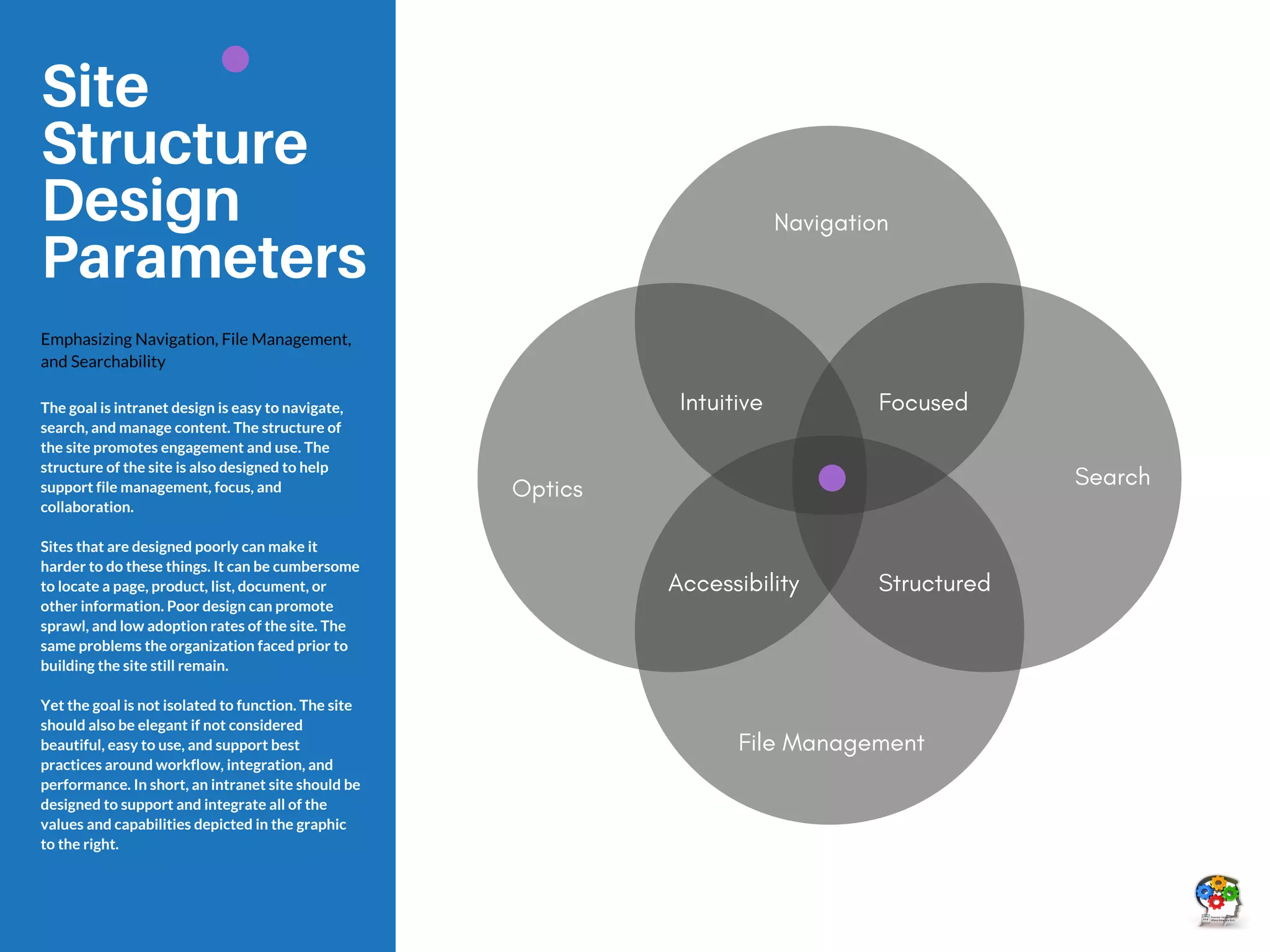
Navigation
Structured
File Management
Site
Structure
Design
Parameters
Emphasizing Navigation, File Management,
and Searchability
The goal is intranet design is easy to navigate,
search, and manage content. The structure of
the site promotes engagement and use. The
structure of the site is also designed to help
support file management, focus, and
collaboration.
Sites that are designed poorly can make it
harder to do these things. It can be cumbersome
to locate a page, product, list, document, or
other information. Poor design can promote
sprawl, and low adoption rates of the site. The
same problems the organization faced prior to
building the site still remain.
Yet the goal is not isolated to function. The site
should also be elegant if not considered
beautiful, easy to use, and support best
practices around workflow, integration, and
performance. In short, an intranet site should be
designed to support and integrate all of the
values and capabilities depicted in the graphic
to the right.
Optics
Focused
Intuitive
Accessibility
Search
A Brief Explanation of
Information Architecture (IA)
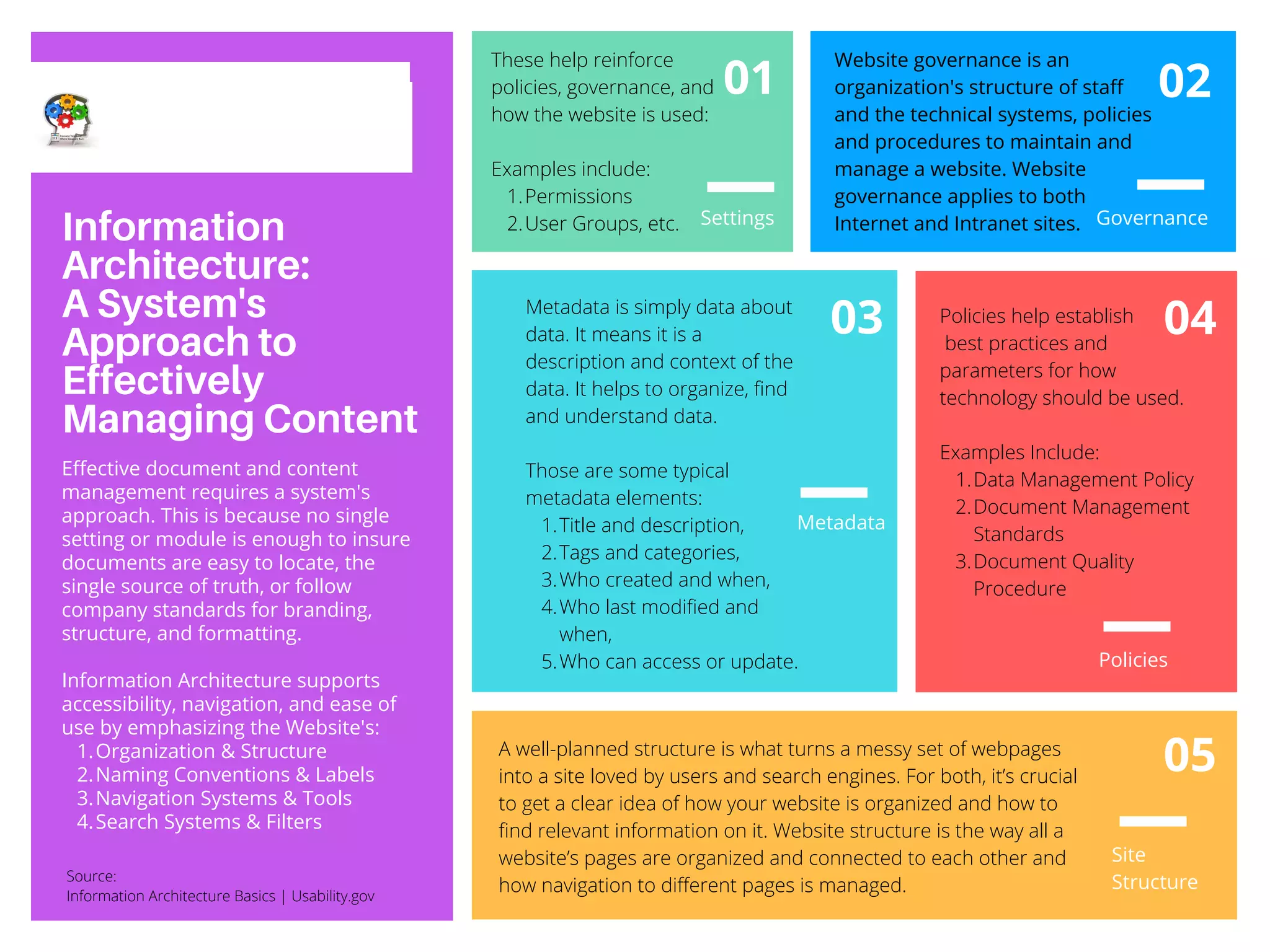
Information
Architecture:
A System's
Approach to
Effectively
Managing Content
Organization & Structure
Naming Conventions & Labels
Navigation Systems & Tools
Search Systems & Filters
Effective document and content
management requires a system's
approach. This is because no single
setting or module is enough to insure
documents are easy to locate, the
single source of truth, or follow
company standards for branding,
structure, and formatting.
Information Architecture supports
accessibility, navigation, and ease of
use by emphasizing the Website's:
1.
2.
3.
4.
01
03
Metadata
05
02
04
Policies
Settings Governance
Site
Structure
Title and description,
Tags and categories,
Who created and when,
Who last modified and
when,
Who can access or update.
Metadata is simply data about
data. It means it is a
description and context of the
data. It helps to organize, find
and understand data.
Those are some typical
metadata elements:
1.
2.
3.
4.
5.
Website governance is an
organization's structure of staff
and the technical systems, policies
and procedures to maintain and
manage a website. Website
governance applies to both
Internet and Intranet sites.
Data Management Policy
Document Management
Standards
Document Quality
Procedure
Policies help establish
best practices and
parameters for how
technology should be used.
Examples Include:
1.
2.
3.
A well-planned structure is what turns a messy set of webpages
into a site loved by users and search engines. For both, it’s crucial
to get a clear idea of how your website is organized and how to
find relevant information on it. Website structure is the way all a
website’s pages are organized and connected to each other and
how navigation to different pages is managed.
Permissions
User Groups, etc.
These help reinforce
policies, governance, and
how the website is used:
Examples include:
1.
2.
Source:
Information Architecture Basics | Usability.gov
Option 1:
Structured by the Strategic Pillars
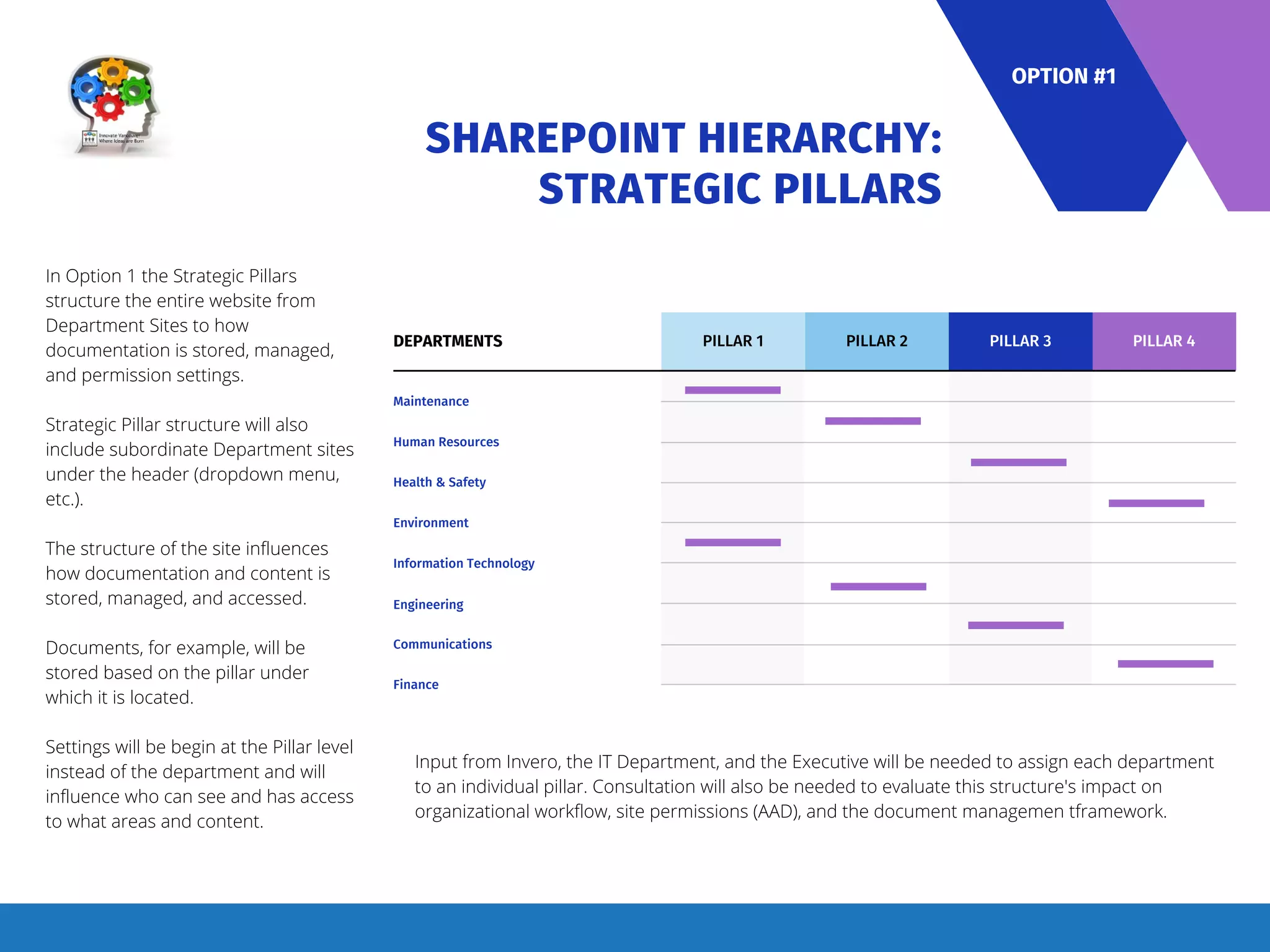
SHAREPOINT HIERARCHY:
STRATEGIC PILLARS
PILLAR 1
DEPARTMENTS
Maintenance
Human Resources
Health & Safety
Environment
Information Technology
Engineering
Communications
Finance
PILLAR 2 PILLAR 3 PILLAR 4
In Option 1 the Strategic Pillars
structure the entire website from
Department Sites to how
documentation is stored, managed,
and permission settings.
Strategic Pillar structure will also
include subordinate Department sites
under the header (dropdown menu,
etc.).
The structure of the site influences
how documentation and content is
stored, managed, and accessed.
Documents, for example, will be
stored based on the pillar under
which it is located.
Settings will be begin at the Pillar level
instead of the department and will
influence who can see and has access
to what areas and content.
OPTION #1
Input from Invero, the IT Department, and the Executive will be needed to assign each department
to an individual pillar. Consultation will also be needed to evaluate this structure's impact on
organizational workflow, site permissions (AAD), and the document managemen tframework.
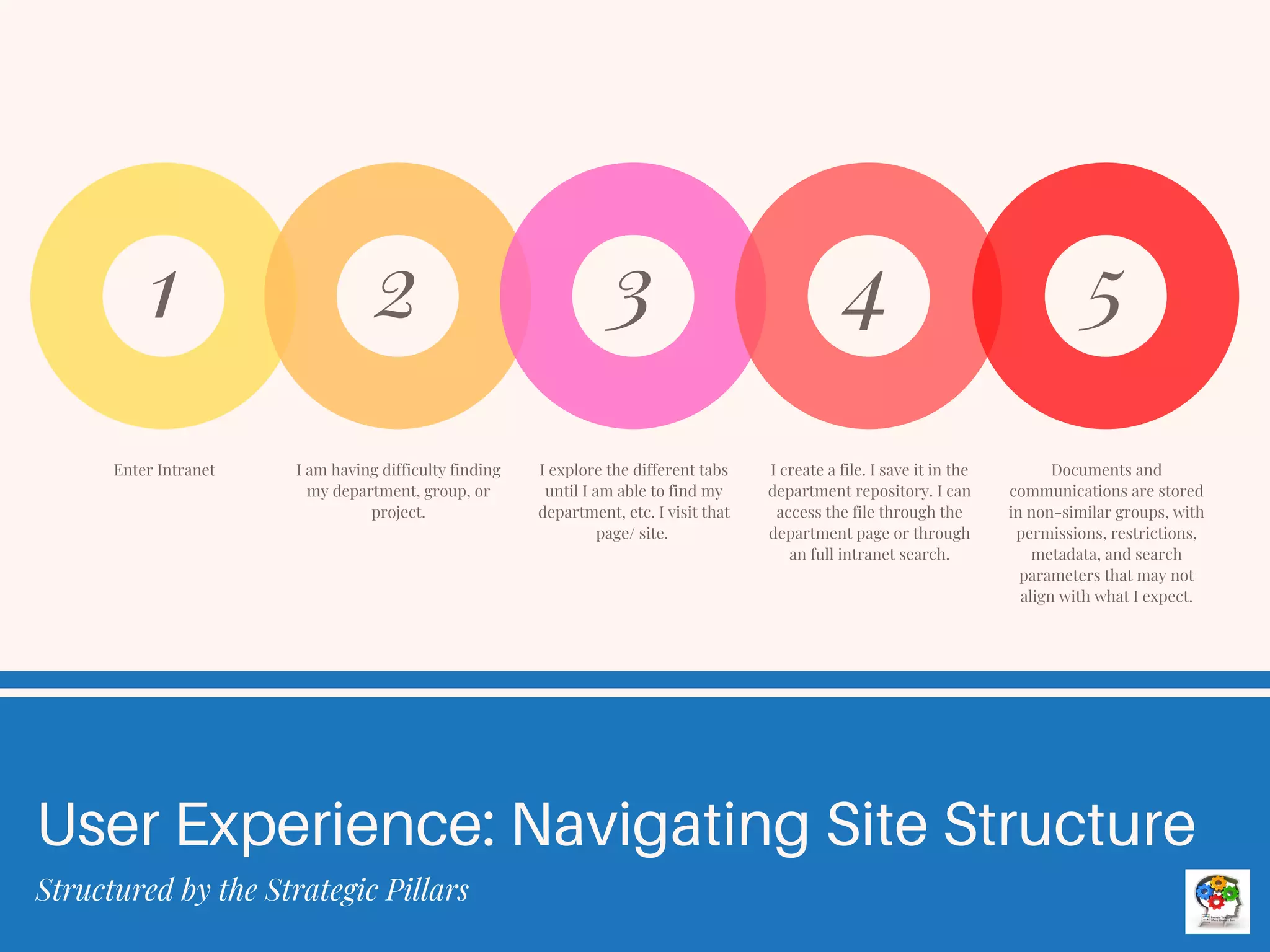
User Experience: Navigating Site Structure
Structured by the Strategic Pillars
Enter Intranet
1
I am having difficulty finding
my department, group, or
project.
2
I explore the different tabs
until I am able to find my
department, etc. I visit that
page/ site.
3
I create a file. I save it in the
department repository. I can
access the file through the
department page or through
an full intranet search.
4
Documents and
communications are stored
in non-similar groups, with
permissions, restrictions,
metadata, and search
parameters that may not
align with what I expect.
5
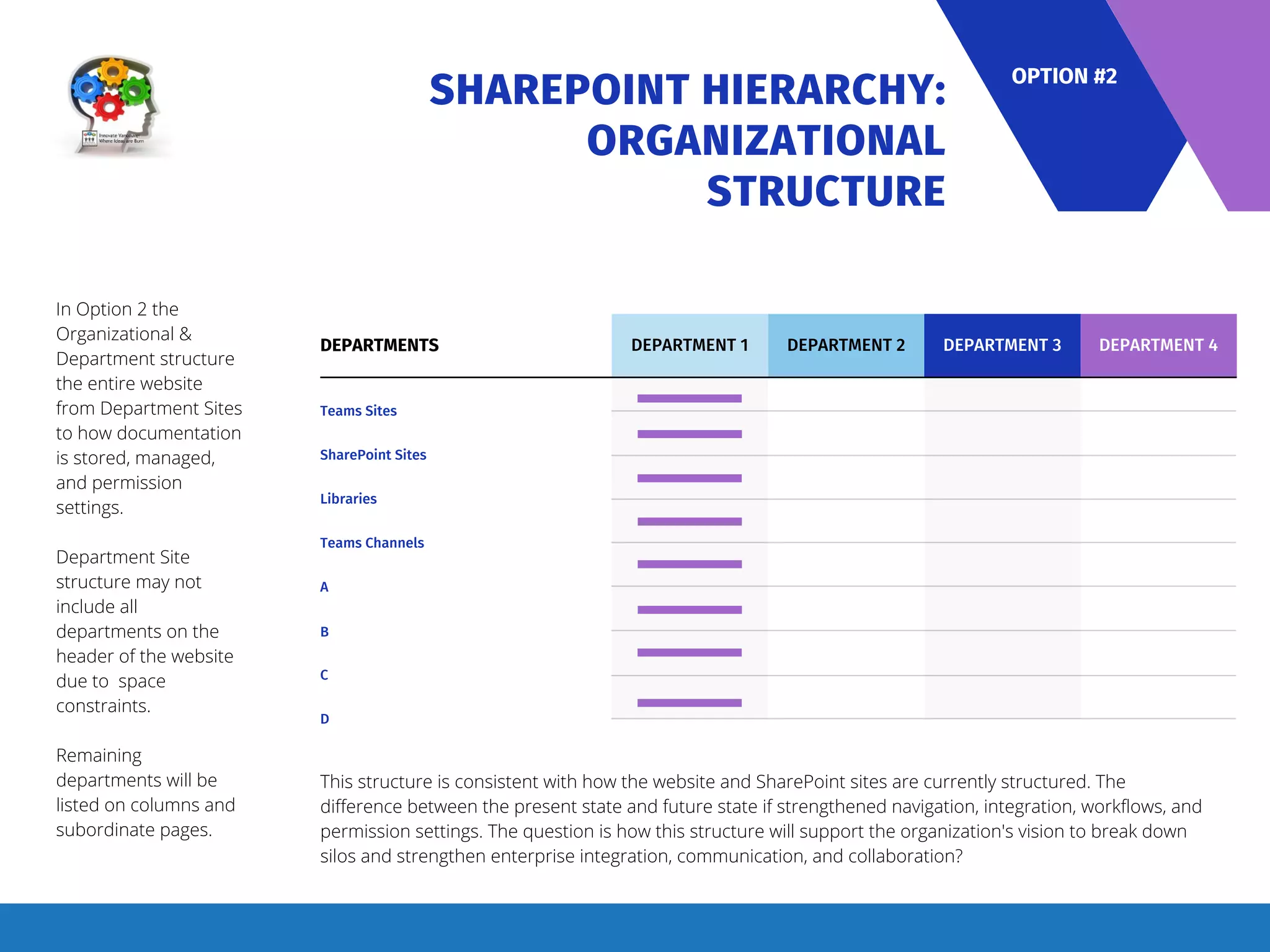
Option 2:
Structured by the Organizational
Structure
SHAREPOINT HIERARCHY:
ORGANIZATIONAL
STRUCTURE
DEPARTMENT 1
DEPARTMENTS
Teams Sites
SharePoint Sites
Libraries
Teams Channels
A
B
C
D
DEPARTMENT 2 DEPARTMENT 3 DEPARTMENT 4
In Option 2 the
Organizational &
Department structure
the entire website
from Department Sites
to how documentation
is stored, managed,
and permission
settings.
Department Site
structure may not
include all
departments on the
header of the website
due to space
constraints.
Remaining
departments will be
listed on columns and
subordinate pages.
OPTION #2
This structure is consistent with how the website and SharePoint sites are currently structured. The
difference between the present state and future state if strengthened navigation, integration, workflows, and
permission settings. The question is how this structure will support the organization's vision to break down
silos and strengthen enterprise integration, communication, and collaboration?
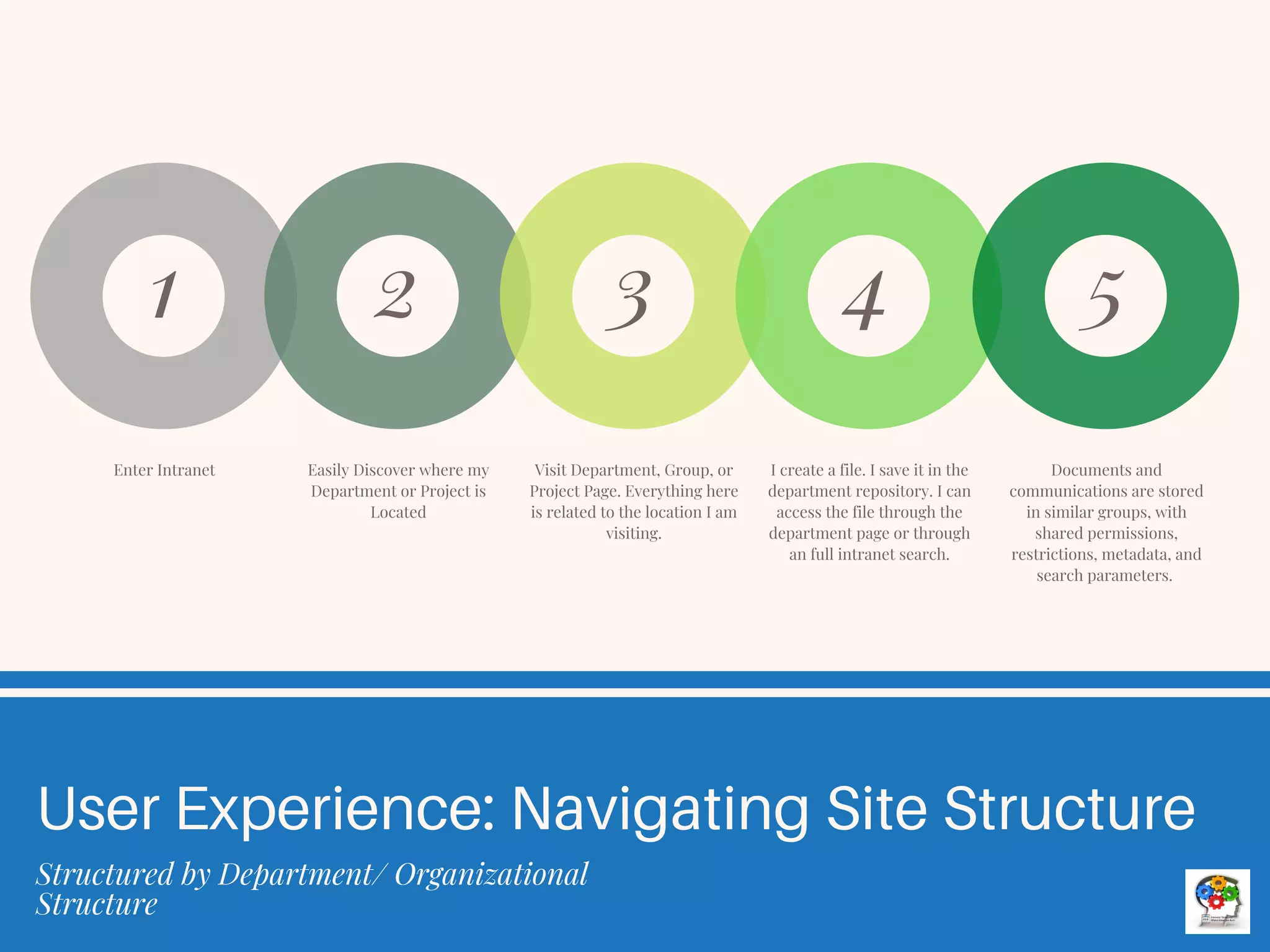
Enter Intranet
1
Easily Discover where my
Department or Project is
Located
2
Visit Department, Group, or
Project Page. Everything here
is related to the location I am
visiting.
3
I create a file. I save it in the
department repository. I can
access the file through the
department page or through
an full intranet search.
4
Documents and
communications are stored
in similar groups, with
shared permissions,
restrictions, metadata, and
search parameters.
5
User Experience: Navigating Site Structure
Structured by Department/ Organizational
Structure
Option 3:
Hybrid?
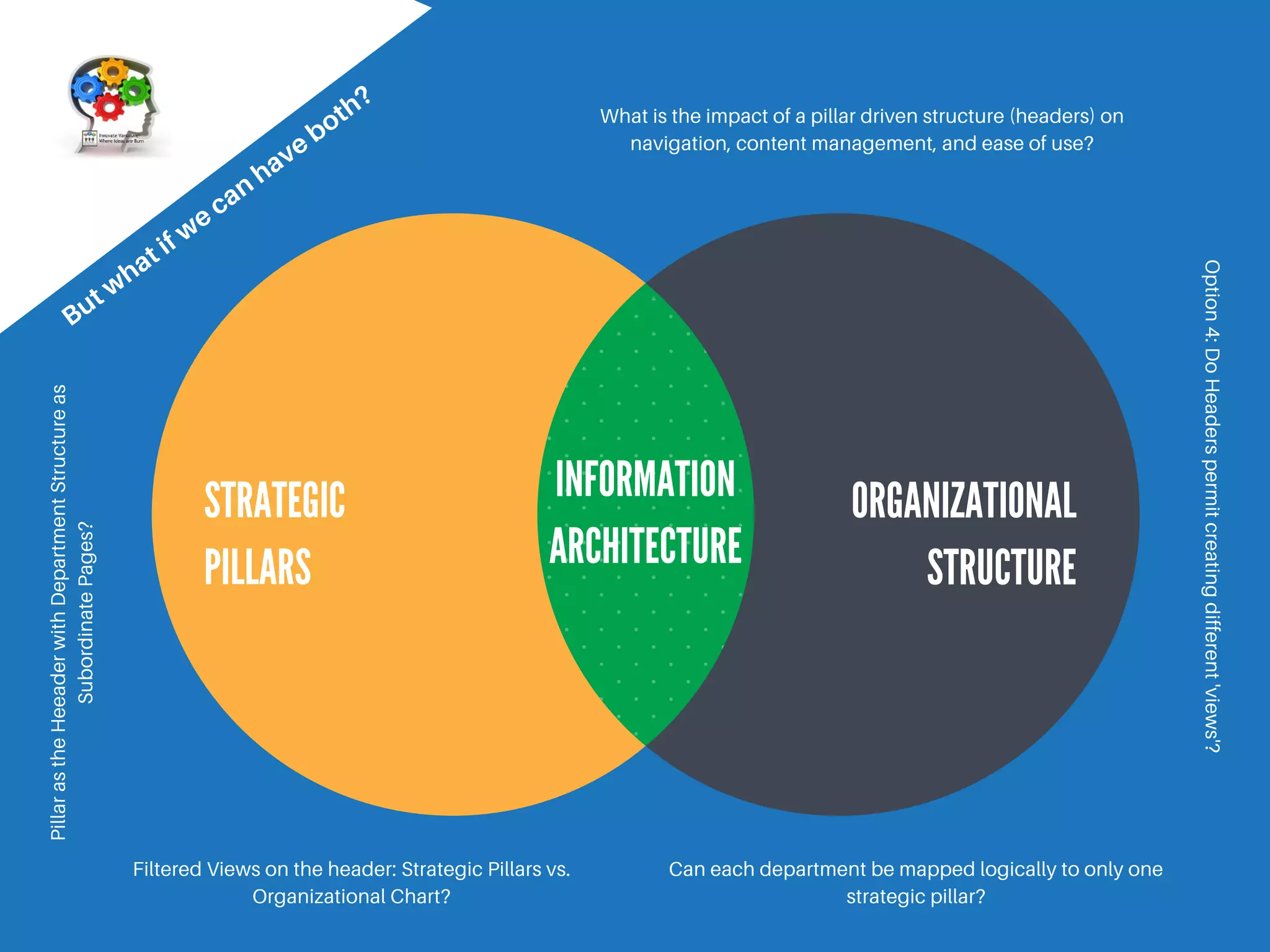
STRATEGIC
PILLARS
ORGANIZATIONAL
STRUCTURE
INFORMATION
ARCHITECTURE
But w
hat if w
e can
have both?
Filtered Views on the header: Strategic Pillars vs.
Organizational Chart?
Can each department be mapped logically to only one
strategic pillar?
What is the impact of a pillar driven structure (headers) on
navigation, content management, and ease of use?
Pillar
as
the
Heeader
with
Department
Structure
as
Subordinate
Pages?
Option
4:
Do
Headers
permit
creating
different
'views'?
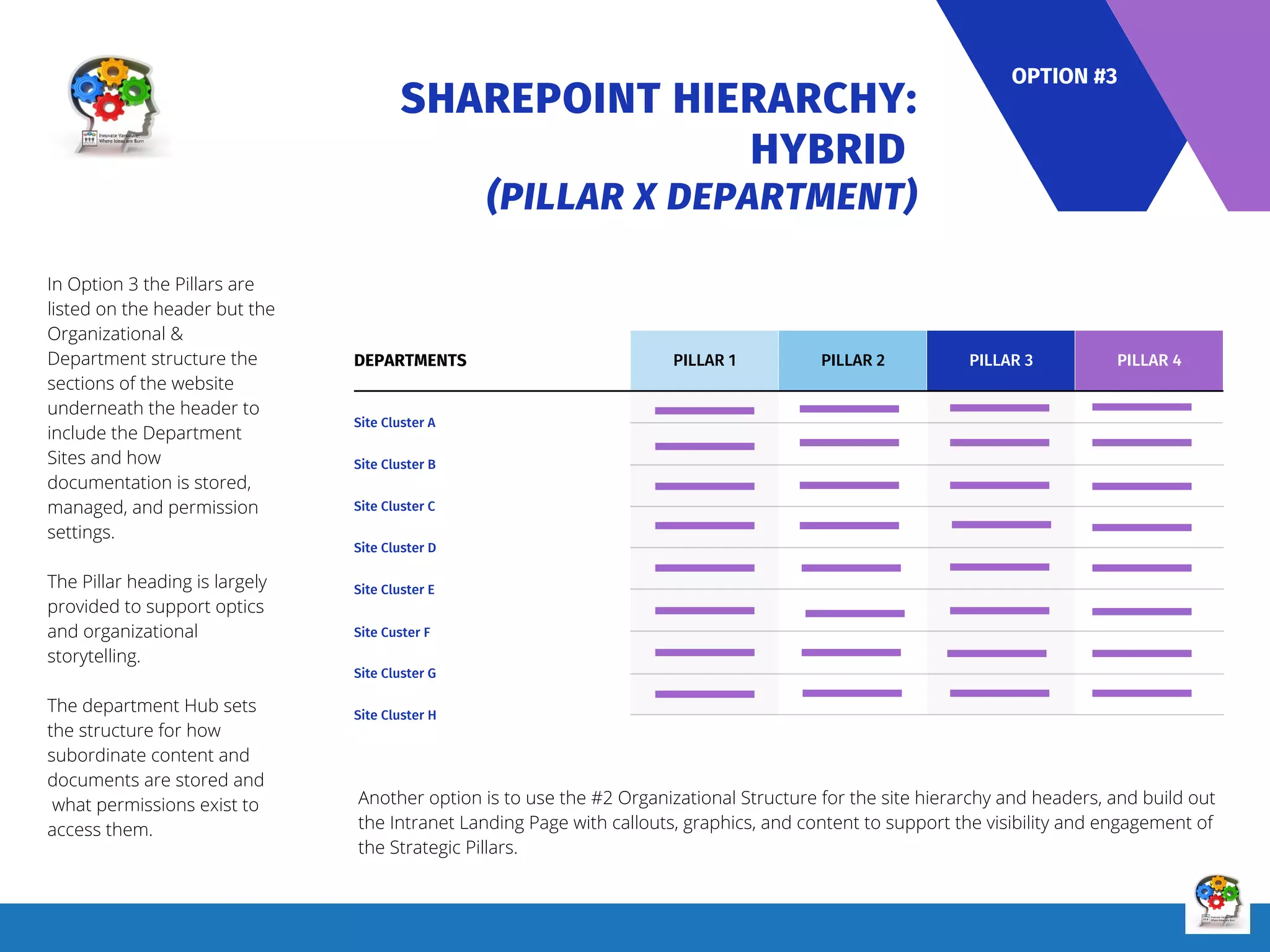
SHAREPOINT HIERARCHY:
HYBRID
(PILLAR X DEPARTMENT)
PILLAR 1
DEPARTMENTS
Site Cluster A
Site Cluster B
Site Cluster C
Site Cluster D
Site Cluster E
Site Custer F
Site Cluster G
Site Cluster H
PILLAR 2 PILLAR 3 PILLAR 4
In Option 3 the Pillars are
listed on the header but the
Organizational &
Department structure the
sections of the website
underneath the header to
include the Department
Sites and how
documentation is stored,
managed, and permission
settings.
The Pillar heading is largely
provided to support optics
and organizational
storytelling.
The department Hub sets
the structure for how
subordinate content and
documents are stored and
what permissions exist to
access them.
OPTION #3
Another option is to use the #2 Organizational Structure for the site hierarchy and headers, and build out
the Intranet Landing Page with callouts, graphics, and content to support the visibility and engagement of
the Strategic Pillars.
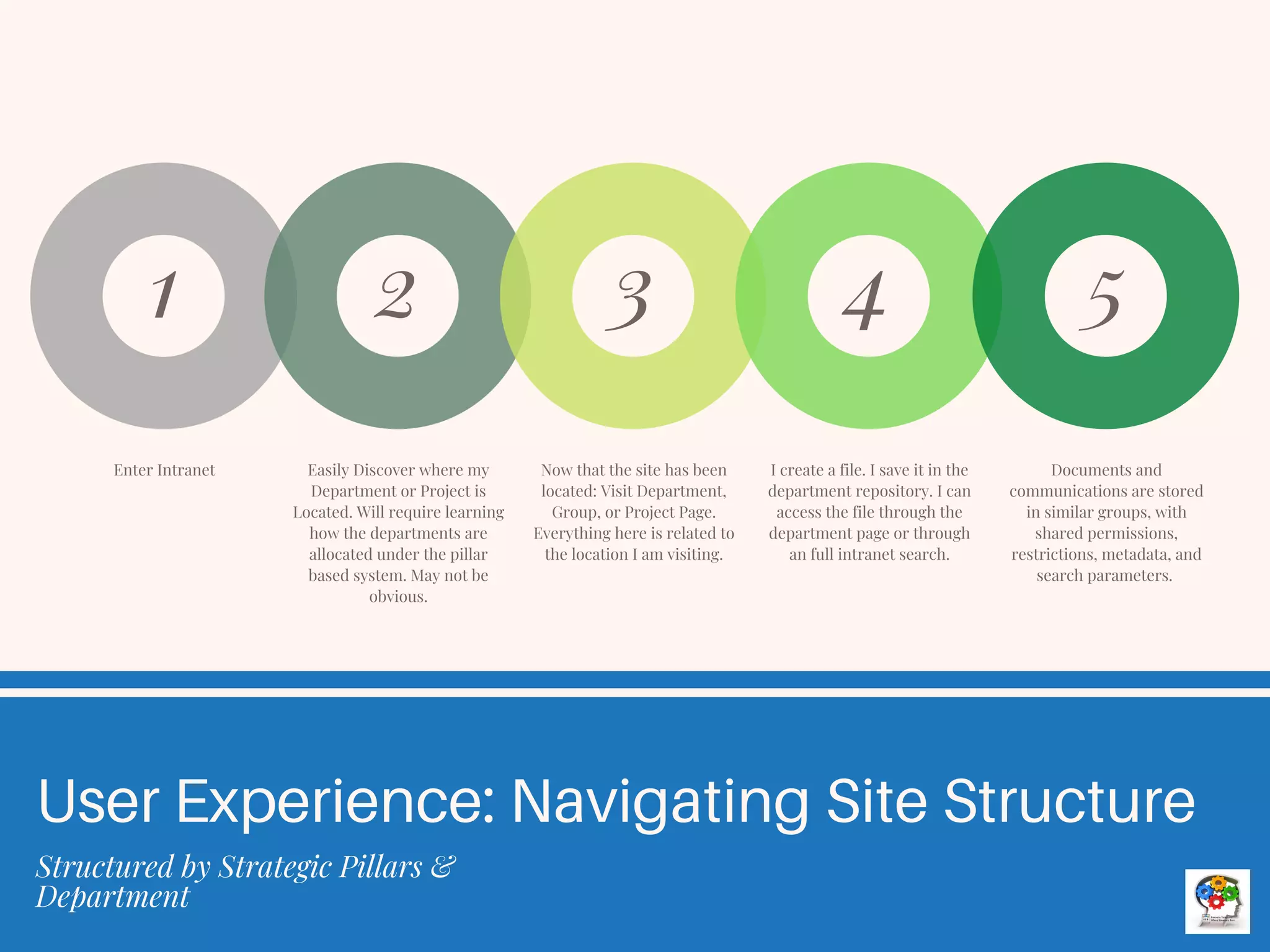
Enter Intranet
1
Easily Discover where my
Department or Project is
Located. Will require learning
how the departments are
allocated under the pillar
based system. May not be
obvious.
2
Now that the site has been
located: Visit Department,
Group, or Project Page.
Everything here is related to
the location I am visiting.
3
I create a file. I save it in the
department repository. I can
access the file through the
department page or through
an full intranet search.
4
Documents and
communications are stored
in similar groups, with
shared permissions,
restrictions, metadata, and
search parameters.
5
User Experience: Navigating Site Structure
Structured by Strategic Pillars &
Department
Evaluating Options
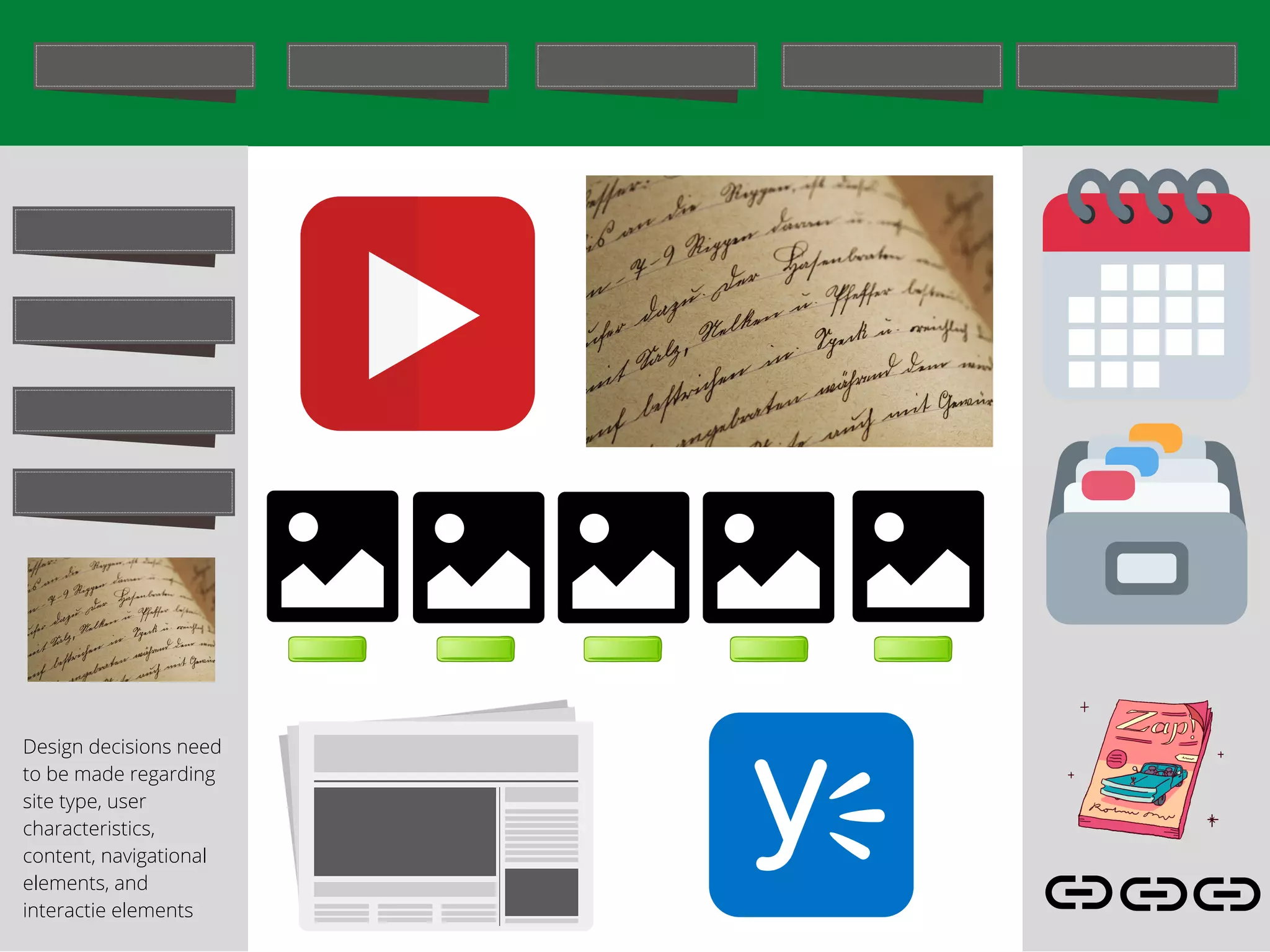
Design decisions need
to be made regarding
site type, user
characteristics,
content, navigational
elements, and
interactie elements
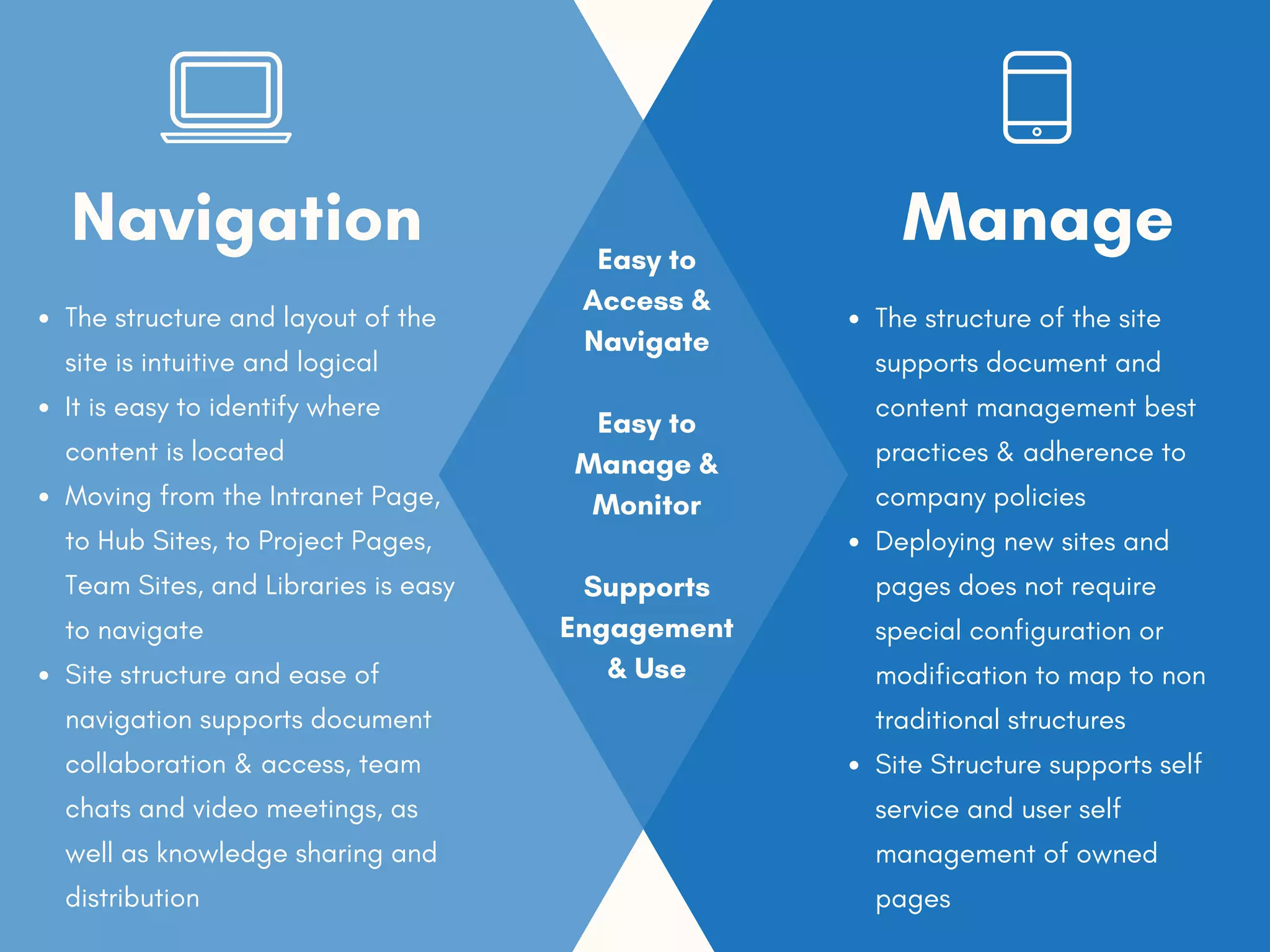
The structure and layout of the
site is intuitive and logical
It is easy to identify where
content is located
Moving from the Intranet Page,
to Hub Sites, to Project Pages,
Team Sites, and Libraries is easy
to navigate
Site structure and ease of
navigation supports document
collaboration & access, team
chats and video meetings, as
well as knowledge sharing and
distribution
Navigation
The structure of the site
supports document and
content management best
practices & adherence to
company policies
Deploying new sites and
pages does not require
special configuration or
modification to map to non
traditional structures
Site Structure supports self
service and user self
management of owned
pages
Manage
Easy to
Access &
Navigate
Easy to
Manage &
Monitor
Supports
Engagement
& Use
Contact Innovate Vancouver for
more Invormation!

SharePoint Site IA Architecture Design Considerations - Innovate Vancouver.pdf

  • 1.
  • 2.
    Priorities and Goalswhen Designing the Site Structure
  • 3.
    Navigation Structured File Management Site Structure Design Parameters Emphasizing Navigation,File Management, and Searchability The goal is intranet design is easy to navigate, search, and manage content. The structure of the site promotes engagement and use. The structure of the site is also designed to help support file management, focus, and collaboration. Sites that are designed poorly can make it harder to do these things. It can be cumbersome to locate a page, product, list, document, or other information. Poor design can promote sprawl, and low adoption rates of the site. The same problems the organization faced prior to building the site still remain. Yet the goal is not isolated to function. The site should also be elegant if not considered beautiful, easy to use, and support best practices around workflow, integration, and performance. In short, an intranet site should be designed to support and integrate all of the values and capabilities depicted in the graphic to the right. Optics Focused Intuitive Accessibility Search
  • 5.
    A Brief Explanationof Information Architecture (IA)
  • 6.
    Information Architecture: A System's Approach to Effectively ManagingContent Organization & Structure Naming Conventions & Labels Navigation Systems & Tools Search Systems & Filters Effective document and content management requires a system's approach. This is because no single setting or module is enough to insure documents are easy to locate, the single source of truth, or follow company standards for branding, structure, and formatting. Information Architecture supports accessibility, navigation, and ease of use by emphasizing the Website's: 1. 2. 3. 4. 01 03 Metadata 05 02 04 Policies Settings Governance Site Structure Title and description, Tags and categories, Who created and when, Who last modified and when, Who can access or update. Metadata is simply data about data. It means it is a description and context of the data. It helps to organize, find and understand data. Those are some typical metadata elements: 1. 2. 3. 4. 5. Website governance is an organization's structure of staff and the technical systems, policies and procedures to maintain and manage a website. Website governance applies to both Internet and Intranet sites. Data Management Policy Document Management Standards Document Quality Procedure Policies help establish best practices and parameters for how technology should be used. Examples Include: 1. 2. 3. A well-planned structure is what turns a messy set of webpages into a site loved by users and search engines. For both, it’s crucial to get a clear idea of how your website is organized and how to find relevant information on it. Website structure is the way all a website’s pages are organized and connected to each other and how navigation to different pages is managed. Permissions User Groups, etc. These help reinforce policies, governance, and how the website is used: Examples include: 1. 2. Source: Information Architecture Basics | Usability.gov
  • 7.
    Option 1: Structured bythe Strategic Pillars
  • 8.
    SHAREPOINT HIERARCHY: STRATEGIC PILLARS PILLAR1 DEPARTMENTS Maintenance Human Resources Health & Safety Environment Information Technology Engineering Communications Finance PILLAR 2 PILLAR 3 PILLAR 4 In Option 1 the Strategic Pillars structure the entire website from Department Sites to how documentation is stored, managed, and permission settings. Strategic Pillar structure will also include subordinate Department sites under the header (dropdown menu, etc.). The structure of the site influences how documentation and content is stored, managed, and accessed. Documents, for example, will be stored based on the pillar under which it is located. Settings will be begin at the Pillar level instead of the department and will influence who can see and has access to what areas and content. OPTION #1 Input from Invero, the IT Department, and the Executive will be needed to assign each department to an individual pillar. Consultation will also be needed to evaluate this structure's impact on organizational workflow, site permissions (AAD), and the document managemen tframework.
  • 9.
    User Experience: NavigatingSite Structure Structured by the Strategic Pillars Enter Intranet 1 I am having difficulty finding my department, group, or project. 2 I explore the different tabs until I am able to find my department, etc. I visit that page/ site. 3 I create a file. I save it in the department repository. I can access the file through the department page or through an full intranet search. 4 Documents and communications are stored in non-similar groups, with permissions, restrictions, metadata, and search parameters that may not align with what I expect. 5
  • 10.
    Option 2: Structured bythe Organizational Structure
  • 11.
    SHAREPOINT HIERARCHY: ORGANIZATIONAL STRUCTURE DEPARTMENT 1 DEPARTMENTS TeamsSites SharePoint Sites Libraries Teams Channels A B C D DEPARTMENT 2 DEPARTMENT 3 DEPARTMENT 4 In Option 2 the Organizational & Department structure the entire website from Department Sites to how documentation is stored, managed, and permission settings. Department Site structure may not include all departments on the header of the website due to space constraints. Remaining departments will be listed on columns and subordinate pages. OPTION #2 This structure is consistent with how the website and SharePoint sites are currently structured. The difference between the present state and future state if strengthened navigation, integration, workflows, and permission settings. The question is how this structure will support the organization's vision to break down silos and strengthen enterprise integration, communication, and collaboration?
  • 12.
    Enter Intranet 1 Easily Discoverwhere my Department or Project is Located 2 Visit Department, Group, or Project Page. Everything here is related to the location I am visiting. 3 I create a file. I save it in the department repository. I can access the file through the department page or through an full intranet search. 4 Documents and communications are stored in similar groups, with shared permissions, restrictions, metadata, and search parameters. 5 User Experience: Navigating Site Structure Structured by Department/ Organizational Structure
  • 13.
  • 14.
    STRATEGIC PILLARS ORGANIZATIONAL STRUCTURE INFORMATION ARCHITECTURE But w hat ifw e can have both? Filtered Views on the header: Strategic Pillars vs. Organizational Chart? Can each department be mapped logically to only one strategic pillar? What is the impact of a pillar driven structure (headers) on navigation, content management, and ease of use? Pillar as the Heeader with Department Structure as Subordinate Pages? Option 4: Do Headers permit creating different 'views'?
  • 15.
    SHAREPOINT HIERARCHY: HYBRID (PILLAR XDEPARTMENT) PILLAR 1 DEPARTMENTS Site Cluster A Site Cluster B Site Cluster C Site Cluster D Site Cluster E Site Custer F Site Cluster G Site Cluster H PILLAR 2 PILLAR 3 PILLAR 4 In Option 3 the Pillars are listed on the header but the Organizational & Department structure the sections of the website underneath the header to include the Department Sites and how documentation is stored, managed, and permission settings. The Pillar heading is largely provided to support optics and organizational storytelling. The department Hub sets the structure for how subordinate content and documents are stored and what permissions exist to access them. OPTION #3 Another option is to use the #2 Organizational Structure for the site hierarchy and headers, and build out the Intranet Landing Page with callouts, graphics, and content to support the visibility and engagement of the Strategic Pillars.
  • 16.
    Enter Intranet 1 Easily Discoverwhere my Department or Project is Located. Will require learning how the departments are allocated under the pillar based system. May not be obvious. 2 Now that the site has been located: Visit Department, Group, or Project Page. Everything here is related to the location I am visiting. 3 I create a file. I save it in the department repository. I can access the file through the department page or through an full intranet search. 4 Documents and communications are stored in similar groups, with shared permissions, restrictions, metadata, and search parameters. 5 User Experience: Navigating Site Structure Structured by Strategic Pillars & Department
  • 17.
  • 18.
    Design decisions need tobe made regarding site type, user characteristics, content, navigational elements, and interactie elements
  • 19.
    The structure andlayout of the site is intuitive and logical It is easy to identify where content is located Moving from the Intranet Page, to Hub Sites, to Project Pages, Team Sites, and Libraries is easy to navigate Site structure and ease of navigation supports document collaboration & access, team chats and video meetings, as well as knowledge sharing and distribution Navigation The structure of the site supports document and content management best practices & adherence to company policies Deploying new sites and pages does not require special configuration or modification to map to non traditional structures Site Structure supports self service and user self management of owned pages Manage Easy to Access & Navigate Easy to Manage & Monitor Supports Engagement & Use
  • 20.
    Contact Innovate Vancouverfor more Invormation!