SharePoint Information Architecture Applied
By Bob Mixon
CollectiveKnowledge Solutions, Inc.
About Bob Mixon
Delivering business solutions for more than 30 years
Focusing on business process improvement, document
management, knowledge management, collaboration and portals
Microsoft
SharePoint MVP
2006, 2007, 2008, 200
9, 2010
Specializing In
 Strategic Content Management
 Knowledge Management
 Document Management
 Content Choreography
 Records Management
 Business Social Collaboration
 Governance
 Business Process Management
and Automation
 Intranet IMS, DMS, DAM, KMS
and Collaboration Portal
Implementation
 Training
 Speaking
CollectiveKnowledge Solutions, Inc.
Founder of CollectiveKnowledge Solutions, Inc.
Senior SharePoint Information Architect
Agenda
• High-level Process Overview
• Site Structure Taxonomy
• Content Types (Data Taxonomy)
• Content Type Hub (Enterprise Data Taxonomy)
CollectiveKnowledge Solutions, Inc.
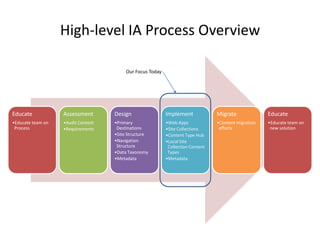
High-level IA Process Overview
Educate
•Educate team on
Process
Assessment
•Audit Content
•Requirements
Design
•Primary
Destinations
•Site Structure
•Navigation
Structure
•Data Taxonomy
•Metadata
Implement
•Web Apps
•Site Collections
•Content Type Hub
•Local Site
Collection Content
Types
•Metadata
Migrate
•Content migration
efforts
Educate
•Educate team on
new solution
Our Focus Today
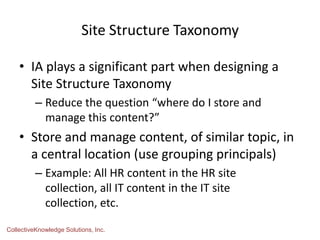
Site Structure Taxonomy
• IA plays a significant part when designing a
Site Structure Taxonomy
– Reduce the question “where do I store and
manage this content?”
• Store and manage content, of similar topic, in
a central location (use grouping principals)
– Example: All HR content in the HR site
collection, all IT content in the IT site
collection, etc.
CollectiveKnowledge Solutions, Inc.
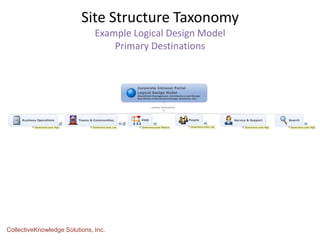
Site Structure Taxonomy
Example Logical Design Model
Primary Destinations
CollectiveKnowledge Solutions, Inc.
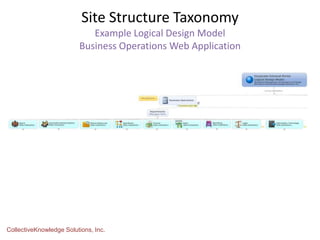
Site Structure Taxonomy
Example Logical Design Model
Business Operations Web Application
CollectiveKnowledge Solutions, Inc.
SharePoint Site Taxonomy
Intranet Example
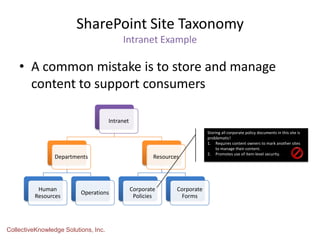
• A common mistake is to store and manage
content to support consumers
CollectiveKnowledge Solutions, Inc.
Intranet
Departments
Human
Resources
Operations
Resources
Corporate
Policies
Corporate
Forms
Storing all corporate policy documents in this site is
problematic!
1. Requires content owners to mark another sites
to manage their content.
2. Promotes use of item-level security.
SharePoint Site Taxonomy
Intranet Example
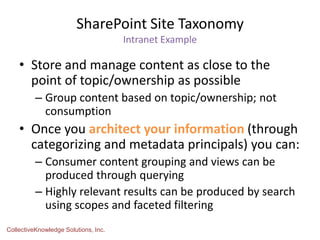
• Store and manage content as close to the
point of topic/ownership as possible
– Group content based on topic/ownership; not
consumption
• Once you architect your information (through
categorizing and metadata principals) you can:
– Consumer content grouping and views can be
produced through querying
– Highly relevant results can be produced by search
using scopes and faceted filtering
CollectiveKnowledge Solutions, Inc.
SharePoint Site Taxonomy
Intranet Example
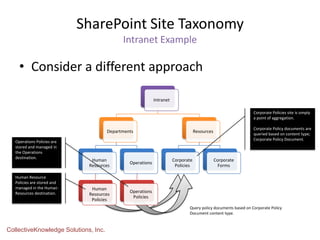
• Consider a different approach
CollectiveKnowledge Solutions, Inc.
Intranet
Departments
Human
Resources
Human
Resources
Policies
Operations
Operations
Policies
Resources
Corporate
Policies
Corporate
Forms
Corporate Policies site is simply
a point of aggregation.
Corporate Policy documents are
queried based on content type;
Corporate Policy Document.
Human Resource
Policies are stored and
managed in the Human
Resources destination.
Operations Policies are
stored and managed in
the Operations
destination.
Query policy documents based on Corporate Policy
Document content type.
Content Types
A Quick Refresher
• Provide a means of central
management
• Will enforce the types of content that
can be managed in a list or library
• Will consistently enforce the
metadata associated with specific
content
• Document content types can refer to
a specific document template
• Associate workflow
• Associate policies
• Content types are hierarchical
CollectiveKnowledge Solutions, Inc.
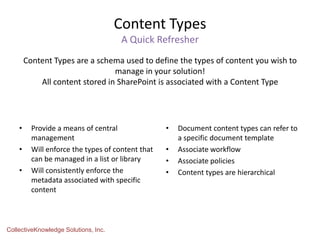
Content Types are a schema used to define the types of content you wish to
manage in your solution!
All content stored in SharePoint is associated with a Content Type
Content Type Taxonomy
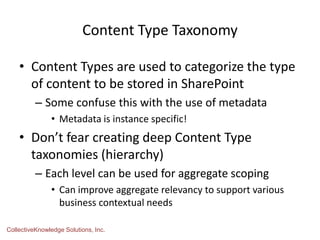
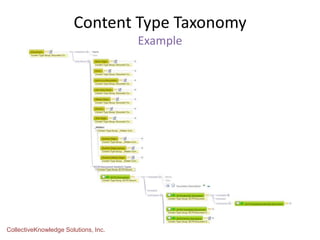
• Content Types are used to categorize the type
of content to be stored in SharePoint
– Some confuse this with the use of metadata
• Metadata is instance specific!
• Don’t fear creating deep Content Type
taxonomies (hierarchy)
– Each level can be used for aggregate scoping
• Can improve aggregate relevancy to support various
business contextual needs
CollectiveKnowledge Solutions, Inc.
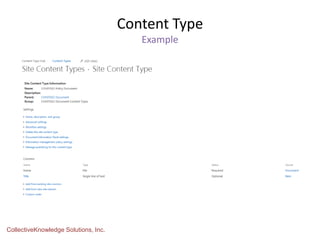
Content Type
Example
CollectiveKnowledge Solutions, Inc.
Content Type Taxonomy
Example
CollectiveKnowledge Solutions, Inc.
Content Types
Best Practices
• Never modify a SharePoint out-of-box content
type
• Avoid organizational taxonomy
– Difficult and time consuming to re-base a content type
• Use a consistent naming convention
– Consider “Document” suffix for all document content
types
• Govern design, implementation and use
• Educate users as to the value
CollectiveKnowledge Solutions, Inc.
Content Types
When to Create Content Types?
• When you wish to govern specific types of
content
– Specify what types of content can be stored in specific
lists and libraries
• When you need to include specific metadata
• When you wish to associate a specific document
template
• When you wish to associate specific workflow
• When you wish to specify policies
– Such as for records management
CollectiveKnowledge Solutions, Inc.
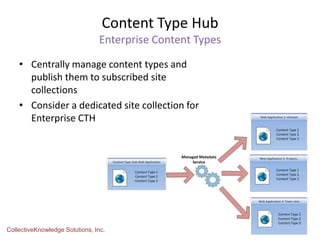
Content Type Hub
Enterprise Content Types
• Centrally manage content types and
publish them to subscribed site
collections
• Consider a dedicated site collection for
Enterprise CTH
CollectiveKnowledge Solutions, Inc.
Content Type Hub
Things to Remember
• Republish after all changes
• Cannot publish a content type that has
managed metadata column associated with a
term set defined in the hub
• Govern the implementation, maintenance and
use of content types derived from the hub
CollectiveKnowledge Solutions, Inc.
Advantages of Doing All This IA Work?
• Reduce the question “where do I store and
manage my content”
• Product highly relevant aggregate content
• Product highly relevant search results
• Provide aggregate and search refinement
(scopes)
• Provide further refinement through faceted
filtering
Join us right after the event at the Firehouse Grill!
Socialize and unwind after our day of learning.
1765 E. Bayshore Road
East Palo Alto, CA

SharePoint Information Architecture Applied

  • 1.
    SharePoint Information ArchitectureApplied By Bob Mixon CollectiveKnowledge Solutions, Inc.
  • 3.
    About Bob Mixon Deliveringbusiness solutions for more than 30 years Focusing on business process improvement, document management, knowledge management, collaboration and portals Microsoft SharePoint MVP 2006, 2007, 2008, 200 9, 2010 Specializing In  Strategic Content Management  Knowledge Management  Document Management  Content Choreography  Records Management  Business Social Collaboration  Governance  Business Process Management and Automation  Intranet IMS, DMS, DAM, KMS and Collaboration Portal Implementation  Training  Speaking CollectiveKnowledge Solutions, Inc. Founder of CollectiveKnowledge Solutions, Inc. Senior SharePoint Information Architect
  • 4.
    Agenda • High-level ProcessOverview • Site Structure Taxonomy • Content Types (Data Taxonomy) • Content Type Hub (Enterprise Data Taxonomy) CollectiveKnowledge Solutions, Inc.
  • 5.
    High-level IA ProcessOverview Educate •Educate team on Process Assessment •Audit Content •Requirements Design •Primary Destinations •Site Structure •Navigation Structure •Data Taxonomy •Metadata Implement •Web Apps •Site Collections •Content Type Hub •Local Site Collection Content Types •Metadata Migrate •Content migration efforts Educate •Educate team on new solution Our Focus Today
  • 6.
    Site Structure Taxonomy •IA plays a significant part when designing a Site Structure Taxonomy – Reduce the question “where do I store and manage this content?” • Store and manage content, of similar topic, in a central location (use grouping principals) – Example: All HR content in the HR site collection, all IT content in the IT site collection, etc. CollectiveKnowledge Solutions, Inc.
  • 7.
    Site Structure Taxonomy ExampleLogical Design Model Primary Destinations CollectiveKnowledge Solutions, Inc.
  • 8.
    Site Structure Taxonomy ExampleLogical Design Model Business Operations Web Application CollectiveKnowledge Solutions, Inc.
  • 9.
    SharePoint Site Taxonomy IntranetExample • A common mistake is to store and manage content to support consumers CollectiveKnowledge Solutions, Inc. Intranet Departments Human Resources Operations Resources Corporate Policies Corporate Forms Storing all corporate policy documents in this site is problematic! 1. Requires content owners to mark another sites to manage their content. 2. Promotes use of item-level security.
  • 10.
    SharePoint Site Taxonomy IntranetExample • Store and manage content as close to the point of topic/ownership as possible – Group content based on topic/ownership; not consumption • Once you architect your information (through categorizing and metadata principals) you can: – Consumer content grouping and views can be produced through querying – Highly relevant results can be produced by search using scopes and faceted filtering CollectiveKnowledge Solutions, Inc.
  • 11.
    SharePoint Site Taxonomy IntranetExample • Consider a different approach CollectiveKnowledge Solutions, Inc. Intranet Departments Human Resources Human Resources Policies Operations Operations Policies Resources Corporate Policies Corporate Forms Corporate Policies site is simply a point of aggregation. Corporate Policy documents are queried based on content type; Corporate Policy Document. Human Resource Policies are stored and managed in the Human Resources destination. Operations Policies are stored and managed in the Operations destination. Query policy documents based on Corporate Policy Document content type.
  • 12.
    Content Types A QuickRefresher • Provide a means of central management • Will enforce the types of content that can be managed in a list or library • Will consistently enforce the metadata associated with specific content • Document content types can refer to a specific document template • Associate workflow • Associate policies • Content types are hierarchical CollectiveKnowledge Solutions, Inc. Content Types are a schema used to define the types of content you wish to manage in your solution! All content stored in SharePoint is associated with a Content Type
  • 13.
    Content Type Taxonomy •Content Types are used to categorize the type of content to be stored in SharePoint – Some confuse this with the use of metadata • Metadata is instance specific! • Don’t fear creating deep Content Type taxonomies (hierarchy) – Each level can be used for aggregate scoping • Can improve aggregate relevancy to support various business contextual needs CollectiveKnowledge Solutions, Inc.
  • 14.
  • 15.
  • 16.
    Content Types Best Practices •Never modify a SharePoint out-of-box content type • Avoid organizational taxonomy – Difficult and time consuming to re-base a content type • Use a consistent naming convention – Consider “Document” suffix for all document content types • Govern design, implementation and use • Educate users as to the value CollectiveKnowledge Solutions, Inc.
  • 17.
    Content Types When toCreate Content Types? • When you wish to govern specific types of content – Specify what types of content can be stored in specific lists and libraries • When you need to include specific metadata • When you wish to associate a specific document template • When you wish to associate specific workflow • When you wish to specify policies – Such as for records management CollectiveKnowledge Solutions, Inc.
  • 18.
    Content Type Hub EnterpriseContent Types • Centrally manage content types and publish them to subscribed site collections • Consider a dedicated site collection for Enterprise CTH CollectiveKnowledge Solutions, Inc.
  • 19.
    Content Type Hub Thingsto Remember • Republish after all changes • Cannot publish a content type that has managed metadata column associated with a term set defined in the hub • Govern the implementation, maintenance and use of content types derived from the hub CollectiveKnowledge Solutions, Inc.
  • 20.
    Advantages of DoingAll This IA Work? • Reduce the question “where do I store and manage my content” • Product highly relevant aggregate content • Product highly relevant search results • Provide aggregate and search refinement (scopes) • Provide further refinement through faceted filtering
  • 21.
    Join us rightafter the event at the Firehouse Grill! Socialize and unwind after our day of learning. 1765 E. Bayshore Road East Palo Alto, CA

Editor's Notes

  • #2 The intended purpose of this presentation is to provide viewers with a better understanding of How Information Architecture techniques are applied to SharePoint.Copyright © 2010, 2011, 2012, 2013 Bob MixonAuthored and Published by Bob MixonSharePoint Management, Architecture and Design (SPMAD) and All Editions are Copyright Protected (2010, 2011, 2012, 2013) by Bob Mixon. All Documentation, Designs, Drawings and Photographs are owned and Copyright Protected (2010, 2011, 2012, 2013) by Bob Mixon.ALL RIGHTS RESERVED.No part of this publication may be reproduced, stored or transmitted in any form, for any reason or by any means, whether re-drawn, enlarged or otherwise altered including mechanical, photocopy, digital storage & retrieval or otherwise, without the prior permission in writing from the copyright owner. The text, layout and designs presented in this book, as well as the book in its entirety, are protected by the copyright laws of the United States (17 U.S.C. 101 et seq.) and similar laws in other countries.Scanning, uploading and/or distribution of this document, or any designs or photographs contained herein, in whole or part (whether re-drawn, re-photographed or otherwise altered) via the Internet, CD, DVD, E-zine, photocopied hand-outs, or any other means (whether offered for free or for a fee) without the expressed written permission from the copyright owner is illegal and punishable by law.The copyright owner of this document appreciates your honesty and integrity and ask that you do not participate in or encourage piracy of copyrighted material. Be sure to purchase (or download) only authorized material.
  • #3 Conclusion slide
  • #22 SharePint