Migration from eRoom to
Office 365 and SharePoint
Notes:
 If you experience audio issues during the webinar, you can dial in through telephone details provided to you in
your registration confirmation email.
 Please feel free to post questions in the questions dialog & we will try to answer as many as we can at the end.
 Recording of this session will be shared in next 24-48 hours.
 You can also write to us at marketing@winwire.com for any clarifications or information.
Session Speaker
Madan M
Senior Architect
WinWire Technologies
Agenda
2. Drivers for migrating to Office 365
3. Migration Methodology
4. Q&A
1. Why migrate from eRoom
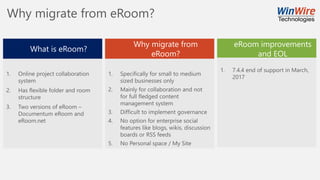
Why migrate from eRoom?
What is eRoom?
1. Online project collaboration
system
2. Has flexible folder and room
structure
3. Two versions of eRoom –
Documentum eRoom and
eRoom.net
Why migrate from
eRoom?
1. Specifically for small to medium
sized businesses only
2. Mainly for collaboration and not
for full fledged content
management system
3. Difficult to implement governance
4. No option for enterprise social
features like blogs, wikis, discussion
boards or RSS feeds
5. No Personal space / My Site
eRoom improvements
and EOL
1. 7.4.4 end of support in March,
2017
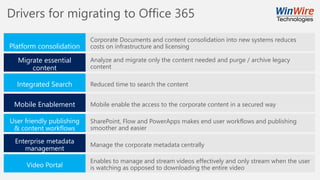
Drivers for migrating to Office 365
Platform consolidation
Migrate essential
content
Integrated Search
Mobile Enablement
User friendly publishing
& content workflows
Enterprise metadata
management
Video Portal
Corporate Documents and content consolidation into new systems reduces
costs on infrastructure and licensing
Analyze and migrate only the content needed and purge / archive legacy
content
Reduced time to search the content
Mobile enable the access to the corporate content in a secured way
SharePoint, Flow and PowerApps makes end user workflows and publishing
smoother and easier
Manage the corporate metadata centrally
Enables to manage and stream videos effectively and only stream when the user
is watching as opposed to downloading the entire video
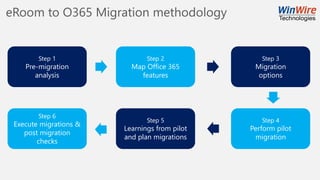
eRoom to O365 Migration methodology
Step 1
Pre-migration
analysis
Step 2
Map Office 365
features
Step 3
Migration
options
Step 4
Perform pilot
migration
Step 5
Learnings from pilot
and plan migrations
Step 6
Execute migrations &
post migration
checks
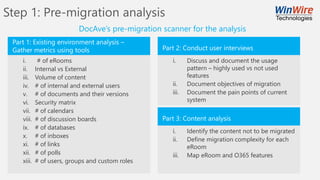
Step 1: Pre-migration analysis
i. # of eRooms
ii. Internal vs External
iii. Volume of content
iv. # of internal and external users
v. # of documents and their versions
vi. Security matrix
vii. # of calendars
viii. # of discussion boards
ix. # of databases
x. # of inboxes
xi. # of links
xii. # of polls
xiii. # of users, groups and custom roles
DocAve’s pre-migration scanner for the analysis
Part 1: Existing environment analysis –
Gather metrics using tools Part 2: Conduct user interviews
i. Discuss and document the usage
pattern – highly used vs not used
features
ii. Document objectives of migration
iii. Document the pain points of current
system
Part 3: Content analysis
i. Identify the content not to be migrated
ii. Define migration complexity for each
eRoom
iii. Map eRoom and O365 features
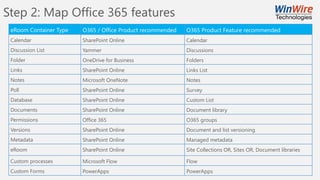
Step 2: Map Office 365 features
eRoom Container Type
Calendar
Discussion List
Folder
Links
Notes
Poll
Database
Documents
Permissions
Versions
Metadata
eRoom
Custom processes
Custom Forms
O365 / Office Product recommended
SharePoint Online
Yammer
OneDrive for Business
SharePoint Online
Microsoft OneNote
SharePoint Online
SharePoint Online
SharePoint Online
Office 365
SharePoint Online
SharePoint Online
SharePoint Online
Microsoft Flow
PowerApps
O365 Product Feature recommended
Calendar
Discussions
Folders
Links List
Notes
Survey
Custom List
Document library
O365 groups
Document and list versioning
Managed metadata
Site Collections OR, Sites OR, Document libraries
Flow
PowerApps
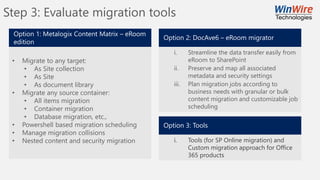
Step 3: Evaluate migration tools
• Migrate to any target:
• As Site collection
• As Site
• As document library
• Migrate any source container:
• All items migration
• Container migration
• Database migration, etc.,
• Powershell based migration scheduling
• Manage migration collisions
• Nested content and security migration
Option 1: Metalogix Content Matrix – eRoom
edition
Option 2: DocAve6 – eRoom migrator
i. Streamline the data transfer easily from
eRoom to SharePoint
ii. Preserve and map all associated
metadata and security settings
iii. Plan migration jobs according to
business needs with granular or bulk
content migration and customizable job
scheduling
Option 3: Tools
i. Tools (for SP Online migration) and
Custom migration approach for Office
365 products
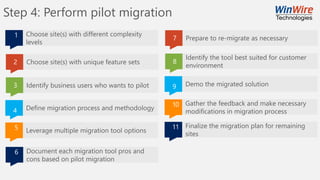
Step 4: Perform pilot migration
1
2
3
4
5
Choose site(s) with different complexity
levels
Choose site(s) with unique feature sets
Identify business users who wants to pilot
Define migration process and methodology
Leverage multiple migration tool options
6 Document each migration tool pros and
cons based on pilot migration
7
8
9
10
Prepare to re-migrate as necessary
Identify the tool best suited for customer
environment
Demo the migrated solution
Gather the feedback and make necessary
modifications in migration process
11 Finalize the migration plan for remaining
sites
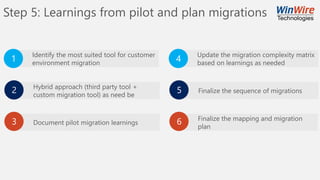
Step 5: Learnings from pilot and plan migrations
Hybrid approach (third party tool +
custom migration tool) as need be
Document pilot migration learnings
Identify the most suited tool for customer
environment migration
Update the migration complexity matrix
based on learnings as needed
Finalize the sequence of migrations
Finalize the mapping and migration
plan
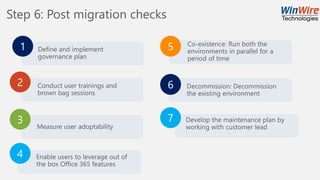
Step 6: Post migration checks
1 Define and implement
governance plan
2 Conduct user trainings and
brown bag sessions
4 Enable users to leverage out of
the box Office 365 features
3
Measure user adoptability
5 Co-existence: Run both the
environments in parallel for a
period of time
6 Decommission: Decommission
the existing environment
7 Develop the maintenance plan by
working with customer lead
Who We Are
IT solutions company focused on Making Information Actionable TM
for enterprises in the Mobile-Cloud world.
Q & A
http://www.winwire.com/blog-winsights/
www.twitter.com/winwire
marketing@winwire.com
www.winwire.com
Next Webinar
Topic: Enable Digital Transformation with
Secure Productive Enterprise (SPE)
More details visit:
http://www.winwire.com/webinars/

Migration from eRoom to office 365

  • 1.
    Migration from eRoomto Office 365 and SharePoint Notes:  If you experience audio issues during the webinar, you can dial in through telephone details provided to you in your registration confirmation email.  Please feel free to post questions in the questions dialog & we will try to answer as many as we can at the end.  Recording of this session will be shared in next 24-48 hours.  You can also write to us at marketing@winwire.com for any clarifications or information.
  • 2.
    Session Speaker Madan M SeniorArchitect WinWire Technologies
  • 3.
    Agenda 2. Drivers formigrating to Office 365 3. Migration Methodology 4. Q&A 1. Why migrate from eRoom
  • 4.
    Why migrate fromeRoom? What is eRoom? 1. Online project collaboration system 2. Has flexible folder and room structure 3. Two versions of eRoom – Documentum eRoom and eRoom.net Why migrate from eRoom? 1. Specifically for small to medium sized businesses only 2. Mainly for collaboration and not for full fledged content management system 3. Difficult to implement governance 4. No option for enterprise social features like blogs, wikis, discussion boards or RSS feeds 5. No Personal space / My Site eRoom improvements and EOL 1. 7.4.4 end of support in March, 2017
  • 5.
    Drivers for migratingto Office 365 Platform consolidation Migrate essential content Integrated Search Mobile Enablement User friendly publishing & content workflows Enterprise metadata management Video Portal Corporate Documents and content consolidation into new systems reduces costs on infrastructure and licensing Analyze and migrate only the content needed and purge / archive legacy content Reduced time to search the content Mobile enable the access to the corporate content in a secured way SharePoint, Flow and PowerApps makes end user workflows and publishing smoother and easier Manage the corporate metadata centrally Enables to manage and stream videos effectively and only stream when the user is watching as opposed to downloading the entire video
  • 6.
    eRoom to O365Migration methodology Step 1 Pre-migration analysis Step 2 Map Office 365 features Step 3 Migration options Step 4 Perform pilot migration Step 5 Learnings from pilot and plan migrations Step 6 Execute migrations & post migration checks
  • 7.
    Step 1: Pre-migrationanalysis i. # of eRooms ii. Internal vs External iii. Volume of content iv. # of internal and external users v. # of documents and their versions vi. Security matrix vii. # of calendars viii. # of discussion boards ix. # of databases x. # of inboxes xi. # of links xii. # of polls xiii. # of users, groups and custom roles DocAve’s pre-migration scanner for the analysis Part 1: Existing environment analysis – Gather metrics using tools Part 2: Conduct user interviews i. Discuss and document the usage pattern – highly used vs not used features ii. Document objectives of migration iii. Document the pain points of current system Part 3: Content analysis i. Identify the content not to be migrated ii. Define migration complexity for each eRoom iii. Map eRoom and O365 features
  • 8.
    Step 2: MapOffice 365 features eRoom Container Type Calendar Discussion List Folder Links Notes Poll Database Documents Permissions Versions Metadata eRoom Custom processes Custom Forms O365 / Office Product recommended SharePoint Online Yammer OneDrive for Business SharePoint Online Microsoft OneNote SharePoint Online SharePoint Online SharePoint Online Office 365 SharePoint Online SharePoint Online SharePoint Online Microsoft Flow PowerApps O365 Product Feature recommended Calendar Discussions Folders Links List Notes Survey Custom List Document library O365 groups Document and list versioning Managed metadata Site Collections OR, Sites OR, Document libraries Flow PowerApps
  • 9.
    Step 3: Evaluatemigration tools • Migrate to any target: • As Site collection • As Site • As document library • Migrate any source container: • All items migration • Container migration • Database migration, etc., • Powershell based migration scheduling • Manage migration collisions • Nested content and security migration Option 1: Metalogix Content Matrix – eRoom edition Option 2: DocAve6 – eRoom migrator i. Streamline the data transfer easily from eRoom to SharePoint ii. Preserve and map all associated metadata and security settings iii. Plan migration jobs according to business needs with granular or bulk content migration and customizable job scheduling Option 3: Tools i. Tools (for SP Online migration) and Custom migration approach for Office 365 products
  • 10.
    Step 4: Performpilot migration 1 2 3 4 5 Choose site(s) with different complexity levels Choose site(s) with unique feature sets Identify business users who wants to pilot Define migration process and methodology Leverage multiple migration tool options 6 Document each migration tool pros and cons based on pilot migration 7 8 9 10 Prepare to re-migrate as necessary Identify the tool best suited for customer environment Demo the migrated solution Gather the feedback and make necessary modifications in migration process 11 Finalize the migration plan for remaining sites
  • 11.
    Step 5: Learningsfrom pilot and plan migrations Hybrid approach (third party tool + custom migration tool) as need be Document pilot migration learnings Identify the most suited tool for customer environment migration Update the migration complexity matrix based on learnings as needed Finalize the sequence of migrations Finalize the mapping and migration plan
  • 12.
    Step 6: Postmigration checks 1 Define and implement governance plan 2 Conduct user trainings and brown bag sessions 4 Enable users to leverage out of the box Office 365 features 3 Measure user adoptability 5 Co-existence: Run both the environments in parallel for a period of time 6 Decommission: Decommission the existing environment 7 Develop the maintenance plan by working with customer lead
  • 13.
    Who We Are ITsolutions company focused on Making Information Actionable TM for enterprises in the Mobile-Cloud world.
  • 14.
    Q & A http://www.winwire.com/blog-winsights/ www.twitter.com/winwire marketing@winwire.com www.winwire.com NextWebinar Topic: Enable Digital Transformation with Secure Productive Enterprise (SPE) More details visit: http://www.winwire.com/webinars/